20 Managing Libraries and Version Control
More
Depth: Practitioner
Progress saves as you read. Mark sections complete as you go; your progress appears in the sidebar.
20.1 Start With the Story
This section: Start With the Story — Picture a team adding a sensor library that makes a prototype work in one hour.
Know Which Behavior the Library Now Owns
Picture a team adding a sensor library that makes a prototype work in one hour. Months later, a new version changes its default time limit and the device repeats commands after a weak link. The maintainer needs to know what was chosen, what changed, and how to return to a known build.
For each library, record the problem it solves, exact name and version, source, licence, settings, parts it controls, known limits, test device, owner, and replacement path. Save the lock file and the commands that recreate the build.
Remove the link, return bad input, fill memory, deny access, restart during work, update one dependency, and rebuild on a clean machine. Check normal behavior, failure behavior, size, timing, warnings, and the installed version. Keep a small known test that fails when the library’s promise changes.
Version control records change; it does not make a change correct. Popularity, a recent release, or a clean install also does not prove field fit, security, support life, or licence fit.
Practitioner builds the dependency and hand-off record. Under the Hood explains version ranges, linked dependencies, review flow, update risk, history repair, and how to replace a library without losing the product’s behavioral contract.
Use this dependency check:
- Name the exact job it owns.
- Pin the exact source version.
- Save all settings with the build.
- Record its licence and owner.
- List all linked packages.
- Build once on a clean machine.
- Return bad input on purpose.
- Fill memory and watch recovery.
- Restart during unfinished work.
- Change one dependency at a time.
- Keep a test for changed defaults.
- Write a practical replacement path.
A library can make a prototype look finished in an afternoon. It can also hide timeouts, stale readings, retry loops, memory pressure, credential handling, update behavior, or a license problem that matters later. The story is not “install a package”; it is “prove that this dependency exposes the behavior the project must trust.”
This chapter treats libraries as evidence boundaries. Accept a dependency only after its role, version, failure modes, configuration, and replacement cost are visible in the prototype record.
20.2 Dependencies Shift Responsibility
This section: Dependencies Shift Responsibility — Adding a library is an architecture decision.
Adding a library is an architecture decision. The prototype gains speed, but some behavior moves from code the team owns into code the team must understand, configure, test, and update.
Figure 20.1 follows a library from a defined job to a retest condition.
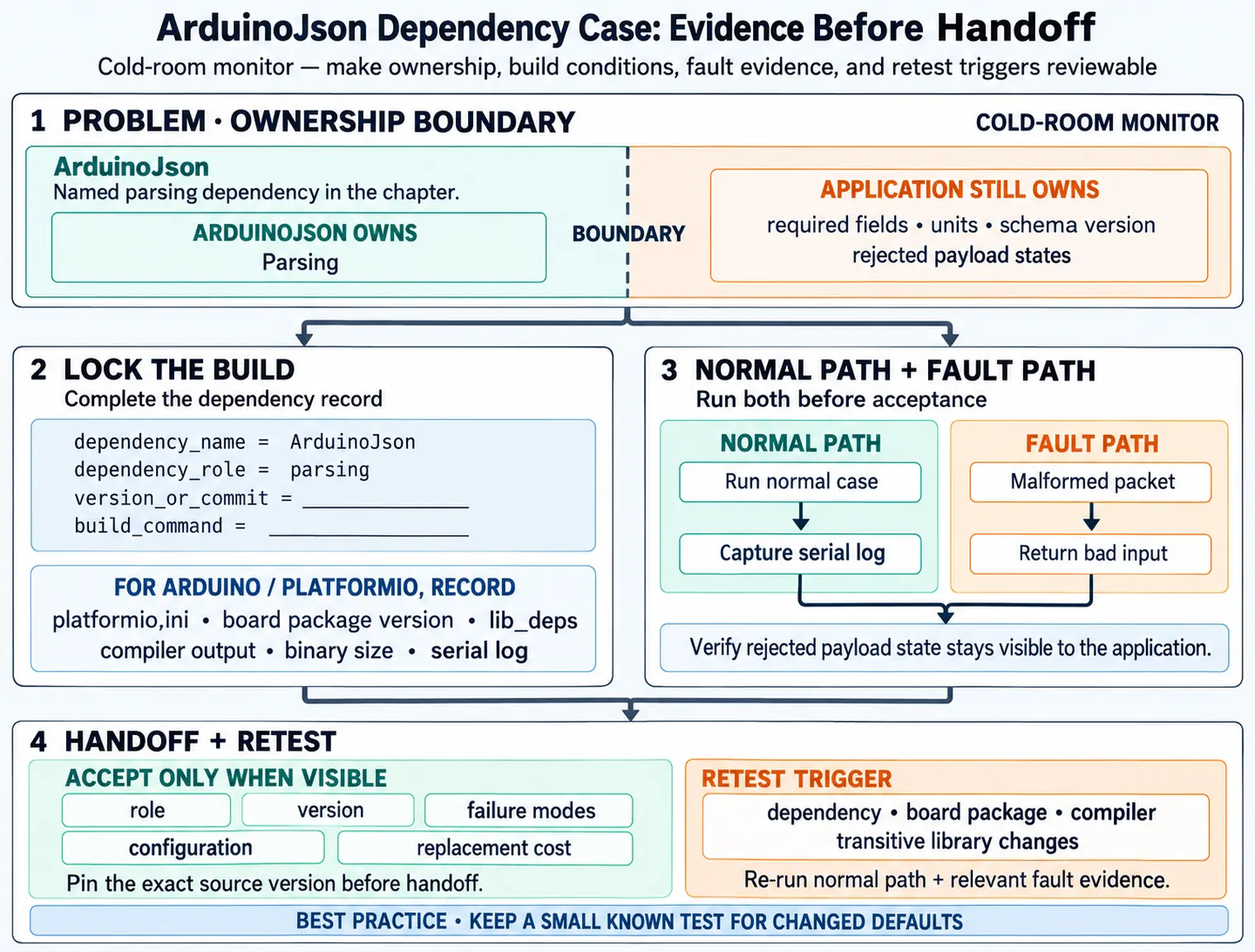
Start by naming the exact behavior the library owns, then check whether the candidate fits the target and its interfaces. Record its source, exact version, configuration, and board package so the build can be recreated. A normal run checks the intended API path; a fault run checks the behavior that matters when an input, link, or resource fails. The decision records why the version is kept and what change would require a new test. Importing a library is only the beginning of proof because the dependency can alter timing, storage, and recovery behavior.
The review question is not whether a dependency is popular. It is whether the dependency makes the target behavior clearer, repeatable, and safer to hand off.
For a cold-room monitor, a SHT31 driver may own I2C transactions and unit conversion, PubSubClient or AsyncMqttClient may own MQTT connection details, ArduinoJson or nanopb may own payload encoding, LittleFS or NVS may own retained records, and a display helper may own rendering primitives. Each choice saves implementation time, but each also moves timing, memory allocation, error reporting, retry behavior, and version risk into code outside the application boundary.
The dependency record should therefore say what the library proves and what it does not prove. A driver that returns clean readings on one bench board does not prove bus timeout behavior. A gateway client that publishes once does not prove reconnect backoff, queue pressure, TLS configuration, or broker permission failure. A storage helper that writes a file does not prove full-storage, corrupt-record, migration, or power-loss behavior.
Make the boundary visible before the dependency spreads. If the MQTT client owns reconnect timing, the application should still own stale-state policy and local alarm behavior. If ArduinoJson owns parsing, the application should still own required fields, units, schema version, and rejected payload states. If a LoRaWAN stack owns join and uplink scheduling, the prototype should still record the duty-cycle, queue, and payload decisions that the product depends on.
Good dependency practice is not hostility to libraries. It is controlled trust. Pin the package source, version, board support package, compiler or runtime, configuration flags, and build command. Then run the normal path and the one fault path that matters to the current prototype. If that evidence is clear, the dependency can move forward with a known owner and a known trigger for checking it again.
20.3 Record Contract Before Import
This section: Record Contract Before Import — Before adding a sensor, MQTT, storage, display, or OTA helper library, write down the contract the prototype expects from it.
Before adding a sensor, MQTT, storage, display, or OTA helper library, write down the contract the prototype expects from it.
Start with the role. A sensor library might be acceptable if it exposes status codes, lets the application set timeouts, and does not hide stale readings. A messaging library needs a visible connection state, bounded publish call, retry policy, queue limit, and TLS or credential configuration. A storage library needs an explicit policy for full flash, corrupt records, write interruption, and schema changes. An OTA library needs package verification, compatibility check, health confirmation, rollback behavior, and a record of which image slot is active.
Then prove the contract in the smallest useful run. For Arduino or PlatformIO firmware, record platformio.ini, board package version, lib_deps, compiler output, binary size, and the serial log for one normal and one fault case. For ESP-IDF or Zephyr, record component revision, Kconfig or devicetree options, build target, partition table, stack or heap evidence, and the command that flashed the board. For gateway code, record the npm, pip, Go module, Cargo, or Docker lockfile plus the local broker, SQLite queue, systemd unit, or container configuration used during the run.
- Owned behavior: note whether the library owns timing, retries, parsing, buffering, memory allocation, transport security, or error handling.
- Version lock: record package source, exact version, configuration, board profile, compiler/runtime, and build command.
- Fault proof: test the failure that matters, such as missing sensor, malformed packet, reconnect storm, full storage, or rejected update.
- Update risk: name what must be checked again if the dependency, board package, compiler, or transitive library changes.
Keep rejected options useful. If a heavier MQTT client is rejected because it blocks local alarm handling during reconnect, record that reason. If a storage helper is postponed because its migration behavior is unclear, record the simpler queue that will be used for the current prototype. Those notes prevent the same debate from restarting when the project moves from bench evidence to pilot handoff.
20.4 Version Control as Evidence
This section: Version Control as Evidence — A prototype cannot be reviewed if the build cannot be recreated.
A prototype cannot be reviewed if the build cannot be recreated. Source code, dependency versions, board support packages, generated artifacts, configuration examples, and test outputs need clear boundaries in the repository.
Small commits make dependency behavior visible. A commit that only adds a library and its evidence is easy to review. A commit that changes architecture, pins a dependency, rewrites tests, and edits hardware wiring at the same time hides which change created the new behavior.
Version control should capture both code and the conditions that made the evidence true. For PlatformIO, that means the board environment, framework, library versions, and any lock or manifest file. For Zephyr, it includes west manifest revisions, module versions, Kconfig selections, overlays, and generated configuration summaries. For ESP-IDF, it includes component revisions, sdkconfig, partition layout, and toolchain version. For Node.js, Python, Go, or Rust gateway code, the lockfile and runtime version are part of the dependency evidence.
Generated files need an explicit policy. Protocol Buffer output, OpenAPI clients, firmware images, map files, coverage reports, and built app bundles can help review, but they should not be mixed into source commits unless the repository policy says they are source-of-truth artifacts. If generated output is ignored, record the generator version and command. If generated output is committed, keep it in the same change as the schema or generator input that produced it.
The under-the-hood risk is drift. A transitive update can change TLS defaults, MQTT keepalive behavior, JSON parsing, flash write timing, memory footprint, or exception handling without changing application source. A reviewer should be able to compare the lockfile, manifest, board package, and evidence record and know exactly which dependency changed before deciding whether to repeat the normal run, gateway outage run, full queue run, or update rollback run.
20.5 Learning Objectives
This section: Learning Objectives
By the end of this chapter, you will be able to:
- Choose libraries from evidence needs rather than popularity or habit.
- Review target support, resource cost, API fit, update risk, and testability before adding a dependency.
- Record exact library versions, sources, configuration, build commands, and evidence runs.
- Structure a firmware repository so source, tests, hardware notes, configuration examples, and generated artifacts are easy to separate.
- Use source control to keep dependency changes small, reviewable, and recoverable.
20.6 Prerequisites
This section: Prerequisites
This chapter builds on:
- Software Development Environments, where the build, upload, and observation tools are recorded.
- Choosing Languages for IoT Software Prototypes, where runtime constraints and mixed-language boundaries are selected.
- Choosing Architecture Patterns for IoT Software Prototypes, where driver, state, communication, storage, and update responsibilities are separated.
20.7 Dependency Choice Is Evidence Choice
This section: Dependency Choice Is Evidence Choice — A software prototype often starts by adding a sensor driver, communication client, display library, storage helper, or cloud connector.
A software prototype often starts by adding a sensor driver, communication client, display library, storage helper, or cloud connector. That shortcut is useful only if the team can still explain what the dependency owns and what evidence proves it behaves well enough for the prototype.
Start with the dependency question:
A library can hide bus timing, memory allocation, retry loops, blocking calls, and default configuration. Add the dependency only when the hidden behavior is acceptable or made visible through a record, log, test, or boundary.
20.8 Library Selection Gates
This section: Library Selection Gates — Do not evaluate a dependency as a single yes/no decision.
Do not evaluate a dependency as a single yes/no decision. Review it through gates that match the prototype risk. A small helper can pass quickly; a networking, storage, update, or security-sensitive dependency needs a stronger record.
Figure 20.2 tests a cold-room messaging client before pilot adoption.
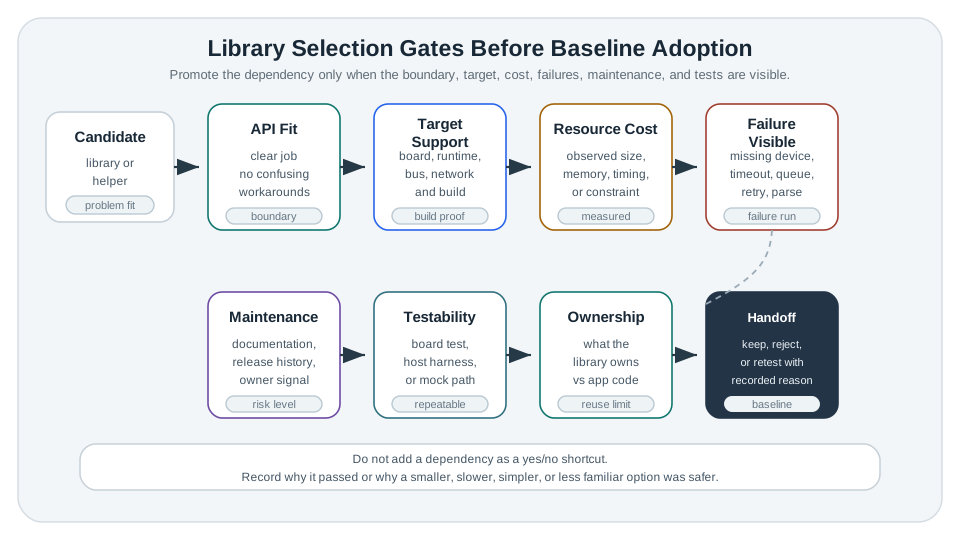
The client owns gateway connection and publish calls, so the first gate checks its contract with the firmware. Build evidence must identify its version and configuration. Normal observations show whether messages are sent under the expected link; the fault gate checks timeout, retry, and recovery when the gateway is unavailable. A pilot decision can only use the result if the application keeps sensing and marks stale status during that gap. Keep the logs and the chosen version together. A successful publish by itself does not answer whether the library blocks the rest of the monitor.
Use these gates before a dependency becomes part of the prototype baseline:
If a library is rejected, record why. A rejected option can still be useful evidence when a later reviewer asks why the prototype chose a smaller, slower, simpler, or less familiar dependency.
20.9 Define the Reuse Boundary
This section: Define the Reuse Boundary — The safest dependency is not always the smallest one.
The safest dependency is not always the smallest one. The safer choice is the dependency whose boundary is understandable. A sensor library may own bus reads and calibration conversion, but the application should still own stale-data policy. A communication library may own connection details, but the application should still own payload meaning and offline behavior.
20.10 Version and Build Records
This section: Version and Build Records — Version control does not make a build reproducible by itself.
Version control does not make a build reproducible by itself. A reproducible prototype also needs dependency versions, source locations, lock files or equivalent records, configuration, and the command used to build or test the result.
Figure 20.3 connects a dependency change to a rebuildable firmware artifact.
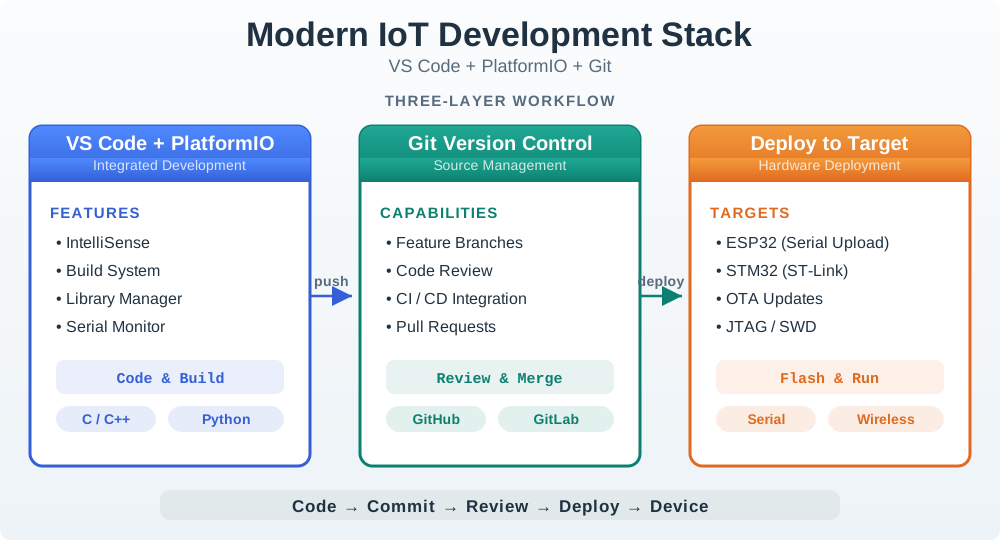
The dependency change in Figure 20.3 connects three kinds of proof. The build record keeps the board profile, library versions, configuration, exact command, and artifact details so a second builder can reproduce the binary. Code review narrows the change to a messaging dependency and records why the version was locked after a gateway fault run. The device run then keeps both normal publish output and a blocked-gateway timeout and retry trace. Compile success answers only whether the build completed; the serial evidence answers what the changed code did. Keep manifest, lock record, review, and run artifacts together before calling the baseline reproducible.
A dependency record should answer these questions:
dependency_name=
dependency_role=
source=
version_or_commit=
lock_or_manifest_file=
target_environment=
configuration_options=
build_command=
normal_run_evidence=
fault_run_evidence=
known_limits=
update_rule=
review_owner=
review_date=
For early experiments, a loose version can be acceptable if the record says it is temporary. Before a prototype is handed to another team, used in a pilot, or used as the basis for production work, the dependency set should be locked tightly enough that another reviewer can rebuild the same result.
Lock the dependency source, version, board or target profile, toolchain version, configuration flags, generated-code source, and the command used for the evidence run. If the project uses a package manager with a lock file, keep that lock file under review with the source.
20.11 Firmware Evidence Repository
This section: Firmware Evidence Repository — A repository should help reviewers separate source code, dependency configuration, tests, hardware notes, generated output, and secrets.
A repository should help reviewers separate source code, dependency configuration, tests, hardware notes, generated output, and secrets. The exact folders vary by project, but the purpose should be clear.
Figure 20.4 shows which firmware evidence belongs in version control.
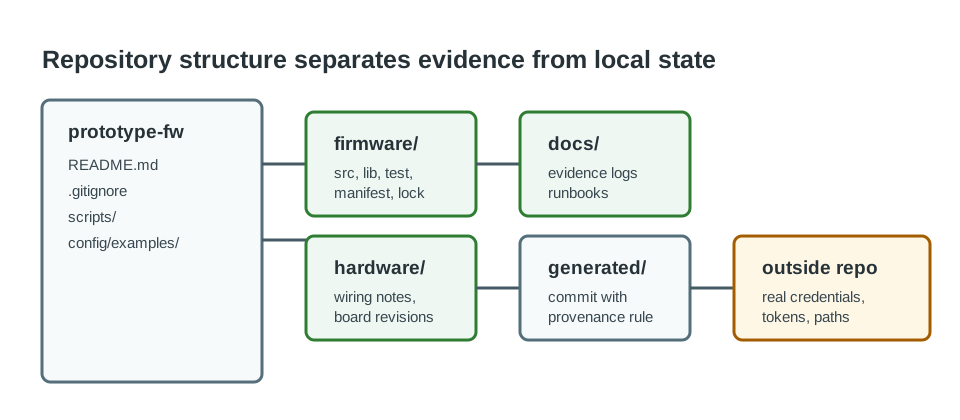
Source, tests, hardware notes, a dependency manifest, and lock data should describe the build another reviewer needs to repeat. The figure keeps temporary credentials and local secrets outside that record. A board package or library version is part of the evidence because a later build can change behavior without changing the application source. Keep a clear link from the repository revision to the binary and test logs used in the review. The layout is useful when a fault can be replayed from reviewed inputs without copying a private lab setup into the product.
One reviewable layout is:
prototype-firmware/
  firmware/
    src/
    lib/
    test/
    dependency-manifest
    dependency-lock
  hardware/
    wiring-notes/
    board-revisions/
  docs/
    evidence-records/
    runbooks/
  config/
    example.env
    example-device-config.json
  scripts/
    build
    test
    capture-evidence
  .gitignore
  README.md
Keep real credentials, private keys, device-specific tokens, and local machine paths out of version control. Commit examples and instructions instead, so a reviewer knows what is required without receiving a secret.
# Generated build output
build/
dist/
*.bin
*.hex
*.elf

# Local environment and secrets
.env
secrets.*
device-credentials.*

# Local editor and machine files
.vscode/
.idea/
.DS_Store
20.12 Source-Control Workflow
This section: Source-Control Workflow — Dependency changes deserve small, reviewable commits because one version bump can affect timing, memory, protocol behavior, and failure recovery.
Dependency changes deserve small, reviewable commits because one version bump can affect timing, memory, protocol behavior, and failure recovery. Treat each dependency change like a design decision, not a background cleanup.
Figure 20.5 keeps one dependency change and its behavior evidence in the same review.
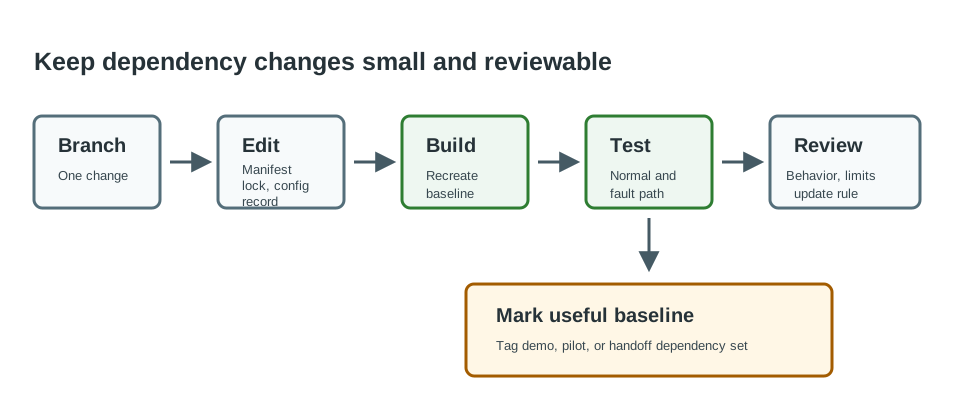
A focused change names the library or version being updated and leaves unrelated feature edits out of the comparison. The build record captures the new source, lock, board context, and artifact. Then the reviewer can compare normal behavior and the fault case against the earlier version, including timing or retry effects. The decision states whether to keep the change and which trigger would require another run. A commit message alone does not prove the new dependency is safe; its value is that it points to a small, repeatable evidence set.
Use this workflow:
Good commit messages say what changed and why:
Add sensor-driver dependency record for cold-room probe test
Lock messaging dependency after gateway reconnect fault run
Replace display helper after refresh timing review
Remove unused parser dependency from firmware baseline
20.13 Cold-Room Dependency Review
This section: Cold-Room Dependency Review — A team is prototyping a cold-room monitor.
A team is prototyping a cold-room monitor. The device reads temperature, reports status to a gateway, stores short offline history, and exposes a small local display. The first demo works, but the team needs to decide which dependencies are safe enough to keep for a pilot.
20.13.1 Dependency Questions
The team lists four candidate dependencies:
First, A sensor driver that owns bus reads and unit conversion. Next, A messaging client that owns gateway connection and publish calls. Then, A storage helper that owns local queue persistence. After that, A display library that owns drawing primitives.
The architecture chapter already separated driver, state, communication, storage, display, and observability boundaries. The dependency review now asks whether each external library respects those boundaries or blurs them.
20.13.2 Evidence Runs
The team records one normal run and one failure run for each high-risk dependency:
20.13.3 Review Decision
The sensor driver and display library are kept because their boundaries are narrow and their failures are visible. The messaging client is kept only after adding an explicit timeout and reconnect record. The storage helper is postponed because the current prototype can use a simpler queue until pilot storage requirements are clearer.
prototype=cold-room-monitor
dependency_question=which libraries are safe enough to keep for pilot evidence?
kept=sensor-driver, messaging-client-with-timeout-record, display-library
postponed=storage-helper
normal_runs=sensor_read, gateway_publish, display_refresh
fault_runs=probe_missing, gateway_blocked, display_unavailable, queue_full
version_policy=lock exact versions for pilot baseline
handoff=testing chapter must repeat fault runs; OTA chapter must review update impact
20.14 Library Handoff Record
This section: Library Handoff Record — Every kept dependency should leave a handoff record.
Every kept dependency should leave a handoff record. The next reviewer should not have to infer why a library exists or whether a version was accidental.
prototype=
dependency=
role=
owner_boundary=
selected_because=
rejected_alternatives=
version_or_commit=
lock_file=
configuration=
normal_evidence=
fault_evidence=
resource_observations=
known_limits=
update_policy=
keep_rewrite_or_check_again=
next_review_trigger=
20.15 Knowledge Check
This section: Knowledge Check
20.16 Common Failure Patterns
This section: Common Failure Patterns
20.17 Summary
This section: Summary — First, A library choice is an evidence decision, not just a convenience.
First, A library choice is an evidence decision, not just a convenience. Next, Review API fit, target support, resource observations, failure visibility, maintenance signal, and testability before adding a dependency to the baseline. Then, Lock or record source, version, configuration, build command, normal evidence, and fault evidence. After that, Keep secrets and generated output policies clear in the repository structure. Finally, Use small source-control branches and explicit handoff records so future testing, OTA, and production work can trust the prototype baseline.
20.18 Key Takeaway
This section: Key Takeaway — Libraries accelerate prototypes only when their licenses, maintenance, footprint, security posture, and failure behavior are understood.
Libraries accelerate prototypes only when their licenses, maintenance, footprint, security posture, and failure behavior are understood.
20.19 What’s Next
This section: What’s Next
Find help
3 reviewed answers.
Where should I start in a module?
Open the module page from the sidebar to see its chapters in order. Use the module map to return to a topic you need.
Modules and pathsReviewed
What can I try when a project does not work?
Check the symptom, then work through the diagnostic steps. Keep the error message and the smallest example that reproduces it.
When you are stuckReviewed
How do interactive examples work?
Use the interactive guide to check how examples and simulations work before changing your project.
Interactive examples guideReviewed