12 Choosing a Development Environment
Select the environment that makes firmware behavior, build inputs, debugging evidence, and handoff risk visible
IoT development environment, firmware toolchain, embedded build record, IoT prototype debugging, reproducible firmware build
12.1 Start With the Story
Two learners can write the same sensor sketch and get different results because their board package, compiler, library version, upload tool, serial monitor, or simulator setup is different. The environment is part of the prototype, not a background detail. If it is invisible, the evidence cannot travel.
This chapter starts from that practical problem. Choose the simplest environment that exposes the current risk, then record enough detail for another person to rebuild, upload, observe, and challenge the result without guessing which machine made it work.
12.2 Environment Choice Guides Proof
The environment decides what the team can rebuild, upload, observe, and hand off. A fast editor helps only if the build path and debugging evidence can be repeated by someone else.
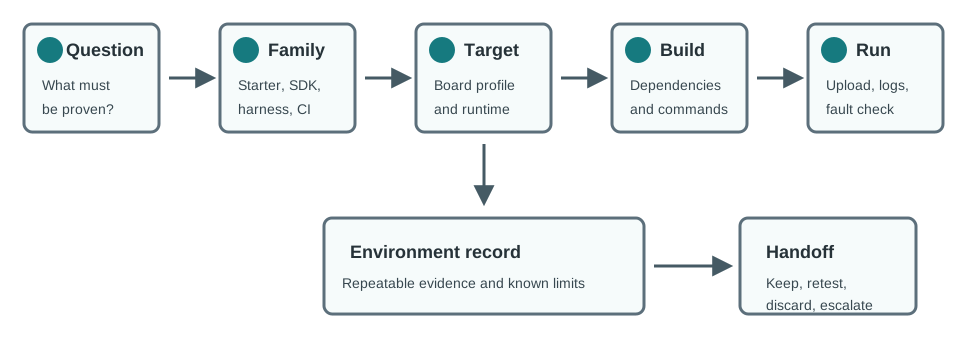
For IoT prototypes, environment choice also decides how much board-specific behavior is visible: pin maps, clock setup, flash partitioning, RAM pressure, driver versions, simulator gaps, upload mode, and live logs. An Arduino IDE sketch may be enough to prove first contact with an ESP32 or Nano 33 IoT board, but it is weak evidence if nobody records the selected board package, library source, upload port, serial speed, and example configuration.
As the prototype moves beyond first contact, the environment should expose more of the risk. A PlatformIO project can pin board profiles and libraries in the repository. ESP-IDF can make partition tables, sdkconfig options, FreeRTOS settings, and monitor output explicit. Zephyr with west can show board overlays, devicetree bindings, Kconfig choices, and a repeatable build command. A host harness can test payload parsing or retry-state logic before scarce hardware is available, while Wokwi, Renode, QEMU, or vendor simulators can speed iteration only when their hardware limits are clearly stated.
For example, a cold-room sensor prototype may need a board package record, BME280 library version, I2C pin map, serial capture, and one temperature-step log before the team can trust the reading path. A pump controller may need the upload method, watchdog reset log, and relay-disable observation before reviewers discuss architecture style. In both cases, the environment proves a narrow claim and names the claims it does not yet prove.
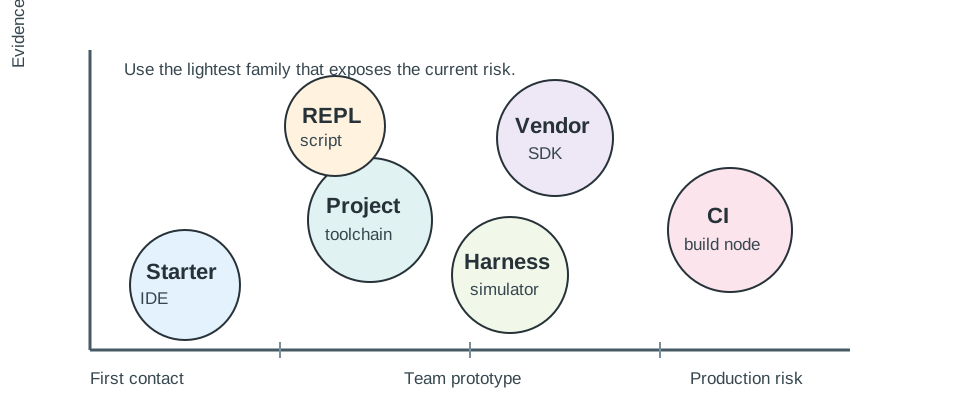
The best choice is therefore not the most advanced tool. It is the lightest environment that exposes the current evidence question and leaves a record that later language, architecture, library, testing, OTA, and best-practice chapters can reuse.
12.3 Reproducible Setup First
Record the environment while the prototype is still changing. The notes should be specific enough for a reviewer to recreate the same firmware path from a clean checkout.
- Target profile: board name, MCU/runtime, board package, compiler, language version, memory assumptions, and enabled peripherals.
- Build path: exact command, dependency lock source, configuration file, generated-output boundary, and expected artifact location.
- Upload and observe path: programmer, boot mode, cable or network path, serial speed, debugger setup, log capture, and reset procedure.
- Boundary notes: what the simulator, REPL, CI runner, or vendor SDK cannot prove until the real target is tested.
For a first sensor run, this record may be short: board selection, library version, upload command, serial monitor settings, one normal log, and the unproven conditions such as battery current, enclosure temperature, and RF range. For a team prototype, it should become a repository artifact: platformio.ini, sdkconfig, CMakeLists.txt, Zephyr overlay files, dependency lockfiles or version notes, build scripts, and a README section that states how to rebuild and observe the device.
Match the environment to the current review question. Use Arduino IDE, Thonny, or a vendor starter project when the evidence is first board contact. Move to PlatformIO, ESP-IDF, STM32CubeIDE, nRF Connect SDK, Zephyr west, or a CMake-based project when dependency control, multi-file structure, board variants, or team review matters. Add OpenOCD, J-Link, Ozone, pyOCD, serial captures, logic-analyzer traces, or power-profiler notes when the problem is timing, reset cause, memory corruption, interrupt handoff, or power state.
Keep secrets out of the environment record. It should name where credentials come from, such as a local environment file, GitHub Actions secret, lab token, or provisioning fixture, without storing keys, certificates, passwords, production endpoints, or private device identities. A repeatable environment is valuable only when it is also safe to share with reviewers.
12.5 Learning Objectives
By the end of this chapter, you will be able to:
- Define what evidence a software development environment must leave for an IoT prototype.
- Match environment families to prototype stage, board risk, language risk, team workflow, and debugging need.
- Record board profiles, build inputs, dependency versions, configuration, and upload commands without exposing secrets.
- Decide when a simulator, REPL, vendor SDK, project-based toolchain, or CI build adds useful evidence.
- Write a handoff record that lets the next software chapter continue from a reproducible environment.
12.6 The Environment Is Part of the Evidence
The previous chapter treated software prototypes as evidence. This chapter focuses on the environment that creates that evidence. If another engineer cannot rebuild, upload, inspect, and challenge the prototype, the environment is still incomplete.
Start with the prototype question, then choose the environment that makes the answer visible:
“Which IDE should we use?” is too early. Ask what must be proven: a first board blink, a sensor driver, a multi-board abstraction, a power state, a crash recovery path, or a repeatable team build. The right environment depends on the evidence question.
12.7 Selection Criteria
No development environment is best for every IoT prototype. Use criteria that reviewers can observe instead of relying on tool preference.
12.8 Choose Environment by Evidence
The environment decision should be repeatable enough that two reviewers would choose the same starting point from the same evidence need.
- Name the prototype question. Write the narrow claim the next run must support, such as “the ESP32-S3 board can read the BME280 over I2C,” “the payload parser rejects malformed JSON,” or “the Zephyr build still fits in the selected flash partition.”
- Pick the lightest environment that exposes that question. Use Arduino IDE, Thonny, or a starter vendor example for first contact; PlatformIO, ESP-IDF, STM32CubeIDE, Zephyr west, or nRF Connect SDK when board profiles, dependencies, and multi-file builds matter; and host tests or simulators when the question is logic rather than physics.
- Record the path from source to observation. Capture source revision, board profile, dependency versions, build command, upload command, serial or debugger command, expected output, and the part of the result that remains unproven.
- Retest when the risk changes. A clean serial demo does not prove sleep current, OTA rollback, RF range, secure boot, or field recovery. Move to the next environment only when it reveals evidence the current one cannot.
12.9 Concept Check: Clean Build Evidence
12.10 Environment Families
It is safer to think in environment families than to memorize a fixed ranking of named tools. Specific products change, but the evidence role stays stable.
12.11 Incremental Examples
Beginner Example: A student proves first contact with an Arduino Nano 33 IoT or ESP32 development board. Arduino IDE or Thonny is acceptable if the record names the board package, selected port, library source, upload command, and one serial log line that shows the sensor read path. The result proves board contact and basic observation, but not power, RF reliability, or maintainable team workflow.
Intermediate Example: A small team moves an ESP32, STM32, or Raspberry Pi Pico prototype into PlatformIO, ESP-IDF, STM32CubeIDE, or a CMake-based project. The repository now contains the target profile, dependency lock or version notes, build command, host-side parser tests, and a serial capture for one normal run and one fault case. The result proves a repeatable multi-file build and reviewable logic, but hardware timing still needs board evidence.
Advanced Example: A product-like prototype uses Zephyr west, nRF Connect SDK, ESP-IDF, or a vendor SDK because the question depends on flash partitions, secure boot, RTOS timing, Bluetooth LE stack behavior, low-power states, or signed update flow. CI builds the firmware artifact, the debugger or trace method is documented, and the handoff record separates host-test evidence from target-board evidence. The result is stronger, but only if the team also records board revision, SDK version, configuration overlays, and the retest trigger for silicon or field changes.
Before choosing an environment, write the condition that will let the team move on. Examples: “clean build from checkout,” “sensor fault reproduced with logs,” “same payload built for two board profiles,” or “unit tests run without hardware.”
12.12 Reproducible Toolchain Record
The most common environment failure is an unrepeatable build. The prototype may work on one laptop, but nobody can explain compiler version, board profile, library state, or configuration inputs.
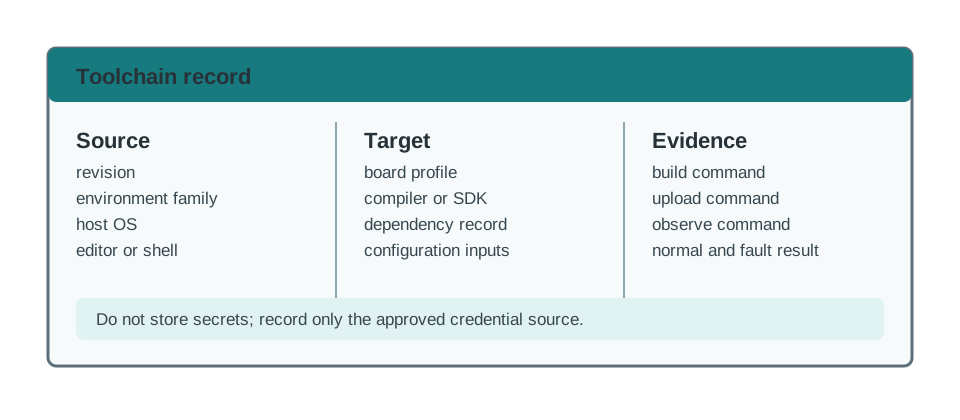
Record the environment as soon as the first meaningful build runs:
prototype=
evidence_question=
source_revision=
environment_family=
host_os=
editor_or_shell=
compiler_or_interpreter=
sdk_or_framework_version=
board_profile=
dependency_record=
configuration_inputs=
secret_handling_note=
build_command=
upload_or_run_command=
observe_command=
normal_result=
fault_result=
known_environment_limits=
retest_trigger=
review_owner=
review_date=
Keep secrets out of the record. It is enough to say where credentials come from, such as a local environment file, a secret manager, or a temporary lab token. Do not paste tokens, certificates, private keys, or production endpoints into prototype notes.
12.13 Debug and Observation Loop
The environment should shorten the loop between a code change and an observed behavior. A faster editor does not help if the team cannot see why the device changed state or failed.
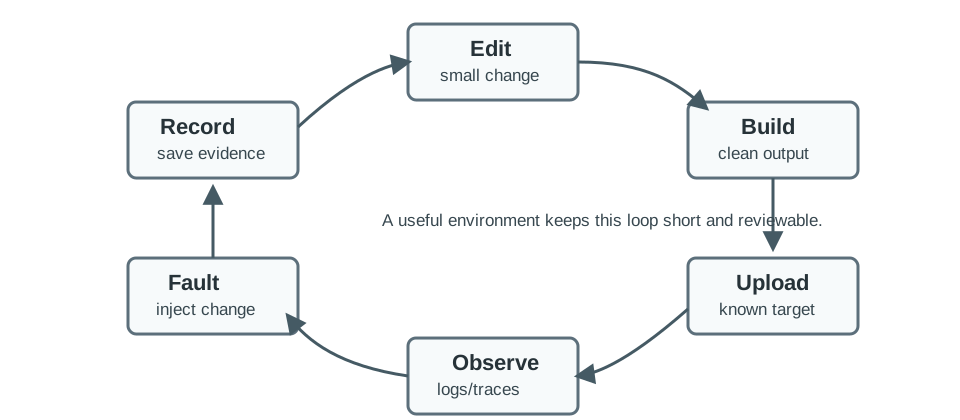
Use the lightest observation method that can answer the question:
Escalate tools by the question they can answer:
| Question | Tool | Evidence |
|---|---|---|
| What did firmware believe happened? | Serial monitor or structured log | Boot log, version, state transition, error counter, and timestamp |
| Where did execution stop? | Debugger, trace, or crash dump | Stack frame, register state, variable value, and source revision |
| Did the digital bus carry the expected bits? | Logic analyzer | I2C/SPI/UART trace with voltage level, sample rate, and decoded transaction |
| Did the analog or power signal behave correctly? | Oscilloscope or current probe | Rail sag, reset line, clock, wake signal, or current profile under load |
| Can another developer reproduce the build? | CI build node or scripted local build | Command, target profile, warnings, artifact, dependency lock, and size report |
| Does the behavior survive outside the bench? | Field log or long-running harness | Recovery event, reconnect count, watchdog reason, and retest trigger |
Before attaching a debugger, logic analyzer, or scope, check ground reference, voltage level, connector pinout, and probe loading. A debug session should not become the fault being debugged.
12.14 Simulator and Harness Boundary
Simulation is useful when it makes a software question cheaper to test. It is risky when reviewers treat simulated success as proof of hardware behavior.
12.15 Concept Check: Simulator Boundary
12.16 Try It Now
Choose one IoT prototype you have already built or could plausibly build. Fill in five fields from the toolchain record: evidence_question, environment_family, board_profile, build_command, and known_environment_limits. If any field is unknown, write the next action that would expose it without changing the product design.
12.17 Review Environment Records
Review this short record and mark one item to keep, one to retest, and one to escalate:
prototype=classroom-air-monitor
environment_family=PlatformIO project with ESP32 target
board_profile=esp32dev, recorded in project configuration
build_command=platformio run
upload_or_run_command=platformio run --target upload
observe_command=115200 baud serial monitor
normal_result=temperature and CO2 payload printed once per minute
known_environment_limits=no battery-current measurement, no Wi-Fi congestion test, no OTA rollback test
Keep the repeatable build and upload path. Retest power and wireless behavior on the actual enclosure and network. Escalate OTA rollback to a later environment if update recovery becomes part of the release question.
12.18 Cold-Room Firmware Scenario
A team is building firmware for a cold-room monitor. The device reads temperature and door state, logs excursions, and reports status through a gateway. The team chooses environments in stages instead of making one permanent choice on day one.
12.18.1 Stage 1: First Board Contact
The first environment is a low-friction starter setup. It proves that the board can boot, read one temperature value, toggle a status output, and write a serial log. The review record captures board profile, library version, upload command, and one clean log.
12.18.2 Stage 2: Repeatable Project Build
The prototype now has multiple files: sensor boundary, state machine, payload formatter, and storage stub. The team moves into a project-based toolchain so dependencies, build commands, and board profiles live with the repository.
12.18.3 Stage 3: Host-Side Harness
The team creates host tests for excursion logic and payload formatting. These tests do not prove sensor accuracy or power use, but they do prove the decision logic before every run reaches hardware.
12.18.4 Stage 4: Vendor-Specific Evidence
Low-power wake behavior and secure update layout depend on silicon features, so the team evaluates a vendor SDK or lower-level framework. The decision is based on evidence needs, not on tool prestige.
prototype=cold-room-monitor
current_question=can the team rebuild, upload, and observe the firmware repeatably?
environment_family=project-based toolchain with host test harness
board_profile=recorded in repository configuration
dependency_record=committed lock file or explicit version list
build_command=recorded and checked from clean checkout
upload_command=recorded with board connection notes
observe_command=serial log plus host test output
simulator_limit=logic and payload only; no power, RF, enclosure, or sensor drift proof
handoff=language, architecture, library, testing, and OTA chapters can reuse the record
12.19 Handoff Decision
An environment choice should leave a decision trail. The next chapter may change language, the architecture chapter may split the firmware into tasks, and the testing chapter may formalize the harness. Those later decisions need to know what the current environment actually proved.
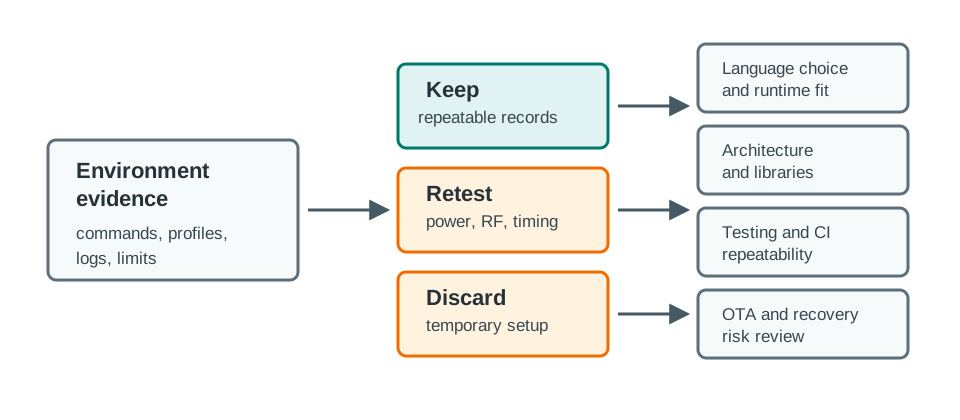
Before moving on, classify the result:
12.20 Knowledge Check
12.21 Common Failure Patterns
12.22 See Also
- Prototyping Languages explains how language choice changes firmware, gateway, scripting, and data-processing environment needs.
- Software Architecture Patterns shows how loop, event, task, and state models affect project structure and test harness design.
- Libraries & Version Control covers dependency selection, reuse boundaries, version records, and update risk.
- Testing & Debugging turns environment records into repeatable unit, integration, hardware, and fault checks.
- Over-the-Air Updates covers the deployment and rollback evidence that starter environments usually cannot prove.
12.23 Summary
- A development environment is part of the prototype evidence, not just a place to edit code.
- Choose the environment that exposes the current risk with the least hidden setup.
- Record build inputs, board profiles, dependency versions, upload commands, observation commands, and simulator limits.
- Treat simulated evidence and hardware evidence as different kinds of proof.
- Hand off only the parts of the environment that another reviewer can repeat or deliberately retest.
12.24 Key Takeaway
Development environments should make builds repeatable across laptops, CI, and devices; undocumented manual setup becomes a deployment risk.