22 Safe Over-the-Air Updates
More
Depth: Practitioner
Progress saves as you read. Mark sections complete as you go; your progress appears in the sidebar.
22.1 Start With the Story
This section: Start With the Story — An over-the-air update demo can succeed once and still be unsafe.
An over-the-air update demo can succeed once and still be unsafe. The important story asks what happens when the package is wrong, the download stops, the device reboots halfway, the new firmware cannot report health, or the rollback path is not understood by support. OTA evidence is about recovery, not just delivery.
Read this chapter as a rehearsal for change under stress. A prototype update path should record image identity, compatibility checks, health confirmation, rollback behavior, and the conditions that force another test before release.
22.2 OTA as Controlled Device Path
This section: OTA as Controlled Device Path — An OTA system is safe only when the team can control which package reaches which device and can prove what happened after installation.
An OTA system is safe only when the team can control which package reaches which device and can prove what happened after installation. The download is only one step in that path.
Figure 22.1 applies an update gate to the cold-room monitor’s retry change.
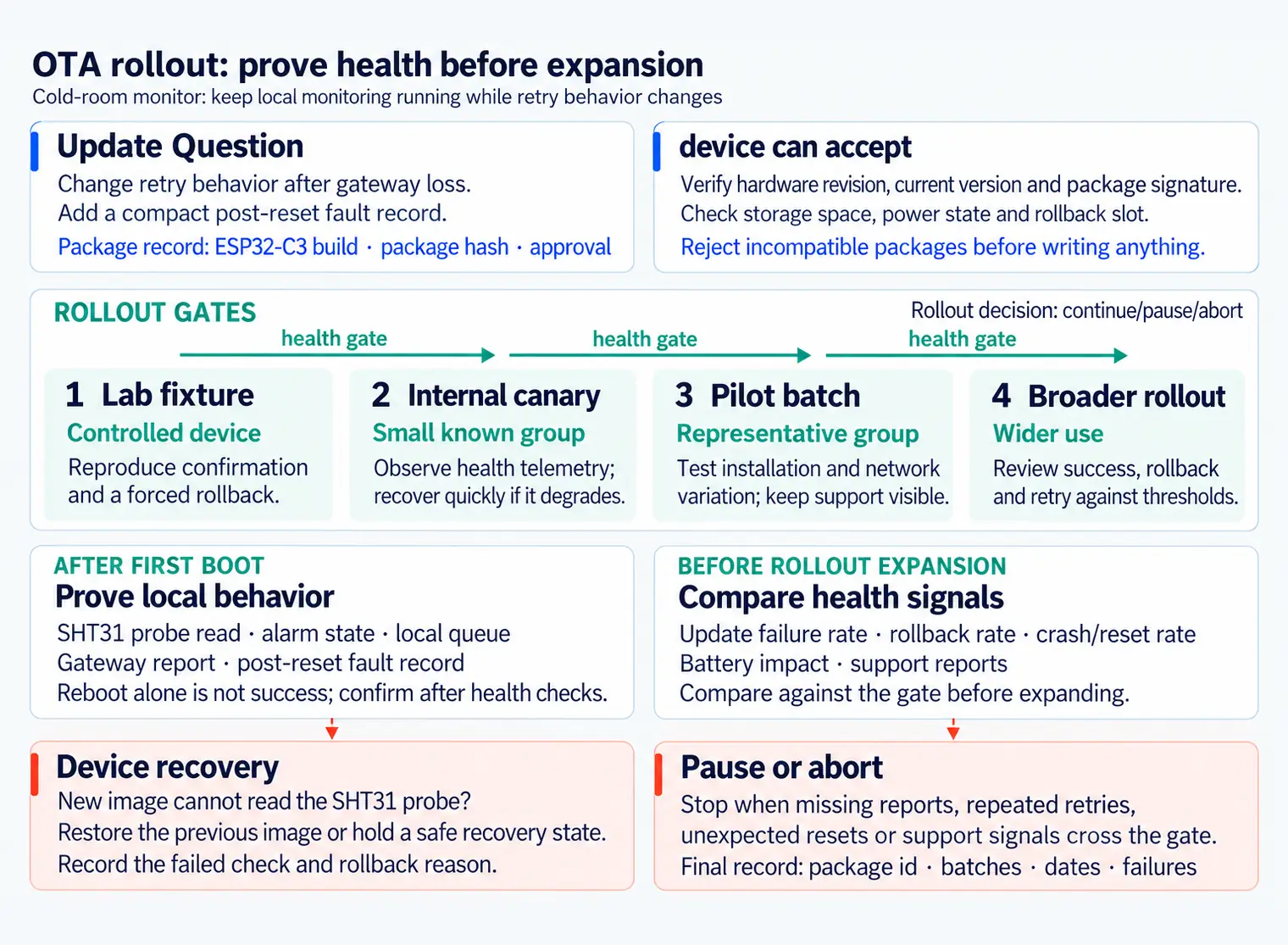
The rollout path in Figure 22.1 begins with a narrow retry change for a cold-room monitor. A package record names the ESP32-C3 build, hash, and approval. Eligibility checks hardware revision, current version, signature, storage, power, and rollback slot before any write. Lab, canary, pilot, and wider gates then use first-boot health: sensor read, alarm state, local queue, gateway report, and post-reset fault record. Reboot is not confirmation. If the new image cannot read the probe, restore the prior image or hold a safe state and record the failed check. Expansion depends on health, rollback, crash, battery, and support evidence at each gate.
A reviewable prototype names the package, checks device eligibility, installs through a recoverable state machine, observes first-boot health, and keeps a rollback route available until the update is confirmed.
For a cold-room monitor, the package record might name an ESP32-C3 build, source revision, partition table, dependency record, package hash, signature or approval record, target hardware revision, current-version range, and expected health checks. A device with the wrong sensor board, too little storage, weak battery, incompatible bootloader layout, or unsupported current version should reject the package before writing anything. That rejection is useful evidence, not a failed demo.
The update path should keep local behavior visible while the package moves through download, verification, staging, reboot, health check, confirmation, and rollback. If the gateway drops during download, the device should continue local sensing and report retry state. If the new image boots but cannot read the SHT31 probe, restore the previous image or hold the device in a safe recovery state with a clear reason. If the update succeeds, report package id, firmware version, health checks, queue state, and last fault so the rollout can continue deliberately.
Even a small prototype should separate the release owner, package store, rollout rule, device update agent, and health telemetry. That separation lets a reviewer challenge the update path without guessing whether a failure came from build content, targeting policy, network delivery, device storage, boot confirmation, or post-update behavior.
This is why OTA belongs in the prototype phase. It exposes package identity, device eligibility, field recovery, and fleet visibility before the team depends on remote updates to rescue deployed devices. A simple local update fixture is enough for early evidence if the record already shows the safety controls a later device-management platform must preserve.
22.3 Confirm Health Before Success
This section: Confirm Health Before Success — Do not mark an update successful at reboot.
Do not mark an update successful at reboot. Mark it successful after the device proves the capabilities that matter for the product.
Start with a lab fixture that can offer the right package, an incompatible package, a corrupt package, and an interrupted download. For ESP-IDF, record OTA partition slots, esp_ota_mark_app_valid_cancel_rollback, image size, project version, secure boot or signing choice, and the health signal used before confirmation. For MCUboot-based Zephyr or Nordic builds, record slot layout, image version, signing key identity, boot status, swap state, and how the firmware confirms the new image. For Linux gateways, record the systemd unit, package source, checksum, service health check, and rollback command.
Make the rollout gate numerical enough to act on. A canary batch might continue only if devices report package id, new version, successful sensor read, queue recovery, gateway publish, stable reset count, and battery or power state within the expected window. It should pause if missing reports, repeated retries, unexpected resets, rollback reasons, or support tickets cross the threshold. The point is to make continue, pause, abort, and rollback ordinary outcomes of the same review path.
- Before install: verify model, hardware revision, current version, package signature, storage space, power state, and rollback slot.
- During install: report download progress, verification result, write result, reboot reason, and any interruption.
- After first boot: confirm sensor access, actuator safety state, queue recovery, network reconnect, sleep behavior, and version telemetry.
- Before rollout expansion: compare update failure rate, rollback rate, crash/reset rate, battery impact, and support reports against the gate.
Keep secrets out of firmware source and review records. Public verification material, package hashes, package ids, and approval references can be recorded. Keep release-signing private keys off deployed devices; when a device needs Wi-Fi or update credentials or a device-specific token, provision them into protected device storage with clear ownership and rotation. A prototype that hard-codes update credentials may work in the lab while teaching the wrong release habit.
22.4 Rollback Is Update Logic
This section: Rollback Is Update Logic — Rollback must be designed into the update state machine.
Rollback must be designed into the update state machine. A device needs to know when a new image is pending, when it is confirmed, and when it should return to the previous image because boot, health, or communication checks failed.
The hard cases are usually partial: power loss during write, valid firmware on the wrong hardware revision, an update that boots but cannot read a sensor, or a fleet segment that passes the lab gate but fails on weak networks. OTA evidence should make those partial failures visible before the rollout reaches the whole fleet.
Under the hood, the update agent needs persistent state that survives reboot. It should record attempted package id, previous version, candidate version, slot or partition, verification result, reboot reason, health-check status, confirmation state, retry count, and rollback reason. If power fails during a write, the bootloader and agent should know whether to resume, reject, or keep the previous image. If the new image boots but never confirms health, the boot path should return to known-good behavior or hold the device in a controlled recovery state.
Compatibility is also a firmware boundary. A package built for a larger flash layout, different sensor board, changed calibration schema, incompatible radio stack, or new storage migration can boot and still be wrong for a device. The update record should state target product, hardware revision, current-version range, bootloader or partition scheme, configuration migration, and minimum power or storage conditions. The device update agent should check those facts before staging the package.
-
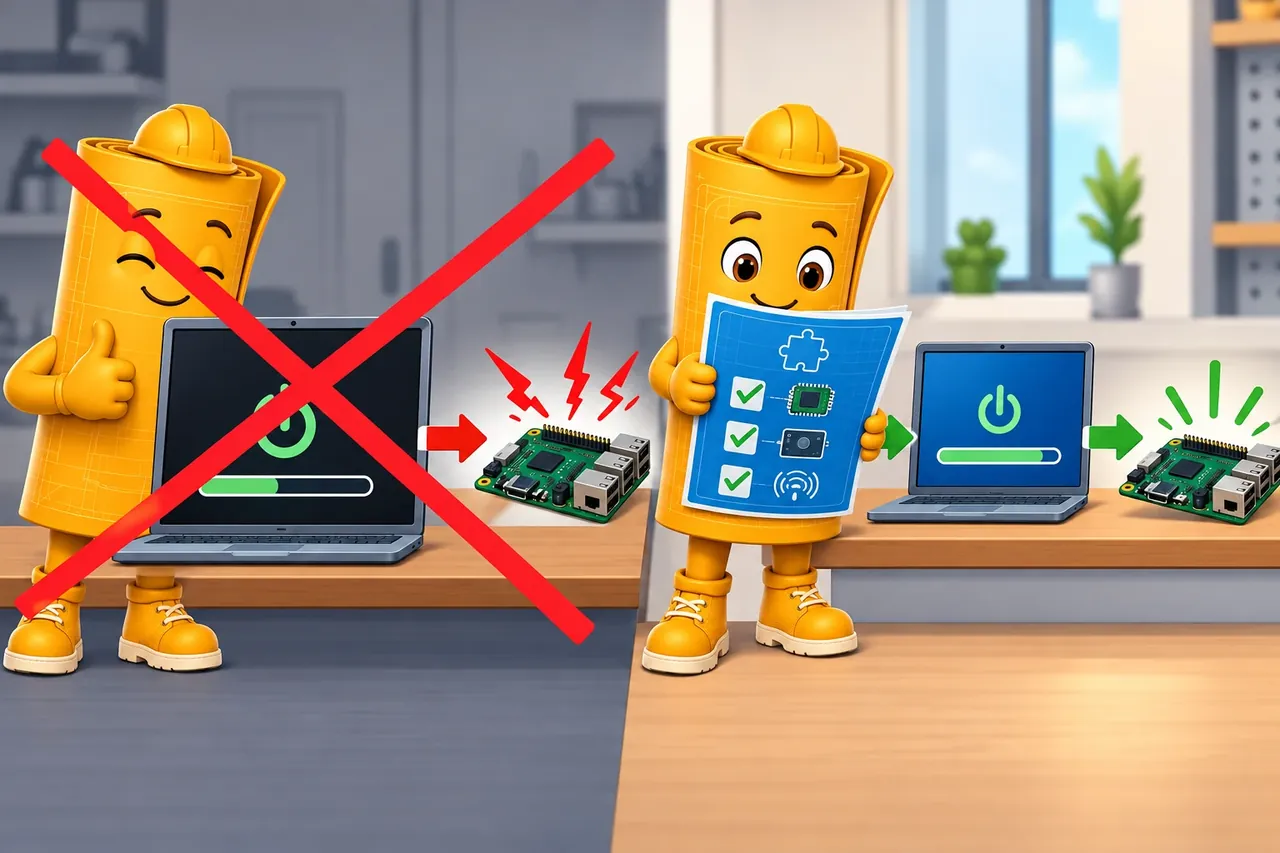
Wrong idea: the bootloader always rejects a package for the wrong device. It fails because code can boot despite a bad board, layout, radio, or data match.
Telemetry closes the loop. A rollout dashboard or simple review table should distinguish rejected, downloaded, verified, staged, booted, confirmed, retried, rolled back, missing, and unresolved devices. Without those states, a fleet can look quiet while some devices are stuck in retry loops, have reverted to an old image, or stopped reporting during a weak-network update window.
22.4.1 Why the Bootloader Is the Risk Surface
On an ESP32-C3, a first-stage bootloader in ROM runs first and loads a second-stage bootloader from flash. That bootloader selects and starts an application. During ESP-IDF app OTA, the running application writes a new image to an inactive app partition; the bootloader selects it on a later boot. Boot settings depend on the target: ESP-IDF reads SPI flash settings from the selected app image header, while some Microchip MCUs use non-volatile configuration bits for the clock, watchdog, and brown-out detection. A wrong partition layout or boot setting can prevent a device from starting, so test the update on the exact target hardware.
This is why bricking is not a vague fear. If an update path writes directly over the only copy of the bootloader or active image and the transfer is interrupted, corrupted, or aimed at the wrong hardware revision, there may be no known-good code left to boot into. A device in that state is unrecoverable over the air, and lost outright if it is physically inaccessible. The recoverable-slot and boot-confirmation requirements earlier in this section exist to prevent exactly that: the update agent stages the new image in an inactive slot or partition; with application-confirmed rollback enabled, the bootloader boots the candidate first, and the running application then confirms its health or rejects it so the bootloader returns to the previous image.
Two established OTA architectures make different trade-offs with this risk. An on-chip bootloader that handles the update itself can reuse the device’s existing radio or serial hardware and keeps size and cost down, but a corrupted bootloader on that same chip can brick the device with no fallback path. A dedicated off-chip programmer — a companion chip or module that owns the update protocol separately from the application processor — keeps the update path isolated from application firmware risk, at the cost of extra size, complexity, and unit cost. Record which architecture a target device uses in target_bootloader_or_partition_scheme; it changes what “recoverable” means for that hardware.
22.5 Learning Objectives
This section: Learning Objectives
By the end of this chapter, you will be able to:
- Treat OTA as a controlled update path rather than a single firmware feature.
- Define update package records with version, target, compatibility, integrity, authenticity, and rollback expectations.
- Separate build, signing, distribution, rollout policy, device agent, health checks, and telemetry responsibilities.
- Review update safety controls such as protected transport, signed packages, anti-rollback rules, boot slots, power and space checks, and post-update health confirmation.
- Plan staged rollout gates and handoff records that make a prototype update safe to repeat.
22.6 Prerequisites
This section: Prerequisites
This chapter builds on:
- Managing Libraries and Version Control for IoT Prototypes, where dependency and build inputs are recorded.
- Testing and Debugging IoT Software Prototypes, where normal runs, fault runs, and regression records are created.
- Choosing Architecture Patterns for IoT Software Prototypes, where update, storage, communication, and observability responsibilities are separated.
22.7 OTA Is a Lifecycle Evidence Path
This section: OTA Is a Lifecycle Evidence Path — An OTA feature is not complete when a device can download a file and reboot.
An OTA feature is not complete when a device can download a file and reboot. The review question is broader: can the team prove that the right package reaches the right device, at the right time, with enough health evidence to confirm or roll back the update?
Start with four evidence questions:
OTA update flow narrated tour
Narrated audio tour. The full transcript is below.
Play the tour to open the workbench. Pause, replay a beat, or read the full transcript below. Some situations cannot be shown by this teaching model; those beats provide captions only.
Full transcript — OTA update flow (8 beats)
B1 — Camera recovery
You are the engineer responsible for updating factory cameras. A software repair needs to reach deployed devices while preserving a working version if the repair fails. Sending the repair is only part of your job. The stakes are whether the cameras can recover when the new software goes wrong.
Model caption: You manage a camera update that must preserve a recovery path if the candidate fails.
B2 — Controlled OTA
An over-the-air update, or OTA update, sends a software change through a network. Firmware is the software stored inside the device. A controlled update checks the package before installation and keeps a recovery path. Success also requires checks showing healthy operation.
Model caption: An over-the-air update changes device software through a network. Package checks, recovery, and healthy operation govern success.
B3 — Canary cohort
Begin with a canary group: a small group receiving the update before wider groups. In the teaching model, your fleet contains twelve hundred cameras. For a ten percent group, divide twelve hundred by one hundred. Then multiply by ten to get one hundred twenty cameras receiving the candidate update.
Model caption: Model fleet: 1,200 cameras. Canary cohort: 10%. Target count: round(1,200 × 10 ÷ 100) = 120.
B4 — Package verification
The service sends a manifest, a description of the expected update package. It includes a digital signature that the device checks to confirm who sent the description and whether it has changed. The device checks that signature before trusting the download instructions.
Model caption: Verify the signed manifest before trusting download instructions. After transfer, check trusted source, intact contents, and device fit. Reject corrupt or unauthorized firmware before activation.
B5 — Pending health
For the camera example, the update goes into an inactive storage slot. The previous working slot remains a recovery path. Activation tries the new software, but it still needs to pass a health check. Confirmation waits for the required behavior after the device starts, rather than ending at installation.
Model caption: Write to the inactive slot. Keep the confirmed slot available. Activation remains pending health until required behavior is proven.
B6 — Boot issue and rollback
Give the candidate a boot issue. In the model's final stage, it starts but fails its health check. The model sets the verified share to seventy-four percent. Multiply one hundred twenty by seventy-four percent to get eighty-eight point eight. Round to eighty-nine cameras displayed as verified. The action is to roll back the canary, returning to the old slot.
Model caption: Model result: 74% verified; round(120 × 74 ÷ 100) = 89 displayed as verified. Health failed. Action: Roll back canary. Recovery instruction: return to old slot.
B7 — Reboot misconception
A common mistake is to assume a camera that restarts is ready for wider rollout, but after a reboot, the update still needs to pass its health checks. Starting software does not establish the required healthy behavior. Even with eighty-nine cameras displayed as verified, the model reports a failed health check and orders rollback. The figures are teaching values; they do not establish a safe acceptance threshold for your fleet.
Model caption: Reboot does not prove success. The model says booted, then failed health, and orders rollback despite displaying 89/120 verified. These are teaching values, not an acceptance threshold.
B8 — Health evidence takeaway
Keep the first group small, and let health check results decide whether the release grows or returns to the previous working version.
Model caption: Keep the first group small, and let health evidence decide whether the release grows or returns to the previous working version.
A device that reboots into a new version has not necessarily accepted a safe update. Confirmation should wait until the post-update health checks prove the device can still sense, decide, communicate, store, sleep, and recover in the ways the prototype requires.
22.8 OTA System Boundaries
This section: OTA System Boundaries — An OTA system crosses more boundaries than device firmware.
An OTA system crosses more boundaries than device firmware. A reviewable prototype names each boundary and records which evidence it owns.
Figure 22.2 separates build identity, trust, rollout policy, and device health.
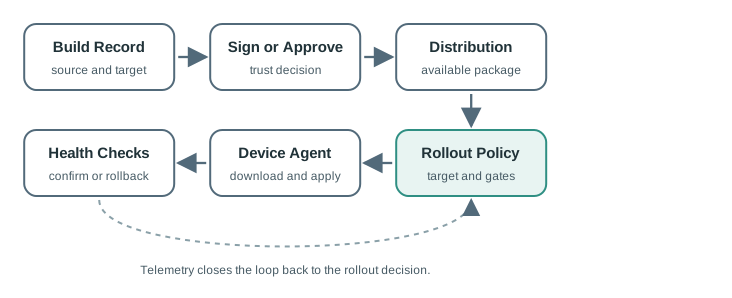
The boundaries in Figure 22.2 give each OTA stage an owner and an artifact. The build record binds source, target, and package; signing or approval establishes the trust decision. Distribution keeps the package available, while rollout policy chooses target devices and pause or abort gates. The device agent checks eligibility, downloads, verifies, writes, and boots the candidate. Health checks confirm it or trigger rollback. Telemetry closes the loop by sending the result to the rollout decision. A download log alone cannot prove that the right device received a trusted image or that local sensing recovered after reboot, so retain evidence across all six stages.
Use these boundaries in the review:
The prototype can start with a simple update server or local fixture, but the record should already name the package, target devices, expected safety controls, and health signals. That prevents the demo path from becoming an unreviewed production path.
22.9 Package and Compatibility Records
This section: Package and Compatibility Records — Every update needs a package record that can be checked by both people and devices.
Every update needs a package record that can be checked by both people and devices. The record does not have to use a specific platform format, but it should make compatibility and rejection rules explicit.
package_id=
package_type=full-image | delta | configuration | model | script | data
target_product=
target_hardware_revision=
target_bootloader_or_partition_scheme=
current_version_range=
new_version=
source_revision=
dependency_record=
build_command=
package_size=
package_hash=
signature_or_approval_record=
minimum_power_or_storage_state=
expected_health_checks=
rollback_available=yes | no | limited
release_owner=
release_notes=
Review the record before testing the update. If the package target is vague, the device may accept a build meant for another board, another partition layout, another sensor configuration, or another dependency set.
22.10 Update Safety Controls
This section: Update Safety Controls — Safety controls make a bad update detectable and recoverable.
Safety controls make a bad update detectable and recoverable. The right set depends on prototype risk, but a review should not skip the question.
Figure 22.3 shows how server policy and device checks limit an update rollout.
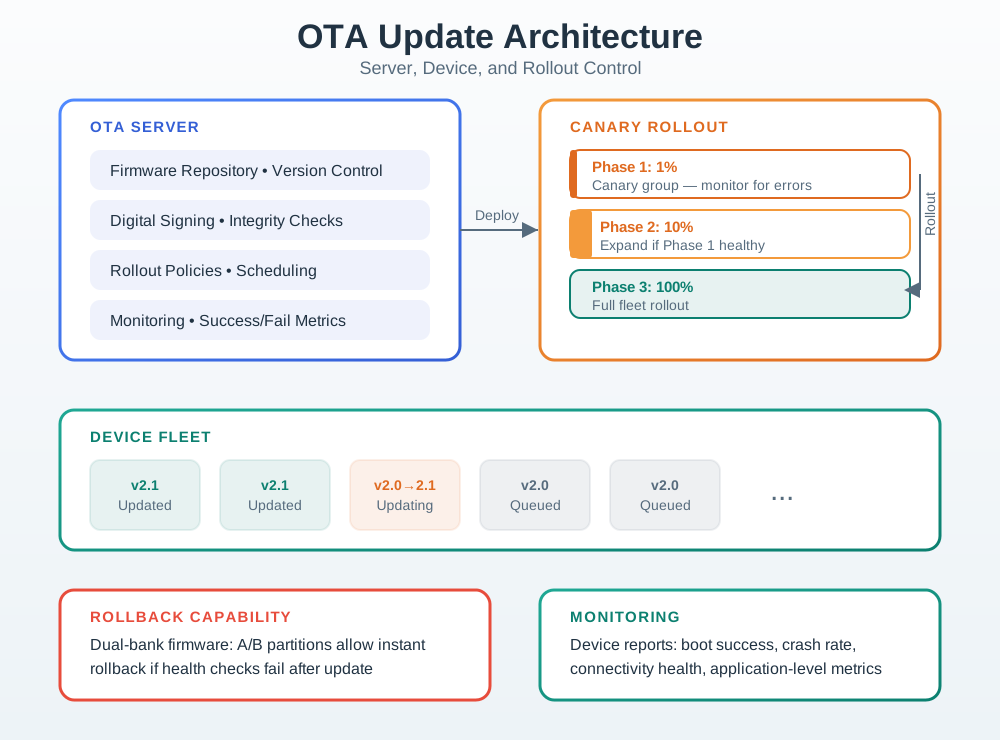
The server side keeps the firmware revision, signing or integrity decision, rollout schedule, and success metrics together. A canary group receives the package before wider groups so errors can be observed while exposure is limited. The device must still verify eligibility and package integrity, apply the update, then report health after reboot. Monitoring closes the loop: a successful download is not the same as a healthy application. Keep the prior valid image and the rollback condition clear before expanding the rollout. The figure’s percentage stages are policy examples, not evidence that this prototype has passed them.
Review these controls:
Public verification material can live on the device; private signing material should not. Keep credentials, signing keys, and update-control secrets out of firmware source and out of deployed devices unless the design explicitly requires and protects them.
22.11 Device Update State Machine
This section: Device Update State Machine — OTA failure handling is easier to review when the device has explicit update states.
OTA failure handling is easier to review when the device has explicit update states. The state machine should make rejection and recovery as visible as success.
Figure 22.4 follows the device from eligibility to health confirmation or rollback.
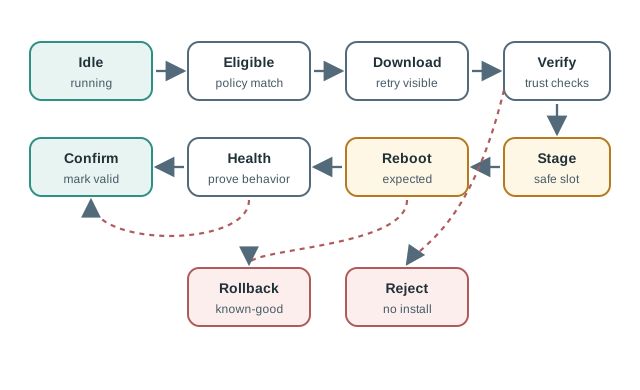
Idle means the device is still running its current image. Eligibility checks target and policy before a download begins; retry behavior must remain visible if the transfer stalls. Verification checks the package before it is staged in a safe slot. After reboot, the health state tests the behavior needed to confirm the new image. If that check fails, rollback returns to a known-good version rather than treating the reboot as success. Record the transition and its result so the update decision can distinguish a transport failure, a trust failure, and an application failure.
Use clear states:
22.12 Health Checks and Rollback Evidence
This section: Health Checks and Rollback Evidence — A health check is not “the device turned on.” It is a small, targeted proof that the update did not break the prototype’s essential behavior.
A health check is not “the device turned on.” It is a small, targeted proof that the update did not break the prototype’s essential behavior.
Common health checks include:
Rollback evidence should record the failed check, previous version, attempted package, device state, and whether the device returned to service. A rollback without a reason is hard to distinguish from an ordinary reboot.
22.13 Rollout Gates
This section: Rollout Gates — Rollout is a decision process, not a single button.
Rollout is a decision process, not a single button. Each gate should have a small enough blast radius that the team can learn, pause, and recover.
Inspect Figure 22.5 and ask what evidence permits a candidate to expand from one rollout population to the next.
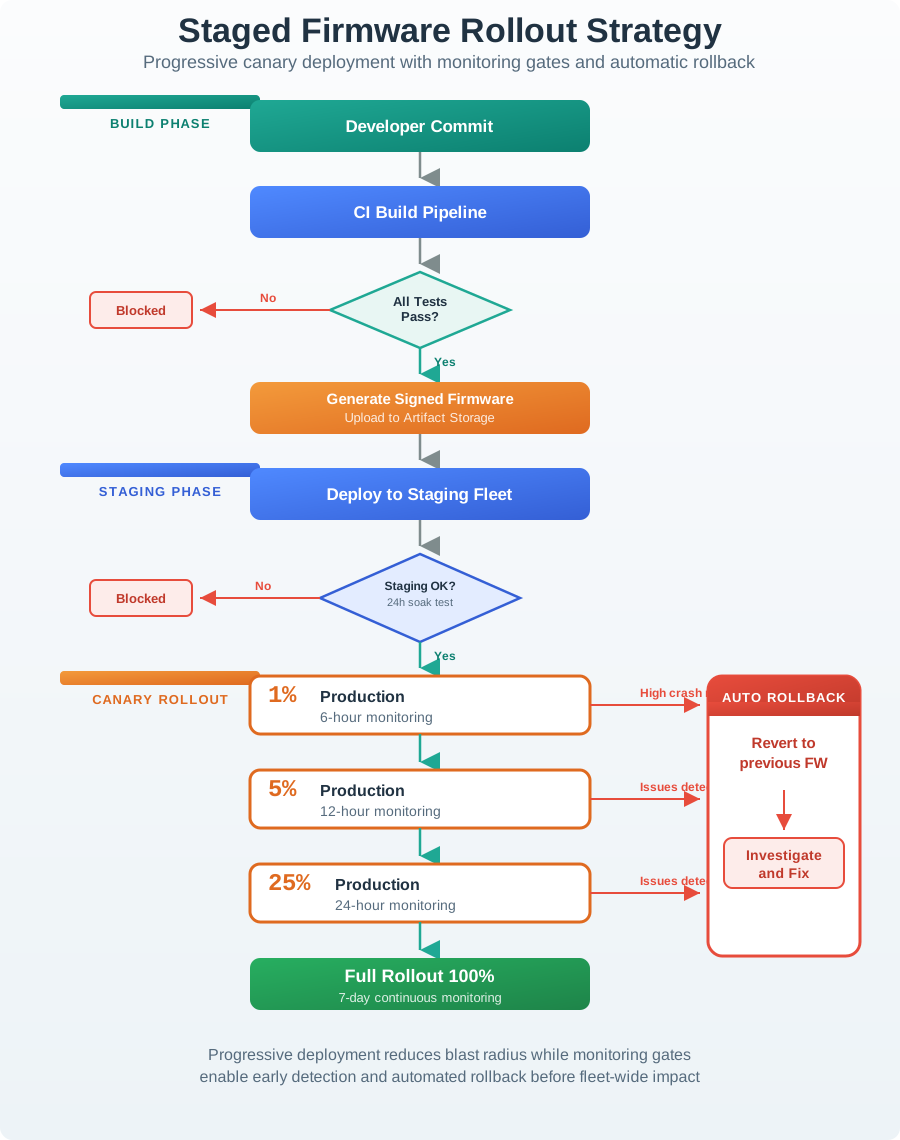
Read Figure 22.5 from the build through each larger group. Lab rigs come first, then staff devices, a pilot batch, and wider use. Each group supplies proof for install, boot, health, app use, and recovery before risk grows. A breached limit leaves the growth path at once. It leads to pause, stop, rollback, and repair, not to a note that the next gate may ignore. The final record links one release to each group, its measures, its stop rules, and the recovery choice.
Review gates before a wide update:
An OTA review is healthier when pausing or aborting is a normal gate outcome, not an emergency exception. Define the stop rule before the rollout begins.
22.14 Cold-Room OTA Review
This section: Cold-Room OTA Review — A team is preparing an update for a cold-room monitor prototype.
A team is preparing an update for a cold-room monitor prototype. The update changes retry behavior after gateway loss and adds a compact post-reset fault record. The testing chapter already proved the new retry state on a bench board and an integration rig.
22.14.1 Update Questions
The OTA review asks:
First, Which devices should accept this package? Next, Can the device reject a package built for the wrong board or current version? Then, Can it download and stage the package without stopping local temperature monitoring? After that, Can the new firmware prove that probe read, alarm state, local queue, gateway report, and post-reset fault record still work? Finally, Can the device return to the previous image if health checks fail?
22.14.2 Evidence Runs
The team records these runs:
22.14.3 Handoff Decision
The package is allowed into a canary batch only after the team can reproduce both a successful confirmation and a forced rollback. The broad rollout remains blocked until canary health telemetry confirms that update state, local sensing, gateway reporting, and fault records behave as expected.
prototype=cold-room-monitor
update_question=retry-state update must not stop local monitoring
package_id=
source_revision=
target_hardware_revision=
current_version_range=
new_version=
normal_update_evidence=download, verify, stage, reboot, health confirm
fault_evidence=incompatible package, interrupted download, forced health failure
rollback_evidence=previous image restored and rollback reason reported
canary_gate=success, retry, rollback, and missing-report signals reviewed
handoff=best-practices chapter should keep update records in release review
22.15 OTA Handoff Record
This section: OTA Handoff Record — Rerun the OTA path whenever the bootloader, partition layout, update agent, package format, signing process, communication dependency, storage migration, or health-check criteria changes.
Every reviewed OTA path should leave a handoff record for future releases:
release_name=
package_id=
package_type=
source_revision=
dependency_record=
target_devices=
excluded_devices=
eligibility_rules=
safety_controls=
lab_evidence=
fault_evidence=
rollout_gates=
pause_or_abort_rules=
health_signals=
rollback_path=
unresolved_devices=
next_rerun_condition=
review_owner=
Rerun the OTA path whenever the bootloader, partition layout, update agent, package format, signing process, communication dependency, storage migration, or health-check criteria changes.
22.16 Knowledge Check
This section: Knowledge Check
22.17 Common Failure Patterns
This section: Common Failure Patterns
22.18 Summary
This section: Summary — First, OTA review starts with package identity, device eligibility, recovery path, and rollout evidence.
First, OTA review starts with package identity, device eligibility, recovery path, and rollout evidence. Next, Build, signing or approval, distribution, rollout policy, device agent, and health telemetry are separate boundaries. Then, Safety controls should cover authenticity, integrity, compatibility, anti-rollback policy, power and storage gates, recoverable boot, health confirmation, and telemetry. After that, A device update state machine should make rejection, retry, confirmation, and rollback visible. Finally, Staged rollout gates let the team learn, pause, abort, and record before a wider update becomes hard to reverse.
22.19 Key Takeaway
This section: Key Takeaway — OTA design is a reliability feature: include identity, integrity checks, rollback, staged rollout, telemetry, and a recovery path before relying on remote updates.
OTA design is a reliability feature: include identity, integrity checks, rollback, staged rollout, telemetry, and a recovery path before relying on remote updates.
22.20 What’s Next
This section: What’s Next
Find help
3 reviewed answers.
Where should I start in a module?
Open the module page from the sidebar to see its chapters in order. Use the module map to return to a topic you need.
Modules and pathsReviewed
What can I try when a project does not work?
Check the symptom, then work through the diagnostic steps. Keep the error message and the smallest example that reproduces it.
When you are stuckReviewed
How do interactive examples work?
Use the interactive guide to check how examples and simulations work before changing your project.
Interactive examples guideReviewed