14 Hardware Prototyping Case Studies
More
Depth: Practitioner
Progress saves as you read. Mark sections complete as you go; your progress appears in the sidebar.
14.1 Start With the Story
This section: Start With the Story — A case study is not a success story to imitate.
A case study is not a success story to imitate. It is a record of what the team thought was true, what the prototype revealed, and how evidence changed the next decision. An ESP32 reboot, a weak regulator, a noisy sensor lead, or a late enclosure problem matters because it shows how a visible symptom led to a measured cause.
Read these examples as investigation patterns. For each case, follow the question, symptom, measurement, revision, verification, and handoff note so your own prototype failures become useful evidence instead of anecdotes.
14.2 ESP32 Wi-Fi Reboot Case
This section: ESP32 Wi-Fi Reboot Case — A classic prototyping case: an ESP32 sensor node runs perfectly on the bench, but every time it connects to Wi-Fi it resets — sometimes looping forever at the join step.
A classic prototyping case: an ESP32 sensor node runs perfectly on the bench, but every time it connects to Wi-Fi it resets — sometimes looping forever at the join step. The instinct is to blame the code, and hours vanish adding delays and rewriting the network logic. The real fault is almost always power: the Wi-Fi radio’s current surge is browning out the supply.
Figure 14.1 shows what an ESP32 reboot case must record before naming a fix.
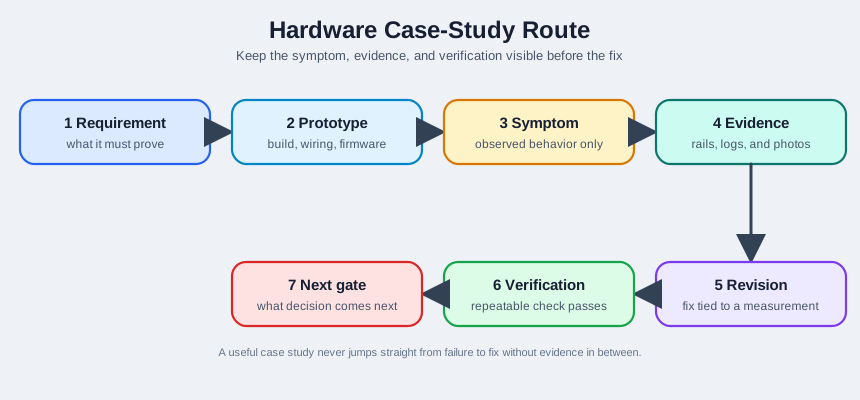
The route begins with the requirement and the exact prototype build, so the reset has a known context. The symptom records that Wi-Fi join triggers a reboot; the evidence stage then asks for a rail capture and reset log before choosing a revision. If the 3.3 V rail falls during radio activity, the power path becomes a candidate for change. Verification repeats the same join test on the revised build, and the next gate states what still needs proof. Keeping those stages separate stops a cable or capacitor swap from being reported as a general solution without a measured cause.
This case teaches a durable prototyping lesson: when a failure correlates with a specific hardware activity (radio TX, motor start, SD write), suspect the power rail before the firmware. The symptom lives in software (a reset), but the cause is a volt-drop. The review route matters because the same visible reset can have several causes: a weak USB cable, a low-current regulator, a missing local capacitor, a bad ground return, or a firmware watchdog that fires after the radio stalls. A case study should preserve what was observed before it claims why the observation happened.
Record the scenario as evidence: hardware revision, regulator part, battery or USB source, cable length, firmware build, Wi-Fi access point, radio mode, reset reason, and the exact step that reproduces the loop. Then add the measurements that changed the team’s mind. For an ESP32 brownout case, the decisive evidence is usually a 3.3 V rail capture during association or transmit, plus a log that shows the reset reason. That record lets a later team reuse the lesson without copying a lucky fix into a different board.
The tell: a reset that fires exactly when the radio transmits is a brownout, not a bug. Measure the rail before you touch the code.
14.2.1 Overview Knowledge Check
14.3 Measure Current Surge and Rail
This section: Measure Current Surge and Rail — The ESP32 draws perhaps 20-80 mA idle, but when its power amplifier keys up to transmit Wi-Fi, current spikes to roughly 300-500 mA in microseconds.
The ESP32 draws perhaps 20-80 mA idle, but when its power amplifier keys up to transmit Wi-Fi, current spikes to roughly 300-500 mA in microseconds. If the supply — a marginal LDO, a coin cell, a thin USB cable, or long thin PCB traces — cannot deliver that surge fast enough, the local 3.3 V rail sags. The ESP32’s brownout detector trips near ~2.7 V and resets the chip.
Diagnosis over guessing. Put an oscilloscope on the 3V3 pin and watch it during a connection attempt. Probe at the module power pin and ground close to the module, not only at the bench supply terminals. Trigger on the reset line, the EN pin, or the falling edge of the rail so the capture shows the moment before reboot. If you see the rail dip sharply and the reset land at the bottom of the dip, the diagnosis is confirmed — no code change could fix a 2.6 V rail. This is the “measure, don’t guess” discipline of hardware prototyping: the scope trace names the fault in seconds where days of firmware edits would not.
The oscilloscope in Figure 14.2 is the tool for watching the rail during a Wi-Fi reset.

The display shows voltage changing over time, while the TIME/DIV control sets how much of the start or transmit event fits on screen. Place the probe at the 3V3 pin and use the reset or EN line as a trigger so the capture includes the moment the board reboots. The red and black probe connections establish the measured point and reference. In this case the question is whether the rail sags toward the stated brownout threshold during radio activity. A photograph of the instrument shows the controls; only the captured trace can answer that electrical question.
A good case record then separates tests that confirm the cause from tests that only mask it. Changing the USB cable, swapping the regulator board, lowering Wi-Fi transmit power, adding 47-100 uF near 3V3, or powering from a current-limited bench supply are useful if each change is made one at a time and followed by the same connection test. Adding random delays, retry loops, or a later watchdog reset may make the demo appear calmer while the rail is still outside spec. The next gate should be a repeatable capture in the worst mode: cold start, scan, association, DHCP, TLS or MQTT connection, and first publish.
| State | ESP32 current | Effect on a weak rail |
|---|---|---|
| Idle | ~20-80 mA | Rail holds |
| Wi-Fi TX burst | ~300-500 mA | Rail sags toward brownout |
14.3.1 Practitioner Knowledge Check
14.4 Size the Bulk Capacitor
This section: Size the Bulk Capacitor — Before applying the specification, inspect Figure 14.8 for the package, terminals, scale, and installation context that the abstract value omits.
Before applying the specification, inspect Figure 14.8 for the package, terminals, scale, and installation context that the abstract value omits.

Read the photograph in Figure 14.8 from the cylindrical package to its two terminals and the space needed around them. Polarity and lead access affect installation, while the physical scale constrains placement near the pulsed load. The image cannot establish capacitance, voltage rating, equivalent series resistance, temperature life, or peak-current suitability, so those remain datasheet checks. It grounds the calculation that follows in a component that must also be mounted, wired, protected, and serviced.
The fix is a local bulk capacitor near the module’s power pin that supplies the fast current surge until the regulator catches up. Size it from the charge the transient demands: Q = I x dt, and C = Q / dV for an allowed voltage droop dV.
Worked example. Suppose the radio pulls an extra 300 mA and the regulator takes ~10 us to respond, and you can tolerate a 0.1 V droop. Then Q = 0.3 A x 10 us = 3 uC, and C = 3 uC / 0.1 V = 30 uF. So a 47-100 uF bulk capacitor placed close to the pin comfortably rides out the surge, paired with a small 0.1 uF ceramic for the high-frequency edge. Equally important, the regulator (or battery) must be rated for the peak, not the average — a 250 mA LDO cannot sustain a 400 mA burst no matter how large the capacitor.
The capacitor photo in Figure 14.3 shows the kind of bulk part considered for the radio surge.

The cylindrical can and vent markings help identify an electrolytic capacitor, but the image cannot establish its capacitance, polarity, voltage rating, or effective behavior in this circuit. The worked section sizes a 47–100 µF part close to the module power pin for a 300 mA surge. Before adding it, check the actual rail capture and the part markings against the intended placement. After the change, repeat the Wi-Fi join test and compare the rail trace and reset log. The component is a proposed power-path revision, not proof that the reset cause has been fixed.
The deeper point is that the revision must follow the measurement. The scope said “the rail drops ~0.5 V for ~10 us during TX,” and that measurement sized the capacitor and set the regulator spec. The same evidence also checks placement and part choice: a capacitor with high ESR, long leads, or a long return path may store enough charge on paper while failing at the module pins. A practical revision pairs bulk storage with low-ESR ceramic decoupling, short traces, a ground return that does not share motor or relay current, and a regulator whose transient response is documented near the required load step.
Verification should repeat the failing operating mode, not only confirm that the device boots once. Capture the rail across repeated Wi-Fi scans, association attempts, retries, and the first high-current transmission at the highest expected TX power. Log the reset reason before and after the revision, and keep the old capture beside the new one in the case record. That comparison turns a hardware fix into transferable engineering knowledge: future reviewers can see the symptom, the arithmetic, the physical placement, the rejected alternatives, and the gate that allowed the prototype to move forward.
14.4.1 Under-the-Hood Knowledge Check
14.5 Learning Objectives
This section: Learning Objectives
By the end of this chapter, you should be able to:
- Review hardware prototype case studies using an evidence timeline.
- Separate observed failure symptoms from guessed root causes.
- Compare hardware alternatives using requirements, measurements, and risks.
- Decide whether a prototype is ready for another revision, PCB layout, pilot handoff, or more bench work.
- Write case-study records that help future teams avoid repeated mistakes.
14.6 Read Case Studies as Evidence
This section: Read Case Studies as Evidence — A useful case study follows the build, not the story.
A useful case study follows the build, not the story. It should show what the team believed, what they built, what failed, what they measured, what changed, and how the change was verified.
14.7 Evidence Timeline
This section: Evidence Timeline — Read every scenario as a timeline.
Read every scenario as a timeline. A timeline makes it harder to skip from “it failed” to “we know why” without measurement.
Figure 14.4 keeps the ESP32 reset observation separate from the measurement that explains it.
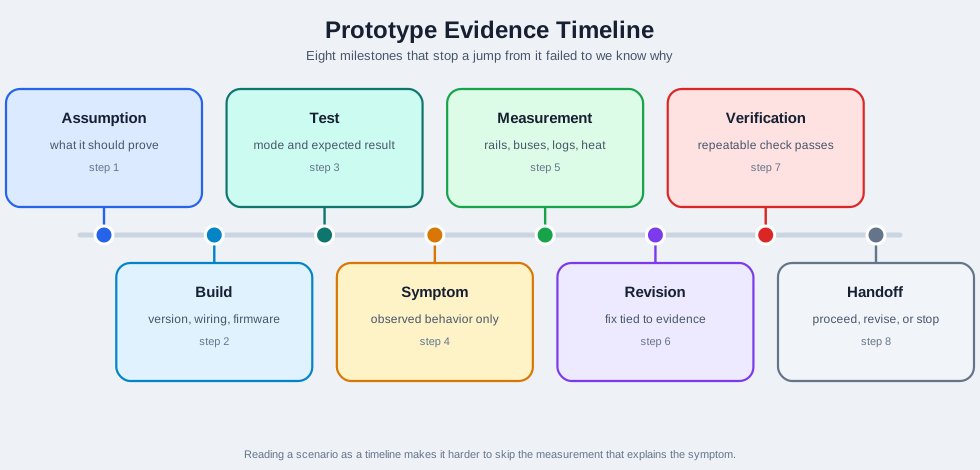
The first stage expects the sensor node to join Wi-Fi while holding its 3.3 V rail. The build and test stages record a bench setup and the join attempt; the symptom stage records the reset without assigning a cause. A rail measurement at the failing moment can then test whether supply voltage falls during the radio surge. Revision follows that result, not the mere fact of rebooting. Verification repeats the join on the changed build, and the final handoff records what passed and what remains open. That order lets a later reviewer see which observation justified the fix.
14.8 Incremental Examples
This section: Incremental Examples
14.8.1 Environmental Sensing Node
Situation: A battery-powered environmental node reads multiple sensors and reports periodically. The proof board works on the bench, but field tests show missing reports and inconsistent readings.
Observed symptoms:
- Reports arrive in clusters instead of at the expected interval.
- One sensor sometimes returns implausible readings after wake.
- The device recovers after a manual reset.
Evidence gathered:
- Boot log showing wake reason and firmware version.
- Power trace across sleep, wake, sensor read, and transmit modes.
- Bus capture around the failing sensor read.
- Field photo showing cable strain and sensor placement.
Decision: The team keeps the same controller but revises the wake sequence, adds a sensor-ready check, moves strain relief, and records the field condition that must be checked again before handoff.
14.8.2 Actuator Control Prototype
Situation: A controller drives a relay or motorized actuator. The actuator works in isolation, but the controller resets during real load switching.
Review evidence:
- Source and regulated rail measured during load start.
- Reset line captured during the fault.
- Actuator wiring, return path, and protection parts documented.
- Firmware log proving whether the reset happens before or after the command.
Figure 14.5 applies a measured fault sequence to an actuator controller that resets under load.
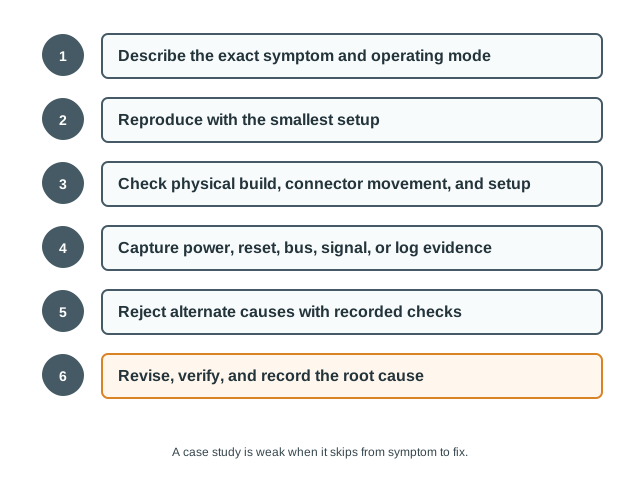
The symptom is specific: the actuator works alone, but the controller resets when the real load switches. Reproduce that mode with the smallest setup, then check the power rail and return path while switching occurs. A command or actuator capture can show whether the control signal changed before or after the reset. Only after those observations should the team choose a driver, supply, protection, or firmware revision. Repeat the same load-switch test on the revised build and keep the result with the build identity. The flow makes the proposed fix answer the observed failure instead of a general hardware guess.
Possible conclusions should remain evidence-backed:
- If the rail drops during load start, revise the power path and repeat the load-start check.
- If the reset line toggles while the rail is stable, inspect reset circuitry, noise coupling, or firmware watchdog behavior.
- If the command is repeated unexpectedly, isolate firmware state and event handling.
- If the fault appears only in the enclosure, inspect heat, cable strain, grounding, and connector movement.
14.8.3 Threshold-Controlled Fan with Remote Telemetry
Situation: A DHT temperature/humidity sensor and a relay-driven fan formed a working bench demo: read the sensor, switch the relay when the reading crossed a threshold. The team then extended the same node so its readings also went out over the network to a second machine, where they were logged and plotted live instead of only driving the local relay.
Observed symptoms:
First, Near the threshold, the fan clicked on and off in short bursts instead of settling into a stable state. Next, Early bench runs had the fan running when the room felt cool and idle when it felt warm, which read like a backwards relay before anyone touched the wiring. Then, Once remote logging was added, the saved log showed the humidity column repeating the same value for many samples in a row while the temperature column changed in small steps — the team’s first guess was a stuck sensor.
Evidence gathered:
First, The switching code itself: one comparison (if temperature > 30) followed by GPIO.output(pin, 0) to close the relay and a fixed sleep(5) before opening it again — no hysteresis band and no re-check of the sensor while the relay was held on.
Next, The relay’s documented behavior: driving its control pin low is what closes the contact. That single “active low” line in the reference code was easy to miss and explained the backwards-looking fan behavior long before any wiring was actually wrong.
Then, A side-by-side of the two socket patterns in the reference material: a TCP-style handshake (connect/accept, send/recv) versus the connectionless path the team shipped for telemetry — socket.SOCK_DGRAM on both ends, sock.sendto(message, server_address) from the sensor node, sock.recvfrom(4096) on the logging machine. A dropped periodic reading was cheap to lose; a stalled TCP connection on a headless sensor node was not something worth recovering from in the field.
After that, The saved log lines next to the DHT22’s published resolution: humidity updates in whole-percent steps while temperature updates in tenths of a degree, so several identical humidity readings in a row while temperature keeps ticking is normal sensor behavior, not a stalled channel.
Decision: The team kept the single-threshold comparison but added a minimum on-time and re-check derived from the observed short-cycling, and pulled the relay’s active-low behavior out into a named constant so a future reviewer would not have to re-derive it from a datasheet comment. The telemetry link stayed on UDP — occasional loss was an acceptable tradeoff for a simpler, connectionless sensor node — but the team added a live two-pane plot (temperature and humidity, redrawn on every received reading) specifically so a flat channel was visible immediately as a shape on screen instead of being misread from a raw log column.
14.8.4 Advanced Example: PCB Readiness Review
Situation: A module stack demonstrates the concept. The team wants to move to a custom board because the prototype is physically bulky.
The right question is not “Can we make it smaller?” The right question is “Are the interfaces stable enough to commit to layout?”
Inspect Figure 14.6 and ask which missing record should stop a prototype from advancing to PCB layout.
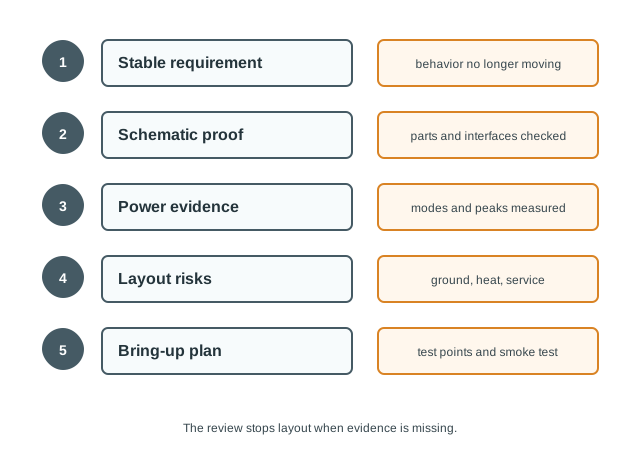
Read Figure 14.6 from stable sensing, actuation, communication, sleep, reset, and safe-output behavior into fixed interfaces and placement needs. Electrical proof then records power modes, peak loads, reset behavior, timing, and noise-sensitive readings. The first-board plan adds test points, programming access, inspection, smoke tests, and rollback. If those records are missing or still changing, the route returns to an integration prototype or schematic review. Layout release follows evidence maturity, not schedule pressure.
PCB readiness evidence:
Decision: If those records are missing, the next revision should be an integration prototype or schematic review, not layout release.
14.8.5 Field-Test Handoff Example
Situation: A prototype works in the lab and is ready for a small field trial. The risk moves from “Can it function?” to “Can it be installed, serviced, diagnosed, and recovered?”
Field-test handoff packet:
- Assembly photos and connector orientation.
- Firmware build artifact and flash method.
- Serial settings and expected boot log.
- Installation checklist and acceptable placement range.
- Known failure symptoms and triage steps.
- Data-quality checks and stop conditions.
- Recovery plan for reset, reflash, sensor replacement, or safe removal.
Decision: A field test is ready only if someone other than the original builder can follow the record.
14.9 Decision Matrix
This section: Decision Matrix — Use a decision matrix to summarize scenarios without turning them into slogans.
Use a decision matrix to summarize scenarios without turning them into slogans.
Figure 14.7 pairs each prototype symptom with evidence that could justify a revision.
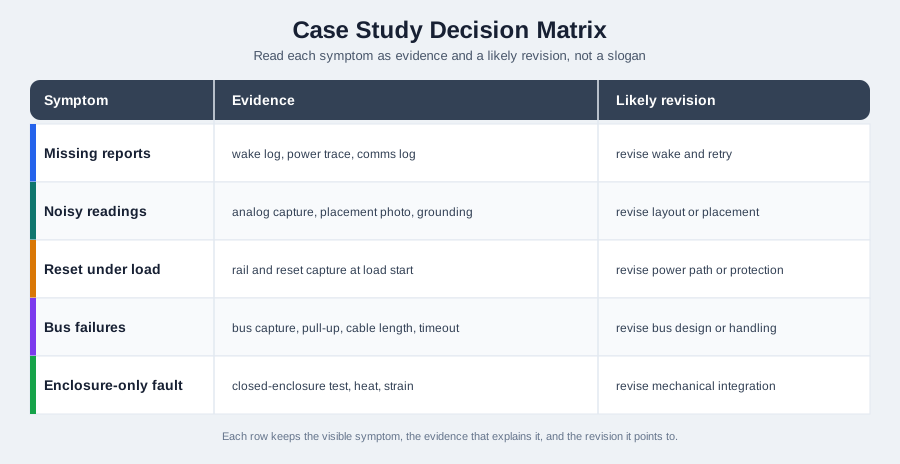
Missing reports call for a wake log, power trace, and communication log before changing retry behavior. Noisy readings instead need an analog capture, placement photo, and grounding check; a reset under load needs a rail and reset capture at the load start. Bus failures point to a bus trace, pull-up, cable, and timeout review. An enclosure-only fault needs a test with the enclosure closed. The likely revision column is a hypothesis tied to those observations, not an automatic prescription. Select the row matching the observed mode, collect its evidence, and repeat that mode after any change.
14.10 Case Study Record Template
This section: Case Study Record Template
Scenario: what the prototype is trying to prove.
Version: hardware build, firmware artifact, setup, and operating mode.
Symptom: observed behavior and reproduction steps.
Evidence: measurements, logs, captures, photos, and rejected causes.
Revision: change made and why it follows from the evidence.
Verification: test proving the revision worked.
Next gate: proceed, repeat the check, revise, or stop.
Example:
scenario=outdoor sensor node field report failure
version=integration-build-r2 firmware=field-smoke-0.6
symptom=missed reports after overnight deployment
evidence=wake-log.txt, power-trace.csv, bus-capture.png, install-photo.jpg
rejected=server outage, dead battery, missing firmware image
revision=add sensor-ready wait, improve cable strain relief, repeat wake-sequence check
verification=overnight bench cycle plus field reinstall checklist
next_gate=short field trial with stop condition for repeated missing reports
14.11 Try It Now: Build a Case Timeline
This section: Try It Now: Build a Case Timeline — Choose one prototype issue and write the timeline before proposing a revision.
Choose one prototype issue and write the timeline before proposing a revision.
| Field | Your answer |
|---|---|
| Requirement | What behavior or environment had to be proven? |
| Version | Hardware build, firmware artifact, setup, and operating mode |
| Symptom | Observed behavior, not a guessed cause |
| Measurement | Rail, bus, log, photo, temperature, current, packet, or enclosure check |
| Rejected cause | What was checked and ruled out? |
| Revision | One change that follows from the measurement |
| Verification | Check that proves the change worked |
| Next gate | Bench repeat, layout review, pilot handoff, field stop condition, or stop |
14.12 Pick the Missing Evidence
This section: Pick the Missing Evidence — For each case summary, name the missing evidence.
For each case summary, name the missing evidence.
First, “The field node missed reports, so we changed the controller.”. Next, “The relay prototype resets, so we added a delay before switching.”. Then, “The module stack works, so we released a compact PCB layout.”. After that, “The lab unit works, so the installer can handle the field trial.”.
14.13 Concept Check: Evidence Before Revision
This section: Concept Check: Evidence Before Revision
14.14 Concept Check: Match the Case Evidence
This section: Concept Check: Match the Case Evidence
14.15 Order the Case Study Review
This section: Order the Case Study Review
14.16 Common Failure Patterns
This section: Common Failure Patterns
14.17 Summary
This section: Summary — Good hardware case studies teach decision discipline.
Good hardware case studies teach decision discipline. They show assumptions, prototype versions, symptoms, measurements, revisions, verification, and next gates. The value is not copying another team’s hardware choice; it is learning how evidence turns prototype surprises into better reviews.
14.18 Key Takeaway
This section: Key Takeaway — Case studies matter when they show the evidence path: requirement, prototype choice, measured result, failure, design change, and the decision that followed.
Case studies matter when they show the evidence path: requirement, prototype choice, measured result, failure, design change, and the decision that followed.
14.19 See Also
This section: See Also — First, Hardware Components reviews the parts that appear in these scenarios.
First, Hardware Components reviews the parts that appear in these scenarios. Next, Getting Started with Hardware Prototyping covers first bench setup and early build practice. Then, PCB Design and Fabrication expands the PCB readiness and bring-up flow. After that, Hardware Prototyping Best Practices and Debugging gives the detailed debugging workflow behind these case reviews.
Find help
3 reviewed answers.
Where should I start in a module?
Open the module page from the sidebar to see its chapters in order. Use the module map to return to a topic you need.
Modules and pathsReviewed
What can I try when a project does not work?
Check the symptom, then work through the diagnostic steps. Keep the error message and the smallest example that reproduces it.
When you are stuckReviewed
How do interactive examples work?
Use the interactive guide to check how examples and simulations work before changing your project.
Interactive examples guideReviewed