4 Why Hardware Prototyping Matters
More
Depth: Practitioner
Progress saves as you read. Mark sections complete as you go; your progress appears in the sidebar.
4.1 Start With the Story
This section: Start With the Story — A door-counter demo can look convincing when it counts a hand wave on the bench.
A door-counter demo can look convincing when it counts a hand wave on the bench. The harder story begins when the team asks what the next build must decide: does the sensor survive the doorway, does the power rail sag, does the enclosure block the field of view, and can a second unit behave the same way? Hardware prototyping matters because each physical build should answer one of those questions before the design gets harder to change.
Follow the door-counter build from a convincing demo to its next question.
-
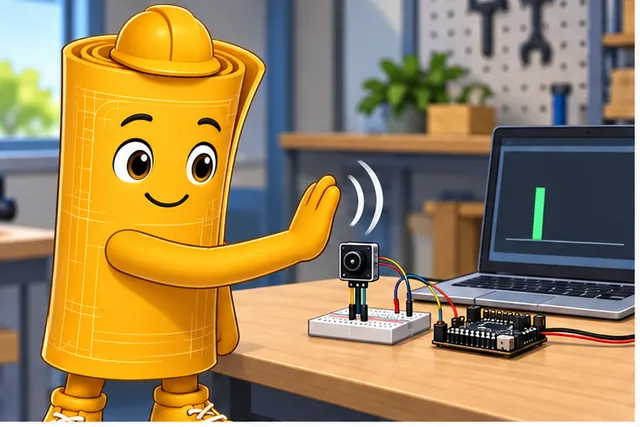
A door-counter demo counts one hand wave on the bench.
-
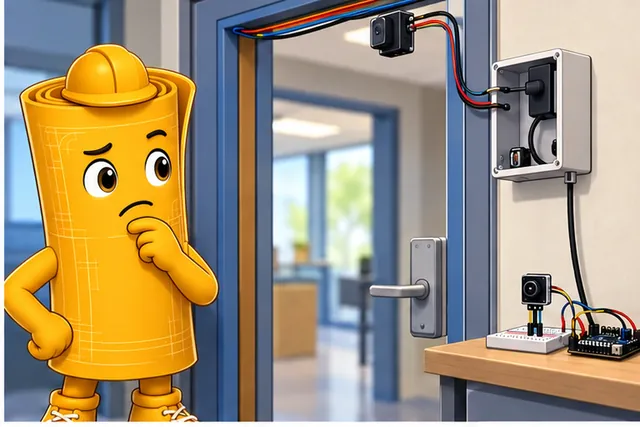
The doorway, power rail, case, and second unit may expose new failures.
-
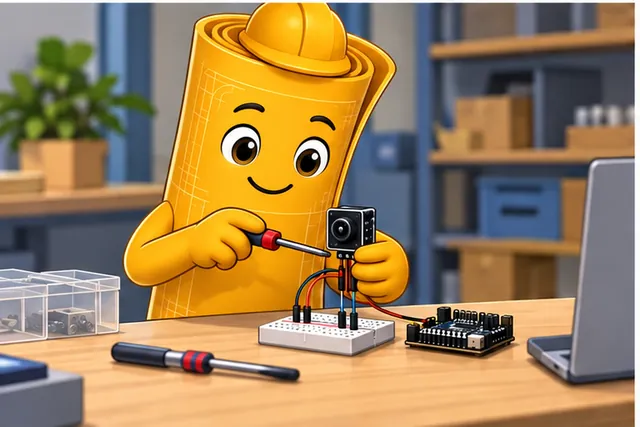
Build the cheapest form that answers the next physical question.
-
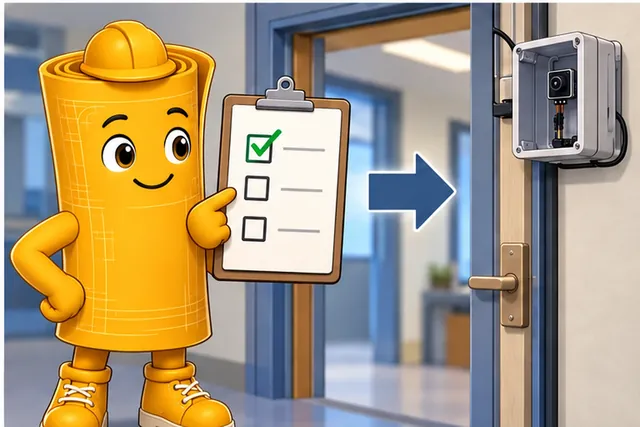
Move to a harder build only when the recorded decision is clear.
Use the stages in this chapter as a ladder. Start with the cheapest build that exposes the current uncertainty, record the evidence, then move to the next form only when the decision is clear.
4.2 Match Build to Question
This section: Match Build to Question — Hardware prototypes are useful when the build form matches the uncertainty.
Hardware prototypes are useful when the build form matches the uncertainty. A breadboard can prove sensor behavior and basic wiring; a module carrier can reduce loose-wire faults; a custom board can test layout, power, connectors, and enclosure fit.
Figure 4.1 compares build forms for one bench temperature alarm.
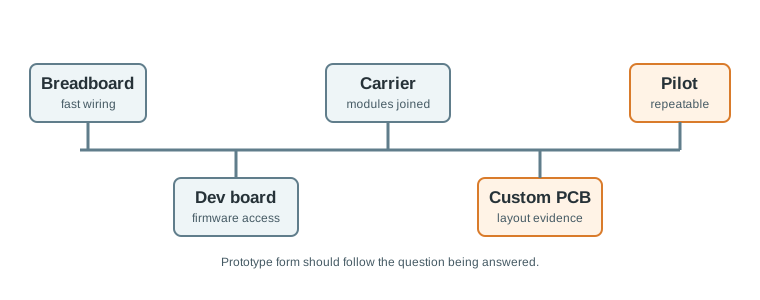
The breadboard, Pico development board, TMP36 sensor, resistor, and LED can answer a first question: does the ADC reading change as the sensor warms? Loose wiring is useful for that quick component check. A development-board build can then put the same parts in a repeatable firmware and interface test, while a more integrated board addresses assembly and connection questions. The labels identify different evidence jobs rather than a contest for the best board. Choose the form that exposes the current uncertainty and carry the measured result forward when the form changes.
The first design decision is therefore not “which board looks closest to the product?” It is “which build will expose the risk we still do not understand?”
- Use a quick build when the unknown is component behavior, pin wiring, or simple firmware interaction.
- Use a repeatable build when the unknown is integration, power integrity, cable strain, or unit-to-unit variation.
- Use a field build when the unknown is installation, maintenance access, environment, or user behavior.
Consider a farm soil sensor. A breadboard with an ESP32 DevKit and an analog probe can answer whether the ADC readings change enough to be useful. It cannot prove that a battery connector survives vibration, that a LoRaWAN uplink works from the field edge, or that an enclosure keeps water away from the probe cable. Those questions belong to later builds with different evidence: current measurements, radio logs, cable strain checks, seal inspection, and repeated installation steps. Treating all of those questions as one “prototype” usually creates a demo that looks complete but answers no decision cleanly.
The same pattern applies to a wearable beacon, door counter, or valve controller. A development board can prove firmware timing and sensor choice. A module carrier can reduce jumper-wire failures and let several people repeat the build. A custom PCB can reveal regulator behavior, antenna keep-out, connector placement, programming access, and enclosure fit. A pilot unit can test assembly instructions and support handoff. Hardware prototyping matters because each form removes one kind of uncertainty while exposing the next one. A good team names that next uncertainty before buying parts.
4.3 Write the Gate Before Building
This section: Write the Gate Before Building — Before assembling hardware, write the gate in one sentence: what this prototype must prove, how it will be measured, and which decision follows.
Before assembling hardware, write the gate in one sentence: what this prototype must prove, how it will be measured, and which decision follows. That sentence keeps the team from judging a proof-of-concept by pilot-build standards or accepting a pilot with proof-of-concept evidence.
Example: for a doorway occupancy node, a proof-of-concept gate might be “detect ten walking passes with no more than one duplicate count on the bench.” An engineering gate might be “detect the same traffic while mounted in the doorway enclosure, after power interruption, with service access still available.”
- Record the setup. Include parts, wiring, firmware version, mounting, supply, measurement tool, and operating mode.
- Record the misses. False triggers, resets, thermal drift, connector failures, and confusing setup steps are evidence, not noise.
- Record the next move. Proceed, revise, repeat measurement, or stop, with the next gate named explicitly.
A practical gate should name a measurement that can fail. “Build a smart locker prototype” is too broad. “Using an nRF52840 board, read the door sensor, advertise state over BLE every 2 seconds, and keep the sleep current below 100 microamps after the door closes” is a testable gate. It names hardware, behavior, timing, and a power threshold. The builder can choose a multimeter, Nordic Power Profiler Kit II, serial log, BLE scanner, and photo record that match the question. If the current is 600 microamps, the result is still useful because it points to firmware sleep state, pull-ups, sensor leakage, or regulator quiescent current.
Write the next gate before celebrating the current one. A proof-of-concept may justify a functional prototype with the intended sensor and communication path. A functional prototype may justify a custom board only after power, reset, programming, and connector assumptions are named. An engineering prototype may justify a pilot only after someone other than the original builder can power it, program it, recover it, and interpret its logs. This is how a prototype review stays connected to the next hardware decision instead of becoming a show-and-tell checkpoint.
4.4 Evidence Changes by Stage
This section: Evidence Changes by Stage — Each stage changes the dominant error sources.
Each stage changes the dominant error sources. Early prototypes are limited by missing context; later prototypes are limited by repeatability, packaging, support, and manufacturing variation.
- Electrical behavior: Breadboard capacitance, wire length, pull-up values, grounding, regulator response, and load transients can hide until the circuit is stressed.
- Physical behavior: Enclosures affect antennas, sensors, heat, button access, cable strain, and how maintainers reset or replace the unit.
- Operational behavior: A single lab unit does not test assembly notes, firmware programming, calibration, labeling, spare parts, or support handoff.
- Decision quality: A prototype without setup records cannot be reproduced, so later teams cannot tell whether a change improved the design or merely changed the conditions.
The deeper hardware skill is moving only the right assumptions forward and forcing the risky assumptions to meet stronger evidence before they reach a field pilot.
Breadboard evidence often hides parasitic effects and physical constraints. Long jumpers add capacitance and noise pickup. Split power rails create invisible open circuits. Weak grounds can look like firmware instability. Moving the same circuit to a compact board changes trace length, return paths, regulator thermal behavior, and connector strain. A custom PCB is therefore not just a neat breadboard; it is a new experiment about layout, power distribution, programming access, test points, and the way humans will assemble the device.
Enclosures and field installation add another layer. A plastic case can detune a BLE or LoRa antenna, trap heat near a regulator, block airflow around a temperature sensor, hide a reset button, or make USB recovery impossible. A cable gland can change strain relief and water ingress risk. A pilot build adds process variation: soldering differences, label mistakes, firmware version drift, calibration steps, spare-part substitutions, and support tickets. Under the hood, each stage asks whether the design still works after one more source of real-world variation is introduced.
4.5 Learning Objectives
This section: Learning Objectives
By the end of this chapter, you will be able to:
- Explain why hardware prototypes are evidence tools, not miniature finished products.
- Distinguish proof-of-concept, functional, engineering, and pilot-stage prototypes by the decisions they support.
- Choose a prototyping approach from the current uncertainty, not from habit or popularity.
- Identify common gaps between breadboard behavior, custom board behavior, enclosure behavior, and field behavior.
- Write a prototype review record that supports the next hardware decision.
4.6 What Hardware Prototyping Is For
This section: What Hardware Prototyping Is For — Hardware prototyping turns uncertain assumptions into observable behavior.
Hardware prototyping turns uncertain assumptions into observable behavior. A prototype is valuable when it answers a question that a diagram, simulation, or parts list cannot answer alone.
Figure 4.2 shows how a prototype turns an assumption into a decision.
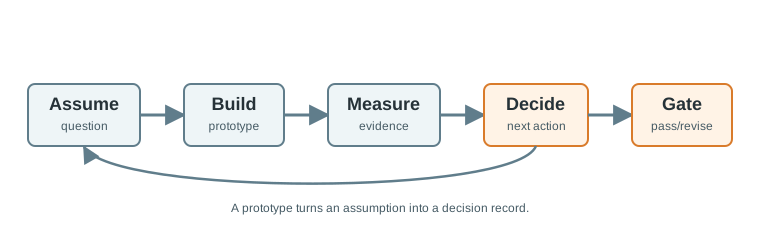
Start with a question the build can answer, such as whether a sensor reading changes under a controlled input. The prototype is the test setup, not the conclusion. Measure the response and keep the observation with the build and conditions so another person can repeat it. The decision gate then records whether the claim passed or needs revision. If the result fails, return to the assumption or build and test again; changing a part without recording the old result loses the reason for the change. This route matters because it makes an early bench experiment useful in later design review.
Useful prototypes usually answer questions such as:
A demo can prove that something worked once. A prototype review needs the setup, measurement, operating mode, failure notes, and next gate so the result can guide the next build.
4.7 How It Works: Stage a Hardware Prototype
This section: How It Works: Stage a Hardware Prototype — Stage gates help teams avoid asking a fragile early prototype to answer a late-stage question.
Stage gates help teams avoid asking a fragile early prototype to answer a late-stage question. Each stage increases realism and asks for stronger evidence.
Figure 4.3 places discovery, proof of concept, and later builds on a product timeline.
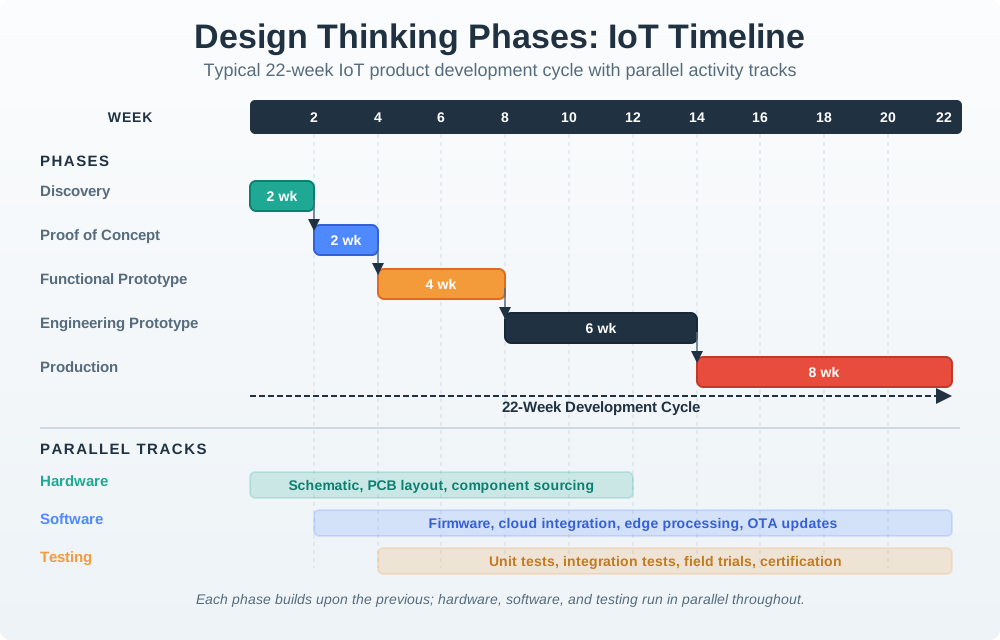
Discovery asks which need and physical constraints matter, while proof of concept checks whether a core function can work at all. A functional prototype adds the interacting parts; an engineering prototype tests the power, signal, packaging, and repeatability questions raised by integration. Testing overlaps those builds rather than waiting for a finished product. The production stage requires a more stable design and evidence that another unit can be made and checked. The week marks in the graphic are a planning example, so use the stages as review gates and adjust their duration to the project evidence.
4.7.1 Proof of Concept
The first build answers a narrow question about whether the core technical idea can work. Choose the smallest prototype form that exposes that uncertainty, using known-good parts where possible. Write the assumption, measurement, and decision gate before assembling the hardware so the result can be assessed against a specific question.
Record the parts, wiring, firmware version, supply, operating mode, and observations, including misses or failures. A successful demonstration supports the tested function under those conditions; packaging, field behavior, and assembly repeatability need stronger evidence from later stages. Stop when the core question is answered and use the result to decide whether to proceed, revise, repeat the measurement, or stop. If proceeding, name the next gate for integrating the intended subsystems.
4.7.2 Functional Prototype
The functional prototype connects the major subsystems and tests the user-visible behavior.
First, Integrate sensors, outputs, communication, power, and firmware. Next, Add diagnostics so failures are observable. Then, Test realistic operating sequences. After that, Record which requirements are stable and which remain uncertain.
4.7.3 Engineering Prototype
The engineering prototype is closer to the intended physical design. It tests layout, power distribution, connectors, firmware update path, service access, mechanical fit, and environmental effects.
First, Replace loose wiring with repeatable interconnects. Next, Measure rails, signal timing, thermal behavior, and resets under load. Then, Test enclosure and installation effects. After that, Record changes needed before any larger build.
4.7.4 Pilot Build
The pilot build tests repeatability, handoff, assembly notes, support records, and behavior across multiple units.
First, Build more than one unit. Next, Compare unit-to-unit behavior. Then, Track assembly errors and ambiguous instructions. After that, Decide whether to revise, continue testing, or freeze the design.
4.8 Choose the Right Prototype Form
This section: Choose the Right Prototype Form — Prototype form should match the question being asked.
Prototype form should match the question being asked. A breadboard is excellent for early circuit learning, but weak evidence for mechanical, power, radio, and field behavior. A custom board can answer layout questions, but it is a slower way to test a vague concept.
The choice is not permanent. A mature project often uses several forms at once: a breadboard for a new sensor experiment, a development board for firmware debugging, and a custom board for the main hardware path.
4.9 The Breadboard-to-Board Gap
This section: The Breadboard-to-Board Gap — Breadboards and jumper wires are useful because they are easy to change.
Breadboards and jumper wires are useful because they are easy to change. That same flexibility makes them weak evidence for long-term reliability, signal quality, power integrity, and mechanical behavior.
Figure 4.4 shows why a breadboard result must be tested again after packaging.
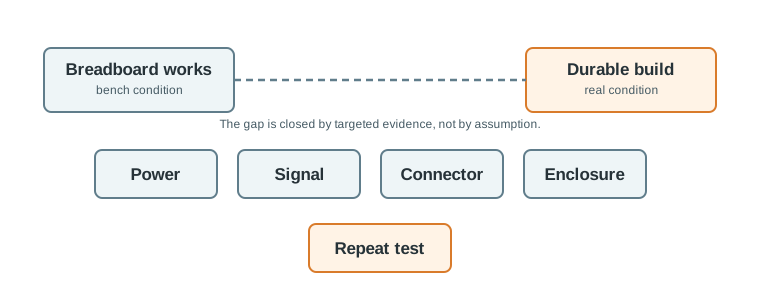
The comparison in Figure 4.4 shows why a breadboard pass must be repeated after packaging. On the bench, a supply and jumper wires can support a quick sensor check. A compact board and enclosure change the power, signal, mechanical, and service paths: rails now need a load test, timing and noise need checks, cables face strain, and recovery must work after access is restricted. The figure also marks the enclosure effect as a worked calculation, not a durability result. Keep the same claim but run it on the new build. A second unit using the same record tests whether the result is repeatable beyond one assembly.
Review these gaps before moving forward:
Move from breadboard to a more durable build when connection uncertainty starts hiding the real design question. The goal is not polish; the goal is better evidence.
4.10 Prototype Review Decisions
This section: Prototype Review Decisions — Figure 4.5 ties the passage sensor build to a decision and its remaining risk.
A hardware review should end with one of four decisions:
Figure 4.5 ties the passage sensor build to a decision and its remaining risk.
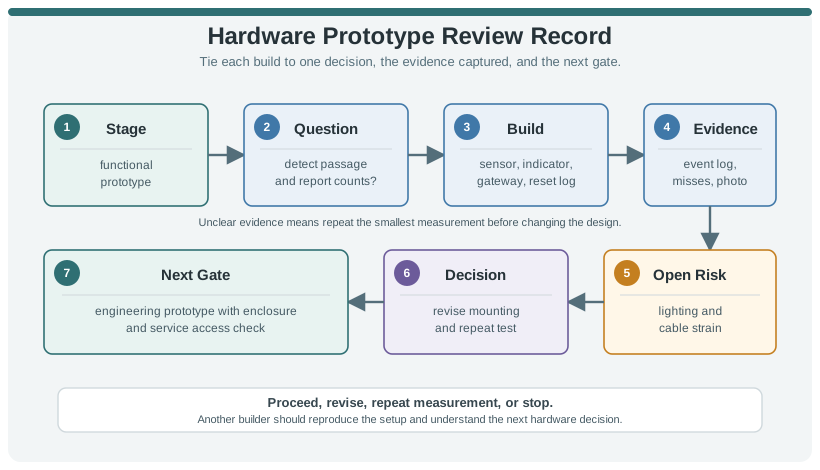
The question asks whether the prototype can detect passage and report counts. The build field names the sensor, indicator, gateway, and reset log so the evidence belongs to a specific setup. Event logs, misses, and a photo can test the count claim; lighting variation and cable strain remain open risks even if a bench run passes. The next gate adds a service-access check before the result becomes a durable design claim. This record separates a measured detection result from environmental and mechanical assumptions, so a reviewer knows what to repeat on the next build.
4.11 Incremental Examples
This section: Incremental Examples
4.11.1 Bench Temperature Alarm
A learner starts with a Raspberry Pi Pico, a TMP36 analog temperature sensor, a 10 kOhm resistor for a simple indicator circuit, and a breadboard LED. The prototype question is narrow: can the ADC reading change predictably when the sensor warms, and can firmware drive a visible alarm output when a threshold is crossed?
This proof-of-concept should record the Pico board revision, ADC pin, supply voltage, threshold value, sample interval, and the observed raw ADC range. It should not claim that the final device is calibrated, enclosed, manufacturable, or field-ready. The next gate is a functional prototype with the intended sensor package, wiring strain relief, and a repeatable measurement procedure.
4.11.2 Doorway Occupancy Prototype
A team wants a small doorway occupancy device for a shared lab. The first idea is simple: detect passage events, show local status, and report counts to a nearby gateway. The staged prototype path keeps the team from confusing an early demo with durable hardware.
4.11.3 Stage-Gate Path
4.11.4 Review Record
prototype=doorway-occupancy
stage=functional-prototype
question=can the device detect passage events and report counts repeatably?
build=sensor, indicator, gateway message, reset button, diagnostic serial log
evidence=event log, missed-event notes, reset test, mounting photo
risk=doorway lighting and cable strain not tested yet
decision=revise mounting method and repeat the doorway measurement
next_gate=engineering prototype with enclosure and service access check
4.11.5 Wearable BLE Beacon Prototype
Choose one operating sequence before measuring: advertise, drive the vibration motor, return to sleep, then recover through the programming connection. Keep current and radio observations aligned with that sequence. A reset during the motor pulse points to a different question from weak reception after the case is fitted, even if both appear as missing advertisements.
A team moves from an nRF52840 development kit to a wearable BLE beacon using an LIS3DH accelerometer, a LiPo cell, a charger IC, SWD programming pads, a vibration motor, and a small enclosure. The prototype question is no longer “can BLE advertising work?” It is whether the physical build can survive charging, firmware updates, antenna detuning, button access, battery brownout, and wearer motion.
The engineering prototype should measure advertising interval, connection current, sleep current, charge current, battery cutoff behavior, enclosure effect on RSSI, accelerometer interrupt behavior, vibration-motor load transients, and firmware recovery through the SWD header. A Nordic Power Profiler Kit II, BLE scanner log, firmware build hash, and assembly notes make the result repeatable enough to decide whether to revise the board, adjust the antenna keep-out, change the enclosure, or build a small pilot batch.
4.12 Try It Now: Write a Prototype Gate
This section: Try It Now: Write a Prototype Gate — Choose a hardware prototype you could build this week and fill in the gate before choosing parts.
Choose a hardware prototype you could build this week and fill in the gate before choosing parts.
| Field | Your answer |
|---|---|
| Prototype stage | Proof of concept, functional prototype, engineering prototype, or pilot build |
| Question | What uncertainty must this build answer? |
| Prototype form | Breadboard, development board, module carrier, custom board, or pilot unit |
| Measurement | What will be measured, logged, photographed, or compared? |
| Stop condition | What result would prevent moving to the next stage? |
| Next gate | What stronger evidence will be needed after this build? |
4.13 Choose the Honest Small Build
This section: Choose the Honest Small Build — For each situation, name the prototype form that can answer the question without overbuilding.
For each situation, name the prototype form that can answer the question without overbuilding.
First, You need to know whether an analog soil-moisture probe gives stable readings on a microcontroller ADC. Next, You need to know whether a custom PCB regulator survives Wi-Fi transmit current peaks. Then, You need to know whether four installers can assemble and mount the same enclosure from written notes. After that, You need to know whether a BLE antenna keep-out still works after the enclosure and battery are installed.
4.14 Concept Check: Stage-Gate Evidence
This section: Concept Check: Stage-Gate Evidence
4.15 Match Evidence to Prototype Stage
This section: Match Evidence to Prototype Stage
4.16 Order Hardware Prototype Review
This section: Order Hardware Prototype Review
4.17 Common Failure Patterns
This section: Common Failure Patterns
The team asks a proof-of-concept build to prove field behavior, manufacturing repeatability, or service workflow. Use each stage for the questions it can actually answer.
The prototype works in front of the team, but no one records the setup, measurements, failure cases, or operating mode. The result cannot guide the next build reliably.
A circuit works with loose wiring but changes behavior when moved to a compact board, enclosure, harness, or field mounting. Treat layout and packaging as separate evidence gates.
Only the original builder understands how to power, program, test, or recover the prototype. A later-stage prototype needs notes that another person can follow.
4.18 Summary
This section: Summary — Hardware prototyping is a disciplined sequence of evidence gates.
Hardware prototyping is a disciplined sequence of evidence gates. Start with the smallest build that answers the current question, then increase realism as the risks change. The best prototype record explains what was tested, what was learned, what remains uncertain, and what the next gate should be.
4.19 Key Takeaway
This section: Key Takeaway — Hardware prototyping connects requirements to physical evidence; every board should prove or disprove a specific assumption about the eventual device.
Hardware prototyping connects requirements to physical evidence; every board should prove or disprove a specific assumption about the eventual device.
4.20 See Also
This section: See Also — First, MCU vs MPU - choose the controller class that matches the prototype question.
First, MCU vs MPU - choose the controller class that matches the prototype question. Next, PCB Design - turn stage-gate evidence into layout and bring-up decisions. Then, Hardware Platforms - compare platform roles without treating platform choice as the whole design. After that, Hardware Components - select sensors, actuators, modules, and power parts from evidence.
Find help
3 reviewed answers.
Where should I start in a module?
Open the module page from the sidebar to see its chapters in order. Use the module map to return to a topic you need.
Modules and pathsReviewed
What can I try when a project does not work?
Check the symptom, then work through the diagnostic steps. Keep the error message and the smallest example that reproduces it.
When you are stuckReviewed
How do interactive examples work?
Use the interactive guide to check how examples and simulations work before changing your project.
Interactive examples guideReviewed