13 Hardware Build Discipline and Debugging
More
Depth: Practitioner
Progress saves as you read. Mark sections complete as you go; your progress appears in the sidebar.
13.1 Start With the Story
This section: Start With the Story — A motor prototype resets whenever the load starts.
A motor prototype resets whenever the load starts. The fastest-looking response is to edit firmware, but the disciplined story starts with power, wiring, and signals: reproduce the symptom, measure the rail, check the ground path, capture the control signal, and only then decide whether code is involved. Good hardware practice keeps the team from debugging from hope.
This chapter frames best practice as evidence discipline. Build in small steps, expose test points, record measurements, and leave a trail that explains why the next revision is safer than the last one.
13.2 Debugging Discipline Starts Early
This section: Debugging Discipline Starts Early — Hardware best practice is not extra paperwork.
Hardware best practice is not extra paperwork. It is the habit of keeping each prototype change narrow enough that a failure can be traced to power, wiring, firmware, sensor behavior, load behavior, enclosure placement, or environment instead of becoming a mystery.
The pump-start calculation in Figure 13.1 gives the debug loop a measurable fault.
The pump example in Figure 13.1 makes the failing mode measurable. A startup surge through the shared path is shown dropping the regulator input below its required level, which can explain an ESP32 reset. A separate supply path is only a candidate fix. The next panel keeps firmware and supply settings the same, repeats pump startup, and asks for scope captures of both rails and the reset pin, plus the brownout log. The record holds wiring revision, firmware commit, and capture together. An idle pass cannot clear the next risk because the fault appeared during startup. Change one path, measure that mode, then decide whether the fix held.
For IoT prototypes, the risky moments are often transitions: boot, radio transmit, sensor warmup, actuator start, sleep entry, wake source, OTA reboot, enclosure close, and cable strain. A bench pass at idle does not prove those transitions are safe.
- Build small so a new symptom has a short list of possible causes.
- Measure in mode so boot, transmit, load, sleep, and reset behavior are not inferred from idle readings.
- Keep access so rails, reset, clocks, buses, programming headers, and debug logs remain inspectable after the build is enclosed.
For a small environmental node, this means the first useful build is not “sensor, radio, battery, enclosure, dashboard, and pump all at once.” It might start with an ESP32-C3 or Raspberry Pi Pico W powered from a current-limited bench supply, one SHT31 or BME280 sensor, serial logging, and a written pin map. That build should prove the rail voltage, the I2C address, one believable reading, and the firmware identity. The next build might add the enclosure cable length and record whether the reading changes because of placement or heat. The next one might add Wi-Fi or LoRaWAN transmit and measure current during association or uplink. Each step leaves evidence that can be reused when a later symptom appears.
The same habit matters for actuators. A relay, MOSFET, motor driver, pump, valve, heater, or LED strip should be tested as a load path before it is treated as a firmware feature. A motor that starts cleanly from a bench supply but resets the controller when switched by the prototype has already given a useful clue: the fault may be supply sag, ground return, inrush current, missing flyback protection, or reset sensitivity. Hardware discipline turns that clue into a measurement plan instead of a rewrite.
13.3 Bring Up Power Before Features
This section: Bring Up Power Before Features — Start a board or wiring build with power and identity, then move outward.
Start a board or wiring build with power and identity, then move outward. A current-limited bench supply, digital multimeter, oscilloscope, logic analyzer, and serial console can answer most first-order questions before application firmware is blamed.
- Power: measure input, fuse or protection drop, buck or LDO output, ripple, inrush current, sleep current, brownout threshold, and reset pin behavior.
- Signals: inspect I2C pull-ups, SPI clock polarity, UART baud, interrupt polarity, PWM duty, ADC reference, and actuator-driver enable lines.
- Firmware identity: record build hash, target board, bootloader version, flash method, serial port settings, and smoke-test command.
- One fix at a time: change one harness, pull-up, firmware branch, supply setting, enclosure route, or component value before repeating the failing mode.
A practical bring-up log should start before code changes. Write down the supply current limit, the board or wiring revision, loaded parts, expected rails, firmware commit, and stop condition. On a new board, inspect rail-to-ground resistance before first power, then apply power with a limit low enough to reveal a short without burning a trace or regulator. If the 3.3 V rail is correct, record the idle current and reset state before attaching sensors, radios, storage, displays, or loads. If the rail is wrong, stop and isolate the power section instead of loading the full application.
For buses and timing, use the tool that can see the failure. A multimeter can prove a missing rail, but it cannot show I2C clock stretching, SPI mode errors, UART baud mismatch, PWM edge timing, or reset pulses. A Saleae Logic or similar logic analyzer can show an I2C address NACK, a stuck bus, or a chip-select conflict. An oscilloscope can show a relay coil transient, buck-regulator ripple, or brownout dip during a radio burst. A Joulescope, Otii Arc, Nordic Power Profiler Kit II, or shunt plus scope can show why sleep current is higher than expected. The practitioner rule is simple: choose the measurement that observes the failing mode, then change only one thing.
13.4 Test Points Are Design Features
This section: Test Points Are Design Features — A prototype is easier to trust when debug access is designed in.
A prototype is easier to trust when debug access is designed in. Test pads, headers, current-measurement jumpers, labeled connectors, accessible reset and boot pins, and known-good firmware images keep diagnosis possible after the first exciting demo.
- Instrumentation: use Saleae-style logic analyzers, oscilloscopes, differential probes, shunt resistors, Joulescope, Otii Arc, or Nordic Power Profiler Kit II when power or timing margins matter.
- Debug paths: preserve UART logs, SWD/JTAG, boot-mode straps, reset control, firmware rollback image, and hardware watchdog visibility.
- Revision linkage: tie schematic revision, PCB revision, BOM line, harness photo, firmware commit, measurement file, and known issue to the same build identifier.
- Failure modes: test connector reversal, low battery, radio burst, actuator stall, ESD-prone handling, clock drift, enclosure close, thermal rise, and field cable movement before pilot handoff.
Good hardware notes let someone else repeat the setup, see the same symptom, and understand why the next revision is justified.
Test access is often the difference between a one-hour diagnosis and a week of guesses. A rail test pad near the load can show whether the voltage drop happens at the regulator, the connector, or the actuator. A current-measurement jumper can separate microcontroller sleep current from sensor leakage or a radio module that never entered low-power mode. A UART header can show bootloader output and reset reasons when the dashboard simply says the device is offline. A SWD or JTAG header can recover firmware when OTA testing leaves a device in a bad slot. These are not conveniences; they are design features that preserve the evidence path.
Under the hood, hardware evidence also needs identity control. If a field node uses an nRF52 board, SX1276 radio, LiPo charger, fuel gauge, and custom harness, the test record should tie the schematic revision, board revision, BOM, assembly photo, firmware hash, bootloader version, radio settings, antenna position, enclosure state, battery voltage, reset cause, and packet log together. Without that linkage, a successful test may not be reproducible and a failed test may not be diagnosable. The next revision should be justified by a measured behavior: moved test point, changed pull-up, added bulk capacitance, corrected connector polarity, changed regulator, added ESD protection, or revised firmware recovery path.
13.5 Learning Objectives
This section: Learning Objectives
By the end of this chapter, you should be able to:
- Apply modular hardware build habits that keep prototype behavior reviewable.
- Create useful documentation for wiring, parts, firmware, tests, and measurements.
- Add test access before a prototype becomes hard to inspect.
- Use a systematic debugging ladder instead of changing many variables at once.
- Run board bring-up checks that separate power, boot, bus, firmware, and load faults.
- Write revision notes that explain what changed, why it changed, and how it was verified.
13.6 Bring Up Hardware in Steps
This section: Bring Up Hardware in Steps — Best practices are useful only when they create evidence.
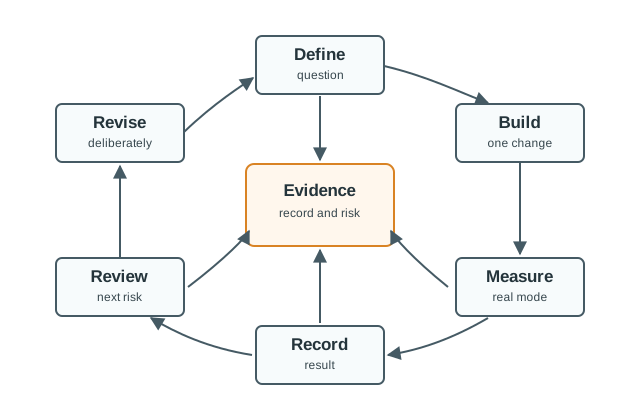
Best practices are useful only when they create evidence. The loop is simple: define the question, build a small change, measure it, record the result, review the next risk, and revise deliberately.
13.7 Build Discipline
This section: Build Discipline — Hardware debugging becomes difficult when several things change at once.
Hardware debugging becomes difficult when several things change at once. Keep each prototype revision narrow enough that a failure has a likely cause.
13.8 Documentation That Helps Debugging
This section: Documentation That Helps Debugging — Documentation should answer practical questions during a failure: what is connected, what version is running, what changed, what should the signal look like, and how do we reproduce the symptom?
Documentation should answer practical questions during a failure: what is connected, what version is running, what changed, what should the signal look like, and how do we reproduce the symptom?
Figure 13.2 ties measurements and open risks to one identified prototype build.
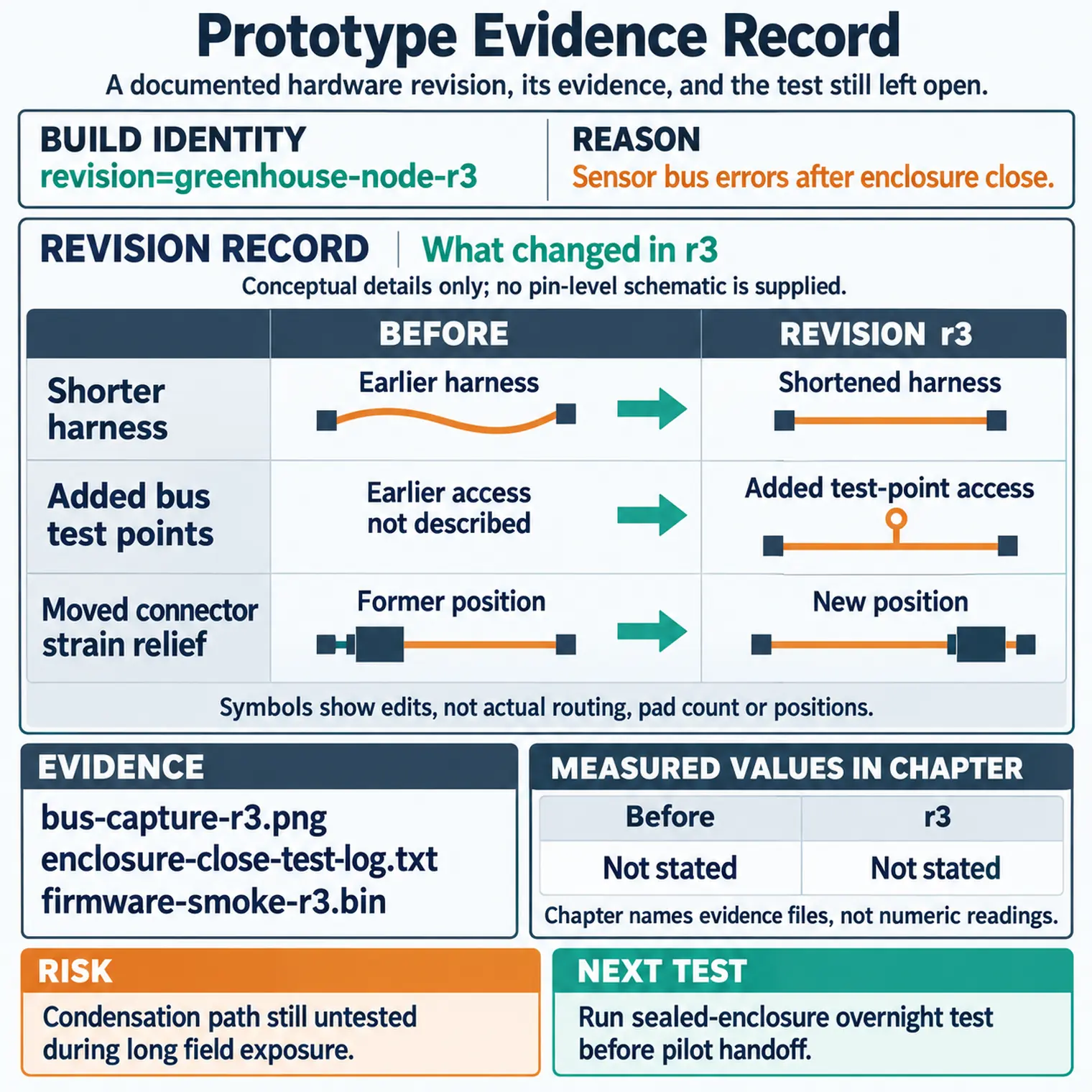
The build identity links a particular schematic, wiring map, firmware revision, and set of measurements. Without that link, a rail capture or issue note could belong to an earlier assembly. The revision record then shows what changed and why, while the risks and next test keep unresolved behavior visible. A reviewer can check whether the result applies to this exact build and repeat the test after a connector, power path, or firmware change. The record is useful because it joins a decision to evidence and a revision, not because it merely lists parts.
Minimum useful records:
- Requirements snapshot and test purpose.
- Controller, sensor, actuator, power, connector, and enclosure assumptions.
- Pin map, bus addresses, wire colors, connector orientation, and debug pins.
- Firmware commit, build target, configuration file, and flash method.
- Power and signal measurements for important operating modes.
- Known issues, rejected causes, open risks, and next test.
13.9 Design For Testability
This section: Design For Testability — Testability means a future reviewer can inspect the device without tearing it apart or guessing where to probe.
Testability means a future reviewer can inspect the device without tearing it apart or guessing where to probe. Add access while the design is still flexible.
13.10 Power And Signal Checks
This section: Power And Signal Checks — Power and signal checks should be part of normal build rhythm, not emergency work after the prototype fails.
Power and signal checks should be part of normal build rhythm, not emergency work after the prototype fails.
Figure 13.3 separates the worked pump voltage drop from the traces still needed on the bench.
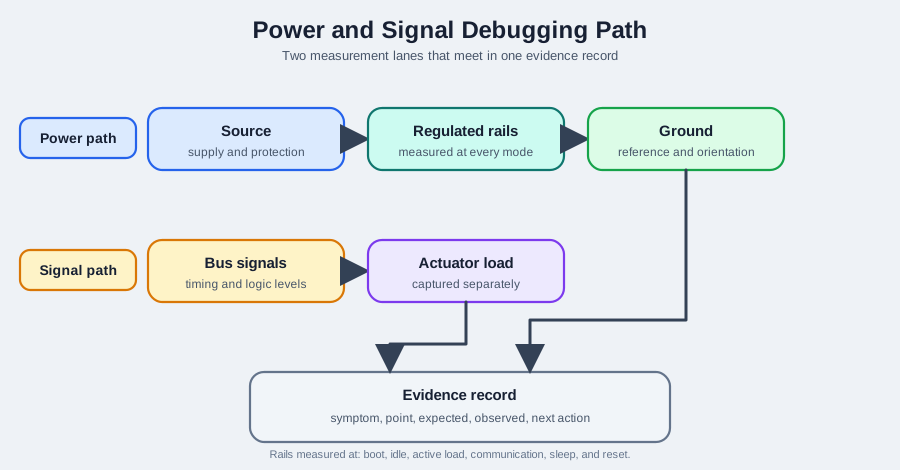
The source starts at 5.00 V, but the example assigns a 1.50 A surge to a 2.00 Ω shared path. That gives a 3.00 V drop and only 2.00 V at the regulator input, below the shown 3.60 V requirement. Ground and return wiring are part of that path, so a source reading alone cannot clear the supply. The signal side still needs captures during the reset to show what the controller commanded and what the load did. Keep the worked arithmetic distinct from a measured trace, then use the rail and reset captures to decide whether the power path needs revision.
Recommended checks:
- Verify the source and protection path before connecting sensitive boards.
- Measure regulated rails at boot, idle, active load, communication, sleep, and reset.
- Check ground reference and connector orientation before probing signals.
- Capture bus timing and logic levels when communication fails.
- Capture actuator load behavior separately from sensor sampling.
- Record the symptom, measurement point, expected value, observed value, and next action.
If a rail, bus, or reset line has not been measured during the failing mode, treat it as unknown. Many hardware faults look like firmware faults until the power or signal evidence is captured.
13.11 Bring-Up Checklist
This section: Bring-Up Checklist — Board bring-up should proceed from low-risk checks to active firmware behavior.
Board bring-up should proceed from low-risk checks to active firmware behavior. Do not load the full application before basic electrical checks pass.
Inspect Figure 13.4 and ask what evidence must close one bring-up stage before riskier behavior begins.
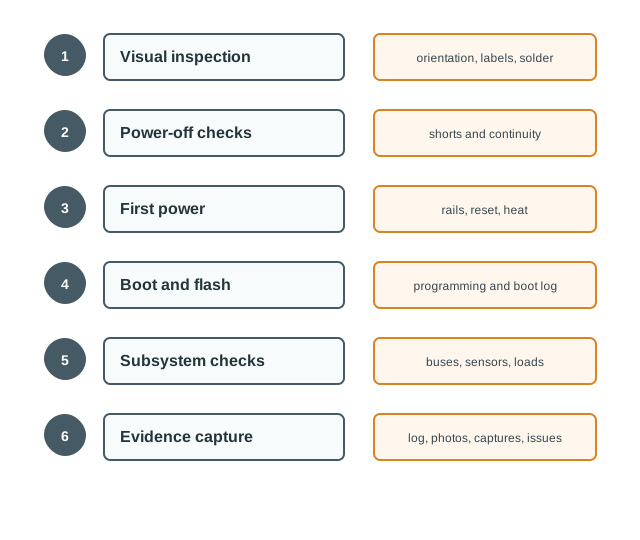
Follow Figure 13.4 from visual inspection and power-off checks into current-limited first power. Wrong rails stop the process at the power section instead of loading the application. Only then do boot access, firmware identity, buses, sensors, storage, communications, and actuators enter one group at a time. The final evidence stage saves measurements, logs, photographs, captures, pass or fail decisions, and known issues. That ordering confines faults and makes the next retest start from the last proven boundary.
13.12 Debugging Ladder
This section: Debugging Ladder — Use a debugging ladder to avoid jumping from symptom to guess.
Use a debugging ladder to avoid jumping from symptom to guess. Each step should produce evidence that narrows the fault.
Figure 13.5 orders the observations that can narrow a hardware fault.
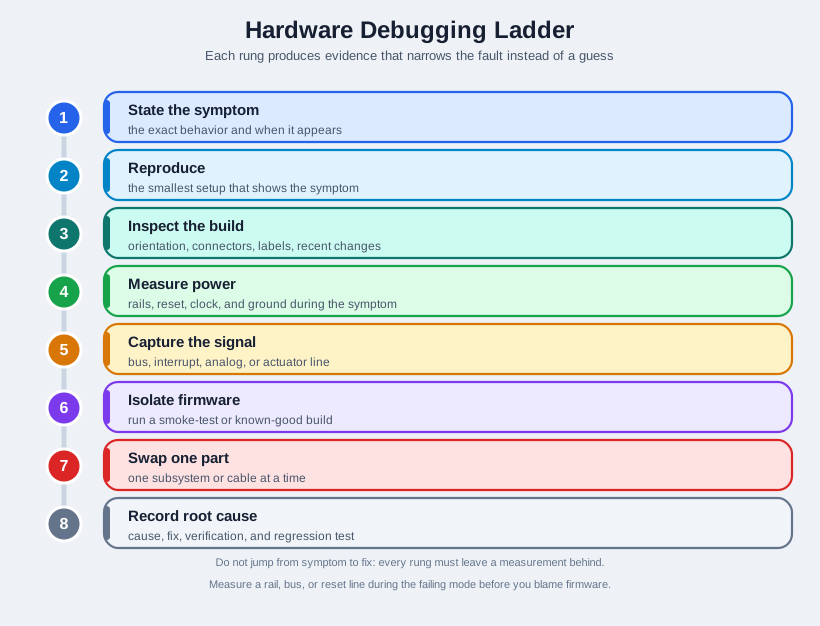
Start by stating the exact symptom and the mode in which it appears, then reproduce it with the smallest useful setup. Inspect orientation, connectors, and recent changes before measuring rails, reset, clock, and ground while the symptom occurs. A bus or actuator capture can show a failure that a static voltage reading misses. A known-good firmware build helps separate hardware from code; change only one part or subsystem before repeating the same check. Record the root cause with the evidence that supports it. Each rung has a distinct job, so skipping capture can turn a plausible fix into an untested guess.
- State the exact symptom and when it appears.
- Reproduce the symptom with the smallest setup.
- Inspect the physical build, connector orientation, labels, and recent changes.
- Measure power rails, reset, clock, and ground reference during the symptom.
- Capture the relevant bus, interrupt, analog, or actuator signal.
- Isolate firmware by running a smoke-test build or known-good artifact.
- Swap only one subsystem or cable at a time.
- Record root cause, fix, verification, and regression test.
13.13 Incremental Examples
This section: Incremental Examples
13.13.1 Beginner Example: I2C Sensor Bring-Up
A learner connects a BME280 temperature, pressure, and humidity sensor to an ESP32 development board. The best-practice question is narrow: does the sensor respond at the expected I2C address, and do the readings change in a plausible direction when the board is warmed by hand?
The useful record is small but specific: ESP32 board model, firmware commit, i2cdetect or serial scan output, SDA/SCL pins, pull-up value if external pull-ups are used, supply voltage, library version, and one short reading log. If the sensor does not answer, the first checks are power, ground, address, bus pull-ups, connector orientation, and logic level before changing application code.
13.13.2 Motor Reset Under Load
A prototype uses a 5 V relay module to switch a small pump while an ESP32 reads a flow sensor. The symptom is a reset whenever the pump starts. A disciplined debug pass does not replace all wiring or rewrite firmware first.
Measure the 5 V and 3.3 V rails during pump startup with an oscilloscope or fast logging meter, capture the reset pin, and compare behavior with the pump disconnected, relay coil active, and pump load connected. Record the power source current limit, ground path, relay module part, flyback path, wire length, brownout log, and boot reason. Only then choose a fix such as a separate supply path, improved grounding, snubber, flyback diode, bulk capacitance, or firmware brownout handling.
13.13.3 Battery Gateway Limits
A field gateway combines an STM32 or nRF52 controller, an SX1276 LoRa radio module, a LiPo cell, charger IC, fuel-gauge IC, external antenna, and sealed enclosure. The advanced question is whether the prototype survives the transitions that a bench demo often hides: boot, radio burst, deep sleep, wake interrupt, charge state, enclosure close, antenna placement, and firmware recovery.
Use a Nordic Power Profiler Kit II, Otii Arc, Joulescope, oscilloscope, or shunt-resistor setup to measure sleep current, transmit current, startup inrush, brownout threshold, charger behavior, and wake latency. Record firmware build hash, bootloader version, radio settings, spreading factor, transmit power, antenna position, enclosure state, battery voltage, temperature, reset cause, and packet log. The decision should identify one next hardware change or one next measurement, not a bundle of untraceable changes.
13.14 Revision Control
This section: Revision Control — Hardware revisions need the same discipline as firmware revisions.
Hardware revisions need the same discipline as firmware revisions. Keep schematic, layout, wiring, enclosure, parts list, firmware, and test records tied together.
Revision: board or build identifier.
Reason: symptom, requirement, or risk being addressed.
Change: schematic, layout, part, wiring, enclosure, or firmware change.
Evidence: measurement, test, capture, photo, and firmware artifact.
Risk: what remains uncertain and what would trigger another revision.
Example:
revision=greenhouse-node-r3
reason=sensor bus errors after enclosure close
change=shorter harness, added bus test points, moved connector strain relief
evidence=bus-capture-r3.png, enclosure-close-test-log.txt, firmware-smoke-r3.bin
risk=condensation path still untested during long field exposure
next=run sealed-enclosure overnight test before pilot handoff
13.15 Handoff Evidence
This section: Handoff Evidence — Before a prototype leaves the bench, another person should be able to assemble, flash, test, and diagnose it from the record.
Before a prototype leaves the bench, another person should be able to assemble, flash, test, and diagnose it from the record.
13.16 Try It Now: Write a Bring-Up Check
This section: Try It Now: Write a Bring-Up Check — Pick one prototype subsystem and write the first bring-up check before changing hardware.
Pick one prototype subsystem and write the first bring-up check before changing hardware.
| Field | Your answer |
|---|---|
| Subsystem | Power input, regulated rail, I2C bus, SPI display, UART modem, actuator driver, battery charger, or radio |
| Operating mode | Boot, idle, sampling, transmit, load start, sleep, wake, reset, or enclosure closed |
| Measurement point | Pin, connector, rail, test pad, log message, bus line, or current path |
| Expected behavior | Voltage, current, timing, address, reset state, packet, or log output |
| Failure clue | What result would narrow the fault? |
| One next change | The single change allowed after measurement |
13.17 Choose the First Instrument
This section: Choose the First Instrument — For each symptom, choose the first instrument or record to use.
For each symptom, choose the first instrument or record to use.
First, An ESP32 resets when a relay switches a pump. Next, A BME280 sensor returns no readings on an I2C bus. Then, A battery prototype drains overnight in sleep mode. After that, A LoRa gateway loses packets only after the enclosure is closed.
13.18 Concept Check: Debug a Motor Reset
This section: Concept Check: Debug a Motor Reset
13.19 Match Practice to Evidence
This section: Match Practice to Evidence
13.20 Order the Debugging Workflow
This section: Order the Debugging Workflow
13.21 Common Failure Patterns
This section: Common Failure Patterns
13.22 Summary
This section: Summary — Hardware best practices reduce debugging uncertainty.
Hardware best practices reduce debugging uncertainty. Keep builds modular, document wiring and firmware together, preserve test access, measure power and signals during real operating modes, use bring-up and debugging ladders, and tie every revision to evidence. The goal is not bureaucracy; it is making prototype behavior reviewable and repeatable.
13.23 Key Takeaway
This section: Key Takeaway — Prototype discipline means documenting assumptions, measuring real interfaces, keeping debug access, and retiring fragile bench shortcuts before field or layout work.
Prototype discipline means documenting assumptions, measuring real interfaces, keeping debug access, and retiring fragile bench shortcuts before field or layout work.
13.24 See Also
This section: See Also — First, Hardware Case Studies and Worked Examples applies these practices to realistic prototype decisions.
First, Hardware Case Studies and Worked Examples applies these practices to realistic prototype decisions. Next, Hardware Components reviews sensors, actuators, communication parts, power parts, and connectors. Then, PCB Design and Fabrication covers layout readiness and board revision flow. After that, IoT Hardware Prototyping gives the broader hardware prototype route and stage gates.
Find help
3 reviewed answers.
Where should I start in a module?
Open the module page from the sidebar to see its chapters in order. Use the module map to return to a topic you need.
Modules and pathsReviewed
What can I try when a project does not work?
Check the symptom, then work through the diagnostic steps. Keep the error message and the smallest example that reproduces it.
When you are stuckReviewed
How do interactive examples work?
Use the interactive guide to check how examples and simulations work before changing your project.
Interactive examples guideReviewed