24 Choosing a Prototyping Kit
More
Depth: Practitioner
Progress saves as you read. Mark sections complete as you go; your progress appears in the sidebar.
24.1 Start With the Story
This section: Start With the Story — Choosing a kit is easy when the team asks which box has the most features.
Choosing a kit is easy when the team asks which box has the most features. It is harder and more useful to ask which box will retire the next risk with the least new lock-in. A good kit selection story names the evidence gap, hard constraints, support burden, data ownership, update path, and exit cost before the purchase feels obvious.
Choose the prototype kit by the next uncertainty it must expose.
-
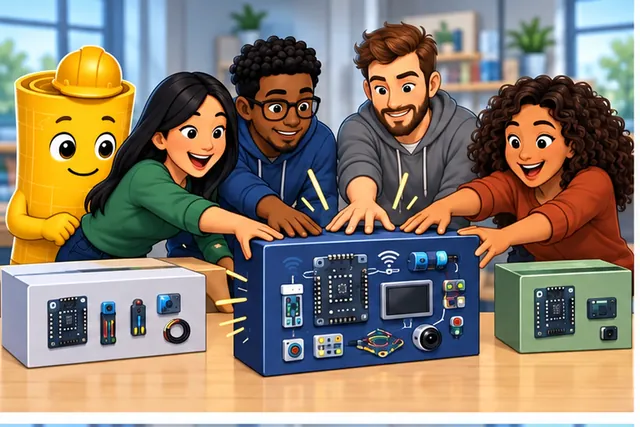
A team reaches for the kit with the most features.
-
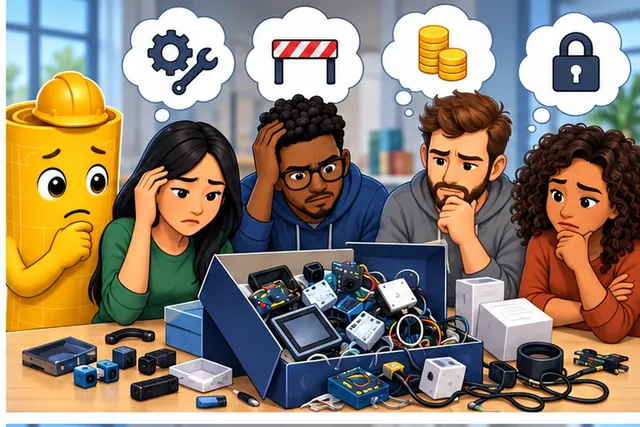
That box may add support work, hidden limits, or costly lock-in.
-
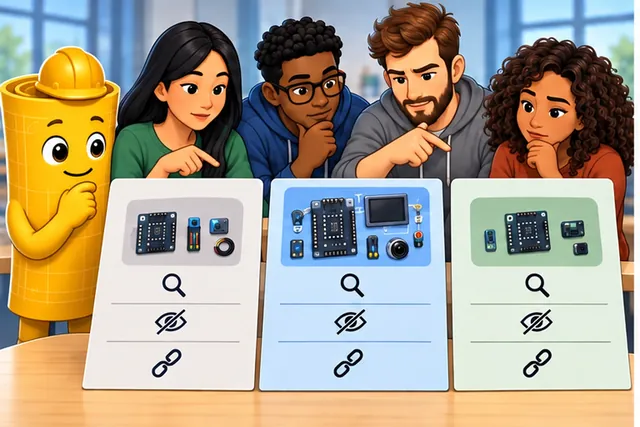
Compare what each kit proves, hides, and forces the team to keep.
-

Choose the kit that removes the next risk with the least new lock-in.
This chapter turns kit selection into a decision record. Compare candidates by what they prove, what they hide, and what would force the team to move from a kit to custom hardware, maintained firmware, or another platform.
24.2 Kit Selection Removes Risk
This section: Kit Selection Removes Risk — A kit is the right choice only if it exposes the next uncertainty better than the alternatives.
A kit is the right choice only if it exposes the next uncertainty better than the alternatives. The decision should start with a sentence about the behavior, context, and next design form, then reject kits that cannot exercise that question under representative conditions.
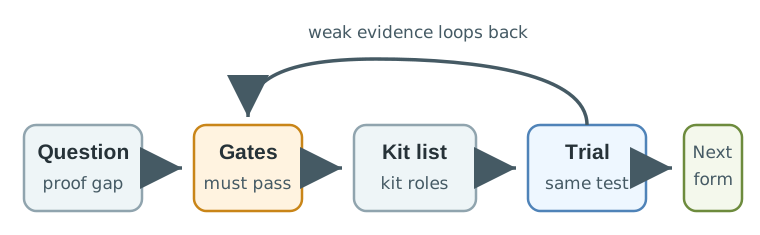
In Figure 24.1, The useful comparison is not Arduino versus Raspberry Pi versus ESP32 versus a vendor kit. The useful comparison is whether the candidate can show the measurement, message path, power state, physical fit, update route, and service behavior the next decision needs.
- Gate first: remove kits that cannot support the sensor range, timing, environment, safety boundary, radio path, debug access, or team toolchain.
- Score second: compare only candidates that can run the same evidence script with visible logs, raw readings, version notes, and failure states.
- Handoff always: mark the board, enclosure, library, gateway, cloud account, connector, and supply assumptions that cannot silently become product requirements.
The selection record should be written before the team falls in love with a board. If the question is a cold-room monitor, the evidence script might require DS18B20 or RTD readings, a door-event input, timestamped stale-data status, gateway restart recovery, and a staff-facing warning state. A kit that shows a pretty dashboard but hides retry logs is weaker than a plainer kit that exposes raw readings, firmware version, configuration, and recovery states.
Selection also has a time horizon. A kit can be perfect for proving a measurement path and still be wrong for an enclosure, pilot, or product. The goal is not to select the final hardware in one pass; it is to reduce the next uncertainty while leaving a clean boundary for what must be retested when power, enclosure, gateway, firmware, or service workflow changes.
24.3 Make the Shortlist Concrete
This section: Make the Shortlist Concrete — A disciplined shortlist names the kit role and the missing check.
A disciplined shortlist names the kit role and the missing check. An ESP32 DevKit, Raspberry Pi Pico W, Arduino MKR Wi-Fi 1010, Arduino MKR WAN 1310, STM32 Nucleo, Nordic nRF52840 DK, Adafruit Feather, Particle Boron, RAKwireless WisBlock, Raspberry Pi Compute Module carrier, Phidgets USB I/O kit, or industrial gateway can all be correct in different contexts. The answer depends on whether the prototype needs GPIO timing, low-power BLE, Wi-Fi provisioning, LoRaWAN join behavior, LTE-M/NB-IoT coverage, desktop USB sensing and control, Linux services, RS-485 Modbus, Ethernet, secure update, or enclosure fit.
- Measurement gate: name the real sensor path, such as BME280, SHT31, DS18B20, MAX31865 RTD, ADS1115 ADC, INA219 current monitor, HX711 load cell interface, IMU, reed switch, or optical interrupt.
- Communication gate: test the actual path: BLE GATT, Wi-Fi MQTT, HTTPS, LoRaWAN, LTE-M, NB-IoT, Thread, Matter, Ethernet, RS-485 Modbus, CAN, or gateway buffering.
- Observability gate: require serial logs, SWD/JTAG or J-Link access where relevant, timestamped samples, firmware version, configuration export, local status, and a way to reproduce failure cases.
- Toolchain gate: check whether Arduino IDE, PlatformIO, ESP-IDF, Zephyr, CircuitPython, MicroPython, vendor SDKs, AWS IoT, Azure IoT, or a managed dashboard is helping the test or hiding a dependency.
Use one evidence script across the shortlist. For example, run the same sensor sampling interval, radio outage, restart, firmware update, and operator review task on each candidate. Record setup time, wiring changes, firmware commits, package versions, credentials used, radio metrics, current draw, raw readings, warning labels, and what a reviewer had to infer. If a kit needs a shield, FeatherWing, Grove module, Qwiic cable, USB host computer, vendor API, vendor gateway, SIM plan, or cloud account, list it as part of the kit path instead of treating it as invisible setup.
A USB-attached kit such as Phidgets is strongest when the prototype question is host-controlled sensing or actuation: can a desktop application read linear touch, pH, force, pressure, light, current, voltage, sonar, or IR-distance inputs and drive outputs such as servos, steppers, DC motors, or displays through a supported API on the target operating system? That evidence is real, but it should be recorded as a host-plus-USB kit path; it does not by itself prove a battery endpoint, embedded firmware port, field connector, or custom-board transition.
Keep the scoring language humble. Mark a candidate strong only when it directly proves the evidence need under the selected constraint. Mark it usable when extra fixtures or instrumentation are needed, weak when it demonstrates a related idea but hides the hard part, and reject when it fails a hard gate. The notes matter more than the number.
24.4 Early Convenience Costs Later
This section: Early Convenience Costs Later — Kit convenience is valuable when it reduces uncertainty quickly.
Kit convenience is valuable when it reduces uncertainty quickly. It becomes risk when tutorial firmware, breadboard wiring, USB power, default credentials, vendor dashboards, auto-generated cloud topics, or board-specific libraries become hidden architecture decisions.
- Electrical migration: check voltage domains, regulator headroom, sleep current, level shifting, connector keying, ESD paths, antenna placement, and test points before assuming the kit can become a carrier board.
- Firmware migration: separate application logic from board support package calls, sample credentials, blocking demo loops, cloud client code, and library-specific message schemas.
- Operations migration: verify provisioning, secure boot, signed OTA update, credential rotation, rollback, local logs, replacement flow, and support diagnostics before a pilot.
- Supply migration: name kit-only cables, shields, modules, sensor boards, enclosures, accounts, and parts with unstable availability before the next form depends on them.
The hidden cost often appears at the interface between kit software and product responsibilities. A vendor SDK may publish MQTT topics with a schema the team never designed; a tutorial may store credentials in source; a cloud dashboard may make retry, buffering, or duplicate-message behavior invisible; a breakout board may rely on pull-ups, level shifting, or regulator margin that disappears on a custom PCB. Those are not reasons to reject every convenient kit, but they are reasons to write a boundary before the evidence is reused.
There is also a data-contract cost. The kit should leave raw samples, timestamps, configuration, calibration notes, status labels, failure events, firmware identifiers, and test conditions in a form another reviewer can inspect. If the next form changes board support packages, antenna placement, enclosure material, provisioning flow, or cloud integration, the evidence script should say which parts of the kit result remain valid and which checks must repeat.
The selection record should let a reviewer repeat the comparison, challenge the rejected options, and see exactly which checks must repeat after the kit is replaced.
This section:

This section:
24.5 Learning Objectives
This section: Learning Objectives
By the end of this chapter, you will be able to:
- State the evidence gap a prototyping kit must close before comparing products.
- Separate hard selection gates from weighted tradeoffs.
- Build a kit scorecard that rewards testability, visibility, portability, and handoff readiness.
- Identify ecosystem dependencies that can become transition risks.
- Write a review record that preserves selected options, rejected options, assumptions, and change conditions.
24.6 Start With the Evidence Gap
This section: Start With the Evidence Gap — Kit selection is not a shopping exercise.
Kit selection is not a shopping exercise. A kit is useful when it helps a team learn something that affects the next design decision. The same kit can be a strong choice for a first evidence loop and a weak choice for production transition, so the review must name the current question.
Start by writing one sentence:
The kit must help us prove whether [prototype behavior] works under [representative constraint] before we choose [next design form].Then classify the evidence need:
The kit with the longest list of sensors, libraries, or cloud features is not automatically the best fit. Choose the kit that exposes the current uncertainty with the least extra complexity.
24.7 Selection Gates
This section: Selection Gates — Use hard gates before scoring tradeoffs.
Use hard gates before scoring tradeoffs. A kit that fails a hard gate should not remain in the shortlist, even if it is inexpensive, familiar, or popular.
Figure 24.2 turns each hard gate into a question, a pass artifact, and a fail action. Begin with Evidence fit: if the kit cannot expose the next decision’s observable, the rest of its feature list is irrelevant.
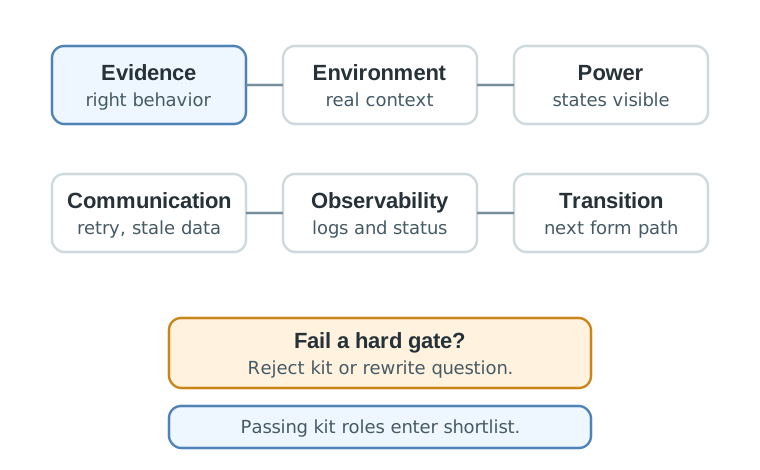
Read Figure 24.2 in number order. Communication requires loss and recovery traces, Observability requires states and error identity, and Transition requires owners, known gaps, and a retest plan. Any failure rejects the option or rewrites the experiment; six passes only earn a place on the shortlist.
Review these gates first:
Write down why a kit was rejected. A rejected option is evidence too, especially when a later reviewer asks why the team did not choose a simpler board, a modular sensor kit, a gateway kit, or a more specialized platform.
24.8 Score the Shortlist
This section: Score the Shortlist — After hard gates, use a scorecard to compare the remaining options.
After hard gates, use a scorecard to compare the remaining options. Keep the scores qualitative unless the team has measured evidence. Weighted numbers can be useful, but they should not pretend that unknowns are precise.
Figure 24.3 keeps the reason beside every qualitative judgement. Its worked comparison deliberately gives the controller and gateway different strengths because they serve different system roles.
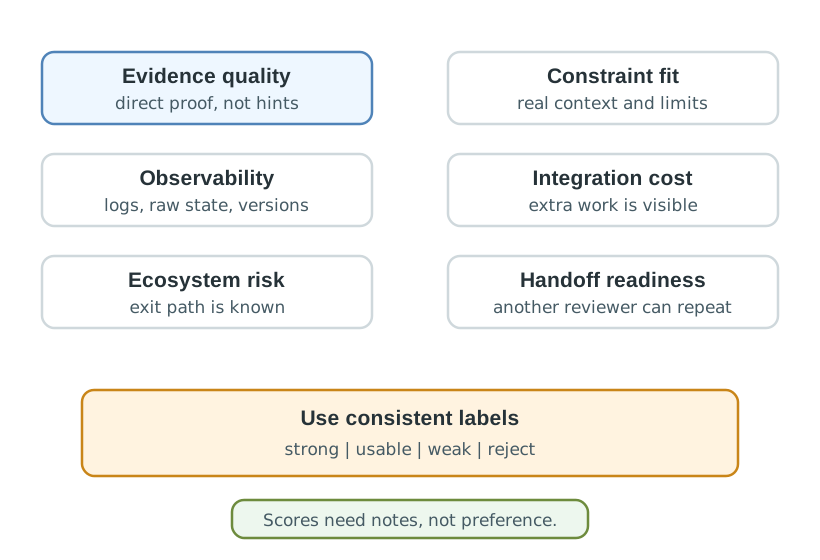
Compare Evidence quality with Constraint fit in Figure 24.3, then inspect the integration and ecosystem rows that can reverse an apparent winner. Select by required role and traceable fit, retain the rejected evidence, and reopen the scorecard when constraints or proof change.
Score each kit with review notes:
Use consistent score labels:
strong = directly proves the evidence need in representative context
usable = supports the evidence need but needs added instrumentation or fixtures
weak = demonstrates a related idea but hides major assumptions
reject = fails a hard gate or creates unacceptable transition risk
24.9 Ecosystem and Portability Review
This section: Ecosystem and Portability Review — Many kits accelerate early progress by bundling a board, firmware library, connector system, gateway, dashboard, or managed cloud.
Many kits accelerate early progress by bundling a board, firmware library, connector system, gateway, dashboard, or managed cloud. That convenience is useful during discovery, but it must be named before the prototype becomes a product decision.
Review ecosystem dependencies with these questions:
A proprietary library or managed service can be acceptable for a proof of concept. The risk appears when the team forgets to mark the boundary and later treats the convenient kit path as the final architecture.
24.10 Lifecycle and Cost Shape
This section: Lifecycle and Cost Shape — Avoid exact cost forecasts until the team has measured its own sourcing, integration, support, service, and production assumptions.
Avoid exact cost forecasts until the team has measured its own sourcing, integration, support, service, and production assumptions. For selection review, the more useful question is the cost shape: where effort and risk will move as the prototype grows.
24.11 Cold-Room Kit Shortlist
This section: Cold-Room Kit Shortlist — A team is building a cold-room monitoring prototype.
A team is building a cold-room monitoring prototype. The first decision is not which kit is cheapest. The team needs evidence that temperature and door events can be captured, buffered during connectivity gaps, and reviewed by staff without hiding stale data.
24.11.1 Step 1: Evidence Statement
The kit must help us prove whether temperature and door-event status can be captured and recovered after short connectivity gaps before we choose the gateway, enclosure, and maintenance workflow.24.11.2 Step 2: Hard Gates
The team rejects any option that cannot log raw readings, show stale-data status, expose retry behavior, support the intended sensor placement, or preserve configuration notes. That leaves three kit styles on the shortlist: a modular sensor kit, a connected controller kit, and a gateway-centered kit.
24.11.3 Step 3: Evidence Trial
Run the same evidence script on each shortlisted kit, using the same room placement, door-event pattern, connectivity interruption, restart and staff review task. Shared trial conditions make the comparison traceable to the cold-room monitoring question. Record raw readings, status labels, missed events and recovery behavior, including whether stale data remains visible during interruption and recovery.
Keep wiring assumptions and setup friction beside the results. List additional modules, gateway dependencies and service accounts as part of the tested kit path. Preserve firmware versions and configuration notes so another reviewer can repeat the comparison. Use the observed evidence to assess measurement visibility, recovery and staff interpretation, and mark unresolved assumptions. These records support the selection decision and identify checks to repeat when the board, enclosure, gateway or workflow changes.
24.11.4 Step 4: Review Decision
The modular sensor kit gives fast measurement evidence but needs gateway work. The connected controller kit gives strong firmware visibility but needs a clearer service workflow. The gateway-centered kit gives the best recovery evidence but hides some sensor-driver assumptions. The team chooses the kit that best exposes the current uncertainty and records which assumptions must be checked again.
prototype=cold-room-monitor
current_question=can status recover after connectivity gaps without hiding stale readings?
hard_gates=raw_readings, stale_status, retry_visibility, placement_notes, configuration_record
selected_kit_role=gateway-centered kit for recovery evidence
rejected_options=modular sensor kit because gateway behavior remained untested; connected controller kit because service workflow was unclear
integration_boundary=kit proves recovery behavior, not enclosure, final gateway, staff workflow, or production sensor mount
change_condition=repeat trial when enclosure, antenna position, gateway location, or status dashboard changes
next_step=fixture and enclosure review with same gap-recovery evidence script
24.12 Transition Boundary
This section: Transition Boundary — The kit proves selected evidence under selected conditions.
The kit proves selected evidence under selected conditions. It does not prove the final board, enclosure, mounting, supply path, deployment workflow, or support plan unless those were actually tested.
Figure 24.4 keeps a cold-room kit result within its tested conditions.
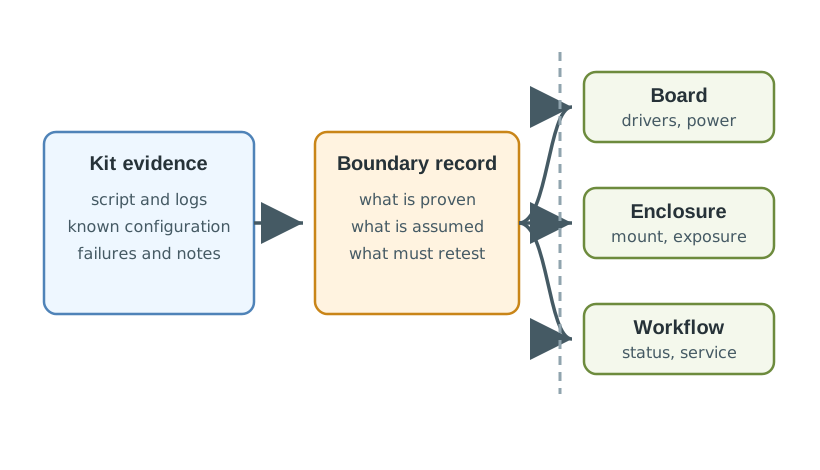
The transition in Figure 24.4 keeps a kit result inside its tested conditions. The cold-room script records raw readings, stale status, missed events, and restart recovery in one room setup. Those logs and the known-good configuration can move forward. Demo wiring, tutorial firmware, sample dashboard, and temporary gateway placement are replaced as the form changes. Accuracy, power states, update path, mounting, and staff interpretation need another check on the next board or enclosure. Write down what the kit proved and what remains open before calling the new form ready; the same recovery script can anchor the retest.
Write the boundary before changing form:
24.13 Kit Review Record
This section: Kit Review Record — A review record makes the selection decision reproducible.
A review record makes the selection decision reproducible. It also prevents later teams from treating an early kit preference as an architecture requirement.
Figure 24.5 ties the cold-room kit choice to stale-status and recovery evidence.
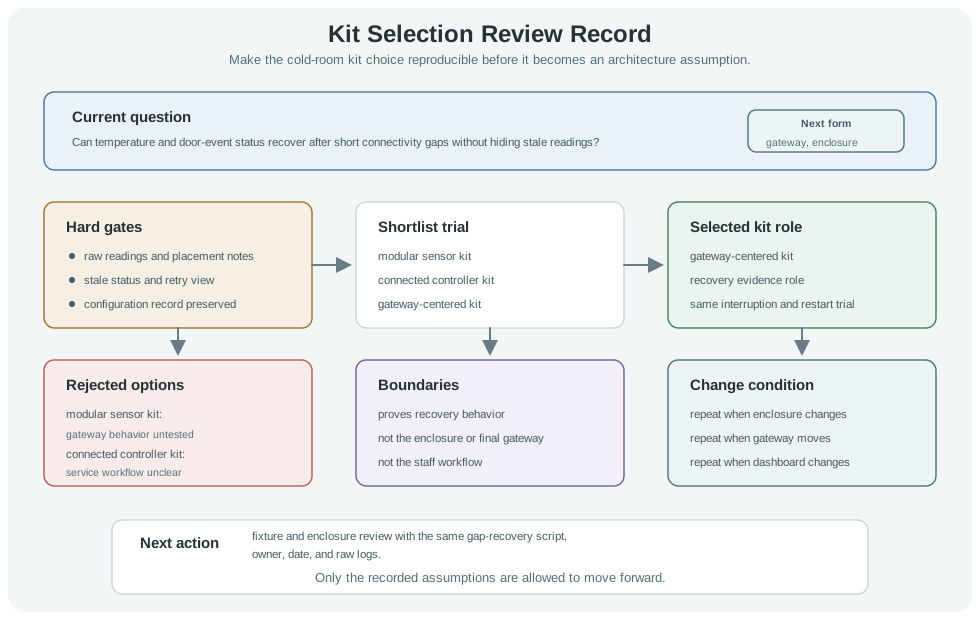
The worked record in Figure 24.5 ties a kit choice to one cold-room question: can status recover after a short connectivity gap without hiding a stale reading? The hard gates ask for raw readings, placement notes, stale status, a retry view, and saved configuration. A gateway-centered kit is selected for the interruption and restart trial. The modular sensor option leaves gateway behavior untested, while the connected controller leaves the service workflow unclear. The figure then marks enclosure, final gateway, and staff workflow as open. Its next action is a fixture and enclosure review using the same gap-recovery script, with raw logs and an owner.
Use this template:
prototype=
current_question=
evidence_need=
hard_gates=
shortlisted_kit_roles=
selected_kit_role=
evidence_script=
observed_results=
rejected_options=
ecosystem_boundary=
integration_boundary=
change_condition=
next_action=
review_owner=
review_date=
24.14 Knowledge Check
This section: Knowledge Check
24.15 Common Failure Patterns
This section: Common Failure Patterns
24.16 Summary
This section: Summary — First, Select kits by evidence need first, then by hard gates, then by weighted tradeoffs.
First, Select kits by evidence need first, then by hard gates, then by weighted tradeoffs. Next, A good shortlist contains kit roles that can be tested with the same evidence script. Then, Scorecards should reward observability, repeatability, portability, and handoff readiness, not just feature count. After that, Ecosystem convenience is useful when the team marks the boundary and keeps an exit path visible. Finally, Kit evidence must be checked again when the board, enclosure, gateway, mounting, data path, service workflow, or operating context changes.
24.17 Key Takeaway
This section: Key Takeaway — Kit selection should produce a fit record: requirement, interfaces, software support, supply risk, expansion path, security, and the evidence still missing.
Kit selection should produce a fit record: requirement, interfaces, software support, supply risk, expansion path, security, and the evidence still missing.
24.18 What’s Next
This section: What’s Next
| If you want to… | Read this |
|---|---|
| Compare smart-home and environmental kit evidence | Smart Home and Environmental Kits |
| Review robotics and agricultural kit evidence | Robotics and Agricultural Kit Selection for IoT Prototypes |
| Plan the move from kit evidence to board-level hardware decisions | Hardware Platform Selection for IoT Prototypes |
Find help
3 reviewed answers.
Where should I start in a module?
Open the module page from the sidebar to see its chapters in order. Use the module map to return to a topic you need.
Modules and pathsReviewed
What can I try when a project does not work?
Check the symptom, then work through the diagnostic steps. Keep the error message and the smallest example that reproduces it.
When you are stuckReviewed
How do interactive examples work?
Use the interactive guide to check how examples and simulations work before changing your project.
Interactive examples guideReviewed