12 PCB Design and Fabrication
More
Depth: Practitioner
Progress saves as you read. Mark sections complete as you go; your progress appears in the sidebar.
12.1 Start With the Story
This section: Start With the Story — Moving from breadboard to PCB feels like progress, but it can also freeze every untested assumption into copper.
Moving from breadboard to PCB feels like progress, but it can also freeze every untested assumption into copper. A stable sensor reading on loose wires does not prove footprint orientation, reset access, antenna keep-out, regulator heat, connector strain, or first-power bring-up. The PCB story should begin before layout with the question: what evidence says this circuit is ready to become a board?
Read the design steps as a risk filter. Schematic checks, footprint review, layout constraints, fabrication outputs, and bring-up notes all exist to make the first board teach the next revision instead of hiding the cause of failure.
12.2 PCB Freezes Assumptions
This section: PCB Freezes Assumptions — Moving from breadboard to PCB is useful when the next risk is repeatability, enclosure fit, connector orientation, power integrity, signal return, service access, or assembly handoff.
Moving from breadboard to PCB is useful when the next risk is repeatability, enclosure fit, connector orientation, power integrity, signal return, service access, or assembly handoff. It is risky when the team uses layout to avoid unresolved schematic, footprint, or bring-up questions.
The board files should encode what the prototype already learned: power path, controller pins, sensor placement, connector pinout, reset and boot controls, programming access, test points, and the first-power sequence.
Figure 12.1 asks which breadboard facts are ready to become PCB assumptions.
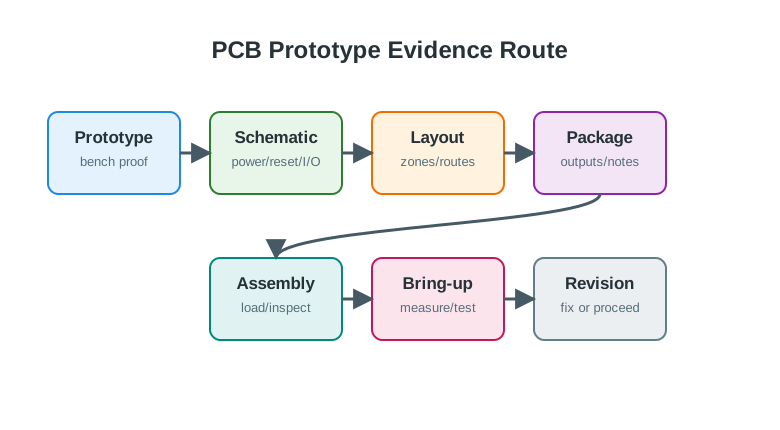
The ESP32-C3 room monitor has already read an SHT31 and published MQTT messages, but that only proves behavior on the prototype setup. The first PCB must still test sensor distance from regulator heat, battery connector polarity, power integrity, antenna clearance, and debug access. Keep those questions visible in the schematic, placement, and first-article plan. Manufacturing outputs and notes carry one revision to fabrication; bring-up evidence then shows what the board actually did. A working demo cannot substitute for tests of the new physical paths.
- Schematic readiness means the power tree, protection, reset, boot, buses, debug, and safe-state hardware are reviewable before routing.
- Layout readiness means power loops, return paths, antenna keep-outs, sensor placement, mounting, and service access are visible on the board.
- Bring-up readiness means the first article can be inspected, powered, programmed, measured, and stopped before damage spreads.
For example, a breadboarded room-monitoring node might use an ESP32-C3 module, an SHT31 temperature and humidity sensor, a status LED, a JST battery connector, and a USB-to-serial programming header. The breadboard can prove that the firmware reads the sensor and publishes MQTT messages. It does not prove that the SHT31 will be far enough from the regulator heat, that the battery connector polarity is visible to an assembler, that the boot pins have the right pulls, that the antenna keep-out remains clear inside the enclosure, or that the first board can be recovered if the firmware image fails. Those become PCB-stage questions.
A good board decision therefore starts by separating what is already known from what the board must teach. Known evidence might include the chosen sensor address, the tested pull-up value, the current draw during Wi-Fi association, the reset button behavior, and the debug header used during firmware work. Unknown evidence might include footprint orientation, connector strain, ground return under the radio module, regulator temperature, and whether a test point remains reachable after the lid is installed. If the unknowns are layout, assembly, service, and repeatability questions, a PCB is a useful next prototype. If the unknowns are still basic sensor choice, actuator current, or firmware state handling, the board risks freezing uncertainty into copper.
12.3 Check Manufacturing Package
This section: Check Manufacturing Package — For a prototype board, KiCad, Altium Designer, Eagle, EasyEDA, or another EDA tool is only the source.
For a prototype board, KiCad, Altium Designer, Eagle, EasyEDA, or another EDA tool is only the source. The handoff includes generated outputs that must agree with the revision being built.
- Electrical checks: run ERC, DRC, unconnected-net checks, net-class spacing checks, clearance rules, and intentional-exception review.
- Fabrication outputs: inspect Gerber or ODB++ layers, Excellon drill files, board outline, solder mask, silkscreen, paste layers, stackup notes, and impedance notes if used.
- Assembly outputs: check BOM manufacturer part numbers, alternates, do-not-populate parts, pick-and-place coordinates, polarity marks, pin-one marks, and special handling notes.
- Bring-up outputs: include rail names, expected voltages, current limits, programming tool, diagnostic firmware, pass criteria, stop conditions, and known rework options.
Use the generated package as the review target because manufacturers and assemblers do not build from the designer’s intent. Open the Gerbers in an independent viewer such as KiCad GerbView, a board-house previewer, or another CAM viewer. Check that the outline appears once, drills align with pads, copper pours connect where expected, solder mask openings are not missing, silkscreen does not cover pads, and top and bottom placement files are not mirrored incorrectly. Then compare the BOM against actual manufacturer part numbers, package variants, pin-one marks, and do-not-populate choices. A correct schematic symbol is not enough if the ordered switch, sensor, regulator, or JST connector is a different footprint variant.
The same discipline applies to first bring-up. Before applying power, inspect orientation marks, rail-to-ground resistance, solder bridges, connector polarity, and any parts that were intentionally left unloaded. Start with a current-limited bench supply or protected source, not a battery that can hide the first fault. Bring up the power section first where practical, then verify the controller rail, programming access, reset path, and a minimal diagnostic firmware image before loading the full application. A strong bring-up note names the board revision, loaded parts, current limit, expected rails, measured rails, programming tool, firmware build, fault symptoms, rework, and the next revision decision. That note is what turns a failed first board into useful design evidence.
12.4 Layout Quality Needs Current Loops
This section: Layout Quality Needs Current Loops — A schematic says nodes connect.
A schematic says nodes connect. The PCB decides how current returns, how noise couples, how heat leaves, and whether a human can debug the board. IoT boards often combine quiet sensors, radios, switching regulators, connectors, batteries, and human-service features in a small area.
- Power integrity: keep buck converter hot loops short, place decoupling capacitors close to pins, size copper for load current, and expose rail test points.
- Signal integrity: preserve ground return near I2C, SPI, UART, clocks, interrupts, PWM, ADC references, and radio-module control lines.
- RF and sensors: respect antenna keep-outs, ground clearance, sensor exposure, thermal isolation, ESD paths, and enclosure materials that change readings.
- Safety and service: check creepage, clearance, fuse or polyfuse placement, TVS placement, keyed connectors, reset access, SWD/JTAG/UART access, and current-measurement jumpers.
The first board is successful when it teaches the next revision quickly, not merely when it arrives from the fabricator.
The loop view explains why two layouts with the same schematic can behave differently. A buck regulator’s high-current switching loop should be short, with the input capacitor, switch, diode or synchronous path, inductor, and ground return placed so current does not travel across the sensor area. A microcontroller power pin needs a nearby decoupling capacitor with a short return to ground; placing the capacitor on the far side of a connector or routing its ground through a narrow detour can make reset and radio transmit faults more likely. An ADC input for a thermistor, current shunt, or battery divider needs a quiet reference path and often filtering near the measurement point, not beside a motor driver or relay coil.
Radio and enclosure decisions add another layer. ESP32, nRF52, LoRa, LTE-M, NB-IoT, Thread, and Wi-Fi modules often specify antenna keep-outs, ground clearance, placement at a board edge, and restrictions on copper or metal near the antenna. A board can pass DRC while still burying the antenna under a battery, enclosure post, cable, or ground pour. Sensor boards have similar physical constraints: a temperature sensor placed near a regulator may measure board heat, a humidity sensor under conformal coating may respond slowly, and a microphone or pressure sensor may need a real opening. Layout review is therefore part electrical review and part physical evidence review.
Service access is also a circuit decision. SWD, JTAG, UART, reset, boot, current-measurement links, and rail test points should remain usable after partial assembly and enclosure fit checks. If a test point disappears under a module or a programming header requires removing the battery, bring-up slows down and faults become less reproducible. The under-the-hood goal is to preserve the evidence path: current flows can return cleanly, signals can be measured, firmware can be recovered, and the next revision can be based on observed behavior instead of guesswork.
12.5 Learning Objectives
This section: Learning Objectives
By the end of this chapter, you will be able to:
- Decide when breadboard evidence is strong enough to move into a custom PCB stage.
- Review a schematic and footprint set before layout begins.
- Place and route components using power, return-path, connector, sensor, and radio constraints.
- Prepare a fabrication and assembly package that another builder can inspect.
- Bring up a new board safely and record revision evidence for the next design turn.
12.6 From Prototype to PCB
This section: From Prototype to PCB — A custom board removes jumper-wire uncertainty, but it introduces layout, footprint, assembly, and bring-up uncertainty.
A custom board removes jumper-wire uncertainty, but it introduces layout, footprint, assembly, and bring-up uncertainty. The design should move to a PCB when the current prototype needs stronger evidence about repeatability, packaging, service access, power integrity, signal behavior, or assembly handoff.
The PCB stage should answer questions such as:
A working breadboard is useful evidence, but it does not prove footprints, trace routing, ground return, connector orientation, assembly sequence, or enclosure behavior. Treat PCB layout as a new evidence gate.
12.7 Schematic and Footprint Readiness
This section: Schematic and Footprint Readiness — The schematic should describe more than logical connectivity.
The schematic should describe more than logical connectivity. It should also include power entry, protection, pull resistors, decoupling, programming or update access, reset behavior, indicators, test points, and any safe-state hardware.
Before layout, review these items:
12.8 Footprint Review Rule
Print or view the layout at actual size before ordering boards. Compare connectors, modules, switches, headers, and polarized parts against the physical parts or trusted package drawings.
12.9 Layout Planning
This section: Layout Planning — Good layout starts with zones.
Good layout starts with zones. Connectors, power entry, radio or antenna areas, sensors, high-current loads, quiet analog circuits, and debug access should not compete for the same space.
Figure 12.2 puts the board’s power, sensing, radio, and service paths on a placement map.
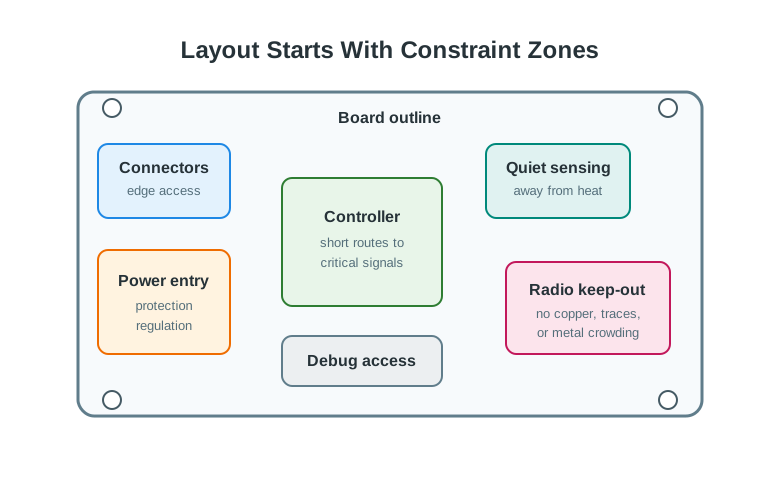
Connectors belong where the enclosure and harness can reach them. The power entry, protection, and regulators need a short path that can be inspected before signals cross the board. The controller and quiet analog sensing area should be placed with noise and routing in mind; the radio antenna needs its keep-out region. Debug access must remain reachable after assembly. These are layout constraints to check against the schematic and intended enclosure, not decorations. A placement that hides a rail test point or violates the antenna area can make first-article evidence weak even when design rules pass.
Use placement to make the important paths short and inspectable:
12.10 Power, Ground, and Return Paths
This section: Power, Ground, and Return Paths — Most first-board failures are not caused by the schematic being completely wrong.
Most first-board failures are not caused by the schematic being completely wrong. They come from missing decoupling, interrupted return paths, weak power distribution, reversed connectors, inaccessible test points, or a bring-up sequence that hides the first fault.
Inspect Figure 12.3 and ask whether current, signal return, heat, noise, and probing all have deliberate physical paths.
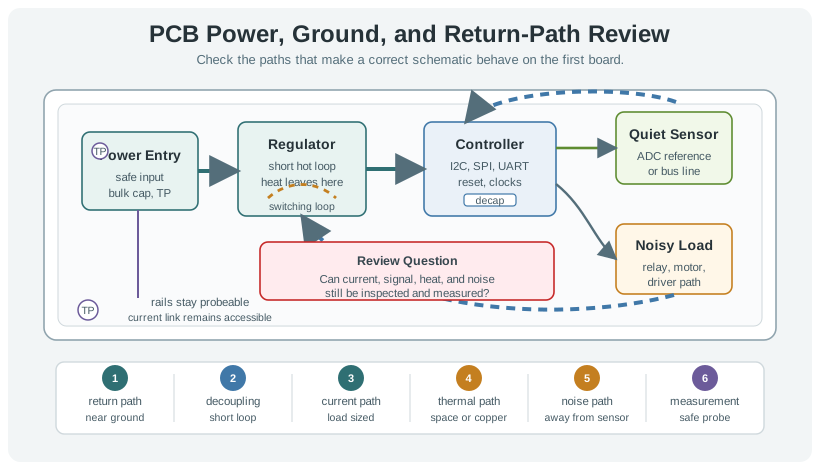
Read Figure 12.3 from protected power entry through the regulator hot loop and local controller decoupling. The nearby ground return keeps fast current loops short, while the quiet sensor route stays apart from relay or motor noise. Thermal copper, airflow, and spacing provide a separate escape path for heat. Finally, probe access keeps rails, buses, reset, and programming pins measurable without shorting adjacent pads. The board is ready only when each physical path can be traced and tested.
During layout review, check:
12.10.1 Layer Count Decision
Layer count is an engineering tradeoff, not a badge. A simple low-speed board can often start with two layers if ground return remains continuous and routing is not forced into long detours. Move to more layers when routing density, controlled impedance, split power domains, quiet analog return, radio layout, or high-speed interfaces make the two-layer return path fragile.
Do not ask, “Can the router finish?” Ask, “Can the return paths, power paths, test points, and keep-outs still be inspected after routing?”
12.11 Fabrication and Assembly Package
This section: Fabrication and Assembly Package — The fabrication package is the handoff from design intent to board production.
The fabrication package is the handoff from design intent to board production. It should be complete enough for someone else to inspect, fabricate, assemble, and bring up the board without guessing which file is authoritative.
Figure 12.4 shows what must travel with a reviewed board revision.
A schematic and layout review checks footprints against physical parts, then ERC, DRC, and unconnected-net results expose design errors before fabrication. The manufacturing set includes copper, mask, silkscreen, paste, and drill outputs. Assembly data and bring-up notes tell the builder how to populate and test that same revision. A passing design rule check alone does not prove the files match the intended parts or enclosure. Inspect the generated outputs together, give them one revision identity, and use that identity when the first board is powered and debugged.
Prepare and review:
Passing a design rule check is not enough. Inspect the generated outputs directly. Many errors come from wrong layer export, missing drill files, mirrored placement, hidden outline problems, or footprints that passed rules but do not match the part.
12.12 First Article Bring-Up
This section: First Article Bring-Up — The first assembled board should be brought up in small steps.
The first assembled board should be brought up in small steps. The goal is to localize faults before they damage parts or bury the evidence under full firmware behavior.
Treat soldering as part of bring-up, not as a separate craft step. Before heating the board, lay out the parts, values, orientation marks, jumpers, wire links, and expected no-connects against the schematic. Prepare the iron with a clean, tinned tip, use enough heat to wet the pad and lead quickly, and keep cleaning and re-tinning the tip as flux and oxide build up. After each small group of joints, inspect for bridges, cold joints, lifted pads, reversed parts, and clipped-lead debris before adding the next group.
Figure 12.5 shows the tools needed for controlled first-article soldering.

The iron tip makes the joint, while the coiled stand keeps the hot tool off the bench between joints. Cleaning material and solder help keep the tip wettable; nearby hand tools let the builder place and inspect parts without improvising around heat. Those visible tools support assembly, but they cannot prove a new PCB works. For the first amplifier board, compare placement with the design record, check continuity and rails, then power with a current limit. Keep the board revision and test results with any rework so the next assembly can repeat the same checks.
For a small amplifier board, compare the PCB against the breadboard before trusting the result. Start with continuity and rail checks, then power the board through current limiting, confirm the op-amp supply pins, and drive a known input. An LED or other simple indicator can show whether the output crosses the expected threshold, but it should be read as a test result, not as proof of the whole analog design. If the breadboard passes and the PCB fails, isolate the difference: feedback resistor values, input polarity, op-amp channel pins, supply reference, solder bridges, and whether the output load changes the amplifier behavior.
Figure 12.6 orders first-board checks from the bare PCB to tested subsystems.
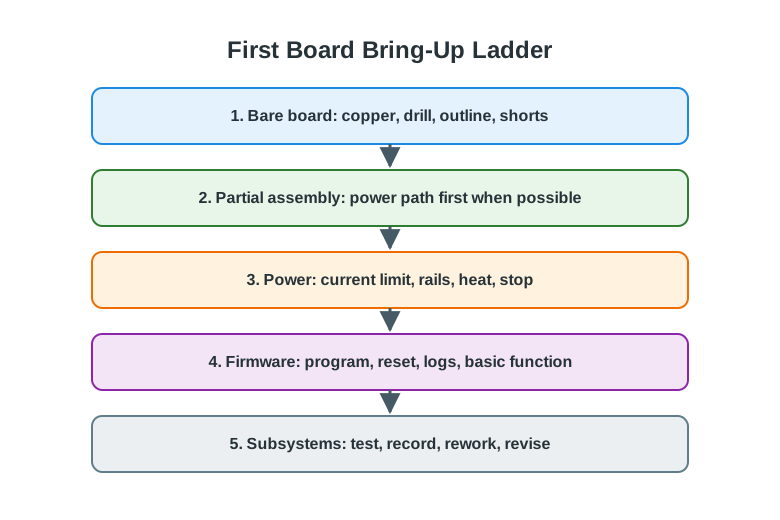
Inspect copper, drill holes, board outline, and shorts before components hide those surfaces. Assemble the power path first when possible, then apply power through a current limit and check rails, heat, and the stop condition. Only after those checks should firmware programming, reset, and basic logs be trusted. Subsystem tests can then isolate a sensor, bus, radio, or output rather than treating the whole board as one fault. Record rework and the revised result at each rung. This order protects the board and makes a failed first article useful for the next revision.
Use a ladder like this:
12.12.1 Example Bring-Up Record
board=room-node-rev-a
stage=first-article-bring-up
loaded_parts=power entry, regulator, controller, programming header, status indicator
pre_power=rail-to-ground resistance checked, connector orientation checked, visual inspection passed
power_limited_test=main rail stable, current within expected no-load range
programming=minimal diagnostic firmware loads and reset works
faults=sensor connector pin order ambiguous, one test point hidden after enclosure fit
decision=revise connector symbol, move test point, continue subsystem testing on current board
next_revision=rev-b schematic and layout notes opened
12.13 Incremental Examples
This section: Incremental Examples
12.13.1 Breakout-to-Carrier Board
A breadboarded ESP32-C3 sensor node uses a known SHT31 module, a JST battery connector, a programming header, and one status LED. The first PCB should be a carrier board that reduces wiring risk without pretending the design is production-ready.
First, Copy the proven pinout into a schematic with explicit rail names, pull-ups, reset access, boot strap behavior, and test points. Next, Verify the JST connector, module header, LED polarity, programming header, mounting holes, and enclosure clearance against physical parts or trusted package drawings. Then, Bring up the board with current limiting, then check the 3.3 V rail, programming access, I2C scan, LED output, and sleep-current path before loading full firmware.
This is a beginner case because the board mostly preserves a known module-based prototype. The main evidence is whether the PCB removes wiring ambiguity while keeping debug access visible.
12.13.2 Custom Sensor and Power Section
A field node moves from modules to a board with an nRF52840, a BME280, a load switch, a LiPo charger, a buck regulator, and a current-measurement jumper. The PCB now owns more electrical behavior.
- Review regulator input range, charger protection, battery connector polarity, buck converter hot loop, decoupling capacitor placement, and BME280 exposure away from heat sources.
- Inspect generated Gerbers, Excellon drills, solder mask, paste layer, board outline, BOM, and pick-and-place file in an independent viewer.
- Assemble power and programming sections first, then add the sensor and radio path only after rail current, reset behavior, and SWD access are proven.
This case is harder because footprint and layout decisions can change the measurement. A correct schematic is not enough if the sensor is heated by the regulator or the debug pads disappear under the enclosure.
12.13.3 Portable Condition Monitor PCB
A team has a functional prototype that samples vibration and temperature, logs local events, and reports summaries through a nearby gateway. The breadboard proved the sensing concept, but the team needs a board that can fit in an enclosure, survive cable strain, and support repeatable field tests.
12.13.4 PCB Review Plan
12.13.5 Review Decision
decision=proceed-to-board-revision
why=breadboard answered sensing question, but enclosure fit and repeatable wiring remain unproven
layout_focus=power entry, sensor isolation, connector strain, programming access, test points
assembly_focus=load power section first, then controller, then sensor and output sections
stop_condition=unexpected rail current, unstable reset, missing programming access, or overheated part
12.14 Try It Now
This section: Try It Now
Choose one breadboarded hardware prototype and write a PCB gate note with three parts: the evidence that is strong enough to freeze into copper, the evidence that still needs a layout or footprint check, and the first measurement that would stop first-power bring-up.
12.15 Spot Fabrication Risk Early
This section: Spot Fabrication Risk Early — A team exports Gerbers for a battery node with an SHT31 sensor, SX1262 LoRa module, buck regulator, SWD pads, and JST battery connector.
A team exports Gerbers for a battery node with an SHT31 sensor, SX1262 LoRa module, buck regulator, SWD pads, and JST battery connector. The DRC passes. The board outline fits the enclosure.
Name two checks still required before ordering. Strong answers include connector polarity, pin-one marks, antenna keep-out, sensor airflow, regulator hot-loop area, decoupling placement, drill alignment, paste layer, BOM manufacturer part number, pick-and-place rotation, test-point reach, and whether the SWD pads remain accessible inside the enclosure.
12.16 Concept Check: PCB Stage Gate
This section: Concept Check: PCB Stage Gate
12.17 First Power Stop Condition
This section: First Power Stop Condition
12.18 Match PCB Evidence to the Review Gate
This section: Match PCB Evidence to the Review Gate
12.19 Order the First-Board Bring-Up
This section: Order the First-Board Bring-Up
12.20 Common Failure Patterns
This section: Common Failure Patterns
The schematic is correct, but the physical part does not match the footprint, pin numbering, pad size, courtyard, or orientation mark. Review packages against physical parts or trusted package drawings before ordering boards.
The board routes successfully, but ground return is sliced by traces, slots, keep-outs, or layer changes. The result may be noisy sensing, reset instability, or unreliable communication.
Programming pins, reset, test points, buttons, or current-measurement links are reachable on the bench but blocked by the enclosure, cables, or mounted components.
Every part is assembled before rails are checked. A simple power-path error then becomes harder to diagnose and may damage parts that did not need to be loaded yet.
12.21 Summary
This section: Summary — PCB design is a controlled evidence gate between a flexible prototype and a repeatable hardware build.
PCB design is a controlled evidence gate between a flexible prototype and a repeatable hardware build. Review schematic completeness, footprint reality, layout constraints, output files, assembly order, and bring-up results as separate decisions. A clean PCB review leaves enough evidence for another builder to fabricate, assemble, test, and revise the board.
12.22 Key Takeaway
This section: Key Takeaway — PCB design should begin only after interfaces, power paths, connectors, debug access, firmware assumptions, and bring-up tests are stable enough to review.
PCB design should begin only after interfaces, power paths, connectors, debug access, firmware assumptions, and bring-up tests are stable enough to review.
12.23 See Also
This section: See Also — First, Hardware Platforms - compare platform roles after board-level constraints are understood.
First, Hardware Platforms - compare platform roles after board-level constraints are understood. Next, Hardware Components - connect component choices to footprints, power paths, and test evidence. Then, Best Practices and Debugging - use systematic debugging records during board bring-up. After that, Case Studies and Worked Examples - review how evidence records guide hardware revisions.
Find help
3 reviewed answers.
Where should I start in a module?
Open the module page from the sidebar to see its chapters in order. Use the module map to return to a topic you need.
Modules and pathsReviewed
What can I try when a project does not work?
Check the symptom, then work through the diagnostic steps. Keep the error message and the smallest example that reproduces it.
When you are stuckReviewed
How do interactive examples work?
Use the interactive guide to check how examples and simulations work before changing your project.
Interactive examples guideReviewed