19 Firmware Architecture Patterns
More
Depth: Practitioner
Progress saves as you read. Mark sections complete as you go; your progress appears in the sidebar.
19.1 Start With the Story
This section: Start With the Story — A firmware prototype often begins as one file because that is the quickest way to see a sensor value.
A firmware prototype often begins as one file because that is the quickest way to see a sensor value. The architecture story starts when the same file must handle state, timing, retries, storage, updates, and diagnostics without hiding where faults belong. Architecture is not ceremony; it is a set of trust lines that lets reviewers see what each part owns.
Use this chapter to draw those lines only as far as the evidence requires. Start with the runtime boundary, test normal and fault paths, then decide whether the structure should be kept, simplified, or replaced.
19.2 Architecture Sets Trust Lines
This section: Architecture Sets Trust Lines — Firmware architecture is not only code organization.
Firmware architecture is not only code organization. It decides which behavior can be measured, repeated, and trusted when the prototype leaves the bench.
Figure 19.1 assigns each greenhouse control task to a runtime boundary.
The sensor and door inputs enter through drivers that report a reading and its validity. An event queue carries changes into the state machine, which decides when the fan relay should switch. MQTT publication is a separate path, so a blocked gateway must not delay the local control decision. The fault path records missing readings and recovery behavior with an identified owner. Trace one normal temperature change and one gateway failure through those boundaries. The architecture is useful when the logs show which part made each decision and whether local ventilation continued during the fault.
The central design question is ownership. One part of the firmware should own sensor reads, another should own product state, another should own communication, and another should expose evidence when timing or recovery fails.
For a greenhouse ventilation prototype, this means the SHT31 or BME280 driver reports readings and validity flags, the application state machine decides whether the fan relay should run, the MQTT layer publishes a status document, and the diagnostic layer records loop time, publish failures, and stale readings. If those jobs are mixed into one long function, the dashboard may update once while the team still cannot explain which code owns a sensor fault, a gateway outage, or a manual override.
The architecture does not need to be large to be useful. A small super loop can be a good first choice when it has bounded driver calls and clear state labels. A state machine is better when operating modes matter. An event queue helps when door interrupts, timer ticks, gateway messages, and fan-current alerts arrive at different times. A FreeRTOS, Zephyr, or ESP-IDF task model is worth considering only when independent responsibilities have real timing or blocking pressure.
That choice should be reversible during prototyping. If a one-board slice shows that publish backoff is harmless, the team can keep the simpler loop. If the same slice shows missed fan decisions or stale payloads, the record justifies adding a queue or task boundary before the structure spreads into more features.
Record the architecture as evidence, not as a decorative diagram. Name the board or harness, pattern, state owner, communication owner, storage owner, blocking paths, and one fault run. That record tells the next engineer whether to keep the pattern, simplify it, or check the timing again when the MCU, radio, broker, payload, or update path changes.
19.3 Separate Three Hard Problems
This section: Separate Three Hard Problems — Most prototype firmware becomes fragile when state, time, and faults are mixed into one loop.
Most prototype firmware becomes fragile when state, time, and faults are mixed into one loop. Separate those concerns before the demo becomes the pilot code.
Start by drawing the smallest runtime boundary that can answer the question. For a cold-room sensor node on an ESP32-C3, the first boundary might be a driver module for I2C temperature and door inputs, a pure state function that classifies normal, door_open, sensor_fault, and gateway_offline, and a publisher that formats MQTT JSON for Mosquitto, EMQX, AWS IoT Core, or Azure IoT Hub. The prototype then proves whether each boundary has a visible input, output, timeout, and error signal.
Use instrumentation before adding architecture weight. Measure the longest sensor read, publish attempt, flash write, display update, and watchdog window. If the loop still responds within the required window, keep it simple. If publish backoff delays fan safety logic, move communication into a state transition, queue, or task. If a door interrupt triggers heavy work, turn it into a short event capture and process the decision in normal context.
- State ownership: Name the valid modes, transitions, stale-data states, and rejected commands before writing handlers.
- Time ownership: Identify blocking reads, retry delays, sensor warm-up, watchdog windows, and radio duty-cycle limits.
- Fault ownership: Decide which module reports sensor failure, queue overflow, bad configuration, failed publish, brownout restart, or update rollback.
A super loop can be enough when those owners are visible. An event queue or RTOS is worth the extra complexity when the owners must run independently or meet competing deadlines.
Keep shared state boring. Prefer snapshots, typed events, atomic flags, or one owning task instead of global structures that drivers, callbacks, and publishers all mutate. In FreeRTOS, record task names, priorities, queue lengths, stack high-water marks, and the timeout used when one task waits for another. In Zephyr, record the work queue, message queue, timer, and device-tree assumptions. In a host harness, record which simulated events stand in for hardware behavior and which timing claims still require the target board.
19.4 Prototype Architecture Ages Fast
This section: Prototype Architecture Ages Fast — Early firmware often works because the device is observed, reset manually, and tested on one network.
Early firmware often works because the device is observed, reset manually, and tested on one network. Production firmware must survive missing packets, long sleep periods, full queues, corrupted settings, partial updates, and restarts without a developer watching the serial monitor.
The architecture should therefore make hidden coupling visible. If a sensor driver can block communication, if an MQTT retry can starve actuator safety logic, or if a configuration write can corrupt calibration during brownout, the prototype has answered an architecture question before the fault reaches a field pilot.
Most hidden coupling comes from time, memory, or ownership. A TLS handshake may block long enough for a display to show stale values. A flash erase may pause a low-cost MCU while an alarm transition is due. An interrupt may update a shared flag while the main loop is formatting a payload. A queue may drop events faster than the review log records them. The architecture is trustworthy only when those behaviors have an owner and an observation point.
Embedded operating-system boundaries are part of that evidence. On a phone, laptop, or Linux gateway, the kernel usually protects itself from ordinary application code and mediates hardware access through drivers and services. Many MCU firmwares are flatter: application code, driver code, and runtime code may share one address space, and a bad pointer or runaway callback can stop the whole device. Cortex-M memory-protection units help when the runtime actually configures them, but the prototype record should not assume that protection exists. It should say whether the firmware has a protected process boundary, MPU regions, or a single trusted image, and which code is allowed to bypass the abstraction for direct peripheral control.
Interrupt handling is the sharpest version of that boundary. The direct handler should do the smallest urgent work: capture the event, clear or read the device status, copy a byte or timestamp, and enqueue a fact for normal code. Heavier processing belongs in a deferred context such as an event queue, work queue, bottom-half callback, or RTOS task. That deferred work still needs a contract: new interrupts may preempt it, queues may fill, and shared state can be touched from both handler and background paths unless ownership is explicit.
Event-driven and threaded designs expose different costs. An event-driven callback model can keep RAM low and make every external event visible, but cross-event state must live in a named state object or queue, and the callback must not block behind a send, storage write, or long calculation. A threaded model can make blocking flows easier to read because each responsibility has its own stack and wait points, but the record must include task priority, stack headroom, queue depth, wake source, and the condition that makes a task runnable. In FreeRTOS-style systems, higher-priority tasks can preempt lower-priority work and interrupts can unblock tasks; in Mbed OS or vendor SDKs, richer peripheral APIs can make code cleaner while still leaving implementation details and direct-register escape hatches to review.
On an ESP32 or STM32 target, useful under-the-hood evidence includes maximum loop duration, watchdog reset reason, heap-watermark trend, queue depth, stack high-water mark, publish retry count, and the specific fault that forced a state transition. On a Nordic nRF52840 or other low-power node, include wake reason, radio association time, sample-to-publish duration, and current profile. On a Linux gateway, include service restart behavior, systemd unit state, persistent queue size, and what happens when DNS or the broker is unavailable.
Architecture also shapes update safety. If configuration migration, OTA download, bootloader confirmation, and rollback policy are hidden inside unrelated application code, a partial update can leave the prototype in an unclear state. Separate the update boundary early enough that later OTA work can check image slot, firmware version, schema migration, rollback trigger, and safe fallback behavior without untangling every driver and publisher.
19.5 Learning Objectives
This section: Learning Objectives
By the end of this chapter, you will be able to:
- Choose an architecture pattern from evidence needs rather than implementation habit.
- Separate driver, application state, communication, storage, update, and observability responsibilities.
- Compare super loop, state machine, event queue, and RTOS task models as prototype evidence tools.
- Review timing, blocking, fault recovery, and shared-state risks before a demo becomes an architecture.
- Write an architecture review record that supports later library, testing, OTA, and best-practice decisions.
19.6 Architecture Choice Is Evidence Choice
This section: Architecture Choice Is Evidence Choice — The language chapter decided which runtime carries each software risk.
The language chapter decided which runtime carries each software risk. Architecture decides how responsibilities are separated inside that runtime. The prototype should make one question reviewable: what structure best exposes the current timing, state, fault, or handoff risk?
Start with the evidence question:
An RTOS is not automatically better than a small state machine. A super loop is not automatically careless. A useful prototype chooses the simplest architecture that can expose the deciding risk and records when that choice must be revisited.
19.7 Responsibility Boundaries
This section: Responsibility Boundaries — Architecture starts by naming ownership.
Architecture starts by naming ownership. If every function reads hardware, changes state, formats payloads, and publishes messages, the prototype may work once but will be hard to review.
A source-era house and Boggle-game analogy divides a software product into the work users can see and shape—layout, interaction flow, login, and scoring—and the less visible algorithms, data structures, dictionaries, boards, and credential storage. It uses full stack for the work that connects both sides. The durable lesson is the boundary, not an assumed label: write interface/interaction, application logic/data, and cross-boundary contract in the architecture record so every contributor agrees which side owns each decision.
Inspect Figure 19.2 and ask who owns each state change, recovery action, and observation across the firmware.
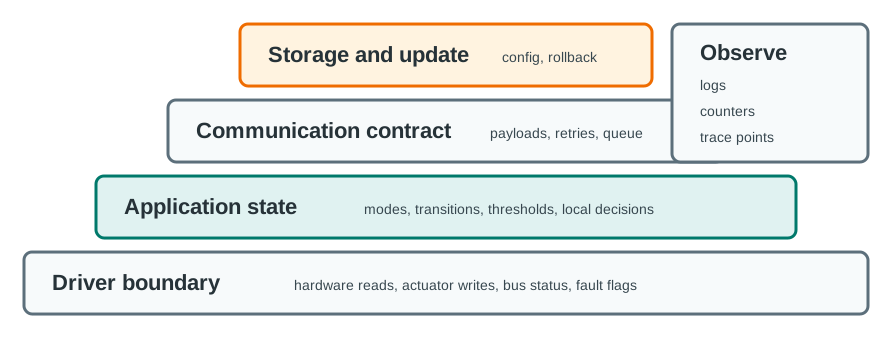
Read Figure 19.2 from the hardware driver into the rest of the stack. The driver owns device reads and writes. App state, message rules, local storage, and updates each have their own edge. Every edge owns its fault rule as well as its normal work. Stale data, retry delay, queued data, moves, and rollback cannot sit between modules. Logs, counts, debug pins, status output, and trace points explain what took place across the stack. This split lets a test name the failed boundary instead of treating one good sensor read as proof of the whole app.
Use these boundaries when reviewing prototype code:
Before accepting a firmware architecture, record one reviewer-visible answer for each boundary:
First, Which module owns the boundary and which other modules may call it. Next, The normal input, output, timeout, and error signal for the boundary. Then, The fault case that proves the boundary does not silently hide stale data, failed I/O, full storage, bad configuration, or update interruption. After that, The observation that will appear in logs, counters, debug output, or test artifacts when the boundary is exercised. Finally, The handoff decision: keep the boundary as-is, rewrite it before pilot use, or check it again after the next hardware or protocol change.
19.8 Pattern Selection Map
This section: Pattern Selection Map — Architecture patterns are not levels to climb.
Architecture patterns are not levels to climb. They are different ways to make evidence visible.
Figure 19.3 compares structures by the state and timing evidence they expose.
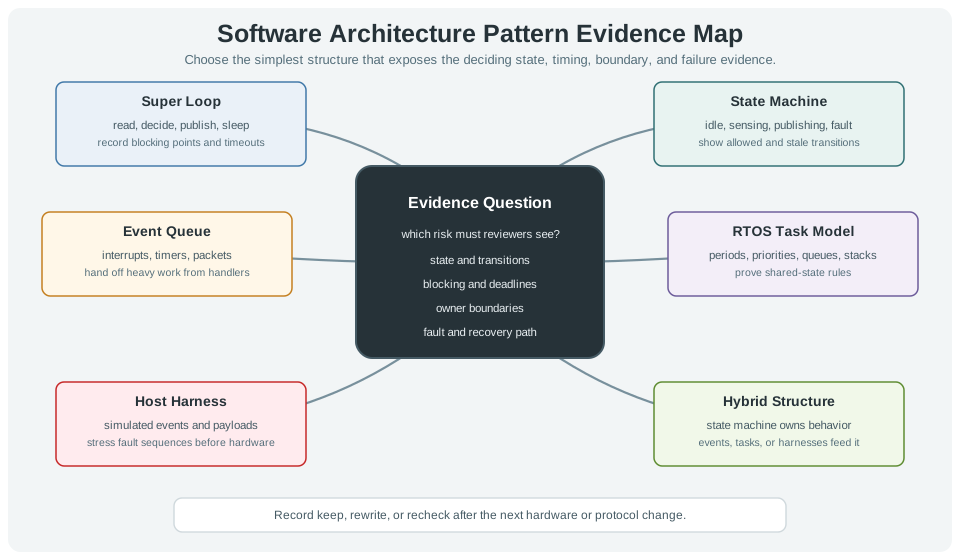
The choices in Figure 19.3 follow the risk a reviewer must see. A super loop can expose one read-decide-publish-sleep sequence if blocking points are bounded. A state machine makes allowed, stale, and recovery transitions visible. An event queue lets interrupts and timers hand heavy work to normal code, while an RTOS task model needs proof of periods, priorities, queues, and shared state. A host harness can stress event and fault sequences before each run reaches hardware. The hybrid option keeps behavior in a state machine and feeds it through events or tasks. Choose the simplest form that exposes the needed state, timing, boundary, and failure evidence.
Whatever pattern you choose, every sensor read, bus transaction, network publish, storage write, update check, and wait path should have a bounded behavior or a documented reason why it does not yet need one.
Use small examples to prove the boundary before copying a full framework.
enum class NodeMode { Booting, Sampling, Publishing, Sleeping, Fault };

NodeMode nextMode(NodeMode mode, bool sampleReady, bool publishOk, bool fault) {
  if (fault) return NodeMode::Fault;
  switch (mode) {
    case NodeMode::Booting: return NodeMode::Sampling;
    case NodeMode::Sampling: return sampleReady ? NodeMode::Publishing : NodeMode::Sampling;
    case NodeMode::Publishing: return publishOk ? NodeMode::Sleeping : NodeMode::Fault;
    case NodeMode::Sleeping: return NodeMode::Sampling;
    case NodeMode::Fault: return NodeMode::Fault;
  }
  return NodeMode::Fault;
}
Pair the state machine with a driver boundary and an event handoff:
First, Driver interface: return typed readings with units and validity flags, not raw global variables. Next, Pure processing: convert ADC, calibration, filtering, threshold checks, and payload formatting into deterministic functions. Then, Event queue: keep interrupts and callbacks short; enqueue or flag work, then process it in normal context. After that, Bounded retry: limit publish attempts, log each attempt, and convert blocking retry loops into state transitions when responsiveness matters. Finally, Configuration record: validate sample interval, pins, thresholds, and site settings before a run becomes evidence.
Review rule: procedural loops, state machines, objects, queues, functional transforms, and RTOS tasks are useful only when each one has a named job and a testable boundary.
19.9 Timing and Shared-State Review
This section: Timing and Shared-State Review — Most architecture bugs hide in time and shared state.
Most architecture bugs hide in time and shared state. The prototype should show which work can block, which work must be quick, and which data can be shared safely.
Figure 19.4 divides an interrupt response into handler, queue, state, and slow-work intervals.
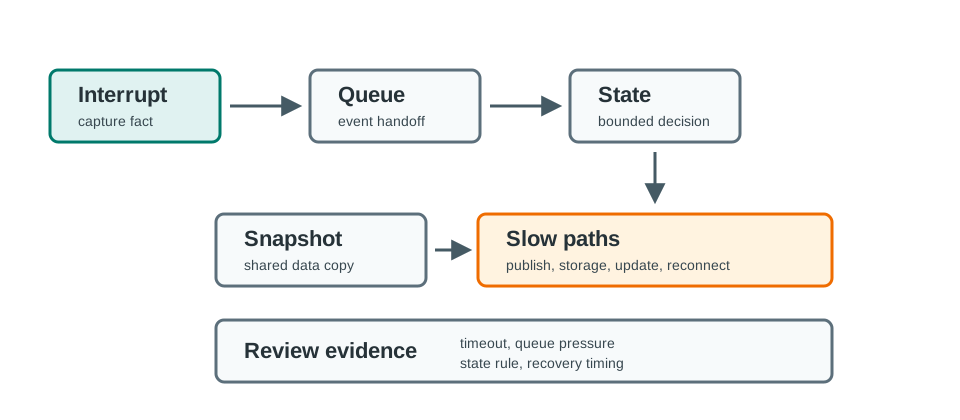
The greenhouse trace in Figure 19.4 separates a quick door interrupt from slower publish work. The handler captures a timestamp and minimal fact, then queues it. The main loop takes that input, lets the state machine decide, and only then reaches the gateway publish path. The labeled time gaps call for measurements of handler, queue, state, and slow-path delay on the target board. Queue depth, drop policy, and loop duration also need records before a timing claim is made. The queue owns input facts and the state machine owns decisions, so a network wait cannot quietly become the rule for urgent state changes.
Review these risks:
19.10 Greenhouse Ventilation Controller
This section: Greenhouse Ventilation Controller — A team is prototyping firmware for a greenhouse ventilation controller.
A team is prototyping firmware for a greenhouse ventilation controller. The device reads temperature, humidity, and door state, drives a fan relay, reports status to a gateway, and must recover safely if a sensor or gateway is unavailable.
19.10.1 Stage 1: Super Loop for First Evidence
The first slice uses a simple ordered loop: read inputs, decide fan state, publish status, record log, wait. This proves the drivers, payload fields, and basic control rule. The team records where blocking can occur and keeps the loop intentionally small.
19.10.2 Stage 2: State Machine for Behavior
Introduce the states idle, ventilating, sensor_fault, gateway_offline, and manual_override so the ventilation controller’s operating behavior can be reviewed explicitly. The state machine owns fan decisions, while drivers supply readings and validity flags and the gateway path publishes status. This separation makes the reason for a decision visible when sensor or communication conditions change.
Give each transition a reason, timeout expectation, and recovery rule. Keep logs, counters, or trace points from normal and fault runs beside these rules, showing which input led to each state change. Review stale readings, an unavailable gateway, and manual override through the declared state ownership. The resulting evidence describes behavior and recovery beyond the ordered function calls of the first loop, providing a basis for the later event handoff.
19.10.3 Stage 3: Event Queue for Inputs
Door interrupts, timer ticks, fan-current alerts, and gateway messages become events that carry input facts into the main loop. Handlers capture the minimal information needed and enqueue it; the state machine owns the resulting decisions and state changes. This separates input capture from application behavior, making event and fault sequences easier to test through a host harness.
The handoff still needs timing and failure evidence. Measure handler duration, queue delay, state-processing time, and loop duration on the target board. Record queue depth, the policy for dropped events, and who reports overflow. Slow gateway publication remains a separate responsibility whose blocking behavior needs review. Adding a queue makes ownership visible, but responsiveness must be checked during normal operation and gateway faults.
19.10.4 Stage 4: Task Model Only if Needed
If gateway communication, display update, and sensor sampling become independent blocking responsibilities, the team may move to a task model. That decision requires evidence: queue contracts, stack or memory headroom, shared-state rules, and fault behavior.
prototype=greenhouse-vent-controller
architecture_question=can the firmware expose control state and fault recovery clearly?
current_pattern=state machine with event queue
driver_boundary=temp_humidity, door, fan_relay, gateway_status
states=idle, ventilating, sensor_fault, gateway_offline, manual_override
events=timer_tick, sensor_ready, door_changed, publish_failed, override_command
normal_run=read sensors, update state, drive fan, publish status
fault_run=sensor missing, gateway unavailable, relay feedback mismatch
shared_state_rule=event queue owns input facts; state machine owns decisions
handoff=keep states, events, payload samples, and fault cases; repeat timing check on target
19.11 Architecture Review Record
This section: Architecture Review Record — Leave a record that another engineer can replay or challenge.
Leave a record that another engineer can replay or challenge. A diagram alone is not enough; the record must say which pattern was chosen, what it proved, and what remains unproven.
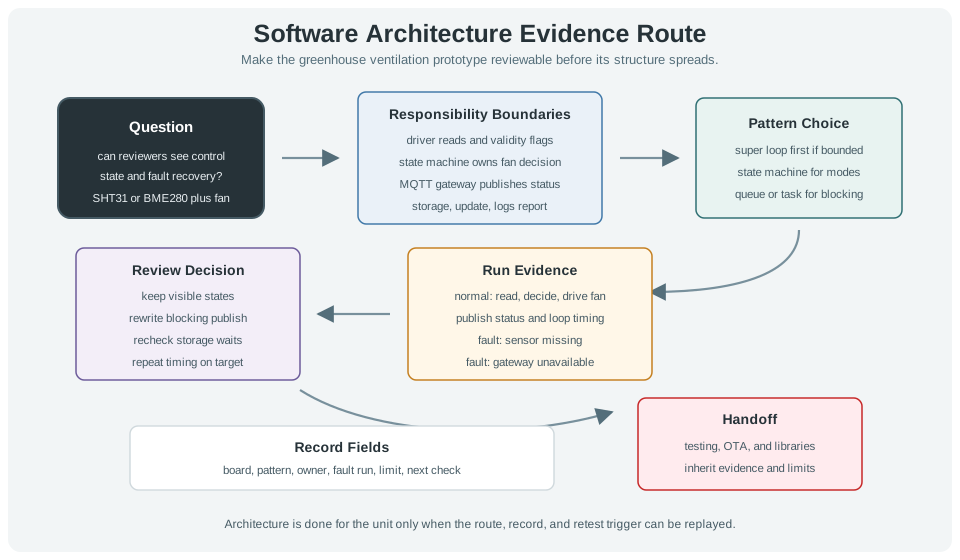
Figure 19.5 keeps the greenhouse state-machine choice tied to replayable runs.
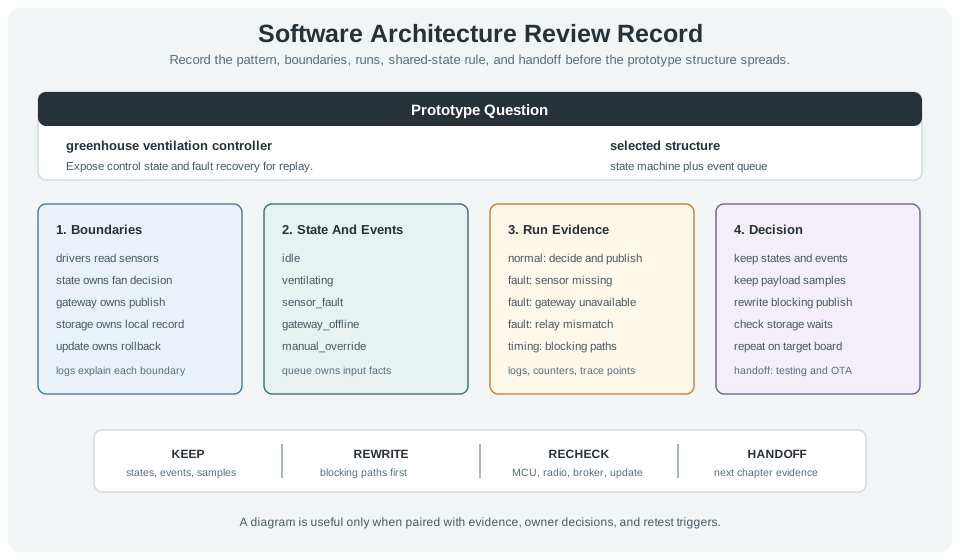
The worked greenhouse record in Figure 19.5 makes the chosen structure reviewable. Drivers read sensors, the state machine owns fan decisions, and the gateway, storage, and update paths each have a named boundary. The event queue owns incoming facts, including a missing sensor or unavailable gateway, before state changes are made. Normal and fault runs keep logs, counters, and trace points with the selected pattern. The decision section keeps states, events, and payload samples, but marks blocking publish work for rewrite and storage waits for checking. A target-board rerun and testing or OTA handoff remain explicit, so the diagram alone is not treated as proof.
Use this template:
prototype=
architecture_question=
selected_pattern=
responsibility_boundaries=
state_or_event_model=
normal_run_evidence=
fault_run_evidence=
blocking_paths=
shared_state_rule=
timing_evidence=
observability_evidence=
keep=
rewrite=
repeat_check_when=
next_chapter_handoff=
review_owner=
review_date=
19.12 Knowledge Check
This section: Knowledge Check
19.13 Common Failure Patterns
This section: Common Failure Patterns
19.14 Summary
This section: Summary — First, Architecture patterns are evidence tools for timing, state, failure, and handoff risk.
First, Architecture patterns are evidence tools for timing, state, failure, and handoff risk. Next, Use responsibility boundaries before choosing a pattern. Then, Super loops, state machines, event queues, RTOS tasks, host harnesses, and hybrids all have valid prototype roles. After that, Review blocking paths, interrupt handoff, queue pressure, shared state, priority risk, and recovery timing. Finally, Record what to keep, rewrite, check again, and hand off to the library, testing, OTA, and best-practice chapters.
19.15 Key Takeaway
This section: Key Takeaway — A useful software architecture separates hardware access, application logic, communication, configuration, and diagnostics so prototypes can evolve without rewrites.
A useful software architecture separates hardware access, application logic, communication, configuration, and diagnostics so prototypes can evolve without rewrites.
19.16 What’s Next
This section: What’s Next
Find help
3 reviewed answers.
Where should I start in a module?
Open the module page from the sidebar to see its chapters in order. Use the module map to return to a topic you need.
Modules and pathsReviewed
What can I try when a project does not work?
Check the symptom, then work through the diagnostic steps. Keep the error message and the smallest example that reproduces it.
When you are stuckReviewed
How do interactive examples work?
Use the interactive guide to check how examples and simulations work before changing your project.
Interactive examples guideReviewed