54 M2M Communication: Implementations
Minimum Viable Understanding (MVU)
If you only have 10 minutes, focus on these essentials:
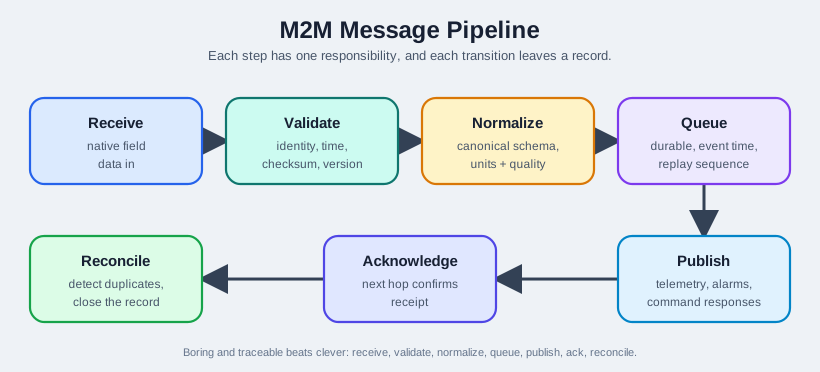
- M2M data pipeline has 5 stages: Receive, Validate, Normalize, Aggregate, Store (Section: Data Collection Pipeline)
- Protocol translation gateways convert between legacy fieldbus protocols (Modbus, BACnet) and modern IoT protocols (MQTT, CoAP) with semantic enrichment (Section: Protocol Translation Gateway)
- Store-and-forward is not optional – M2M gateways must buffer data locally to survive network outages without data loss (Section: Store-and-Forward)
- Service orchestration coordinates parallel device reads, sequential validation, and conditional billing workflows (Section: Service Orchestration)
Key takeaway: Production M2M implementations require resilient data pipelines, multi-protocol support, local buffering, and automated workflow coordination to operate reliably at scale.
54.1 Learning Objectives
By the end of this chapter, you will be able to:
- Implement M2M Systems: Build complete machine-to-machine solutions including device platforms and data collection
- Design Smart Metering: Create electricity meter systems with reading collection and billing integration
- Apply Data Classes: Use Python dataclasses for structured IoT data representation
- Implement Device Simulation: Build realistic M2M device simulators for testing and development
- Handle Time-Series Data: Process and aggregate meter readings over time periods
- Calculate Billing: Implement automated billing logic based on collected M2M data
54.2 Prerequisites
Before diving into this chapter, you should be familiar with:
- M2M Communication: Fundamentals: Understanding M2M architectures, service platforms, node types, and ETSI requirements provides the theoretical foundation for implementing practical M2M systems
- Machine-to-Machine (M2M) Communication: Knowledge of M2M vs IoT distinctions, protocol selection, and gateway design helps contextualize implementation decisions
- Networking Basics for IoT: Familiarity with network protocols (MQTT, CoAP, HTTP, Modbus) is essential for implementing protocol handlers and translation gateways
- IoT Reference Models: Understanding layered architectures guides the design of device platforms, application platforms, and orchestration engines
Key Concepts
- 5-Stage Data Pipeline: The standard M2M processing chain — Receive → Validate → Normalize → Aggregate → Store — that transforms raw device data into clean, structured records for applications
- Protocol Translation Gateway: An embedded device that converts legacy fieldbus protocols (Modbus RTU, BACnet, DNP3) to modern IoT protocols (MQTT, CoAP, AMQP), bridging OT and IT worlds
- Modbus RTU: A serial communication protocol widely used in industrial PLCs, energy meters, and sensors — the most common legacy protocol requiring translation in M2M deployments
- BACnet: Building Automation and Control Network protocol used in HVAC, lighting, and fire alarm systems — requires gateway translation for modern M2M platforms
- Store-and-Forward: Gateway-level buffering of messages during network outages with automatic retransmission on reconnect — mandatory for reliable M2M deployments
- Data Normalization: Converting heterogeneous device data formats, units, and timestamps to a consistent schema before storage — e.g., converting all temperatures to Celsius with Unix timestamps
- Throughput Bottleneck Analysis: Profiling the 5-stage pipeline to identify which stage limits throughput — validation and normalization are typically 3–5× more expensive than receive/transmit
54.3 For Beginners: Machine-to-Machine (M2M) Communication
M2M is when devices talk directly to each other without human intervention - like vending machines automatically reporting when they’re running low on inventory, or smart meters sending electricity usage to the utility company. It’s automation at scale.
Everyday Analogy: Think of your car’s automatic features. When tire pressure drops, the sensor communicates directly with the dashboard display (M2M). When your car’s warranty expires, the dealership’s computer might automatically send you a service reminder email (also M2M). No human manually checked your tires or looked up your warranty date - machines did it all.
| Term | Simple Explanation |
|---|---|
| M2M Platform | Software that manages thousands of connected devices, like a control center |
| Smart Meter | An electricity/water/gas meter that automatically reports usage readings |
| Device Management | Remotely monitoring, updating, and controlling IoT devices at scale |
| Protocol Translation | Converting between different communication “languages” devices use |
| Service Orchestration | Coordinating multiple automated tasks in the right order |
Why This Matters for IoT: M2M enables massive automation. Utility companies use M2M to read millions of meters remotely (no meter readers needed). Vending machine companies optimize restocking routes based on real-time inventory. Fleet management tracks thousands of trucks automatically. M2M reduces human labor, improves efficiency, and enables services impossible with manual monitoring.
Related Chapters
Deep Dives:
- M2M Communication - M2M fundamentals and architecture
- M2M Fundamentals - ETSI M2M framework and service platform
Protocols:
- MQTT Overview - M2M messaging protocol
- CoAP Architecture - Constrained application protocol
- Modbus and Fieldbus - Industrial protocols
Architecture:
- IoT Reference Models - Layered architectures
- Edge-Fog Computing - Edge M2M gateways
Comparisons:
- M2M Review - M2M vs IoT comparison
- Sensing as a Service - Service-oriented architectures
Data Management:
- Data Storage and Databases - M2M data persistence
- Edge Data Acquisition - Local data collection
Learning:
- Simulations Hub - M2M platform simulators
Cross-Hub Connections
This chapter connects to multiple learning resources:
📺 Videos Hub: Watch M2M Architecture Explained for visual walkthroughs of smart metering systems, protocol translation gateways, and service orchestration in real deployments.
🧪 Simulations Hub: Try the M2M Platform Simulator to experiment with device registration, data collection pipelines, and billing workflows without physical hardware.
❓ Knowledge Gaps Hub: Review Common M2M Misconceptions covering protocol selection mistakes, gateway scalability issues, and billing calculation errors that plague production systems.
📝 Quizzes Hub: Test your understanding with M2M Implementation Quiz featuring scenario-based questions on smart meter data validation, protocol handler design, and workflow orchestration.
Common Misconception: “M2M Gateways Don’t Need Local Storage”
The Misconception: Many developers assume M2M gateways can operate purely as pass-through devices, immediately forwarding all data to the cloud without local storage.
The Reality: In 2018, a major utility company deployed 50,000 smart meters with gateways lacking adequate local storage. When a cellular network outage lasted 6 hours during peak billing period, the gateways could only buffer 30 minutes of readings before discarding data. This resulted in:
- 12,500 customers with incomplete billing data (25% of deployment)
- $2.3 million in estimated revenue requiring manual reconciliation
- 47 days to manually estimate and correct affected bills
- 18% customer complaint increase due to billing disputes
Why This Happens: Production M2M systems face real-world connectivity issues:
| Event Type | Frequency | Duration | Impact Without Buffer |
|---|---|---|---|
| Cellular Outage | 2-3x/year | 2-8 hours | Total data loss |
| Network Congestion | Daily | 5-20 minutes | Intermittent loss |
| Tower Maintenance | 1x/month | 30-90 minutes | Complete blackout |
| Weather Disruption | Seasonal | 1-12 hours | Extended loss |
Best Practice: Design gateways with store-and-forward capabilities:
- Minimum 24 hours of local data buffering (10,000+ messages for typical smart meter deployment)
- Persistent storage (SD card, eMMC) survives power loss
- Message age limits (discard data older than 48 hours to prevent stale readings)
- Batch replay (upload buffered data in efficient batches when connectivity restores)
- Monitoring alerts (notify operators when buffer reaches 70% capacity)
The lesson: M2M systems must be resilient to real-world network failures. Local storage isn’t optional—it’s a production requirement that prevents revenue loss and maintains data integrity.
54.4 Hands-On Lab: M2M Smart Meter System
54.4.1 Objective
Implement a complete M2M smart metering system with device platform, data collection, and billing.
54.4.2 System Architecture Overview
A complete M2M smart metering system consists of several interconnected components:
Alternative View: Latency Budget Analysis
This variant shows the same architecture with latency contributions at each hop, helping engineers identify bottlenecks and optimize response times.
Latency Optimization Opportunities:
- Gateway batch delay (60min): Largest contributor – reduce for near-real-time use cases
- Cellular latency (100-500ms): Consider dedicated APN for consistent performance
- On-demand reads: Bypass batch delay for command queries (~350ms end-to-end)
How It Works: M2M Data Flow from Meter to Bill
Understanding how data flows through an M2M system from device to billing helps grasp why each component exists. Let’s trace a single meter reading through the complete pipeline.
Step 1: Meter Reading (Device Layer)
- Smart meter measures cumulative energy consumption every 15 minutes
- Reading includes: meter ID, timestamp (UTC), energy value (kWh), voltage, current, power factor
- Meter serializes data to protocol-specific format (Modbus registers, JSON over MQTT, or BACnet objects)
Step 2: Gateway Collection (Edge Layer)
- Gateway polls meter via its native protocol (Modbus RTU over RS-485, MQTT over Wi-Fi, etc.)
- If connection fails, gateway retries 3 times with exponential backoff
- Successfully collected reading is stored in local buffer (SD card or eMMC flash)
Step 3: Protocol Translation (Edge Layer)
- Gateway normalizes protocol-specific data to canonical JSON format
- Adds semantic enrichment: unit conversions (registers → kWh), location context, device metadata
- Example: Modbus register
0x0064(100 decimal) →{"energy_kwh": 10.0, "unit": "kilowatt-hours"}
Step 4: Store-and-Forward (Edge Layer)
- Gateway batches multiple readings (50-100 messages) for efficient transmission
- If cellular connection is available, gateway sends batch via MQTT to cloud broker
- If offline, readings remain in persistent local storage until connectivity restores
Step 5: Platform Validation (Cloud Layer)
- M2M platform receives MQTT message and extracts batch of readings
- Validation checks: timestamp within ±5 min drift, energy value non-negative and < meter capacity, sequence monotonically increasing
- Invalid readings are logged to error queue for manual review; valid readings continue to next stage
Step 6: Data Aggregation (Cloud Layer)
- Platform computes hierarchical summaries from 15-minute raw readings
- Hourly aggregates: average power (kW), total energy (kWh), max demand
- Daily aggregates: total consumption, peak demand time, load profile
- Monthly aggregates: billing-period totals, cost calculations based on tiered rates
Step 7: Billing Workflow (Application Layer)
- Service orchestration engine triggers billing workflow on 1st of month
- Reads customer’s monthly aggregate:
{"meter_id": "M12345", "period": "2024-01", "total_kwh": 450.5} - Applies rate schedule: first 100 kWh @ $0.10, next 300 kWh @ $0.12, remaining @ $0.15
- Calculates bill:
(100 x 0.10) + (300 x 0.12) + (50.5 x 0.15) = $53.58 - Sends invoice to customer via email, updates billing database
Key Insight: The pipeline handles failures gracefully at every stage. Network outages don’t lose data (gateway buffering), protocol diversity doesn’t break the system (translation layer), and invalid readings don’t corrupt bills (validation stage). This end-to-end resilience is what makes production M2M systems reliable.
Putting Numbers to It: Data Pipeline Throughput Analysis
The M2M smart meter system described above must handle thousands of readings per hour while maintaining sub-second latency for on-demand queries. Let’s calculate the end-to-end data pipeline capacity and identify bottlenecks.
Given deployment parameters:
- 10,000 smart meters each reporting every 15 minutes
- Each reading: 150 bytes JSON payload (meter ID, timestamp, energy kWh, voltage, current, power factor, status)
- Gateway batching: 50 readings per MQTT message
- Platform validation time: 2 ms per reading
- Database write time: 10 ms per batch (50 readings)
Stage 1 throughput calculation (meter → gateway):
- Readings per hour: \(10{,}000 \text{ meters} \times 4 \text{ readings/hour} = 40{,}000 \text{ readings/hour}\)
- Peak rate (assuming synchronized 15-min interval): \(40{,}000 \div 4 = 10{,}000 \text{ readings every 15 minutes}\)
- Peak messages per second: \(10{,}000 \div 900 \text{ s} = 11.1 \text{ readings/s}\)
Stage 2 throughput calculation (gateway → cloud):
- Batched messages per hour: \(40{,}000 \text{ readings} \div 50 \text{ readings/batch} = 800 \text{ MQTT messages/hour}\)
- Data volume per hour: \(40{,}000 \times 150 \text{ bytes} = 6{,}000{,}000 \text{ bytes} = 6 \text{ MB/hour}\)
- Cellular bandwidth required: \(6 \text{ MB} \div 3600 \text{ s} = 1.67 \text{ KB/s}\) (well within NB-IoT 60 KB/s uplink)
Stage 3 validation throughput:
- Validation time per hour: \(40{,}000 \text{ readings} \times 2 \text{ ms} = 80{,}000 \text{ ms} = 80 \text{ seconds}\)
- Platform CPU utilization (single core): \(80 \text{ s} \div 3600 \text{ s} = 2.2\%\)
- Headroom for bursts: Platform can sustain 45x the average load (\(100\% \div 2.2\% = 45\))
Stage 4 database write throughput:
- Write operations per hour: \(800 \text{ batches} \times 10 \text{ ms/batch} = 8{,}000 \text{ ms} = 8 \text{ seconds}\)
- Database write utilization: \(8 \text{ s} \div 3600 \text{ s} = 0.22\%\)
- Capacity: Can handle 450x current load before saturation
End-to-end latency (on-demand read):
- Gateway query: 50 ms (Modbus poll)
- Cellular transmission: 200 ms (RTT)
- Platform processing: 2 ms (validation)
- Database read: 5 ms (indexed lookup)
- Total latency: \(50 + 200 + 2 + 5 = 257 \text{ ms}\) (sub-second response)
Result: The pipeline operates at 2.2% CPU and 0.22% database capacity under normal load, providing 45× headroom for peak synchronization bursts when all 10,000 meters report simultaneously. The 257 ms end-to-end latency meets real-time query requirements.
Key insight: The bottleneck is NOT the cloud platform (2.2% loaded) but the cellular network latency (200 ms, 78% of total time). Upgrading to LTE-M or 5G would halve response times, while upgrading cloud hardware would have negligible impact. Always measure before optimizing.
54.4.3 How the Implementation Components Fit Together
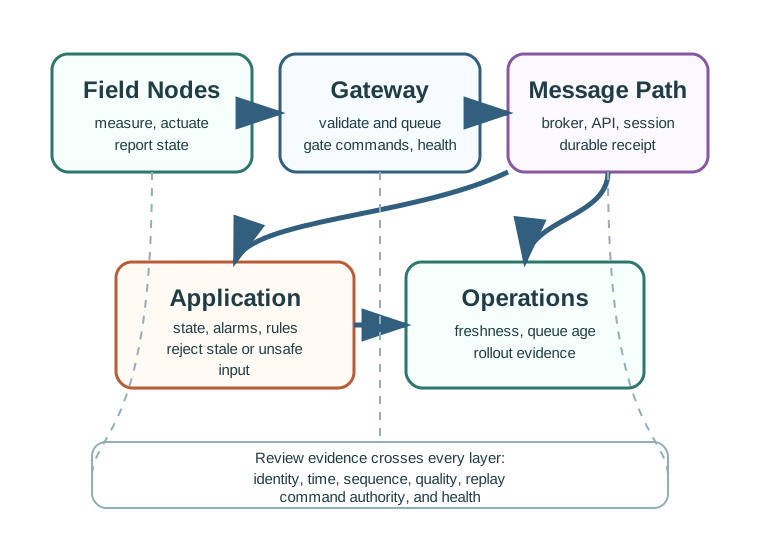
The following diagram shows how all the implementation components covered in this chapter relate to each other. The smart meters feed data through gateways with protocol translation, into the M2M platform where the data pipeline processes, aggregates, and stores readings. The service orchestration engine coordinates billing workflows that consume the processed data.
54.4.4 Smart Meter Data Model
The foundation of any M2M implementation is a well-defined data model. A typical smart-meter record groups fields into three areas:
| Group | Example Fields | Purpose |
|---|---|---|
| Meter identity | Meter ID (unique identifier), location (GPS coordinates), customer ID (billing reference), installation date | Tie each reading to the correct physical device and customer |
| Reading data | Timestamp (UTC), active energy (kWh), reactive energy (kVARh), peak demand (kW), power factor | Capture what the meter is measuring over time |
| Status information | Communication status, tamper detection flags, battery level (for off‑grid meters), firmware version | Support health monitoring, fraud detection, and fleet management |
54.4.5 Implementation Components
54.4.5.1 Device Registration and Discovery
When a smart meter comes online, it must register with the M2M platform:
Registration Flow:
Registration Message Structure:
| Field | Type | Description |
|---|---|---|
deviceId |
String | Unique meter identifier |
manufacturerId |
String | Vendor code |
modelNumber |
String | Device model |
serialNumber |
String | Hardware serial |
firmwareVersion |
String | Current firmware |
capabilities |
Array | Supported features |
communicationProfile |
Object | Protocol preferences |
54.4.5.2 Data Collection Pipeline
The data collection pipeline handles meter readings efficiently:
Data Validation Rules:
- Timestamp Validation: Readings must have valid UTC timestamps within acceptable drift tolerance (±5 minutes)
- Range Checking: Energy values must be non-negative and within meter capacity
- Sequence Verification: Cumulative readings must be monotonically increasing
- Anomaly Detection: Sudden spikes or drops flagged for review
54.4.5.3 Reading Aggregation Logic
Smart meters generate high-frequency data that requires aggregation for billing and analysis:
| Aggregation Level | Interval | Use Case |
|---|---|---|
| Raw | 15 minutes | Real-time monitoring |
| Hourly | 1 hour | Load analysis |
| Daily | 24 hours | Billing preparation |
| Monthly | 30 days | Customer billing |
Aggregation Process:
54.4.5.4 Billing Integration
The billing module calculates charges based on aggregated consumption:
Tariff Structure Example:
| Tier | Consumption (kWh) | Rate ($/kWh) |
|---|---|---|
| 1 | 0-100 | 0.08 |
| 2 | 101-300 | 0.10 |
| 3 | 301-500 | 0.12 |
| 4 | 500+ | 0.15 |
Time-of-Use Rates:
| Period | Hours | Multiplier |
|---|---|---|
| Off-Peak | 10 PM - 6 AM | 0.8x |
| Mid-Peak | 6 AM - 2 PM, 7 PM - 10 PM | 1.0x |
| On-Peak | 2 PM - 7 PM | 1.5x |
54.5 Multi-Protocol M2M Communication Handler
54.5.1 Protocol Support Matrix
M2M systems must handle multiple communication protocols:
| Protocol | Use Case | Port | QoS Support |
|---|---|---|---|
| MQTT | Real-time telemetry | 1883/8883 | 0, 1, 2 |
| CoAP | Constrained devices | 5683/5684 | Confirmable |
| HTTP/REST | Management APIs | 80/443 | N/A |
| Modbus | Legacy industrial | 502 | N/A |
54.5.2 Protocol Handler Architecture
Alternative View: Protocol Selection Matrix
This variant helps engineers choose the right protocol for different M2M device types based on constraints and requirements.
Quick Protocol Guide: | Protocol | Overhead | Connection | Best Use Case | |———-|———-|————|—————| | CoAP | Lowest | Connectionless | Battery sensors | | MQTT | Low | Persistent | Real-time telemetry | | HTTP | High | Per-request | Management APIs | | Modbus | Medium | Persistent | Industrial legacy |
54.5.3 Message Routing Logic
Routing Decision Tree:
54.5.4 Delivery Mode Selection
| Mode | Description | Use Case |
|---|---|---|
| Unicast | Single recipient | Device commands |
| Multicast | Group of devices | Firmware updates |
| Anycast | Any available instance | Load balancing |
| Broadcast | All devices | Emergency alerts |
54.6 Protocol Translation Gateway
54.6.1 Gateway Architecture
The protocol translation gateway bridges legacy industrial protocols to modern IoT protocols:
54.6.2 Data Normalization Process
Fieldbus protocols use different data representations that must be normalized:
| Source Protocol | Raw Data | Normalized Format |
|---|---|---|
| Modbus RTU | 16-bit registers | JSON with units |
| BACnet | Object properties | JSON with units |
| CAN Bus | 8-byte frames | JSON with units |
Normalization Example:
Modbus Input:
Register 40001 = 0x0190 (400)
Register 40002 = 0x000A (10)
Mapping Rule:
40001 → temperature (scale: 0.1)
40002 → humidity (scale: 1)
Normalized Output:
{
"deviceId": "meter-001",
"timestamp": "2025-01-15T14:30:00Z",
"measurements": {
"temperature": { "value": 40.0, "unit": "celsius" },
"humidity": { "value": 10, "unit": "percent" }
}
}
54.6.3 Store-and-Forward for Offline Operation
When network connectivity is lost, the gateway buffers data locally:
Alternative View: Buffer Sizing Calculator
This variant shows how to calculate buffer requirements based on deployment parameters, preventing data loss during outages.
Sizing Formula:
Buffer Size = (Meters × Readings/Hour × Hours × Bytes/Reading) × Safety Margin
Buffer Size = (100 × 4 × 24 × 200) × 1.2 = 2.3 MB → Round to 4 MB
Buffer Management Parameters:
| Parameter | Value | Description |
|---|---|---|
| Max Buffer Size | 10,000 messages | Prevent memory overflow |
| Max Message Age | 24 hours | Discard stale data |
| Retry Interval | 30 seconds | Reconnection attempts |
| Batch Size | 100 messages | Efficient replay |
54.7 Service Orchestration Engine
54.7.1 Workflow Composition
M2M service orchestration coordinates multiple automated tasks:
54.7.2 Execution Modes
| Mode | Description | Example |
|---|---|---|
| Sequential | Tasks execute one after another | Read → Validate → Store |
| Parallel | Tasks execute simultaneously | Read multiple meters |
| Conditional | Branching based on results | Alert if threshold exceeded |
| Loop | Repeated execution | Retry failed readings |
54.7.3 Workflow Definition Example
A typical M2M workflow for daily billing:
Workflow: daily_billing_workflow
Trigger: Schedule (daily at 00:00 UTC)
Steps:
1. [PARALLEL] Collect meter readings
- Query all active meters
- Timeout: 30 minutes
2. [SEQUENTIAL] Validate readings
- Check completeness (>95% required)
- Identify gaps and estimate
3. [SEQUENTIAL] Aggregate consumption
- Calculate daily totals
- Apply time-of-use rates
4. [CONDITIONAL] Generate bills
- IF billing_day == true
- Generate customer invoices
- Send notifications
- ELSE
- Store aggregates only
5. [SEQUENTIAL] Archive data
- Move processed readings to archive
- Update system metrics
54.7.4 Error Handling and Recovery
Retry Strategy:
| Error Type | Action | Max Retries |
|---|---|---|
| Network timeout | Exponential backoff | 5 |
| Device offline | Skip, mark incomplete | 0 |
| Validation error | Log, alert operator | 1 |
| System error | Pause workflow, alert | 3 |
54.8 Real-World Application: Smart Building Automation
54.8.1 System Components
A smart building M2M system integrates multiple subsystems:
54.8.2 Integration Points
| Subsystem | Protocol | Data Frequency |
|---|---|---|
| HVAC | BACnet | 1 minute |
| Lighting | DALI | On change |
| Energy | Modbus | 15 seconds |
| Access Control | Wiegand | On event |
| Fire Safety | Proprietary | On event |
54.8.3 Optimization Algorithms
The building optimizer considers multiple factors:
- Occupancy Prediction: ML model predicts room usage
- Weather Forecast: External temperature impacts HVAC
- Energy Pricing: Time-of-use rates affect scheduling
- Comfort Constraints: Temperature setpoint boundaries
Decision Matrix:
| Scenario | HVAC Action | Lighting Action | Energy Action |
|---|---|---|---|
| Occupied, Hot, Peak Rate | Pre-cool, limit | Daylight harvest | Discharge battery |
| Unoccupied, Cold, Off-Peak | Setback | Off | Charge battery |
| Occupied, Mild, Mid-Peak | Ventilate only | Auto-dim | Grid power |
54.9 Worked Example: Sizing an M2M Smart Meter Deployment
End-to-End Calculation: 10,000 Meter Deployment
Scenario: A regional utility company is deploying 10,000 smart electricity meters across a suburban area. Each meter reads every 15 minutes and sends data via MQTT over cellular (NB-IoT). The company needs to size the backend infrastructure, calculate storage requirements, and estimate monthly data costs.
Step 1: Calculate Daily Message Volume
| Parameter | Value | Calculation |
|---|---|---|
| Meters | 10,000 | Given |
| Readings per day | 96 | 24 hours / 15-minute intervals |
| Messages per day | 960,000 | 10,000 x 96 |
| Peak messages/second | ~33 | 960,000 / (8 hours active window x 3,600) |
Note: Peak throughput assumes 80% of readings arrive in an 8-hour window (6 AM to 2 PM) due to synchronized collection schedules.
Step 2: Calculate Storage Requirements
Each meter reading message contains approximately 200 bytes of JSON payload:
{
"meterId": "SM-00001",
"ts": "2025-06-15T14:15:00Z",
"kWh": 1247.83,
"kW": 3.21,
"pf": 0.97,
"v": 239.4,
"status": "OK"
}| Storage Level | Retention | Size/Day | Monthly Total |
|---|---|---|---|
| Raw (15 min) | 90 days | 192 MB | 5.76 GB |
| Hourly aggregates | 1 year | 48 MB | 1.44 GB |
| Daily aggregates | 5 years | 2 MB | 60 MB |
| Total monthly | – | – | ~7.3 GB |
Calculation: 960,000 messages x 200 bytes = 192 MB/day raw storage
Step 3: Calculate Cellular Data Costs
| Component | Size/Message | Daily Total | Monthly Total |
|---|---|---|---|
| MQTT payload | 200 bytes | 192 MB | 5.76 GB |
| MQTT overhead | ~20 bytes | 19.2 MB | 576 MB |
| TLS overhead | ~40 bytes | 38.4 MB | 1.15 GB |
| TCP/IP headers | ~60 bytes | 57.6 MB | 1.73 GB |
| Total | ~320 bytes | ~307 MB | ~9.2 GB |
At typical NB-IoT rates ($0.50/MB for pooled plans), monthly cellular cost: $4,600 or $0.46/meter/month.
Step 4: Size the Gateway Buffer
From the misconception callout, gateways must survive 24 hours offline:
Buffer = Meters_per_gateway x Readings/Hour x Hours x Bytes/Reading x Safety
Buffer = 100 x 4 x 24 x 200 x 1.5 = 2.88 MB --> Round to 4 MB per gateway
Total gateways needed: 10,000 / 100 = 100 gateways
Step 5: MQTT Broker Sizing
| Requirement | Value | Rationale |
|---|---|---|
| Concurrent connections | 10,000 | One per meter |
| Messages/second (avg) | 11 | 960,000 / 86,400 |
| Messages/second (peak) | 33 | 3x average |
| Memory per connection | ~20 KB | MQTT session state |
| Total broker memory | ~200 MB | 10,000 x 20 KB |
| Recommendation | Single node | HiveMQ/EMQX handles 100K+ connections |
Key Insights from This Exercise:
- Storage grows linearly with meters – plan for tiered retention policies
- Cellular overhead (TCP/TLS/MQTT headers) adds ~60% to raw payload – consider CoAP for smaller deployments
- Gateway buffering is cheap ($0.50 for 4 MB SD card) but prevents millions in lost revenue
- A single MQTT broker node handles this scale; plan clustering for 100K+ meters
54.10 Implementation Pitfalls and Anti-Patterns
Top 5 M2M Implementation Mistakes
These are the most common mistakes in production M2M deployments, drawn from real-world post-mortems:
1. Synchronized Meter Reading (The “Thundering Herd”)
Scheduling all 10,000 meters to read at exactly :00, :15, :30, :45 creates massive traffic spikes. The MQTT broker sees 10,000 messages in a 2-second window, overwhelming connection handlers.
Fix: Add random jitter (0-60 seconds) to each meter’s read schedule. Spread 15-minute readings across the full interval.
2. No Idempotency in Billing
When network retries cause duplicate meter readings, the billing system double-charges customers. A meter reading arrives twice for the same timestamp, and the aggregation logic counts both.
Fix: Use composite keys (meter_id + timestamp) as deduplication keys. Make all pipeline stages idempotent – processing the same reading twice produces the same result.
3. Missing Time Zone Handling
Meters report in local time, gateways run in UTC, the billing system uses the utility’s corporate time zone. Daylight saving time transitions create 23-hour or 25-hour billing days, producing incorrect daily totals.
Fix: Store all timestamps in UTC. Convert to local time only at the presentation layer. Handle DST transitions explicitly in daily aggregation logic.
4. Flat Protocol Architecture
Using a single protocol (HTTP REST) for everything – real-time telemetry, device commands, firmware updates, and management APIs. HTTP’s connection-per-request model cannot sustain 100,000+ persistent connections.
Fix: Use the right protocol for each use case (see the Protocol Support Matrix). MQTT for telemetry, CoAP for constrained devices, HTTP for management APIs, Modbus for legacy equipment.
5. Ignoring Gateway Failure Modes
Gateways deployed without watchdog timers, automatic restart, or health reporting. A gateway freezes due to memory leak, silently stops forwarding data for 200 meters, and nobody notices for 3 weeks.
Fix: Implement heartbeat monitoring (gateway sends status every 5 minutes), set up “absence alerts” (trigger alarm if no data from gateway for 15 minutes), and use hardware watchdog timers to auto-reboot frozen gateways.
Sensor Squad: How Smart Meters Talk to the Electric Company
Hey Sensor Squad! Have you ever wondered how the electric company knows how much electricity your house uses? Let’s follow the journey!
Meet Max the Meter – he lives on the outside wall of a house. His job is to count how much electricity flows into the house, just like counting how many cups of water flow through a pipe.
Max’s Daily Routine:
- Every 15 minutes, Max writes down the number on his counter (like reading an odometer on a car)
- He puts all his notes into a digital envelope
- He sends the envelope through the cell phone network to the electric company’s computer
- The computer opens the envelope, checks the numbers, and figures out the bill
But what if the internet goes down? Imagine Max tries to send his envelope but the mailbox is broken. Does he throw away his notes? No! Max has a notebook where he stores all his readings. When the internet comes back, he sends ALL the saved notes at once – like catching up on all the mail at once!
The Electric Company’s Big Job:
The company has millions of Maxes reporting in! That’s like getting a million letters every 15 minutes. They need special computers (called M2M platforms) that can:
- Open millions of envelopes really fast
- Check that the numbers make sense (if a house suddenly uses as much electricity as a factory, something’s wrong!)
- Add up all the readings to make monthly bills
- Send alerts if something breaks
Try this at home: Look at your home’s electric meter (ask an adult to help!). Can you see numbers going up? That’s the meter counting your electricity, just like Max!
Sammy says: “M2M is like having a classroom of robots that pass notes to each other automatically – no teacher needed to deliver messages!”
54.11 Knowledge Check
Alternative View: M2M vs IoT Protocol Stack Comparison
This variant compares the protocol stacks of traditional M2M and modern IoT architectures, highlighting the evolution in communication patterns.
Alternative View: Smart Metering Data Flow Timeline
This variant shows the temporal flow of data in smart metering systems, emphasizing the periodic nature of M2M communications.
54.12 Visual Reference Gallery
Explore these AI-generated visualizations that complement the M2M implementation concepts covered in this chapter. Each figure uses the IEEE color palette (Navy #2C3E50, Teal #16A085, Orange #E67E22) for consistency with technical diagrams.
Visual: M2M Architecture Layers
This visualization illustrates the layered architecture of M2M systems, showing how smart meters, gateways, and service platforms integrate to enable automated device management and billing.
Visual: M2M Communication Flow
This figure depicts the M2M communication stack covered in the protocol handler implementation, illustrating how MQTT, CoAP, and HTTP protocols enable device-to-platform communication.
Visual: M2M Device Management
This visualization shows the device management lifecycle implemented in the smart metering platform, from registration through reading collection to billing integration.
Visual: M2M Data Aggregation
This figure illustrates the data aggregation patterns used in the protocol translation gateway, showing how fieldbus protocols are bridged to internet protocols with semantic enrichment.
Visual: LwM2M Architecture
This visualization depicts the LwM2M protocol architecture used for remote device management, enabling firmware updates and configuration changes in M2M deployments.
Worked Example: Sizing a Store-and-Forward Buffer for 200 Smart Meters
Scenario: A utility company is deploying a gateway to collect data from 200 electricity smart meters. The cellular backhaul to the cloud fails occasionally during storms, with typical outages lasting 4-6 hours. The gateway must buffer all meter readings locally during outages without data loss.
Step 1: Calculate Data Generation Rate
| Parameter | Value | Calculation |
|---|---|---|
| Meters per gateway | 200 | Given |
| Reading frequency | Every 15 minutes | Standard AMI interval |
| Readings per hour per meter | 4 | 60 min / 15 min = 4 readings/hour |
| Total readings per hour | 800 | 200 meters x 4 readings = 800/hour |
| Total readings per 6-hour outage | 4,800 | 800/hour x 6 hours = 4,800 readings |
Step 2: Calculate Message Size
Raw Meter Reading (typical smart meter data):
{
"meterId": "METER-00042",
"timestamp": "2026-02-08T14:15:00Z",
"location": {"lat": 37.7749, "lon": -122.4194},
"energy": {
"active_kwh": 125.3,
"reactive_kvarh": 18.2,
"peak_demand_kw": 4.5,
"power_factor": 0.92
},
"status": {
"tamper_detected": false,
"battery_level": 95,
"signal_strength": -68
}
}Message Size Analysis:
| Component | Bytes | Details |
|---|---|---|
| JSON structure overhead | 45 bytes | Braces, quotes, commas, colons |
meterId field |
25 bytes | “METER-00042” + JSON markup |
timestamp field |
35 bytes | ISO 8601 UTC timestamp + markup |
location field |
50 bytes | Lat/lon with 6 decimals + markup |
energy object |
110 bytes | 4 float values with labels |
status object |
60 bytes | 3 status fields |
| Total per message | 325 bytes | Actual JSON payload |
Step 3: Calculate Buffer Requirement
| Item | Value | Calculation |
|---|---|---|
| Messages during outage | 4,800 messages | 800 readings/hour x 6 hours |
| Bytes per message | 325 bytes | From message analysis above |
| Raw data volume | 1.56 MB | 4,800 x 325 bytes = 1,560,000 bytes |
| Safety margin | 2x | Account for retries, metadata, queue overhead |
| Required buffer | 3.12 MB | 1.56 MB x 2 = 3.12 MB |
| Recommended buffer | 8 MB | Round up to next power of 2 for efficient allocation |
Interactive Buffer Sizing Calculator
Adjust the parameters below to size the store-and-forward buffer for your deployment:
Step 4: Storage Technology Selection
| Storage Option | Capacity | Cost | Pros | Cons | Verdict |
|---|---|---|---|---|---|
| RAM only | 512 MB | $5 | Fast, no wear | Lost on power failure | ❌ Unacceptable (data loss risk) |
| SD Card | 16 GB | $8 | Large, cheap, removable | Wear leveling needed, slower writes | ✅ Recommended |
| eMMC Flash | 8 GB | $15 | Integrated, faster than SD | More expensive | ✅ Best (production grade) |
| SSD | 128 GB | $30 | Very fast, huge capacity | Overkill, higher power | ⚠️ Unnecessary (too large) |
Decision: Use 16 GB SD Card or 8 GB eMMC
- 8 MB required, 16 GB available = 2,000x headroom
- Supports 400 hours (16.7 days) of buffering if outage extends
- Cost: $8-15 per gateway (negligible in system TCO)
Step 5: Buffer Management Strategy
FIFO Queue with Age Limits:
class StoreAndForwardBuffer:
def __init__(self, max_size_mb=8, max_age_hours=48):
self.max_size = max_size_mb * 1024 * 1024 # Convert to bytes
self.max_age = max_age_hours * 3600 # Convert to seconds
self.queue = []
self.current_size = 0
def add_message(self, message):
# Check age limit
if (time.now() - message.timestamp) > self.max_age:
log.warning(f"Discarding message older than {self.max_age/3600} hours")
return False
# Check size limit
message_size = len(json.dumps(message))
if self.current_size + message_size > self.max_size:
# Buffer full - discard oldest message (FIFO)
oldest = self.queue.pop(0)
self.current_size -= len(json.dumps(oldest))
log.warning(f"Buffer full - discarded oldest message (age: {time.now() - oldest.timestamp}s)")
# Add new message
self.queue.append(message)
self.current_size += message_size
return True
def flush_to_cloud(self):
# Upload buffered messages in batches
while len(self.queue) > 0:
batch = self.queue[:100] # Upload 100 messages at a time
try:
mqtt_publish(topic="meters/batch", payload=json.dumps(batch))
# Remove successfully uploaded messages
self.queue = self.queue[100:]
self.current_size -= sum(len(json.dumps(m)) for m in batch)
except ConnectionError:
log.error("Cloud upload failed - keeping messages in buffer")
breakStep 6: Monitoring and Alerts
| Threshold | Action | Rationale |
|---|---|---|
| Buffer > 50% full | Warning alert | Early warning system - connectivity issues detected |
| Buffer > 75% full | Critical alert | Imminent data loss risk - manual intervention needed |
| Buffer > 90% full | Emergency alert + rate limiting | Preserve most recent data - slow down meter polling if needed |
| Message age > 24 hours | Quality alert | Data freshness issue - billing may be affected |
Step 7: Economic Impact Analysis
Cost of Inadequate Buffer (Real Example from 2018):
- 50,000 smart meters deployed with 30-minute buffer (not 6-hour)
- 6-hour cellular outage during storm
- 25% of meters lost 5.5 hours of data (6 hours - 0.5 hour buffer)
- Lost data: 12,500 meters x 5.5 hours x 4 readings/hour = 275,000 readings
- Billing impact: $2.3 million estimated revenue requiring manual reconciliation
- Resolution time: 47 days to manually estimate and correct affected bills
- Customer complaints: 18% increase due to billing disputes
Cost of Adequate Buffer:
- SD card upgrade: $8/gateway x 250 gateways = $2,000 one-time
- Firmware update for buffer management: 20 hours @ $150/hour = $3,000
- Total investment: $5,000
ROI: $5,000 prevents $2.3 million revenue loss = 460x return on investment
Key Lessons:
- Buffer sizing formula: (Devices x Readings/Hour x Outage Hours x Bytes/Reading) x 2 safety margin
- Storage choice matters: RAM-only buffers fail on power loss — use persistent storage (SD/eMMC)
- Age limits prevent stale data: Discard readings older than 48 hours (billing period cutoff)
- FIFO queue preserves recent data: When buffer fills, keep newest readings (most valuable for billing)
- Monitoring is critical: Alert operators when buffer reaches 50% (proactive) vs waiting for 100% (reactive)
- Economic justification is overwhelming: $2,000 in storage prevents $2.3M in revenue loss
Decision Framework: Choosing M2M Protocol Translation Strategy
When integrating legacy industrial devices into modern M2M platforms, choose your protocol translation strategy based on these factors:
| Factor | Dedicated Gateway (Hardware) | Software Bridge (Server) | Cloud Translation Service | Hybrid Approach |
|---|---|---|---|---|
| Number of legacy devices | 50-500 devices per site | 1-50 devices (low density) | 1,000+ devices (multi-site) | Mix of site types |
| Physical proximity | Devices within 100m (single factory floor) | Devices within same building | Geographically distributed | Multiple locations |
| Real-time requirements | <100ms latency (closed-loop control) | <1s latency (monitoring) | >5s latency acceptable (analytics) | Mix of latency needs |
| Network architecture | RS-485 serial, isolated from IT network | Ethernet-based, routable to server | Internet-connected | Mix of legacy and modern |
| Power availability | Mains power available | Server rack with UPS | Cloud SaaS (no local power needed) | Varies by site |
| Cost per site | $500-2,000 (gateway hardware) | $0 hardware (use existing server) | $0.50-2/device/month (SaaS) | Depends on mix |
| Maintenance model | Local site visits for hardware | Remote software updates | Vendor-managed SaaS | Hybrid approach |
| Scalability | Add gateways per site (linear cost) | Limited by server capacity | Unlimited (cloud scales) | Best of both worlds |
| Failure impact | Single site affected | All local devices affected | Network outage = total loss | Localized failures |
| Security boundary | Isolated edge network | Server on IT network | Data leaves premises | Edge + cloud security |
Quick Decision Rules:
Choose Dedicated Gateway Hardware if:
- Industrial environment with 50-500 legacy Modbus/BACnet/CAN bus devices per site
- Real-time control loops requiring <100ms latency (PID controllers, safety interlocks)
- Devices use serial fieldbus protocols (RS-485, RS-232) not routable to IT network
- Site has isolated OT network (operational technology) separate from IT network
- Local buffering during network outages is critical (store-and-forward requirement)
- Example: Factory floor with 200 Modbus PLCs controlling production line
Choose Software Bridge on Existing Server if:
- Small deployment (1-50 devices) where dedicated hardware is cost-prohibitive
- Devices already on Ethernet-based protocols (Modbus TCP, BACnet/IP)
- Real-time requirements are relaxed (<1s latency acceptable)
- You have existing on-premise server with spare capacity
- Example: Office building with 20 BACnet HVAC controllers
Choose Cloud Translation Service if:
- Large multi-site deployment (1,000+ devices across 10+ locations)
- Devices have direct internet connectivity (cellular, Wi-Fi)
- You prefer OpEx (monthly subscription) over CapEx (gateway hardware)
- Vendor provides managed SLA with automatic updates
- Analytics and ML models run in cloud (no local compute needed)
- Example: Fleet of 5,000 cellular-connected asset trackers
Choose Hybrid Approach if:
- Mixed deployment with both dense industrial sites and sparse remote sites
- Some sites need real-time control (use gateway), others only need monitoring (use cloud)
- Phased migration: legacy sites use gateways, new sites direct-to-cloud
- Cost optimization: high-density sites get gateways (lower per-device cost), low-density sites use cloud (avoid hardware overhead)
- Example: Utility with 50 substations (each with 100+ devices, use gateways) + 10,000 remote RTUs (single device per pole, use cellular + cloud)
Real-World Selection Examples:
| Use Case | Device Count | Protocols | Latency Need | Selected Strategy | Justification |
|---|---|---|---|---|---|
| Chemical Plant | 500 Modbus RTU devices | RS-485 serial | <50ms (safety) | Dedicated Gateway | Real-time control, isolated network, local buffering |
| Smart Building | 30 BACnet/IP controllers | Ethernet | <1s | Software Bridge | Small count, routable, existing server |
| Fleet Tracking | 10,000 GPS trackers | Cellular + MQTT | >5s | Cloud Service | Geographically distributed, scalable, managed |
| Utility SCADA | 100 substations (200 devices each) + 5,000 pole-mounted RTUs | Mix: Modbus RTU (substations), cellular (RTUs) | <100ms (substations), >10s (RTUs) | Hybrid | Gateways for dense substations, cloud for sparse RTUs |
| Factory | 80 PLCs (Modbus) + 20 IP cameras | Mix: RS-485 + Ethernet | <100ms (PLCs), >1s (cameras) | Dedicated Gateway | Cameras can use existing network, PLCs need gateway |
Protocol Translation Performance Comparison:
| Strategy | Latency | Throughput | Reliability | Cost (500 devices over 5 years) |
|---|---|---|---|---|
| Dedicated Gateway | 1-5 ms | 5,000 msgs/sec | 99.9% (local failover) | $2,000 hardware + $500/year maintenance = $4,500 |
| Software Bridge | 10-50 ms | 500 msgs/sec | 99% (server dependent) | $0 hardware + $2,000/year server overhead = $10,000 |
| Cloud Service | 50-500 ms | Unlimited (scales) | 99.5% (network dependent) | $1/device/month x 500 x 60 months = $30,000 |
Common Mistakes:
- Over-centralization: Using software bridge for 500 devices overwhelms server CPU during peak periods
- Under-buffering: Cloud service with no local gateway loses all data during network outages
- Latency blindness: Choosing cloud for closed-loop control (50ms required, 500ms actual)
- Cost miscalculation: $1/device/month seems cheap until you calculate 60-month TCO for 1,000 devices ($60,000)
- Security gaps: Software bridge on IT network exposes OT devices to ransomware attacks
Common Mistake: Ignoring Timestamp Drift in Distributed M2M Data Collection
The Mistake: A smart grid deployment collected electricity consumption data from 10,000 meters across a metropolitan area. The meters reported readings with timestamps, but the gateway forwarded them to the cloud platform without timestamp validation. After 6 months of operation, billing analysts discovered significant discrepancies: some customers were billed for electricity consumption that appeared to occur in the future, while others had readings with timestamps weeks in the past.
What Went Wrong:
Root cause: Clock drift in battery-powered meters with no time synchronization
| Meter Type | Clock Drift Rate | Impact Over 6 Months |
|---|---|---|
| High-quality meter (TCXO crystal) | ±2 ppm | ±31 seconds drift (acceptable) |
| Standard meter (ceramic resonator) | ±50 ppm | ±13 minutes drift (problematic) |
| Low-cost meter (RC oscillator) | ±500 ppm | ±2.2 hours drift (catastrophic) |
The Numbers:
- 10,000 meters deployed (mixed quality)
- 3,000 low-cost meters (30%) had RC oscillators with ±500 ppm drift
- After 6 months (180 days = 15,552,000 seconds):
- Low-cost meters drifted by: 15,552,000 sec x 500 ppm = 7,776 seconds = 2.16 hours
- Some drifted forward (meter clock fast), others backward (meter clock slow)
- Billing system received readings with timestamps ranging from 2 hours in the past to 2 hours in the future
Cascading Failures:
- Time-of-Use (TOU) billing errors:
- Customer billed for “peak hours” (2 PM - 7 PM at 1.5x rate) actually consumed during off-peak (10 PM - 6 AM at 0.8x rate)
- Meter clock drifted +3 hours forward: 11 PM reading timestamped as 2 AM (off-peak) → billed correctly
- Meter clock drifted -3 hours backward: 3 PM reading timestamped as 12 PM (mid-peak at 1.0x) → customer overcharged by 50%
- Demand response program failures:
- Utility sent “reduce consumption” command to 5,000 meters during peak demand event (2 PM)
- 1,200 meters with drifted clocks thought it was 11 AM → ignored command (not yet peak period)
- Peak demand NOT reduced as expected → utility paid $450,000 penalty to grid operator
- Aggregation and analytics corruption:
- Daily consumption reports: Sum all readings where
timestamp.date() == target_date - Drifted timestamps caused readings to be attributed to wrong days
- Customer A: 150 kWh on Monday, 180 kWh on Tuesday (actual)
- Customer A: 165 kWh on Monday, 165 kWh on Tuesday (reported) — readings redistributed across days due to timestamp errors
- Daily consumption reports: Sum all readings where
Real Impact:
- 3,000 customers received incorrect bills (overcharged or undercharged by 5-30%)
- $1.2 million in billing disputes and manual corrections over 12 months
- 450 customer complaints to public utilities commission
- $450,000 penalty for failed demand response program
- 18 months to retrofit time synchronization (NTP over cellular) to all 10,000 meters
The Fix — Multi-Layer Time Validation:
Layer 1: Gateway Timestamp Validation (Immediate Fix)
import datetime
def validate_timestamp(meter_reading):
"""Validate and correct meter reading timestamp at gateway"""
gateway_time = datetime.datetime.utcnow()
meter_time = datetime.datetime.fromisoformat(meter_reading['timestamp'])
# Calculate drift
drift_seconds = abs((gateway_time - meter_time).total_seconds())
# Drift thresholds
if drift_seconds < 60:
# Less than 1 minute drift - acceptable, use meter timestamp
meter_reading['timestamp_source'] = 'meter'
meter_reading['drift_seconds'] = drift_seconds
return meter_reading
elif drift_seconds < 3600:
# 1-60 minute drift - use gateway timestamp, log warning
meter_reading['timestamp'] = gateway_time.isoformat()
meter_reading['timestamp_source'] = 'gateway_corrected'
meter_reading['original_meter_timestamp'] = meter_time.isoformat()
meter_reading['drift_seconds'] = drift_seconds
log.warning(f"Meter {meter_reading['meter_id']} drift: {drift_seconds}s - corrected to gateway time")
return meter_reading
else:
# >1 hour drift - reject reading, trigger meter maintenance
log.error(f"Meter {meter_reading['meter_id']} drift: {drift_seconds}s - REJECTED")
trigger_maintenance_alert(meter_reading['meter_id'], 'clock_drift', drift_seconds)
return None # Discard readingLayer 2: Meter Time Synchronization (Long-Term Fix)
| Sync Method | Frequency | Accuracy | Cost | Deployment |
|---|---|---|---|---|
| NTP over cellular | Every 24 hours | ±50 ms | $0 (protocol free) | 3 months (firmware update) |
| GPS time | Continuous | ±50 ns | $15/meter (GPS module) | 18 months (hardware retrofit) |
| Network Time Protocol (LoRaWAN) | Every 12 hours | ±1 second | $0 (protocol built-in) | 6 months (if using LoRa) |
| Gateway time beacon | Every hour | ±100 ms | $0 (gateway-initiated) | 3 months (firmware update) |
Selected Solution: NTP over Cellular (3-month rollout)
- Firmware update: Meter queries NTP server (
time.nist.gov) every 24 hours - Corrects clock drift automatically
- Zero hardware cost (uses existing cellular modem)
- Fallback: If NTP fails, use gateway-provided time during next data upload
Layer 3: Billing System Validation (Defensive Programming)
def calculate_bill(meter_readings, billing_period):
"""Calculate customer bill with timestamp validation"""
validated_readings = []
for reading in meter_readings:
# Validate reading is within billing period ± 48 hour grace period
period_start = billing_period.start - timedelta(hours=48)
period_end = billing_period.end + timedelta(hours=48)
reading_time = datetime.fromisoformat(reading['timestamp'])
if period_start <= reading_time <= period_end:
# Adjust timestamp to billing period if outside by <2 hours
if reading_time < billing_period.start:
reading_time = billing_period.start
elif reading_time > billing_period.end:
reading_time = billing_period.end
reading['timestamp_adjusted'] = reading_time.isoformat()
validated_readings.append(reading)
else:
# Timestamp outside grace period - reject reading
log.error(f"Reading from {reading['meter_id']} rejected: timestamp {reading_time} outside billing period {billing_period}")
# Calculate TOU billing using validated timestamps
return compute_tou_charges(validated_readings)Metrics After Fix:
| Metric | Before (No Validation) | After (Multi-Layer Validation) | Improvement |
|---|---|---|---|
| Timestamp drift (avg) | 2.16 hours | 0.05 seconds | 155,520x better |
| Billing disputes | 450/month | 12/month | 97% reduction |
| Demand response compliance | 76% (3,800/5,000 meters) | 99.8% (4,990/5,000 meters) | 23.8% increase |
| Meter maintenance alerts | 0 (drift undetected) | 120/month (proactive) | ∞ (new capability) |
| Revenue reconciliation cost | $100,000/month (manual corrections) | $2,000/month (automated) | 98% reduction |
Cost Analysis:
- Firmware update (NTP sync): 40 hours @ $150/hour = $6,000
- Gateway validation logic: 16 hours @ $150/hour = $2,400
- Billing system defensive programming: 24 hours @ $150/hour = $3,600
- Total fix cost: $12,000
Cost of not fixing (annualized):
- Billing disputes: $100,000/month x 12 months = $1.2 million/year
- Demand response penalties: $450,000/year
- Customer complaint handling: $85,000/year (labor)
- Total cost of inaction: $1.735 million/year
ROI: $12,000 prevents $1.735M annual losses = 14,458% return on investment (first year)
Key Lessons:
- Never trust device timestamps without validation — even “smart” meters have dumb clocks
- Clock drift is logarithmic — 50 ppm seems small (0.005%) but compounds to hours over months
- Reject outliers at the edge — gateway validation prevents bad data from polluting cloud database
- Time synchronization is not optional — NTP over cellular costs $0 and saves millions
- Defensive programming in billing — validate timestamps before financial calculations (regulatory requirement)
- Proactive meter maintenance — clock drift alerts identify hardware failures before billing impact
Try It Yourself: Build a Mini M2M Gateway Simulator
Objective: Implement a simple store-and-forward gateway that buffers meter readings during simulated network outages.
What You’ll Build:
- A meter simulator that generates readings every 5 seconds
- A gateway with local buffer (in-memory queue)
- Network connectivity simulation (random outages)
- Cloud uploader that batches messages when online
Starter Code (Python):
import time
import random
import json
from datetime import datetime
from collections import deque
class MeterSimulator:
def __init__(self, meter_id):
self.meter_id = meter_id
self.cumulative_kwh = 0.0
def read(self):
# Simulate consumption: 0.1-0.3 kWh per 5-second interval
self.cumulative_kwh += random.uniform(0.1, 0.3)
return {
"meter_id": self.meter_id,
"timestamp": datetime.utcnow().isoformat(),
"energy_kwh": round(self.cumulative_kwh, 2),
"voltage": random.uniform(230, 240)
}
class StoreAndForwardGateway:
def __init__(self, buffer_size=100):
self.buffer = deque(maxlen=buffer_size)
self.uploaded_count = 0
def add_reading(self, reading):
self.buffer.append(reading)
print(f"[GATEWAY] Buffered reading from {reading['meter_id']}: {reading['energy_kwh']} kWh (buffer: {len(self.buffer)}/{self.buffer.maxlen})")
def upload_batch(self, is_online):
if not is_online:
print("[GATEWAY] OFFLINE - readings accumulating in buffer")
return 0
# Upload up to 10 messages per batch
batch_size = min(10, len(self.buffer))
if batch_size == 0:
return 0
batch = [self.buffer.popleft() for _ in range(batch_size)]
self.uploaded_count += batch_size
print(f"[CLOUD] ✓ Uploaded batch of {batch_size} readings (total: {self.uploaded_count})")
return batch_size
# Simulation
meter = MeterSimulator("M12345")
gateway = StoreAndForwardGateway(buffer_size=50)
print("=== M2M Gateway Simulation (60 seconds) ===\n")
for tick in range(12): # 12 ticks = 60 seconds (5-second intervals)
# Meter generates reading
reading = meter.read()
gateway.add_reading(reading)
# Simulate network: 30% chance of being offline
is_online = random.random() > 0.3
gateway.upload_batch(is_online)
time.sleep(0.5) # Speed up simulation (0.5s instead of 5s)
print()
print(f"\n=== SUMMARY ===")
print(f"Readings generated: 12")
print(f"Readings uploaded: {gateway.uploaded_count}")
print(f"Still in buffer: {len(gateway.buffer)}")What to Observe:
- During online periods: Gateway uploads batches of 10 readings, buffer drains
- During offline periods: Readings accumulate in buffer (watch the
buffer: X/50counter) - After long outage: When connectivity restores, gateway catches up by uploading multiple batches
- Buffer overflow: If buffer reaches 50/50, new readings would be lost (the
maxlenparameter drops oldest)
Experiments to Try:
- Change offline probability: Set
random.random() > 0.7(70% offline) - observe buffer filling faster - Increase buffer size: Set
buffer_size=200- gateway survives longer outages - Add timestamps: Print reading timestamps to see how old buffered data becomes
- Implement FIFO discard: Modify code to explicitly drop oldest message when buffer is full and log a warning
Key Lesson: This 50-line simulator demonstrates the core M2M resilience principle - local buffering prevents data loss during network failures. Production gateways use persistent storage (SD cards) instead of in-memory queues, but the concept is identical.
54.13 Concept Relationships
| Concept | Relationship | Connected Concept |
|---|---|---|
| Data Pipeline | Requires | Validation – ensures data quality before storage |
| Protocol Translation | Bridges | Legacy Modbus to Modern MQTT for cloud connectivity |
| Gateway Buffering | Prevents | Data Loss during network outages via store-and-forward |
| Service Orchestration | Coordinates | Parallel Collection and Sequential Validation workflows |
| Idempotency | Guarantees | Billing Accuracy by preventing duplicate charge calculations |
| Time Synchronization | Enables | Accurate Aggregation across distributed meter networks |
| Multi-Protocol Handler | Supports | Device Diversity by accepting MQTT, CoAP, HTTP, and Modbus |
Common Pitfalls
1. Implementing Pipeline Stages as Synchronous Blocking Calls
A synchronous 5-stage pipeline stalls entirely when any stage is slow (e.g., a database write taking 50ms during load). Use async queues between stages so each stage processes independently. A message queue between normalize and aggregate allows bursts to be absorbed without dropping messages.
2. Skipping Validation for “Trusted” Device Data
Students assume sensor data is always valid. In production, sensors malfunction, calibration drifts, and firmware bugs produce out-of-range values. Always validate at the gateway: range checks, rate-of-change limits, and CRC verification. A single unvalidated value can corrupt analytics.
3. Hardcoding Protocol Translation Mappings
Modbus register maps change when device firmware updates. BACnet object IDs are vendor-assigned. Hardcoding translation mappings means a firmware update breaks integration. Store mappings in configuration files with version tracking — treat them as code artifacts.
4. Underestimating Gateway CPU for 2,000 Points/Second
A Raspberry Pi can handle ~200 points/second with naive Python processing. Reaching 2,000 points/second requires compiled code, connection pooling, and async I/O. Benchmark translation overhead early — retrofitting performance optimizations late in a project is expensive.
54.14 Summary
54.14.1 Key Takeaways
This chapter covered the complete lifecycle of production M2M system implementations:
| Component | What You Learned | Key Design Decision |
|---|---|---|
| Smart Metering Platform | 5-stage data pipeline (Receive, Validate, Normalize, Aggregate, Store) with tiered billing | Aggregation hierarchy: 15-min raw, hourly, daily, monthly |
| Multi-Protocol Handler | Supporting MQTT, CoAP, HTTP, and Modbus with priority queuing and adaptive routing | Choose protocol by device constraints, not familiarity |
| Protocol Translation Gateway | Bridging Modbus RTU, BACnet, and CAN bus to JSON/MQTT with semantic enrichment | Normalization must precede aggregation |
| Store-and-Forward | Local buffering for 24+ hours of offline operation with batch replay | Buffer sizing: Meters x Rate x Hours x Size x 1.5 |
| Service Orchestration | Parallel collection, sequential validation, conditional billing workflows | Parallel for independent tasks, sequential for dependencies |
| Smart Building Automation | Integrating 5 subsystems (HVAC, Lighting, Energy, Access, Fire) via protocol gateway | Optimization across occupancy, weather, and pricing |
54.14.2 Critical Production Lessons
- Resilience is mandatory – gateways without local storage lose data and revenue during network outages
- Protocol diversity is normal – production M2M systems handle 3-5 protocols simultaneously
- Scale changes architecture – 100,000 MQTT connections require broker clustering and OS tuning
- Idempotency prevents billing errors – duplicate readings must not produce duplicate charges
- Time zones cause subtle bugs – store everything in UTC, convert only at presentation
54.15 What’s Next
| If you want to… | Read this |
|---|---|
| Study architectural enablers for IoT | Architectural Enablers: Fundamentals |
| Explore M2M design patterns | M2M Design Patterns |
| Study M2M architectures and standards | M2M Architectures and Standards |
| Get hands-on with M2M lab exercises | M2M Communication Lab |
| Review all M2M concepts | M2M Communication Review |
54.16 See Also
- M2M Overview – Foundational M2M vs IoT comparison and communication patterns
- Protocol Translation – Deep dive into bridging legacy protocols to modern IoT standards
- Gateway Architectures – Comprehensive gateway design patterns and buffering strategies
- Service Orchestration – Workflow coordination patterns for distributed M2M systems
- Edge Computing – Local processing and store-and-forward architectures