47 S2aaS Implementation Readiness
More
Depth: Practitioner
Progress saves as you read. Mark sections complete as you go; your progress appears in the sidebar.
47.1 Start Simple
This section: Start Simple — Picture a city team that lets a university reuse readings from street air monitors.
Prove One Shared Stream Can Keep Its Promise
Picture a city team that lets a university reuse readings from street air monitors. The first sample looks useful, but a later road closure moves two monitors and changes the meaning of the trend. The service owner must keep the shared record honest while people, sites, and needs change.
Write a small service promise. Name the source, place, unit, update pace, quality mark, allowed use, support owner, and end date. State who may correct a reading and who tells users about a move or gap. Keep each change tied to a version and a time.
Test a silent monitor, a moved device, an old buyer, a sudden load rise, a rule conflict, and a request to erase data. Check the weaker mode as well as the happy path. A stream that arrives on time can still be unfit if its place, age, or quality is unclear.
Keep urgent street action with the team that can see local conditions. Shared data can support study and planning, but it should not become a hidden control path without a new safety case.
This opening does not settle price or law for every user. Practitioner turns the promise into an owner and readiness record. Under the Hood examines isolation, change control, scale, recovery, and the records needed when the service grows.
Use a short release check. Can the owner name the source and user? Does each value keep its place and time? Does weak data look weak? Can access end cleanly? Does one person own each gap? If any answer is no, keep the service in trial.
Start with one sensor stream that another team wants to reuse. In S2aaS Implementation Readiness, the practical question is who owns the sensing resource, what quality is promised, and what policy keeps the service safe to consume.
47.2 Learning Objectives
This section: Learning Objectives
By the end of this chapter, you will be able to:
- Define production readiness gates for an S2aaS service.
- Assign operational ownership for quality, security, incidents, subscriptions, retention, and lifecycle work.
- Design data-quality records that help consumers judge whether a stream is fit for use.
- Identify tenant-isolation and policy-enforcement checks that must apply across the full delivery path.
- Choose scaling and resource guardrails without relying on brittle vendor pricing or fixed throughput assertions.
- Write a readiness check that blocks production launch when core controls are missing.
47.3 Prerequisites
This section: Prerequisites
This chapter builds on:
- S2aaS Implementations, which mapped platform responsibilities and proof gates.
- S2aaS Data Ownership and Privacy, which introduced rights, retention, consent, and governed reuse.
- S2aaS Concepts and Service Models, which introduced virtual sensors, discovery, and subscription lifecycle.
47.4 Concept Map
This section: Concept Map — Implementation considerations connect the service promise to the controls that keep it true in production.
Implementation considerations connect the service promise to the controls that keep it true in production.
47.4.1 Promise
Resource contract, allowed use, quality target, delivery form, retention rule, support path, and exit terms.
47.4.2 Service Proof
Freshness, completeness, calibration, provenance, error state, incident history, audit log, and test results.
47.4.3 Control
Identity, tenant isolation, policy checks, quotas, fallback behavior, lifecycle change, and operator response.
47.5 Readiness Gates
This section: Readiness Gates — Production readiness should be a sequence of gates, not a single launch meeting.
Production readiness should be a sequence of gates, not a single launch meeting. Each gate asks for proof that the service can keep a specific promise.
47.5.1 Gate 1: Service Contract
The resource is named, the owner is known, the consumer purpose is allowed, and the delivery format is documented.
47.5.2 Gate 2: Quality Record
The platform reports freshness, completeness, calibration state, provenance, and known gaps with each stream or report.
47.5.3 Gate 3: Tenant Controls
Access is isolated in identity, API scope, stream topic, storage partition, cache key, export path, support tooling, and audit.
47.5.4 Gate 4: Operations
Monitoring, incident response, revocation, retention, backup, restore, and support ownership are tested with operators.
47.5.5 Gate 5: Lifecycle Control
The team knows how to change schemas, migrate consumers, rotate secrets, retire sensors, delete data, and exit the platform.
An S2aaS service is not production-ready if the team can only demonstrate a successful request. It must also demonstrate a denied request, a degraded stream, a revoked subscription, a failed sensor, and a recoverable incident.
47.6 Operational Ownership
This section: Operational Ownership — S2aaS operations cross organizational boundaries.
S2aaS operations cross organizational boundaries. The sensor owner may control physical maintenance, the platform team may own policy enforcement, and consumers may depend on the service for their own decisions. Production planning should name the owner for each recurring task.
47.6.1 Sensor Health
Who receives device failure alerts, calibration warnings, battery or power events, and location-change notifications?
47.6.2 Data Quality
Who investigates missing readings, stale values, drift, duplicates, unit mismatches, and suspicious outliers?
47.6.3 Subscription Changes
Who approves new consumers, purpose changes, retention exceptions, higher sampling rates, and revocation requests?
47.6.4 Platform Incidents
Who triages failed APIs, queue backlogs, policy-engine errors, delayed exports, and audit-log gaps?
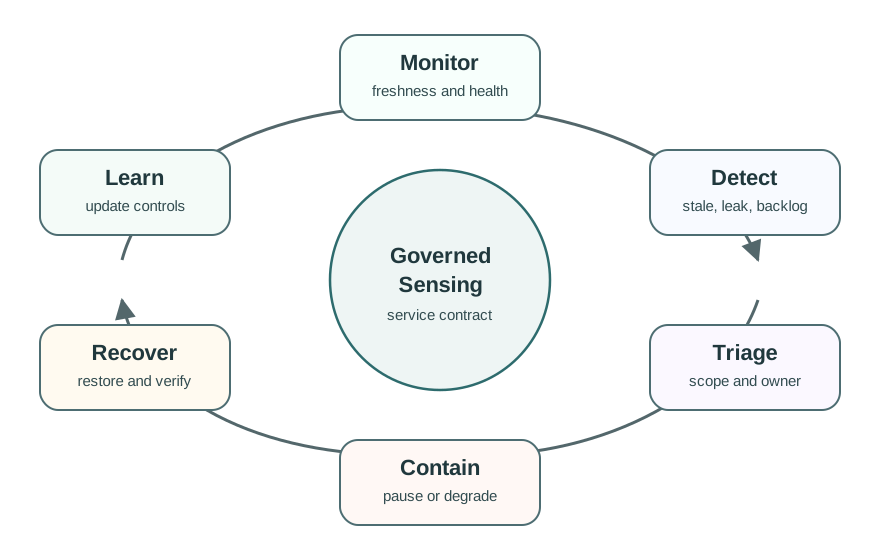
47.6.5 Runbooks and Escalation
A runbook should describe what operators do when a stream is stale, a tenant reports missing data, a policy decision seems wrong, an export job fails, or a sensor owner asks for deletion. The runbook does not need to be long. It must be specific enough that a different operator can follow it under pressure.
Minimum runbook fields:
- Trigger: what alert, customer report, audit signal, or health check starts the process.
- Scope check: which tenant, resource, policy, delivery interface, and time window are affected.
- First containment action: pause delivery, lower quality state, route to fallback, revoke access, or disable a bad stream.
- Communication path: who is informed, what uncertainty is stated, and where status is recorded.
- Recovery check: what proof confirms the service is healthy again.
- Learning item: what monitor, test, control, or documentation should change.
47.7 Data Quality and Fitness for Use
This section: Data Quality and Fitness for Use — Shared sensor data can be technically available but still unfit for a consumer’s purpose.
Shared sensor data can be technically available but still unfit for a consumer’s purpose. A comfort dashboard, safety alarm, research export, and billing-like report may all need different quality records.
47.7.1 Freshness
How old is the latest observation, and does the consumer know when it is stale?
47.7.2 Completeness
How much expected data is present, missing, duplicated, filtered, or delayed?
47.7.3 Provenance
Which physical sensor, virtual resource, transformation, aggregation rule, and version produced the output?
47.7.4 Calibration
Is the sensor within its maintenance window, and are drift or confidence flags visible?
47.7.5 Context
What unit, location or asset scope, sampling cadence, and operating condition apply?
47.7.6 Known Limits
What conditions make the stream approximate, delayed, aggregated, suppressed, or unavailable?
A platform that returns temperature = 22.1 without freshness, unit, quality state, and provenance invites misuse. Consumers need to know whether a value is current, inferred, aggregated, stale, substituted, or under inspection.
47.8 Security and Tenant Isolation
This section: Security and Tenant Isolation — Security for S2aaS is more than login.
Security for S2aaS is more than login. A reusable sensing service must enforce who can access which virtual resource, for what purpose, through which interface, for how long, and with what redistribution rights.
47.8.1 Identity Boundary
Use device identity for ingestion and consumer identity for service access. Do not let a shared credential become the only boundary between tenants.
47.8.2 Policy Boundary
Bind each request to allowed purpose, resource scope, quality level, retention, rate, export, and redistribution terms.
47.8.3 Data Boundary
Apply tenant separation to streams, tables, caches, object storage, search indexes, dashboards, and generated reports.
47.8.4 Audit Boundary
Record enough information to explain who accessed what, under which policy, with which quality state, and which delivery path.
Test a denied request as carefully as an allowed request. If an unauthorized tenant can discover a resource name, infer another tenant’s activity from timing, or receive a cached export, the isolation model is incomplete.
47.9 Scaling and Resource Guardrails
This section: Scaling and Resource Guardrails — Scaling decisions should be driven by measured bottlenecks and consumer commitments, not by generic architecture diagrams.
Scaling decisions should be driven by measured bottlenecks and consumer commitments, not by generic architecture diagrams. The goal is controlled growth: protect existing tenants while adding new resources, consumers, and delivery forms.
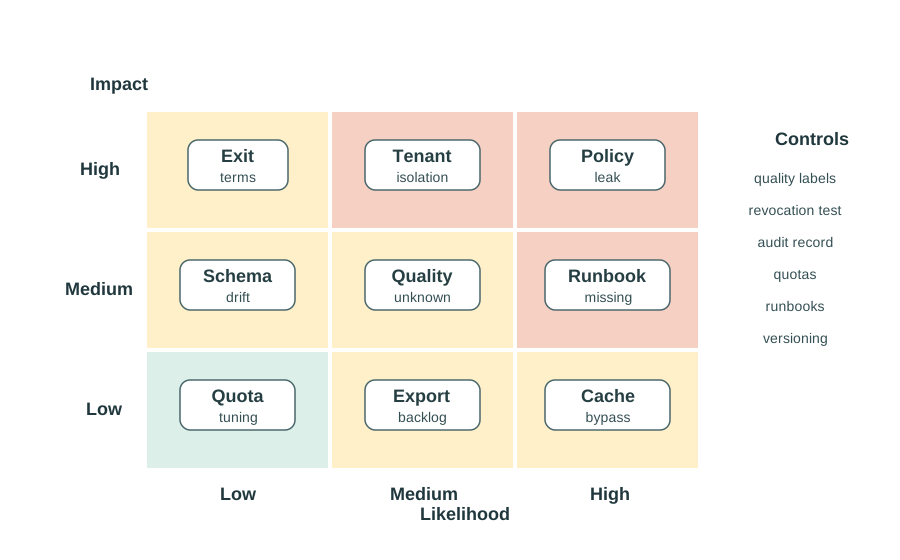
Use these guardrails before adding capacity:
- Define per-tenant quotas for request rate, stream fanout, export size, retention, and expensive query patterns.
- Use backpressure and queues so a slow consumer does not block ingestion or other tenants.
- Separate ingestion health from delivery health; a reporting delay should not silently corrupt raw observation history.
- Track the deepest bottleneck first: storage writes, stream consumers, policy checks, cache misses, export jobs, or API delivery.
- Keep degraded modes visible. Delayed, sampled, aggregate-only, or fallback data should be labeled as such.
- Check capacity changes with the service contract. A faster stream can change privacy, retention, cost, and quality assumptions.
47.10 Lifecycle and Change Control
This section: Lifecycle and Change Control — S2aaS services evolve.
S2aaS services evolve. Sensors are replaced, schemas change, policies tighten, tenants leave, and delivery interfaces are retired. Implementation planning must include change control from the start.
47.10.1 Schema Change
Version resource metadata, observation fields, units, quality labels, and API responses. Give consumers migration notice before removing fields.
47.10.2 Policy Change
Record who approved a purpose, retention, sharing, or redistribution change. Re-evaluate active subscriptions when policy changes.
47.10.3 Sensor Replacement
Keep stable virtual resources even when physical devices are replaced. Preserve provenance so consumers can see when the source changed.
47.10.4 Service Exit
Plan data export, deletion, key revocation, subscription closure, and audit retention when a tenant or sensor owner leaves.
47.11 Campus Sensing Service
This section: Campus Sensing Service — Scenario: A campus platform exposes room comfort, air quality, and occupancy-derived aggregates to facilities staff, researchers, and a student-facing comfort application.
Scenario: A campus platform exposes room comfort, air quality, and occupancy-derived aggregates to facilities staff, researchers, and a student-facing comfort application.
Implementation considerations:
- Define virtual resources for room comfort, ventilation state, and building-level occupancy aggregates.
- Keep raw occupancy-like signals restricted; expose aggregate or delayed views unless a stronger purpose is approved.
- Attach quality state to every response: fresh, delayed, estimated, maintenance, suppressed, or unavailable.
- Separate tenant access by role: facilities operations, approved research export, and student comfort view.
- Create a runbook for stale sensors, failed gateways, policy disputes, and deletion requests.
- Test revocation by removing a research subscription and confirming API, stream, export, cache, and dashboard access all stop.
- Add resource quotas so one research export cannot degrade live comfort dashboards.
- Record provenance when a physical sensor is replaced or a comfort score algorithm changes.
Decision: The service is ready for a limited pilot when quality labels, tenant isolation, policy logs, and operator runbooks are tested. It is not ready for broad reuse until revocation, deletion, incident response, capacity guardrails, and lifecycle changes are repeatable.
47.12 Production Readiness Checklist
This section: Production Readiness Checklist
- Each virtual resource has owner, steward, allowed purposes, delivery forms, retention rules, and quality states.
- Data consumers can see freshness, completeness, provenance, calibration state, and known limitations.
- Tenant isolation is enforced in APIs, streams, storage, caches, exports, dashboards, support tools, and background jobs.
- Policy checks cover purpose, rate, retention, redistribution, quality level, and revocation.
- Operators have runbooks for stale data, sensor failure, delivery delay, policy conflict, and suspected data leak.
- Degraded modes are visible to consumers and do not masquerade as normal service.
- Subscription changes and access revocation are tested end to end.
- Capacity guardrails prevent one tenant or export job from degrading others.
- Schema, sensor, policy, and interface changes have versioning and migration plans.
- Exit procedures cover export, deletion, key rotation, subscription closure, and audit retention.
47.13 Knowledge Check
This section: Knowledge Check
47.14 S2aaS Deployment Models
This section: S2aaS Deployment Models
47.14.1 Place the Shared Sensing Tasks
Imagine a city team wants to let a second service use readings from its street sensors. The owner must decide where the shared service will run and who may rely on it. A gateway is a device or service that links one network or system to another.
The city cannot offer street-sensor readings as a shared service until it says what each consumer receives and who is responsible when the reading is old or poor. Place raw sensing, gateway processing, access checks, and central publishing where their owners can enforce those promises.
47.14.1.1 Check the Reading Promise
- Which reading is being shared, and for what use?
- What age and quality limits does that use require?
- Who may see raw data and who receives an aggregate?
- Which team repairs a failed sensor, gateway, or central feed?
For each virtual resource, record its source, update time, quality label, audience, and duty owner. A consumer should see a stale or unavailable state rather than an apparently current value.
47.14.1.2 When a Feed Is Not a Service
A data feed becomes a service when access, quality, and support are agreed and backed by tested controls. Receiving readings is insufficient if consumers cannot judge their age, location, provenance, or permitted use. The service promise should name the resource, its owner, its audience, and the response to poor or unavailable data.
Deployment placement follows these responsibilities. Raw sensing, gateway processing, access checks, and central publishing belong where their owners can enforce the agreed terms. Raw occupancy-like signals remain restricted, with aggregate or delayed views exposed unless a stronger purpose is approved. Readiness therefore depends on visible quality states, accountable support, and tested access revocation as well as successful delivery.
47.14.2 Start Simple
Start with one sensor stream that another team wants to reuse. In S2aaS Deployment Models, the practical question is who owns the sensing resource, what quality is promised, and what policy keeps the service safe to consume.
47.14.3 Placement Is a Responsibility Map
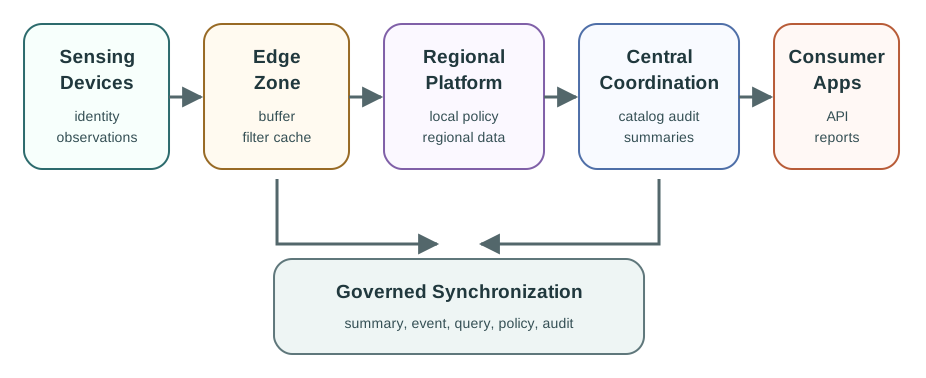
A Sensing-as-a-Service deployment model decides where each service responsibility runs: near the sensor, at a gateway, in a regional platform, in a central control plane, or in a consumer-facing application. The right model is the one that satisfies the service contract with clear placement, authority, policy, freshness, quality, and operations evidence, not the one that sounds most distributed.
Figure 47.3 shows S2aaS placement spans sensing devices, edge processing, regional platforms, central coordination, and consumers.
Central Cloud
Best when one catalog, common policy, global analysis, and a simple operations surface matter more than local autonomy.
Edge Assisted
Best when gateways need to buffer, filter, cache, or serve local consumers while central services remain authoritative.
Regional Platform
Best when locality, ownership, approval, or support boundaries require data and selected policy decisions to stay close.
Federated Edge-Cloud
Best only when local or regional nodes can safely become authoritative for defined resources and expose their freshness, quality, and audit state.
47.14.4 Write the Deployment Decision Record
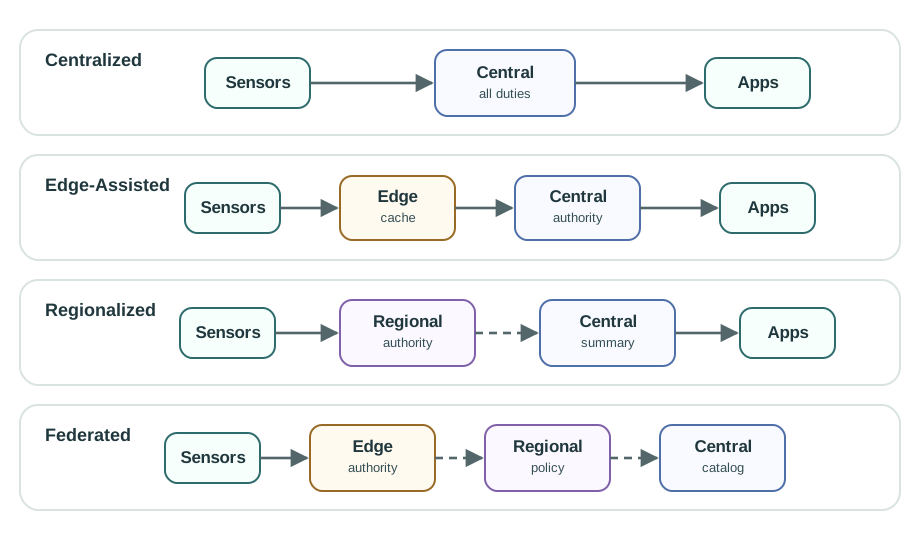
The practitioner output is a placement record that names the service promise, chosen model, accepted exceptions, and evidence needed before release. It should let a platform engineer, site owner, data steward, and support lead see why work belongs at the device, edge, regional, or central layer.
Figure 47.4 shows authority, locality, continuity, governance, and operating cost distinguish S2aaS deployment models.
Start Central When Learning
A central foundation is often the cleanest first release while the team proves virtual resources, policy checks, quality labels, audit, and consumer workflows.
Move Work Outward for Evidence
Use edge or regional placement when the service promise requires local continuity, data locality, latency-sensitive action, site authority, or reduced raw-data movement.
Do Not Hide Operations Cost
Every edge or regional node adds patching, monitoring, security, backup, conflict handling, retirement, and incident-response work.
47.14.5 Synchronize Authority, Not Just Readings
The hard part of distributed S2aaS is not moving a sensor value. It is keeping authority, quality state, policy context, freshness, revocation, and audit evidence coherent when devices, edge nodes, regional platforms, and central services do not always see the same state at the same time.
Figure 47.5 shows synchronization carries evidence and authority across S2aaS boundaries.
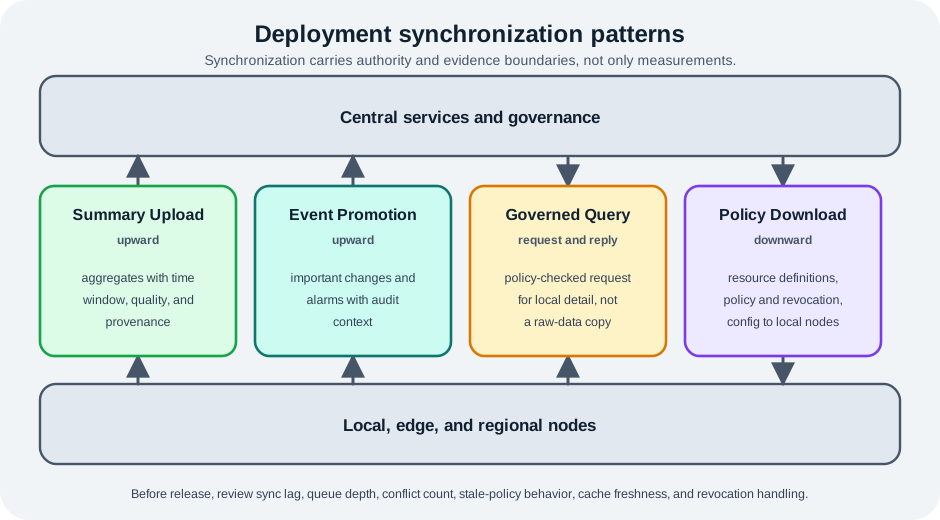
Summary Upload
Local or regional nodes publish aggregates with time window, quality state, provenance, and policy version for central discovery or portfolio reporting.
Event Promotion
Edge nodes promote important changes or alarms upward with enough context for central audit and consumer notification.
Governed Query
Central consumers ask a local authority for detail through a policy-checked query path instead of copying raw data by default.
Policy Download
Central governance distributes resource definitions, policy versions, revocation lists, and configuration changes to local nodes before they serve consumers.
47.14.6 Summary
S2aaS deployment models place service responsibilities across central, regional, and edge layers. A strong deployment record names where identity, validation, policy, storage, analytics, delivery, audit, and operations live; explains which layer is authoritative for each resource; and proves how data, summaries, events, queries, and configuration cross boundaries. Centralized deployment is a valid starting model, while edge-assisted, regional, and federated models should be justified by service evidence.
47.14.7 Key Takeaway
Do not choose cloud, edge, regional, or federated S2aaS as a slogan. Choose the placement that can prove latency, locality, quality, policy, audit, degraded-mode behavior, and ownership for the service contract.
47.14.8 See Also
S2aaS Implementation Considerations
Review tenant isolation, evidence gates, lifecycle controls, and readiness checks.
S2aaS Implementations
Connect deployment placement to platform responsibilities and service evidence.
S2aaS Multi-Layer Implementation
Trace the handoff between physical sensing, virtual resources, service rules, and consumers.
S2aaS Data Ownership
Use ownership and policy boundaries to decide what can move across deployment layers.
47.15 Concept Relationships
This section: Concept Relationships
- Service contracts define what the platform promises to consumers and sensor owners.
- Readiness gates convert those promises into records that can be checked before launch.
- Quality metadata tells consumers whether data is current, complete, calibrated, and fit for use.
- Tenant isolation prevents one consumer from seeing, inferring, or degrading another consumer’s service.
- Policy enforcement turns ownership, consent, purpose, retention, and redistribution rules into runtime checks.
- Operations runbooks make failure response repeatable across people and shifts.
- Lifecycle controls keep subscriptions, sensors, schemas, policies, and exits from drifting out of governance.
47.16 Common Pitfalls
This section: Common Pitfalls
47.16.1 Treating Monitoring as Optional
If operators cannot see freshness, backlog, error state, and policy decisions, they cannot protect consumers during incidents.
47.16.2 Testing Only the Happy Path
Production readiness checks should test denied access, stale data, failed export, revoked tenant, replaced sensor, and delayed stream behavior.
47.16.3 Confusing Scaling With Readiness
More servers do not fix missing quality metadata, weak tenant isolation, unclear ownership, or untested deletion.
47.16.4 Launching Without Exit Terms
Every subscription needs a plan for export, deletion, key revocation, audit retention, and consumer migration.
47.17 References and Further Reading
This section: References and Further Reading
- OGC SensorThings API, for modeling sensor resources, observations, features of interest, and queryable service interfaces.
- W3C SOSA/SSN, for describing sensors, observations, observed properties, procedures, and systems.
- IETF RFC 8428, for Sensor Measurement Lists (SenML) as a compact representation for sensor observations.
- oneM2M functional architecture, for common service-layer responsibilities relevant to shared sensing.
- NIST Cybersecurity Framework, for organizing security outcomes, risk management, incident response, and recovery activities.
- OWASP IoT guidance, for common security risks in connected-device and IoT service deployments.
47.18 Readiness as Stress Proof
This section: Readiness as Stress Proof — If you only need the operating rule, this layer is enough: an S2aaS service is ready when it can keep, explain, narrow, or stop its promise under normal, degraded, denied, changed, and exit conditions.
If you only need the operating rule, this layer is enough: an S2aaS service is ready when it can keep, explain, narrow, or stop its promise under normal, degraded, denied, changed, and exit conditions.
Figure 47.6 shows contract, quality, tenant, operations, and lifecycle checks form readiness gates for S2aaS deployment.
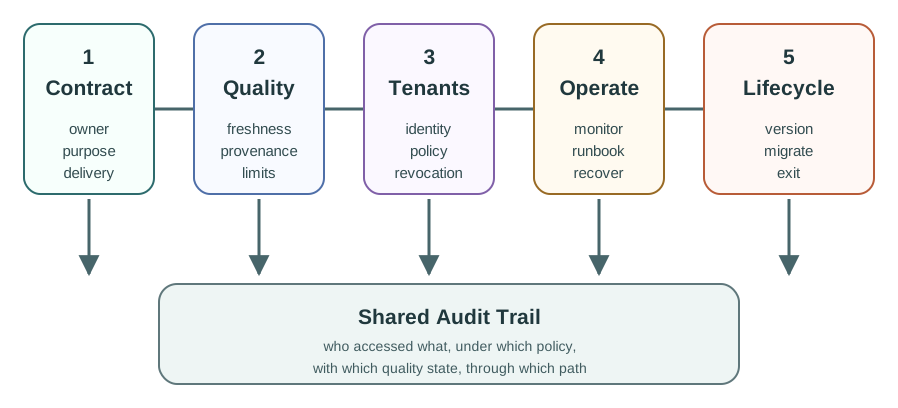
Mobile summary: A launch-ready S2aaS service proves the service contract, quality records, tenant controls, operations runbook, lifecycle controls, and shared audit trail before broad reuse depends on it.
Consider a campus environmental sensing service that sells room comfort, air quality, and occupancy-derived aggregates to facilities teams, researchers, and a student mobile application. The platform may use MQTT or HTTPS ingestion from gateways, a time-series database for observations, an API gateway for consumers, object storage for exports, and dashboards for operational review. The production question is not whether one dashboard can display a fresh CO2 value. The question is whether that value carries the service contract, tenant boundary, freshness, unit, provenance, calibration state, retention rule, and support path needed by each consumer.
Readiness therefore looks like a controlled launch file. A facilities tenant can receive near-real-time ventilation state because the purpose is operational. A research tenant receives delayed or aggregated exports because raw occupancy-like signals may expose behavior patterns. A student application receives comfort scores with suppressed rooms hidden when privacy or maintenance rules require it. If a sensor is replaced, the virtual resource remains stable but provenance changes are visible. If a subscription is revoked, API tokens, stream topics, cached exports, dashboards, support views, and scheduled jobs all stop using that tenant's scope.
Those checks are not paperwork. They are the difference between a reusable sensing service and a pile of convenient telemetry. A production S2aaS team should be able to show the allowed path, the denied path, the degraded path, the recovery path, and the exit path before broad reuse depends on the platform.
Launch promise
The contract names the resource, owner, purpose, delivery form, quality target, retention rule, support path, and exit terms.
Operating proof
Freshness, completeness, provenance, calibration state, degraded labels, failed-sensor behavior, and recovery checks travel with the service.
Control proof
Tenant isolation, denied requests, revocation, export limits, policy decisions, audit, and capacity guardrails are tested end to end.
47.19 Limited Pilot Readiness Record
This section: Limited Pilot Readiness Record — For a campus comfort service, write the pilot record as evidence the next operator can inspect.
For a campus comfort service, write the pilot record as evidence the next operator can inspect.
Start with one concrete virtual resource, such as building-a.room-204.comfort. The record should name the physical sensor or gateway source, the steward who owns calibration, the platform owner who owns API policy, the consumers allowed to use the stream, and the decision the stream is allowed to support. Then test a normal response, a stale response, a denied request, a revoked subscription, a failed export, and a sensor replacement. Each result should leave a trace in logs, quality metadata, support procedures, or audit tables.
- Resource contract: room comfort, ventilation state, and occupancy-derived aggregates have owners, purposes, delivery forms, retention windows, and quality states.
- Quality path: responses show timestamp, unit, provenance, calibration state, completeness, stale or estimated labels, and known limits.
- Isolation path: facilities, research, and student-app tenants are separated across API, stream, cache, export, dashboard, support, and audit paths.
- Failure path: operators test denied access, revoked subscriptions, failed gateways, delayed exports, stale readings, deletion requests, and sensor replacement.
- Growth path: quotas, backpressure, retention budgets, migration notice, and exit procedures protect existing consumers before capacity is expanded.
For example, a research export may run through a scheduled job that writes a compressed CSV to object storage. The readiness record should prove the job respects tenant filters, labels the time range and aggregation rule, blocks rows below a privacy threshold, writes an audit event, and deletes or disables the export when a subscription ends. A live facilities dashboard has different evidence: stream lag, missing-read counters, unit labels, gateway health, and an operator escalation path matter more than bulk export format.
The practical habit is to treat every happy-path demo as incomplete until it has a matching refusal, degradation, and recovery example. If the team cannot explain who owns a failed gateway, who approves a purpose change, how stale values are labeled, and how a consumer leaves cleanly, the pilot record should stay in limited-launch status.
Operator handoff
The runbook names who triages, who contains, who communicates uncertainty, what proves recovery, and what test or monitor changes afterward.
Launch block
Hold broad launch when any tenant can still receive stale data as normal, keep access after revocation, or depend on an unowned incident path.
47.20 Happy Paths Hide Readiness Gaps
This section: Happy Paths Hide Readiness Gaps — Happy-path tests collapse several promises into one visible success.
Happy-path tests collapse several promises into one visible success. A dashboard can update while another tenant's cache leaks, a policy engine silently falls back to allow, an export job misses deletion, or a replaced sensor changes provenance without warning.
Under the hood, an S2aaS request usually crosses more boundaries than the product screen shows. A gateway authenticates with a device certificate, a broker accepts observations, an ingestion worker validates schema, a policy service maps virtual resources to allowed purposes, a database stores raw and aggregate records, a cache accelerates common queries, an export worker writes files, and a dashboard or API returns results. Tenant isolation must hold across each of those boundaries, not only at the first login form.
- Policy bypass: API checks pass, but stream topics, exports, support tooling, or cached reports ignore the same purpose and tenant rules.
- Quality ambiguity: consumers receive a value without knowing whether it is fresh, estimated, suppressed, calibrated, or drawn from a replaced sensor.
- Operational drift: incident owners, deletion jobs, schema migration, and quota changes live in memory instead of tested records.
- Capacity coupling: a research export consumes queue, storage, policy, or cache capacity that live operational dashboards need.
The subtle failures are often created by asynchronous paths. A revoked tenant may lose API access immediately but still receive a scheduled export generated from an old job definition. A cache key may omit the tenant id or quality level. A support console may bypass policy because it was built for internal triage. A schema migration may change units or provenance while keeping the same endpoint. A queue backlog may make values look current if the dashboard only displays the latest received timestamp rather than the observation timestamp.
Production controls should make these paths testable. Use separate device and consumer identities, include tenant and purpose in cache keys, record policy decisions with resource ids and quality states, version schemas, label observation time separately from delivery time, and run revocation tests through APIs, streams, exports, dashboards, support tools, and scheduled jobs. The readiness record is strong when it proves those checks with evidence an operator can repeat after platform changes.
47.21 Summary
This section: Summary — S2aaS implementation considerations turn a working prototype into an accountable service.
S2aaS implementation considerations turn a working prototype into an accountable service. A production platform needs readiness gates, operational ownership, data-quality records, tenant isolation, policy enforcement, capacity guardrails, visible degraded modes, and lifecycle controls. The strongest readiness check does not only ask whether data can be delivered. It asks whether the platform can deny improper access, explain data quality, recover from failure, revoke a subscription, change safely, and exit cleanly.
47.22 What’s Next
This section: What’s Next
- Choose where platform work should run in S2aaS Deployment.
- Study layer handoffs in S2aaS Multi-Layer Architecture.
- Reuse design patterns in S2aaS Architecture Patterns.
- Evaluate tool and platform choices in S2aaS Implementation Platforms.
- Use S2aaS Readiness Check after completing the S2aaS section.
47.23 Key Takeaway
This section: Key Takeaway — S2aaS implementation must cover calibration, uptime, privacy, billing, tenant isolation, API design, support, and incident response.
S2aaS implementation must cover calibration, uptime, privacy, billing, tenant isolation, API design, support, and incident response. Sensor installation is only one part of the service.
Find help
3 reviewed answers.
Where should I start in a module?
Open the module page from the sidebar to see its chapters in order. Use the module map to return to a topic you need.
Modules and pathsReviewed
What can I try when a project does not work?
Check the symptom, then work through the diagnostic steps. Keep the error message and the smallest example that reproduces it.
When you are stuckReviewed
How do interactive examples work?
Use the interactive guide to check how examples and simulations work before changing your project.
Interactive examples guideReviewed