22 Digital Twin Sync and Modeling
More
Depth: Practitioner
Progress saves as you read. Mark sections complete as you go; your progress appears in the sidebar.
22.1 Start Simple
This section: Start Simple — Picture a screen model of a warehouse door.
Put a Clock on the Twin
Picture a screen model of a warehouse door. The model says the door is closed, but a delayed field update is still travelling through the system. An operator acts on the neat picture and sends a worker into an unsafe area. A model without time can look certain while being wrong.
A digital twin is a useful model linked to a real thing or process. Telemetry means the readings and status sent from that real system. Message Queuing Telemetry Transport (MQTT) is one common way to carry those updates. For each model value, keep the source, event time, arrival time, unit, quality, and model version.
Set an age limit before anyone may act. Then delay an update, deliver two changes out of order, remove a sensor, and restart the model. The display should reveal stale or conflicting state instead of quietly showing an old value as current.
No twin can copy every detail of the physical world. State what the model leaves out and which decisions remain local. The deeper sections show how update rules, conflict handling, and verification keep the model fit for a named use.
Start with one decision that would be safer if a live model stayed aligned with the physical system. In Digital Twin Sync and Modeling, the practical question is what state must be synchronized, who acts on it, and what evidence proves the twin is still fit to use.
22.2 Sync as Decision Contract
This section: Sync as Decision Contract — Digital twin synchronization keeps a digital model aligned with the physical system at the speed required by the decision.
Digital twin synchronization keeps a digital model aligned with the physical system at the speed required by the decision. It does not mean sending every sensor value as fast as possible. It means each value is fresh enough, traceable enough, and trustworthy enough for the action the twin supports.
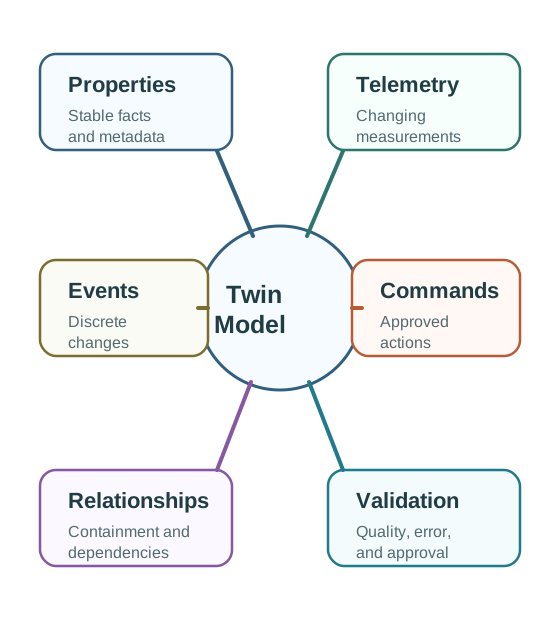
Modeling gives that synchronized state meaning. A useful twin records identity, stable properties, changing telemetry, events, commands, relationships, assumptions, and validation evidence. Without those semantics, a twin becomes a live dashboard with unclear authority.
Begin with a freshness budget for each decision path. A local safety interlock may need millisecond-scale control that stays at the edge, while a maintenance recommendation may tolerate minutes if the timestamp, source, and quality state are visible. The architecture should state the maximum age, accepted jitter, missing-data response, and owner review rule before deciding whether updates travel through MQTT events, OPC UA reads, historian batches, or operator inspection records.
The twin should also keep stale or estimated state labeled as such. Reusing the last known value can be acceptable for a low-risk trend chart, but it is not acceptable for a recommendation unless the rule explicitly allows that age. A synchronized model is trustworthy when readers can separate observed state, inferred state, desired state, command acknowledgement, and verification evidence.
Local Control Loop
Use when delayed action can create immediate risk. The edge controller acts locally and synchronizes the outcome to the wider twin.
Operational Loop
Use when operators, alerts, recommendations, or short-horizon predictions need current state. Seconds or minutes may be acceptable depending on the process.
Planning Loop
Use for trends, reporting, what-if studies, maintenance planning, and lifecycle decisions. Batch updates can be enough when action is not immediate.
The synchronization-cadence figure matches update timing to the decision horizon and the physical dynamics, rather than demanding the maximum sensor rate everywhere.
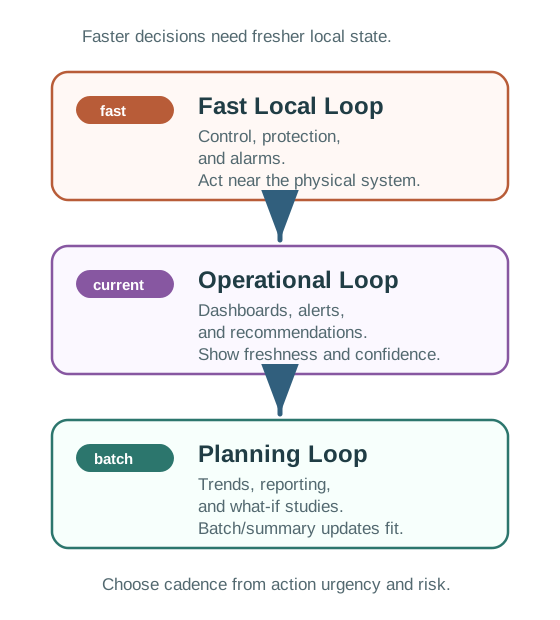
Read the synchronization-cadence figure from urgent to planned. A fast local loop needs timestamp, source, and quality evidence because stale state can cause unsafe actuation. An operational loop must show observation and ingestion time so a dashboard exposes age and confidence. A planning loop can use versioned, complete windows because its risk is a poor plan rather than an immediate physical action. The justified cadence therefore records freshness evidence and the consequence of staleness at each horizon.
Minimum Trust Context
22.3 Expose Staleness and Conflicts
This section: Expose Staleness and Conflicts — Production twins fail quietly when stale data, predictions, commands, and field evidence are allowed to overwrite each other without rules.
Production twins fail quietly when stale data, predictions, commands, and field evidence are allowed to overwrite each other without rules. A practitioner should define the authoritative source for each important state field and the behavior when evidence is missing or contradictory.
The rule should be specific enough to operate: maximum staleness, acceptable difference, command timeout, degraded behavior, escalation owner, and retest trigger.
Physical Evidence Wins
Use when the twin monitors reality. A verified sensor, inspection, or operator observation corrects the digital state.
Command Intent Is Tracked
Use when the twin issued an approved command. Track pending, confirmed, failed, or timed-out status without pretending the physical state already changed.
Prediction Stays Separate
Keep predicted and observed state separate so model error can be measured instead of hidden by overwrites.

Human Review Required
Pause automation when disagreement can create safety, compliance, financial, or operational risk.
Synchronization Pattern Choices
A twin that quietly displays old data can be worse than no twin because it creates false confidence. If a value is too old for the decision, the twin should mark the path degraded or block the recommendation.
Timestamp rules also need an engineering tolerance. A value can be recent in wall-clock terms and still be unsafe if device clocks drift, gateway delays are asymmetric, or event replay hides the order in which observations actually happened. Treat clock synchronization quality as part of the freshness budget, especially when the twin compares event sequences or command acknowledgements across devices.
Conflict Rule Checklist
Treat conflict Rule Checklist as one connected review. Begin with state field and decision supported. With that boundary fixed, examine authoritative source and allowed substitute source. Then connect it to maximum acceptable staleness. Then connect it to acceptable difference between predicted and observed state. Then connect it to command timeout and confirmation evidence. Then connect it to behavior when telemetry is missing or delayed. Then connect it to human escalation owner. Close the review by checking retest trigger for model, sensor, asset, or policy changes. The order matters: each later judgment depends on the owner, state, constraint, or failure evidence retained by the preceding step, so the resulting record can support the next chapter decision.
22.4 Model Semantics and Verification
This section: Model Semantics and Verification — A twin model is more than a schema.
A twin model is more than a schema. It defines which entities exist, what their state means, which commands are allowed, how entities relate, which assumptions are active, and how trust is verified over time.
The under-the-hood risk is semantic drift: a value keeps arriving, but the asset, calibration, unit, relationship, or prediction model no longer means what the twin assumes.
Room Comfort Twin Example
A classroom comfort twin should not try to become a full building platform in one step. It can start with one decision: recommend whether to pre-condition a room before scheduled occupancy.
Bounded Decision
Recommend pre-conditioning only for rooms with known schedule, occupancy, air-quality, temperature, and HVAC-zone relationships.
Fresh State
Use recent temperature, humidity, carbon dioxide, occupancy state, supply-air status, and sensor quality.
Relationships
Connect room, floor, HVAC zone, air handler, dampers, sensors, work orders, and seasonal comfort assumptions.
Verification
Compare predicted comfort with measured comfort and complaints after occupancy begins. Track model error by room and season.
22.5 Set a Twin Cadence for a Cooling Tank
This section: Set a Twin Cadence for a Cooling Tank — For digital-twin synchronization, a cooling tank changes slowly during normal production but can heat fast when a valve sticks.
For digital-twin synchronization, a cooling tank changes slowly during normal production but can heat fast when a valve sticks. Figure 22.1 places event, periodic, and requested updates on a time line; read each labelled cadence against the physical rate of change. Figure 22.2 then separates measured state, model state, assumptions, and derived values so the digital twin does not present an estimate as a fresh sensor reading.
Suppose temperature is sampled every 60 seconds. For digital-twin synchronization, in this twin model, a valve fault that raises the tank by 0.4 °C each minute can add 0.4 °C before the next periodic update and 2.0 °C across five missed updates. In this twin model, an event rule that sends when change exceeds 0.2 °C can shorten that gap, but only if the edge device continues measuring and the threshold itself is valid near the fault.
22.5.1 Predict the Twin’s State Age
Sync quality also depends on a common time base. If edge and cloud clocks disagree, a new twin update can appear older than the state it should replace. Carry clock source and uncertainty when event order controls the model.
Model updates need their own version. A new heat-transfer coefficient can change predicted tank temperature even when no new sensor value arrives. The digital twin should record which model version made each forecast. Otherwise a sync jump may be blamed on the tank when the real change was mathematical. Measured temperature, estimated temperature, and commanded setpoint also need separate names.
- Predict: The twin shows 18.0 °C from a sample taken nine minutes ago. Is 18.0 °C the current tank truth? Check: No. The digital twin must show the value and its nine-minute age as separate facts.
- Predict: Network service returns after four queued updates. Should arrival order alone set model state? Check: No. Sync logic should use measurement time and reject or reorder stale twin events.
22.6 Summary
This section: Summary
- Synchronization cadence should be selected from decision speed, physical dynamics, and stale-data risk.
- Every important value needs freshness context: timestamp, source, quality, confidence, and version.
- Conflict rules should identify the authoritative source for each field and the degraded behavior when evidence is missing.
- Twin models need properties, telemetry, events, commands, relationships, and validation records.
- Relationship graphs support dependency queries that isolated sensor streams cannot answer.
- Model verification should track drift, prediction error, calibration, command outcomes, and retest triggers.
22.7 Key Takeaway
This section: Key Takeaway
A digital twin is trustworthy only when synchronization rules and model assumptions are explicit. Freshness, authority, relationships, and validation determine whether decisions should rely on it.
22.8 See Also
This section: See Also
What Is a Digital Twin?
Introduces the physical-to-digital feedback idea and the scope of useful twins.
Digital Twin Architecture
Places synchronization, models, analytics, control, and governance into one boundary.
When Digital Twins Help
Connects synchronization needs to practical operational and planning decisions.
Find help
3 reviewed answers.
Where should I start in a module?
Open the module page from the sidebar to see its chapters in order. Use the module map to return to a topic you need.
Modules and pathsReviewed
What can I try when a project does not work?
Check the symptom, then work through the diagnostic steps. Keep the error message and the smallest example that reproduces it.
When you are stuckReviewed
How do interactive examples work?
Use the interactive guide to check how examples and simulations work before changing your project.
Interactive examples guideReviewed