42 M2M Case Studies
More
Depth: Practitioner
Progress saves as you read. Mark sections complete as you go; your progress appears in the sidebar.
42.1 Start Simple
This section: Start Simple — Picture a drink machine that reports low stock before it becomes empty.
Picture a drink machine that reports low stock before it becomes empty. The machine sends a small event, and a service plans a refill. A gateway is a local bridge between the machine and a wider system.
Start each case with the job that must happen. Name the event, message path, owner, and response. Then ask what happens if the link fails, a reading repeats, or a command arrives late. Compare the evidence with the claim instead of copying a design from another site. A good case explains why its choices fit its own limits.
Use dates and units in every case. Keep names stable. Mark missing facts. Ask who could challenge the result. Save the answer beside the final choice.
Ask one final question: could another team repeat the case? Give them the inputs, limits, and expected result. Include one failed result. Include the fix and retest. Keep claims tied to this evidence. A short honest case teaches more than a broad success story with no boundary.
Keep each case to one page at first. Draw the event. Draw the action. Add the normal message path. Add the path used during an outage. Mark the owner of every step. Write the latest useful response time. Record one field result. End with the case limit. This makes unlike cases easier to compare without hiding their setting.
Use the same questions for every case. What physical event begins the story? Which machine sees it? Which machine or service acts? How late can the action be? What happens without the network? Who owns the local bridge? Where are old records held? How are repeated events handled? Which failure appears to an operator? What field test supports the claim? Which change forces a retest?
Then compare cases by these answers. Do not compare them only by product name. A water meter and a delivery truck may share a message pattern but face different loss. A useful case keeps that difference visible.
One successful case cannot prove that the same plan fits every fleet. Power, coverage, timing, rules, and support may differ. The Practitioner section compares the cases through a common record. Under the Hood follows their architecture and scaling trade-offs.
Start with two machines that need to coordinate a job without waiting for a person to interpret every message. In M2M Case Studies, the practical question is what event, gateway boundary, fallback behavior, and evidence record make the exchange trustworthy.
42.2 Learning Objectives
This section: Learning Objectives
By the end of this chapter, you will be able to:
- Read an M2M case study as an architecture record instead of a marketing story.
- Compare fleet, retail, utility, and cold-chain M2M deployment patterns.
- Identify when gateways, direct connectivity, edge filtering, and store-and-forward are justified.
- Build a case-study evidence record for your own deployment.
- Recognize common mistakes in M2M case-study reasoning.
- Convert case-study lessons into architecture review questions.
42.3 How to Read These Cases
This section: How to Read These Cases — The cases in this chapter are deployment patterns.
The cases in this chapter are deployment patterns. They deliberately avoid unsupported named-company performance claims. Use them to practice the reasoning process: identify the system boundary, choose the communication pattern, define evidence, and test degraded behavior.
Every case should answer:
42.3.1 What Is Being Managed?
Name the devices, local networks, gateway, platform service, applications, and operations team.
42.3.2 What Is the Architecture Pattern?
Identify direct IP, gateway-mediated, hybrid connectivity, edge filtering, or site-local common services.
42.3.3 What Evidence Proves It Works?
Define delivery, latency, freshness, outage recovery, security, maintenance, and operator workflow evidence.
42.3.4 What Would Make It Fail?
List synchronized reporting, weak identity, missing buffer, gateway overload, stale mappings, and ownership gaps.
42.4 Case Study 1: Mobile Fleet Telemetry
This section: Case Study 1: Mobile Fleet Telemetry — Scenario: A fleet operator wants vehicle location, diagnostic status, door events, and driver-facing alerts.
Scenario: A fleet operator wants vehicle location, diagnostic status, door events, and driver-facing alerts. Vehicles move across regions and cannot rely on a fixed site gateway during trips.
42.4.1 Selection Workflow: Architecture Pattern
- Device domain: vehicle gateway, GNSS receiver, engine diagnostics interface, door and temperature sensors.
- Connectivity: direct cellular or managed mobile connectivity while the vehicle is moving.
- Platform services: device registry, telemetry containers, command policies, alert subscriptions, and fleet operations dashboard.
- Local behavior: the gateway keeps a buffer while coverage is weak and prioritizes safety-relevant or time-sensitive events.
42.4.2 Checkpoint: Evidence to Collect
- Coverage gaps by route, not only citywide coverage maps.
- Message freshness for live tracking and alert events.
- Buffer depth and drain behavior after connectivity returns.
- Credential rotation and vehicle decommissioning process.
- Driver or dispatcher workflow when a diagnostic alert appears.
Depot offload can be useful for bulk data, but it should not replace wide-area reporting when the operational need is live tracking or safety-relevant alerting during the route.
42.5 Retail Machine Replenishment
This section: Retail Machine Replenishment — Scenario: Distributed retail machines report inventory, payment status, door-open events, and environmental health.
Scenario: Distributed retail machines report inventory, payment status, door-open events, and environmental health. A service team wants to reduce unnecessary visits without missing stock, power, or refrigeration problems.
42.5.1 Selection Workflow: Architecture Pattern
- Device domain: machine controller, inventory sensors, payment module, door switch, temperature or power sensors.
- Gateway role: local validation, event filtering, and store-and-forward; direct device connectivity may be used when a machine already has a secure IP connection.
- Scheduling: routine summaries are staggered; exception events bypass routine schedule.
- Application behavior: route planning and maintenance tickets are triggered by evidence, not by fixed visit assumptions alone.
42.5.2 Checkpoint: Evidence to Collect
- Which events are sent immediately and which are summarized.
- False-positive and missed-event review for replenishment triggers.
- Gateway reboot behavior and retained local data.
- Physical access controls for machines in public locations.
- Technician workflow for closing a service event.
42.6 Utility Meter Modernization
This section: Utility Meter Modernization — Scenario: A utility upgrades metering across homes, shops, or remote assets.
Scenario: A utility upgrades metering across homes, shops, or remote assets. Some meters are new and IP-capable. Others are legacy devices connected through local radio, power-line communication, or serial gateways.
42.6.1 Selection Workflow: Architecture Pattern
- Hybrid device estate: direct-capable meters coexist with legacy meter networks.
- Gateway role: protocol translation, local collection schedule, and controlled uplink to the platform.
- Resource model: each meter remains a first-class resource even when many meters share one gateway.
- Operations: meter replacement, tenant change, credential change, and disputed reading review must be supported.
42.6.2 Checkpoint: Evidence to Collect
- Reading completeness across normal days, outage days, and installation transitions.
- How gateway failures are detected and repaired.
- Whether access control separates meter read, meter configuration, and disconnect authority.
- How estimated readings are flagged when actual readings are missing.
- Whether replayed records preserve original sensor timestamps.
42.7 Case Study 4: Cold-Chain Monitoring
This section: Case Study 4: Cold-Chain Monitoring — Scenario: Refrigerated rooms, trailers, or containers need temperature records, door events, alarm handling, and proof that records were not silently lost during outages.
Scenario: Refrigerated rooms, trailers, or containers need temperature records, door events, alarm handling, and proof that records were not silently lost during outages.
42.7.1 Selection Workflow: Architecture Pattern
- Device domain: temperature sensors, door switches, refrigeration controller, and local alarm device.
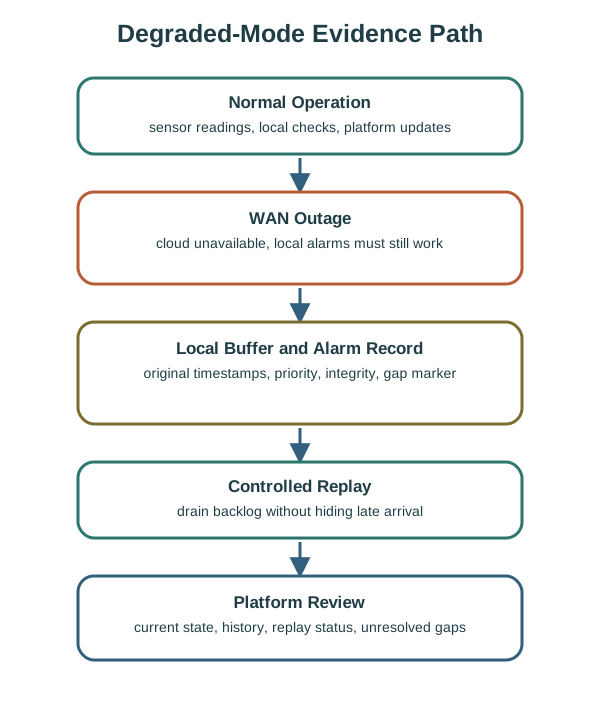
- Local behavior: site or trailer gateway enforces local alarms even when WAN connectivity is unavailable.
- Store-and-forward: readings are buffered with original timestamps, integrity checks, and backlog-drain limits.
- Platform behavior: operators see current state, compliance users retrieve history, and maintenance users inspect equipment behavior.
42.7.2 Checkpoint: Evidence to Collect
- Worst credible outage duration and buffer capacity.
- Alarm behavior when the cloud cannot be reached.
- Time source and timestamp quality.
- Replay rule: oldest first, priority first, or summarized backlog.
- How operators know the system is in degraded mode.
For safety, compliance, or contractual evidence, “sent later” is not enough. The record must preserve when the event happened, whether the local clock was trusted, whether the data was modified, and whether any gap remains.
42.8 Cross-Case Comparison
This section: Cross-Case Comparison
42.9 Case Study Record Template
This section: Case Study Record Template — Use this record before you turn a case study into a design recommendation.
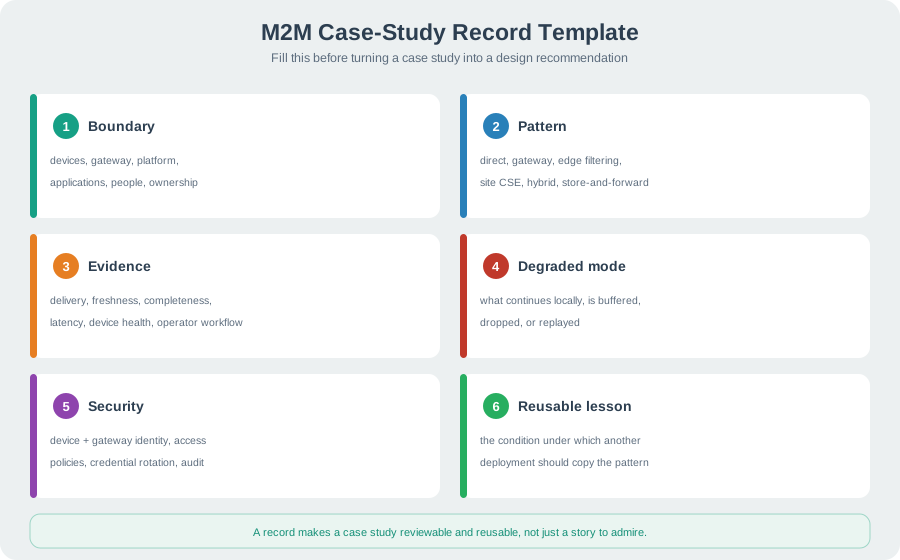
Use this record before you turn a case study into a design recommendation.
42.9.1 Checkpoint: Required Fields
- Boundary: devices, gateway, platform, applications, people, and ownership.
- Pattern: direct connectivity, gateway, edge filtering, site CSE, hybrid, or store-and-forward.
- Evidence: delivery, freshness, completeness, latency, device health, and operator workflow.
- Degraded mode: what continues locally, what is buffered, what is dropped, and what gets replayed.
- Security: device identity, gateway identity, access policies, credential rotation, and audit records.
- Reusable lesson: the condition under which another deployment should copy the pattern.
42.10 Practice Checks
This section: Practice Checks
42.11 Common Mistakes
This section: Common Mistakes
42.11.1 Copying Headline Results
Do not reuse a claimed percentage, ranking, or savings statement unless the baseline, measurement window, and exclusions are explicit.
42.11.2 Ignoring Workload Shape
Average message volume hides bursts. Review reporting schedules, retries, wake-up patterns, and backlog replay.
42.11.3 Treating the Gateway as Free
A gateway needs ownership, update paths, credentials, monitoring, local storage policy, and replacement planning.
42.11.4 Losing Evidence During Outages
Store-and-forward is not only a buffer. It must preserve original timestamps, integrity, priority, and gap visibility.
42.12 Checkpoint: Architecture Review Checklist
This section: Checkpoint: Architecture Review Checklist
Before adopting a case-study pattern, ask:
- Does the case match your device density, mobility, and local-network constraints?
- Is the gateway role translation, buffering, filtering, local control, or all of these?
- What data can be summarized locally, and what must remain raw for review?
- How are routine reports scheduled to avoid synchronized traffic?
- What continues locally during WAN loss?
- How are device and gateway credentials provisioned, rotated, and revoked?
- Who owns field maintenance, incident review, and platform access policy?
- What evidence would disprove the pattern after deployment?
42.14 Overview: A Real M2M Case — NB-IoT Smart Water Metering
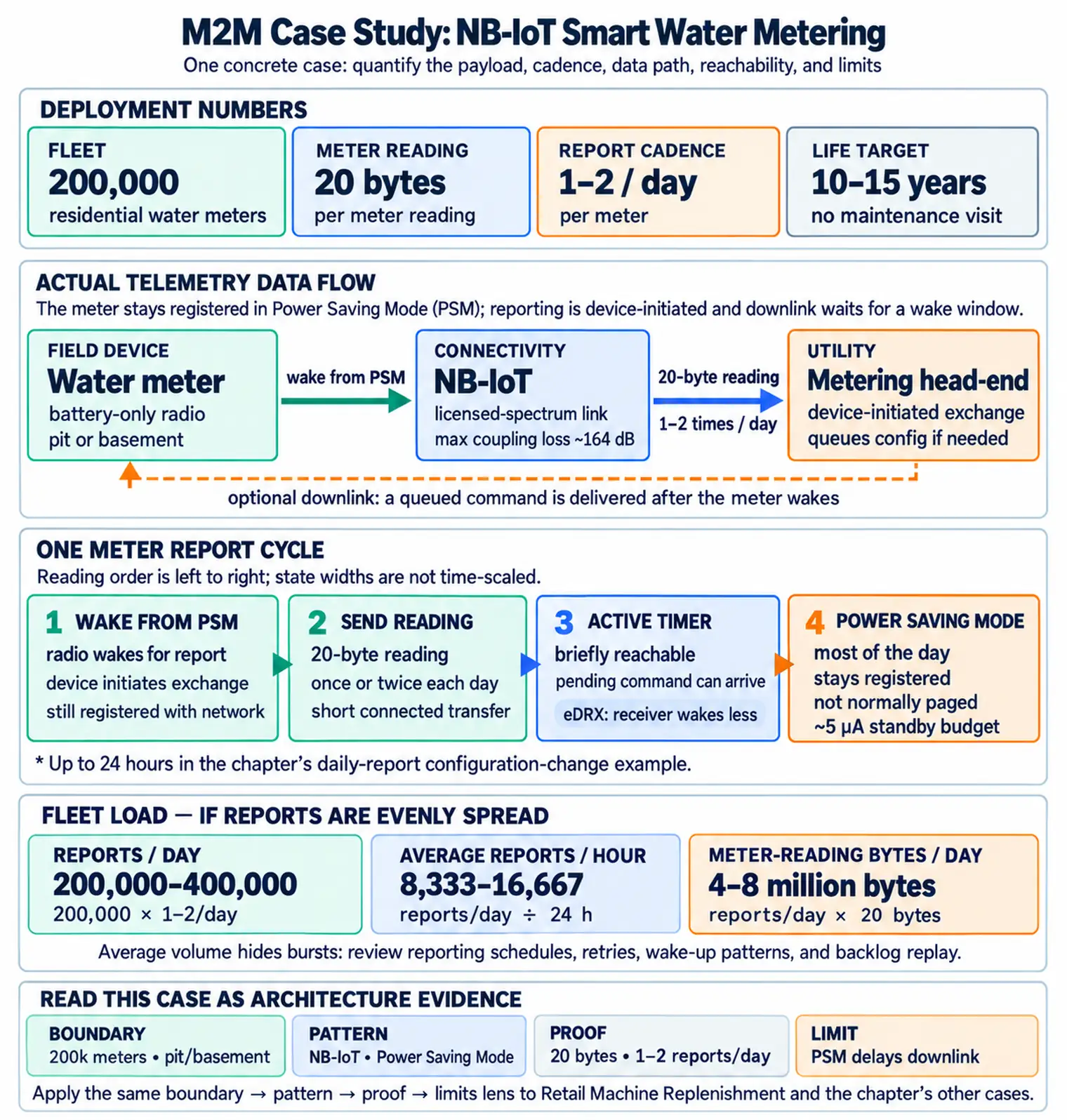
This section: Overview: A Real M2M Case — NB-IoT Smart Water Metering — Consider a concrete, standard M2M deployment: a utility fits 200,000 residential water meters with cellular modules that report the meter reading once or twice a day.
Consider a concrete, standard M2M deployment: a utility fits 200,000 residential water meters with cellular modules that report the meter reading once or twice a day. The device is a battery-only radio buried in a pit or basement, expected to run 10–15 years with no maintenance visit. That single set of constraints — tiny payload, rare reports, deep-indoor location, decade-long battery — drives every technical choice.
Figure 42.4 shows the cellular module that wakes to register and transmit meter readings before returning to sleep.

The connectivity answer is NB-IoT, not Wi-Fi, LTE, or LoRaWAN. NB-IoT gives licensed-spectrum reliability, deep-coverage link budget (up to ~164 dB maximum coupling loss for basement pits), and ultra-low-power sleep — at the cost of low throughput, which a 20-byte meter reading does not need.
Inspect Figure 42.5 and ask when a sleeping meter can receive a downlink without sacrificing its battery objective.
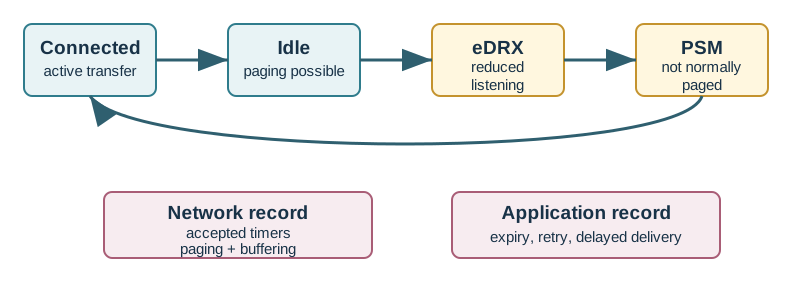
Follow Figure 42.5 across one meter report. A short link sends the twenty-byte reading. Idle paging then allows a quick downlink for a set time. eDRX cuts how often the receiver wakes. Power Saving Mode fills most of the day and does not normally accept a page. That sleep can support a ten-to-fifteen-year goal for 200,000 meters that report once or twice each day. It also delays a command until the meter next calls in. Set reach time from the command deadline, then test coverage, retries, and measured energy. Low power does not mean always reachable.
The meter's constraints pick the tech: tiny payload + rare reports + deep indoor + 10-year battery → NB-IoT with PSM. Throughput is irrelevant; coverage and sleep current are everything.
Overview Knowledge Check
42.15 Practitioner: The Battery Math That Decides the Design
This section: Practitioner: The Battery Math That Decides the Design — Battery life is not a guess; it is a budget.
Battery life is not a guess; it is a budget. Take a 5 Ah (5000 mAh) Li-SOCl₂ primary cell and a 10-year target. The daily charge budget is 5000 mAh ÷ (10×365) ≈ 1.37 mAh/day. Two things spend it: standby and reporting.
Figure 42.6 shows the primary lithium cell whose low self-discharge supports a decade-long meter energy budget.

| Item | Draw | Daily cost |
|---|---|---|
| PSM standby | ~5 µA | 5 µA × 24 h ≈ 0.12 mAh |
| One report (good coverage) | ~0.3 mAh/report | drives the report count |
| One report (deep coverage, CE2) | ~1.5 mAh/report | repetitions multiply cost |
Worked example. After standby, 1.37 − 0.12 = 1.25 mAh/day remains for reporting. In good coverage at 0.3 mAh/report that funds 1.25 ÷ 0.3 ≈ 4 reports/day for the full decade. In a deep-coverage pit needing coverage enhancement, one report costs ~1.5 mAh, so the same battery funds under one report per day — the identical meter cannot meet the same reporting SLA. Coverage, via repetitions, is the dominant battery cost, which is why site survey (measured RSRP) belongs in the design, not the field.
Practitioner Knowledge Check
This section:

This section:
42.16 Under the Hood: PSM, and Why the Meter Is Unreachable
This section: Under the Hood: PSM, and Why the Meter Is Unreachable — The consequence is a real design constraint the case must surface: a PSM meter is unreachable for downlink between its wakeups.
The 5 µA standby figure comes from Power Saving Mode (PSM): between reports the modem stays registered on the network but powers down almost completely, waking only to send its reading or to run a periodic tracking-area update. This is what turns a cellular radio — normally a battery killer — into a decade-long device. The device requests two timers: an Active Timer (how long it stays reachable after sending) and an extended TAU timer (how long it may sleep).
The consequence is a real design constraint the case must surface: a PSM meter is unreachable for downlink between its wakeups. You cannot push a command or firmware update to it on demand; it will only accept one in the brief window after it next reports. A metering head-end is therefore built around device-initiated exchanges — the meter calls in, and any pending command rides the reply — not server-initiated polling. Designers who assume on-demand reachability discover that a meter in PSM is asleep and unreachable for much of its reporting interval.
Worked example. The utility needs to change a meter's reporting schedule. It cannot connect to the sleeping meter; instead it queues the new config at the head-end, and when the meter next wakes to report (up to 24 hours later) it downloads the config in the Active-Timer window before returning to PSM. If a firmware campaign needs many such windows, it is spread over days and paced so the network and battery absorb it. The whole operations model follows from one fact: PSM buys the battery life by making the device deaf between reports.
Under-the-Hood Knowledge Check
42.17 Summary
This section: Summary — M2M case studies should make architecture choices more testable.
M2M case studies should make architecture choices more testable. The useful lesson is not “gateways always win” or “direct connectivity always wins.” The useful lesson is the condition: clustered devices may justify gateways, mobile assets may need direct reporting, compliance systems need strong store-and-forward evidence, and any claimed improvement must be backed by a clear baseline and operating assumptions.
42.20 Key Takeaway
This section: Key Takeaway — M2M case studies are most useful when they reveal operational tradeoffs: device constraints, network reliability, platform integration, data freshness, maintenance, and failure recovery.
M2M case studies are most useful when they reveal operational tradeoffs: device constraints, network reliability, platform integration, data freshness, maintenance, and failure recovery.
Find help
3 reviewed answers.
Where should I start in a module?
Open the module page from the sidebar to see its chapters in order. Use the module map to return to a topic you need.
Modules and pathsReviewed
What can I try when a project does not work?
Check the symptom, then work through the diagnostic steps. Keep the error message and the smallest example that reproduces it.
When you are stuckReviewed
How do interactive examples work?
Use the interactive guide to check how examples and simulations work before changing your project.
Interactive examples guideReviewed