23 Digital Twin Fit and Use Cases
More
Depth: Practitioner
Progress saves as you read. Mark sections complete as you go; your progress appears in the sidebar.
23.1 Start Simple
This section: Start Simple — Start with one decision that would be safer if a live model stayed aligned with the physical system.
Start with one decision that would be safer if a live model stayed aligned with the physical system. In Digital Twin Fit and Use Cases, the practical question is what state must be synchronized, who acts on it, and what evidence proves the twin is still fit to use.
23.2 Learning Objectives
This section: Learning Objectives
By the end of this chapter, you will be able to:
- Classify digital twin use cases by decision pattern rather than industry label.
- Choose an appropriate twin scope: component, asset, system, process, fleet, or lifecycle.
- Identify the records and feedback path required for a candidate use case.
- Distinguish monitoring, prediction, simulation, optimization, coordination, and training use cases.
- Route yourself to the right detailed chapter for industry patterns, synchronization, examples, or assessment.
23.3 Use Case Pattern Map
This section: Use Case Pattern Map — The same patterns appear across many domains.
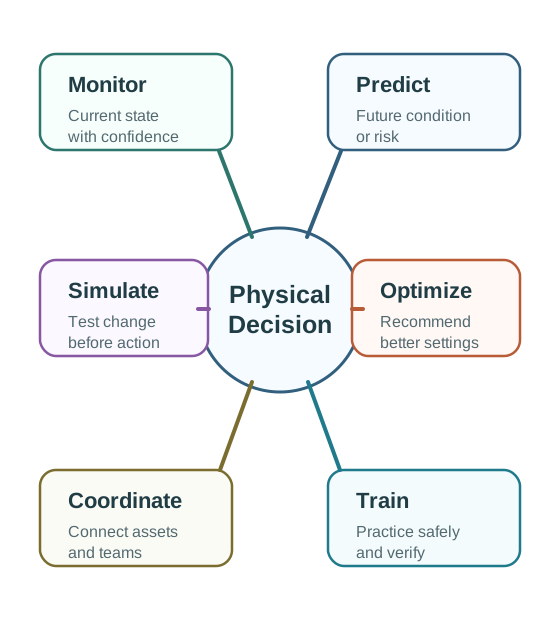
The same patterns appear across many domains. A building comfort twin and an industrial equipment twin may look different, but both can use monitoring, prediction, simulation, and verification.
23.3.1 Monitor
Show current physical state with freshness and confidence. This is the entry point for many twins, but it is not enough by itself.
23.3.2 Predict
Estimate future condition, demand, risk, or performance from current and historical records.
23.3.3 Simulate
Test an intervention, route, schedule, treatment, or configuration before changing the physical system.
23.3.4 Optimize
Recommend a setting, maintenance window, dispatch plan, energy schedule, or process parameter.
23.3.5 Coordinate
Connect several assets, teams, or services so decisions do not conflict across the system.
23.3.6 Train and Rehearse
Use the twin as a safe environment for operators, maintainers, clinicians, or planners to practice decisions.
Do not choose a use case because a sector example sounds impressive. Choose it because the physical decision is clear, the records exist, the model can be verified, and the feedback path is safe for the risk involved.
23.4 Selecting a Use Case
This section: Selecting a Use Case — Use case selection should answer five questions before platform or visualization choices.
Use case selection should answer five questions before platform or visualization choices.
1. Name the decision Write a concrete sentence: decide when to inspect, which schedule to use, which route to choose, which setpoint to recommend, or which scenario to test.
2. Bound the physical scope Choose a component, asset, line, room, building, route, patient pathway, service area, fleet, or lifecycle record. Smaller verified scope beats vague broad scope.
3. Check record readiness Identify required telemetry, events, inspections, history, work orders, model assumptions, and freshness requirements.
4. Choose the feedback level Decide whether the twin will display, alert, recommend, request approval, or send an automatic command under defined guardrails.
5. Define verification Record what baseline, action log, model-error check, or outcome check will prove that the use case is working.
23.5 Common Use Case Families
This section: Common Use Case Families
23.5.1 Predictive Maintenance
Use when equipment condition can be observed before failure and a planned action is better than an unplanned disruption.
23.5.2 Condition Records
Vibration, temperature, pressure, current, duty cycle, inspection notes, operating mode, work orders, and maintenance history.
23.5.3 Feedback
Recommend inspection, change maintenance priority, create a work order, or adjust operating conditions inside approved limits.
23.5.4 Process and Quality Optimization
Use when process settings, recipes, routes, or schedules influence output quality, throughput, waste, or rework.
23.5.5 Process Records
Process parameters, batch records, product quality checks, equipment state, environment, operator events, and material inputs.
23.5.6 Feedback
Recommend parameter changes, flag at-risk batches, compare what-if settings, or hold a process for approval.
23.5.7 Building, Energy, and Comfort
Use when spaces, equipment, schedules, occupancy, comfort, air quality, and energy decisions are connected.
23.5.8 Building Records
Space hierarchy, occupancy, schedule, temperature, humidity, air quality, equipment state, meters, alarms, and complaints.
23.5.9 Feedback
Recommend conditioning schedules, flag equipment that affects several rooms, test setpoint policies, or request operator approval.
23.5.10 Safety and Scenario Rehearsal
Use when a physical test would be dangerous, disruptive, expensive, or impossible to repeat.
23.5.11 Scenario Records
Hazard models, operating constraints, emergency procedures, sensor state, training goals, and scenario assumptions.
23.5.12 Feedback
Run what-if scenarios, train operators, compare response options, or keep automatic control separate from rehearsal mode.
23.5.13 Fleet, Logistics, and Coordination
Use when many entities move, depend on one another, or need decisions coordinated across space and time.
23.5.14 Fleet Records
Location, condition, route state, demand, capacity, inventory, handoff events, service windows, and exception records.
23.5.15 Feedback
Recommend routes, rebalance resources, prioritize exceptions, simulate disruptions, or coordinate work between teams.
23.6 Scope Levels
This section: Scope Levels — Scope should match the decision.
Scope should match the decision. A broader scope is justified only when the decision needs broader relationships.
23.6.1 Component
A bearing, valve, battery, sensor, device, or subsystem. Use when a small part is critical or has distinct behavior.
23.6.2 Asset
A pump, machine, room, vehicle, turbine, or medical device. Use when the whole asset has meaningful state and decisions.
23.6.3 System
A line, building, ward, feeder, corridor, plant, or service zone. Use when relationships between assets drive the decision.
23.6.4 Process
A workflow, route, care pathway, supply chain, inspection process, or production recipe. Use when timing and handoffs matter.
23.6.5 Fleet
Many similar assets that share models, record patterns, operating policies, or exception workflows.
23.6.6 Lifecycle
Design, commissioning, operation, maintenance, change, and retirement records tied to a physical entity.
23.7 Use Case Record
This section: Use Case Record — Use this record to keep a use case grounded.
Use this record to keep a use case grounded.
23.7.1 Decision Owner
Who is responsible for accepting or rejecting the twin output?
23.7.2 Physical Scope
What asset, process, system, fleet, or lifecycle record is included?
23.7.3 Decision Statement
What decision will change because of the twin?
23.7.4 Required Records
What sensor, event, inspection, history, or model proof is required?
23.7.5 Model Behavior
Does the twin monitor, predict, simulate, optimize, coordinate, train, or verify?
23.7.6 Feedback Level
Display only, alert, recommendation, approval workflow, or automatic command?
23.7.7 Verification
How will the team compare baseline, action, result, and model error?
- The use case has a sector name but no decision owner.
- The model displays data but cannot explain, predict, simulate, or recommend.
- The figure or dashboard is treated as proof before outcomes are measured.
- The feedback path is automatic even though the risk calls for approval.
- The team cannot say what proof would show the use case failed.
23.8 Chapter Router
This section: Chapter Router — Use this page to choose where to go next.
Use this page to choose where to go next.
23.8.1 Need Sector Patterns?
Read Digital Twin Industry Applications when you want to compare manufacturing, buildings, healthcare, cities, energy, and logistics patterns.
23.8.2 Need Model Mechanics?
Read Digital Twin Sync and Modeling when the use case depends on freshness, relationships, conflict rules, or model versioning.
23.8.3 Need Architecture?
Read Digital Twin Architecture when you need components, feedback loops, edge/cloud boundaries, or implementation patterns.
23.8.4 Need Practice?
Read Digital Twin Worked Examples when you need step-by-step scenarios and tradeoff analysis.
23.9 Checkpoint: Practice Checks
This section: Checkpoint: Practice Checks
- A hospital wants a twin for operating-room turnover. Is the main scope an asset, system, process, or lifecycle use case?
- A cold-chain operator tracks route, location, and cargo temperature. Which records and feedback level should be defined first?
- A building team wants to reduce comfort complaints. What is the smallest scope that can verify the first use case?
- A factory dashboard already shows live machine data. What additional model behavior would make the first twin use case meaningful?
23.11 Overview: Start With Decision Proof
This section: Overview: Start With Decision Proof — If you only need the selection shortcut, this layer is enough: a digital twin use case is worth building when it improves one named physical decision and leaves enough proof to show whether the decision improved.
If you only need the selection shortcut, this layer is enough: a digital twin use case is worth building when it improves one named physical decision and leaves enough proof to show whether the decision improved.
A good use case record starts smaller than the technology stack. It names the physical asset, process, or route; the person or system that owns the decision; the baseline used for comparison; and the evidence that must be fresh before advice is trusted. A dashboard that only shows current values may be useful, but it is not yet a twin use case unless those values change inspection, scheduling, routing, setpoint, maintenance, or planning behavior.
For example, "reduce comfort complaints in one lecture zone" is a stronger first use case than "make a campus twin." The smaller claim can name the zone, the air-handling equipment, the room schedule, the complaint baseline, the allowed feedback level, and the outcome review period. Once that proof works, the same pattern can scale to more rooms, buildings, or portfolios without pretending that visual coverage alone proves operational value.
Reject use cases that cannot name the before-state and after-state. The first proof loop should say what action will be recommended, what record shows the action happened, what outcome changed, and what evidence would make the team stop or redesign the use case.
Inspect Figure 23.2 and ask which physical decision the first twin must improve before its scope expands.
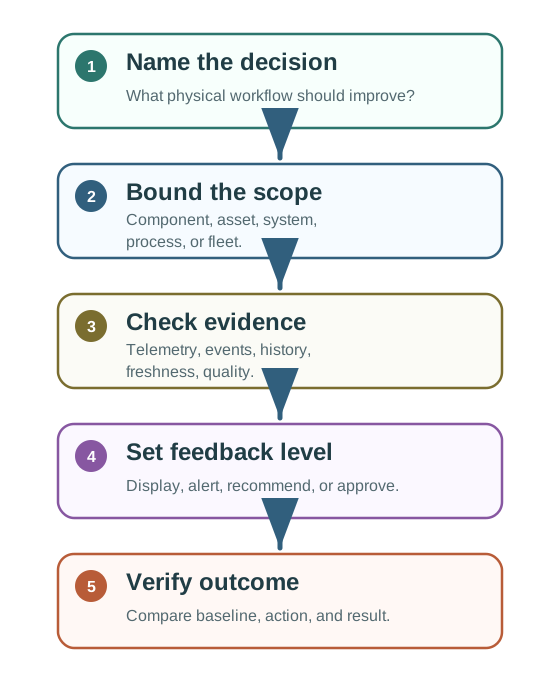
Work through Figure 23.2 from one comfort-zone choice to scope, records, feedback, and result. One building worker owns a set schedule or setpoint choice. Occupancy, time, heat, air quality, plant state, and complaints provide facts with known age and quality. The first release gives advice instead of direct control, so its rights match its proof. Compare complaints, energy, actions, overrides, and the physical result with the baseline. A strong result may support wider use; a weak one returns to review. Prove one real choice with traced inputs and governed feedback before calling the wider model a twin.
Decision
Name the action that changes: inspect, schedule, route, tune, rehearse, hold, approve, or command.
Records
Show the telemetry, events, inspections, history, assumptions, freshness, and model-error checks that keep the twin current.
Feedback
Choose display, alert, recommendation, approval workflow, or automatic control based on risk and verification evidence.
23.12 First Use Case Record
This section: First Use Case Record — For a building team trying to reduce comfort complaints, the first twin should be scoped small enough to verify.
For a building team trying to reduce comfort complaints, the first twin should be scoped small enough to verify. A floor, zone, or air-handling system is easier to prove than a whole-building promise.
Write the record before selecting the platform. The record should name the decision owner, affected occupants, equipment boundary, normal schedule source, comfort sensors, maintenance system, and action channel. In a building context, that may mean BACnet points from the building management system, occupancy or timetable data, work orders from a CMMS, and complaint records from the service desk. Each source needs an owner and a freshness rule.
The first feedback level should usually be advisory. A recommendation to pre-condition a room can be reviewed against baseline complaints, measured temperature and carbon dioxide, energy impact, and operator override notes. Automatic control should wait until the team can show that stale schedules, failed sensors, manual overrides, and unusual occupancy are handled without hiding risk from the operator.
Make the acceptance test operational rather than aspirational. A useful record might say: recommendations are shown only when the schedule is confirmed within the last day, temperature and air-quality sensors are current, the air handler is available, and the operator can see why the recommendation was made. The review should compare complaint rate, comfort recovery time, energy delta, overrides, and false recommendations for the same zone before expanding the pattern.
Also define the stop rule. If complaints do not fall, energy rises beyond the agreed limit, or operators override most recommendations, the team should pause expansion and revise the record before adding more zones.
Decision record
Owner: facilities operator. Scope: one comfort zone. Decision: adjust schedule or setpoint before complaints rise. Feedback: recommendation first, automatic command only after guardrails are proven.
Evidence record
Keep occupancy, schedule, temperature, humidity, air quality, equipment state, complaint log, action log, baseline comfort rate, energy impact, and model error.
23.13 Under the Hood: Why Use Cases Drift
This section: Under the Hood: Why Use Cases Drift — Digital twin use cases fail quietly when the team keeps expanding the model but stops checking the physical decision it was supposed to improve.
Digital twin use cases fail quietly when the team keeps expanding the model but stops checking the physical decision it was supposed to improve.
The technical control is a use-case lifecycle, not just a model lifecycle. Treat the use case as a versioned claim with an owner, decision rule, input contract, feedback limit, and retirement trigger. When a sensor is replaced, a schedule source changes, a model is retrained, or the action policy moves from recommendation to command, the use case needs review because the original evidence chain no longer proves the same thing.
Separate model accuracy from operational success. A forecast can have low error and still fail the use case if operators ignore it, if the action arrives too late, or if the cost of acting outweighs the reduced risk. The twin should keep prediction error, decision latency, action acceptance, override reason, and outcome delta as different records so teams can see whether they have a model problem, a workflow problem, or a value problem.
The drift review should also check whether the use case has become a hidden policy change. Adding new assets, new tenants, new routes, or automatic command authority changes the risk boundary even when the same model code still runs. Version the data contract, feedback rule, and authorization rule together so an audit can reconstruct what the twin was allowed to influence at the time.
- Dashboard drift: live data is visible, but no prediction, simulation, recommendation, or verification changes the workflow.
- Record drift: telemetry is fresh, but inspections, work orders, complaints, events, or assumptions are stale or missing.
- Scope drift: the team models a factory, building, or fleet before one component, process, zone, or route has been verified.
- Feedback drift: recommendations become automatic commands without safety limits, owner approval, or outcome checks.
23.14 Checkpoint: Summary
This section: Checkpoint: Summary
In this chapter, you learned:
- Digital twin use cases should be selected by decision pattern, not by sector label.
- Common patterns include monitoring, prediction, simulation, optimization, coordination, training, and verification.
- Use-case quality depends on record readiness, bounded scope, feedback governance, and outcome verification.
- Scope levels include component, asset, system, process, fleet, and lifecycle.
- A use case record keeps the work grounded and prevents dashboard-only drift.
23.15 What’s Next
This section: What’s Next
| If you want to… | Read this |
|---|---|
| Study digital twin architecture | Digital Twin Architecture |
| Compare industry patterns | Digital Twin Industry Applications |
| Learn synchronization and modeling | Digital Twin Sync and Modeling |
| Work through examples | Digital Twin Worked Examples |
| Test your understanding | Digital Twin Concepts and Scenario Assessment |
23.16 Key Takeaway
This section: Key Takeaway — Choose digital-twin use cases where the twin drives action: maintenance, optimization, simulation, operator training, anomaly response, or planning.
Choose digital-twin use cases where the twin drives action: maintenance, optimization, simulation, operator training, anomaly response, or planning. Each use case needs data sources, model logic, and a decision owner.
Find help
3 reviewed answers.
Where should I start in a module?
Open the module page from the sidebar to see its chapters in order. Use the module map to return to a topic you need.
Modules and pathsReviewed
What can I try when a project does not work?
Check the symptom, then work through the diagnostic steps. Keep the error message and the smallest example that reproduces it.
When you are stuckReviewed
How do interactive examples work?
Use the interactive guide to check how examples and simulations work before changing your project.
Interactive examples guideReviewed