36 Lab: UAV Trajectory
Lab Workflow, Test Gates, Record Packs, and Safe Iteration for UAV Path Planning
36.1 Start Simple
Start with a mission that moves, loses energy, and changes its radio path while it works. In Lab: UAV Trajectory, the practical question is what the aircraft must sense, relay, decide, and prove before the flight or network role is safe enough to trust.
36.2 Learning Objectives
By the end of this chapter, you will be able to:
- Build a repeatable UAV trajectory lab workflow from mission envelope through record checks.
- Separate route generation, scenario testing, safety gates, telemetry logging, and readiness decisions.
- Design lab scenarios that test normal operation, low reserve, blocked route, stale link, and data-quality failure cases.
- Create a lab record pack that supports a clear promote, revise, hold, or reject decision.
- Avoid implementation drift caused by tool-specific steps, unrunnable examples, or unchecked simulator assumptions.
36.3 Route Readiness as Record
A UAV trajectory lab does not prove readiness by drawing a smooth path. It proves readiness when the route candidate is tied to a mission envelope, gate decisions, telemetry freshness, coverage result, fallback behavior, and a clear promote, revise, hold, or reject decision.
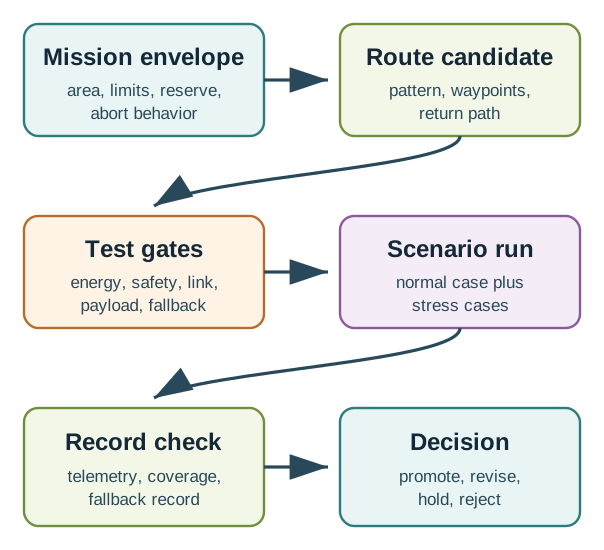
Mobile summary: Route readiness comes from a repeatable record loop, not from a smooth animation or a single tool run.
The useful output is the record that explains why a route version should change. A rejected route can be as valuable as a promoted one when it shows which reserve, geofence, link, payload, or fallback assumption failed.
36.4 Route Record Pack
For each run, keep the mission envelope, route manifest, gate report, scenario log, telemetry trace, coverage result, skipped-area notes, fallback record, and revision decision together. The pack should let a teammate compare the planned route with the executed trace and defend the next action.
Run at least one normal case and one stress case. Low reserve, blocked segments, stale links, missing payload records, role handoff, and skipped coverage are the cases that show whether the route planner is ready for a harder exercise.
36.5 Under the Hood: Route Gates Are Coupled
Energy, safety, link, payload, and fallback gates do not fail independently. A detour can solve an obstacle problem while breaking return reserve. A safe route can still miss the data goal. Fresh telemetry can become stale before a handoff decision is safe.
That coupling is why the lab records rejected routes, gate changes, skipped areas, and retest triggers. Without those records, a tool-specific demo can hide the exact assumptions that need to change before the route is promoted.
- A trajectory lab is a decision loop, not a demonstration.
- The lab should state what the route is allowed to do before any implementation details appear.
- Gates must reject unsafe, energy-infeasible, or untraceable route changes.
- Logs matter only when they connect route state, gate decisions, telemetry, and final readiness decision.
- A lab result should say what changed for the next route version.
36.6 Prerequisites
Revisit these chapters if the terms are unfamiliar:
- UAV Trajectory Control: route adjustment and decision records.
- UAV Energy-Aware Mission Planning: reserve gates and return feasibility.
- UAV Missions and Avoidance: mission patterns, coverage records, and detect-and-avoid planning.
- UAV Trajectory Swarm Coordination: path-level coordination, handoff, and multi-aircraft records.
36.7 How This Chapter Fits
The earlier UAV trajectory chapters explain what a route planner should decide. This chapter explains how to test those decisions without drifting into a tool tutorial. The next hardware simulation chapter can use a specific environment, but this chapter keeps the implementation discipline portable: define the envelope, test the route, inspect the records, and revise the plan.
The overview depth layer shows the lab workflow that ties mission envelope, route candidate, test gates, scenario run, record check, and revision decision into one route-readiness loop.
36.8 Lab Workflow
Use the same loop for a paper lab, a simulator, a hardware-in-the-loop exercise, or a controlled field rehearsal. The implementation details can change; the check structure should not.
36.8.1 Mission envelope
State the operating area, route limits, altitude band, payload assumptions, link expectation, energy reserve, return condition, and abort condition.
Do not let an implementation run outside this envelope just because the route generator produced a path.
36.8.2 Route candidate
Create the route as a versioned artifact: waypoint list, pattern choice, track spacing, dwell points, turn behavior, return path, and known exclusions.
The route should be inspectable before execution.
36.8.3 Test gates
Apply route-length, reserve, geofence, separation-basis, link-freshness, payload, and fallback checks before the route is accepted for a scenario.
Rejected routes are useful records.
36.8.4 Scenario run
Run the route under controlled conditions. Include at least one normal case and one stress case such as weak link, blocked segment, low reserve, or skipped coverage.
The scenario should test a decision, not just animation.
36.8.5 Record check
Compare planned route, actual route, gate decisions, telemetry freshness, coverage record, and fallback behavior.
The records should explain the outcome without depending on memory.
36.8.6 Revision decision
Promote, revise, hold, or reject the route. Record the reason and the next change.
A lab that does not change future planning is incomplete.
36.9 Test Gates
Implementation quality depends on gates that reject bad route decisions early. The exact thresholds depend on aircraft, operating context, approval basis, environment, and local rules. The durable pattern is to name the gate, define its record, and record the decision.
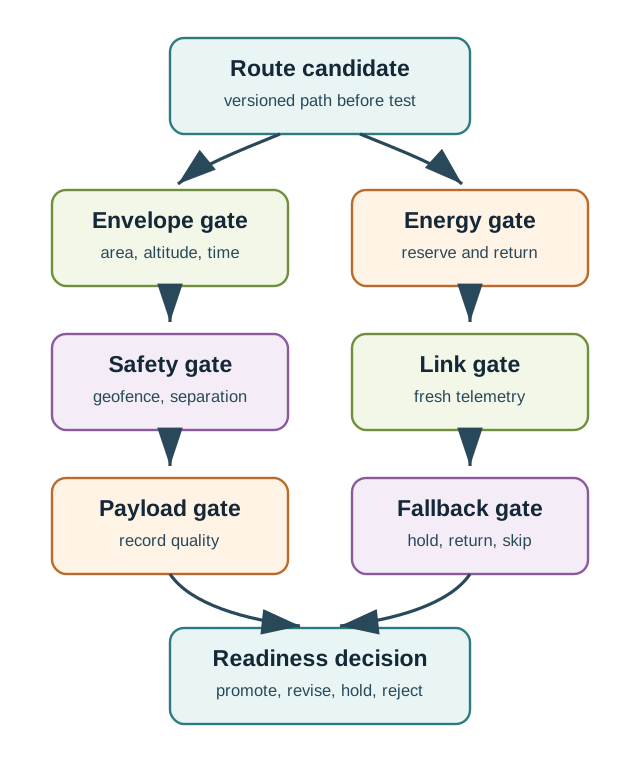
Envelope gate The route must remain inside the stated area, altitude band, time window, and operating assumptions.
Energy gate The route must preserve launch reserve, segment reserve, and return feasibility from the current or worst-case point.
Safety gate The route must respect the mission’s separation basis, geofence, obstacle assumptions, and abort behavior.
Link gate Telemetry, command, and coordination assumptions must be fresh enough for the route decision being tested.
Payload gate The path should support the data goal: footprint, dwell, revisit interval, sensor mode, and data-quality threshold.
Fallback gate The route must have a bounded fallback: hold, return, shorten scope, skip a segment, or transfer ownership.
A visual path can look smooth while still violating reserve, leaving gaps in coverage, hiding stale telemetry, or failing to record why a fallback was chosen. The lab passes only when the lab record pack supports the readiness decision.
36.10 Implementation Record
Each lab should leave a compact record that another teammate can inspect. The record does not need to be verbose; it needs to connect the route version to the records and decision.
Artifact
What it records
Decision question
Mission envelope
Area, altitude band, route limits, reserve policy, link assumption, abort behavior, and data goal.
Was the route tested inside its allowed operating context?
Route manifest
Pattern, waypoint sequence, segment ownership, dwell points, turn behavior, return path, and exclusions.
Can the route be reproduced and compared to the executed trace?
Gate report
Accepted and rejected checks for energy, geofence, separation basis, link freshness, payload state, and fallback.
Which conditions blocked unsafe or weak route versions?
Scenario log
Normal case, stress cases, injected failures, telemetry freshness, gate changes, and fallback events.
Did the lab test decisions that matter outside the happy path?
Lab record pack
Planned route, actual route, coverage result, reserve trace, skipped areas, warnings, and final decision.
Can a teammate defend the promote, revise, hold, or reject outcome?
36.11 Lab Record Pack
The lab record pack is the handoff from implementation to the readiness decision. It should be small enough to read and complete enough to explain why the next route version should change.
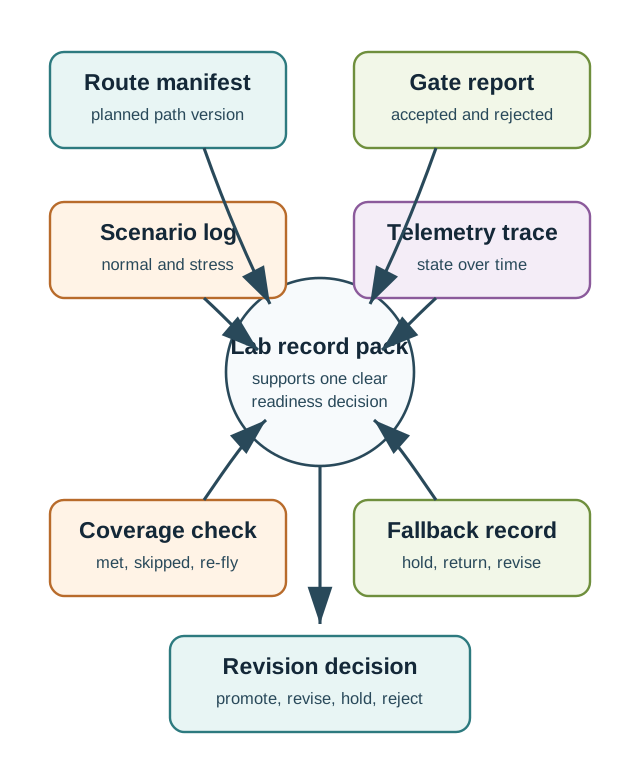
- Route manifest: planned path, route version, mission pattern, return path, and known exclusions.
- Gate report: accepted and rejected decisions before launch, during segments, and during fallback.
- Scenario log: normal case plus stress cases that test low reserve, blocked segment, stale link, missed coverage, or payload failure.
- Telemetry trace: time, position, route state, reserve estimate, link freshness, payload state, and fallback state.
- Coverage or service result: what records were collected, what was skipped, and whether the task goal was met.
- Revision decision: promote, revise, hold, or reject, with the specific next change.
36.12 Lab Set
These labs can be completed with a spreadsheet, a simple route script, a simulator, or a hardware simulation environment. Use the same record expectations regardless of tool.
Run it: For Lab 1 (Coverage route check), do not just sketch a lane pattern on paper — build the route in the coverage workbench below. Choose a scenario preset such as Field survey or Search grid, pick a Route pattern (Lawnmower for lanes, or Spiral/Sector for point-inspection coverage), then press Play or Step through it and read the mission metrics for footprint, route length, turn overhead, coverage, and skipped area. Use those observed numbers to fill Lab 1’s footprint, route-length, turn-overhead, and skipped-area records, then check whether the route manifest and the coverage record actually agree.
36.12.1 Lab 1: Coverage route check
Build a lane, perimeter, or point-inspection route. Record footprint assumptions, route length, turn overhead, skipped areas, and coverage records.
Pass when the route manifest and coverage record agree.
36.12.2 Lab 2: Energy gate failure
Start with a route that is too long or too optimistic. Apply reserve and return checks until the route is shortened or rejected.
Pass when the rejected route teaches the next scope decision.
36.12.3 Lab 3: Avoidance injection
Inject a blocked segment, no-fly area, or conflict event. Compare hold, detour, shortened mission, and return behavior.
Pass when the fallback is bounded and recorded.
36.12.4 Lab 4: Handoff or role change
For a multi-UAV scenario, transfer a lane, sector, or relay position from one aircraft to another.
Pass when ownership, record freshness, energy gate, and fallback are explicit.
36.13 Worked Example: Revising a Survey Route
Scenario: A team is preparing a small survey lab for a rectangular site. The first route uses parallel lanes and includes a return path to the launch point. The goal is not to prove that the route can be drawn; the goal is to decide whether the route records are strong enough to promote to the next exercise.
Initial route record
- Pattern: parallel survey lanes.
- Data goal: full site coverage with documented skipped areas.
- Route estimate: lane distance plus turns plus transit to and from the site.
- Gate policy: preserve mission reserve and return feasibility from the farthest point.
- Stress case: one lane blocked by a temporary exclusion zone.
Check finding
The normal case passes the envelope and coverage gates, but the blocked-lane stress case creates an unchecked gap. The route generator detours around the blocked lane, but the lab record pack does not mark the skipped area or explain whether a later re-fly is required.
Revision
The team keeps the route pattern but changes the record rules:
- Add a skipped-area field to the coverage record.
- Mark each blocked segment as “covered,” “skipped with reason,” or “queued for re-fly.”
- Add a recheck trigger when skipped area exceeds the mission’s allowed gap policy.
- Rerun the blocked-lane scenario and compare the new lab record pack.
Decision: Revise, not promote. The route may be geometrically acceptable, but the lab records are not yet complete enough for a mission check.
The lab produced a concrete change to the route check process. That is a stronger outcome than a screenshot of a successful path because it improves the next route version and makes future exceptions visible.
36.14 Common Pitfalls
36.14.1 Happy-path only
Testing one clean route hides the cases that matter most: blocked segments, stale links, low reserve, missing payload records, and fallback behavior.
36.14.2 Tool-first drift
Starting with a specific simulator, API, or autopilot command can turn the lab into a button sequence. Start with the mission envelope and route record.
36.14.3 Rated-endurance planning
Battery or endurance labels are not mission records. The lab should use the chosen reserve policy, route distance, dwell, turns, environment assumptions, and return path.
36.14.5 No data-quality gate
A route can be safe but still fail the data goal. Payload footprint, dwell, revisit interval, and missed-data rules need their own gate.
36.14.6 Unclear promotion decision
If the lab ends with “looks good,” it is not traceable. The outcome should be promote, revise, hold, or reject with a reason.
36.15 Implementation Checklist
Before marking a trajectory lab complete, confirm that:
- The mission envelope is written before the route is executed.
- The route manifest can be compared to the executed trace.
- Normal and stress scenarios are both included.
- Energy, safety, link, payload, and fallback gates produce explicit decisions.
- Rejected route versions are recorded rather than discarded.
- The lab record pack includes skipped areas, fallback events, and data-quality gaps.
- The final decision names the next action: promote, revise, hold, or reject.
36.16 Interactive Checks
36.17 Summary
UAV trajectory implementation labs should make route decisions traceable. The route candidate is only one artifact. The lab also needs a mission envelope, gates that can reject weak routes, normal and stress scenarios, telemetry and coverage records, fallback records, and a final decision that changes the next route version. This keeps implementation work connected to the UAV planning concepts instead of drifting into tool-specific demonstrations.
36.18 See Also
- UAV Trajectory Control: bounded path adjustments and route records.
- UAV Energy-Aware Mission Planning: reserve gates and return feasibility.
- UAV Missions and Avoidance: mission patterns and detect-and-avoid planning.
- UAV Trajectory Swarm Coordination: multi-aircraft path ownership and handoff records.
- FANET Fundamentals: aerial network constraints that can affect route testing.
36.19 What’s Next
36.19.1 Hardware simulation lab
36.19.2 Production checks
36.19.3 UAV and FANET integration
36.19.4 Energy-aware system design
36.20 Key Takeaway
UAV trajectory implementation should connect planning assumptions to telemetry, route updates, mission logs, and failsafe behavior. A planned path matters only if the system can execute and revise it.