49 S2aaS Architecture Patterns
More
Depth: Practitioner
Progress saves as you read. Mark sections complete as you go; your progress appears in the sidebar.
49.1 Start Simple
This section: Start Simple
49.1.1 Make Reuse Keep Its Meaning
A campus team records room temperature for its heating system. A second team wants the same readings for a study of comfort. Reuse sounds cheap, but the study can mislead people if it receives the wrong room, an old value, or a value taken while the measuring unit was faulty. The data owner must make the promise clear.
Start with one shared reading. Keep its source, place, event time, unit, quality state, allowed use, and owner together. Give the receiving team a stable name for the resource and a way to learn when its meaning changes. State what happens during upkeep, outage, correction, and withdrawal. A simple catalogue entry should lead to those facts.
Then test the hand-off. Rename a room. Delay a reading. Mark a unit faulty. Remove a user’s permission. Correct an earlier value. Check whether every receiver sees the right state and whether the audit record explains the change. Watch what happens when demand grows faster than the source can supply fresh data.
This test does not make one stream suitable for every purpose. It proves a bounded sharing contract. The deeper sections separate discovery, stable resource identity, event handling, delivery, quality, and audit patterns, then show how a team can choose only the parts its risk requires.
A receiving team should be able to ask: What does this value mean? Where was it made? When was it made? Which unit does it use? Is it known to be good? Who may use it? How long will it exist? Who corrects it? How will a change be announced? What can the team do during an outage?
Give each answer one clear home. Keep the catalogue short. Keep the record rich. Make poor quality visible before use. Let an owner pause sharing without erasing the past. Let a receiver leave and take the allowed record. Test every change with a small known example. These moves make the pattern serve the contract, rather than forcing the contract to fit a product.
Start with one sensor stream that another team wants to reuse. In S2aaS Architecture Patterns, the practical question is who owns the sensing resource, what quality is promised, and what policy keeps the service safe to consume.
49.2 Learning Objectives
This section: Learning Objectives
By the end of this chapter, you will be able to:
- Identify the core architecture patterns used in Sensing-as-a-Service platforms.
- Explain how catalog, virtual-resource, event-pipeline, delivery, quality, and audit patterns work together.
- Choose a minimal pattern set for an early implementation without locking the platform into brittle technology choices.
- Describe what records must move with a sensor observation before it becomes a governed service result.
- Check capacity and reliability guardrails without relying on fixed cost assertions or one-size-fits-all thresholds.
49.3 Prerequisites
This section: Prerequisites
- S2aaS Fundamentals: service roles, virtual sensing, and shared sensing business context.
- S2aaS Multi-Layer Architecture: layer contracts and handoff records.
- S2aaS Deployment Models: placement choices for centralized, regional, edge-assisted, and federated operation.
49.4 S2aaS Implementation Patterns
This section: S2aaS Implementation Patterns — An S2aaS platform can be built from many technologies, but the same pattern responsibilities appear again and again.
An S2aaS platform can be built from many technologies, but the same pattern responsibilities appear again and again. The safest design conversation starts with those responsibilities.
49.4.1 Discovery Pattern
Catalog available resources, capabilities, locations, owners, quality rules, and access terms.
49.4.2 Virtual Resource Pattern
Expose stable service objects that hide physical device churn and processing placement.
49.4.3 Governed Delivery Pattern
Check tenant, purpose, quality, retention, revocation, rate, and audit before data leaves the platform.
49.5 Pattern Map
This section: Pattern Map — The overview depth layer shows the core implementation patterns and the records that connect them.
The overview depth layer shows the core implementation patterns and the records that connect them.
The map is intentionally independent of vendor names. A small campus deployment and a city-scale marketplace may choose different tools, but both still need the same pattern boundaries.
49.6 Pattern 1: Sensor Catalog and Discovery
This section: Pattern 1: Sensor Catalog and Discovery — The catalog pattern answers a consumer’s first question: what sensing resources exist, what do they measure, and under what conditions may they be used?
The catalog pattern answers a consumer’s first question: what sensing resources exist, what do they measure, and under what conditions may they be used?
A useful catalog record includes:
- Resource identity and display name.
- Observed property, unit, feature of interest, and location or asset scope.
- Source owner, data steward, and operational contact.
- Supported delivery modes such as latest value, historical query, stream, report, or export.
- Quality rules such as freshness, calibration status, uncertainty, coverage, and completeness.
- Access terms such as purpose, tenant scope, retention, redistribution, and revocation.
- Provenance rule linking virtual resources back to physical or derived sources.
If the catalog only says “temperature sensor,” it is not enough for S2aaS. A consumer needs to know where the measurement applies, how fresh it is, what quality state it carries, and whether the requested use is allowed.
49.7 Pattern 2: Virtual Resource Facade
This section: Pattern 2: Virtual Resource Facade — The virtual-resource pattern exposes a stable service object over physical sensors, edge aggregates, fused signals, derived indicators, and reports.
The virtual-resource pattern exposes a stable service object over physical sensors, edge aggregates, fused signals, derived indicators, and reports. This pattern is what lets the platform replace a device, move processing, change a gateway, or adjust sampling without forcing every consumer integration to change.
49.7.1 Facade Responsibilities
- Stable resource id. Give consumers a service identity that can remain stable when devices or processing locations change.
- Human-readable name and description. Explain the resource’s meaning for discovery and use.
- Quality state and freshness rule. Make delayed or partial data visible before consumers act on it.
- Mapping to one or more sources. Connect the service object to its physical or derived inputs.
- Transformation rule. Record how source observations become the resource output.
- Policy binding. Carry use terms into governed delivery checks.
- Provenance and audit link. Connect sources, outputs, policy versions, and delivery decisions so operators can explain service behavior.
49.7.2 Do Not Expose as Contract
- Physical serial number as the primary API identity. A stable virtual resource id lets consumers keep their integration when a physical device is replaced.
- Gateway queue name. Delivery should depend on the service contract while the platform can change its gateway.
- Internal table name. Storage replacement should preserve the consumer API contract.
- Temporary processing job id. The resource identity should remain stable when processing moves.
- Unversioned schema detail. Consumers need a way to learn when resource meaning changes.
- Device-specific quirks that consumers must work around. Normalization and source mapping belong within the platform.
The virtual resource is not a decorative abstraction. It is the contract boundary that makes shared sensing maintainable.
49.8 Event Pipeline and Normalization
This section: Event Pipeline and Normalization — The event-pipeline pattern receives observations, validates the envelope, normalizes the event, applies mapping rules, and prepares the update for service delivery.
The event-pipeline pattern receives observations, validates the envelope, normalizes the event, applies mapping rules, and prepares the update for service delivery. It can be implemented with a small queue, a managed stream, a batch job, or an edge service. The pattern is the same even when the tool changes.
Every normalized event should preserve:
- Source identity and virtual-resource target.
- Observation time and platform receive time.
- Unit, observed property, and feature of interest.
- Quality flags such as delayed, estimated, missing, duplicate, out of range, or maintenance.
- Replay status and sequence information.
- Provenance id and policy version.
Converting a payload into a standard shape does not make it trustworthy. The platform still needs quality checks, provenance, policy binding, and delivery controls before the event becomes a reusable service result.
49.9 Pattern 4: Governed Delivery
This section: Pattern 4: Governed Delivery — The governed-delivery pattern decides whether a consumer may receive a resource update, historical response, report, or export.
The governed-delivery pattern decides whether a consumer may receive a resource update, historical response, report, or export. It should be enforced consistently for API calls, streams, dashboards, and bulk delivery.
49.9.1 Delivery Checks
- Tenant or caller identity. Connect the request to the consumer whose access is being checked.
- Subscription or entitlement. Check whether that consumer may receive the resource.
- Purpose and allowed use. Compare the requested purpose with the resource’s access terms.
- Requested delivery mode. Apply controls consistently to streams, queries, reports, and exports.
- Quality requirement. Compare the visible quality state with the consumer’s needs.
- Retention and redistribution terms. These govern keeping and sharing delivered data.
- Revocation state. Access may be blocked by policy or lifecycle decisions.
- Rate and volume controls. Relate delivery demand to capacity guardrails.
49.9.2 Delivery Records
- Resource id and version. Connect the delivery to the virtual resource and its recorded version.
- Policy version. Show which policy governed the delivery decision.
- Quality state. Preserve the condition visible when the consumer received the result.
- Provenance id. Link the result back to its physical or derived source.
- Request id. Connect the delivery decision with the consumer request.
- Response time. Keep this with the request and delivery record.
- Deny reason when blocked. Explain why the request was not allowed.
- Export or cache status when relevant. Keep this context connected for later audit review.
Do not let every application invent its own access checks. S2aaS succeeds when delivery controls are centralized enough to be consistent and visible enough to be audited.
49.10 Quality State and Degraded Modes
This section: Quality State and Degraded Modes — Quality state is a first-class pattern because shared data can be reused outside the team that understands the original deployment.
Quality state is a first-class pattern because shared data can be reused outside the team that understands the original deployment. Consumers need a compact signal that says whether a value is current, delayed, estimated, partial, unavailable, or under maintenance.
Recommended quality-state vocabulary:
fresh: within the expected freshness window.delayed: late but still usable for some purposes.estimated: computed from a model, substitute source, or interpolation.partial: missing part of the expected coverage.maintenance: source or pipeline is under planned work.unavailable: no serviceable value should be delivered.revoked: access is blocked by policy or lifecycle decision.
Quality states should be simple enough for consumers to act on and rich enough for operators to trace.
49.11 Pattern 6: Audit Records and Operations
This section: Pattern 6: Audit Records and Operations — The audit-record pattern keeps enough context to explain service behavior later.
The audit-record pattern keeps enough context to explain service behavior later. It supports incidents, consumer disputes, policy checks, data-subject requests, retention decisions, and internal learning.
Audit records should connect:
- Consumer request.
- Virtual resource.
- Physical or derived source.
- Event or aggregate version.
- Quality state.
- Policy version.
- Delivery decision.
- Operator action when a manual change occurred.
Audit records should not become a large unmanaged log swamp. They need clear retention, search, and ownership rules.
49.12 Request Flow
This section: Request Flow — A typical S2aaS request touches multiple patterns.
A typical S2aaS request touches multiple patterns. The figure below shows the request path and the records that must remain connected.
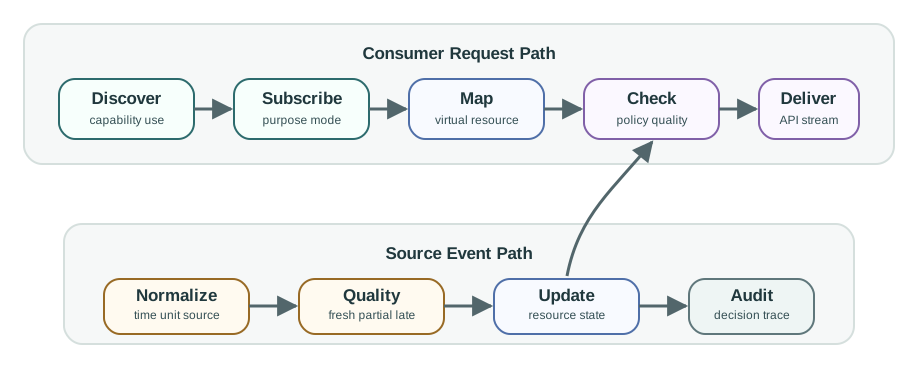
49.12.1 Discovery to Subscription
The consumer finds a resource by capability, quality, location, and allowed use. The subscription captures the requested purpose and delivery mode.
49.12.2 Resource to Event
The virtual resource maps the request to one or more physical, edge, regional, or derived sources while preserving provenance.
49.12.3 Event to Delivery
The delivery layer checks policy, quality, rate, retention, and revocation before returning a value or stream update.
49.12.4 Delivery to Audit
The platform records what happened, which policy was applied, what quality state was visible, and why a request was allowed or denied.
49.13 Choosing a Pattern Mix
This section: Choosing a Pattern Mix — Not every implementation needs the same amount of machinery on day one.
Not every implementation needs the same amount of machinery on day one. The pattern mix should match risk, scale, and change frequency.
49.13.2 Operational Service
- Versioned catalog. Keep discovery records connected to resource meaning and give consumers a way to learn about changes.
- Automated quality state. Make delayed, partial, unavailable, and maintenance conditions visible before consumers use a result.
- Stream and query delivery. Support these access modes through the same governed resource contract.
- Policy enforcement at every delivery mode. Apply purpose, quality, retention, revocation, and rate checks consistently as data leaves the platform.
- Incident and lifecycle records. Connect service changes and operator actions to audit context so later review can explain service behavior.
49.13.3 Regulated or Multi-Owner Service
- Federated or regional placement when required. Placement should follow the service contract and operational risk while preserving source ownership and approved sharing.
- Strong provenance. Connect virtual resources and delivered observations to their physical or derived sources so later reviews can trace meaning.
- Purpose and retention controls. Apply allowed-use and retention terms before delivery across the supported delivery modes.
- Revocation and deletion workflow. Keep lifecycle decisions traceable alongside the policy version and delivery decision.
- Cross-owner audit coordination. Connect requests, resources, sources, quality states, and operator actions with clear ownership and retention rules for audit records.
A pattern decision should survive tool replacement. If the design says “use the stream broker,” the platform can change the broker later. If the design says “every consumer must know topic names and internal partitions,” the implementation has leaked infrastructure into the service contract.
49.14 Capacity Guardrails
This section: Capacity Guardrails — Capacity planning is still important, but the useful output is a guardrail and monitoring plan, not a fixed universal cost estimate.
Capacity planning is still important, but the useful output is a guardrail and monitoring plan, not a fixed universal cost estimate.
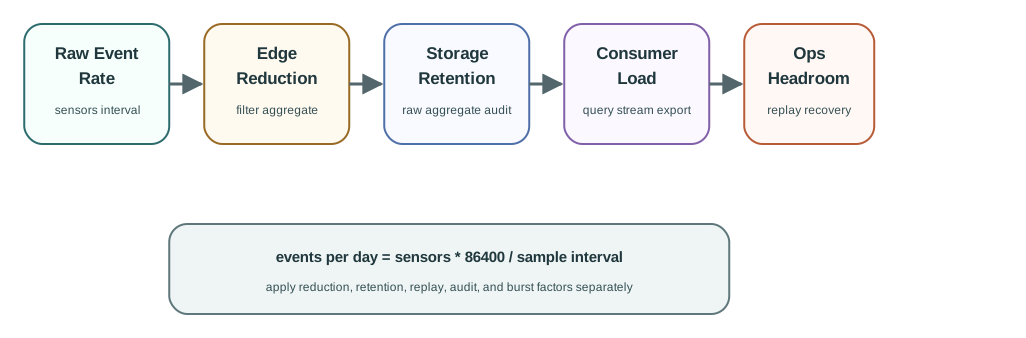
Use capacity estimates to answer these questions:
- How many raw events arrive per second at normal and burst conditions?
- Which observations can be filtered, aggregated, or delayed at the edge without damaging the service contract?
- How long must raw, normalized, aggregate, and audit records be retained?
- Which consumers require latest value, historical query, stream, report, or export delivery?
- What happens when the pipeline is late, the catalog is unavailable, or quality state is degraded?
- What headroom is needed for maintenance windows, replay, backfill, and incident recovery?
For one sensor group, approximate raw event volume as:
events_per_day = sensors * 86400 / sample_interval_seconds
bytes_per_day = events_per_day * average_message_bytes
Then apply edge reduction, retention, replay, and audit factors separately. Do not hide those assumptions inside a single optimistic number.
49.15 Campus Environmental Sensing
This section: Campus Environmental Sensing — A campus wants to share indoor comfort and air-quality data with facilities staff, research dashboards, and a public building-status page.
A campus wants to share indoor comfort and air-quality data with facilities staff, research dashboards, and a public building-status page.
Source groups:
- Room comfort sensors report temperature and humidity every minute.
- Air-quality sensors report particulate and carbon-dioxide readings every two minutes.
- Gateways can aggregate low-risk comfort values into five-minute summaries.
- Research consumers need historical query access, while the public page only needs current status.
Pattern decisions:
- Catalog pattern: publish virtual resources for rooms, zones, and public status summaries.
- Virtual-resource pattern: hide physical sensor replacement behind room and zone resource ids.
- Event-pipeline pattern: normalize units, attach observation time, source id, quality flags, and replay state.
- Governed-delivery pattern: allow facilities staff detailed access, researchers approved historical exports, and the public page only coarse current status.
- Quality-state pattern: mark public status as
delayedorpartialwhen a zone is stale instead of silently showing old values. - Audit pattern: record export approvals, policy versions, source substitutions, and denied requests.
Result: The platform can start with a modest event pipeline because the service contract is clear. If load grows, the implementation can replace the queue, storage, or dashboard tool without changing the catalog or consumer API contract.
49.16 Pattern Readiness Checklist
This section: Pattern Readiness Checklist
- Every pattern has a named owner and contract.
- Consumers discover virtual resources, not physical device internals.
- Normalized events include source, unit, time, quality, provenance, and replay state.
- Delivery checks apply to APIs, streams, dashboards, reports, and exports.
- Quality states are visible to consumers and operators.
- Audit records connect request, resource, source, policy, quality, and delivery decision.
- Capacity estimates separate raw ingest, edge reduction, storage retention, consumer query load, and replay.
- The design can replace a tool without changing the consumer-facing service contract.
49.17 Knowledge Check
This section: Knowledge Check
49.18 Concept Relationships
This section: Concept Relationships
- Catalog pattern enables discovery by capability, location, quality, and allowed use.
- Virtual-resource pattern stabilizes consumer contracts while physical and processing infrastructure changes.
- Event-pipeline pattern preserves identity, time, unit, quality, provenance, and replay records.
- Governed-delivery pattern enforces purpose, entitlement, quality, retention, revocation, and rate checks.
- Quality-state pattern makes degraded data visible instead of silently serving stale values.
- Audit-record pattern connects requests, resources, sources, policy versions, quality states, and delivery decisions.
- Capacity guardrails reveal where ingestion, reduction, retention, query, and replay assumptions need monitoring.
49.19 Common Pitfalls
This section: Common Pitfalls
49.19.1 Pattern as Product List
Naming a database, broker, or gateway does not define the service contract. Define the responsibility first, then choose the tool.
49.19.2 Direct Device Contracts
Letting consumers depend on physical device ids makes replacement and maintenance visible as consumer breakage.
49.19.4 Audit Afterthought
Adding logs after launch rarely reconstructs missing policy, quality, source, and delivery context. Design audit records into each pattern.
49.20 References and Further Reading
This section: References and Further Reading
- OGC SensorThings API, for resource-oriented modeling of Things, Datastreams, Sensors, Observations, and Features of Interest.
- W3C SSN/SOSA, for describing sensors, observations, observed properties, and systems.
- oneM2M functional architecture, for common service-layer responsibilities and resource modeling in IoT systems.
- MQTT Version 5.0 specification, for publish/subscribe messaging concepts and metadata properties.
49.21 Patterns by Responsibility
This section: Patterns by Responsibility — If you only need the operating rule, this layer is enough: choose S2aaS patterns by the responsibility they prove, not by the product they happen to use today.
If you only need the operating rule, this layer is enough: choose S2aaS patterns by the responsibility they prove, not by the product they happen to use today.
Figure 49.3 shows S2aaS patterns connect request, resource, source, policy, quality, and delivery responsibilities.
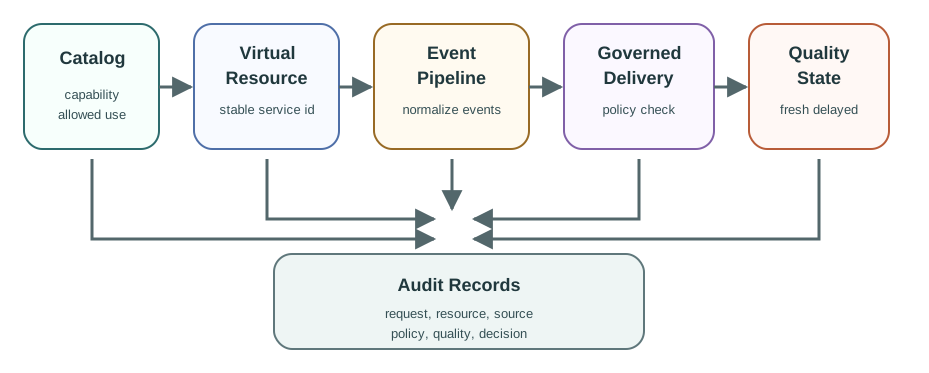
Mobile summary: Catalog, virtual-resource, event-pipeline, governed-delivery, quality-state, and audit patterns work together when records preserve request, resource, source, policy, quality, and decision context.
Find and name
The catalog and virtual-resource patterns make the service discoverable, stable, governed, and insulated from physical device churn.
Check and deliver
The event-pipeline and governed-delivery patterns preserve context, apply purpose and quality rules, and release only allowed outputs.
Explain and recover
Quality-state, audit, and capacity-guardrail patterns make degraded data, denied requests, replays, and bottlenecks visible.
49.22 Campus Pattern Set
This section: Campus Pattern Set — For a campus comfort service, start with a small but complete pattern set instead of a tool list.
For a campus comfort service, start with a small but complete pattern set instead of a tool list.
Treat campus Pattern Set as one connected review. Begin with catalog: expose room, zone, and public-status resources by capability, location, owner, quality rule, allowed purpose, and delivery mode. With that boundary fixed, examine virtual resource: keep zone-comfort-a stable while sensors, gateways, aggregation windows, and comfort-score versions change. Then connect it to event pipeline: normalize source events with time, unit, quality flag, replay state, provenance id, and policy version. Then connect it to governed delivery: apply different purpose, precision, retention, and export rules for facilities, research, and public status consumers. Then connect it to quality and audit: show fresh, delayed, partial, maintenance, or revoked state and record request, resource, source, policy, quality, and decision. Close the review by checking guardrails: separate ingest rate, edge reduction, retention, query load, export load, replay, and incident headroom. The order matters: each later judgment depends on the owner, state, constraint, or failure evidence retained by the preceding step, so the resulting record can support the next chapter decision.
Minimal does not mean vague
A small queue and simple API can work when the virtual-resource, quality, policy, and audit contracts are explicit.
Reopen trigger
Recheck the pattern mix when a new consumer, smaller zone, raw export, longer retention window, replay backlog, or policy exception appears.
49.23 Why Product Lists Break Contracts
This section: Why Product Lists Break Contracts — A product list hides which responsibility is supposed to fail closed.
A product list hides which responsibility is supposed to fail closed. Teams can say "the broker handles streams" while no one owns replay policy, degraded quality, tenant-specific delivery, export revocation, or audit retention.
Treat why Product Lists Break Contracts as one connected review. Begin with catalog gap: consumers can find a value but not its owner, quality rule, allowed use, or retention terms. With that boundary fixed, examine facade gap: device identifiers leak into API contracts, so hardware replacement becomes consumer breakage. Then connect it to delivery gap: dashboards, streams, exports, and reports implement different access checks for the same service. Close the review by checking audit gap: logs record traffic volume but cannot explain why a request was allowed, denied, delayed, or revoked. The order matters: each later judgment depends on the owner, state, constraint, or failure evidence retained by the preceding step, so the resulting record can support the next chapter decision.
49.24 Summary
This section: Summary — S2aaS architecture patterns turn shared sensing into a governed service.
S2aaS architecture patterns turn shared sensing into a governed service. The catalog pattern supports discovery. The virtual-resource pattern stabilizes consumer contracts. The event-pipeline pattern preserves observation context. The governed-delivery pattern enforces use rules. The quality-state pattern makes degraded data visible. The audit-record pattern explains what happened later. Capacity planning connects all of these patterns by showing where ingest, edge reduction, storage, query, replay, and operations assumptions need monitoring.
49.25 What’s Next
This section: What’s Next
- S2aaS Multi-Layer Architecture: layer contracts and handoff detail.
- S2aaS Deployment Models: placement decisions for centralized, regional, edge-assisted, and federated operation.
- S2aaS Real-World Platforms: platform responsibility checks.
- S2aaS Deployment Considerations: readiness, operations, security, and lifecycle controls.
- S2aaS Readiness Check: capstone readiness check across the S2aaS section.
49.26 Key Takeaway
This section: Key Takeaway — S2aaS implementation patterns should match data freshness, aggregation, tenancy, privacy, and SLA needs.
S2aaS implementation patterns should match data freshness, aggregation, tenancy, privacy, and SLA needs. The right pattern is the one that preserves data trust while meeting service obligations.
Find help
3 reviewed answers.
Where should I start in a module?
Open the module page from the sidebar to see its chapters in order. Use the module map to return to a topic you need.
Modules and pathsReviewed
What can I try when a project does not work?
Check the symptom, then work through the diagnostic steps. Keep the error message and the smallest example that reproduces it.
When you are stuckReviewed
How do interactive examples work?
Use the interactive guide to check how examples and simulations work before changing your project.
Interactive examples guideReviewed