38 M2M Design Patterns
More
Depth: Practitioner
Progress saves as you read. Mark sections complete as you go; your progress appears in the sidebar.
38.1 Start Simple
This section: Start Simple — Picture a water tank that asks a pump to start when the level falls.
Make One Machine Exchange Survive a Bad Day
Picture a water tank that asks a pump to start when the level falls. Two machines can exchange that request without a person, but a late, repeated, or missing message could overflow the tank or run the pump dry. The owner needs more than a normal-path demo.
Write the exchange as states: request made, request accepted, action started, action checked, and final result recorded. Give each job an identity and time. State which machine owns each step, how long it may wait, and what safe local action applies when the other side is silent.
Now remove the link, repeat a request, change message order, restart each side, fill its saved-message space, and restore power with an old request present. Check that the pump does not repeat a physical action merely because a reply was lost.
A gateway is a boundary device that may translate or carry messages between unlike systems. If one is used, record what meaning it preserves or changes, including identity, time, unit, quality, and version.
These states are a design runway, not a complete pattern library. Practitioner selects and tests buffering, retry, and fallback patterns. Under the Hood covers timing races, saved state, identity checks, and recovery after partial failure.
Use this exchange test order:
- Name the request and its owner.
- Give each job one identity.
- Mark the safe local state.
- Lose the request before receipt.
- Lose the reply after action.
- Repeat the same request twice.
- Change two messages into wrong order.
- Restart each machine in turn.
- Fill saved space on purpose.
- Restore power with old work present.
- Reconcile request, action, and result.
- Keep each failed trace as proof.
Start with two machines that need to coordinate a job without waiting for a person to interpret every message. In M2M Design Patterns, the practical question is what event, gateway boundary, fallback behavior, and evidence record make the exchange trustworthy.
38.2 Learning Objectives
This section: Learning Objectives
By the end of this chapter, you will be able to:
- Explain the main M2M pattern families and the failure modes they address.
- Select store-and-forward, backoff, scheduling, duty cycling, edge filtering, dynamic configuration, authentication, and failover patterns for appropriate contexts.
- Define acceptance records for each design pattern.
- Avoid pattern misuse such as hiding stale data, discarding anomalies, or retrying all devices at the same time.
- Check a pattern set for consistency across gateway, platform, operations, and device lifecycle responsibilities.
38.3 Pattern Families
This section: Pattern Families — M2M design patterns are easiest to compare in three families: resilience, efficiency, and governance.
M2M design patterns are easiest to compare in three families: resilience, efficiency, and governance. A production design usually needs at least one pattern from each family.
38.3.1 Resilience
Keeps records and safe behavior intact when links, gateways, brokers, or applications are unavailable.
38.3.2 Efficiency
Reduces needless wake time, duplicate transmission, raw-data volume, and synchronized load spikes.
38.3.3 Governance
Controls identity, configuration, command authority, credential lifecycle, and upgrade paths.
38.4 Core Patterns
This section: Core Patterns
38.5 Store, Retry, Reconcile
This section: Store, Retry, Reconcile — The most common M2M failure is not total device failure.
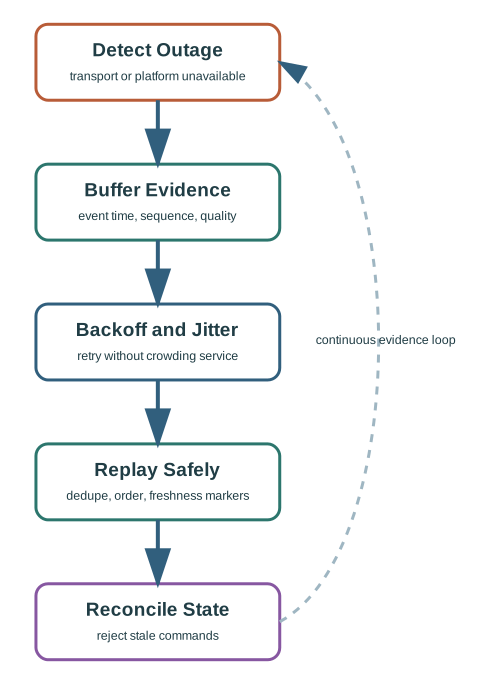
The most common M2M failure is not total device failure. It is partial connectivity: the device is alive, the gateway can still observe field state, but the platform is unreachable. The design pattern should preserve the event and make delayed data visible after recovery.
38.5.1 Good Recovery Behavior
- Keep event time separate from upload time.
- Mark replayed data as delayed or buffered.
- Replay with sequence checks and duplicate handling.
- Preserve local safety behavior while disconnected.
38.5.2 Poor Recovery Behavior
- Rewrite old readings as if they are current. This hides the distinction between event time and upload time; replayed records should remain marked as delayed or buffered.
- Retry continuously without delay control. Backoff, jitter, and a retry cap help protect recovering services from synchronized load.
- Drop low-priority records without an overflow rule. Queue handling needs an explicit rule so record preservation during outages can be assessed.
- Resume commands without checking whether they are stale. Recovery should include stale-command rejection and reconciliation of requests, actions, and results.
38.6 Efficiency Pattern: Send Less, Mean More
This section: Efficiency Pattern: Send Less, Mean More — Efficiency is not only about reducing traffic.
Efficiency is not only about reducing traffic. It is about sending the right information at the right time. An M2M device can conserve power and bandwidth by sleeping between useful work, batching routine observations, and letting a gateway send summaries while still preserving urgent exceptions.
38.6.1 Duty Cycling
Sleep when no observation or command window is needed. Keep explicit wake reasons so operations can distinguish scheduled wake, alarm wake, and maintenance wake.
38.6.2 Event-Driven Reporting
Send immediately when a defined state change or alarm occurs. Use scheduled heartbeats so the platform can still detect silent failure.
38.6.3 Edge Filtering
Convert noisy raw readings into summaries, state changes, or alerts. Keep an anomaly escape path so filtering does not hide rare but important behavior.
38.7 Do Not Trap the Fleet
This section: Do Not Trap the Fleet — M2M deployments often live long enough for networks, endpoints, certificates, thresholds, and ownership to change.
M2M deployments often live long enough for networks, endpoints, certificates, thresholds, and ownership to change. A design pattern is incomplete if it only handles the first deployment day.
38.7.1 Dynamic Configuration
Use named endpoints, signed configuration, versioned policy, and rollback behavior. A deployed device should not require a site visit just because a platform endpoint or threshold changed.
38.7.2 Authentication and Lifecycle
Every device and gateway needs a credential state: provisioned, active, suspended, retired, or compromised. Rejected messages should be visible in operations records.
38.8 Pattern Selection Flow
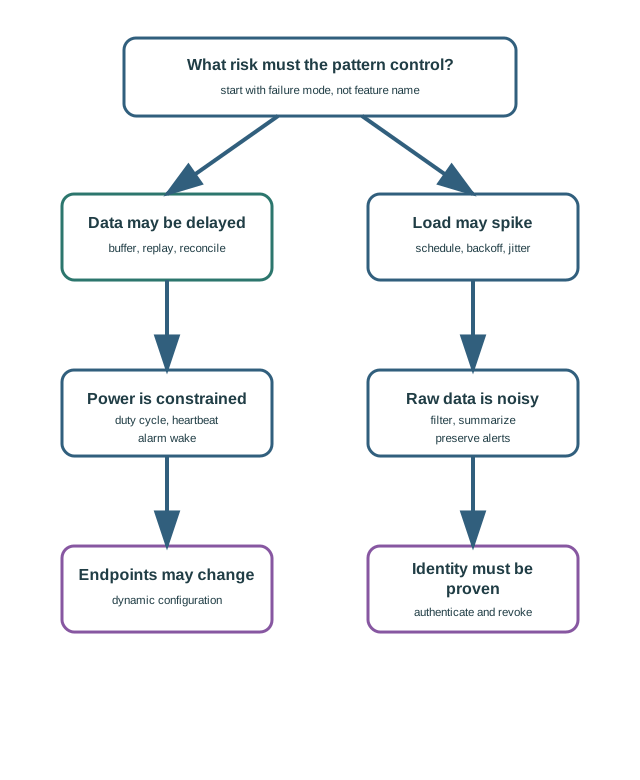
This section: Pattern Selection Flow — Pattern selection starts with the risk you are trying to control.
Pattern selection starts with the risk you are trying to control. The same deployment may need several patterns, but each pattern should have a clear reason.
38.9 Remote Cold-Storage Gateway
This section: Remote Cold-Storage Gateway — A cold-storage site has temperature sensors, a local controller, a gateway, and a platform connection.
A cold-storage site has temperature sensors, a local controller, a gateway, and a platform connection. The goal is not to send every raw reading forever. The goal is to preserve safe operation, records, and maintainability.
38.9.1 Selected Patterns
- Store and forward for outage records. Preserve event time, receipt time, sequence, and quality so delayed uploads remain interpretable.
- Backoff and jitter for reconnect behavior. Spread retries and define a cap to limit load on recovering services.
- Local control rule for temperature safety. Preserve local safety behavior while the platform connection is unavailable.
- Dynamic configuration for thresholds and endpoint changes. Use a trusted source, versioning, validation, and rollback to a known-good configuration.
- Device authentication for gateway and sensor identity. Include credential lifecycle states and visible records of rejected messages.
38.9.2 Acceptance Records
- Delayed readings remain marked as delayed after upload. Event and receipt times support the distinction between buffered history and current observations.
- Alarm events bypass routine batching. This preserves urgent exceptions while routine observations are grouped.
- Config versions and rollback decisions are visible. These records support checking configuration changes and fallback behavior.
- Retired sensor IDs are rejected and logged. The record connects identity checks with device lifecycle state.
- Operators can see why the gateway switched transport paths. Include switch criteria, queue handling, and return-to-primary behavior when assessing failover.
38.10 Pattern Boundary Checklist
This section: Pattern Boundary Checklist
Use this checklist before accepting an M2M design-pattern set:
- Each selected pattern names the failure mode it controls.
- Buffered data includes event time, receipt time, sequence, and quality state.
- Retry logic has a backoff rule, jitter or offset rule, and retry cap.
- Duty cycling includes alarm override and heartbeat behavior.
- Edge filtering records what was retained, what was summarized, and what bypasses the filter.
- Configuration has a trusted source, version, rollback rule, and invalid-config behavior.
- Authentication has provisioning, revocation, and rejected-message records.
- Failover includes switch criteria, queue handling, and return-to-primary behavior.
- Operations can distinguish fresh, delayed, estimated, rejected, and locally handled events.
38.11 Practice Checks
This section: Practice Checks
This section:
This section:
38.12 Common Mistakes
This section: Common Mistakes
38.12.1 Buffering Without Freshness
Buffered data is not automatically current data. Preserve event time, receipt time, replay order, and quality state.
38.12.2 Jitter Without a Cap
Retry spread helps, but unlimited growth can hide a fleet that never recovers. Define maximum delay and alert behavior.
38.12.3 Filtering Without Escape Paths
An edge filter that drops unusual data can hide the exact event the system was meant to detect. Let alarms bypass routine summaries.
38.12.4 Configuration Without Rollback
Remote configuration is risky if a bad version can strand a device. Keep versioning, validation, and a known-good fallback.
38.13 References and Further Reading
This section: References and Further Reading
- oneM2M, Functional Architecture, for common-service-layer design responsibilities across devices, gateways, and applications.
- OMA SpecWorks, Lightweight M2M Core Specification, for bootstrap, observation, configuration, and firmware-management patterns.
- IETF RFC 7252, The Constrained Application Protocol (CoAP), for constrained request-response design.
- OASIS MQTT specifications, for brokered publish-subscribe behavior and delivery semantics.
38.14 Patterns as Failure Controls
This section: Patterns as Failure Controls — If you only need the operating rule, this layer is enough: choose an M2M pattern only after naming the failure it controls and the records that prove it works in normal, degraded, and recovery states.
If you only need the operating rule, this layer is enough: choose an M2M pattern only after naming the failure it controls and the records that prove it works in normal, degraded, and recovery states.
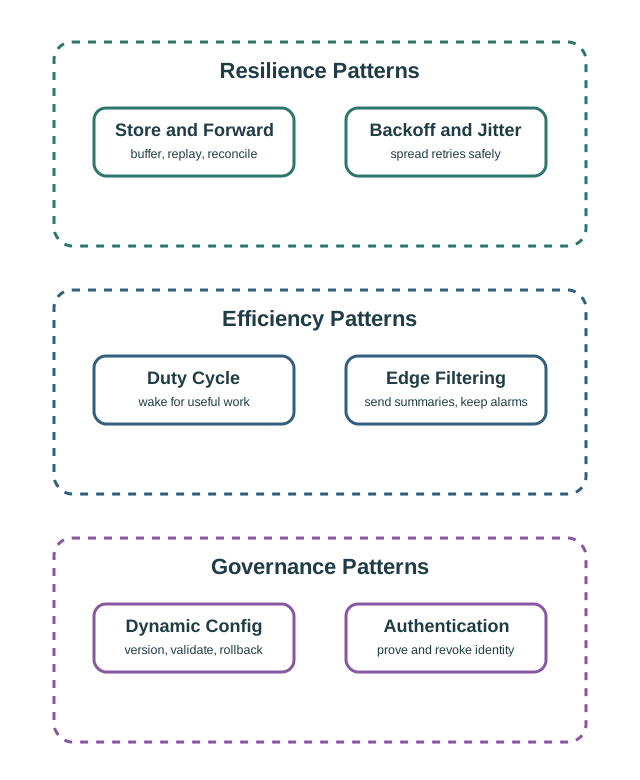
Figure 38.3 shows resilience, efficiency, and governance patterns address different fleet failure modes.
Mobile summary: Use resilience, efficiency, and governance patterns together so outage recovery, low-power operation, filtering, configuration, and authentication do not create hidden failure modes.
Resilience
Store-and-forward, failover, and reconciliation preserve state when links, gateways, brokers, or applications are unavailable.
Efficiency
Duty cycling, scheduling, backoff, jitter, and filtering reduce unnecessary wake time, duplicate traffic, and synchronized load.
Governance
Dynamic configuration, authentication, credential lifecycle, and rollback keep devices manageable after they leave the lab.
38.15 Cold-Storage Pattern Set
This section: Cold-Storage Pattern Set — For the remote cold-storage gateway, one pattern is not enough.
For the remote cold-storage gateway, one pattern is not enough. The useful design combines records that protect safety, auditability, network recovery, and future operations.
Local safety
Alarms continue locally during WAN outage, and cloud notifications are replayed later with delayed status instead of pretending they were live.
Recovery traffic
Buffered records drain with capped backoff, jitter, sequence checks, and duplicate handling so reconnection does not create a new outage.
Configuration control
Threshold changes carry source, version, validation result, rollout scope, rollback rule, and the behavior for invalid configuration.
Rejected shortcut
Reject summary-only edge filtering because a cold-chain anomaly must bypass routine summaries and preserve enough raw evidence for review.
38.16 Why Patterns Must Be Coupled
This section: Why Patterns Must Be Coupled — Pattern failures usually come from using one good idea alone.
Pattern failures usually come from using one good idea alone. Buffering, retry, filtering, authentication, and configuration all change each other's risk.
Treat why Patterns Must Be Coupled as one connected review. Begin with buffering needs freshness: event time, receipt time, replay order, duplicate state, and quality markers keep delayed data from looking current. With that boundary fixed, examine retry needs restraint: capped backoff and jitter prevent recovering devices from retrying together until the broker fails again. Then connect it to filtering needs escape paths: alarms, anomalies, and quality changes need bypass rules so efficiency does not erase evidence. Close the review by checking configuration needs rollback: versioned thresholds, validation, and a known-good fallback keep remote changes from stranding devices. The order matters: each later judgment depends on the owner, state, constraint, or failure evidence retained by the preceding step, so the resulting record can support the next chapter decision.
38.17 Summary
This section: Summary — M2M design patterns are practical safeguards against recurring field failures.
M2M design patterns are practical safeguards against recurring field failures. Store-and-forward protects records during outages. Backoff and jitter protect recovering services. Duty cycling and edge filtering reduce unnecessary work. Dynamic configuration, authentication, and failover keep the fleet maintainable over its lifetime. A pattern is only complete when the proof records show how it behaves during normal operation, degraded operation, and recovery.
38.18 Concept Relationships
This section: Concept Relationships
- M2M communication defines the message contracts that these patterns protect.
- M2M service platforms provide the identity, policy, scheduling, and operations services that make patterns observable.
- M2M implementations turn these patterns into gateway queues, retry functions, configuration stores, and credential workflows.
- Edge and fog computing often host the local filtering, fallback, and recovery logic.
38.19 What’s Next
This section: What’s Next
| If you want to… | Read this |
|---|---|
| Study service-platform support for these patterns | M2M Service Platforms |
| Revisit the communication contracts behind these patterns | M2M Communication |
| Practice lab records for buffering and recovery | M2M Labs and Assessment |
| Move from patterns into implementation details | M2M Implementations |
| Compare pattern choices in full scenarios | M2M Case Studies |
38.20 Key Takeaway
This section: Key Takeaway — M2M patterns such as telemetry, command, request-response, publish-subscribe, gateway aggregation, and store-forward should be chosen from coupling, scale, reliability, latency, and management requirements.
M2M patterns such as telemetry, command, request-response, publish-subscribe, gateway aggregation, and store-forward should be chosen from coupling, scale, reliability, latency, and management requirements.
Find help
3 reviewed answers.
Where should I start in a module?
Open the module page from the sidebar to see its chapters in order. Use the module map to return to a topic you need.
Modules and pathsReviewed
What can I try when a project does not work?
Check the symptom, then work through the diagnostic steps. Keep the error message and the smallest example that reproduces it.
When you are stuckReviewed
How do interactive examples work?
Use the interactive guide to check how examples and simulations work before changing your project.
Interactive examples guideReviewed