40 Participatory Sensing Platform

More
Depth: Practitioner
Progress saves as you read. Mark sections complete as you go; your progress appears in the sidebar.
40.1 In 60 Seconds
This section: In 60 Seconds — Picture a city asking people to mark broken pavements with their phones.
Picture a city asking people to mark broken pavements with their phones. Many reports can reveal a pattern. They can also miss streets where few people take part. The map must show both the reports and the gaps.
Participatory sensing means people help collect or label evidence. Start with one clear task. Tell the person what to see, what to send, and why it is needed. Ask for consent before private data is used. Keep only the context needed for the decision. Mark a report as raw until its checks pass. Keep missing places marked as missing. Give the person useful feedback without claiming that each report is true.
Use this task route:
- What decision will the reports support?
- What should the person observe?
- What should the phone record?
- Which context is truly needed?
- Did the person agree to that use?
- Can two reports be the same event?
- How is a mistake found?
- Which areas have few reports?
- Which devices may skew the result?
- When is a fixed sensor still needed?
A large crowd does not remove bias. A good platform makes uncertainty and coverage limits easy to see. Practitioner covers the campaign, checks, feedback, and owner. Under the Hood covers calibration, duplicate handling, harmful reports, and coverage bias. Those details may limit the claim. They never turn a blank area into evidence of no problem.
Keep four limits in view. A report can be wrong. A crowd can be biased. A blank area is unknown. Private context still needs care.
Participatory sensing asks people to collect, label, or submit observations using phones, wearables, small add-on sensors, or web forms. The WSN design question is not “can a phone sense it?” The question is whether the task, consent boundary, sensor behavior, context capture, validation method, coverage bias, feedback loop, and operations owner are strong enough for the decision being made.
Good participatory platforms make uncertainty visible. They separate raw reports from accepted evidence, mark missing areas as missing, keep personal data minimized, and give contributors clear feedback without implying that every submission is automatically correct.
40.2 Learning Objectives
This section: Learning Objectives
By the end of this chapter, you will be able to:
- Design a participatory sensing review around the decision, task, participant role, and evidence record.
- Separate mobile capture, upload, validation, aggregation, feedback, and operations responsibilities.
- Review sensor suitability, context capture, duplicate handling, calibration, and malicious or mistaken submissions.
- Identify coverage bias caused by who participates, where they travel, when they report, and which devices they use.
- Decide when participatory sensing supports a claim and when it needs fixed sensors, professional inspection, or delayed-DTN review.
40.3 Participatory Sensing Review
This section: Participatory Sensing Review
40.4 Start With the Task
This section: Start With the Task — Participatory sensing fails when the task is vague.
Participatory sensing fails when the task is vague. A useful task says what the participant should observe, what the phone or sensor should capture, what context is required, what precision is acceptable, and what decision the platform will support.
The task should avoid asking learners to collect more data “just in case.” More precision can make validation easier, but it can also expose people, create bias, or exceed the decision need.
40.5 Platform Review Route
This section: Platform Review Route — Follow Figure 40.1 to see where consent, validation, and feedback constrain a participatory sensing decision.
Follow Figure 40.1 to see where consent, validation, and feedback constrain a participatory sensing decision.
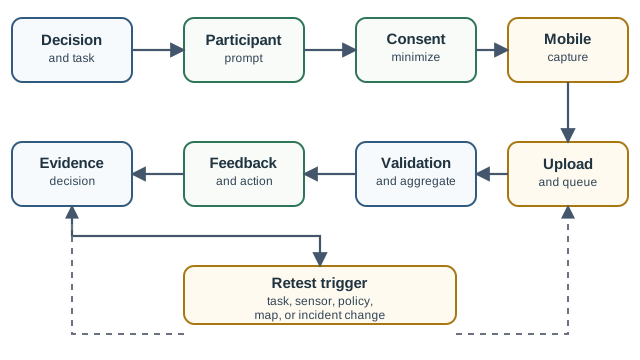
Begin with the choice and task. Then read the prompt so the person knows what to observe before the phone takes data. Consent and data limits cut what the phone may keep. Upload and a local queue save records when the link comes and goes. Checks and group work must keep failed or doubtful reports in view; they should not blend them into the result. A reply tells people what took place, while the last box states what the group result can support. A new task, user group, app, or pass rule sends the path back to test.
The route separates collection from acceptance. A report can be received, but still need duplicate review, context checks, sensor-quality review, or human confirmation before it supports a decision.
Use Figure 40.2 to trace how a submitted observation either becomes usable evidence or is held for review.
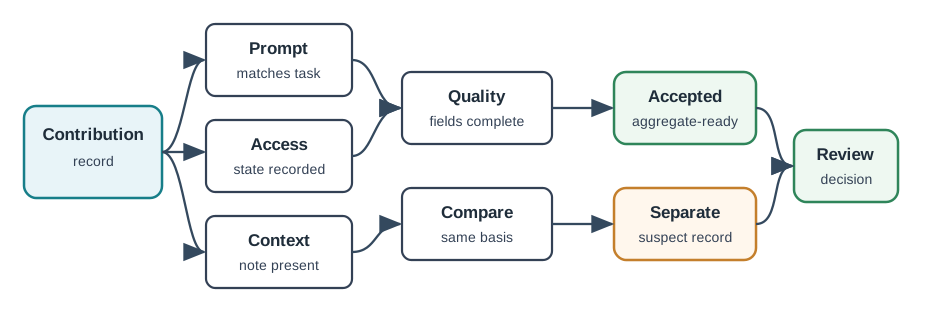
Start with the sent record and compare it with the prompt. A reading can look sound but still answer the wrong task. Access state and site facts show whether the phone was allowed to collect and whether the value can be read in context. Quality fields and one shared basis then decide if the report can join the group result. The two exits matter. Passed records go to study, while suspect ones keep a reason and wait for review. This protects the result from repeats, old reports, missing facts, and uneven use without throwing away a record that may still help.
A report can route attention while it is still provisional. It becomes accepted evidence only after the prompt matches the task, the participant and device state are recorded, enough context is present, quality fields are complete, and the comparison basis is clear. Otherwise the platform should separate it as suspect, duplicate, stale, outside-scope, or manual-review evidence.
40.5.1 Crowdsensing Campaign Review
40.6 Platform Layers
This section: Platform Layers — A participatory sensing platform usually has four review layers.
A participatory sensing platform usually has four review layers. The names can vary, but the responsibilities should be visible.
Do not let the dashboard hide the review. A beautiful map is weak evidence if it does not show stale reports, low-confidence areas, missing zones, duplicate reports, or rejected submissions.
40.7 Data Quality Evidence
This section: Data Quality Evidence — The reason to inspect Figure 40.3 is Data Quality Evidence.
The reason to inspect Figure 40.3 is Data Quality Evidence. Its Evidence and record elements locate Participatory sensing evidence record precisely.
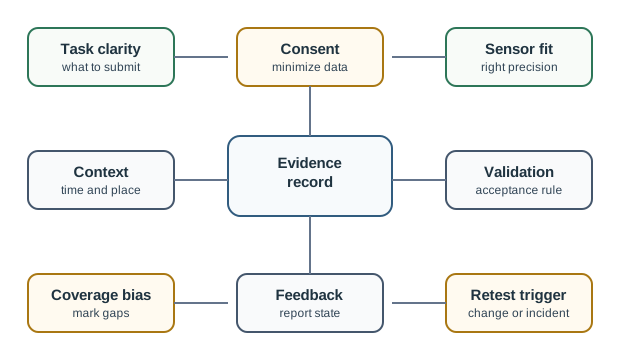
Figure Figure 40.3 separates a received contribution from an accepted one. The ledger checks task and time. It also checks permission, placement, prompt, and sensor mode before comparing reports. Validation can accept a report for aggregation or keep it separate from the main claim. Feedback then tells the contributor what happened and gives an owner a follow-up action. The lower fields record task clarity, consent, sensor fit, duplicate and reference checks, coverage bias, and a retest trigger. Blank areas remain unknown; a dashboard must show missing and low-confidence evidence rather than presenting every received report as proof.
Quality review should not pretend that all problems are malicious. Many weak reports are honest mistakes: unclear prompts, poor GPS conditions, blocked sensors, phone model variation, duplicate categories, or missing context.
Keep a contribution state ledger rather than a single accepted/rejected flag. That ledger lets operators use early reports without overclaiming them.
| Ledger state | Evidence to store | Operational meaning |
|---|---|---|
| Received | Task id, time, coarse location, device or form class, participant action, and upload path | The platform can acknowledge the report, but cannot yet use it as accepted evidence |
| Context complete | Required fields, placement or media cues, permission state, local conditions, and missing-field notes | The report can enter quality review because the reviewer knows what it describes |
| Comparable | Same prompt version, sensor mode, aggregation cell, time window, and calibration or reference basis | The report can be compared with other records without mixing incompatible evidence |
| Accepted or separated | Duplicate status, cross-report agreement, manual review, abuse signal, and confidence label | Accepted records can aggregate; separated records stay visible but out of the main claim |
| Closed with feedback | Outcome label, contributor message, owner action, retention class, and retest trigger | The contributor and operator know whether the record was used, merged, rejected, or needs follow-up |
Aggregate only like-with-like records. Nearby points are not automatically comparable if they use different prompts, device states, capture conditions, or privacy treatments.
| Aggregation gate | Review question | Unsafe shortcut |
|---|---|---|
| Prompt compatibility | Did contributors answer the same task with the same category definitions? | Merging old and new prompt versions as if fields mean the same thing |
| Capture compatibility | Were sensor mode, device state, placement, and local context sufficient? | Comparing covered microphones, moving phones, and stationary samples without labels |
| Spatial-temporal basis | Is the aggregation cell, time window, and upload delay appropriate for the claim? | Using stale uploads or sparse cells as live neighborhood evidence |
| Privacy boundary | Can the claim be supported after location, identity, media, and retention are minimized? | Keeping exact traces because they make validation easier but exceed the decision need |
| Decision limit | Does the result state what it can and cannot support? | Letting a planning trend become enforcement, emergency response, or individual judgment |
Validation tools also need caveats. Duplicate merging can hide repeated problems if the merge radius is too wide. Reputation can freeze out new contributors. Outlier removal can suppress rare real events. Manual review can lag behind field changes. Reference sensors can be placed in easier areas. A defensible design records which validation rule was used and what claim it supports.
40.8 Worked Review: Street Damage Reporting
This section: Worked Review: Street Damage Reporting — A local authority wants residents to report road and sidewalk damage through a mobile form.
A local authority wants residents to report road and sidewalk damage through a mobile form. Reports include a photo, an approximate location, a category, and optional notes. The authority uses the reports for inspection routing and maintenance planning.
Task: Report visible damage that can be inspected later, not urgent danger requiring immediate emergency response.
Privacy boundary: Collect approximate location of the issue, report time, and photo of the damage. Avoid continuous tracking or unnecessary contributor identity exposure.
Validation: Merge nearby duplicate reports, flag unclear photos for staff review, and label unverified reports as provisional until accepted.
Bias: Areas with active contributors will appear more visible than quiet areas. The dashboard should show low-report zones instead of treating silence as no damage.
Feedback: Notify contributors when a report is accepted, merged, needs clarification, or is closed after inspection.
Retest trigger: New report categories, a changed inspection workflow, repeated false categories, privacy policy changes, or missed feedback reopen review.
The defensible claim is narrow: participatory reports improve inspection triage when validation, bias, and staff response are visible. They do not replace professional inspection or emergency reporting.
40.9 Worked Review: Community Noise Map
This section: Worked Review: Community Noise Map — A community group invites volunteers to measure neighborhood noise with a phone app.
A community group invites volunteers to measure neighborhood noise with a phone app. The goal is a public trend map for planning discussions, not enforcement against individual households or businesses.
Task: Collect short noise samples with approximate location and time band so the map can show broad patterns.
Consent and minimization: Explain microphone use, avoid storing raw audio when not needed, reduce location precision, and allow participants to delete pending submissions.
Quality checks: Reject samples taken during phone calls, music playback, covered microphones, or missing location context.
Aggregation: Show trend bands and confidence labels rather than single-point certainty.
Bias: Recruit for under-sampled streets and time periods. Mark areas with insufficient evidence.
Retest trigger: New phone models, changed sampling prompts, complaints about privacy, or unexplained map shifts reopen review.
This is a good participatory fit when the claim is about community-level patterns. It is a poor fit for punitive decisions unless the platform adds stronger measurement, calibration, due process, and independent confirmation.
40.10 Common Review Mistakes
This section: Common Review Mistakes
40.11 Review Checklist
This section: Review Checklist — The decision the platform supports and any decisions it must not support.
Before accepting a participatory sensing design, confirm that the record states:
The decision the platform supports and any decisions it must not support. The participant action, required context, and accepted data precision. Consent, notice, opt-out, minimization, retention, and access boundaries. Sensor suitability, device variation, calibration assumptions, and blocked-sensor checks. Validation rules for duplicates, unclear submissions, low-confidence reports, and manual review. Coverage bias by location, time, population, route, device, and participation level. Contributor feedback, operations owner, escalation path, and retest triggers.
40.12 Knowledge Check: Report Acceptance
This section: Knowledge Check: Report Acceptance
40.13 Knowledge Check: Coverage Bias
This section: Knowledge Check: Coverage Bias
40.14 Aggregation Compatibility
This section: Aggregation Compatibility
40.15 Matching: Participatory Evidence
This section: Matching: Participatory Evidence
40.16 Ordering: Participatory Review Route
This section: Ordering: Participatory Review Route
40.17 Summary
This section: Summary — Participatory sensing extends WSN practice by letting people contribute observations and mobile sensor readings.
Participatory sensing extends WSN practice by letting people contribute observations and mobile sensor readings. Its value comes from reach, context, and community participation, but its risks come from vague tasks, overcollection, device variation, duplicate reports, missing populations, and maps that hide uncertainty.
Accept a participatory sensing design when task evidence, consent, sensor fit, context capture, validation, bias markers, feedback, and operations ownership are visible. Narrow or reject the claim when the platform treats reports as truth, hides missing coverage, or uses participatory evidence for decisions that need stronger confirmation.
40.18 Key Takeaway
This section: Key Takeaway — Participatory Sensing Platform Review should treat people, delay, consent, data quality, custody, privacy, intermittent connectivity, and deployment evidence as part of the sensing architecture.
Participatory Sensing Platform Review should treat people, delay, consent, data quality, custody, privacy, intermittent connectivity, and deployment evidence as part of the sensing architecture.
40.19 Concept Relationships
This section: Concept Relationships — Human-Centric Sensing explains the broader human roles that participatory sensing belongs to.
Human-Centric Sensing explains the broader human roles that participatory sensing belongs to. MWSN Types and Mobile Entities Review shows how participatory collection fits broader mobile entity roles. Delay-Tolerant Networks for IoT covers store-carry-forward evidence when reports or sensor summaries cannot upload immediately. Mobile Phones as Sensors reviews phone sensor capabilities and mobile-sensing constraints. WSN Communication keeps upload, gateway, acknowledgement, and traffic evidence grounded.
40.20 What’s Next
This section: What’s Next — Use Mobile Phones as Sensors when the main question is phone sensor capability.
Use Mobile Phones as Sensors when the main question is phone sensor capability. Use Human-Centric Sensing and Delay-Tolerant Networks for IoT when the same design mixes contribution, human roles, and delayed upload. Use WSN Mobile Sinks when collection depends on planned mobile carriers rather than voluntary participant reports.
Find help
3 reviewed answers.
Where should I start in a module?
Open the module page from the sidebar to see its chapters in order. Use the module map to return to a topic you need.
Modules and pathsReviewed
What can I try when a project does not work?
Check the symptom, then work through the diagnostic steps. Keep the error message and the smallest example that reproduces it.
When you are stuckReviewed
How do interactive examples work?
Use the interactive guide to check how examples and simulations work before changing your project.
Interactive examples guideReviewed