6 WSN Fundamentals and Topologies
6.1 Learning Objectives
By the end of this chapter, you will be able to:
- Define WSN Architecture: Explain the components and organization of wireless sensor networks including nodes, base stations, and gateways
- Compare Network Topologies: Evaluate star, mesh, cluster-tree, and hybrid topologies for different application requirements
- Identify WSN Challenges: Classify the unique constraints that differentiate WSNs from traditional networks
- Select Appropriate Topology: Apply decision frameworks to choose the right topology for specific deployment scenarios
MVU: Minimum Viable Understanding
If you only have 5 minutes, grasp these core ideas:
- A WSN is a team of battery-powered sensors that communicate wirelessly and self-organize to monitor an environment
- Energy is the #1 constraint – radio transmission uses 1000x more power than sleep, so WSN protocols optimize aggressively for power savings
- Three main topologies: Star (simple, limited range), Mesh (self-healing, complex), Cluster (best balance of efficiency and scalability)
- WSNs differ from regular networks because they must operate for years on batteries in harsh, inaccessible locations
If you remember nothing else: energy efficiency drives every WSN design decision.
For Kids: Wireless Sensor Networks Explained Simply
Meet the Sensor Squad!
Temperature Terry, Light Lucy, Motion Marley, Pressure Pete, and Signal Sam are part of a special team - a Wireless Sensor Network! They work together like a team of scouts spread across a giant forest, always watching and reporting back to headquarters.
Simple Story:
Imagine a beautiful forest that needs protecting from fires. The park rangers can’t watch every tree themselves, so they ask the Sensor Squad for help! Temperature Terry and his friends spread out across the forest - some near the river, some on the hills, some deep in the woods.
Each squad member watches their little area and talks to their neighbors using special walkie-talkies. When Temperature Terry on the far side of the forest notices it’s getting really hot (uh oh, maybe a fire!), he can’t reach headquarters directly - it’s too far away! But he CAN tell his neighbor Motion Marley, who tells Light Lucy, who tells Pressure Pete, who finally tells Signal Sam at headquarters. The message hops from friend to friend until it arrives - just like passing a note in class!
The best part? The Sensor Squad is really good at saving energy. They take little naps throughout the day (called “duty cycling”) and only wake up to check on things. This way, their batteries last for YEARS instead of days!
Fun Facts:
- WSNs are like scouts spread across a forest, each watching their area and passing messages to headquarters!
- Sensor nodes can run for 5+ years on tiny batteries by taking lots of little naps!
- If one sensor stops working, the others find a new path to pass messages - teamwork!
- A farm might have hundreds of sensors checking soil, weather, and crops all at once!
Try This at Home:
Play “telephone” with your family or friends! Spread out across different rooms. The person farthest from the “headquarters” (maybe the kitchen) whispers a message to their nearest neighbor, who passes it along until it reaches headquarters. This is exactly how wireless sensor networks pass information through “multi-hop” communication!
For Beginners: Introduction to WSN Concepts
What is this chapter? This chapter provides the foundational concepts of Wireless Sensor Networks before diving into specific implementations.
Key Terms:
| Term | Meaning |
|---|---|
| Node | Individual sensor device in the network |
| Cluster | Group of nodes managed by a cluster head |
| Routing | Path selection for data transmission |
| Topology | How nodes are organized and connected |
Why Learn WSN?
- Core building block of IoT systems
- Understand energy-constrained design
- Foundation for smart city, agriculture, and industrial IoT
Recommended Path:
- Complete this introductory chapter
- Move to WSN Energy and Architecture
- Explore WSN Applications
Common Pitfalls
1. Prioritizing Theory Over Measurement in WSN Fundamentals and Topologies
Relying on theoretical models without profiling actual behavior leads to designs that miss performance targets by 2-10×. Always measure the dominant bottleneck in your specific deployment environment — hardware variability, interference, and load patterns routinely differ from textbook assumptions.
2. Ignoring System-Level Trade-offs
Optimizing one parameter in isolation (latency, throughput, energy) without considering impact on others creates systems that excel on benchmarks but fail in production. Document the top three trade-offs before finalizing any design decision and verify with realistic workloads.
3. Skipping Failure Mode Analysis
Most field failures come from edge cases that work in the lab: intermittent connectivity, partial node failure, clock drift, and buffer overflow under peak load. Explicitly design and test failure handling before deployment — retrofitting error recovery after deployment costs 5-10× more than building it in.
6.2 What is a Wireless Sensor Network?
Common Misconception: “Wi-Fi is Fine for Battery Sensors”
Myth: “Wi-Fi is everywhere and easy to use, so it’s a good choice for battery-powered WSN deployments.”
Reality: Wi-Fi consumes 10-100x more power than WSN protocols (Zigbee, Thread, LoRaWAN), making it unsuitable for multi-year battery operation:
- Wi-Fi idle listening: 100-200 mW continuously (waiting to receive messages)
- Zigbee sleep mode: 0.001 mW (1 uA current)
- Battery lifetime impact: Wi-Fi sensors last 2-4 weeks; Zigbee sensors last 2-5 years on same battery
Putting Numbers to It
Comparing Wi-Fi vs Zigbee battery lifetime:
\[T_{lifetime} = \frac{\text{Battery Capacity (mAh)}}{\text{Average Current (mA)}}\]
Worked example: 2000 mAh battery with 1% duty cycle: - Wi-Fi: \(0.01 \times 150 + 0.99 \times 0.001 = 1.5\) mA avg → \(2000/1.5 = 1333\) hours = 56 days - Zigbee: \(0.01 \times 20 + 0.99 \times 0.001 = 0.20\) mA avg → \(2000/0.20 = 10,000\) hours = 417 days - Ratio: Zigbee lasts 7.5× longer on the same battery!
Why This Matters: A smart building deployed 200 Wi-Fi temperature sensors expecting 2-year operation. After 3 weeks, batteries started dying. Annual replacement cost: $24,000 (200 sensors x $120 labor x 12 months/3 weeks).
Correct Approach: Use Wi-Fi for mains-powered devices (cameras, displays, gateways). Use Zigbee/Thread/LoRaWAN for battery sensors requiring multi-year operation.
6.3 Key Concepts Simplified
| WSN Term | Simple Explanation | Everyday Analogy |
|---|---|---|
| Sensor Node | Small device that senses and communicates | A scout with a walkie-talkie |
| Base Station / Sink | Central point that collects all data | Scout headquarters |
| Gateway | Connects WSN to the internet | A translator between scouts and city officials |
| Multi-Hop | Messages travel through multiple nodes | Scouts passing messages relay-style |
| Data Aggregation | Combining data from multiple sensors | Scouts summarizing reports before sending |
| Topology | How nodes are organized | How scouts are positioned in the forest |
6.4 Why Are WSNs Different from Regular Networks?
WSNs face unique challenges that regular computer networks don’t:
6.5 Understanding Network Topologies
How sensor nodes are organized matters a lot. Here are the main patterns:
6.5.1 Topology Selection Decision Tree
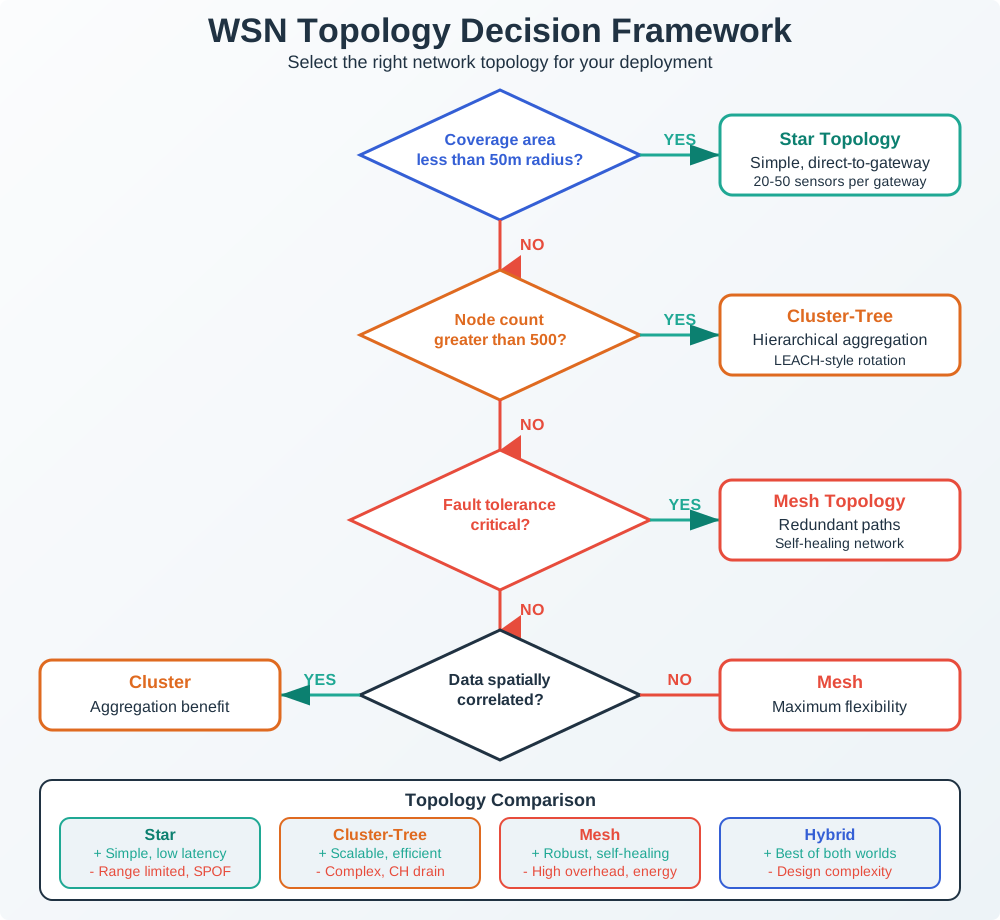
Topology Comparison:
- Star: Every node talks directly to base - Simple, but nodes far away can’t reach
- Mesh: Nodes relay messages for each other - Robust, but complex
- Cluster: Groups of nodes with leaders - Good balance of efficiency and range
Tradeoff: Flat vs Hierarchical WSN Topology
Decision context: When deploying a wireless sensor network, choosing between flat (mesh) and hierarchical (cluster-based) topologies fundamentally affects network lifetime, scalability, and data delivery patterns.
| Factor | Flat Topology (Mesh) | Hierarchical Topology (Cluster) |
|---|---|---|
| Energy Distribution | Uneven - nodes near base drain faster (hotspot problem) | Balanced - cluster heads rotate, share burden |
| Scalability | Poor - routing tables grow with network size | Excellent - only cluster heads maintain routes |
| Data Aggregation | None - raw data forwarded | Built-in - cluster heads aggregate locally |
| Latency | Lower - direct multi-hop paths | Higher - aggregation adds delay |
| Fault Tolerance | High - multiple alternate paths | Moderate - cluster head failure affects group |
| Setup Complexity | Simple - self-organizing protocols | Complex - cluster formation algorithms needed |
Choose Flat Topology when:
- Network is small (<50 nodes) where routing overhead is manageable
- Every sensor reading is critical and unique (no aggregation benefit)
- Real-time data delivery is required without aggregation delays
- High redundancy needed for mission-critical monitoring (e.g., industrial safety)
Choose Hierarchical Topology when:
- Large-scale deployment (100+ nodes) where flat routing doesn’t scale
- Sensor readings are spatially correlated (e.g., temperature across a field)
- Network lifetime is critical and energy must be balanced across nodes
- Bandwidth to base station is limited (aggregation reduces traffic)
- Nodes are densely deployed and data redundancy can be exploited
Default recommendation: Use Hierarchical Topology for most real-world WSN deployments. The energy savings from cluster-based aggregation and balanced load distribution typically extend network lifetime by 2-3x compared to flat topologies. Reserve flat mesh for small networks (<50 nodes) or when every individual reading must be preserved without aggregation.
6.5.2 Interactive: Protocol Battery Life Comparison
Adjust the parameters below to compare battery life across different wireless protocols:
6.6 Self-Check: Understanding the Basics
Before continuing, make sure you can answer:
- What makes WSNs different from regular networks? - Battery-powered, many cheap nodes, unreliable wireless links, hard-to-reach locations
- Why is energy efficiency so critical? - Transmitting uses 1000x more power than sleeping; batteries must last years
- What is multi-hop communication? - Sensor nodes relay messages through each other to reach the base station
- What are the three main network topologies? - Star (simple, limited range), Mesh (self-healing, complex), Cluster (hierarchical, efficient)
Key Concepts
- Wireless Sensor Network (WSN): Network of spatially distributed autonomous sensor nodes cooperatively monitoring environmental or physical conditions
- Sensor Node: Small, battery-powered device with sensing, processing, and wireless communication capabilities deployed in monitored environments
- Network Topology: Organization of sensor nodes (star, mesh, cluster, hybrid) affecting communication patterns and energy efficiency
- Multi-Hop Communication: Nodes relay data through intermediaries to reach base stations beyond direct radio range
6.7 WSN vs Traditional IoT: When Do You Need a WSN?
Not every IoT deployment needs a wireless sensor network. The decision depends on scale, environment, and operational constraints.
Decision framework:
| Factor | Use Standard IoT (Wi-Fi/BLE) | Use WSN (Zigbee/802.15.4) |
|---|---|---|
| Node count | Under 50 devices | 50 to 10,000+ devices |
| Power source | Mains power or easy battery access | Battery-only, multi-year lifetime required |
| Coverage area | Single building (<100m radius) | Large outdoor areas (hectares to km^2) |
| Data rate per node | >100 kbps (video, audio) | <10 kbps (temperature, humidity, soil) |
| Infrastructure | Wi-Fi APs already deployed | No existing infrastructure |
| Node cost target | $20-100 per node acceptable | Under $10 per node required at scale |
Real-world cost comparison for a 500-sensor environmental deployment:
- Wi-Fi approach: 500 × ESP32 ($5) + 25 × access points ($150) + PoE switches ($2,000) = $8,250 initial + $3,600/year electricity. Battery life: 2-4 weeks per node, requiring 13,000 battery changes per year at approximately $2 each = $26,000/year in maintenance.
- WSN approach (Zigbee mesh): 500 x sensor nodes ($8) + 25 x cluster heads ($35) + 1 x gateway ($200) = $5,075 initial. Battery life: 2-5 years, requiring 100-250 replacements per year = $500/year in maintenance.
The WSN approach costs 80% less over 5 years for this scenario. The economics flip for high-bandwidth applications (security cameras, voice) where Wi-Fi’s throughput advantage justifies its power cost.
Named Deployment: Intel Lab WSN (UC Berkeley, 2004)
One of the most cited WSN research deployments: 54 Mica2 mote sensors deployed across the Intel Berkeley Research Lab collecting temperature, humidity, light, and voltage readings every 31 seconds.
- Duration: 36 days continuous operation
- Data collected: 2.3 million readings
- Packet delivery rate: 97.2% across the mesh network
- Key finding: Even in a 40m x 30m indoor lab, multi-hop routing improved delivery reliability by 12% over direct transmission because walls and furniture created dead zones. This study proved that WSN mesh routing provides value even at small scales where direct communication seems feasible.
- Battery life: 14-21 days on 2x AA batteries at 31-second sampling – demonstrating that even modest duty cycles demand careful energy budgeting
Quick Check: WSN Topology Selection
A small office with 20 temperature sensors needs monitoring. All sensors are within 30m of a central gateway. Which topology is most appropriate?
- Full mesh
- Cluster-tree with 4 cluster heads
- Star – all nodes communicate directly with the gateway
- Hybrid mesh with mobile sinks
Answer
c) Star topology. Since all 20 nodes are within 30m of the gateway (direct communication range), star topology is ideal. No multi-hop relaying is needed, which eliminates routing complexity and relay energy costs. Mesh and cluster-tree add unnecessary overhead for this small, direct-range deployment.
6.8 Summary
This chapter introduced the fundamental concepts of Wireless Sensor Networks:
- WSNs are distributed sensing systems consisting of many small, battery-powered sensor nodes that communicate wirelessly
- Energy is the primary constraint - radio transmission uses 1000x more power than sleep mode, driving aggressive duty cycling
- Topology choice matters - Star for simplicity, Mesh for reliability, Cluster for scalability and energy efficiency
- Self-organization allows WSNs to adapt to node failures and environmental changes
- Multi-hop routing extends network range beyond individual radio coverage
Understanding these fundamentals prepares you for deeper exploration of WSN energy management, architecture design, and real-world applications.
Worked Example: Calculating Mesh Network Hop Count and Latency for Smart Building
Scenario: A 4-story office building (60m × 40m footprint per floor) deploys a Zigbee mesh network with 200 temperature/occupancy sensors. Calculate maximum hop count and end-to-end latency from farthest sensor to gateway.
Given:
- Zigbee radio range: 15m indoors (through walls/obstacles)
- Gateway location: center of 1st floor
- Sensors: uniform distribution (50 per floor)
- Zigbee CSMA/CA transmission time: 10-30ms per hop (average 20ms including backoff)
- Multi-hop routing protocol: AODV with route caching
Step 1: Calculate maximum linear distance from gateway - Horizontal: corner of building to center = sqrt((30m)² + (20m)²) = 36m - Vertical: 4th floor to 1st floor = 3 floors × 3.5m = 10.5m - 3D distance: sqrt((36m)² + (10.5m)²) = 37.5m
Step 2: Determine hop count using radio range - Radio range: 15m per hop - Required hops: ceiling(37.5m / 15m) = ceiling(2.5) = 3 hops minimum
Step 3: Account for obstacles and routing inefficiency - Direct path blocked by concrete floor slabs (vertical obstacle) - Actual routing path: sensor → intermediate node same floor → stairwell node → intermediate node on 1st floor → gateway - This adds +1-2 hops due to vertical traversal requirement - Practical maximum: 5 hops from farthest 4th floor corner sensor to gateway
Step 4: Calculate end-to-end latency - 5 hops × 20ms average per hop = 100ms nominal latency - Add route discovery overhead (first packet only): 200-500ms for AODV route establishment - Add retransmission overhead (5% packet loss assumed): 100ms × 1.05 = 105ms average - Worst-case latency: 500ms (route discovery) + 100ms (5 hops) + 100ms (one retransmission) = 700ms
Step 5: Validate against application requirements - Temperature reporting: every 5 minutes → 700ms latency negligible (0.02% of update period) - Emergency alert (smoke detected): requires <2 second alert delivery - 700ms < 2000ms → Meets requirement with 1.3 second margin
Step 6: Calculate network capacity utilization - 200 sensors × 1 reading every 5 minutes = 200/300 = 0.67 messages/second - Each message: 5 hops × 1 transmission = 5 transmissions total per message - Network load: 0.67 × 5 = 3.35 transmissions/second - Zigbee throughput (theoretical): 250 kbps / (100 bytes per packet × 8 bits) = 312 packets/second - Utilization: 3.35 / 312 = 1.1% (very light load)
Conclusion: The 200-sensor Zigbee mesh achieves <700ms worst-case latency across 5 hops with only 1.1% network utilization, providing ample headroom for emergency alerts and future expansion to 1,000+ sensors before capacity constraints emerge.
Design validation: Maximum hop count (5) is well below Zigbee’s limit (30 hops), ensuring network-wide connectivity even with some node failures creating routing detours.
Decision Framework: Choosing WSN Topology for Deployment Scenario
| Scenario | Star | Mesh | Cluster-Tree | Hybrid | Best For |
|---|---|---|---|---|---|
| Small office (20 sensors, <50m radius) | ✓ | Star: all nodes reach gateway directly, simple setup | |||
| Large warehouse (200 sensors, 150m × 80m) | ✓ | Mesh: self-healing paths, no single point of failure beyond gateway | |||
| Smart campus (5,000 sensors, 1 km²) | ✓ | Cluster-tree: scalable hierarchy, data aggregation reduces backbone traffic | |||
| Factory with mixed needs (safety + monitoring) | ✓ | Hybrid: Star for critical safety (direct to gateway), Mesh for monitoring | |||
| Agricultural field (500 sensors, solar-powered cluster heads) | ✓ | Cluster-tree: cluster heads aggregate sensor readings, powered nodes handle routing | |||
| Disaster response (mobile sensors, changing topology) | ✓ | Mesh: self-organizing, adapts to node movement/failure |
Decision criteria:
- Choose Star when: Coverage area <50m radius, <30 devices, guaranteed line-of-sight to gateway, simplicity valued over fault tolerance
- Choose Mesh when: Coverage area >100m, fault tolerance critical (industrial safety), no fixed hierarchy needed, node count 50-1,000
- Choose Cluster-Tree when: Very large deployments (>1,000 nodes), spatially correlated data (temperature across field), mains-powered cluster heads available for aggregation
- Choose Hybrid when: Mixed application needs (critical + routine), mix of mains-powered (routers) and battery devices (leaves), combining simplicity (Star core) with extended range (Mesh periphery)
Real-world guideline:
- <50 nodes, <50m: Start with Star
- 50-500 nodes, <200m: Use Mesh
- >500 nodes: Deploy Cluster-Tree with hierarchical aggregation
- Any scale with safety-critical + routine traffic: Hybrid (Star for safety, Mesh/Cluster for routine)
Common Mistake: Deploying Mesh Network Without Considering “Hotspot” Node Energy Depletion
What practitioners do wrong: Deploy WSN in mesh topology assuming uniform battery life across all nodes, without recognizing that nodes near the gateway become routing hotspots and drain batteries 5-10x faster.
Why it fails:
- Hotspot problem: In mesh networks, all traffic converges toward the gateway
- Nodes 1-2 hops from gateway forward traffic for all nodes beyond them
- Example: In 100-node network, a node 1 hop from gateway might forward packets for 50 downstream nodes
- Energy consumption: 50 forwarded packets/minute × 25 mA transmit current = 25x higher load than leaf nodes
Correct approach:
- Identify hotspot zones (predictable based on topology):
- Nodes within 2 hops of gateway = high-traffic routers
- Leaf nodes at network edge = minimal routing burden
- Differentiate power provisioning:
- Hotspot nodes: Mains-powered or large battery packs (e.g., 4× D-cells instead of 2× AA)
- Leaf nodes: Standard battery (2× AA sufficient for 2-5 year life)
- Load balancing techniques:
- Multi-path routing: distribute traffic across multiple paths to gateway (not just shortest-path)
- Cluster-head rotation: in cluster-tree topologies, rotate which node acts as cluster head every 6 months to share burden
- Energy-aware routing: routing protocol considers remaining battery level when selecting next hop
Real-world example: A 150-node environmental monitoring mesh (LoRaWAN) deployed with uniform 2× AA batteries across all nodes. Battery life calculations predicted 3-year deployment lifetime. After 4 months, 8 nodes within 2 hops of gateway died (batteries depleted). These 8 nodes were routing ~80% of all network traffic.
Impact:
- Network partitioned into disconnected islands (70 sensors orphaned, unreachable)
- Emergency battery replacement: $2,400 (8 nodes × $300 truck roll to remote locations)
- Recurred every 4 months → $7,200/year maintenance cost
Solution implemented:
- Replaced 15 hotspot nodes (within 2 hops of gateway) with solar-powered versions ($180 each)
- Implemented energy-aware routing: nodes with <30% battery advertise 2x route cost, forcing traffic to alternate paths
- Result: Remaining nodes (non-hotspot) exceeded 3-year battery life, hotspot nodes operate indefinitely on solar
Cost analysis:
- Solar upgrade: 15 nodes × $180 = $2,700 one-time cost
- Avoided maintenance: $7,200/year → ROI payback in 4.5 months
Lesson: The “hotspot problem” is fundamental to multi-hop networks. Cannot be solved by protocol optimization alone—requires physical infrastructure differentiation (mains power or energy harvesting for high-traffic nodes). Topology-aware power provisioning is mandatory for long-lived mesh deployments.
6.9 Test Your Understanding
Test Your Understanding
Question 1: What is the primary reason WSN protocols differ from traditional network protocols like Wi-Fi?
- WSNs use different radio frequencies
- WSN nodes are battery-powered and must operate for years without replacement
- WSNs have faster processors than traditional network devices
- WSNs always use mesh topology
Answer
b) WSN nodes are battery-powered and must operate for years without replacement. This energy constraint drives every design decision in WSNs. While traditional networks optimize for throughput and latency, WSN protocols prioritize energy efficiency above all else. This leads to aggressive duty cycling, data aggregation, and simplified protocols that sacrifice features for battery longevity.
Question 2: A smart building needs 200 temperature sensors in an area where every point is within 30m of a gateway. Which topology is most appropriate?
- Full mesh – for maximum redundancy
- Cluster-tree – for data aggregation
- Star – simple, no relay burden, all nodes reach gateway directly
- Hybrid mesh with mobile sinks
Answer
c) Star topology. Since all nodes are within 30m of a gateway (direct communication range), star topology is ideal. Nodes communicate directly with the gateway without relaying traffic for others, eliminating relay energy burden and routing complexity. Full mesh would waste energy on unnecessary routing overhead. Cluster-tree adds complexity without benefit when direct communication is available.
Question 3: Why is the common belief “Wi-Fi is fine for battery-powered sensors” a dangerous misconception?
- Wi-Fi has shorter range than WSN protocols
- Wi-Fi consumes 10-100x more power than Zigbee, including continuous idle listening at 100-200 mW
- Wi-Fi cannot support mesh networking
- Wi-Fi is more expensive per node than Zigbee
Answer
b) Wi-Fi consumes 10-100x more power than Zigbee, including continuous idle listening at 100-200 mW. Wi-Fi’s protocol requires maintaining association with the access point, responding to beacons, and continuous radio monitoring – consuming 100-200 mW even when not transmitting data. Zigbee’s deep sleep mode uses just 0.001 mW. A real-world deployment found Wi-Fi sensors lasted 2-4 weeks vs Zigbee sensors lasting 2-5 years on the same battery.
6.10 Knowledge Check
6.11 What’s Next?
| Topic | Chapter | Description |
|---|---|---|
| Energy & Architecture | WSN Energy & Architecture | Energy management, duty cycling, and multi-hop architecture |
| Applications | WSN Node ID & Applications | Node identification, collision avoidance, and real-world domains |
| Sensor Nodes | WSN Sensor Nodes | Sensor node hardware, capabilities, and resource constraints |