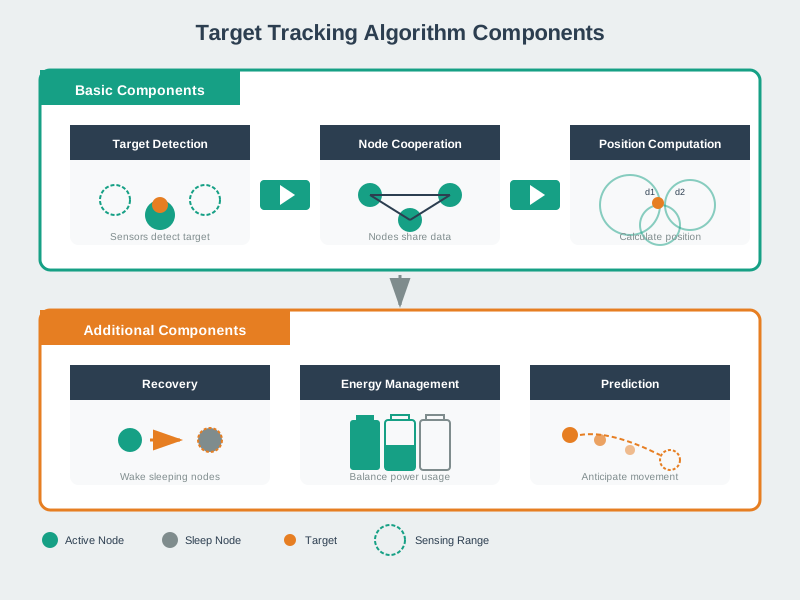
Scenario: A museum uses 50 PIR motion sensors to track visitor movement for exhibit analytics. Each sensor has a 5-meter detection radius. When a sensor detects motion, it must wake up neighboring sensors to hand off tracking responsibility.
Given Data:
- Sensor detection radius: R_sense = 5 meters
- Grid deployment: sensors spaced 8 meters apart
- Average visitor speed: 1.2 m/s (walking pace)
- Wake-up energy cost: 15 mJ per sensor activation
- Tracking accuracy requirement: 90% (no gaps >3 seconds)
Step 1: Calculate minimum wake-up radius
Time to cross sensor range: t_cross = 2 × R_sense ÷ speed = 10 m ÷ 1.2 m/s = 8.3 seconds Distance visitor travels in 3 seconds: d = 1.2 m/s × 3 s = 3.6 meters Minimum wake-up radius to prevent tracking loss: R_min = R_sense + d = 5 + 3.6 = 8.6 meters
Step 2: Calculate energy cost for different wake-up radii
Wake-up candidates in radius R_wake (circular area, grid spacing 8m): - R_wake = 8m: π(8)² ÷ 8² ≈ 3 sensors - R_wake = 12m: π(12)² ÷ 8² ≈ 7 sensors - R_wake = 16m: π(16)² ÷ 8² ≈ 13 sensors
Energy per handoff: - R_wake = 8m: 3 × 15 mJ = 45 mJ - R_wake = 12m: 7 × 15 mJ = 105 mJ - R_wake = 16m: 13 × 15 mJ = 195 mJ
Step 3: Calculate tracking accuracy vs energy trade-off
Tracking success rate (simulation): - R_wake = 8m: 87% accuracy (fails minimum requirement—too small!) - R_wake = 12m: 94% accuracy (meets 90% requirement) - R_wake = 16m: 96% accuracy (marginal improvement for 85% more energy)
Decision: Choose R_wake = 12 meters (2.4× sensor range)
Rationale:
- Meets accuracy requirement (94% > 90%)
- Energy-efficient: 105 mJ per handoff vs 195 mJ for R_wake=16m
- Safety margin: 12m > 8.6m minimum prevents edge-case failures
Key insight: Optimal wake-up radius is 2-3× the sensor detection range—balances tracking continuity with energy efficiency.
Verify the 2-3× optimal wake-up radius guideline for a sensor with 5 m detection range and target at 1.2 m/s walking pace:
Target motion: Crossing time through 5 m range diameter: \(t_{\text{cross}} = \frac{10\text{ m}}{1.2\text{ m/s}} = 8.3\text{ s}\).
Handoff requirement: Must wake next sensor before target exits current sensor. Maximum acceptable handoff delay: \(t_{\text{max}} = 3\text{ s}\) (safety margin).
Distance during handoff: \(d_{\text{handoff}} = v \times t_{\text{max}} = 1.2 \times 3 = 3.6\text{ m}\).
Minimum wake-up radius: \[R_{\text{min}} = R_{\text{sense}} + d_{\text{handoff}} = 5 + 3.6 = 8.6\text{ m} \approx 1.7 \times R_{\text{sense}}\]
Recommended: \(R_{\text{wake}} = 2.5 \times 5 = 12.5\text{ m}\) provides \(12.5 - 8.6 = 3.9\text{ m}\) additional safety margin for velocity variations and activation delays.
Conclusion: The 2-3× guideline (\(R_{\text{wake}} = 10-15\text{ m}\)) encompasses minimum requirement (1.7×) plus safety, validating the rule of thumb!