42 WSN Production Deployment
More
Depth: Practitioner
Progress saves as you read. Mark sections complete as you go; your progress appears in the sidebar.
42.1 Start With the Field Story
This section: Start With the Field Story — Production deployment starts after a prototype has proved its route.
Production deployment starts after a prototype has proved its route. It ends only when the operating team can trust the installed system. The work includes site checks, installation checks, handoff, monitoring, maintenance ownership, fallback actions, and reasons to test again.
42.2 In 60 Seconds
This section: In 60 Seconds — A wireless sensor network (WSN) joins sensors that share readings over wireless links.
A wireless sensor network (WSN) joins sensors that share readings over wireless links. A production deployment rolls out that network in controlled stages. A gateway is a device that passes the readings to another network.
Each stage answers one plain question. A site check asks whether the real place matches the plan. A pilot is a small trial in realistic conditions. Installation checks prove that fitted devices match the record. A handoff gives daily duties to named people. A fallback states what to do when the evidence is weak. A retest rule names the change that makes an old result unsafe to reuse.
The deployment record must prove each part of the design. It covers the network plan, field placement, gateway path, mobile collection plan, power state, and sensor checks. It also covers installation tests, maintenance ownership, fallback action, and reasons to test again. Together, that evidence must support the monitoring decision in real conditions.
Deployment quality drifts when teams scale a lab result into the field without keeping the evidence. A good rollout has separate gates. The site gate checks the real setting. The pilot gate checks a small but realistic trial. The installation gate checks the fitted equipment. The operating gate checks daily use. The change gate decides when old evidence no longer applies. Each gate states what was proven, what remains uncertain, who owns the action, and what stops further growth.
42.3 Learning Objectives
This section: Learning Objectives
By the end of this chapter, you will be able to:
- Review a production WSN deployment as a sequence of evidence gates instead of a one-time installation event.
- Compare stationary, mobile, hybrid, and infrastructure-assisted rollout choices against the monitoring claim and field constraints.
- Define site, pilot, installation, operations, maintenance, fallback, and retest evidence for a production release.
- Identify risks from field conditions, route changes, missed mobile contacts, sensor drift, power stress, and ownership gaps.
- Connect deployment decisions to production practice, mobile sink planning, stationary or mobile review, coverage, routing, and energy management.
42.4 WSN Production Deployment
This section: WSN Production Deployment
42.5 Prerequisites
This section: Prerequisites — This chapter builds on the mobile lessons: Mobile Sink Production Deployment, MWSN Types and Mobile Entities Review, and Mobile WSN Fundamentals Review.
This chapter builds on the mobile lessons: Mobile Sink Production Deployment, MWSN Types and Mobile Entities Review, and Mobile WSN Fundamentals Review. It also uses Stationary WSN Fundamentals Review. The network checks come from WSN Energy Management, WSN Routing Introduction Review, and WSN Coverage Fundamentals.
Review those chapters before approving a plan if these ideas are unclear. The learner should be able to describe sensing claims, node roles, sink choices, and route evidence. They should also understand mobile contact windows, stored-data custody, coverage, power state, and fallback actions.
42.6 Deployment Review Scope
This section: Deployment Review Scope — Production deployment turns a design claim into installed equipment, operating data, and maintenance obligations.
Production deployment turns a design claim into installed equipment, operating data, and maintenance obligations.
42.7 Deployment Evidence Map
This section: Deployment Evidence Map — Figure Figure 42.1 links the monitoring claim to a pilot gate before scale-up.
Figure Figure 42.1 links the monitoring claim to a pilot gate before scale-up.
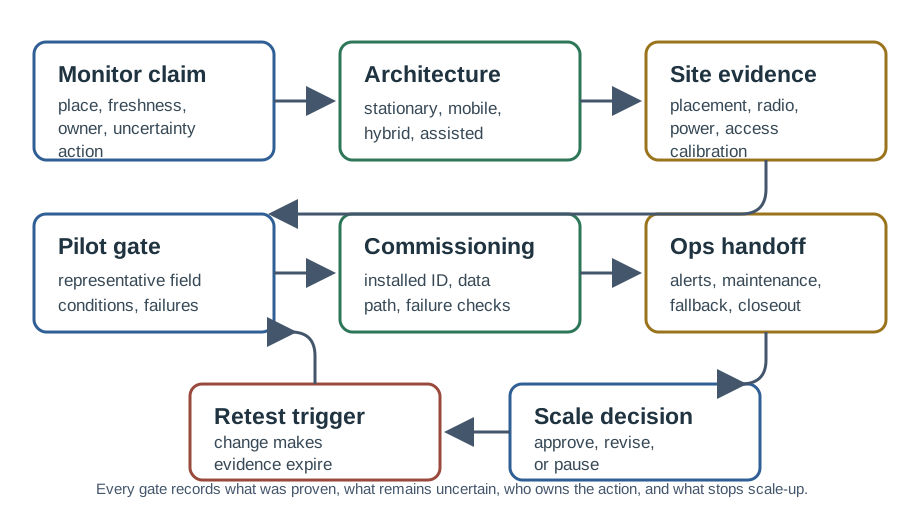
Read Figure 42.1 from Monitor claim to Architecture. The first label states what the network must prove. The second records how the design will meet that claim. The path then checks the site, pilot, installed system, and handoff. It ends with a fallback, a reason to test again, and the decision to scale. Keep the final action in the evidence record.
42.8 Architecture Selection for Deployment
This section: Architecture Selection for Deployment — Architecture choice should be made before installation begins, then tested during the rollout.
Architecture choice should be made before installation begins, then tested during the rollout. Deployment is where architecture assumptions become visible.
42.9 Site and Environment Evidence
This section: Site and Environment Evidence — A site survey is not just a map.
A site survey is not just a map. It is a record of what can disturb sensing, communication, power, maintenance, and interpretation.

42.10 Rollout Gate Plan
This section: Rollout Gate Plan — The chapter now moves from describing rollout gate plan to checking it.
The chapter now moves from describing rollout gate plan to checking it. The diagram at Figure 42.2 is the checkpoint because it puts claim, owners beside site survey, where an unsupported assumption becomes visible.
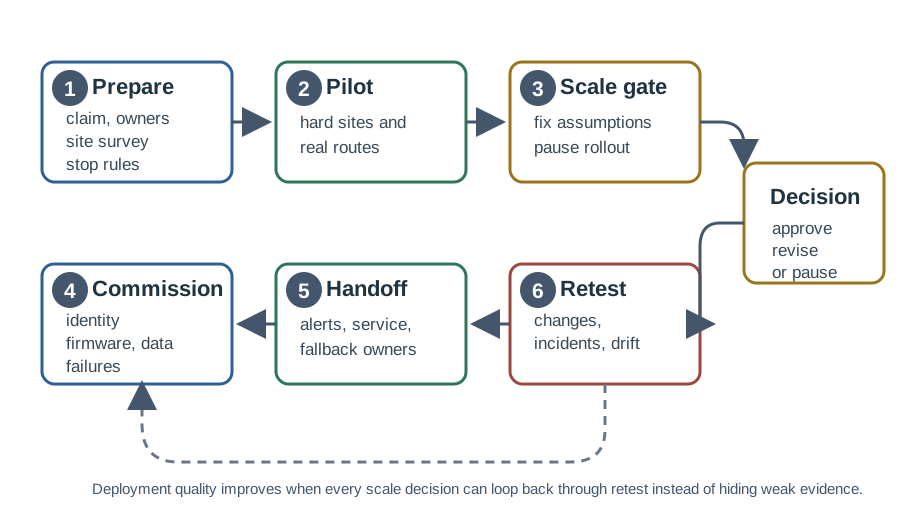
Figure 42.2 starts at claim, owners, where the design states its promise. Next, site survey adds a check of real conditions. The path moves through a realistic pilot, review for wider use, installation, and handoff. It then covers later changes and lessons from incidents. The final stop rules say when the team must pause and test again before further growth.
42.11 Practice Gates and Failure Drills
This section: Practice Gates and Failure Drills — Production best practice is to prove the operating routine before the rollout grows.
Production best practice is to prove the operating routine before the rollout grows. A deployment gate should exercise normal operation, degraded operation, owner response, and the stop condition for further scale.
The deployment record should make these gates auditable. A best-practice list is useful only when it changes whether the release continues, narrows, or retests.
42.12 Installation and Commissioning Evidence
This section: Installation and Commissioning Evidence — Commissioning proves that installed equipment matches the deployment record.
Commissioning proves that installed equipment matches the deployment record.
42.13 Production Data Handoff
This section: Production Data Handoff — A deployment is not complete when sensors transmit.
A deployment is not complete when sensors transmit. It is complete when the data path is trustworthy enough for the decision owner.
Source: Record which sensor, mobile entity, gateway, or manual service event produced the reading.
Place: Record what physical location, asset, route segment, or environment the reading represents.
Freshness: Record when the reading was measured, collected, uploaded, transformed, and shown to the decision owner.
Quality: Record calibration state, missing data, inferred values, duplicates, outliers, drift, and uncertainty labels.
Action: Record the owner, fallback action, and retest trigger when data quality is not strong enough for the claim.
42.14 Fault Tolerance and Maintenance Launch
This section: Fault Tolerance and Maintenance Launch — Fault tolerance should be deployed with the system, not added after the first incident.
Fault tolerance should be deployed with the system, not added after the first incident.
42.15 Mobile Sink and Hybrid Deployment
This section: Mobile Sink and Hybrid Deployment — Hybrid deployments are production systems with two operating surfaces: the stationary sensing layer and the mobile collection layer.
Hybrid deployments are production systems with two operating surfaces: the stationary sensing layer and the mobile collection layer.
42.16 Change and Retest Control
This section: Change and Retest Control — Deployment evidence expires when important conditions change.
Deployment evidence expires when important conditions change.
42.17 Release Ledger and Evidence Expiry
This section: Release Ledger and Evidence Expiry — The Release Ledger and Evidence Expiry claim needs a visual check.
The Release Ledger and Evidence Expiry claim needs a visual check. In Figure 42.3, Requirement sits with Monitoring signals to clarify the signal behind Release Ledger and Evidence Expiry.
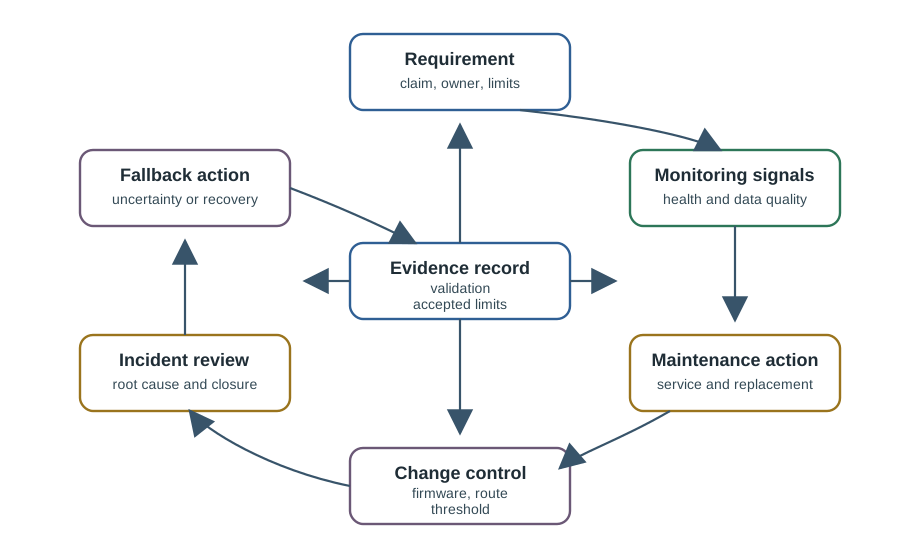
Figure Figure 42.3 connects a released requirement to the signals that show whether it still holds. Health and data-quality monitoring can lead to maintenance, replacement, or a change in firmware, route, or threshold. Incident review records the cause and closure, while fallback marks uncertainty or recovery when the original claim is weak. The evidence record keeps validation and accepted limits with the owner. This loop matters after deployment because packets may still arrive while mounting, route age, calibration, or service access has changed. The release ledger should move to watch, degraded, or expired when those signals no longer support the accepted claim.
| Ledger field | Production evidence | Failure it exposes |
|---|---|---|
| Claim boundary | Decision, location meaning, freshness limit, tolerated uncertainty, safety or privacy constraint | The dashboard supports a broader decision than the field evidence proved |
| Current route | Gateway path, mobile pass, reverse acknowledgement, buffer age, upload confirmation, route owner | Packets arrive, but the path no longer matches the accepted release route |
| Data condition | Timestamp chain, calibration state, units, missing-data label, duplicate rule, transformation history | Old, transformed, missing, or uncalibrated readings are treated as current truth |
| Service state | Power margin, access plan, spare part, maintenance ticket, owner, closure evidence | Known degradation remains open while the deployment keeps scaling |
| Retest rule | Physical, environmental, software, route, owner, threshold, or dashboard change that reopens review | A change invalidates the pilot but no one reruns the evidence gate |
For review purposes, each production signal should update a release state. Released means the claim is still proven by current site, commissioning, and operating evidence. Watch means a leading indicator is weak but the claim can continue with visible monitoring. Degraded means the system may operate only under a fallback or uncertainty label. Expired means the original claim is no longer allowed until representative evidence is refreshed.
This state model matters because production WSNs fail gradually. A sensor may keep sending packets while its mounting shifts. A mobile collector may still upload but later than the freshness budget allows. A gateway may recover but drop reverse acknowledgements. The release ledger turns those partial failures into explicit scale, fallback, and retest decisions.
42.18 Greenhouse Climate WSN
This section: Greenhouse Climate WSN — Scenario: Fixed climate nodes support irrigation and ventilation review across greenhouse zones.
Scenario: Fixed climate nodes support irrigation and ventilation review across greenhouse zones.
Deployment claim: Zone readings can support operating review when each zone has fresh, calibrated, and location-meaningful evidence.
Site evidence: Validate airflow, shading, irrigation spray, node mounting, sensor exposure, gateway reach, route repair, and service access.
Commissioning: Record node identity, zone meaning, calibration state, firmware, timestamp behavior, gateway ingestion, and dashboard labels.
Fallback: Use nearby readings only when the record says that inference is acceptable; otherwise mark the zone uncertain and open service.
Retest trigger: Retest after crop layout, fan, shading, irrigation, node position, gateway position, firmware, or calibration changes.
42.19 Tractor-Collected Field WSN
This section: Tractor-Collected Field WSN — Scenario: Stationary soil sensors buffer readings until an existing service vehicle passes close enough to collect data.
Scenario: Stationary soil sensors buffer readings until an existing service vehicle passes close enough to collect data.
Deployment claim: Field-level soil trends can support review when data age and missed collection are visible to the decision owner.
Site evidence: Validate sensor placement, burial or mounting, antenna exposure, service route, contact windows, buffer depth, and upload path.
Commissioning: Record node identity, field segment, buffer behavior, collector identity, route ownership, duplicate handling, and stale-data labels.
Fallback: Use manual collection, alternate route, temporary relay, delayed decision, or uncertainty marking when collection is missed.
Retest trigger: Retest after route, schedule, crop height, collector maintenance, gateway upload, firmware, or field access changes.
42.20 Facility Condition WSN
This section: Facility Condition WSN — Scenario: Fixed vibration and temperature nodes support maintenance review for equipment areas.
Scenario: Fixed vibration and temperature nodes support maintenance review for equipment areas.
Deployment claim: Equipment condition signals can support maintenance triage when each reading is tied to a known asset and valid mounting condition.
Site evidence: Validate mounting, vibration transfer, heat exposure, interference, gateway reach, power access, service safety, and maintenance workflow.
Commissioning: Record asset identity, mounting method, calibration state, firmware, route evidence, gateway ingestion, and alert ownership.
Fallback: Trigger manual inspection or mark the asset uncertain when stale data, bad mounting, drift, or missed route repair weakens the claim.
Retest trigger: Retest after equipment repair, mount change, enclosure change, new nearby machinery, firmware, threshold, or owner change.
42.21 Common Mistakes
This section: Common Mistakes
42.22 Deployment Readiness Checklist
This section: Deployment Readiness Checklist
Before accepting production deployment, verify these parts of the record:
- The monitoring claim, decision owner, location meaning, freshness need, tolerated uncertainty, and safety or privacy boundary.
- The reason for stationary, mobile, hybrid, infrastructure-assisted, or manually serviced operation.
- Site evidence for sensing exposure, radio behavior, power state, physical durability, data meaning, and field access.
- Pilot evidence from realistic conditions, including weak links, hard service access, and mobile routes where relevant.
- Installation evidence for node identity, firmware, sensor checks, timestamps, gateway intake, dashboard labels, and failure detection.
- Data handoff evidence for source, place, freshness, quality, uncertainty, owner, fallback action, and incident closure.
- Maintenance readiness for spares, access, rollback, route repair, sensor checks, power replacement, and service ownership.
- Stop conditions, fallback actions, the release decision, and reasons to test after future changes.
42.23 Knowledge Check: Pilot Evidence
This section: Knowledge Check: Pilot Evidence
42.24 Knowledge Check: Hybrid Deployment
This section: Knowledge Check: Hybrid Deployment
42.25 Knowledge Check: Evidence Expiry
This section: Knowledge Check: Evidence Expiry
42.26 Match Deployment Evidence
This section: Match Deployment Evidence
42.27 Order a Production WSN Deployment
This section: Order a Production WSN Deployment
42.28 Summary
This section: Summary — Production WSN deployment is a rollout with evidence gates.
Production WSN deployment is a rollout with evidence gates. A deployment is ready only when the installed system can prove its monitoring claim. That proof includes realistic site and pilot evidence. It also includes installation checks, data handoff, operating ownership, maintenance readiness, fallback behavior, and reasons to test again.
The strongest deployment record keeps uncertainty visible. Review the evidence again when field conditions, mobile routes, power behavior, sensor checks, gateways, firmware, ownership, or service access change. Until that review is done, the system must not keep making the same claim.
42.29 Key Takeaway
This section: Key Takeaway — Review both fixed and mobile collection plans before release.
Review both fixed and mobile collection plans before release. Check visit times, storage limits, route reliability, energy use, maintenance ownership, and deployment evidence.
42.30 Concept Relationships
This section: Concept Relationships — Production gate practice provides the release discipline this deployment chapter applies during rollout.
Production gate practice provides the release discipline this deployment chapter applies during rollout. Mobile Sink Production Deployment expands the route, contact, buffer, and custody evidence required for mobile collection. MWSN Types and Mobile Entities Review supports mobile-entity selection when deployment depends on movement. Mobile WSN Fundamentals Review explains contact windows, buffers, freshness, custody, and disconnected collection. Stationary WSN Fundamentals Review supports fixed placement, coverage, connectivity, relay burden, and maintenance access. WSN Energy Management supports power-state evidence, sleep behavior, duty cycle, and maintenance planning. WSN Routing Introduction Review supports route repair, relay burden, link evidence, and gateway behavior. WSN Coverage Fundamentals supports coverage evidence and uncertainty labeling.
42.31 What’s Next
This section: What’s Next — Continue with Mobile Sink Production Deployment to review mobile collector routes, contact windows, buffer custody, missed-contact behavior, and fallback actions in more detail.
Continue with Mobile Sink Production Deployment to review mobile collector routes, contact windows, buffer custody, missed-contact behavior, and fallback actions in more detail.
Find help
3 reviewed answers.
Where should I start in a module?
Open the module page from the sidebar to see its chapters in order. Use the module map to return to a topic you need.
Modules and pathsReviewed
What can I try when a project does not work?
Check the symptom, then work through the diagnostic steps. Keep the error message and the smallest example that reproduces it.
When you are stuckReviewed
How do interactive examples work?
Use the interactive guide to check how examples and simulations work before changing your project.
Interactive examples guideReviewed