36 Mobile WSN Fundamentals

More
Depth: Practitioner
Progress saves as you read. Mark sections complete as you go; your progress appears in the sidebar.
36.1 Check the Cart Visit Schedule
This section: Check the Cart Visit Schedule — Imagine a service cart passes a set of crop sensors once each morning.
Imagine a service cart passes a set of crop sensors once each morning. The team must decide whether that moving visit can collect each reading in time. A gateway is a device that links one network or system to another. Latency means the wait from a real event to the result that a person or machine receives.
The morning cart can save fixed network links, but a crop reading still has to be useful when the grower receives it. Judge the cart by its route, contact windows, and missed visits, not by motion alone.
36.1.1 Trace a Crop Reading Through Contact
- When was each crop sensor last visited?
- How long was the cart within contact range?
- Can the sensor hold data until the next visit?
- Is the delivered reading fresh enough for the grower’s decision?
Link the planned route to actual contacts, stored readings, upload time, and missed stops. If a visit fails, show the oldest undelivered reading and the next recovery opportunity.
36.1.2 When Motion Delays the Answer
Planned movement provides an opportunity to collect readings, but the route alone does not establish coverage or freshness. Compare the planned stops with actual contacts, dwell time, sensing exposure, and missed areas. A reading may remain stored until the next visit, so its measurement time and upload time must stay visible when judging whether it supports a decision.
At Practitioner depth, measure route exposure, transfer retries, and energy effects alongside contact success. Moving a collector can reduce relay burden while adding radio wake time, scanning, storage, and recovery work. When a visit fails, identify the oldest undelivered reading, remaining buffer space, and next recovery opportunity. Use the fixed or manual fallback when delayed collection cannot meet the decision’s freshness requirement.
36.1.3 Before Using a Cart Reading
Before showing a crop condition, check when the sensor measured it and when the cart uploaded it. A reading from a missed visit may still be accurate about yesterday but unsuitable for today’s watering decision. Mark the gap and use the fixed or manual fallback.
36.1.4 Retell the Motion Check
Name why the part moves. Map where it can meet each node. Time a good contact and a weak one. Check how much data waits. Check how much space remains. Mark who owns data in transit. Show a missed visit at once. Keep a fixed or local fallback for urgent work. Retest when the route, load, link, or owner changes.
36.2 Start With the Field Story
This section: Start With the Field Story — A mobile WSN adds motion to the evidence problem.
A mobile WSN adds motion to the evidence problem. The useful first question is why something moves: to sense, to collect data, to bridge gaps, or to follow users. That purpose drives contact windows, custody, latency, energy, and ownership.
36.3 In 60 Seconds
This section: In 60 Seconds — A mobile wireless sensor network uses movement as part of the sensing and communication design.
A mobile wireless sensor network uses movement as part of the sensing and communication design. The moving element may be a sensor, sink, data ferry, robot, vehicle, user device, animal tag, drone, or maintenance route. Mobility can reduce relay pressure, improve contact with moving phenomena, bridge disconnected areas, or collect delayed data where fixed infrastructure is impractical.
Mobility is not automatically an improvement. The review must prove why movement is needed, what moves, how readings remain meaningful, when contact occurs, how data is stored and transferred, what delay is acceptable, who owns recovery, and what change would force retesting. A mobile WSN is acceptable only when movement improves the evidence record for the monitoring claim rather than hiding stale, missing, or unowned data.
36.4 Learning Objectives
This section: Learning Objectives
By the end of this chapter, you will be able to:
- explain the design reasons for adding mobility to a WSN
- distinguish mobility of the sensor, sink, carrier, target, gateway, and maintenance route
- review mobility trade-offs across coverage, contact, energy, latency, custody, and operations
- identify when mobility creates new failure modes instead of solving stationary WSN problems
- build an MWSN evidence record with accepted limits, fallback actions, and retest triggers
36.5 Mobile WSN Fundamentals
This section: Mobile WSN Fundamentals
36.6 Prerequisites
This section: Prerequisites — This chapter builds on Stationary WSN Fundamentals, MWSN Nodes, Sinks, and Data MULEs Review, WSN Communication Fundamentals, WSN Energy Management, and WSN Routing Introduction Review.
This chapter builds on Stationary WSN Fundamentals, MWSN Nodes, Sinks, and Data MULEs Review, WSN Communication Fundamentals, WSN Energy Management, and WSN Routing Introduction Review.
If a learner cannot explain sensing claims, stationary relay burden, node roles, gateway boundaries, duty cycling, buffers, freshness, and maintenance ownership, review those chapters before accepting a mobile WSN design.
36.7 Mobility Review Scope
This section: Mobility Review Scope — MWSN review starts with the reason for mobility.
MWSN review starts with the reason for mobility. Movement should solve a named evidence problem, not just make the architecture look advanced.
36.8 Mobility Fit Map
This section: Mobility Fit Map — Use Figure 36.1 to test whether a greenhouse service cart can collect readings from stationary nodes once each morning.
Use Figure 36.1 to test whether a greenhouse service cart can collect readings from stationary nodes once each morning.
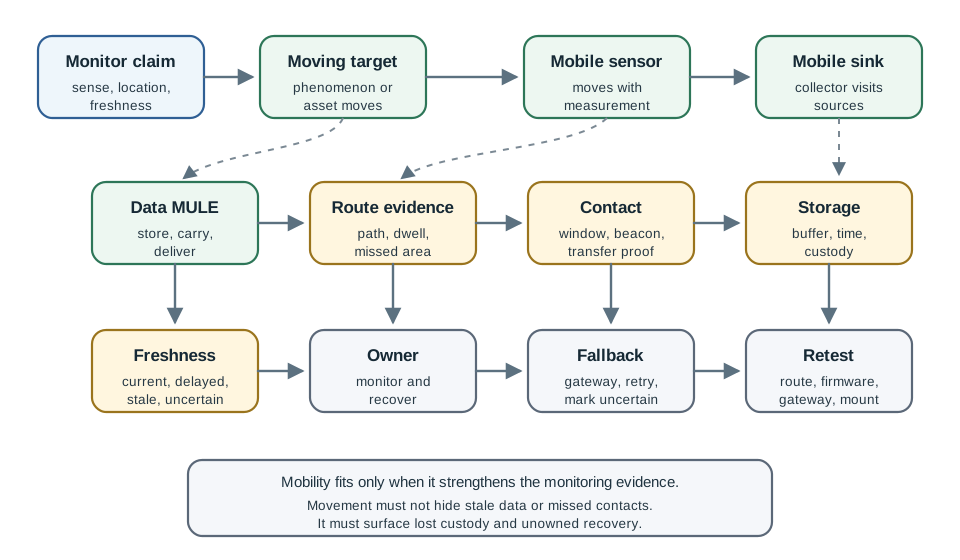
The fit check first asks what must be known, how old the reading may be, and what moves. In the worked case, the cart is a moving collector while the nodes buffer data. One planned visit each morning gives a contact opportunity, but no contact duration or transfer volume is supplied. The lower sequence wakes a node before the visit, overlaps the radios, transfers a bounded batch, then confirms custody and sleeps. Record the expected window, data waiting, partial transfers, and age of the last confirmed reading. This evidence decides whether delayed collection is acceptable and makes a missed visit visible before stale data is trusted.
The fit map keeps mobility tied to a design reason. A mobile sink may help if it reduces relay pressure and still meets freshness requirements. A mobile sensor may help if the measurement must travel with a target. A Data MULE may help if delayed delivery is acceptable. If the claim needs immediate action or continuous backhaul, mobility may need a fixed gateway, alert path, or hybrid design.
Mobility changes more than node coordinates. Figure 36.2 pairs each topology change with the self-management behavior that must answer it.

Use self-configure and self-heal in Figure 36.2 to split two events. The first lets a node join after it moves. The second repairs a route after contact is lost. Next check self-tuning. A send plan that worked for fixed nodes may waste power or miss a sink that moves. Self-protection checks the identity and trust of a new neighbour. Packet flow on its own is not enough. Before the new shape can pass, the network must also regain sound timing, low power use, and a trust state the team can defend.
36.9 Mobility Topology Evidence
This section: Mobility Topology Evidence — Mobile WSN review changes the unit of evidence from a static topology to a time-ordered sequence of contacts.
Mobile WSN review changes the unit of evidence from a static topology to a time-ordered sequence of contacts. The useful proof is the path, contact window, transient link, custody transfer, and freshness state, not just the final delivered packet.
The mobile platform in Figure 36.3 makes that changing evidence boundary concrete: the sensor travels with the robot, so every observation inherits the platform’s pose, route, and contact history.

Photo: S. Winkvist, Public domain
In Figure 36.3, the lidar is rigidly mounted to a vehicle rather than to a surveyed fixed point. That physical arrangement is why a useful mobile-WSN record must bind measurements to platform pose and time, and must distinguish a planned service-cart route from opportunistic movement.
The Mobility Topology Evidence claim needs a visual check. In Figure 36.4, Mobile Wireless Sensor Network (MWSN) sits with Region A to clarify the evidence behind Mobility Topology Evidence.
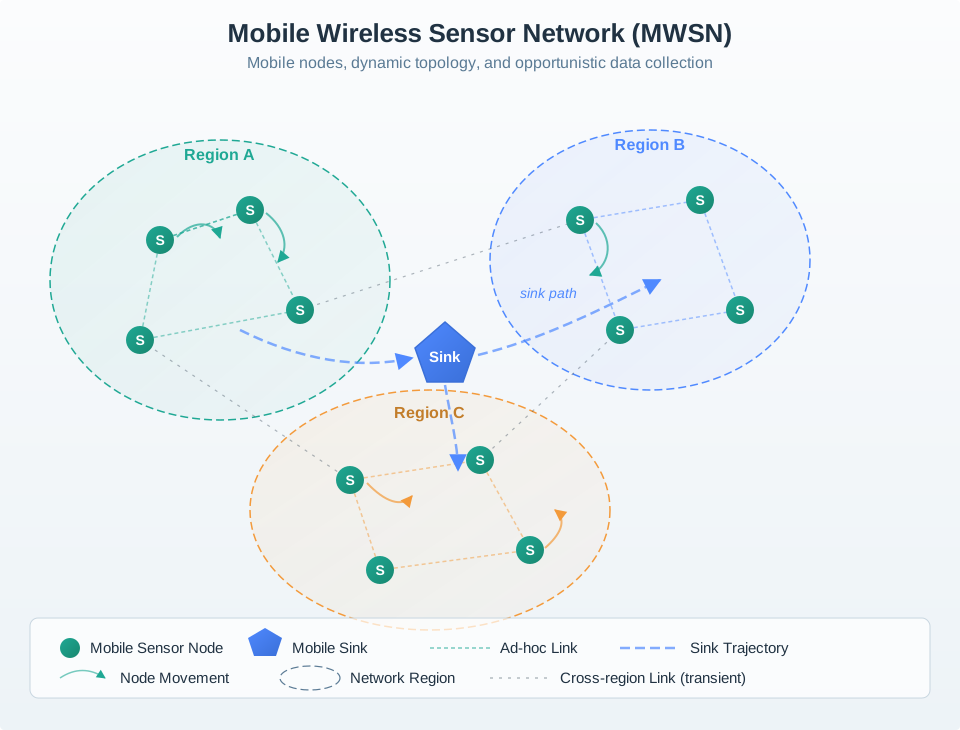
Figure Figure 36.4 divides a mobile network into regions with moving sensor nodes, a mobile sink, and transient cross-region links. The sink trajectory and node movement show why a delivered packet is only the end of a changing contact history. For planned movement, the team can compare visits with a route and log missed contacts. For opportunistic movement, it must preserve the contacts that actually happened. In either case, the section asks for the measurement time, platform location, custody transfer, delay, and recovery path. A final topology snapshot cannot establish those earlier states.
The first question for any mobile deployment is who controls the motion, because that fact decides how predictable the topology is. A planned inspection robot, service cart, or mobile sink can be scheduled; nodes can wake before the expected visit, and missed visits can be logged against a planned route. A human-carried phone, animal tag, drifting sensor, or moving asset is different. The system may not control the path, speed, dwell time, or contact order, so the record must preserve what actually happened rather than what the design hoped would happen.
That is why mobile WSN review starts with evidence flow instead of node labels. Identify what moves, why it moves, what data it carries or collects, how contact is detected, how much delay is acceptable, and what happens when the contact does not occur. Mobility is useful only if movement makes the monitoring claim more trustworthy. If it hides stale data, ambiguous location, missed custody, or unowned recovery, it has made the design harder to audit.
36.9.1 The Self-CHOP Autonomy Loop
A mobile WSN inherits a MANET problem: movement invalidates topology faster than a human operator can repair every link. Self-CHOP is a four-part operational model for that autonomy. The properties work as a loop rather than as four product adjectives.
| Property | Mechanism in a mobile WSN | Evidence and guardrail |
|---|---|---|
| Self-configure | discover neighbors, obtain identity and parameters, select a role or parent, and join without a fixed installation sequence | authenticated join, configuration version, chosen role, rejected peers, and a bounded fallback |
| Self-heal | detect missed beacons, broken contacts, failed relays, or partitions; expire stale state and discover another path | fault trigger, repair start/end, lost or duplicated data, and proof that repair did not loop |
| Self-optimize | adapt parent, channel, transmit power, sampling, buffering, or mobile-sink encounter schedule from measured conditions | objective function, previous/new setting, improvement window, hysteresis, and rollback threshold |
| Self-protect | authenticate peers and control changes, reject replay or spoofing, isolate suspicious nodes, and retain minimum safe service | security event, isolation scope, credential state, false-positive recovery, and safe degraded mode |
| : Self-CHOP translates autonomous behavior into testable mobile-network records. |
Walk through a moving asset tag. On first contact it self-configures by authenticating to a permitted gateway and learning the current collection schedule. When that gateway moves out of range it self-heals by expiring the stale parent and buffering records while seeking another. It self-optimizes only after enough evidence shows that a different wake interval or transmit level improves delivery per joule. If an unauthenticated node advertises an implausibly cheap route, it self-protects by rejecting the control state and retaining the last bounded-safe route or disconnected mode.
The properties can conflict. Aggressive healing can create churn; optimization can reduce redundancy needed for recovery; protection can isolate a legitimate node after noisy evidence; configuration can accept an unsafe default. Use an explicit priority order: preserve safety and identity first, preserve data custody second, restore connectivity third, then optimize. Every autonomous transition needs a timeout, retry bound, safe state, and operator-visible reason so “self-managing” does not mean unreviewable.
36.10 Stationary, Mobile, and Hybrid Fit
This section: Stationary, Mobile, and Hybrid Fit — Mobile review should preserve the stationary baseline instead of treating mobility as a default upgrade.
Mobile review should preserve the stationary baseline instead of treating mobility as a default upgrade. The question is whether movement improves the evidence record for the claim.
When the fit is unclear, narrow the claim before adding motion. Mobility should make uncertainty easier to see, not easier to ignore.
36.11 What Mobility Can and Cannot Prove
This section: What Mobility Can and Cannot Prove
36.12 Evidence Record
This section: Evidence Record — Evidence for Evidence Record starts in Figure 36.5.
Evidence for Evidence Record starts in Figure 36.5. Look at Mobile WSN Evidence Record beside Requirement before accepting the sequence behind Evidence Record.
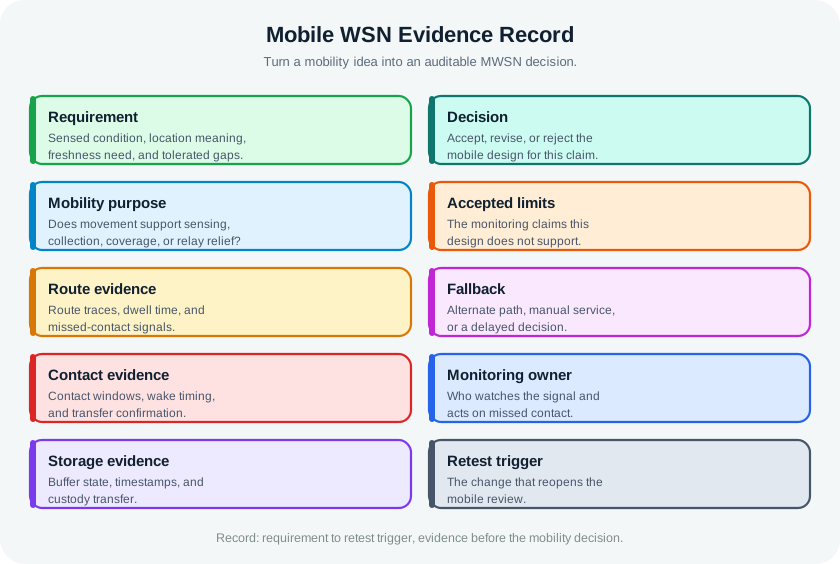
Figure Figure 36.5 turns a mobility proposal into an evidence record. Requirement and mobility purpose say what must be sensed, where location applies, why movement helps, and how much delay is allowed. Route, contact, and storage fields then retain traces, dwell time, wake timing, transfer confirmation, timestamps, and custody. The decision can accept, revise, or reject the design for that claim. Accepted limits and a fallback show what happens outside it, while the monitoring owner and retest trigger keep missed visits visible. The record connects a moving component to an operating decision rather than a role name.
Requirement: Record the sensed condition, location meaning, freshness need, tolerated gaps, and decision that uses the reading.
Mobility purpose: State whether movement supports sensing, collection, coverage, relay relief, disconnected delivery, or operations access.
Observations: Record route traces, contact logs, transfer confirmations, buffer state, timestamps, energy evidence, gateway ingestion, and missed-contact signals.
Decision: Accept, revise, or reject the mobile design for this monitoring claim and operating environment.
Operations: Name owner, monitoring signal, fallback action, uncertainty rule, replacement rule, and retest trigger.
36.13 Reviewing the Mobility Purpose
This section: Reviewing the Mobility Purpose — The first review question is what problem movement solves.
The first review question is what problem movement solves.
Avoid accepting “mobility improves the network” as a reason. The review must name the specific evidence problem movement improves and the new risks it introduces.
36.14 Controlled and Opportunistic Mobility
This section: Controlled and Opportunistic Mobility — Different mobility patterns need different evidence.
Different mobility patterns need different evidence. Controlled motion can be scheduled; opportunistic motion must be observed and labelled after the fact.
| Mobility | Who or what moves | What the review must preserve |
|---|---|---|
| Controlled | Robot, planned Data MULE route, mobile sink, scheduled service cart | Planned path, expected contact window, wake schedule, missed-visit alert, and fallback route. |
| Partly controlled | Worker phone, vehicle route, inspection tool, shared gateway | Observed route, policy limits, dwell variation, transfer confirmation, and owner for missed contacts. |
| Uncontrolled | Animal tag, drifting sensor, moving asset, ad hoc human-carried node | Timestamp, location meaning, custody boundary, buffer state, freshness label, and uncertainty rule. |
Analysts often model motion with random waypoint, random walk, group mobility, or explicit path plans. Those models are useful only when the review connects them to operations evidence. With controlled mobility, the design can pre-schedule contacts: source nodes wake before the robot or sink arrives, transfer a bounded batch, confirm custody, and return to sleep. With uncontrolled mobility, the design relies on opportunistic contact: two nodes exchange data when they happen to meet.
The practical test is to ask what the receiver can prove after a batch arrives. It should be able to say which source created the data, when the measurement was taken, where the location claim applies, when custody changed, whether anything was overwritten or duplicated, and what uncertainty remains.
36.15 Contact, Storage, Freshness
This section: Contact, Storage, Freshness — Mobile designs often trade continuous connectivity for contact windows.
Mobile designs often trade continuous connectivity for contact windows. That trade is acceptable only when the data can tolerate the delay and operations can see failures.
36.16 Neighbour Discovery Under Motion
This section: Neighbour Discovery Under Motion — The hardest low-level problem in a mobile WSN is neighbour discovery, because two effects work against each other.
The hardest low-level problem in a mobile WSN is neighbour discovery, because two effects work against each other. Nodes duty-cycle radios to save energy, so they are off much of the time. Motion makes the contact window temporary, so two nodes may be in range only briefly. For a transfer to happen, the radios must overlap during that brief window, discover each other, negotiate enough link state, and move the data before range, interference, or path direction changes.
Solutions trade energy for discovery probability. A deterministic schedule can guarantee overlap when the path is controlled, but it costs planned awake time and fails if the route slips. A probabilistic wake scheme can help when encounters are uncertain, but it accepts missed contacts as a probability problem. Beaconing more often improves discovery and transfer confirmation, but it burns energy and can increase contention.
| Design pressure | Evidence to keep | Failure signal |
|---|---|---|
| Short contact | Encounter time, dwell time, transfer size, and partial-batch handling. | Repeated partial uploads or stale buffered data. |
| Duty cycling | Wake plan, beacon interval, discovery misses, and energy budget. | Known route passes with no discovery event. |
| Changing topology | Join/leave events, transient links, handoffs, and duplicate-route behavior. | Duplicate batches, temporary partitions, or ambiguous custody. |
That is why mobile WSN protocols are judged on more than raw throughput. The reviewer should ask how many useful contacts were exploited, how many were missed, how much data aged in buffers, and whether recovery was automatic or manual. A mobile sink that delivers a large batch once per day may be excellent for trend monitoring and unacceptable for a real-time alarm.
36.17 Reviewing Energy and Topology Claims
This section: Reviewing Energy and Topology Claims — Mobility can reduce some energy burden, but it can also add wake time, retries, scanning, propulsion, handoff work, and operations effort.
Mobility can reduce some energy burden, but it can also add wake time, retries, scanning, propulsion, handoff work, and operations effort. Review the real workload.
36.18 Worked Review: Greenhouse Service Cart
This section: Worked Review: Greenhouse Service Cart — Scenario: A greenhouse has stationary environmental nodes.
Scenario: A greenhouse has stationary environmental nodes. A service cart already moves through aisles and can collect buffered readings while workers inspect plants.
Requirement: Aisle-level environmental trends, missing-aisle visibility, and enough freshness for daily irrigation and ventilation review.
Mobility purpose: Use an existing service route as a mobile collection path to reduce fixed gateway requirements and relay burden.
Evidence: Route traces, contact logs, transfer confirmations, buffer status, low-battery signal, gateway upload record, and missed-aisle alert.
Decision: Accept only if delayed collection is acceptable and missing contacts are visible before operators trust stale readings.
Fallback: Add a fixed gateway, add a rendezvous point, adjust sampling, change the route, or mark affected aisles uncertain.
36.19 Worked Review: Moving Asset Monitor
This section: Worked Review: Moving Asset Monitor — Scenario: Reusable shipping containers carry sensor nodes that record shock, temperature, and opening events while moving through a facility.
Scenario: Reusable shipping containers carry sensor nodes that record shock, temperature, and opening events while moving through a facility.
Requirement: Event history tied to container identity, location segment, and handling review.
Mobility purpose: The sensor must move with the asset because the measurement describes the asset's condition during handling.
Evidence: Mounting check, timestamp and location evidence, buffer status, dock upload confirmation, missing-upload alert, calibration record, and custody boundary.
Decision: Accept only if movement preserves measurement meaning and operations can detect missing, stale, duplicated, or mis-mounted records.
Fallback: Add fixed checkpoint readers, require manual sync, shorten retention risk, replace the node, or flag the asset record uncertain.
36.20 Common Mistakes
This section: Common Mistakes
36.21 Review Checklist
This section: Review Checklist — sensing claim, location meaning, freshness need, tolerated gaps, and decision owner.
Before accepting a mobile WSN design, verify that the record includes:
sensing claim, location meaning, freshness need, tolerated gaps, and decision owner. mobility purpose: sensing, collection, coverage, relay relief, disconnected delivery, or operations access. component role: mobile sensor, mobile sink, Data MULE, stationary source, rendezvous point, gateway, or hybrid. route evidence, contact window, transfer confirmation, missed-contact signal, and gateway ingestion evidence. buffer behavior, timestamp policy, custody transfer, duplicate handling, stale marking, and uncertainty rule. energy and topology evidence for wake time, retries, scanning, handoff, route repair, and maintenance ownership. fallback action, replacement rule, monitoring owner, and retest trigger.
36.22 Knowledge Check: Discovery Window
This section: Knowledge Check: Discovery Window
36.23 Knowledge Check: Mobility Fit
This section: Knowledge Check: Mobility Fit
36.24 Knowledge Check: Delayed Data
This section: Knowledge Check: Delayed Data
36.25 Match Mobility Claims to Evidence
This section: Match Mobility Claims to Evidence
36.26 Order a Mobile WSN Review
This section: Order a Mobile WSN Review
36.27 Summary
This section: Summary — Mobile WSNs use movement as a design tool, not as a decoration.
Mobile WSNs use movement as a design tool, not as a decoration. Movement may support sensing, collection, coverage, relay relief, disconnected delivery, or operations access. Each use creates evidence requirements: route, contact, storage, freshness, custody, energy, topology, ownership, and recovery.
The accepted design should prove why mobility is needed, what moves, how readings remain meaningful, when contact occurs, how data is transferred, what delay is acceptable, how missed contacts are detected, and which change forces retesting. A mobile WSN improves quality only when it makes the monitoring evidence stronger than the stationary alternative.
36.28 Key Takeaway
This section: Key Takeaway — Mobile WSN Fundamentals Review should compare stationary nodes, mobile nodes, sinks, and data MULEs using coverage, latency, buffer pressure, routing cost, energy, and deployment evidence.
Mobile WSN Fundamentals Review should compare stationary nodes, mobile nodes, sinks, and data MULEs using coverage, latency, buffer pressure, routing cost, energy, and deployment evidence.
36.29 Concept Relationships
This section: Concept Relationships
36.30 What’s Next?
This section: What’s Next?
Continue with MWSN Nodes, Sinks, and Data MULEs Review to review the concrete mobile component roles, MWSN Types and Mobile Entities to compare terrestrial, aerial, underwater, human-carried, and vehicle-assisted mobility, WSN Human-Centric Sensing and Delay-Tolerant Networks for IoT for carried devices and delay-tolerant collection, and WSN Production Deployment when mobile collection becomes an operations decision.
Find help
3 reviewed answers.
Where should I start in a module?
Open the module page from the sidebar to see its chapters in order. Use the module map to return to a topic you need.
Modules and pathsReviewed
What can I try when a project does not work?
Check the symptom, then work through the diagnostic steps. Keep the error message and the smallest example that reproduces it.
When you are stuckReviewed
How do interactive examples work?
Use the interactive guide to check how examples and simulations work before changing your project.
Interactive examples guideReviewed