8 Protocol Pioneers: IoT and 6LoWPAN

More
Depth: Practitioner
Progress saves as you read. Mark sections complete as you go; your progress appears in the sidebar.
8.1 Start With the Decision
This section: Start With the Decision — Kevin Ashton named a world where objects report facts without a person typing them.
Kevin Ashton named a world where objects report facts without a person typing them. RFID lets a reader identify a tagged object. Small radio links then needed a way to carry Internet packets. IPv6 provides those packets with addresses. 6LoWPAN adapts IPv6 for low-power radio links.
8.2 Route Overview
This section: Route Overview — This is part 2 of 2.
This is part 2 of 2. Review Protocol Pioneers: Ethernet and MQTT for the preceding evidence.
8.3 Learning Objectives
This section: Learning Objectives
- Link Ashton’s IoT idea to automatic object data.
- Explain how 6LoWPAN fits IPv6 packets onto small radio links.
8.4 Chapter Roadmap
This section: Chapter Roadmap
- Kevin Ashton (1968-): Coined “Internet of Things”
- What Ashton Made Possible
- Geoff Mulligan: 6LoWPAN Pioneer
- What Mulligan Made Possible
- Concept Relationships: How Pioneers Built on Each Other
- Common Pitfalls
- Knowledge Check
- Label the Diagram
- Code Challenge
- Deep Dive: How Internet Standards Become Interoperable
- Summary
- See Also
- What’s Next?
- Recommended Next Step
8.5 Kevin Ashton (1968-): Coined “Internet of Things”
This section: Kevin Ashton (1968-): Coined “Internet of Things” — Inspect Figure 8.1 and ask what missing physical-world fact prevented the inventory database from explaining an empty shelf.
Inspect Figure 8.1 and ask what missing physical-world fact prevented the inventory database from explaining an empty shelf.
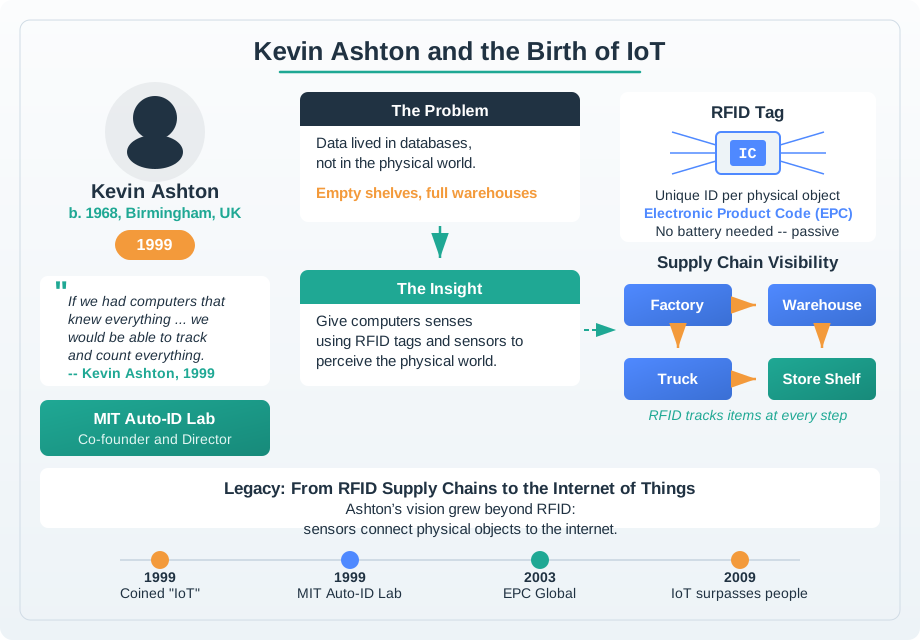
Move through Figure 8.1 from the empty shelf to the RFID path. In 1999, the stock system could say an item was in store while the shelf was bare. The computer relied on people to enter the true physical state. A tagged item and reader can show place or presence without one more hand entry. That data lets the system find the gap and prompt a restock. This claim is more narrow than saying that all things should connect. Sensing and identity add value when they improve a real choice, not merely when an object can send data.
8.5.1 The Problem He Solved
In the 1990s, Kevin Ashton worked at Procter & Gamble in supply chain management. He noticed a frustrating pattern: stockouts — shelves ran out of popular products (like brown lipstick) while warehouses had plenty of inventory. Why?
The problem: Computers knew what inventory existed in databases, but they had no idea what was on store shelves. Humans had to manually count products and update systems. This was slow, error-prone, and expensive.
8.5.2 His Insight: Computers Need Their Own Senses
Ashton’s breakthrough insight in 1999:
“Computers need to sense the physical world directly, without depending on humans to input data. If things could identify themselves and report their location automatically, supply chains would fix themselves.”
He was experimenting with RFID (Radio Frequency Identification) tags — tiny chips that broadcast unique IDs when queried by a reader. Imagine if every lipstick had an RFID tag. Shelves could detect when stock was low and automatically reorder.
8.5.3 Coining “Internet of Things”
In 1999, Ashton gave a presentation to P&G executives about using RFID to track inventory. He needed a catchy phrase to capture the concept. He chose:
“Internet of Things”
The phrase stuck. It perfectly captured the vision: extend the Internet beyond computers to include everyday objects — thermostats, light bulbs, cars, containers, even lipstick.
8.5.4 How to Use: Why “Things” Instead of “Devices”?
Ashton chose “Things” deliberately:
- “Devices” sounds technical — implies electronics, computers, gadgets
- “Things” is universal — includes anything: a shipping container, a parking space, a tree, a pill bottle
The name signals that anything can be connected, not just traditional electronic devices.
8.5.5 How to Use: The Impact
“Internet of Things” became the standard term for connected devices. For scale, IoT Analytics projected 21.1 billion active IoT connections by the end of 2025 in its October 2025 update based on first-half data. IoT Analytics The IoT industry includes:
- Billions of connected devices worldwide, with counts depending on what is classified as IoT
- Hardware, platforms, and services across many markets; spending totals depend on which segments are counted
- Applications in every industry: healthcare, agriculture, manufacturing, transportation, energy, retail
Ashton didn’t invent the technology — RFID, sensors, and networking existed before 1999. But he articulated the vision and gave it a name that the industry rallied around.
The entire IoT industry traces its identity to Ashton’s vision:
- Smart Homes: When you buy a “smart thermostat” or “smart light,” you’re buying an “Internet of Things” device — a term Ashton coined
- Industrial IoT: Manufacturing companies deploy “IIoT solutions” (Industrial Internet of Things) to monitor machines
- Wearables: Fitness trackers and smartwatches are “IoT wearables”
Ashton’s core insight — “computers need their own senses” — drives IoT design philosophy:
- Sensors as computer senses: Temperature, humidity, motion, light, sound, GPS — these are how computers perceive the physical world
- Automated data collection: IoT systems reduce human labor by sensing the environment directly (no manual data entry)
- Real-time awareness: With sensors, computers can react to physical changes in seconds instead of hours/days
For IoT developers: When you explain your project as an “IoT system,” you’re using Ashton’s framing. His insight that “computers need senses” is why IoT systems prioritize sensors and automation over human-in-the-loop processes.
8.6 Geoff Mulligan: 6LoWPAN Pioneer
This section: Geoff Mulligan: 6LoWPAN Pioneer — Inspect Figure 8.2 and ask how much of an IEEE 802.15.4 frame the uncompressed IPv6 and UDP headers would consume.
Inspect Figure 8.2 and ask how much of an IEEE 802.15.4 frame the uncompressed IPv6 and UDP headers would consume.
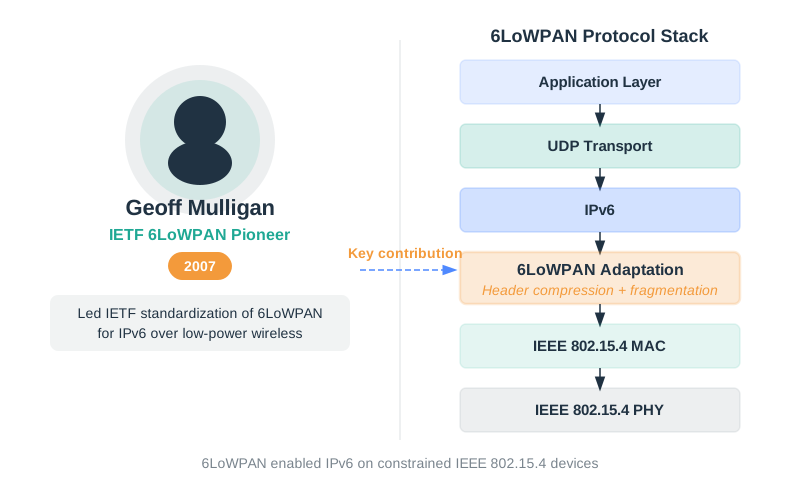
Read Figure 8.2 from the link constraint into the 6LoWPAN adaptation layer. An IEEE 802.15.4 frame is at most 127 bytes, while standard IPv6 and UDP headers total 48 bytes. Their share is , or about 38%, before application data and other framing costs. Header compression can reduce the IPv6 portion from 40 bytes to as little as 2 bytes in suitable contexts. RFC 6282 Fragmentation and reassembly then bridge IPv6’s 1280-byte minimum packet requirement to the smaller radio frames, while mesh support extends reach. The stack view supports Mulligan’s contribution: constrained devices retain Internet-layer semantics by adding an adaptation contract rather than pretending the tiny link is ordinary Ethernet.
8.6.1 The Problem He Solved
By the 2000s, Vint Cerf’s TCP/IP was the universal Internet protocol — but it was designed for computers with megabytes of RAM and wired networks with low error rates. IoT devices had:
- Kilobytes of RAM (not megabytes)
- Low-power radios (IEEE 802.15.4: 127-byte max packet size)
- Potential packet loss from interference, obstruction, or contention; the rate must be measured in the deployment
IPv6 headers alone are 40 bytes — plus 8 bytes for UDP. On a 127-byte 802.15.4 packet, headers consumed 38% of capacity before any application data! This was unsustainable.
8.6.2 His Breakthrough: 6LoWPAN (IPv6 over Low-Power Wireless Personal Area Networks)
Geoff Mulligan led the IETF working group that created 6LoWPAN (RFC 4944, 2007), which makes IPv6 work on tiny devices:
Key Innovations:
1. Header Compression 6LoWPAN compresses IPv6’s 40-byte header down to as little as 2 bytes by:
- Omitting predictable fields (version, flow label)
- Using context to infer addresses (e.g., “the gateway” instead of full address)
- Encoding common patterns efficiently
2. Fragmentation and Reassembly IPv6 packets can be 1280+ bytes, but 802.15.4 only allows 127 bytes. 6LoWPAN fragments large packets at the adaptation layer and reassembles them at the destination.
3. Mesh Routing Support 6LoWPAN enables mesh networks where devices route packets for each other, extending network range without infrastructure.
8.6.3 How to Use: Why IPv6 for IoT?
Mulligan advocated for IPv6 (not IPv4) because:
- Address space: IPv6 provides addresses — enough for every grain of sand on Earth to have an IP address. IPv4’s addresses (4.3 billion) aren’t enough for tens of billions of IoT devices.
- End-to-end addressability: IPv6 can give devices globally routable addresses, although deployments may use private addresses, gateways, and firewalls.
- Simplified routing: IPv6’s larger address space allows hierarchical addressing, making routing more efficient.
8.6.4 How to Use: The Impact
6LoWPAN became the foundation for:
- Thread: The mesh networking protocol for smart homes (used by Google Nest, Apple HomePod, Matter devices) is built on 6LoWPAN
- Zigbee IP: Zigbee’s IP-based variant uses 6LoWPAN
- Industrial IoT: Low-power sensor networks in factories use 6LoWPAN for IPv6 connectivity
Thread-based smart home devices use 6LoWPAN:
- Matter Devices: A Matter-certified smart light or lock may use Thread, which runs 6LoWPAN over IEEE 802.15.4; Matter also supports Wi-Fi and Ethernet
- Border Routers: Apple HomePod, Google Nest Hub, and other “border routers” translate 6LoWPAN to standard IPv6 for your home network
- Battery Life: 6LoWPAN’s header compression reduces packet size, saving energy on battery-powered sensors
Mulligan’s insight — “IoT needs IPv6, but IPv6 needs compression to fit in IoT packets” — solved the tension between universal Internet connectivity (Cerf’s vision) and resource-constrained devices (IoT reality).
For developers: A Thread device may use an IPv6 unique-local prefix such as fd00::/64. 6LoWPAN IPHC can compress the 40-byte IPv6 header to about 2-6 bytes in a suitable setup. The 2-byte minimum can apply when a shared context is installed for that mesh prefix, as Thread does; other addresses and routing details can need more. RFC 6282 specifies this compression.
8.7 Concept Relationships: How Pioneers Built on Each Other
This section: Concept Relationships: How Pioneers Built on Each Other — By this point, the chapter has moved from packet survival to Internet architecture, from human-facing protocols to IoT-specific constraints.
By this point, the chapter has moved from packet survival to Internet architecture, from human-facing protocols to IoT-specific constraints. The relationship table turns those profiles back into a design map.
The pioneers didn’t work in isolation — each contribution enabled the next:
| Pioneer | Built On | Enabled | Contrasts With |
|---|---|---|---|
| Paul Baran | Circuit-switched telephony (negatively) | ARPANET, all packet-switched networks | AT&T’s circuit-switching paradigm |
| Cerf & Kahn | Baran’s packet switching, ARPANET’s NCP | Global Internet, any network can connect | NCP (ARPANET-only protocol) |
| Metcalfe | CSMA (from ALOHAnet), packet switching | LANs, wired IoT connectivity | Token Ring, centralized switching |
| Berners-Lee | TCP/IP (runs over it), hypertext concepts | World Wide Web, HTTP APIs, IoT dashboards | Gopher, proprietary info systems |
| Tomlinson | ARPANET file transfer, user directories | Email, federated messaging, user@host pattern | Local-only messaging systems |
| Perlman | Graph theory, distributed algorithms | Plug-and-play Ethernet, resilient IoT networks | Manually configured network topologies |
| Postel | Early ARPANET, protocol design experience | RFC standards process, IANA, robustness principle | Proprietary protocol documentation |
| Stanford-Clark | TCP/IP, publish/subscribe patterns | MQTT, lightweight IoT messaging | HTTP (too heavy for constrained devices) |
| Ashton | RFID, supply chain management, Internet | “Internet of Things” term, IoT vision | Traditional automation (no Internet connectivity) |
| Mulligan | IPv6, IEEE 802.15.4, mesh routing | 6LoWPAN, Thread, IPv6 for tiny devices | IPv4 (insufficient address space), uncompressed IPv6 |
Generational Flow:
- Baran → packet switching (1964)
- Cerf & Kahn → TCP/IP to connect any networks (1974)
- Metcalfe → Ethernet for local networks (1973)
- Berners-Lee → HTTP over TCP/IP (1989)
- Stanford-Clark → MQTT as lightweight HTTP alternative (1999)
- Mulligan → 6LoWPAN to bring IPv6 to tiny devices (2007)
Each generation solved problems the previous generation left open.
8.8 Selection Workflow: Common Pitfalls
This section: Selection Workflow: Common Pitfalls
- Do not equate the Web with the Internet: Berners-Lee’s Web runs on top of TCP/IP. The Internet existed before HTTP, HTML, browsers, and URLs.
- Do not credit one person with the whole system: Baran, Cerf, Kahn, Metcalfe, Postel, Perlman, Berners-Lee, Tomlinson, Stanford-Clark, Ashton, Mulligan, and many others solved different parts of the stack.
- Do not ignore the original constraint: MQTT’s small header, 6LoWPAN’s compression, Ethernet’s shared-medium logic, and Postel’s tolerance rules all make more sense when you remember the deployment problem they were designed to solve.
- Do not treat openness as incidental: RFCs, royalty-free Web standards, and interoperable implementations are part of the technical architecture, not just project culture.
8.9 Knowledge Check
This section: Knowledge Check
Quick Check: Test your understanding of TCP/IP’s end-to-end principle and its importance for IoT:
Quick Check: Test your understanding of MQTT’s design and how Stanford-Clark’s constraints shaped modern IoT protocols:
Quick Check: Match each protocol pioneer with their key contribution:
Quick Check: Place these networking innovations in the correct chronological order, from earliest to most recent:
8.10 Label the Diagram
This section: Label the Diagram
8.11 Code Challenge
This section: Code Challenge
8.12 Deep Dive: How Internet Standards Become Interoperable
This section: Deep Dive: How Internet Standards Become Interoperable — The pioneers who built the Internet did more than write code.
The pioneers who built the Internet did more than write code. They created a way to agree on open standards so machines from different makers could interoperate. Most core Internet protocols are published by the IETF (Internet Engineering Task Force) as RFCs (Requests for Comments), documents anyone can read and implement for free.
The IETF’s guiding motto, credited to David Clark, is “rough consensus and running code.” Standards are not decreed from above. They emerge when the community broadly agrees and working implementations prove the design. That culture is why the Internet, and IoT on top of it, is built from interoperable protocols rather than one vendor’s proprietary system.
Open RFCs plus rough consensus and running code produce protocols any vendor can implement. That is the governance layer behind multi-vendor IoT.
8.12.1 From Internet-Draft to RFC
A protocol travels a defined path before it becomes a standard. An author publishes an Internet-Draft; a working group discusses and revises it; if it reaches rough consensus it is published as an RFC with a permanent number. Foundational protocols carry famous numbers: IP is RFC 791, TCP is RFC 793, SMTP is RFC 821, and FTP is RFC 959.
RFCs also standardize how requirements are written. RFC 2119 defines the capitalized keywords MUST, SHOULD, and MAY, so a spec can state precisely what an implementation is required to do versus what is recommended or optional. That precision removes ambiguity that would otherwise break interoperability.
CoAP, the constrained-device web protocol, followed this route as RFC 7252 after years as Internet-Drafts in an IETF working group. Because it is an open RFC using RFC 2119 language, a sensor vendor and a cloud vendor can implement CoAP independently and still expect their products to interoperate. A proprietary protocol would offer no such guarantee across vendors.
8.12.2 Why Running Code Matters
The “running code” half of the motto protects against paper standards that look fine but cannot be built or do not interoperate. The IETF has historically wanted to see multiple independent implementations interoperate before a specification advances. A spec is only real when two teams who never coordinated can build it from the text alone and have it work.
This matters intensely for IoT, where devices from dozens of makers must coexist for a decade. A subtle ambiguity in a spec, such as an unclear default or under-specified error case, becomes thousands of incompatible devices in the field. Interoperability events, often called plugfests, and reference implementations flush out those ambiguities before the standard is final.
For example, two vendors might implement a new IoT protocol from its draft and discover they disagree on how to handle a missing option field. One implementation drops the message; the other assumes a default. Caught at a plugfest, the spec can be clarified before publication. Missed, the same ambiguity ships as a fleet-wide interoperability bug. Public RFCs, precise requirement language, and demonstrated running code are the machinery that lets a multi-vendor IoT ecosystem actually interoperate.
8.13 Summary
This section: Summary
8.13.1 How to Use: Key Takeaways
In this chapter, you learned:
- The Internet has no single inventor — it’s the result of collaborative work by hundreds of engineers over 60+ years, with each pioneer building on previous contributions
- Paul Baran’s packet switching (1964) introduced distributed routing and redundant paths, concepts now used in Zigbee and Thread mesh networks
- Vint Cerf and Bob Kahn’s TCP/IP (1974) created the universal Internet protocol with the open architecture principle (any network can connect) and end-to-end reliability (intelligence at endpoints, not network core)
- Tim Berners-Lee’s World Wide Web (1989-91) introduced HTTP, HTML, and URLs — freely given to the world, enabling web-based IoT dashboards and REST APIs
- Ray Tomlinson’s email (1971) established the user@host addressing pattern that influenced hierarchical naming in IoT systems
- Radia Perlman’s Spanning Tree Protocol (1985) prevents network loops and enables plug-and-play Ethernet — used in every building network and industrial IoT deployment
- Bob Metcalfe’s Ethernet (1973) and Metcalfe’s Law () explain why interoperable IoT ecosystems (like Matter) are more valuable than proprietary ones
- Jon Postel’s robustness principle (“be conservative in what you send, liberal in what you accept”) guides protocol design and explains why diverse IoT vendors can interoperate
- Andy Stanford-Clark’s MQTT (1999) became widely used for IoT messaging with a fixed header as short as 2 bytes, QoS levels, and a publish/subscribe pattern
- Kevin Ashton coined “Internet of Things” (1999) and articulated the vision that computers need their own senses (sensors) to understand the physical world
- Geoff Mulligan’s 6LoWPAN (2007) compressed IPv6 headers to work on tiny devices, enabling Thread and Matter smart home ecosystems
8.13.2 How to Use: The Human Element in Protocols
Behind every protocol is a person solving a real problem:
- Baran needed resilience against nuclear strikes
- Cerf wanted universal connectivity despite heterogeneous networks
- Berners-Lee wanted physicists to share research papers
- Tomlinson wanted to message colleagues on different computers
- Perlman wanted redundant network links without loops
- Metcalfe wanted to share Xerox PARC’s laser printer
- Stanford-Clark needed to monitor oil pipelines via expensive satellites
- Ashton wanted to prevent lipstick stockouts in stores
- Mulligan needed IPv6 to work on devices with kilobytes of RAM
Understanding the human stories helps you appreciate why protocols are designed the way they are.
8.14 Related Chapters: See Also
This section: Related Chapters: See Also
Within Foundations:
- IoT History - Technology paradigm shifts and lessons from history
- IoT Introduction - Getting started with IoT fundamentals
- Networking Basics - Deep dive into protocols these pioneers created
Protocols in Detail:
- MQTT Protocol - Stanford-Clark’s lightweight messaging protocol
- OSI and TCP/IP Models - Cerf and Kahn’s Internet protocol suite in the protocol stack
- CoAP API Design - Web-style resource design adapted for constrained IoT
- 6LoWPAN - Mulligan’s IPv6 compression for IoT
- Thread and Matter - Smart home protocols built on 6LoWPAN
8.15 What’s Next?
This section: What’s Next?
Now that you can identify the key protocol pioneers and their contributions, explore the protocols they created in depth:
| Topic | Chapter | Description |
|---|---|---|
| MQTT Protocol | MQTT Publish/Subscribe | Examine how Stanford-Clark’s lightweight messaging protocol works in detail, including QoS levels and pub/sub patterns |
| IoT History | IoT History and Paradigm Shifts | Analyze technology paradigm shifts and the Innovator’s Dilemma that explains why experts like AT&T miss revolutions |
| Networking Basics | Networking Basics Introduction | Build foundational skills in the protocols these pioneers created, from TCP/IP to HTTP |
| 6LoWPAN | 6LoWPAN Overview | Explore Mulligan’s IPv6 compression for constrained IoT devices and how it enables Thread/Matter |
| Thread and Matter | Thread Network Architecture | Discover how modern smart home protocols build on 6LoWPAN and Baran’s mesh networking concepts |
| Resource API Design | CoAP API Design | Apply web-style resource ideas to constrained IoT services |
If you are new to IoT and networking, proceed to Networking Basics Introduction to build foundational skills that apply to all the protocols discussed in this chapter.
If you are interested in how technologies succeed or fail, proceed to IoT History and Paradigm Shifts to examine paradigm shifts and the Innovator’s Dilemma.
8.16 Continue Your Route
This section: Continue Your Route — This is the last part of this chapter.
This is the last part of this chapter. Return to Protocol Pioneers: Ethernet and MQTT or continue from the fundamentals module index.
Find help
3 reviewed answers.
Where should I start in a module?
Open the module page from the sidebar to see its chapters in order. Use the module map to return to a topic you need.
Modules and pathsReviewed
What can I try when a project does not work?
Check the symptom, then work through the diagnostic steps. Keep the error message and the smallest example that reproduces it.
When you are stuckReviewed
How do interactive examples work?
Use the interactive guide to check how examples and simulations work before changing your project.
Interactive examples guideReviewed