2 What IoT Delivers: Closed-Loop Value
More
Depth: Practitioner
Progress saves as you read. Mark sections complete as you go; your progress appears in the sidebar.
- Podcast audio coming soon
- Character narration audio coming soon
2.1 The Decision at Stake
The Internet of Things (IoT) connects physical systems to computation and communication so they can be observed, controlled, improved, or monetized over time. Its value depends on what people or controllers do with the information. This chapter explains the closed loop, the device classification that supports it, and the responsibility and value questions that distinguish a useful connected system.
Start with the room getting too warm. A thermostat can measure temperature and control heating locally; connecting it can also let someone change its schedule from an app. The problem is to connect that measurement to a useful response and evidence of the result. The same problem appears in a shipment arriving late, a pump vibrating differently, or a patient missing a dose. Sensing, computation, and connectivity make the condition visible enough for a person, service, or controller to act.
We will first follow the thermostat’s loop, then use the Three Ingredients Test to distinguish embedded, connected, and IoT products. We will trace who owns the response before considering payback and the Five Verbs Framework. By the end, you should be able to identify present or missing ingredients, explain applications that span several verbs, compare market assumptions, and evaluate consumer or industrial value claims. Comparing growth rates, market sizes, and leading companies is useful only within a stated scope.
No prior IoT background is needed. Familiarity with smartphones, Wi-Fi, and laptops helps with the examples. This is part 1 of 2; the next chapter applies the tests and frameworks in more detail.
KEY CONCEPTS
- Closed loop
Sensing supports a decision, action, and feedback.
- Evidence path
Connect a reading to a decision and observed outcome.
- Operating cost
Count maintenance and response work in the value claim.
2.2 Learning Objectives
By the end of this chapter, you will be able to:
- Define IoT and distinguish IoT devices from traditional embedded systems using the Three Ingredients Test (Thing + Computation + Connectivity)
- Apply the Three Ingredients Test to determine whether any given device qualifies as an IoT device, citing which ingredient is present or missing
- Classify IoT applications into the Five Verbs Framework categories (SUSTAIN, MOVE, HEAL, FEED, MAKE) and explain why solutions often span multiple verbs
- Evaluate IoT market segments by comparing growth rates, market sizes, and leading companies across the Five Verbs categories
- Calculate basic IoT ROI using payback period analysis for consumer and industrial IoT deployments
- Identify cross-verb applications and explain how IoT solutions create cascading benefits across multiple human activity domains
2.3 Follow the Thermostat’s Loop
A closed loop uses feedback from a physical situation to guide the next response. For our thermostat, a sensor measures room temperature, a microcontroller runs control logic, and a relay or heating, ventilation, and air-conditioning (HVAC) controller acts on the result. An actuator takes physical action on command: turning a motor, opening a valve, or dimming a light. Wi-Fi carries status and commands, while a cloud or app interface changes schedules.
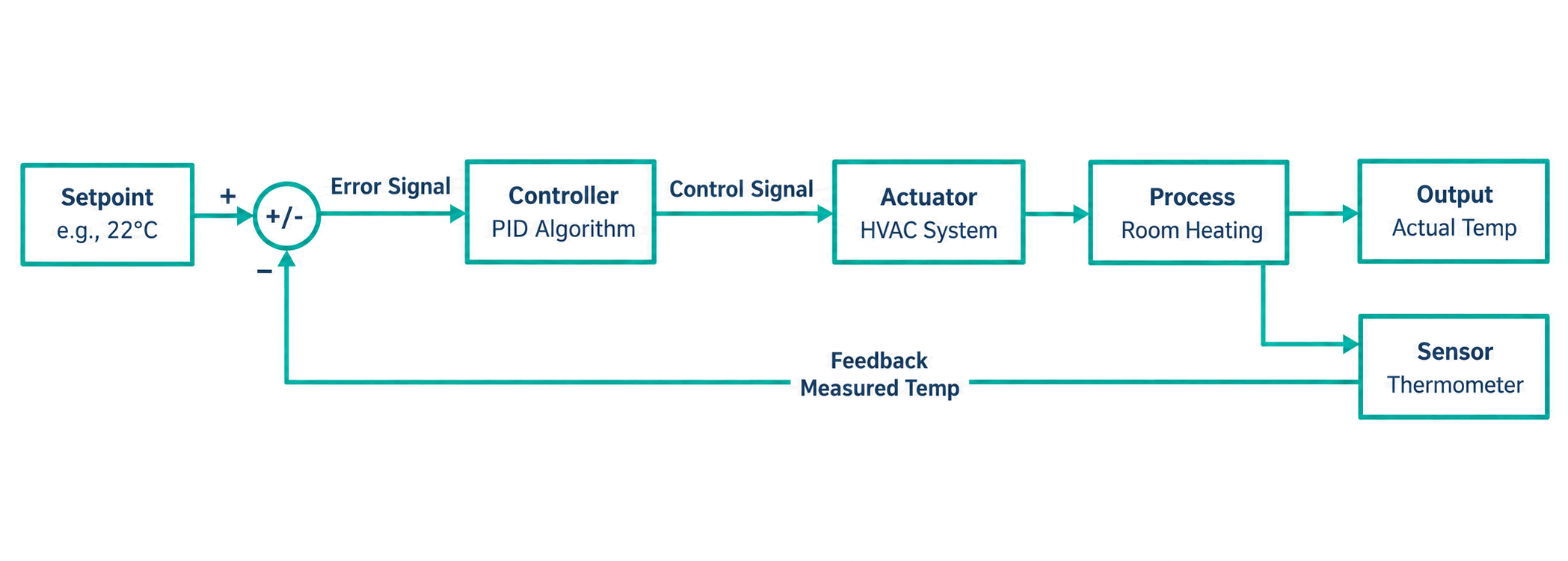
Follow Figure 1 from the temperature setpoint through the controller, heating equipment, and room, then back through the thermometer. The feedback lets the controller respond to the measured condition. Connectivity extends that loop with remote changes and service information. A connected product that only reports raw readings offers less operational value than one that connects those readings to a decision, response, or service improvement.
The pattern has three jobs. Sense a condition such as temperature, motion, vibration, flow, location, or energy use. Decide by processing the reading locally, at a gateway, at the edge, or in a cloud service. Act by notifying a person, changing an actuator, updating a dashboard, tuning a schedule, or triggering a workflow. An action can involve a person; naming it makes the proposed outcome reviewable.
A warehouse pallet tracker senses location and shock, sends events through Bluetooth Low Energy (BLE) gateways or LTE-M, and changes a logistics workflow when a shipment is delayed or mishandled. A water-level monitor senses a river or tank, communicates through LoRaWAN or cellular, and changes release schedules, pump behavior, or maintenance visits. The hardware and network differ, but the reading must still reach a decision and response.
This definition covers homes, factories, hospitals, farms, cities, and transport while excluding ordinary websites, passive labels, and disconnected embedded controllers. A programmable thermostat without networking is embedded control; a phone app without a physical device is software; a sensor tag with no computation is instrumentation rather than a complete IoT system. IoT Perspectives and Definitions examines how different stakeholders describe these boundaries.
2.4 Classify the Device and Its Path
Before asking what the thermostat earns or saves, establish what is connected. The Three Ingredients Test requires a physical thing, computation, and Internet connectivity, directly or through a gateway. A thing is the physical object: a light bulb, car, refrigerator, appliance, vehicle, sensor, or motor. Computation processes readings or applies logic. Connectivity provides a path to exchange readings, status, or commands beyond the device and toward Internet services.

Figure 3 uses plus signs because the ingredients must be present together. The thermostat box is the thing, its chip processes temperature, and Wi-Fi links it through the router. Different sensors, motors, processors, radios, and cloud links can satisfy the same test. If an ingredient is missing, the classification changes; a clever gadget with no network path does not pass merely because its local controller is sophisticated.

Follow Figure 4 in order. Without a physical thing, the candidate is software only. A physical object without a processor may still act through analogue electronics or electromechanical controls. A thing with computation but no Internet path is embedded: a basic microwave is an example. Only the final yes branch combines all three into IoT. The test classifies the device; it does not establish that connecting it justifies the added power, security, and service obligations. Device Evolution develops the embedded, connected, and IoT distinctions.
The Internet path need not originate on the device itself. A gateway bridges devices to the Internet; a Wi-Fi router or smartphone can serve that role. A BLE fitness tracker that syncs through a phone is still IoT when the phone supplies the gateway path. Remote servers that store data and run applications form the cloud, where fitness data may be stored and analyzed. Edge computing processes data near its source, as when a smart camera detects faces locally before uploading. IoT Systems Evolution explains the computing evolution behind these choices.
A factory motor with a vibration sensor may use Modbus or IO-Link locally, then an edge gateway may publish MQTT Sparkplug or OPC UA data to maintenance systems. A soil probe may use LoRaWAN or NB-IoT because range and battery life dominate its design. These choices determine battery budget, latency, installation cost, support skills, and operation when the wide-area connection is unavailable. Industry 4.0 and Classification carries that classification into industrial settings.
Turn the three ingredients into a requirements record. Name the physical asset, environment, installation point, user or operator, power source, mounting constraints, and expected life. Identify the compute boundary: what runs on the microcontroller, gateway, programmable logic controller (PLC), phone, edge computer, or cloud service. Name the connectivity path—Wi-Fi, BLE, Thread, Zigbee, LoRaWAN, LTE-M, NB-IoT, Ethernet, or another gateway protocol—and record its payload, data rate, coverage, network owner, and fallback behavior. IoT Requirements and Characteristics expands this minimum into system requirements.
2.5 Assign Responsibility for the Response
Classification establishes the path; responsibility determines whether it produces a dependable outcome. A dashboard built from manual data entry does not provide the same evidence as an instrumented asset. A sensor that sends readings without an owner for alarm response has not yet delivered an operational outcome. Ask what decision changes: faster dispatch, less downtime, safer care, lower energy use, better replenishment, or a new paid service.
A cold-room monitor can be a simple alarm, an IoT compliance system, or part of a predictive maintenance service. The difference involves more than a temperature sensor. The system must timestamp readings, prove calibration, alert the responsible person, record acknowledgement, preserve local alarm behavior, and produce audit evidence for food safety or medicines storage. An evidence path connects the reading to a decision and an observed outcome.
2.6 Connectivity Changes Responsibility
Connectivity adds owners for state, security, updates, and recovery. Our thermostat may still face a local controller failure, but the connected product can also fail through expired credentials, weak coverage, a broker outage, app permissions, or stale cached state. Define what behavior stays local and who responds when the network path breaks. The device, gateway, broker, application, and update service share the work across firmware, connectivity, services, security, and maintenance.
MQTT, CoAP, HTTP, OPC UA, and industrial gateways have different reliability and support obligations. Each still needs device identity, message freshness, command authorization, and recovery. A dashboard number alone cannot establish that an action is safe. For identity, record how each device is provisioned, authenticated, transferred, and revoked. For freshness, distinguish measurement time from receipt time and flag stale readings. For command ownership, record the target, allowed actor, desired state, expiry, and acknowledgement path. For recovery, preserve useful local behavior while the app, gateway, broker, or cloud is unavailable.
For the thermostat, distinguish the temperature reading from the schedule change and from the resulting room condition. The app can request a change, but the control logic and heating equipment still perform the response. Recording who owns those steps keeps the claim tied to the physical system. The same discipline applies to the cold room: receiving a reading is different from the responsible person acknowledging an alarm, and neither replaces the record needed for an audit.
These handoffs belong in the value case because maintenance and response work cost money. A connection does not remove the obligation to operate the product. The first check asks you to distinguish the device’s ingredients from its loop and to explain who owns the result.
For more practice choosing among conceptual questions, use the Quiz Navigator.
2.7 Sammy Finds IoT
Have you ever talked to a smart speaker or seen lights turn on by themselves? The Sensor Squad is here to explain how it all works!
Meet the Squad:
- Temperature Terry — Feels when things are hot or cold
- Light Lucy — Sees when it is bright or dark
- Max the Motion Sensor — Notices when people and things move around
- Bella the Pressure Sensor — Feels pushes, squeezes, and even the weather
2.7.1 What Makes Things “Smart”?
Regular things just sit there. But SMART things can:
- Feel what is happening (too hot? too dark?)
- Think about what to do
- Talk to other things and to you!
- Act to make things better
| Squad Member | Super Power | What They Help |
|---|---|---|
| Sammy | Feels hot and cold | Keeps your room at the perfect temperature |
| Lila | Sees light and dark | Turns lights on and off automatically |
| Max | Notices movement | Knows when you enter a room |
| Bella | Feels pushing and weather | Tells you if it will rain tomorrow |
2.7.2 A Day With the Sensor Squad
Morning:
You wake up. Lila notices it is bright outside and tells the blinds to open slowly. Sammy checks if your room is warm enough!
Going to School:
Your smart backpack (with a tracker inside) tells your parents’ phone you arrived safely at school. Max noticed you stopped moving — you must be at your desk!
Coming Home:
Max notices you walking up to the door. The smart lock recognizes you and unlocks automatically. Welcome home!
Bedtime:
You say “Goodnight!” to your smart speaker. It turns off the lights (Lila’s idea), plays soft music, and Sammy sets the temperature just right for sleeping. Bella checks the weather for tomorrow so you know what to wear!
2.7.3 What is “IoT”?
Internet of Things = Smart things talking to each other through the internet!
“Things” can be ANYTHING:
- Light bulbs that change colors
- Refrigerators that know when you’re out of milk
- Watches that count your steps
- Pet feeders that give treats when you’re away
- Doorbells that show you who’s there
2.7.4 Why IoT is Cool
- Saves time: Lights turn off by themselves when you leave
- Keeps you safe: Smoke detectors call for help automatically
- Helps everyone: Farmers know exactly when plants need water
- Fun to use: Control your room with your voice!
2.7.5 Key Words for Kids
| Word | What It Means |
|---|---|
| IoT | Internet of Things — smart stuff connected together |
| Smart | A thing that can feel, think, and talk to other things |
| Sensor | The part that feels (like eyes and ears for devices) |
| Internet | The invisible web that connects everything |
| App | A program on your phone that controls smart things |
2.7.6 The Sensor Squad Song (Try Singing It!)
“Things that sense, things that think, Things that talk in just a blink! Connected to the internet they be, That’s what IoT means to me!”
The verse provides a memory aid for sensing, computation, and communication. Sensing means measuring a physical condition, such as temperature or movement. Thinking represents computation that processes a reading or applies control logic. Talking represents exchanging readings, status, or commands through a network. These words describe technical functions rather than human abilities.
Connect the memory aid to a physical device: a thermostat measures room temperature, processes that measurement, and exchanges information through its internet connection. An action, such as changing heating, makes the information useful. The short verse recalls the ingredients, while the closed loop explains their relationship to an outcome. It does not establish how quickly messages travel or whether the connected system delivers enough value to justify its costs.
2.8 Compare Everyday Products by What Changes
With the boundary and responsibilities clear, return to the familiar objects. A regular thermostat maintains temperature, a basic coffee maker brews coffee, a standard light switch controls lights, and a traditional door lock secures the home. Their ordinary controls require someone to walk over to the dial, press a button, flip a switch, or use a key. Connected versions add ways to exchange information and change behavior remotely.
| Connected product | Added capability | Useful change |
|---|---|---|
| Smart thermostat | App control from anywhere | Adjust temperature from work before returning home |
| Smart coffee maker | Scheduled brewing | Wake up to fresh coffee |
| Smart light bulb | Remote switching | Turn lights on before arriving at a dark house |
| Smart lock | Phone-based locking and unlocking | Let guests in while away |
Scheduling alone does not prove that a device is IoT: the three ingredients still apply. A coffee maker can “talk” by sending an “I’m done brewing!” notification, “listen” to “Alexa, start brewing coffee,” and “think” by following a 7am brewing rule. Those verbs mean communication and computation, rather than human abilities. The useful upgrade is the response enabled by information.

Figure 2 compares the same job—heating a room—in traditional and smart forms. The left side lacks a network link, a data record, and remote access. On the right, a link supports data logging, app control, schedules, and learned habits. Read that sequence as added capabilities, rather than assuming connectivity alone provides all of them. The old thermostat still heats the room; the connected version can use information to change how that job is managed.
The same comparison works for other everyday examples. A fitness tracker measures heart rate, steps, and sleep, synchronizes wrist-sensor data to the cloud, and provides health insights. A smart fridge can use cameras, Wi-Fi, and analysis to track food expiration, suggest recipes, and order groceries. A cloud-connected, AI-powered voice assistant listens for requests, controls lights, plays music, and answers questions. A smart doorbell combines a camera, Internet streaming, and mobile alerts so its owner can see visitors remotely.
Convenience comes from a thermostat learning a schedule instead of requiring repeated adjustment. Efficiency comes from detecting factory-machine problems before breakdowns rather than guessing when maintenance is needed. Energy insights show which devices consume the most power and when. A digital twin is a virtual copy of a physical device or system used for simulation and optimization, such as a factory model for testing changes. It is another way to use physical-system information; it is not an additional ingredient required by the device test.
The Sensor Squad supplies a younger reader’s memory aid: feel, think, talk, and act. Temperature Terry feels hot and cold; Light Lucy detects brightness; Max the Motion Sensor notices movement; Bella the Pressure Sensor detects pushes, squeezes, and weather-related pressure. In the everyday squad examples, Sammy keeps the room at a comfortable temperature, Lila switches lights, Max notices people entering, and Bella helps with tomorrow’s weather information. These names make sensing functions memorable; the devices measure conditions rather than experience them.
Their day follows the same loop. In the morning, Lila notices brightness and prompts the blinds to open while Sammy checks room temperature. On the way to school, a smart-backpack tracker reports arrival to a parent’s phone; Max detects a stop in movement, although that observation alone cannot establish that the child is at a desk. Coming home, detected movement and recognition can support a smart lock’s welcome. At bedtime, “Goodnight!” can trigger lights, music, a sleeping-temperature setting, and a weather check.
Color-changing bulbs, refrigerators tracking milk, step-counting watches, remotely operated pet feeders, and video doorbells all make the idea concrete. Automatic lights save time; connected smoke detectors can call for help; farmers can use readings to decide when plants need water; voice control can make a room easier to use. “Smart” is shorthand for sensing, processing, and communicating. An app is a program on a phone; the Internet is the network connecting these systems.
The squad’s verse recalls the ingredients: “Things that sense, things that think, / Things that talk in just a blink! / Connected to the internet they be, / That’s what IoT means to me!” Apply it to the thermostat’s measurement, processing, and information exchange, then add the heating action. The verse does not establish message speed or prove that value exceeds costs. Visual explanations are available in the Video Gallery; interactive tools are collected in the Simulation Playground.
2.9 Build the Value Case from the Human Need
A useful proposal starts with a concrete problem—energy waste, equipment failure, or patient-vital monitoring—and works backward to technology. Connected products can become data-generating assets that support new revenue streams, operational efficiencies, and customer insights. The investment question is which of those outcomes the proposed deployment can demonstrate.
Consider investment when operations produce data that could improve decisions, manual monitoring or inspection is costly or error-prone, or connectivity could differentiate the product. Customers may expect app-based control and visibility; regulatory compliance may require continuous monitoring. Each reason still needs a named response, an owner, and a baseline against which to measure change. IoT History and Paradigm Shifts supplies context for judging claims about what a technology change delivers.
For the thermostat, Google reports average Nest savings of 10–12% on heating and 15% on cooling, with typical annual bills $131–145 lower. Payback varies and can be under two years. DOE/PNNL modeled about 29% potential energy savings from properly tuned controls across commercial building types; actual results vary by building. The DOE/PNNL report concerns commercial controls, so retain that scope when using its estimate.
A percentage improvement means little until the affected cost base is defined. Tie efficiency gains to a named process, baseline, and study; a category-wide 25–50% band does not establish a deployment’s return. Do not compare a hypothetical annual saving in one sector directly with a broad market-size estimate. For an industrial project, start with its own downtime cost, achievable reduction, and implementation cost. For a consumer product, use its investment and measured benefits. Payback measures how long benefits take to recover an investment; return on investment (ROI) relates the return to that investment. Both depend on the use case, rather than a universal 6–36-month payback claim.
Count operating cost alongside the initial purchase: maintenance and response work belong in the value claim. Set security spending from threat modeling, assurance needs, and lifecycle costs. A 15–20% allocation should not be presented as industry best practice. Classification tells us what is connected; measured benefit and the cost of sustaining the response determine whether the connection is worthwhile.
2.10 Read the Five Verbs Model within Its Scope
A deployment’s value can span several kinds of human activity. The Five Verbs Framework groups applications as SUSTAIN, MOVE, MAKE, HEAL, and FEED. It is a classification framework and an illustrative market allocation. A cold-chain service that prevents food spoilage and reduces delivery waste can serve both FEED and MOVE; the goods and the moving sensor do not force it into only one category. Benefits can cascade across domains through the same evidence and action.
| Category | Illustrative 2030 projection | Growth driver in the model |
|---|---|---|
| SUSTAIN: energy and environment | $1.1T | Climate regulations and ESG mandates |
| MOVE: transportation and logistics | $950B | Autonomous vehicles and last-mile delivery |
| MAKE: manufacturing | $870B | Labor shortages and quality demands |
| HEAL: healthcare | $650B | Aging populations and remote care |
| FEED: agriculture | $420B | Water scarcity and food security |
Keep SUSTAIN’s $1.1T and MOVE’s 16.5% growth rate labeled as illustrative model inputs. The five 2024 segments total $1.78 trillion. Applying the model’s 14.5% annual growth rate gives about $2.04 trillion in 2025 and about $4.0 trillion in 2030. These are planning-model values, rather than a universal total for the industry: published market estimates use different scopes. Compounding the same $1.78T baseline at 14.5% for ten years gives about $6.9T in 2034; that is a model extension, not a sourced market forecast.
Device and connection counts need their own scope. The introductory investment model projects 18B devices in 2025 to 40B+ in 2034. Its separate arithmetic example, 40B minus 20B over nine years, gives about 2.22B additional devices per year; it uses a different starting count and should not be silently substituted for the 18B projection. A dated IoT Analytics estimate puts active IoT connections at 21.1 billion at the end of 2025, with a forecast of 39 billion by 2030. A device-growth model and an active-connection estimate are different evidence for scale.
The categories help organize a discussion about outcomes. SUSTAIN asks about energy and environmental needs; MOVE concerns transport and logistics; MAKE concerns production; HEAL concerns healthcare; FEED concerns agriculture. Classifying an application across verbs explains why the same connected service can matter to more than one group. It does not remove the need to identify which decision changes for each group or what evidence supports each claimed benefit. For the cold-chain example, food protection and delivery decisions remain connected parts of the service.
Use these figures to frame an opportunity and compare segment assumptions, then return to the project’s measured outcome. A market allocation does not predict an individual customer’s payback, and a forecast is not revenue already earned. The thermostat’s business case still rests on the response it enables, the benefits measured, and the obligations its connectivity adds.
2.11 Summary
The thermostat connects a physical thing, computation, and an Internet path. Its value comes from linking a sensed condition to a decision, action, and feedback. The same test distinguishes passive objects, embedded controllers, gateway-connected devices, and software alone.
A useful design names the compute and connectivity boundaries, the owner of each response, and the evidence for the resulting state. Identity, freshness, command authorization, recovery, maintenance, and security all affect the cost of operating that loop. The Five Verbs Framework groups the human outcomes; its illustrative market figures provide context while the deployment’s own measured benefits support its investment case.
Name the physical condition, the decision it changes, who acts, and how the outcome is verified before claiming value from connectivity.