28 Voice Compression: Codec and Link Constraints

More
Depth: Practitioner
Progress saves as you read. Mark sections complete as you go; your progress appears in the sidebar.
28.1 Start With the Decision
This section: Start With the Decision — A door intercom can sound clear on the bench but break into gaps on its radio link.
A door intercom can sound clear on the bench but break into gaps on its radio link. Format, loss, and delay must fit the same path.
28.2 Route Overview
This section: Route Overview — This is part 1 of 2.
This is part 1 of 2. Continue with Voice Compression: Samples, Companding, and Speech Models.
28.3 Part Objectives
This section: Part Objectives
- Test why voice gets compressed with a concrete scenario and pass criteria.
- Validate apply it: match the codec to the link with a concrete scenario and pass criteria.
28.4 Chapter Roadmap
This section: Chapter Roadmap
- In 60 Seconds
- Start With the Story
- Why Voice Gets Compressed
- Apply It: Match the Codec to the Link
28.5 In 60 Seconds
This section: In 60 Seconds — Picture a door intercom that sounds clear on the bench but breaks into gaps over its radio link.
Fit One Clear Message Through the Real Link
Picture a door intercom that sounds clear on the bench but breaks into gaps over its radio link. The audio format, packet overhead, loss, and delay must fit the same path.
Analog-to-digital converter means a circuit that turns microphone voltage into numbers; it is often shortened to ADC. Latency means the delay between speech and useful playback. Measure both the encoded stream and the listening result.
Send one known phrase at two quality settings, then add loss and a slow link. Keep sample settings, encoded size, packet overhead, delay, losses, energy, and listening notes.
This runway does not prove that one codec fits every voice task. The deeper sections explain sampling, quantization, compression, packet framing, link budgets, loss handling, and listening validation.
Voice compression turns a raw microphone sample stream into a stream small enough for constrained IoT links. Review it as a complete link-budget, packet-overhead, latency, loss, CPU, energy, and listening-validation decision.
28.6 Start With the Story
This section: Start With the Story — You will compare audio codecs against a PCM baseline and include packet costs when judging whether voice fits a link.
You will compare audio codecs against a PCM baseline and include packet costs when judging whether voice fits a link. Start with the speech task, capture quality, and available transmission budget.
Follow one voice message across four beats to see how codec, overhead, and delay must fit the same constrained link.
-

Packet Pete: “The baseline keeps the voice detail, but it asks the link to carry every sample.”
-

Remi: “Payload and overhead together are delaying the speech we need.”
-

The team: “Balance intelligibility, link capacity, packet cost, and delay before choosing the codec.”
-

Packet Pete: “The compressed speech now arrives intelligibly inside the delay budget.”
The mathematical gist. At the chapter’s kHz rate, Nyquist gives a kHz content ceiling. Ideal linear PCM gives dB full-scale SNR, but a talker dB below full scale keeps only dB. Companding reshapes the amplitude ruler so quiet speech receives finer effective steps while the wire still carries bits at kbps.
28.7 Why Voice Gets Compressed
This section: Why Voice Gets Compressed — Raw digital audio is bandwidth-hungry.
Raw digital audio is bandwidth-hungry. Capturing speech as plain samples produces a steady stream of bits that can overwhelm the narrow, low-power links many IoT devices use. Voice compression shrinks that stream so speech fits the link.
The path is familiar from sampling: a microphone signal is sampled and quantized into numbers, and then compressed before it is packetized and sent. Compression sits after the same sampling and quantization steps covered in the ADC chapter.
If you only need the intuition, this layer is enough: voice compression trades exact fidelity for a stream small enough to fit a tight link, and the main levers are bit rate, audio quality, and end-to-end delay.
Lossy compression is the norm for voice. Unlike a file you must reconstruct exactly, speech only needs to stay intelligible and natural enough, so voice codecs discard detail the ear barely notices in exchange for a much smaller stream. Think of shorthand note-taking: you do not capture every word, only enough to reconstruct the meaning.
For example, a battery-powered site intercom may capture narrowband speech from a MEMS microphone, send it over Wi-Fi or LTE-M backhaul, and need a supervisor to understand a short spoken request with little delay. Raw 8 kHz, 16-bit, mono PCM is 128 kbps before packet headers, and classic 8-bit narrowband PCM is still 64 kbps. A speech codec such as AMR-NB, Opus configured for speech, or Codec2 can reduce the carried voice stream by modelling speech and tolerating small perceptual losses. The choice is not only the advertised codec bit rate; the device must also budget packet headers, jitter buffer delay, dropped packets, CPU energy, and whether the audio is live talk, a push-to-talk clip, or a stored alert.
Before Why Voice Gets Compressed, inspect the figure Figure 28.1. Compare Speech with Capture; their difference reveals Review voice as a complete link: speech task, capture chain, PCM baseline, codec mode, packet budget, and real-speech validation. This gives Why Voice Gets Compressed evidence to revisit.
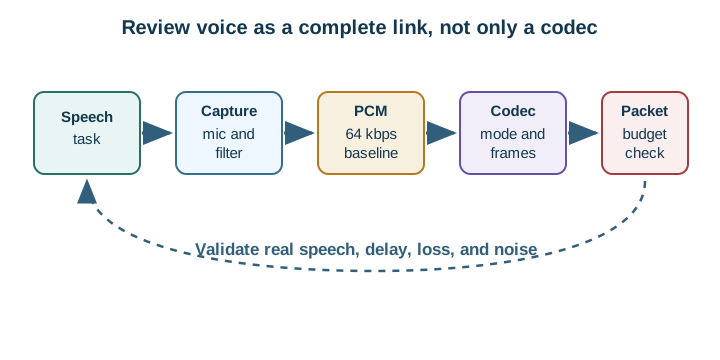
Follow the speech task across Figure 28.1 through microphone capture, the PCM baseline, codec framing, and packet budgeting. The validation strip below checks real speech, delay, loss, and noise across the complete link.
The One-Minute Voice-Coding View
Start from the link
The reliable, sustained bit rate sets the ceiling for the codec you can use.
Mind the delay
Interactive conversation needs low end-to-end latency, which limits how much audio you can batch.
Pick lossy, then validate
Choose a speech codec and confirm it sounds acceptable over the real link, not only on paper.
Beginner Examples
- Plain uncompressed speech samples can exceed what a narrow link comfortably carries, which is why phones compress.
- A one-way recorded alert tolerates more delay than a live two-way conversation.
- Working on bench Wi-Fi does not prove a codec works over a constrained field link.
Voice Compression Knowledge Check
If this gives you the trade-off, you can stop here. Continue to Practitioner when you need to choose a codec and packet size for a real link.
28.8 Apply It: Match the Codec to the Link
This section: Apply It: Match the Codec to the Link — The practical job is to pick a codec and bit rate the link can sustain, size the packets to balance overhead against latency and loss, and confirm the result by listening over the real link.
The practical job is to pick a codec and bit rate the link can sustain, size the packets to balance overhead against latency and loss, and confirm the result by listening over the real link.
A practical review starts with the worst hour of the deployment, not the best bench measurement. A Wi-Fi door station may have enough throughput but suffer roaming gaps and jitter when the access point is busy. An LTE-M tracker may have enough coverage for telemetry but limited uplink budget for live speech. A phone-tethered wearable may depend on BLE connection interval and app foreground behavior. For each case, test the same sentence, background noise, and packet-loss pattern with the candidate codec and packet size, then log perceived intelligibility, round-trip delay, and gaps.
Walkthrough: From Link Budget to Validated Audio
- Measure the link budget. Find the reliable, sustained bit rate and the typical packet loss of the real link, not the peak or the lab figure.
- Set the latency budget. Decide the maximum acceptable end-to-end delay; interactive talk needs far less than one-way playback.
- Choose the codec family. Waveform coders preserve general audio at higher bit rates; speech-model coders reach much lower bit rates for voice specifically. Match the family to the content and the bit rate the link allows.
- Size the packets. Each packet carries header overhead, so very small audio packets waste bandwidth on headers, while large packets add delay and lose more audio per dropped packet.
- Plan for loss. Expect dropped packets on real links; prefer codecs and packet sizes that degrade gracefully, and consider packet-loss concealment.
- Validate with real speech. Listen to representative voices and conditions, because tone tests do not capture intelligibility or conversational delay.
Read Figure 28.2 from waveform-based PCM toward the low-rate speech models. The axis shows the trade-off between waveform fidelity and payload size; the lower note lists costs beyond codec bit rate.
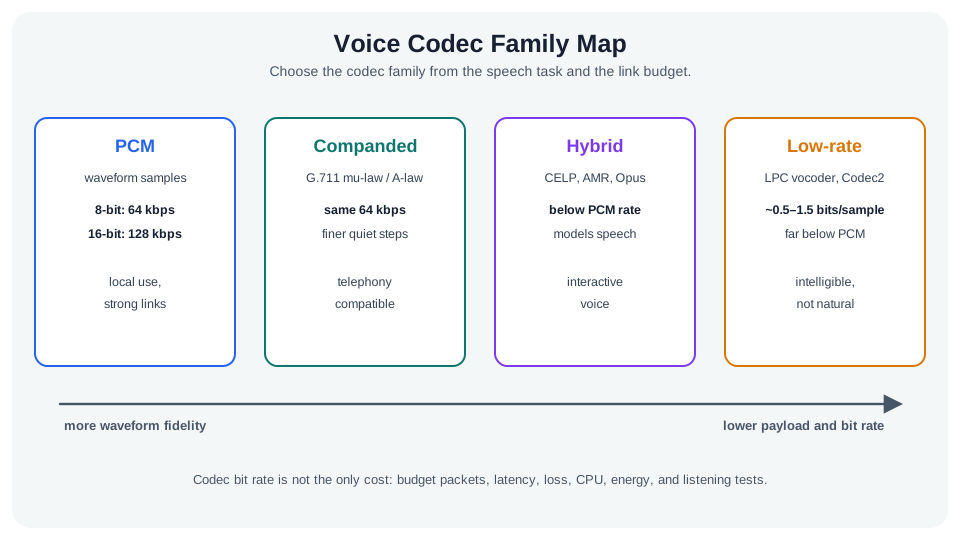
Compare PCM with companded audio in Figure 28.2: G.711 changes quiet-signal steps while retaining the same 64 kbps rate. Continue right to the speech-model options, where smaller payloads require checking whether the resulting speech meets the task.
The Packet-Sizing Trade-Off
There is no single best packet size, only a balance for your link's bit rate, loss rate, and delay budget.
The packet-size choice sits inside a longer voice path. In Figure 28.3, the speech task asks whether the feature must support recognition or replay. A PCM baseline gives the raw-rate reference before the codec mode sets its bit rate and frame shape. The packet budget then adds headers, delay, and loss, which is why a codec rate alone cannot predict link use or live-call quality. Validation uses real audio and a listening result to check the whole route. Record the chosen packet duration with the link rate, loss, and delay budget; a small packet can waste overhead, while a large one adds delay and loss exposure.
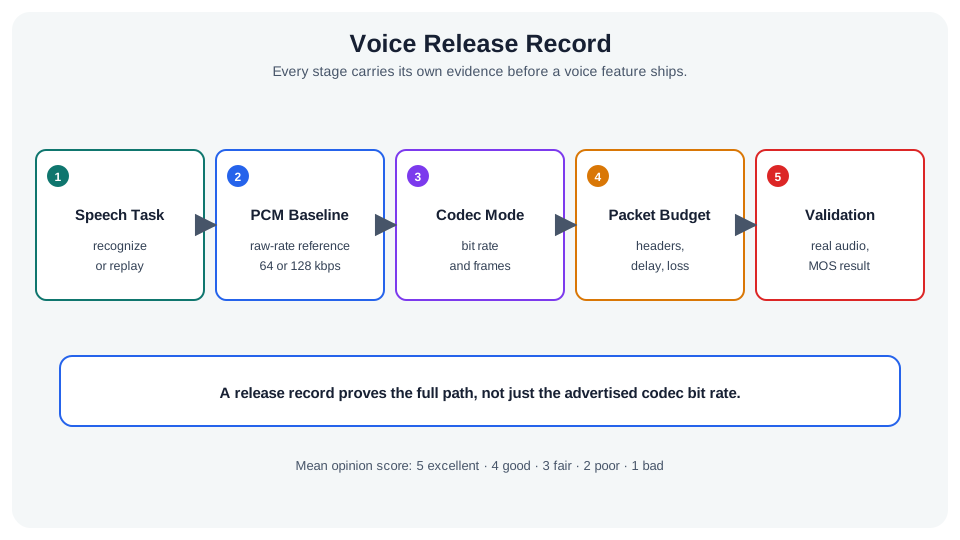
The record in Figure 28.3 links speech task, PCM baseline, codec mode, packet budget, and validation; notice why codec bit rate alone cannot release the path.
Incremental Practice
Beginner
For a one-way audio alert, explain why you can batch more audio per packet than for a live call.
Intermediate
Given a very low reliable bit rate, argue why a speech-model coder may be necessary and what content it assumes.
Advanced
Choose an audio-per-packet size for a lossy link and justify it against header overhead, latency, and per-loss audio.
Packet Sizing Knowledge Check
If your job is to choose a codec and packet size, you can stop here. Continue to Under the Hood for the baseline math and the coder families.
28.9 Continue to the Next Part
This section: Continue to the Next Part — Carry this evidence into Voice Compression: Samples, Companding, and Speech Models, which begins with Under the Hood: From Samples to a Speech Model.
Carry this evidence into Voice Compression: Samples, Companding, and Speech Models, which begins with Under the Hood: From Samples to a Speech Model.
Find help
3 reviewed answers.
Where should I start in a module?
Open the module page from the sidebar to see its chapters in order. Use the module map to return to a topic you need.
Modules and pathsReviewed
What can I try when a project does not work?
Check the symptom, then work through the diagnostic steps. Keep the error message and the smallest example that reproduces it.
When you are stuckReviewed
How do interactive examples work?
Use the interactive guide to check how examples and simulations work before changing your project.
Interactive examples guideReviewed