28  Interface Design: Interaction Patterns

ux-design
interface
interaction
patterns

28.1 Start Simple

An interaction pattern should make timing and authority visible. Start with the command, the optimistic state, the authoritative confirmation, the timeout, the rollback, and the message the user needs when a device, app, cloud service, or support record disagrees.

28.2 Learning Objectives

By the end of this chapter, you will be able to:

  • Implement Optimistic UI Updates: Provide immediate feedback while commands travel to devices
  • Design Distributed State Synchronization: Keep multiple interfaces synchronized with a single source of truth
  • Apply Notification Escalation: Create intelligent alert systems that avoid fatigue while ensuring critical events get attention
  • Match Feedback to Action Importance: Design appropriate response timing and modality for different action types
MVU: Minimum Viable Understanding

Core concept: Network latency is unavoidable in IoT, so interfaces must provide immediate visual feedback (optimistic updates) while commands travel to devices, then reconcile with actual state on success or failure. Why it matters: Users tap buttons expecting instant response. A 3-second delay with no feedback leads to repeated taps, queued commands, and broken user trust. Key takeaway: Acknowledge every action within 100ms visually, show progress during processing, and confirm or gracefully revert based on actual device response.

Chapter Roadmap

Read this as four design contracts:

  1. First make delay visible: fast optimistic state, slower authoritative device state.
  2. Then treat synchronization as UX: source, freshness, ordering, conflict policy, and support evidence need interface language.
  3. Next compare optimistic updates, publish/subscribe state sync, notification escalation, and timing-specific feedback.
  4. Finally test them through code, case studies, quizzes, and common pitfalls.

Checkpoints recap decision rules. Deep examples and quizzes are practice.

28.3 Make Delay Visible

IoT interaction patterns exist because a user action often crosses an app, cloud service, gateway, radio link, device firmware, sensor, and actuator before the result is known. The interface must respond immediately while staying honest about the final device state.

The core pattern is not “pretend it worked.” It is “acknowledge the intent now, show the pending state clearly, then reconcile with the authoritative device state.”

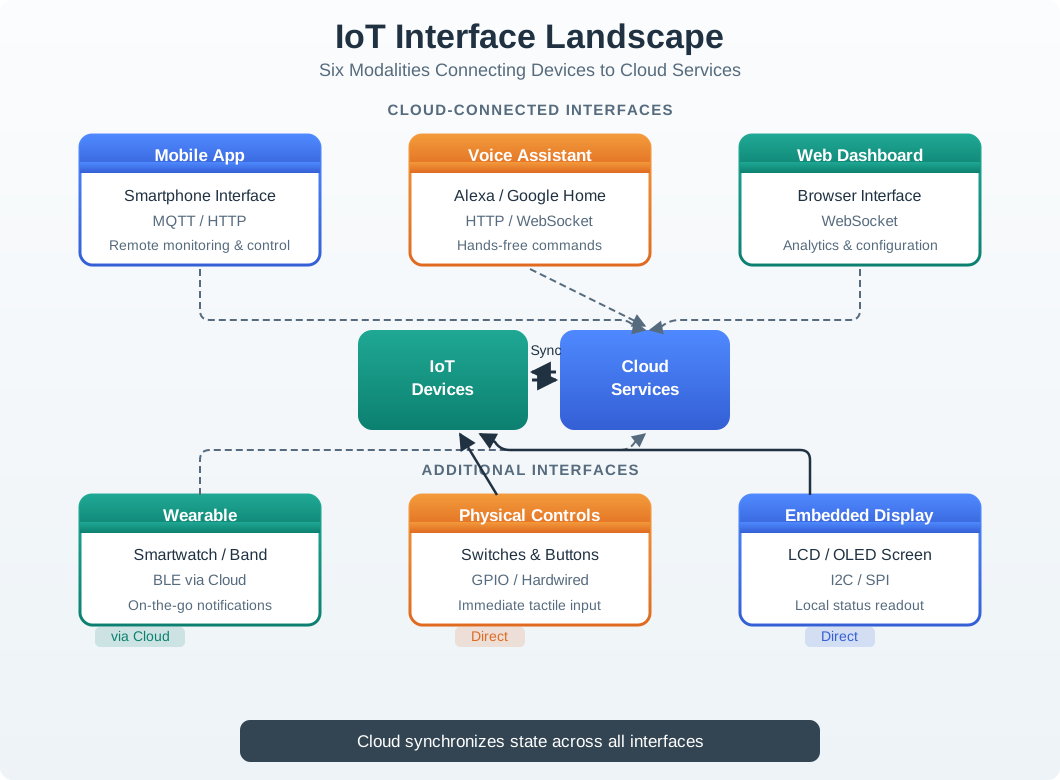
IoT interface landscape showing device controls, mobile app, cloud service, gateway, notifications, support, and physical context as connected touchpoints.
Figure 28.1: Interaction patterns coordinate feedback across local controls, mobile apps, cloud services, notifications, and support views instead of treating each screen as an isolated interface.

Consider a thermostat, smart lock, garage door opener, or security camera. The person does not care whether a delay came from Wi-Fi roaming, a sleeping radio, a gateway queue, a cloud rule, or a firmware retry. They care whether their intent was received, whether the physical world is changing, whether they can safely act again, and what to do if the result does not match the request. Good interaction design turns those questions into visible states.

An optimistic update is one part of that contract. It lets the interface acknowledge a command quickly, usually within a perceptual instant, while marking the result as pending rather than final. A thermostat can show the requested temperature immediately but add “sending” until the device reports the applied setpoint. A lock can show “locking” and suppress duplicate toggles while still exposing that the bolt is moving. A garage door can show “opening” for the mechanical travel time instead of leaving the button unchanged.

The companion pattern is reconciliation. When the authoritative state arrives, the interface either confirms the optimistic state, corrects it, or explains why it was rejected. That explanation should be practical: device offline, permission denied, low battery, blocked sensor, local override, safety interlock, or command timed out. Without reconciliation, optimistic UI becomes misleading decoration. With reconciliation, the user sees both responsiveness and truth.

Synchronization and notification patterns extend the same idea across touchpoints. If a physical panel changes a setpoint, the app, dashboard, voice assistant, and support console need a consistent story. If a camera detects motion all day, notification design must separate routine events from unusual events so people do not silence every alert. Interaction patterns are therefore product rules for state, timing, escalation, and recovery, not only visual components. ## Design State Pairs {.depth-l1}

For each interaction, design both the optimistic interface state and the authoritative state that can confirm, correct, or reject it.

  • Optimistic command: show the user’s intent quickly, such as “locking…” or a temporary selected state, so repeated taps do not create duplicate commands.
  • Authoritative update: replace the pending state only when the device, gateway, or service reports the outcome.
  • Conflict case: explain when another interface, physical control, permission rule, or safety condition changed the result.
  • Escalation path: move from silent status to badge, push, sound, alarm, or support handoff based on risk and user response.

Start with a command-state table before drawing the screen. Useful columns include trigger, affected device, optimistic copy, disabled or allowed follow-up actions, command id, authoritative event, timeout threshold, rollback state, user-facing explanation, accessibility feedback, and support evidence. This table keeps the team from hiding distributed-system uncertainty behind a single spinner.

For a temperature stepper, the optimistic state might be “72 degrees requested” while duplicate taps are merged for a short debounce window. The authoritative event might be a reported setpoint from the device shadow, MQTT topic, or WebSocket stream. If confirmation does not arrive before the timeout, the UI should show the last known actual value, the requested value, and the next action: retry, queue for later, check connectivity, or use local controls.

Design each pattern across at least two touchpoints. A smart lock test should include the mobile app, the lock reader or keypad, and the support view if support handles failed commands. A camera notification test should include phone settings, in-app notification preferences, event history, quiet hours, activity zones, and the escalation rule for night or unknown-person events. A facilities dashboard test should include a live value, stale timestamp, source device, threshold rule, acknowledgement owner, and exportable incident record.

Accessibility belongs in the state table. Pending, confirmed, rejected, stale, and escalated states need non-color indicators, readable text, focus behavior, screen-reader announcements where appropriate, and input paths that do not depend on precise tapping during a moving status change. A disabled control should explain why it is disabled or expose a nearby status detail. A high-priority alert should not rely on sound alone; it should leave a persistent, reviewable state.

Acceptance criteria should test both speed and honesty. The interface should acknowledge intent quickly, suppress accidental duplicate commands, update when another touchpoint changes the device, recover from offline or permission failure, and maintain the same vocabulary in logs and support tooling. If the pattern only works on a perfect network with one user and one interface, it is not ready for an IoT product. ## Synchronization as UX Problem {.depth-l2}

One command now has user-visible states. Next: many interfaces changing the same device at nearly the same time.

State synchronization failures look like interface bugs even when the backend is working. A dashboard, app, physical switch, voice assistant, and support console can all show different truths if freshness, source, ordering, and conflict policy are not visible.

Good UX therefore exposes enough distributed-system behavior for the user to act safely: pending, stale, unreachable, overridden, denied, confirmed, and reverted are different states and need different feedback.

The implementation needs explicit hooks for those states. Command APIs should return a command id or idempotency key so retries do not create extra physical actions. Event streams should include device id, sequence number or timestamp, source, desired state, reported state, and error reason. A device-shadow model such as desired versus reported state is useful because it separates what the user requested from what the device has actually applied.

MQTT and WebSocket updates are common ways to push authoritative changes back to interfaces. MQTT retained messages can help a newly opened dashboard learn the latest reported state, while WebSocket streams can keep browser or mobile sessions synchronized. Both still need freshness policy: a retained value from yesterday should not look the same as a value received five seconds ago. The UI should render timestamp, connectivity, and source confidence when the distinction changes the user’s next action.

Ordering is another product concern. A physical button, mobile app, automation rule, and voice assistant can all send commands close together. Last-write-wins may be acceptable for a lamp, but it can be dangerous for heaters, locks, pumps, or access control. The backend may need conflict rules such as role priority, safety interlock, monotonic sequence checks, lockout windows, or explicit acknowledgement. The interface should expose the result in plain language instead of leaking internal phrases like race condition or stale write.

Notification escalation also depends on implementation detail. APNs and FCM can deliver push messages, but the product still needs event classification, duplicate suppression, quiet-hours policy, acknowledgement state, escalation timer, digest generation, and audit history. A dismissed notification is not the same as an acknowledged incident. A muted camera zone is not the same as a resolved event. Store those as separate states so the UI can preserve signal without flooding the user.

Finally, support and observability should share the same state vocabulary as the interface. Logs that include command id, account role, device firmware, gateway id, network status, battery state, retry count, notification severity, and correlation id let support explain what happened without asking the user to reproduce the failure blindly. The implementation is doing its job when the interface can be fast, truthful, accessible, and diagnosable at the same time.

UX UmaCheckpoint: Delay and Authority

You now know:

  • Optimistic UI means acknowledging intent now, not pretending the device has already finished.
  • Pending, confirmed, rejected, stale, overridden, denied, and reverted are different product states and need different feedback.
  • A robust command path carries reconciliation evidence: command id, desired state, reported state, timestamp or sequence, source, and error reason.
Interaction Pattern Basics

When you tap “turn off lights” on your phone, the command travels over Wi-Fi to a hub, then via Zigbee to the bulb – a journey that takes 200-500 milliseconds. Meanwhile, you are staring at the button wondering if it worked. Interaction patterns solve this problem. The most important one is optimistic UI: the app immediately shows “lights off” (before the command even reaches the bulb), then quietly confirms or corrects when the real response arrives. This chapter covers the patterns that make IoT interfaces feel instant and trustworthy despite the unavoidable network delays underneath.

Key Concepts

  • Application Domain: Category of IoT deployment (agriculture, healthcare, manufacturing) sharing common sensor types, connectivity, and data patterns.
  • Common Pitfalls: Recurring mistakes made during IoT deployments that cause project failures despite technically sound components.
  • Design Pattern: Reusable solution to a commonly occurring design problem in IoT system architecture or product development.
  • Scalability: System property ensuring performance and cost remain acceptable as device count grows from prototype to mass deployment.
  • Interoperability: Ability of devices and systems from different vendors to exchange and use information without special configuration.
  • Total Cost of Ownership (TCO): Complete cost of acquiring, deploying, and operating an IoT system over its full lifecycle, including connectivity and maintenance.
  • Return on Investment (ROI): Financial benefit of an IoT deployment expressed as a percentage of the total investment, used to justify business cases.

28.4 Prerequisites

28.5 Core Interaction Patterns

28.5.1 Optimistic UI Updates

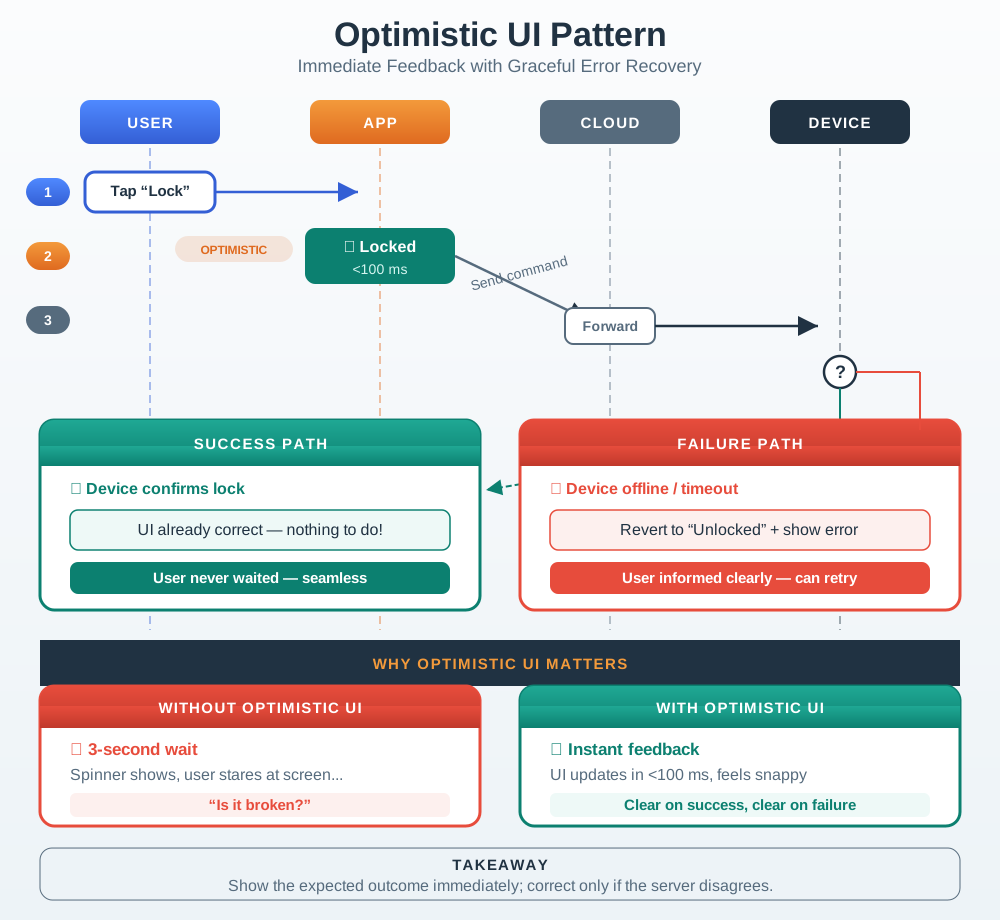
Network latency is a fundamental challenge in IoT interfaces. Optimistic UI provides immediate visual feedback while commands travel to devices:

Sequence diagram showing optimistic UI update pattern in IoT. User taps 'Lock Door', app immediately shows locked state (under 100ms), then sends command to cloud which forwards to device. In success case, UI already shows correct state so no change needed. In failure case (battery dead), app reverts optimistic update and shows error with unlocked state.
Figure 28.2: Optimistic UI Pattern: Immediate Feedback with Graceful Error Recovery

Why Optimistic UI Matters:

Scenario Without Optimistic UI With Optimistic UI
User taps button 3-second wait, no feedback Instant visual change
User perception “Is it broken?” “Command acknowledged”
Repeated taps Multiple commands queue up Single command sent
On failure Confusing state Clear error + recovery

28.5.2 Distributed State Synchronization

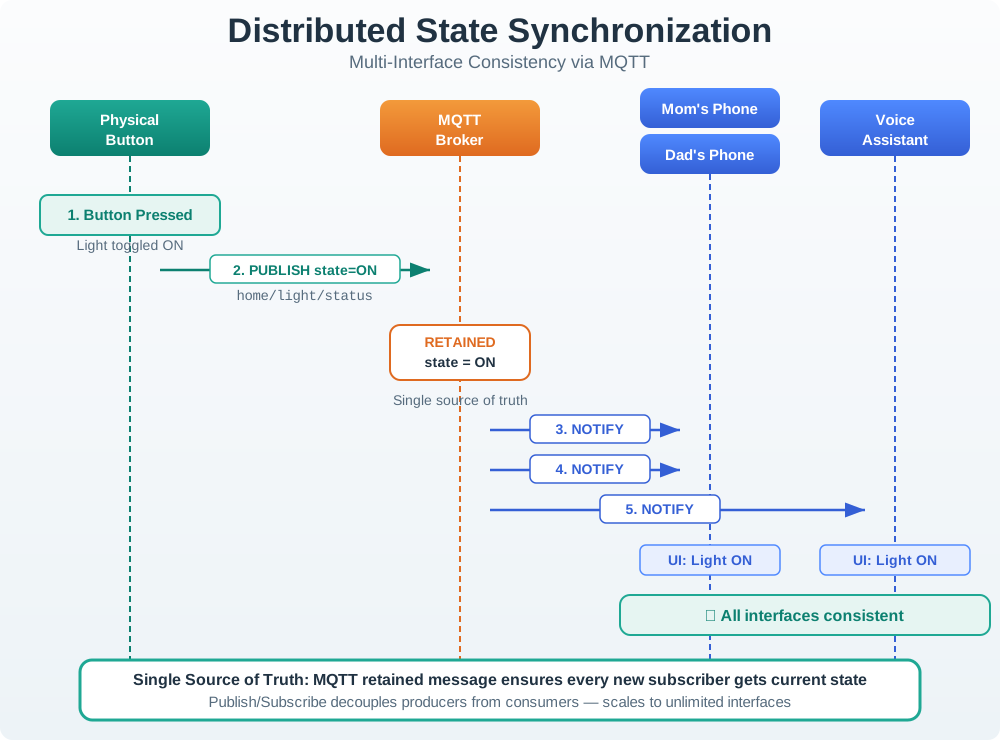
IoT devices often have multiple interfaces (app, voice, physical controls). All must stay synchronized:

Sequence diagram showing distributed state synchronization across multiple IoT interfaces. When physical button sets temperature to 72 degrees, device updates authoritative state and publishes to MQTT broker, which synchronizes to all subscribed interfaces (Mom's phone, Dad's phone, voice assistant). When Dad changes temperature to 68 degrees via app, device state updates and broadcasts to all other interfaces including physical display, maintaining single source of truth.
Figure 28.3: Distributed State Synchronization: Multi-Interface Consistency via MQTT

Synchronization Principles:

  1. Single Source of Truth - Device state is authoritative
  2. Publish/Subscribe - Changes broadcast to all interfaces
  3. Last-Write-Wins - Simple conflict resolution
  4. Offline Queue - Commands stored when disconnected

28.5.3 Notification Escalation

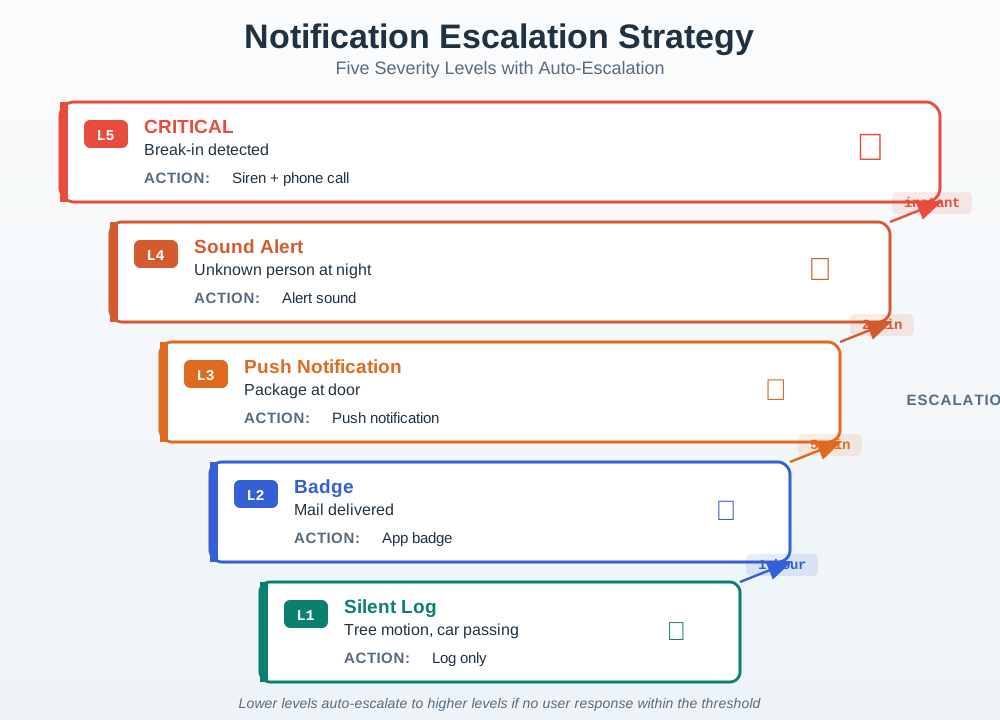
Alert fatigue occurs when users receive too many notifications. Smart escalation ensures important alerts get attention:

Flowchart showing notification escalation strategy for smart security camera. Motion events are classified into 5 levels: Level 1 (silent log for trees/cars), Level 2 (badge notification for mail delivery), Level 3 (push notification for packages), Level 4 (alarm for unknown person at night), Level 5 (critical multi-channel alert for break-in). Lower levels escalate to higher levels if user doesn't respond within time thresholds (1 hour for Level 2, 5 minutes for Level 3, 2 minutes for Level 4).
Figure 28.4: Notification Escalation Strategy: Five Severity Levels with Auto-Escalation

Escalation Levels:

Level Trigger Notification Type Example
1 - Silent Routine Log only Tree motion, car passing
2 - Badge Low App badge update Mail delivered
3 - Push Medium Standard notification Package at door
4 - Sound High Alert sound Unknown person at door
5 - Alarm Critical Siren + phone call Break-in detected

28.5.4 Feedback Design Principles

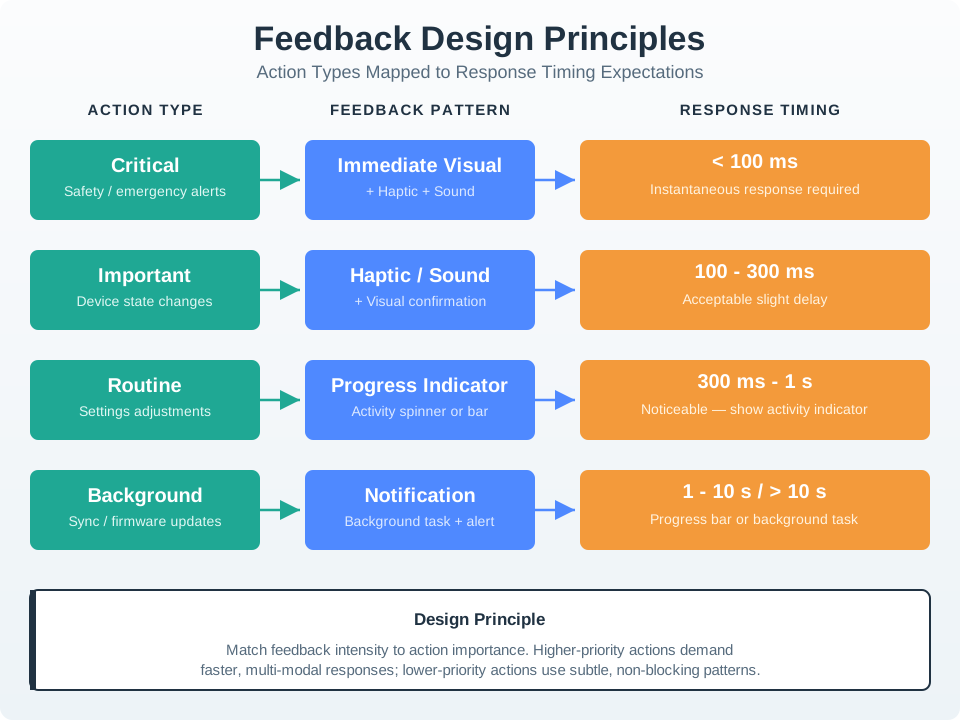
Effective IoT feedback matches the importance of the action:

Diagram showing feedback design principles for IoT actions. User actions are categorized by importance (critical, important, routine, background) and matched to appropriate feedback patterns (immediate visual, haptic/sound, progress indicator, notification) with corresponding response timing expectations (under 100ms for instantaneous, 100-300ms acceptable, 300ms-1s needs activity indicator, 1-10s needs progress bar, over 10s needs background task with notification).
Figure 28.5: Feedback Design Principles: Action Types Mapped to Response Timing Expectations

Response Time Expectations:

Delay User Perception Design Response
< 100ms Instantaneous Direct manipulation feel
100-300ms Slight delay Acceptable for most actions
300ms-1s Noticeable Show activity indicator
1-10s Slow Progress bar + status
> 10s Broken Background task + notification
Responsiveness Gain Calculator

Calculate how much perceived responsiveness improves with optimistic UI:

Key Insight: Even small improvements in feedback timing create dramatic improvements in perceived responsiveness. A 3-second actual delay with 50ms optimistic feedback feels 60× faster to users.

UX UmaCheckpoint: Pattern Selection

You now know:

  • Use optimistic updates when the user needs feedback under 100ms but the device confirmation may take longer.
  • Use publish/subscribe when app, voice, wall panel, dashboard, and support views must share one authoritative state.
  • Escalate notifications by severity, response, and context; routine motion should not use the same channel as a break-in.

28.6 Code Example: MQTT State Synchronization

The following JavaScript example demonstrates real-time state synchronization across multiple IoT interfaces using MQTT. This pattern keeps phone apps, wall panels, and voice assistants in sync:

// MQTT-based state synchronization for IoT dashboards
class DeviceStateSync {
  constructor(mqttClient, deviceId) {
    this.client = mqttClient;
    this.deviceId = deviceId;
    this.state = {};
    this.pendingCommands = new Map();
    this.listeners = new Set();

    // Subscribe to device state updates
    this.client.subscribe(`devices/${deviceId}/state`);
    this.client.on('message', (topic, payload) => {
      if (topic === `devices/${deviceId}/state`) {
        this.handleStateUpdate(JSON.parse(payload));
      }
    });
  }

  // Send command with optimistic update and timeout
  sendCommand(property, value) {
    const commandId = crypto.randomUUID();
    const previousValue = this.state[property];

    // Optimistic update: show new value immediately
    this.state[property] = value;
    this.notifyListeners(property, value, 'pending');

    // Track command for rollback on failure
    this.pendingCommands.set(commandId, {
      property, previousValue, timestamp: Date.now()
    });

    // Publish command via MQTT
    this.client.publish(`devices/${this.deviceId}/command`, JSON.stringify({
      commandId, property, value
    }));

    // Timeout: revert if no confirmation in 10 seconds
    setTimeout(() => {
      if (this.pendingCommands.has(commandId)) {
        this.pendingCommands.delete(commandId);
        this.state[property] = previousValue;
        this.notifyListeners(property, previousValue, 'timeout');
      }
    }, 10000);
  }

  // Handle confirmed state from device
  handleStateUpdate(newState) {
    for (const [key, value] of Object.entries(newState)) {
      this.state[key] = value;
      this.notifyListeners(key, value, 'confirmed');
    }
    // Clear any pending commands that are now confirmed
    this.pendingCommands.clear();
  }

  notifyListeners(property, value, status) {
    for (const listener of this.listeners) {
      listener({ property, value, status });
    }
  }

  onStateChange(callback) {
    this.listeners.add(callback);
  }
}

// Usage: Connect UI elements to synchronized state
const thermostat = new DeviceStateSync(mqttClient, 'thermostat-001');

thermostat.onStateChange(({ property, value, status }) => {
  const display = document.getElementById('temp-display');
  display.textContent = `${value}°F`;
  display.className = status; // 'pending', 'confirmed', or 'timeout'

  if (status === 'timeout') {
    display.setAttribute('aria-label',
      `Temperature change failed. Showing last confirmed: ${value}°F`);
  }
});

State synchronization design decisions:

Pattern Why
Optimistic update with rollback User sees instant response; reverts gracefully on failure
10-second timeout Balances responsiveness with network variability
Status-based CSS classes Visual distinction between pending, confirmed, and failed states
aria-label on timeout Screen reader users understand the failure context

28.7 Ecobee State Synchronization

Ecobee’s smart thermostat (launched 2015) faced a state synchronization challenge that illustrates why distributed state management matters. The thermostat has four interfaces: the device’s touchscreen, the smartphone app, the web portal, and voice assistants (Alexa, Google Assistant). Early versions used a polling-based synchronization model where each interface checked the cloud for updates every 30 seconds.

The problem in numbers:

Interface Sync Method Latency User Complaint
Touchscreen Direct (local) <100ms None
Mobile app Cloud poll every 30s 0-30 seconds “App shows wrong temperature”
Web portal Cloud poll every 60s 0-60 seconds “Outdated readings”
Voice assistant On-demand API call 2-5 seconds “Alexa says 72 but screen says 68”

When a user adjusted the temperature on the wall unit, the app could show stale data for up to 30 seconds. During that window, if someone else opened the app and adjusted the temperature based on the outdated reading, a “temperature war” ensued – the system oscillated between competing setpoints.

Ecobee’s resolution (2017 firmware update):

  1. Push-based sync via WebSocket: Replaced polling with persistent WebSocket connections. State changes propagate to all connected interfaces within 1-2 seconds.
  2. Optimistic UI with reconciliation: The app shows the new setpoint immediately when the user drags the temperature slider, with a subtle pulsing animation (“pending”) until the device confirms.
  3. Conflict resolution with timestamp: Each state change carries a millisecond-precision timestamp. Last-write-wins ensures deterministic behavior during simultaneous adjustments.
  4. Offline queue with merge: When connectivity drops, commands queue locally and replay in order on reconnection. If the device state has changed during the outage, the user sees a notification: “Temperature was changed while you were offline.”

Measurable outcomes:

  • Cross-interface sync latency: 30 seconds reduced to 1.5 seconds average
  • “Wrong temperature” support tickets: decreased 74%
  • User-reported “temperature wars”: decreased 89%
  • App session engagement: increased 23% (users trusted the displayed data)

Design lesson: For any IoT product with multiple control interfaces, push-based synchronization with optimistic UI is not optional – it is the minimum viable architecture. Polling creates a window of inconsistency that erodes user trust in every interface.

UX UmaCheckpoint: Sync Implementation

You now know:

  • Commands need ids so retries do not create duplicate physical actions; pending commands need a timeout path such as 10 seconds.
  • Polling every 30 seconds or 60 seconds creates stale-interface windows; push-based WebSocket or MQTT updates can reduce cross-interface lag to about 1-2 seconds.
  • Support evidence should use the UI vocabulary, so “timeout,” “offline,” “confirmed,” and “changed while offline” mean the same thing in logs and screens.

28.8 Common Mistakes

Interaction Pattern Pitfalls

28.8.1 Mistake 1: Unclear State Indication

The Problem: Toggle switches and buttons that don’t clearly show current state, leaving users guessing.

Real Example: A smart plug app has a toggle labeled “Power.” When the toggle is to the right, does that mean the power is ON, or that tapping will turn it ON?

The Fix:

Bad Design Good Design
Toggle labeled “Power” Status: “CURRENTLY ON” with button labeled “Turn Off”
Button labeled “Lock” Status: “Unlocked” with button labeled “Lock Door”
Slider with no labels “Brightness: 75%” with slider showing current value

Design Principle: Show state (what is true now) separately from controls (what you can do).

28.8.2 Feedback for Delayed Actions

The Problem: Commands sent to IoT devices take 1-5 seconds due to network latency, but UI provides no feedback, leading users to tap repeatedly.

Real Example: User taps “Lock Door” in app. Nothing happens visually for 3 seconds. User taps again, thinking it failed. Door locks, then unlocks.

The Fix: Implement optimistic UI updates with loading states:

User Action Immediate Feedback (0-100ms) During Processing (1-5s) On Success On Failure
Lock door Button shows “Locking…” Spinner + greyed-out state “Locked” (green) “Failed to lock” + retry button
Set temperature Display updates to new temp “Sending to device…” Temperature shows on device “Device offline” + queue for later

Design Principle: Acknowledge immediately (< 100ms), show progress (1-5s), confirm completion, prevent double-submission.

28.9 Knowledge Check

Quiz: Interaction Patterns
Optimistic UI for Garage Doors

Scenario: A smart garage door takes 8-12 seconds to fully open or close (physical mechanical operation). Network round-trip adds 200-500ms latency. Users complained about unresponsive UI.

Without Optimistic UI (Original Implementation):

// BAD: User waits for server confirmation before UI updates
async function toggleDoor() {
    showSpinner();  // Show loading spinner
    const response = await fetch('/api/garage/toggle'); // 8-12 seconds total
    if (response.ok) {
        updateUI('open');  // Finally update UI
    } else {
        showError('Command failed');
    }
}

User Experience: Tap button → Spinner for 8-12 seconds → UI updates. Users tap multiple times thinking it didn’t work, sending duplicate commands.

With Optimistic UI (Improved Implementation):

// GOOD: Immediate UI feedback with reconciliation
async function toggleDoor() {
    const previousState = doorState;  // Save current state
    const targetState = (previousState === 'closed') ? 'opening' : 'closing';

    // Step 1: Immediate optimistic update (< 100ms)
    updateUI(targetState);  // Show "Opening..." immediately
    showProgressIndicator();  // Visual feedback: door animating

    try {
        // Step 2: Send command to device
        const response = await fetch('/api/garage/toggle', {
            method: 'POST',
            body: JSON.stringify({ target: targetState })
        });

        if (response.ok) {
            // Step 3: Poll for actual state confirmation
            const finalState = await pollDoorState(12000);  // 12s timeout
            updateUI(finalState);  // Confirm: "Open" or "Closed"
            clearProgressIndicator();
        } else {
            // Step 4: Rollback on failure
            updateUI(previousState);  // Revert to previous state
            showToast('Door command failed - check if door is obstructed');
        }
    } catch (error) {
        // Network error - revert optimistically updated state
        updateUI(previousState);
        showToast('Connection lost - door may not have moved');
    }
}

async function pollDoorState(timeout) {
    const startTime = Date.now();
    while (Date.now() - startTime < timeout) {
        const state = await fetch('/api/garage/state').then(r => r.json());
        if (state === 'open' || state === 'closed') {
            return state;  // Final state reached
        }
        await sleep(1000);  // Poll every 1 second
    }
    throw new Error('Timeout waiting for door state');
}

UI State Machine:

Time Displayed State Actual Door State Visual Indicator
T+0ms “Opening…” Still closed Animated progress bar
T+100ms “Opening…” Starting to open Progress bar at 10%
T+4s “Opening…” Halfway open Progress bar at 50%
T+8s “Opening…” Fully open Progress bar at 90%
T+8.5s “Open” ✓ Fully open Green checkmark

Error Recovery Scenarios:

Error Condition UI Response User Communication
Network timeout Revert to previous state + warning “Connection lost - verify door state visually”
Door obstructed Show “Opening…” then “Error” “Door stopped - check for obstruction”
Duplicate command Ignore if state matches No change (already opening)
Door sensor failure Show last known state + “?” “Cannot verify door state - sensor offline”

Measured Results:

Metric Without Optimistic UI With Optimistic UI Improvement
Time to visual feedback 8-12 seconds < 100ms 99% faster
Duplicate command rate 43% of users 2% of users 95% reduction
User satisfaction (SUS) 52 (poor) 78 (good) +50%
Support calls about “broken button” 28/month 1/month 96% reduction
Average taps per action 2.7 1.02 62% reduction in duplicate commands

Perceived Responsiveness Calculation:

\[ \text{Perceived delay}_{\text{before}} = 12,000 \text{ ms} \quad \text{(blocking UI)} \]

\[ \text{Perceived delay}_{\text{after}} = 50 \text{ ms} \quad \text{(optimistic update)} \]

\[ \text{Improvement} = \frac{12,000}{50} = \mathbf{240\times \text{ faster}} \]

Key Lesson: For any IoT action with > 500ms latency, optimistic UI is not optional—it’s required for acceptable UX. The actual door operation time (8-12 seconds) didn’t change, but perceived responsiveness improved 240× by acknowledging the tap in 50ms instead of making users wait 12 seconds for confirmation. Always provide immediate visual feedback, then reconcile with actual state asynchronously.

UX UmaCheckpoint: Recovery States

You now know:

  • For slow mechanical actions, show the transition state immediately, then confirm the final state after the device reports it.
  • A failed command should revert or mark uncertainty, not leave the optimistic state looking final.
  • Duplicate commands, obstruction, sensor failure, and network timeout need different messages because each asks for a different next action.
State Sync Strategy Choices
Device Characteristic Sync Strategy Update Mechanism Conflict Resolution
Always online (Wi-Fi smart bulb) Push via WebSocket Device publishes state changes immediately Last-write-wins with timestamp
Intermittently online (battery sensor) Poll + offline queue App polls every 30s; device queues commands when offline Merge queues on reconnection
Multiple physical controls (thermostat with wall dial + app) Authoritative device state All interfaces subscribe to device; device is source of truth Device state overrides app optimistic updates
Low-latency required (smart lock) Local mesh + cloud sync BLE mesh for local control; cloud sync for remote access Local control always wins
High-frequency updates (sensor data) Throttle + aggregate Device sends deltas only (> 0.5°C change); cloud aggregates Latest value in 5-second window

Synchronization Pattern Selection:

Scenario Pattern Trade-offs
Smart home with app + voice + wall switches Pub/sub via MQTT broker All interfaces subscribe to devices/{id}/state topic. Device publishes on change. Low latency (< 500ms), requires broker.
Industrial equipment with local HMI + cloud dashboard Authoritative device with periodic cloud sync Device maintains state; HMI reads local; cloud polls every 10s. Resilient to connectivity loss, cloud data may be stale.
Wearable with phone app Bluetooth GATT with NOTIFY Device notifies app on state change via BLE characteristic. Very low latency (< 50ms), limited range.
Fleet management with thousands of vehicles Event-sourcing with eventual consistency Vehicles log state changes; cloud replays events to rebuild state. Scales to millions of devices, complexity in conflict resolution.

Conflict Resolution Strategies:

Conflict Type Resolution Rule Example
Simultaneous changes Last-write-wins with server timestamp User A sets temp to 70°F at 14:30:00, User B sets to 72°F at 14:30:01 → 72°F wins
Offline edits Operational transform or CRDT Device accumulates +3°C while offline, cloud has -1°C → Merge to +2°C net change
Physical override Physical control always wins User manually adjusts wall thermostat → App optimistic update is discarded
Safety-critical Conservative merge (safer option) Smoke detector armed remotely + locally disarmed → Armed state wins (fail-safe)

Anti-Pattern: Using polling-only synchronization with 30-60 second intervals. Creates inconsistency windows where users see stale data and make conflicting changes.

Pending vs Confirmed States

What Practitioners Do Wrong: Implementing optimistic UI that shows the new state identically to a confirmed state, leaving users unable to distinguish “command sent” from “command completed.”

The Problem: When a user taps “Lock Door,” the UI immediately shows a locked icon. If the command fails (network error, battery dead, door jammed), the UI still shows “locked” for several seconds until the error is detected. During this window, the user believes the door is locked when it’s actually unlocked—a security risk.

Real-World Example: A smart lock app used optimistic UI without status indicators. User testing revealed: - 68% of users left their home within 10 seconds of tapping “Lock” - Average error detection time: 4.2 seconds - In error scenarios, users were already outside before the app showed “Failed to lock” - Result: 34% of users in error scenarios did not return to manually check the door

The Correct Implementation — Visual State Machine:

// Define distinct visual states
const UIStates = {
    UNLOCKED: {
        icon: '🔓',
        color: 'red',
        label: 'Unlocked',
        ariaLabel: 'Door is unlocked'
    },
    LOCKING: {
        icon: '🔒',
        color: 'yellow',
        label: 'Locking...',
        opacity: 0.6,  // Dim to indicate pending
        spinner: true,  // Show activity indicator
        ariaLabel: 'Sending lock command to door'
    },
    LOCKED: {
        icon: '🔒',
        color: 'green',
        label: 'Locked ✓',
        ariaLabel: 'Door is locked and confirmed'
    },
    ERROR: {
        icon: '❌',
        color: 'red',
        label: 'Lock Failed',
        ariaLabel: 'Door failed to lock - check manually'
    }
};

async function lockDoor() {
    setState(UIStates.LOCKING);  // Optimistic: show pending state

    try {
        const response = await sendLockCommand();
        if (response.confirmed) {
            setState(UIStates.LOCKED);  // Confirmed by device
        } else {
            setState(UIStates.ERROR);
            showAlert('Door did not lock - verify manually');
        }
    } catch (error) {
        setState(UIStates.UNLOCKED);  // Revert on network error
        showAlert('Command failed - door still unlocked');
    }
}

Visual Distinction Techniques:

State Visual Indicator Duration User Understanding
Pending Dimmed (60% opacity) + spinner Until confirmed or timeout “Command sent, waiting”
Confirmed Full opacity + checkmark Persistent “Action complete”
Failed Red X + error message Until dismissed “Action did not complete”

Accessibility Requirements (WCAG 2.1): - Don’t rely on color alone: Combine color (yellow/green/red) with text labels (“Locking…” vs “Locked”) - Provide aria-live updates: <div aria-live="polite" aria-atomic="true">Sending lock command...</div> - Use aria-busy attribute: <button aria-busy="true">Locking...</button> while pending

Measured Impact of Proper State Indication:

Metric Without State Distinction With Pending Indicators Change
Users who noticed command failures 32% 91% +184%
Average time to detect error 8.4 seconds 1.2 seconds 86% faster
Users who verified door manually after error 41% 89% +117%

Key Lesson: Optimistic UI requires three distinct visual states: pending (optimistic), confirmed (reconciled), and failed (rolled back). Never show a pending state identically to a confirmed state, especially for safety-critical actions.

UX UmaCheckpoint: Safety and Accessibility

You now know:

  • Pending and confirmed states must look and read differently, especially for locks, alarms, pumps, heaters, and access control.
  • Accessibility is part of the state machine: do not rely on color alone, use text labels, and announce important status changes.
  • A muted notification, dismissed notification, acknowledged incident, and resolved event are separate states, so store and display them separately.
Interactive Quiz: Match Concepts

Interactive Quiz: Sequence the Steps

Common Pitfalls

Map to User Mental Models

Creating interaction flows that make sense to engineers but contradict users’ existing mental models from smartphones and web applications produces steep learning curves and abandonment. Map every primary interaction to an existing familiar pattern before inventing new paradigms.

2. Over-Relying on Icons Without Labels

Icon-only interfaces that appear clean in design reviews fail when users cannot identify what an icon means without trying it. Pair icons with text labels in primary navigation and reserve icon-only presentation for secondary or expert-level interactions where meaning is established.

3. Ignoring State Transition Feedback

Interactions that change device state (locking a door, arming a sensor) without immediate visual or auditory feedback leave users uncertain whether their action was registered, often triggering repeated taps. Acknowledge every state change with a clear animation, LED change, or sound within 200 ms.

Label the Diagram

💻 Code Challenge

28.10 Summary

This chapter covered essential interaction patterns for IoT interfaces:

Key Takeaways:

  1. Optimistic UI: Provide immediate feedback (< 100ms), show progress during network operations, reconcile on success/failure
  2. State Synchronization: Device state is authoritative, all interfaces subscribe to updates, last-write-wins for conflicts
  3. Notification Escalation: Five severity levels from silent logging to emergency alerts, with automatic escalation on non-response
  4. Feedback Matching: Critical actions need immediate + haptic, background tasks need completion notifications
For Kids: Meet the Sensor Squad!

Interaction patterns are the secret rules that make smart devices feel smooth and responsive!

28.10.1 Impatient Button Press

Max the Microcontroller built a smart light switch for the living room. You pressed the button in the app, and… nothing happened for 3 seconds. Then the light turned on.

“Is it broken?” asked Sammy the Sensor, pressing the button again. Now the light turned on, then off, then on again! “I pressed it three times because I thought it wasn’t working!” groaned Sammy.

Lila the LED had an idea. “What if the button IMMEDIATELY shows the light is on – even before the message reaches the actual light? That way, Sammy sees instant feedback!”

They called this trick Optimistic UI – the app shows “light is ON” right away and trusts that the message will get through. If something goes wrong, it changes back and says “Oops, the light didn’t respond. Try again?”

Next problem: Dad changed the thermostat using the wall dial, but Mom’s phone app still showed the old temperature! “Why does my app say 70 when Dad just set it to 72?” asked Mom.

“We need STATE SYNC!” explained Bella the Battery. “When ANYONE changes something – the wall dial, Mom’s phone, Dad’s phone, or even a voice command – ALL of them should update at the same time. Like a group text message for devices!”

Finally, the security camera was sending 50 notifications a day: “Motion detected!” for every squirrel, leaf, and passing car. Everyone turned off notifications… and missed a real delivery!

“We need NOTIFICATION ESCALATION!” said Sammy. “Squirrels get a silent note in the log. Delivery trucks get a quiet badge on the app. But a person at the door at midnight? THAT gets a LOUD alert!”

28.10.2 Key Words for Kids

Word What It Means
Optimistic UI Showing the result instantly (before it actually happens) so the app feels super fast
State Sync Making sure ALL devices show the same information at the same time
Alert Fatigue When you get SO many notifications that you ignore ALL of them, even important ones
Notification Escalation Using quiet alerts for small things and loud alerts for important things
Concept Relationships

How this chapter connects to other IoT concepts:

  • Builds on: Interface Design Fundamentals provides the UI component hierarchy foundation that interaction patterns operate within
  • Enables: Multimodal Design uses optimistic UI and state sync patterns across voice, touch, and gesture interfaces
  • Supports: Design Process & Checklists validation relies on proper implementation of feedback and state synchronization
  • Applied in: Communication Networks understanding network latency characteristics informs optimistic UI timing parameters
  • Privacy consideration: Privacy and Compliance distributed state synchronization affects data residency and GDPR compliance
See Also

Related topics for deeper exploration:

  • MQTT Protocol: The pub/sub messaging pattern used in the state synchronization example is implemented via MQTT in production IoT systems
  • WebSocket Communication: Real-time bidirectional communication for push-based state updates mentioned in the Ecobee case study
  • Event-Driven Architecture: Notification escalation and geofence triggers are examples of event-driven IoT design
  • Accessibility Standards: WCAG 2.1 requirements for aria-live regions and screen reader compatibility in optimistic UI
  • Network Quality of Service: Understanding network latency variability helps design appropriate timeout and retry logic
In 60 Seconds

This chapter covers interface design: interaction patterns, explaining the core concepts, practical design decisions, and common pitfalls that IoT practitioners need to build effective, reliable connected systems.

Try It Yourself

Hands-on exercises to reinforce interaction pattern concepts:

28.10.3 Optimistic UI for Smart Locks

Build a simple web interface that demonstrates optimistic UI with rollback:

  1. Create an HTML button labeled “Lock Door”
  2. On click, immediately show “Locked” state with loading spinner
  3. Simulate 2-second network delay with setTimeout
  4. 80% of the time, confirm lock success; 20% simulate failure
  5. On failure, revert to “Unlocked” and show toast message

What to observe: Notice how instant feedback feels more responsive than waiting 2 seconds. Test clicking the button multiple times rapidly—without optimistic UI, users queue multiple commands. With it, the button disables during pending state.

28.10.4 Exercise 2: Test Notification Fatigue

Configure a smart home simulator with motion sensors:

  1. Set sensors to trigger notifications for every motion event
  2. Simulate 50 motion events in 10 minutes (typical busy household)
  3. Track when you start ignoring notifications
  4. Re-configure with escalation: silent log (trees), badge (routine), push (unusual), alarm (security)

What to observe: Notice the point where you mentally tune out notifications. Compare notification counts: 50 vs. 3-5 after escalation filtering.

28.10.5 Exercise 3: State Sync Race Condition

Create a multi-client simulation:

  1. Open the Wokwi ESP32 MQTT simulator in two browser tabs
  2. Both tabs subscribe to home/thermostat/temperature topic
  3. Both tabs publish temperature changes simultaneously
  4. Observe last-write-wins behavior

What to observe: Which client’s change “wins”? Notice how timestamp resolution affects conflict detection. See what happens if clocks are skewed between clients.

28.11 What’s Next

Next Topic Description
Multimodal Interaction Voice, touch, gesture modalities with accessibility and graceful degradation
Process & Checklists Iterative design methodology and validation checklists
Worked Examples Voice interface design case study for elderly users
Hands-On Lab Build an accessible IoT interface with ESP32 and OLED