16 The IoT Interaction Design Loop
Interactive Design Process, IoT design process, design iteration, IoT prototype testing, interaction evidence
16.1 Start Simple
A good interaction design process leaves a trail from field context to release decision. Start with the question the team must answer, turn it into a prototype or test, capture what happened across touchpoints and failure states, and keep the record clear enough to revisit later.
16.2 In 60 Seconds
The interactive design process gives IoT teams a disciplined way to learn before they commit to a product direction. It is not a straight handoff from research to engineering. It is a loop that turns observed context into a framed design question, explores alternatives, prototypes the smallest useful evidence, tests behavior, and records what must change next.
For connected products, the process must include physical context, device state, setup recovery, accessibility, privacy, support evidence, and operations handoff. A polished screen is not enough if the device cannot explain offline state, rejected commands, low battery, permission failure, or who owns the next action.
Use the process to answer one question at a time:
- Discover what users, devices, spaces, roles, and failures actually require.
- Define the design question and success evidence.
- Ideate several possible interaction paths before choosing one.
- Prototype only what is needed to test the current uncertainty.
- Test observed behavior, not opinions alone.
- Iterate or release based on evidence, open issues, and change conditions.
The process is healthy when it loops for a reason and leaves an inspectable record.
16.3 Learning Objectives
By the end of this chapter, you will be able to:
- explain the main moves in an IoT interactive design process
- distinguish evidence gathering, problem framing, ideation, prototyping, testing, iteration, and release gates
- decide when to move forward, loop back, or stop a design path
- identify process defects such as premature convergence, prototype polish, weak test tasks, and missing release evidence
- write a short process record with owner, open issue, accepted tradeoff, and change condition
- connect this process to prototyping and user-testing chapters without duplicating them
16.4 Prerequisites
This chapter builds on:
- Interactive Design Principles, which defines the review principles this process applies.
- Decision-First Prototype Learning Loop, which introduces prototypes as learning tools.
- User Experience Design, which sets the user-centered goals behind the process.
- Design Thinking for IoT, which connects problem framing, ideation, and testing to the broader design model.
16.5 Loop Reduces IoT Uncertainty
The interaction design loop is useful when each pass reduces a specific uncertainty about a connected product. The uncertainty may live in the physical setting, the device state, the app flow, the cloud service, the support handoff, or the user’s ability to recover. A process stage is weak if it produces activity but does not change what the team knows.
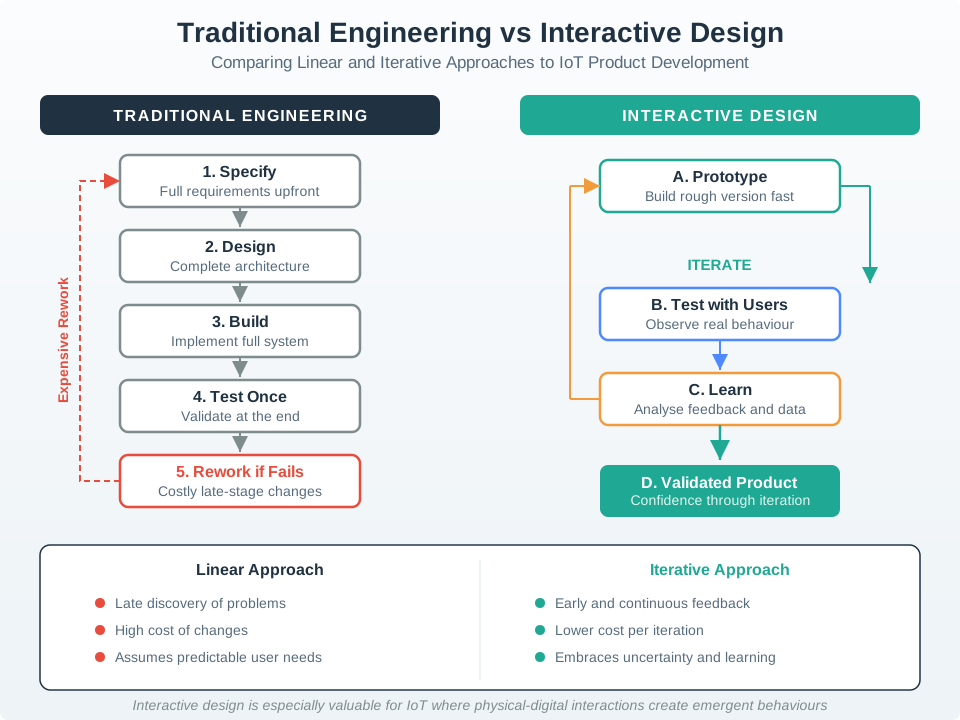
For example, a shared-entry setup flow might begin with residents, installers, and facility staff. The team may discover that the app wording is clear but the wall reader gives no feedback during offline setup. The next loop should not polish the app. It should test reader feedback, expired invite recovery, wrong-unit selection, and support visibility.
The same discipline applies to a medical dispenser, parking sensor, irrigation controller, or smart-building room panel. The design team should name the uncertain behavior before selecting the artifact. If the question is “can a resident recover from an expired invitation?”, a paper flow or Figma click-through may be enough. If the question is “can the user tell whether a command is accepted, pending, rejected, or stale?”, the prototype must expose real or simulated device state, network delay, and acknowledgement behavior.
A healthy loop also separates learning from commitment. Early loops may explore several setup paths, status-light meanings, notification tones, support scripts, or consent moments. Later loops narrow the path and test known risk: accessibility with screen readers and switch control, privacy comprehension before data collection, role transfer when a device changes owner, and operations handoff when a support ticket needs device logs. The process record prevents those learning steps from disappearing into meeting notes.
- Discover: observe roles, locations, devices, service dependencies, and likely failure paths.
- Prototype: choose the smallest artifact that can expose the current uncertainty.
- Release gate: move forward only when state, recovery, accessibility, privacy, support, and ownership are visible enough for the risk.
16.6 Map Stages to Artifacts
Each stage should leave behind an artifact that another role can inspect. Discovery may produce field notes, support-ticket clusters, device-placement photos, failure-mode lists, and role maps. Definition may produce a design question with a named user, device state, constraint, and success behavior. Ideation may compare physical controls, app flows, QR labels, NFC tags, voice prompts, local LEDs, support scripts, and automation rules.
Prototype fidelity should match the question. Figma and paper flows can test wording, role clarity, notification meaning, consent timing, and screen-reader order. ESP32, Raspberry Pi, nRF52, Arduino, Home Assistant, Node-RED, Mosquitto, mock REST APIs, Web Bluetooth, or a simulated device shadow can test timing, pairing, command acknowledgement, stale state, local fallback, and support logs.
Run the loop as a queue of decisions, not as a fixed set of workshop activities. A facilities team testing a shared thermostat might first prototype role labels and invitation language with a clickable flow. If residents still confuse room ownership, the next artifact may be a printed label plus a pairing screen. If pairing works but support cannot diagnose failures, the next artifact may be a small Node-RED or Home Assistant stub that writes command id, device id, firmware version, connection state, and support-visible error text into the same record the help desk will see.
The practitioner check is whether the artifact can fail in the way the real product can fail. A bench ESP32 connected over USB cannot prove battery life, but it can prove button timing, LED state, BLE permission copy, and MQTT acknowledgement copy. A cloud dashboard mock cannot prove radio coverage, but it can prove that stale readings, offline gateways, and delayed automations are visible to the right role. A pilot device in the field can prove more, but it must be bounded by safety, privacy, rollback, and support readiness.
- State the question: name the user, place, device state, recovery path, and evidence that would change the design.
- Pick the artifact: use the lowest fidelity that can expose the risk without hiding timing, physical, or service behavior.
- Set the gate: define pass/fail signals for task completion, error recovery, accessibility, privacy, and support handoff before the test starts.
After the test, write the decision in plain operational language: what changed, what did not change, what evidence was accepted, who owns the remaining risk, and which product or field change reopens the loop. This makes design evidence usable by engineering, security, privacy, operations, and support instead of leaving UX as a separate presentation deck. ## Process Gates Need Signals {.depth-l2}
IoT design gates fail when the process treats implementation signals as invisible. A prototype test cannot judge pending state if the command path has no acknowledgement. A support handoff cannot be reviewed if event ids, timestamps, device ids, firmware versions, account roles, and correlation ids are missing. A privacy review cannot be meaningful if the flow never names what data is collected, retained, shared, or deleted.
Release gates should therefore reference real system behavior. MQTT QoS and retained messages, CoAP response codes, HTTP status codes, WebSocket close reasons, device-shadow version numbers, Matter commissioning status, BLE pairing errors, OAuth token expiry, APNs/FCM delivery state, OTA rollback state, battery thresholds, and gateway offline intervals can all change the interaction decision.
Those signals should be named before the test starts. If the test covers a remote unlock flow, the gate might require an event trace from mobile request to authorization decision, gateway receipt, actuator acknowledgement, timeout, and user-visible final state. If the test covers setup recovery, the gate might require BLE scan error, permission denial, QR fallback, device identity check, account role check, and support-ticket evidence. If the test covers consent, the gate should show which data class, retention period, sharing path, deletion path, and audit trail the interface explains.
The design loop also needs change triggers because connected products keep moving after release. A firmware update may add a new error state. A Matter, Zigbee, BLE, or Wi-Fi stack update may change pairing behavior. A cloud outage may expose local fallback wording that was never tested. A new privacy policy, role model, building layout, or integration partner may make old evidence too narrow. Treat those changes as process inputs, not as reasons to bypass design review.
- Traceability: connect observed user behavior to the event, command, state, or support signal that explains it.
- Regression guard: reopen the loop when firmware, account policy, network path, integration platform, or field context changes the user-facing state.
- Operational handoff: make support and operations see the same accepted, pending, rejected, stale, offline, and recovered states that users experience.
In practice, the under-the-hood record can be short: decision id, prototype version, device or simulator version, participant role, environment, system trace links, observed failure, accepted limitation, owner, and change condition. The value is not bureaucracy. The value is that a later team can tell whether a pleasant test result was supported by real command, state, privacy, accessibility, and support evidence.
16.7 Review Interaction Loop
Review the process by asking whether each stage changed what the team knows.
- What did the team observe, and in which context?
- What user goal, device role, service boundary, and failure mode does the process address?
- What is the current design question?
- Which alternatives were considered before the current path was chosen?
- What prototype fidelity is enough to answer the question?
- What task did representative users attempt?
- What behavior, error, delay, workaround, or support need was observed?
- Which decision changed because of the evidence?
- What remains uncertain?
- Who owns the next step, and what change should reopen the decision?
If a stage cannot answer those questions, it may be a ceremony rather than useful design work.
16.8 Process Map
Use the process map above as a working sequence:
- start from context evidence, not a preferred interface
- frame a decision question that can be tested
- explore more than one interaction path
- prototype only the evidence needed for the current question
- test behavior in a realistic task
- decide whether to loop back, move forward, or release with known limits
- preserve the record so later teams know why the decision was made
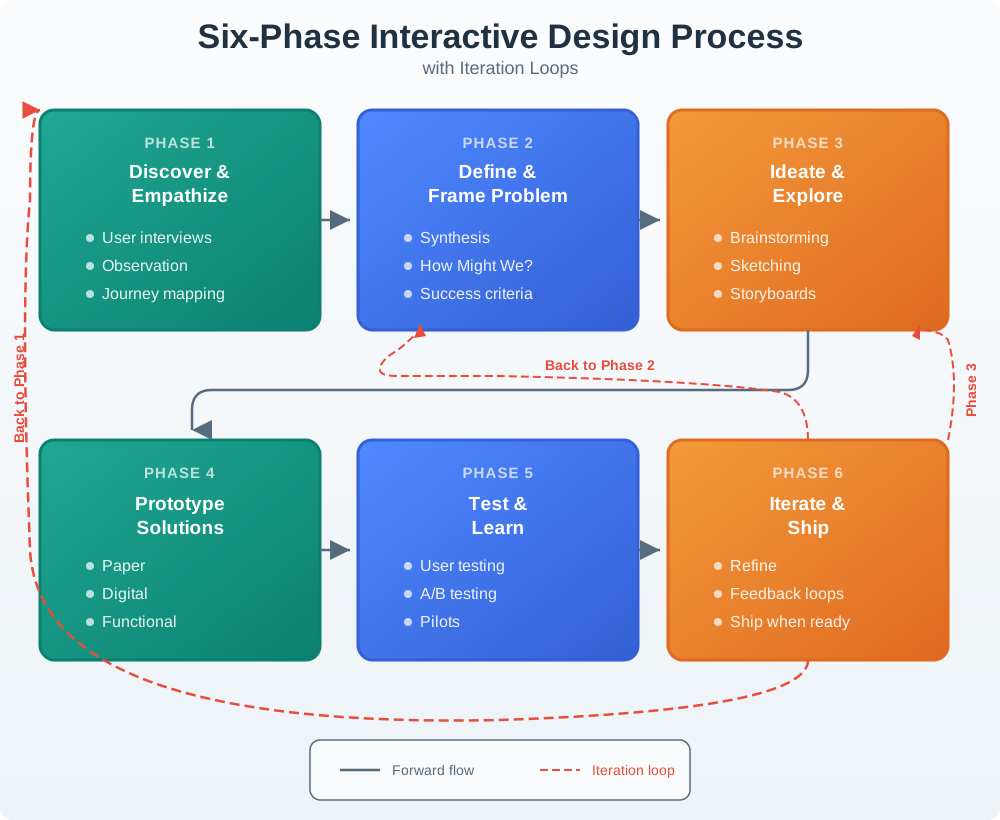
The estate figure in Figure 16.2 shows why the process should be treated as a loop with named exit points. A team can move forward only when the current stage has produced evidence strong enough for the next decision.
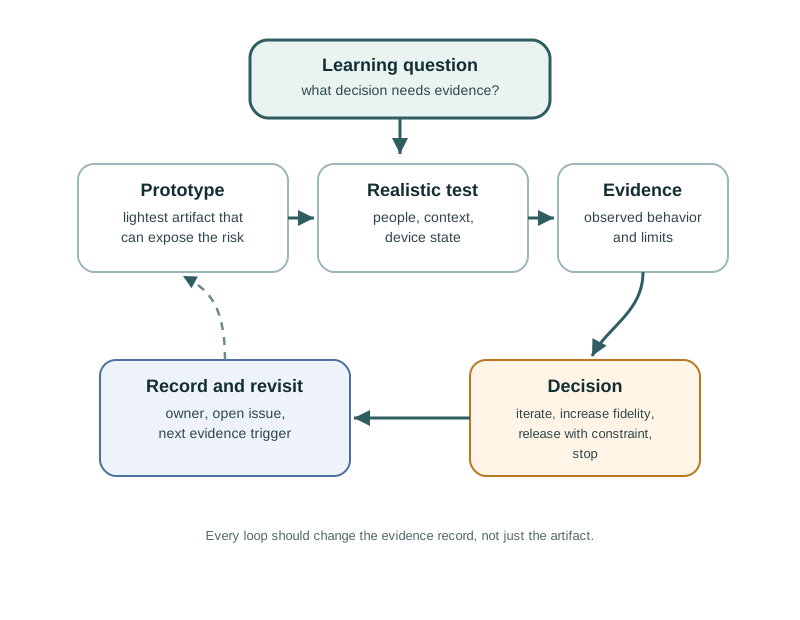
Use Figure 16.3 when the team is unsure whether to continue the same loop or change direction. The next pass should name the learning question first, then choose the artifact and test condition that can answer it.
16.9 Discover Context
Discovery gathers evidence about people, spaces, devices, constraints, and existing workarounds. IoT discovery should include the physical and service context, not only interviews about a future app.
Strong discovery evidence may include:
- observation of the task in the place where the product will be used
- device placement, reach, lighting, noise, weather, mounting, gloves, movement, and shared access constraints
- setup, maintenance, support, and handoff roles
- network, battery, sensor, actuator, permission, account, and cloud failure paths
- existing tools, manual workarounds, labels, checklists, logs, and support tickets
- privacy, consent, accessibility, and safety boundaries
Discovery is weak when the team jumps from a stakeholder request directly to a feature list.
16.10 Define the Design Question
Definition turns raw evidence into a narrow question the team can act on. The question should be specific enough to guide ideation and broad enough to allow alternatives.
Useful definition statements include:
- user or role
- context and constraint
- desired outcome
- current obstacle
- evidence that would show improvement
- known boundary that the design must respect
For example: “How might a facility technician confirm which gateway is offline and start a safe local recovery action without needing cloud access?” This is stronger than “improve the dashboard” because it names the user, context, action, constraint, and evidence path.
16.11 Ideate Alternatives
Ideation deliberately separates idea generation from selection. Connected products often have more than one possible interaction path: physical control, app flow, spoken prompt, local indicator, printed setup code, support workflow, automation rule, or maintenance tool.
A useful ideation pass:
- generates several distinct interaction paths
- includes people who understand users, hardware, firmware, cloud services, support, security, accessibility, and operations
- names the tradeoff each path creates
- keeps simple options visible
- avoids choosing the first technically convenient answer
- records why rejected alternatives were not chosen
The point is not to generate novelty for its own sake. The point is to avoid false certainty.
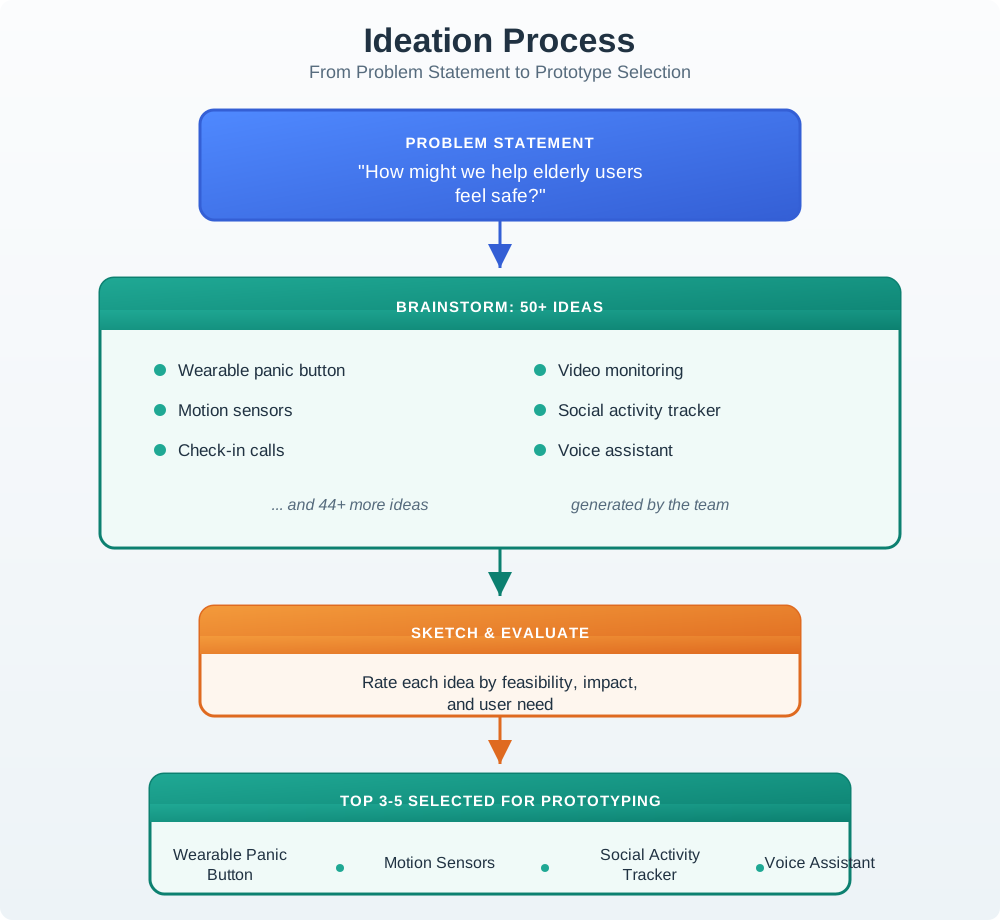
Use Figure 16.4 to keep alternatives visible before the team selects a prototype. For IoT work, the rejected option is often as important as the chosen one because it records why a physical cue, app flow, support script, or automation rule was not the right evidence path.
16.12 Prototype the Current Uncertainty
A prototype should match the question being tested.
Use low-fidelity artifacts when testing wording, sequence, roles, permission moments, notification meaning, or setup logic. Use a functional prototype when timing, device feedback, physical affordance, sensor state, actuator behavior, connectivity, or recovery depends on real behavior.
Right-sized prototype questions include:
- Can users identify the correct device before pairing?
- Does the user understand pending, rejected, stale, and offline states?
- Can the physical control be found and used under the expected conditions?
- Does the alert message explain the action needed?
- Can support staff reconstruct what happened from the available evidence?
- Does local fallback still meet the product promise when remote services fail?
Prototype polish is not evidence. A rough prototype that answers the question is better than a polished prototype that hides the risk.
16.13 Test Behavior
Testing should observe representative users attempting realistic tasks. It should not rely only on preference questions such as “Do you like this?”
A strong test plan includes:
- task scenario and success criteria
- representative participant or role
- environment or simulated context
- prototype fidelity and known limitations
- observations to capture
- failure, recovery, support, and handoff prompts
- accessibility and privacy checks where relevant
- decision rule for what happens after the test
Testing is useful when it reveals what people did, where they paused, which cue they missed, how they recovered, and what evidence the team needs next.
16.14 Iterate, Loop Back, or Release
Iteration should be tied to evidence. A team may loop back to discovery if the task or user role was misunderstood, to definition if the design question is wrong, to ideation if alternatives are too narrow, to prototyping if the artifact cannot test the question, or to testing if the evidence is weak.
A release decision should not mean “no issues remain.” It should mean:
- the core task works for the intended users and context
- important states and recovery paths are visible
- remaining risks are named
- support and operations evidence is available
- owners are assigned
- accepted tradeoffs are recorded
- change conditions are clear
If a change condition fires after release, the process resumes with evidence rather than guesswork.
16.15 Divergent and Convergent Work
The process alternates between expanding and narrowing.
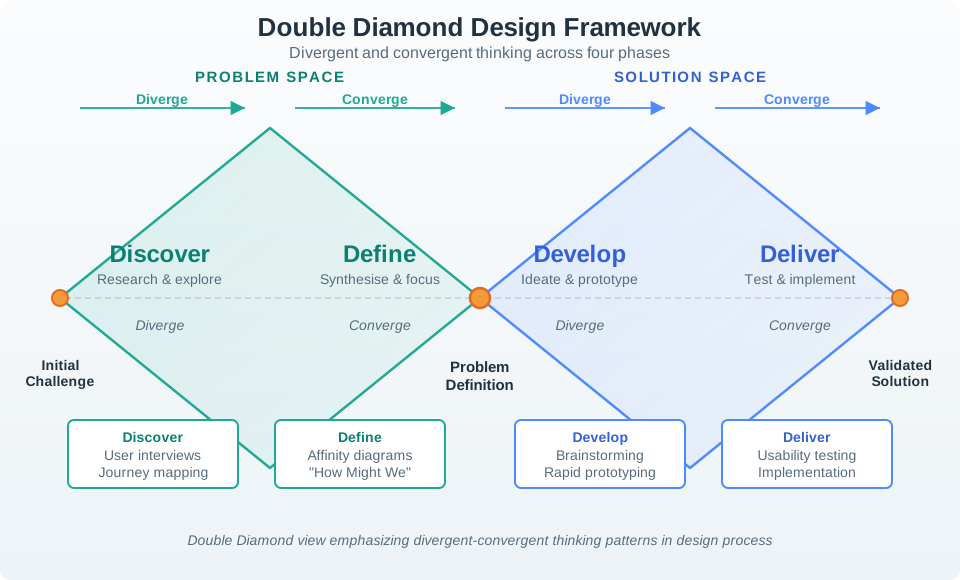
Figure 16.5 is useful when the team confuses activity with progress. Divergent work should broaden evidence or options; convergent work should narrow a decision, not merely shorten a meeting agenda.
Divergent work expands the evidence or option space:
- observing different users and contexts
- generating alternative interaction paths
- exploring physical, mobile, voice, support, and automation surfaces
- trying low-cost prototypes that answer different questions
Convergent work narrows the decision:
- selecting the problem frame
- choosing the simplest useful prototype
- deciding which evidence matters
- accepting, rejecting, or revising a design path
- recording owners and change conditions
Teams drift when they converge too early or never converge at all. Both are process defects.
16.16 IoT Release Gates
Before a connected interaction leaves the design process, check the IoT-specific gates:
- Does the product still provide understandable local value when remote services are unavailable?
- Are setup, pairing, permission, and credential failures recoverable?
- Are stale, pending, rejected, offline, uncertain, and fallback states visible where relevant?
- Are physical controls, mobile screens, notifications, support views, and logs consistent?
- Are accessibility and shared-use requirements built into the interaction path?
- Are privacy and consent moments explained before data is collected or shared?
- Can support staff see enough evidence to help without exposing unnecessary private data?
- Is there a rollback, disable, or safe-mode path for risky automation?
- Is the owner for each unresolved issue named?
These gates keep interaction design connected to the full IoT system.
16.17 Incremental Examples
16.17.2 Maintenance Alert Flow
Scenario: a pump monitor sends maintenance alerts. Operators complain that alerts arrive too often and do not explain whether action is urgent, assigned, snoozed, repeated, or resolved.
A strong process review would accept:
- discovery evidence from operators, field technicians, supervisors, and support records
- a defined question about making alert state actionable without creating alert fatigue
- ideation across local indicators, mobile alerts, dashboard queues, escalation rules, and maintenance records
- a prototype of alert levels, acknowledgement, assignment, snooze, escalation, and cleared states
- testing with realistic alert sequences, missing acknowledgement, repeated alerts, and offline device state
- iteration based on observed confusion, missed cues, over-silencing, and support handoff gaps
- a release gate that checks notification policy, local indication, support logs, and change conditions
The review should reject a process that only changes colors or notification wording without checking alert ownership, state, repetition, recovery, and escalation.
16.17.3 OTA Rollback and Gateway Recovery
Scenario: an industrial gateway receives an over-the-air firmware update. The team wants to release a new setup and recovery flow, but the risk crosses device firmware, local network state, cloud command status, and field support.
A strong process review would accept:
- discovery evidence from installers, site operators, support engineers, security reviewers, and firmware owners
- a defined question about how a site operator understands update progress, rollback, and local recovery when the cloud path is delayed
- ideation across gateway LEDs, local web UI, mobile push, MQTT command topics, device-shadow status, maintenance console, and support scripts
- a bench prototype that exposes bootloader slot, firmware version, signature failure, rollback state, and gateway offline interval
- a field-like prototype that includes weak Wi-Fi, Ethernet failover, battery-backed clock drift, duplicate command id, and idempotency key behavior
- testing that asks operators to distinguish updating, pending restart, rolled back, failed signature, offline gateway, and support-required states
- a release gate that checks OpenTelemetry trace ids, support correlation ids, firmware version, account role, local fallback instructions, and the owner for each unresolved recovery path
The review should reject a process that treats the update as a single success message. The design path is not ready until users and support staff can see the same update state and recovery boundary.
16.18 Process Record
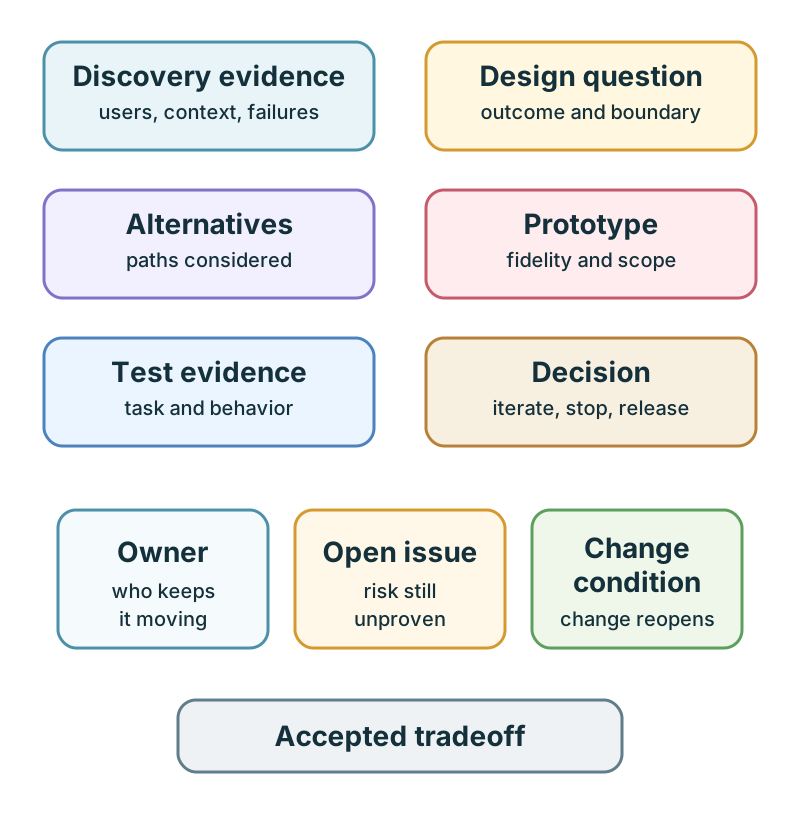
Use Figure 16.6 to keep the process inspectable. A useful record includes:
- discovery evidence
- design question
- alternatives considered
- prototype fidelity and scope
- test task and observed behavior
- decision made
- accepted tradeoff
- owner
- open issue
- change condition
The record should be short enough to maintain and specific enough to guide the next iteration.
Use one current interaction decision from a prototype, lab, or project. Fill in a record before you change the design again:
| Record field | What to write |
|---|---|
| Design question | The narrow user task, device state, or recovery path being tested |
| Alternatives considered | At least two interaction paths, including the rejected option |
| Evidence used | The observation, test task, support record, log, or constraint that changed the decision |
| Decision | Keep, revise, loop back, increase fidelity, or release |
| Owner | The person or role responsible for the next action |
| Open issue | The risk, missing evidence, or known tradeoff that remains |
| Change condition | The condition that will force the team to revisit the decision |
Accept the record only if another team member could understand what changed, why it changed, and what would make the decision unsafe later.
16.19 Micro-Exercise: Choose the Loop Point
For each situation, write which stage should happen next: discover, define, ideate, prototype, test, iterate, or release.
- A smart-lock team knows setup fails when the reader is offline, but no one has observed whether residents understand the offline message.
- A pump-monitoring team has three alert concepts, but has not compared local indicator, mobile notification, dashboard queue, and maintenance-ticket paths.
- A gateway-update flow works in the happy path, but support cannot see firmware version, rollback state, or command correlation id.
16.20 Common Process Defects
Watch for these defects during review:
- starting from a preferred feature rather than observed context
- defining the problem so broadly that any solution could fit
- choosing the first feasible idea before exploring alternatives
- building a polished prototype that does not test the real uncertainty
- testing opinions instead of behavior
- ignoring failure, recovery, support, accessibility, privacy, or shared-role scenarios
- treating the process as linear even after evidence contradicts the current direction
- releasing without owner, open issue, accepted tradeoff, support evidence, or change condition
16.21 Review Checklist
Before accepting an interactive design process, check:
- Does discovery include real context, roles, constraints, and failure modes?
- Is the design question testable?
- Were distinct alternatives considered before selection?
- Does the prototype fidelity match the current uncertainty?
- Did testing observe behavior in a realistic task?
- Were failure and recovery paths tested?
- Did the evidence change a decision?
- Are accessibility, privacy, shared use, support, and operations included?
- Is the release gate explicit?
- Are owner, open issue, accepted tradeoff, and change condition recorded?
Use this when the process needs a concrete checklist record:
design_question=
user_context=
system_state_to_show=
feedback_or_recovery_path=
constraints=
prototype_fidelity=
test_participants_or_scenario=
evidence_collected=
decision=keep | revise | loop back | increase fidelity | release
next_owner=
The template is intentionally short. If the team cannot fill it in, the design process is not ready for implementation review.
16.22 Concept Check: Identify the Process Gap
16.23 Match Process to Evidence
16.24 Interaction Design Loop Order
16.25 Summary
The interactive design process turns uncertainty into evidence. Strong teams discover real context, define a testable question, ideate alternatives, prototype the current risk, test behavior, and iterate or release based on evidence. The process is not linear, but loops should be intentional and recorded.
For IoT products, the process must include devices, services, physical spaces, roles, failures, accessibility, privacy, support, and operations. A design is not ready because it looks complete. It is ready when the team can explain what was tested, what changed, what remains open, who owns it, and what condition requires another review.
16.26 Key Takeaway
The interaction design process should move from user evidence to prototypes, tests, decisions, implementation, and post-release learning.
16.27 See Also
- Interactive Design Principles defines the principles this process applies.
- Prototyping Techniques for IoT explains how to choose prototype fidelity for each process question.
- User Testing and Iteration expands the testing and iteration stage.
- Design Thinking for IoT connects discovery, framing, ideation, prototyping, and testing to the broader design model.
- Interface Design Fundamentals applies process decisions to controls, feedback, navigation, and state.
16.28 What’s Next
Continue to Prototyping Techniques for IoT to choose the right prototype fidelity for the design question, device behavior, physical context, and test evidence needed next.