20 Device Form Factors
device form factors, IoT enclosure design, connected device mounting, IP rating review, IoT RF enclosure constraints, physical UX design
20.1 Start Simple
Shape is a UX decision because the enclosure decides where the device can live, what it can sense, how it communicates, and how people maintain it. Start with the deployment context and the failure that would make the form factor unusable in the field.
20.2 In 60 Seconds
A connected device’s form factor is not cosmetic. It controls whether the device fits the installation context, survives the environment, supports wireless communication, can be maintained, and gives people enough physical feedback to use it correctly.
A good form factor review ties physical choices to installed conditions: the deployment context, component envelope, battery and antenna needs, material behavior, ingress protection, mounting method, interaction surfaces, maintenance access, validation tests, and change conditions.

Phoebe’s Why
This chapter is right that a LoRaWAN sensor sealed inside a metal cabinet may need an external SMA antenna, but the review record should be able to say how many dB that decision is worth, not just that metal is bad for radios. An antenna’s gain in dBi is not amplification – it is focus, redistributing a fixed radiated power into a narrower pattern – and regulators cap the combination of conducted power and antenna gain as EIRP. A metal enclosure does not remove that cap; it just quietly subtracts from the gain side of the ledger, which means the radio has to add the same dB back on the power side or lose range. Whether that trade is even possible, and what it costs the battery, is exactly the arithmetic a “needs an external antenna” note should carry.
The Derivation
\[S=\frac{P_t}{4\pi d^2}\ (\text{isotropic}) \quad\to\quad \mathrm{EIRP(dBm)}=P_t(\mathrm{dBm})+G(\mathrm{dBi})\]
Enclosure detuning and absorption subtract directly from the antenna’s free-air gain, in dB:
\[G_{eff}=G_{antenna}-L_{enclosure}\]
so hitting the same regulatory EIRP ceiling from inside a lossy enclosure needs more conducted power:
\[P_{t,needed}=\mathrm{EIRP}_{target}-G_{eff}\]
Worked Numbers: The Cabinet-Sealed Sensor’s Own Link Budget
This chapter names no specific radio, so the worked numbers use a catalog-typical sub-GHz LPWAN 14 dBm EIRP ceiling:
- Internal chip antenna in free air: \(G=1.5\) dBi (catalog-typical). Needed conducted power: \(P_t=14-1.5=12.5\) dBm.
- Same antenna inside the metal cabinet: catalog-typical severe detuning/absorption \(L=10.0\) dB gives \(G_{eff}=1.5-10.0=-8.5\) dBi, so \(P_{t,needed}=14-(-8.5)=22.5\) dBm \(=178\) mW – if the radio’s PA tops out at a catalog-typical \(20\) dBm (\(100\) mW), the link comes up \(2.50\) dB short of the target EIRP no matter how hard the radio pushes.
- External SMA antenna outside the cabinet: catalog-typical \(G=3.0\) dBi, no enclosure loss, needs only \(P_t=14-3.0=11.0\) dBm \(=12.6\) mW – comfortably inside the radio’s headroom.
- Battery-current view (catalog-typical \(30\%\) PA efficiency, \(3.3\) V rail): the capped internal case draws \(100/0.30/3.3=101\) mA during transmit; the external-SMA case draws \(12.6/0.30/3.3=12.7\) mA – an \(8\times\) smaller transmit-burst current for the antenna that also happens to close the link. The external-antenna tradeoff pays for itself twice: once in range margin, once in the battery’s transmit-burst budget.
20.3 Learning Objectives
By the end of this chapter, you will be able to:
- connect form factor choices to deployment, maintenance, and user-interaction constraints
- review component, battery, antenna, sensor, and thermal constraints before accepting an enclosure shape
- compare enclosure material choices against RF, durability, service, and environmental requirements
- identify mounting and interaction decisions that can make installation fail even when electronics work
- write a bounded form factor record with assumptions, validation checks, owner, and change condition
20.4 Minimum Viable Understanding
The enclosure should be reviewed as part of the system boundary. A device can pass electrical tests and still fail because it is hard to mount, blocks its antenna, traps heat, leaks water, hides status, or cannot be serviced.
The safest review habit is to start with where the device lives and how people handle it. The mechanical shape, materials, seals, buttons, LEDs, displays, straps, screws, magnets, and labels should follow from that evidence.
20.5 Prerequisites
This chapter builds on:
- Connected Devices Fundamentals, which introduces device constraints and product boundaries.
- Connected Devices Lifecycle, which connects design choices to deployment and maintenance.
- Power Management, which explains why batteries often define physical volume.
- Sensor Fundamentals and Types, which explains why sensor placement and orientation matter.
20.6 Form Factor Makes IoT Physical
A connected-device form factor is the physical contract between the system and its installation context. The enclosure has to protect the electronics, expose the right sensors, preserve the radio path, support power and heat, and give installers or users enough feedback to know what state the device is in.
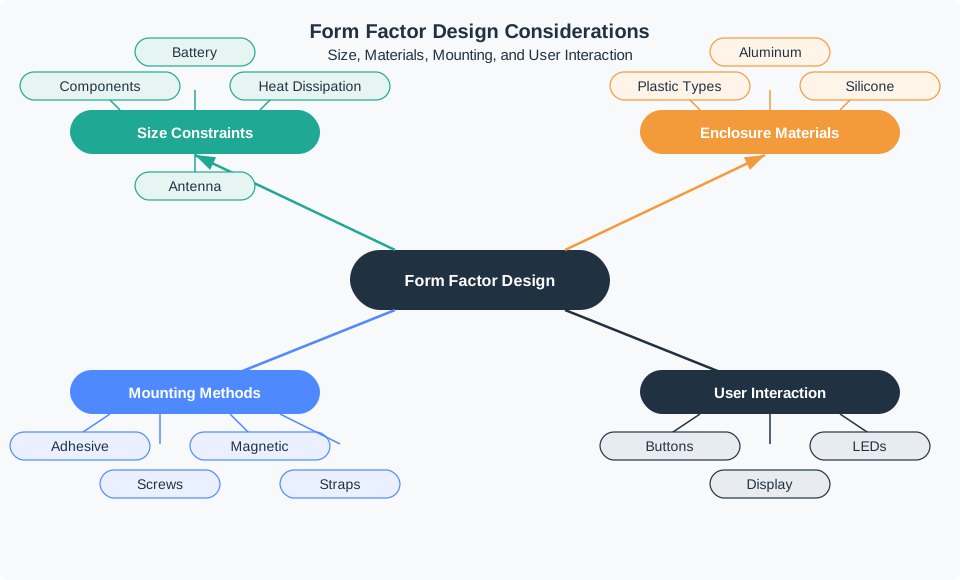
For an outdoor soil sensor, the form factor includes the sensor window, burial depth or mounting stake, gasket, drain path, UV-stable plastic, battery access, antenna clearance, label, and service sequence. For a wearable tag, it includes strap geometry, skin contact, cleaning, charging, pressure points, accelerometer orientation, BLE or UWB antenna placement, and status feedback that can be understood without opening a phone app.
The same electronics can need different form factors in different contexts. A temperature logger fixed inside a refrigerated truck may need a food-safe case, a removable bracket, a barcode label, a battery door that cannot open during cleaning, and a cellular or BLE antenna path that still works near metal shelving. A classroom environmental monitor may accept a wall bracket and USB-C service access because it is indoors, supervised, and easy to reach. A roadside air-quality node may need lockable fasteners, UV-resistant polycarbonate, pressure-equalising vents, tamper evidence, and a maintenance sequence that works in rain.
Review the form factor as a set of user-facing promises: the sensor is exposed to the right physical condition, the radio can communicate after installation, the enclosure survives expected handling, status can be read by the right person, and routine service does not require unsafe improvisation. That framing keeps physical design from becoming a late styling decision. It also prevents teams from treating a printed prototype, a CAD render, or a generic IP rating as proof that the device is ready for its actual environment.
- Environment: design around rain, dust, sweat, cleaning chemicals, impact, sunlight, vibration, and temperature cycling.
- Signals: protect the antenna, sensor opening, acoustic path, optical path, or airflow path that the device depends on.
- Service: make battery replacement, reset, pairing, calibration, cleaning, and disposal physically possible in the installed location.
20.7 Choose Shape from Failure Mode
Start with the failure that would make the device useless in the field. A LoRaWAN sensor in a metal cabinet may need an external SMA antenna or a plastic RF window. A BLE asset tag on a wet pallet may need antenna clearance from liquid and metal. A greenhouse controller may need DIN-rail mounting, cable strain relief, IP-rated glands, and clear local status because workers troubleshoot it without a laptop.
Run the review as a walk-through of the installed life of the device. Put the board, antenna, battery, connector, sensor opening, seal, label, and mounting hardware into the same drawing or physical mock-up. Then ask who touches each part during commissioning, battery replacement, cleaning, reset, calibration, ownership transfer, and disposal. If the installer needs to scan a QR code, the code must remain visible after mounting. If the device uses a reset pinhole, the tool must be available in the service context. If the sensor needs airflow, the mounting bracket cannot block the vents.
Keep the evidence concrete. For RF, record RSSI, SNR, packet-loss, or throughput checks with the enclosure closed and mounted in the expected orientation. For sensing, record response tests with the real membrane, lens, acoustic port, probe length, or airflow path. For ingress, record which opening, gasket, cable gland, button, or battery door is the weak point. For service, record how long the maintenance action takes, what tool it requires, and what error is easy to make under realistic conditions.
- Map the installed envelope. Include board outline, battery chemistry, connector bend radius, sensor keepout, antenna keepout, wall thickness, screws, clips, seals, labels, and the tool path for assembly.
- Select material and protection. Compare PC/ABS, polycarbonate, aluminum, TPU, silicone gaskets, vent membranes, conformal coating, and potting against radio, heat, cleaning, repair, and ingress needs.
- Test the actual orientation. Check RSSI/SNR or packet loss with the cover closed, sensor response through the installed opening, charging or battery access, LED visibility, button reach, and whether the mount survives vibration or impact.
Ratings and prototypes need context. IP54, IP65, IP67, IK impact ratings, UL enclosure materials, and 3D-printed prototype checks are useful only when they match the real exposure, maintenance interval, and installation orientation.
The review should end with an accepted tradeoff, not a vague approval. A sealed sensor might reject field battery replacement to improve washdown reliability, but then the product needs a replacement plan and low-battery warning. A wearable might accept a smaller cell to reduce pressure points, but then the charging habit must fit the user’s day. A metal enclosure might be justified for impact and heat, but only with an antenna plan that has been tested after assembly. Those tradeoffs are design decisions; they should have an owner and a condition for another review. ## Enclosures Change Measurements {.depth-l2}
The enclosure is part of the measurement system. Plastic thickness, dielectric constant, metal nearby, ground-plane shape, cable routing, and battery position can detune PCB, chip, FPC, ceramic, and external antennas. A small change in the housing can move a Wi-Fi, BLE, Thread, Zigbee, LoRaWAN, LTE-M, NB-IoT, GPS/GNSS, or UWB design from reliable to marginal.
Sensors are just as sensitive to form factor. A BME280, SHT31, or other humidity sensor can lag or self-heat if airflow is blocked. A MEMS microphone needs an acoustic path that does not trap water. An accelerometer needs a known axis orientation. A gas sensor needs exposure and sometimes a burn-in or calibration path. A PIR sensor needs a lens and field of view. The housing either preserves those assumptions or invalidates the data.
The hidden coupling is often mechanical. Moving from a hand-built prototype to an injection-moulded enclosure changes wall thickness, rib placement, boss locations, snap fits, gasket compression, and assembly tolerances. Each change can shift antenna tuning, thermal paths, sensor lag, button force, water drainage, or the way a user grips the device. Potting and conformal coating can improve environmental protection while making heat, repair, and sensor exposure worse. A vent membrane can equalise pressure while adding response delay or clogging risk.
Radio and sensing tests should therefore be tied to enclosure revision. Record the PCB revision, antenna part, matching network, cable length, ground clearance, battery position, material, wall thickness, coating, seal design, and mounting condition used during measurement. For cellular and LPWAN devices, test attach time, uplink success, downlink reachability, and margin in the worst expected orientation. For BLE, Thread, Zigbee, and Wi-Fi devices, test near hands, walls, metal, water, and the gateway positions expected in the deployment. For GNSS or UWB, check whether the housing and mounting position create a sky-view or ranging blind spot.
- RF boundary: keep antennas away from metal, batteries, wet surfaces, hands, ground planes, and cable loops unless the design was tuned for that placement.
- Environmental boundary: manage condensation, pressure equalisation, drainage, seal compression, UV aging, and cleaning so protection survives service.
- State boundary: make local status, reset, pairing, calibration, and fault indication visible enough for the person physically at the device.
Good under-the-hood evidence is traceable. If an enclosure supplier changes resin, a battery pack changes size, a cable moves, a device moves from wall mounting to pole mounting, or the service interval changes, the record should say which RF, sensing, ingress, thermal, and interaction checks must be repeated. Without that traceability, a small industrial-design update can silently change the data quality and reliability of the whole IoT product.
20.8 Form Factor Review Path
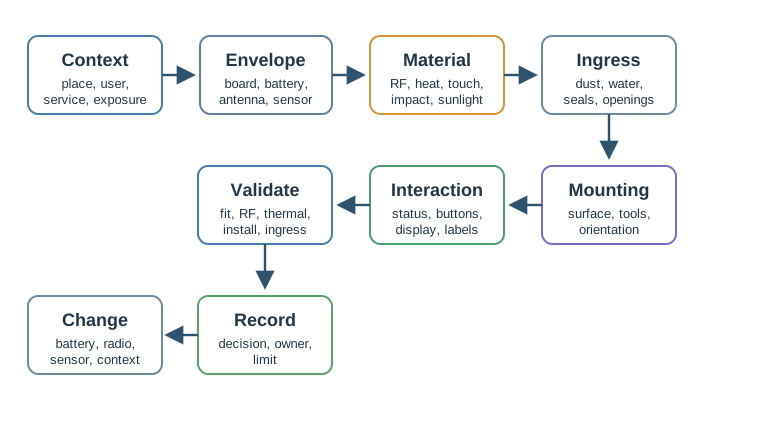
Use Figure 20.2 to keep the review tied to evidence:
- Deployment context: indoor, outdoor, mobile, body-worn, public, industrial, sheltered, exposed, serviced, or inaccessible.
- Component envelope: board size, battery volume, connector clearance, antenna keepout, sensor window, thermal path, and fasteners.
- Material and RF constraints: radio path, metal shielding, impact, UV exposure, surface finish, cleaning, and user touch.
- Ingress protection: dust, water, condensation, drainage, seal compression, cable entry, and service openings.
- Mounting and maintenance: adhesive, screws, strap, clip, rail, magnet, orientation, tamper resistance, and replacement access.
- Interaction surfaces: buttons, LEDs, display, haptics, labels, companion app handoff, and installation feedback.
- Validation checks: fit check, RF check, thermal check, ingress check, drop or vibration check, and installation trial.
- Decision and change condition: accepted tradeoff, owner, evidence limit, and condition that requires another form factor review.
20.9 What Counts As Form Factor Evidence
Useful evidence can be inspected. A review record can include:
- installation photos or annotated placement notes
- component-envelope drawings or mechanical constraints
- antenna and sensor keepout notes
- material samples or prototype observations
- ingress, temperature, drop, vibration, or cleaning test results
- user installation observations
- maintenance, battery-replacement, or reset-access checks
- field issue notes tied to a specific enclosure or mounting revision
Avoid accepting a form factor because it “looks good” or “matches the product style.” Appearance can matter, but it does not replace physical evidence.
20.10 Deployment Context First
Start by naming the place and use pattern:
- Is the device handheld, wall-mounted, worn, hidden, exposed, or moved between sites?
- Who installs it, and what tools or permissions do they have?
- Can the device be reached for battery replacement, reset, cleaning, calibration, or inspection?
- What orientation does the sensor require?
- What happens if the device falls, rotates, is covered, gets wet, or is moved?
- Does the enclosure need to communicate status without a phone nearby?
The form factor should fit the actual deployment, not a simplified lab placement.
20.11 Component Envelope
The component envelope is the physical space that the design must protect without breaking the device behavior.
Review the enclosure against:
- Board footprint: connectors, test pads, mounting holes, cable bend radius, and manufacturing tolerances.
- Battery volume: cell shape, replacement access, swelling allowance where applicable, and safe retention.
- Antenna keepout: distance from metal, batteries, ground planes, wet surfaces, body contact, and cable routing.
- Sensor exposure: airflow, light path, acoustic opening, motion view, liquid contact, or isolation from heat sources.
- Thermal path: heat source, air gap, conductive path, enclosure surface temperature, and duty-cycle assumptions.
- Assembly access: screw bosses, clips, seals, adhesives, labels, and service sequence.
If the enclosure drawing cannot show these constraints, the form factor decision is not ready.
20.12 Materials And RF Boundaries
Material choice affects durability, radio performance, heat, weight, feel, sealing, and serviceability.
Review material choice with these questions:
- Does the material allow the intended radio path, or does it require an external antenna or RF window?
- Does the material survive expected sunlight, cleaning, chemicals, touch, impact, and temperature range?
- Does the material help or hurt thermal behavior?
- Does the surface finish support grip, cleaning, labeling, and inspection?
- Does the material choice change sealing, fasteners, or service access?
- Has the same material been checked in the actual mounting orientation?
Metal may be useful for heat or strength, but it can block wireless signals if the antenna is inside the metal boundary. Soft materials may help wearables or impact protection, but they can create cleaning, aging, or tolerance issues. The record should show which tradeoff was accepted.
20.13 Ingress And Environmental Protection
Ingress protection is a design decision, not a decorative rating label. The reviewer should connect the rating or protection strategy to the actual exposure.
Check:
- dust, splash, rain, spray, immersion, condensation, and cleaning exposure
- cable glands, buttons, seams, sensor openings, and battery doors
- drainage path and orientation
- seal compression after assembly and service
- effect of temperature cycling on seals and condensation
- whether the protection strategy still works after maintenance
Do not infer field readiness from one short lab exposure. The evidence should match the exposure that the device is expected to face.
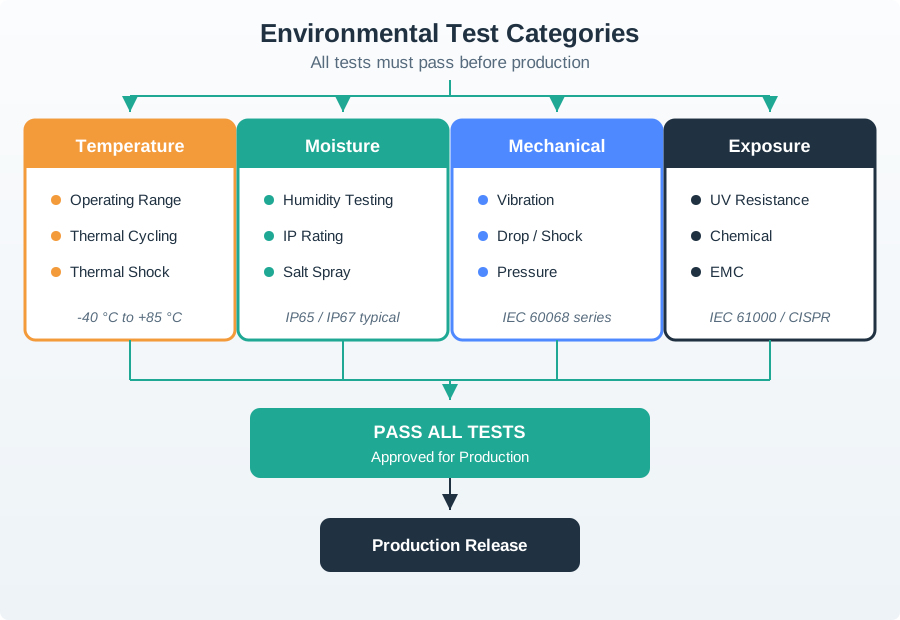
Use Figure 20.3 to separate ingress claims from broader environmental evidence. A form factor record should say which temperature, moisture, vibration, drop, UV, chemical, and EMC checks are in scope for the installed context.
20.14 Mounting And Maintenance
Mounting is part of the user experience. A device that requires the wrong tool, surface, angle, or permission can fail before it starts collecting data.
Review the mounting method against:
- surface type and condition
- installation skill and required tools
- allowed damage to walls, machines, vehicles, clothing, or assets
- vibration, impact, tamper, cleaning, and removal
- orientation needed by the sensor or antenna
- access for battery replacement, reset, pairing, inspection, or disposal
Common mounting choices include adhesive, screw, clip, strap, rail, magnetic, and integrated bracket designs. The correct choice depends on the deployment and maintenance evidence, not on which method is easiest to draw.
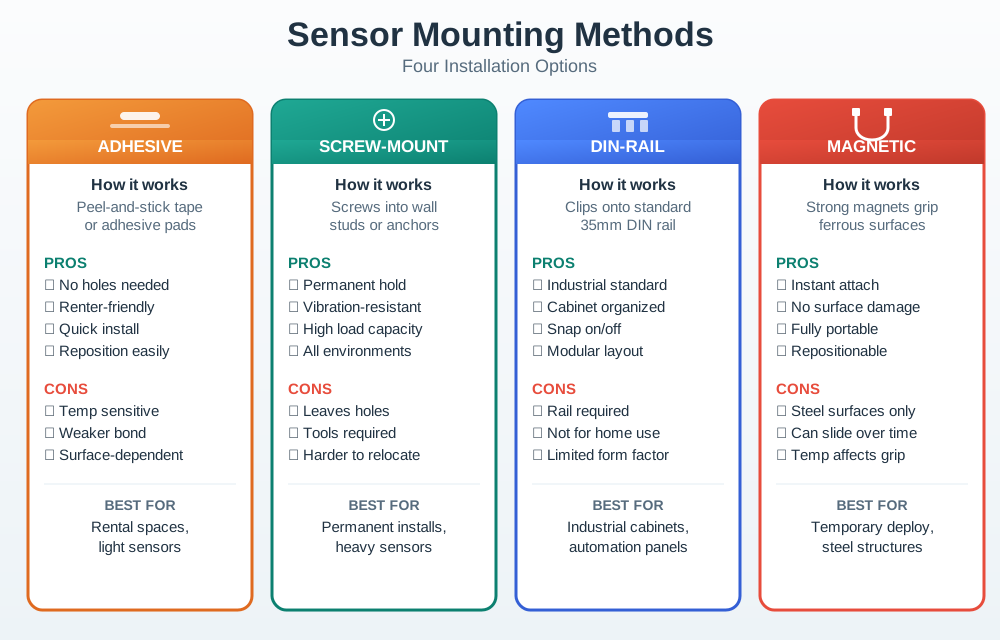
Use Figure 20.4 to make the installation tradeoff explicit. The record should name the surface, tool path, removal path, vibration exposure, and service access for the selected mounting method.
20.15 Interaction Surfaces
Physical interaction should be simple enough for installation and routine use.
Review:
- what status must be visible without opening an app
- whether LED colors and blink patterns are limited and memorable
- whether buttons can be used with wet hands, gloves, or limited visibility
- whether a display is necessary or just adds size, sealing, and power burden
- whether labels remain visible after installation
- whether reset, pairing, calibration, or service actions are protected from accidental use
The device should communicate enough state for the person at the device to know what to do next.
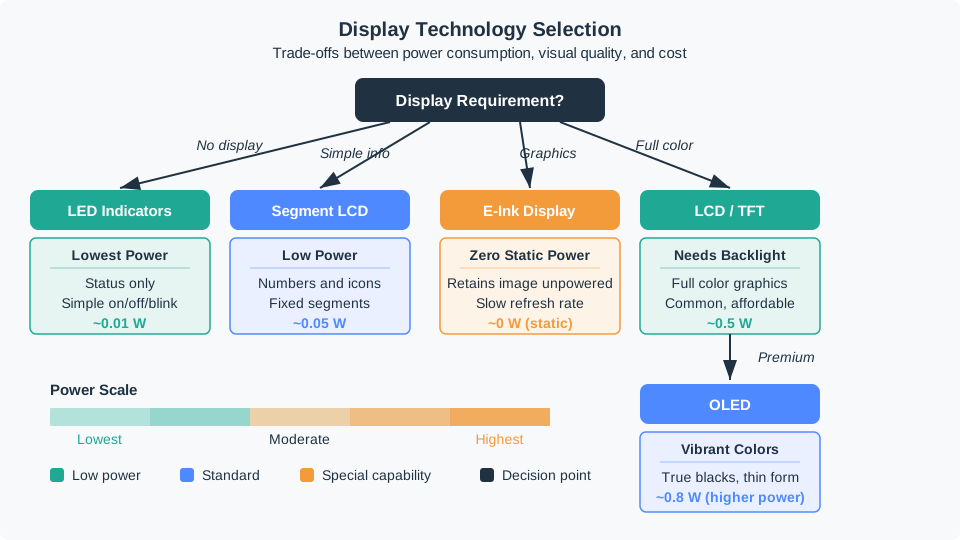
Use Figure 20.5 when the form factor includes a local display or status surface. The display choice changes power, sealing, size, readability, cost, and what a user can understand without a companion app.
20.16 Worked Review: Outdoor Sensor
A soil or weather sensor is planned for an exposed outdoor location.
Review evidence
- The sensor opening and orientation are defined.
- Battery replacement or service access is documented.
- The antenna path is not blocked by the enclosure, mounting post, soil, or nearby metal.
- The protection strategy covers rain, dust, condensation, cleaning, and expected mounting angle.
- The material choice accounts for sunlight, impact, and temperature cycling.
- The validation record includes both bench checks and a placement trial.
Likely review action
Hold the decision if the record only says “outdoor enclosure” without showing the sensor window, antenna path, seal strategy, mounting orientation, and service plan.
Change condition
Rerun the form factor review if the battery size, radio, sensor opening, enclosure seam, installation orientation, service interval, or field exposure changes.
20.17 Worked Review: Wearable Tag
A wearable tag is planned for repeated body contact and daily movement.
Review evidence
- The enclosure does not create sharp pressure points.
- Strap, clip, or attachment method fits the body location and use duration.
- The antenna and sensors still work near the body and clothing.
- Cleaning and sweat exposure are included in the material and seal review.
- Status feedback is visible or felt without forcing frequent phone checks.
- Charging or battery replacement does not make routine use impractical.
Likely review action
Ask for a wear and interaction trial if the design only proves electronics fit inside the case. Comfort, attachment, cleaning, and status feedback are part of the form factor evidence.
Change condition
Rerun when the attachment method, battery, charging method, sensor position, material, body location, or intended wear duration changes.
20.18 Form Factor Record
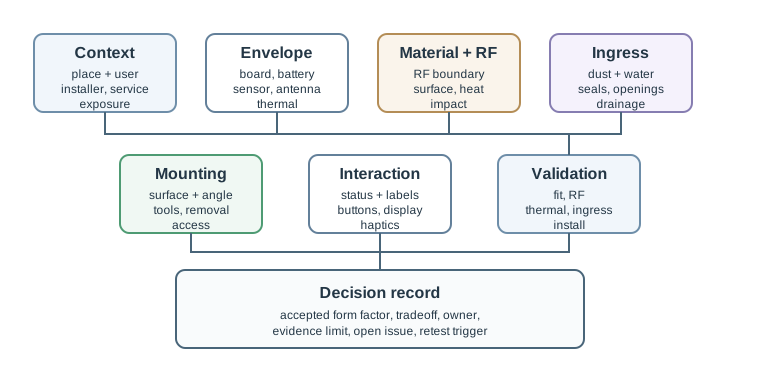
Figure 20.6 shows the fields a reviewer should preserve:
- Context: deployment place, installer, user, service path, and exposure.
- Envelope: board, battery, antenna, sensor, thermal, connector, and assembly constraints.
- Material and RF: material choice, radio boundary, surface behavior, and accepted tradeoff.
- Ingress: dust, water, condensation, seal, opening, drainage, and maintenance effect.
- Mounting: method, surface, tool, orientation, removal, tamper, and service access.
- Interaction: status, button, display, label, haptic, app handoff, and reset or pairing flow.
- Validation: fit, RF, thermal, ingress, impact, cleaning, and installation evidence.
- Decision and change condition: accepted design, owner, known limit, open issue, and condition that requires another review.
20.19 Common Findings
- The enclosure is selected before battery, antenna, sensor, and connector constraints are visible.
- A metal or dense mounting environment blocks the radio path.
- Sensor openings are placed where heat, airflow, light, or liquid exposure changes the measurement.
- The mounting method assumes tools, surface quality, or permissions that installers do not have.
- The design requires status interpretation that users cannot remember.
- A battery door, button, cable entry, or sensor opening weakens the protection strategy.
- Maintenance access is missing from the physical design.
- Validation evidence comes only from a lab bench, not from the intended orientation or location.
20.20 Review Checklist
Before accepting a form factor decision, confirm that the record includes:
- deployment context and user or installer assumptions
- component envelope and physical constraints
- antenna, sensor, thermal, connector, and battery evidence
- material choice and RF boundary
- ingress and environmental protection strategy
- mounting method and maintenance access
- interaction surfaces and status feedback
- validation evidence and known limits
- owner, open issue, and change condition
20.21 Knowledge Check
20.22 Matching Quiz
20.23 Ordering Quiz
20.24 Summary
Device form factor is a functional design decision. The enclosure, mounting method, material, seals, buttons, LEDs, displays, labels, and service access determine whether the connected device can be installed, can communicate, can survive, and can be maintained.
A strong form factor record connects the physical design to deployment context, component envelope, RF boundary, ingress protection, mounting, interaction, validation evidence, and change conditions.
20.25 Key Takeaway
Form factors are UX and reliability decisions: design enclosure, controls, mounting, RF exposure, service access, and validation around the actual deployment context.
20.26 Concept Relationships
- Connected Devices Fundamentals provides the connected-device constraints that shape the form factor.
- Power Management explains why battery volume can dominate enclosure size.
- Connected Devices Lifecycle connects enclosure and mounting decisions to maintenance and field updates.
- Sensor Fundamentals and Types explains why sensor placement and exposure are part of the physical design record.
20.27 What’s Next
Continue to Connected Devices Fundamentals to review the broader connected-device architecture and constraints behind the form factor decision.