10 IoT Design Models as Decision Aids
IoT design model introduction, IoT architecture introduction, IoT design model evidence, IoT system boundary review, IoT architectural views, IoT design rationale record
10.1 Start Simple
A design model is a way to make the product promise discussable. Start by asking what the connected system claims it can do, which boundaries make that claim true, who owns each part, what evidence supports the claim, and what change would make the model obsolete.
10.2 In 60 Seconds
An IoT design model is a way to make connected-product decisions visible before implementation locks them in. It helps a team name the product promise, draw system boundaries, choose useful architectural views, review cross-cutting concerns, and preserve the evidence behind each decision.
This introduction focuses on the first review question: does the model help people make better decisions? A useful model clarifies responsibility, failure behavior, user impact, support evidence, and change conditions. A weak model adds boxes, labels, or diagrams without making the product easier to build, explain, operate, or repair.
10.3 Learning Objectives
By the end of this chapter, you will be able to:
- explain why IoT teams use design models before choosing components and implementation patterns
- distinguish product promise, system boundary, architectural view, design evidence, and cross-cutting concern
- identify when a simple model is enough and when additional views are needed
- spot over-modeled diagrams that hide ownership, failure behavior, or user impact
- build an introductory design model record with evidence, owners, risks, and change conditions
10.4 Choose Models for Decisions
An IoT design model is useful when it helps a team decide what belongs in the product, what each part owns, and what must still work when the network, account, device, or support path fails. The model is not the product architecture by itself; it is the lens that makes one decision easier to review.
For an introductory review, start with the lightest model that can protect the user promise. A storage-room monitor does not need a complete enterprise architecture before a team can review it. It does need a record that says what the product promises, which room and user roles are in scope, where the sensor, gateway, dashboard, installer, and support path sit, and which state is allowed to appear when evidence is old or missing.
Different questions need different views. A C4 context diagram can show people, devices, cloud services, and external systems. A UML sequence diagram can reveal setup and command timing. A state machine can show stale, offline, denied, overridden, and recovered states. A deployment view can expose gateway, edge, cloud, and support boundaries. The view is chosen because it answers a decision question, not because a template requires another diagram.
A useful introductory model also names the evidence that would change the decision. If field testing shows that the room is often occupied while the sensor is blocked, the model must reopen the promise. If support cannot tell whether a gateway, account, or dashboard is at fault, the model must reopen the boundary and observability record. The model is doing its job when it makes those review points visible before implementation momentum turns them into hidden product behavior.
- Boundary: Show which devices, apps, services, users, installers, and support tools are inside the review.
- Responsibility: Name the owner of identity, device state, data meaning, update behavior, and recovery.
- Decision: Use the model to accept, defer, simplify, or reject a design choice.
10.5 Practitioner: Match the View to the Risk
Start with the risk that makes the product hard to trust. If account transfer is unclear, model identity and ownership. If a dashboard can show stale data, model state and freshness. If the device may work in Apple Home, Google Home, Alexa, and the vendor app, model where Matter, cloud APIs, and support tools agree or disagree.
In practice, the first artifact is often a compact decision record plus one view. For a dashboard freshness problem, that view may be a state machine with states such as measured, inferred, stale, offline, overridden, and unknown. For provisioning, it may be a sequence diagram showing installer, device, gateway, identity service, and support handoff. For field deployment, it may be a deployment map that separates local network, gateway, broker, cloud API, notification service, dashboard, and support tooling.
Use named artifacts when they help. AsyncAPI can describe MQTT topic contracts. OpenAPI can document service boundaries. A Matter cluster or OPC UA information model can clarify capability and data semantics. A SysML block diagram can help hardware/software boundary reviews. The artifact is valuable only if it changes a decision or exposes a missing owner.
Attach operational evidence early. A reviewable model can point to the last-seen timestamp, source device, firmware version, gateway identifier, broker topic, API contract, freshness window, support correlation ID, role permission, local override rule, and known tradeoff. Without those fields, the team may approve a diagram that cannot explain why the user saw the wrong state. With those fields, support and engineering have a shared record for deciding whether the model is still valid after a site, device, firmware, integration, or promise change.
- Pick one decision question. Example: Who owns the truth when local lock state, cloud state, and app state disagree?
- Select the lightest model. Use a table, C4 view, sequence, state machine, or deployment map instead of drawing every layer by habit.
- Attach the rationale. Record owner, accepted tradeoff, open issue, and change condition so the model can be revisited when the product changes.
10.6 State Ambiguity Breaks Models
The hard part of IoT modeling is not drawing boxes. It is representing distributed state accurately enough that users and operators are not misled. Device firmware, gateway cache, cloud rules, notification queues, mobile app storage, and support tools can all hold different versions of the same product state.
That ambiguity is technical and organizational. A sensor may measure motion, a gateway may infer room availability, a broker may buffer a delayed message, a cloud service may apply an automation rule, a mobile app may cache the previous result, and a support console may show a diagnostic summary. If the model calls all of those values “status,” it hides the most important design question: which value should a person trust, and under which conditions?
A strong model shows the source of truth for each state and the path for recovery. It distinguishes measured state from inferred state, command intent from applied state, and current readings from cached values. It also shows which paths remain local when identity services, brokers, or cloud dashboards are unavailable.
The model should make authority, time, and replay explicit. Authority says whether the device, gateway, cloud, app, or support workflow owns a state transition. Time says when evidence was captured, when it expired, and when a user must see stale or unknown instead of a confident label. Replay says how the team can reconstruct the path from sensor event to dashboard display during an incident. Those details turn a design model into an executable review aid: engineers can map it to logs and contracts, support can diagnose failure, and product reviewers can see when new evidence should reopen the decision.
- State semantics: Define measured, inferred, stale, denied, pending, confirmed, and overridden states before UI labels are finalized.
- Model drift: Revisit the model when firmware, broker topics, APIs, access rules, deployment topology, or support process changes.
- Operational fit: Connect the model to logs, health checks, update records, and support workflows so it stays useful after launch.
10.7 Minimum Viable Understanding
A design model is not the final architecture. It is a decision aid.
Use it to answer:
- what outcome the connected product promises
- which devices, people, services, and support paths are in scope
- where sensing, control, state, identity, data, updates, and recovery belong
- what evidence supports the chosen boundary
- which concerns cross every boundary
- what tradeoff was accepted
- who owns the decision
- what future change requires another review
If the model cannot answer those questions, the team is likely drawing a diagram instead of reviewing a design.
10.8 Prerequisites
This chapter builds on:
- Design Model for IoT, which shows how the full workflow connects architecture, design thinking, facets, calm technology, patterns, and records.
- IoT Architecture Model Selection, which reviews model fit and responsibility boundaries in more depth.
- Connected Device Fundamentals, which defines device roles and connected-system boundaries.
- Layered Network Models, which explains communication layers behind IoT systems.
- User Experience Design, which grounds design decisions in feedback, control, and recovery.
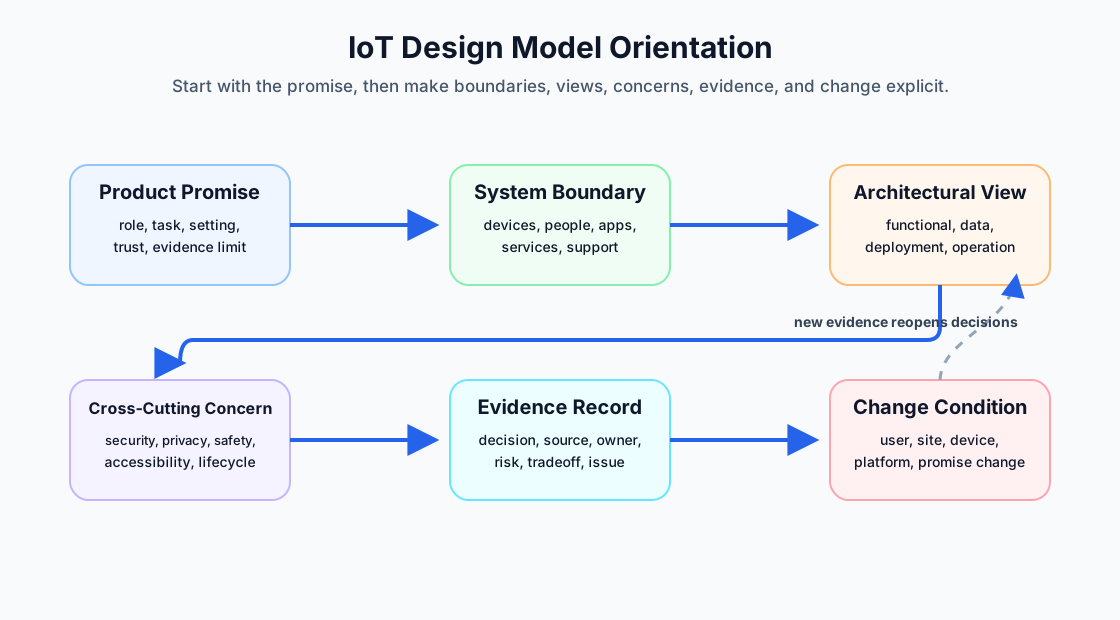
10.9 Design Model Orientation
Use Figure 10.2 to keep the introduction simple:
- Product promise: the user-facing outcome the system claims to support.
- System boundary: the devices, gateways, apps, cloud services, people, support tools, and external systems in scope.
- Architectural view: the perspective used to make a decision, such as layer responsibility, data meaning, deployment placement, operation, or risk.
- Cross-cutting concern: a concern that spans several boundaries, such as security, privacy, safety, accessibility, reliability, observability, and lifecycle support.
- Evidence record: the reason a decision was accepted, including evidence, owner, risk, tradeoff, and open issue.
- Change condition: a future change that reopens the decision.
10.10 Why Teams Use Design Models
IoT products combine physical devices, communication links, local behavior, cloud services, apps, dashboards, support workflows, and operating environments. Without a model, teams often make decisions in separate fragments:
- hardware teams choose sensing and power behavior
- software teams choose data paths and state ownership
- app teams design screens and alerts
- operations teams inherit support and update problems
- users experience the whole system as one product
A design model gives those decisions a shared structure. It should help the team ask the same questions from different roles:
- What does the user think the system does?
- What does the system actually measure or control?
- Where is the source of truth?
- What remains local when remote paths fail?
- Who can diagnose the issue?
- What evidence supports the claim?
- What change invalidates the decision?
10.11 Model Vocabulary
Use precise vocabulary early. Vague words like “platform,” “smart,” “cloud,” “edge,” or “system” can hide ownership.
Helpful terms:
- Boundary: what is inside the review and what is outside it.
- Layer: a responsibility grouping, not just a drawing level.
- View: a perspective used for a decision, such as data, deployment, operation, or risk.
- Interface: what crosses a boundary and in what form.
- Owner: the role or team accountable for a decision or behavior.
- Evidence: observation, test result, deployment record, support finding, incident record, or technical validation.
- Tradeoff: a known limit accepted for a reason.
- Change condition: the condition that makes the old decision unsafe to rely on.
When the vocabulary is clear, the model becomes easier to test. When the vocabulary is vague, the model can make the design look more mature than it is.
10.12 Start With The Product Promise
Begin with the promise, not the diagram.
Review:
- who the product is for
- what task or situation it supports
- what the user should be able to trust
- what the system measures, infers, controls, or only reports
- what local behavior must keep working during weak connectivity
- what the product does not promise
- what support evidence is needed when the promise fails
Weak promise: “Provide smart monitoring.”
Stronger promise: “Show operators whether a shared room is likely available, label stale state clearly, and keep a local override available when remote services are unavailable.”
The stronger promise tells the team what the model must preserve: role, status meaning, freshness, local behavior, and recovery.
10.13 Draw The System Boundary
The boundary defines what the model must explain.
Review:
- physical devices, sensors, actuators, indicators, and power sources
- gateways, routers, local services, and protocol translators
- apps, dashboards, installer tools, support tools, and administrator tools
- cloud services, data stores, identity services, update services, and notification paths
- users, shared users, installers, operators, maintainers, support roles, and external systems
- deployment sites, environmental constraints, and lifecycle paths
Do not hide people and support outside the model. If users, installers, or support teams must act for the system to work, they are part of the design boundary.
10.14 Choose The Lightest Useful Model
A simple model is often enough when responsibilities are clear. Additional layers or views are useful only when they help decisions.
A model may be too thin when:
- device management, updates, support, or replacement have no owner
- data meaning changes across devices, gateways, cloud services, and dashboards
- multiple roles need different explanations of the same state
- privacy, security, safety, or accessibility requirements cross several boundaries
- support cannot diagnose whether the issue is device, link, account, platform, or user workflow
A model may be too heavy when:
- extra layers have no unique decisions
- teams debate labels more than behavior
- every box passes responsibility to another box
- diagrams are maintained separately from the real implementation
- users and support teams still cannot explain what failed
The right model is the lightest one that makes responsibility and recovery clearer.
10.15 Use Architectural Views As Questions
An architectural view is useful when it answers a real question.
Common introductory views:
- Functional view: what services, commands, workflows, rules, and user actions exist?
- Information view: what data exists, what it means, how fresh it is, where it is stored, and who may use it?
- Deployment view: where software and hardware run, what network paths connect them, and what physical constraints apply?
- Operational view: how the system is monitored, updated, diagnosed, maintained, transferred, and decommissioned?
- Risk view: where privacy, security, safety, accessibility, reliability, misuse, and lifecycle risks appear?
Do not create views for decoration. Create a view when one perspective is hiding a decision that another role needs to see.
10.16 Review Cross-Cutting Concerns
Some concerns are not owned by one layer or one component. They cross the model.
Review:
- Security: identity, permissions, credentials, update integrity, secure defaults, and incident response.
- Privacy: collection, consent, visibility, sharing, retention, deletion, and support access.
- Safety: local control, fail-safe behavior, physical effects, warnings, and override.
- Accessibility: setup, indicators, alerts, controls, language, physical reach, and support.
- Reliability: retry, buffering, stale state, degraded operation, replacement, and recovery.
- Observability: logs, health signals, support evidence, user-visible status, and incident records.
- Lifecycle: provisioning, maintenance, update, transfer, reuse, and decommissioning.
If a cross-cutting concern appears in only one box, the model is probably incomplete. It should be reviewed at every boundary where the concern changes behavior or responsibility.
10.17 Evidence Over Diagram Polish
A clean diagram can still be weak. The review should ask what evidence supports the decision.
Useful evidence includes:
- field observation of user task and environment
- prototype result for setup, status, alerting, recovery, or physical placement
- technical validation of data path, local fallback, update behavior, or interface contract
- support evidence showing how failure will be diagnosed
- security, privacy, safety, accessibility, reliability, or lifecycle review
- accepted tradeoff with owner and change condition
Avoid accepting a model because it looks complete. Accept it because it helps the team make a decision that can be tested and maintained.
10.18 Introductory Design Model Record
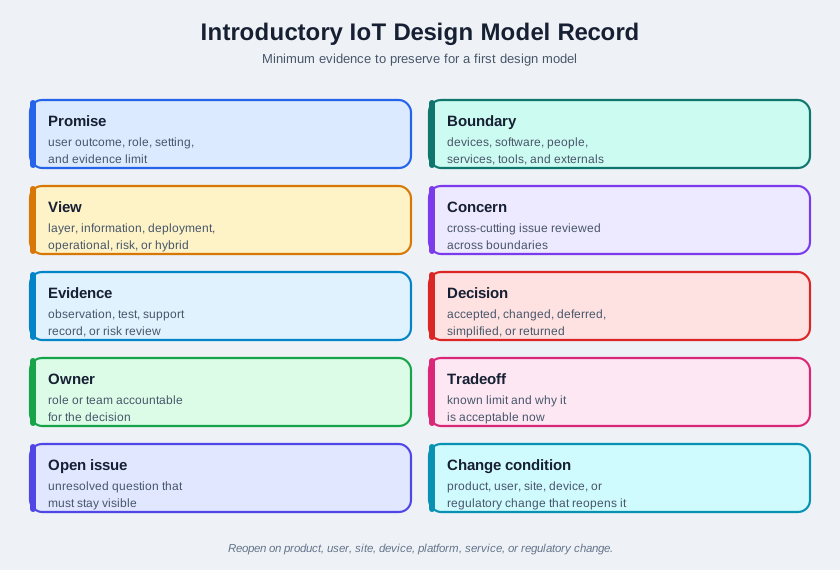
Figure 10.3 shows the minimum evidence to preserve:
- Promise: user outcome, role, setting, and evidence limit.
- Boundary: devices, software, people, services, support tools, and external systems in scope.
- View: layer, information, deployment, operational, risk, or hybrid view used for the decision.
- Concern: cross-cutting issue that must be reviewed across boundaries.
- Evidence: observation, test, support record, technical validation, or risk review.
- Decision: what was accepted, changed, deferred, simplified, or sent back for more evidence.
- Owner: role or team accountable for the decision.
- Tradeoff: known limit and why it is acceptable now.
- Open issue: unresolved question that must remain visible.
- Change condition: product, user, site, device, platform, service, or regulatory change that reopens the review.
10.19 Worked Review: First Connected Prototype
A team wants to build a first prototype for a connected storage-room monitor. The first sketch shows a sensor, a gateway, and a dashboard.
Review questions
- What user outcome is promised: occupancy, door state, item count, safety confirmation, or only recent motion?
- What is in scope: sensor, gateway, dashboard, installer flow, support flow, room reassignment, and local indicator?
- Where is state owned: sensor, gateway, cloud service, dashboard, or support record?
- What happens when readings are stale or the gateway is offline?
- Which concerns cross boundaries: privacy, access control, local fallback, stale-state labeling, support diagnosis, and device replacement?
- What evidence exists from the actual room context?
Likely review action
Approve a simple model only if it names state meaning, freshness, local fallback, support evidence, and owner. Hold the model if the dashboard says “available” but the sensor evidence only supports “recent motion detected.”
10.21 Common Findings
- The model starts with a preferred technology instead of the product promise.
- The diagram includes devices and cloud services but omits users, installers, support, and lifecycle work.
- Layers are named but not owned.
- Data freshness, inference, and uncertainty are hidden.
- Cross-cutting concerns are placed in one box instead of reviewed across boundaries.
- Failure behavior is discussed after the architecture is treated as final.
- The model grows more complex without improving decisions.
- The record lacks evidence, owner, accepted tradeoff, open issue, or change condition.
10.22 Review Checklist
Use this checklist before accepting an introductory design model:
- product promise is stated in user terms
- system boundary includes devices, software, people, services, support, and lifecycle paths
- chosen model or view answers a real decision question
- layer or component responsibilities are owned
- data meaning, freshness, uncertainty, and source of truth are visible
- local fallback and degraded behavior are described
- security, privacy, safety, accessibility, reliability, observability, and lifecycle concerns are reviewed across boundaries
- evidence, decision, owner, accepted tradeoff, open issue, and change condition are recorded
10.23 Knowledge Check
10.24 Matching Quiz
10.25 Ordering Quiz
10.26 Summary
An IoT design model helps a team make connected-product decisions before implementation makes them expensive to change. The introduction standard is simple: state the product promise, draw the system boundary, choose a useful view, review cross-cutting concerns, and preserve the evidence behind the decision.
The model should be as light as possible while still clarifying responsibility, failure behavior, user impact, support evidence, accepted tradeoffs, and change conditions.
10.27 Key Takeaway
The design model is a shared map that keeps human needs, technical constraints, and operational evidence connected.
10.28 Concept Relationships
- Design Model for IoT shows how this introductory vocabulary fits into the full design-model workflow.
- IoT Architecture Model Selection expands model-choice and layer-boundary review.
- Design Thinking for IoT provides the field and test evidence needed before accepting a model.
- 8 Facets of IoT Design checks whether the model covers visible and hidden experience work.
- Design Facets and Calm Technology reviews attention policy and failure behavior across the model.
10.29 What’s Next
Continue to IoT Pattern Selection Assessment to practice checking whether model decisions and pattern choices are supported by evidence.