24 Device Communication Patterns
IoT communication patterns, device topology review, hub and spoke IoT, mesh network UX, direct device communication, local control review
24.1 Start Simple
A communication topology becomes UX when people depend on its effects. Start with one action, trace the route from trigger to device response, and decide what feedback should explain direct control, hub mediation, mesh forwarding, cloud delay, local fallback, or stale state.
24.2 In 60 Seconds
Device communication patterns describe how connected products exchange commands, state, and telemetry. The pattern can be direct device-to-device communication, a hub-and-spoke system, a mesh network, a cloud-mediated path, or a hybrid that combines several of these at different layers.
The UX review question is not “which protocol is best?” The useful question is whether the communication pattern supports the user goal, installation context, response expectation, privacy boundary, power budget, recovery path, and maintenance model.
24.3 Learning Objectives
By the end of this chapter, you will be able to:
- distinguish direct, hub-and-spoke, mesh, cloud-mediated, and hybrid communication patterns
- review how a communication pattern changes setup, responsiveness, reliability, privacy, and support behavior
- identify where commands, automation rules, state, and logs actually travel
- separate user-visible failure modes from hidden network implementation details
- write a communication-pattern record with accepted limits, owners, and change conditions
24.4 Minimum Viable Understanding
A communication pattern is reviewable only when it names the participants, the path between them, the owner of automation logic, the local/cloud boundary, the failure behavior, and the user or operator action required when the path breaks.
Avoid accepting protocol labels as evidence. “Uses Wi-Fi,” “uses BLE,” “uses Thread,” or “uses MQTT” does not prove that the product is responsive, recoverable, private, easy to install, or suitable for battery operation. The pattern must be reviewed in the installed context.
24.5 Prerequisites
This chapter builds on:
- Connected System Review Gate, which introduces the user-facing meaning of connected devices.
- Connected Device Fundamentals, which defines the device role and boundary.
- Connected Devices - Power Management, which reviews power evidence that communication patterns often change.
- Layered Network Models, which explains protocol layers behind these UX decisions.
24.6 Communication Path Ownership
A communication pattern is the product’s answer to a practical question: where do commands, telemetry, automation rules, permissions, and logs travel before the user sees an outcome? The protocol label is only one detail. The user experience depends on which path is local, which path needs the cloud, which component owns state, and what happens when one segment is degraded.
For a lighting system, a wall switch may talk directly to a bulb, through a hub, across a Thread or Zigbee mesh, through a building gateway, and then to a cloud dashboard for remote monitoring. Those paths do not have the same latency, privacy boundary, power cost, failure mode, or support owner.
Review the pattern from the user’s promise. “The switch turns on the corridor light” is a different promise from “the facility dashboard receives occupancy telemetry” or “the cloud schedule updates every zone overnight.” The first may need local acknowledgement and bounded latency even when the internet is down. The second may tolerate buffering, sequence numbers, and delayed upload. The third may require account authority, audit logs, rollback, and a clear message when a cloud rule has not reached the local controller.
The pattern also changes who must understand the system. Installers need to know which nodes must be powered routers, where the hub or gateway belongs, and how to verify routes after doors, walls, or furniture change. Support staff need evidence that separates a sleeping endpoint from a weak link, a hub bridge fault, an internet outage, a cloud API error, or an account permission problem. Users need status that names the action they can take rather than a generic offline label.
- Command path: know where user intent is accepted, queued, authorized, delivered, acknowledged, and confirmed.
- State path: know which device, hub, app, broker, cloud service, or dashboard is authoritative when state disagrees.
- Recovery path: know what remains local, what waits, what retries, what alerts, and what support can inspect.
24.7 Map Protocols to Behavior
Choose the pattern from the required behavior, then select protocols. MQTT publish/subscribe, CoAP request/response, HTTP APIs, WebSockets, BLE GATT, Matter over Thread or Wi-Fi, Zigbee clusters, LoRaWAN uplinks/downlinks, Modbus, OPC UA, and cellular MQTT all make different tradeoffs for latency, power, addressing, acknowledgement, provisioning, and diagnostics.
Start with one real workflow and trace every hop. For a wall switch, record whether the switch sends a bound Zigbee command to a bulb, sends an event to a hub rule engine, publishes an MQTT message to a broker, calls an HTTP API, or asks a cloud automation service to decide. Then record the acknowledgement that proves the physical effect: command accepted, message delivered, actuator applied, state confirmed, or stale status shown. Those are different evidence points, and they should not be collapsed into “online.”
- Map the live command. Trace one user action from button, app, automation rule, or operator dashboard through authentication, routing, acknowledgement, physical effect, and UI confirmation.
- Map the stale state. Define last-seen time, retained message behavior, cached state, sequence number, timestamp, confidence, and the message shown when state age exceeds the product promise.
- Map degraded operation. Test internet loss, hub reboot, weak mesh route, sleeping endpoint, broker outage, expired credential, gateway queue backlog, and cloud API failure.
Use the installed environment, not a bench shortcut. A Thread sleepy end device may behave well near a border router but fail after a powered router is removed. A BLE direct-control path may feel immediate until the phone leaves the room or the device sleeps. A cloud-mediated alert may work in the lab but become confusing when local control still works and remote notifications stop. The review should include the exact fallback message, retry window, queue depth limit, and support evidence for each degraded state.
The implementation should expose enough diagnostics for support. Useful signals include RSSI/SNR, route parent, missed acknowledgements, queue depth, broker disconnect reason, CoAP response code, HTTP status, WebSocket close reason, gateway firmware version, and device firmware version. ## Path vs Decision {.depth-l2}
A device may use a local radio path but still depend on a cloud decision. A hub may receive a command locally but fetch permissions from an account service. A mesh may relay packets locally but store schedules in the cloud. Good UX depends on separating transport path, authority path, automation path, and support path.
Message semantics matter. MQTT QoS 0/1/2, retained messages, Last Will and Testament, topic ACLs, CoAP confirmable messages, HTTP idempotency keys, WebSocket session state, Matter fabrics, Thread border routers, Zigbee binding tables, LoRaWAN confirmed downlinks, and gateway store-and-forward behavior all affect what “sent,” “received,” “applied,” and “failed” mean.
Authority should be explicit in the protocol and data model. A local button press, scheduled cloud rule, technician override, mobile app command, and safety interlock can all target the same actuator. The system needs idempotency, command expiry, conflict resolution, replay protection, permission checks, and audit records so delayed or duplicated messages do not create surprising physical behavior. If account revocation happens in the cloud, the record should state what local credentials remain valid and for how long.
Observability should preserve path evidence without exposing unnecessary personal data. Gateways can store sequence numbers, route parents, retry counts, broker disconnect reasons, cloud correlation IDs, clock confidence, firmware versions, and local decision logs. Those fields let support distinguish radio coverage, sleeping endpoints, hub storage pressure, internet loss, account failure, and cloud-service outage. They also let product teams repeat the review at the right layer when a protocol bridge, routing policy, firmware version, topology, or account model changes.
- Ordering: use sequence numbers, timestamps, idempotent commands, and conflict rules so delayed messages do not create surprising physical actions.
- Authority: separate device identity, user account authority, local override, tenant ownership, and support access.
- Observability: log enough path state to distinguish device power, local link, hub, gateway, internet, cloud, account, and firmware failures.
24.8 Pattern Review Map
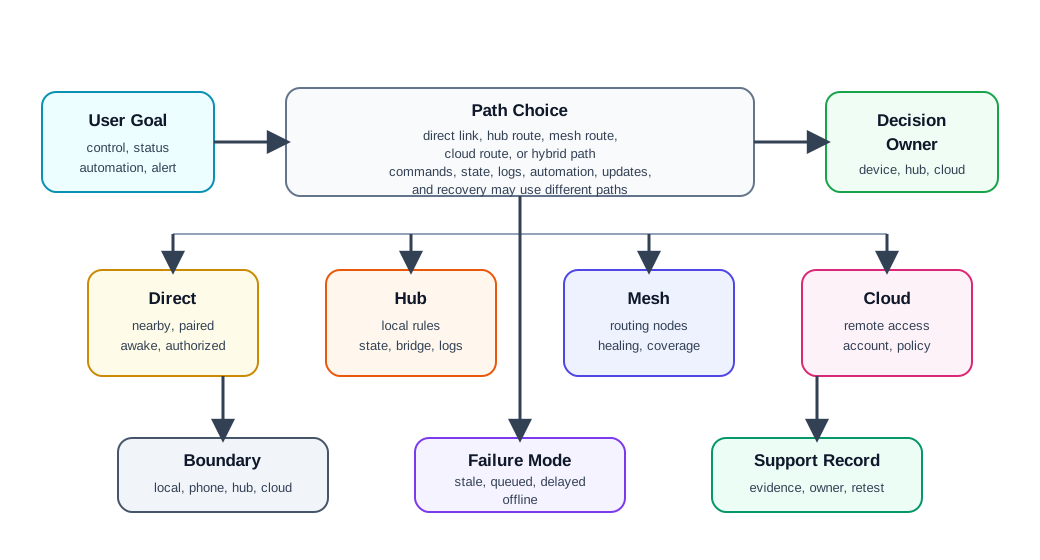
Use Figure 24.2 to keep the review concrete:
- User goal: command, status, automation, monitoring, alerting, onboarding, or maintenance.
- Participants: device, phone, gateway, hub, router node, cloud service, dashboard, technician, or third-party platform.
- Path: direct local link, hub route, mesh route, cloud route, or a mixed path.
- Control owner: device, hub, edge gateway, cloud rule engine, mobile app, or operator workflow.
- Boundary: what works locally, what needs the internet, what needs an account, and what needs a nearby phone or gateway.
- Failure behavior: delayed command, missing state, queued event, degraded mode, local fallback, alarm, or manual recovery.
- Record: accepted tradeoff, user-facing message, support evidence, owner, and change condition.
24.9 Direct Communication
Direct communication links two nearby participants without a central coordinator in the primary command path. Examples include a phone commissioning a device over a local link, a sensor reporting to a nearby controller, or a device accepting a local maintenance command.
Review:
- whether the direct link is for setup, everyday control, diagnostics, emergency recovery, or data transfer
- whether both participants must be awake, nearby, paired, authorized, and using compatible versions
- what the user sees while discovery, pairing, authentication, and command acknowledgement happen
- what happens when the phone leaves, a device sleeps, the link is weak, or credentials expire
- whether the direct path bypasses cloud policy, logging, support visibility, or access controls
- whether the direct path is a fallback or the main product experience
Direct communication can feel immediate when it works, but it can also create setup friction and unclear responsibility. A product that depends on a nearby phone should explain when the phone is required and what continues without it.
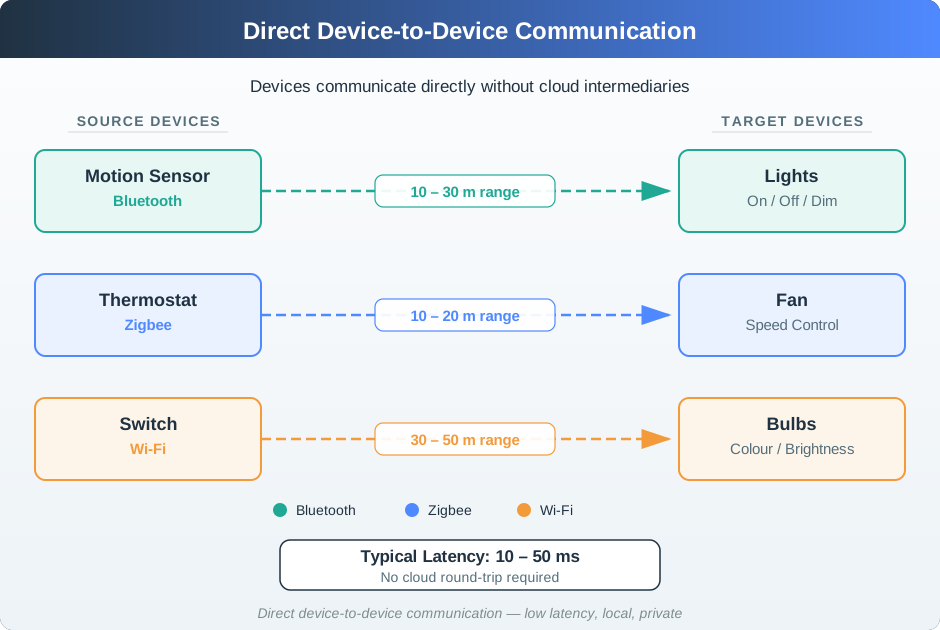
Figure 24.3 is useful when the review claim is “local” or “direct.” The evidence should still name range, authorization, awake state, acknowledgement, and whether the direct path bypasses policy or support logs.
24.10 Hub-And-Spoke Communication
A hub-and-spoke pattern routes devices through a local hub, gateway, bridge, or controller. The hub can coordinate automation, translate protocols, keep local state, and offer a single control point.
Review:
- which devices depend on the hub for commands, state, automation, logging, or updates
- whether automation rules run locally, in the cloud, or in a mixed path
- whether the hub stores enough state to operate during internet loss
- what device behavior remains available if the hub is offline, rebooting, updating, or full
- whether setup creates a clear relationship between room, device, hub, account, and user role
- whether support can distinguish device failure from hub failure, network failure, and cloud failure
Hub-and-spoke is often easier for users to understand because there is a visible coordinator. It also concentrates risk. The review should name the single point of failure and the intended fallback before deployment.
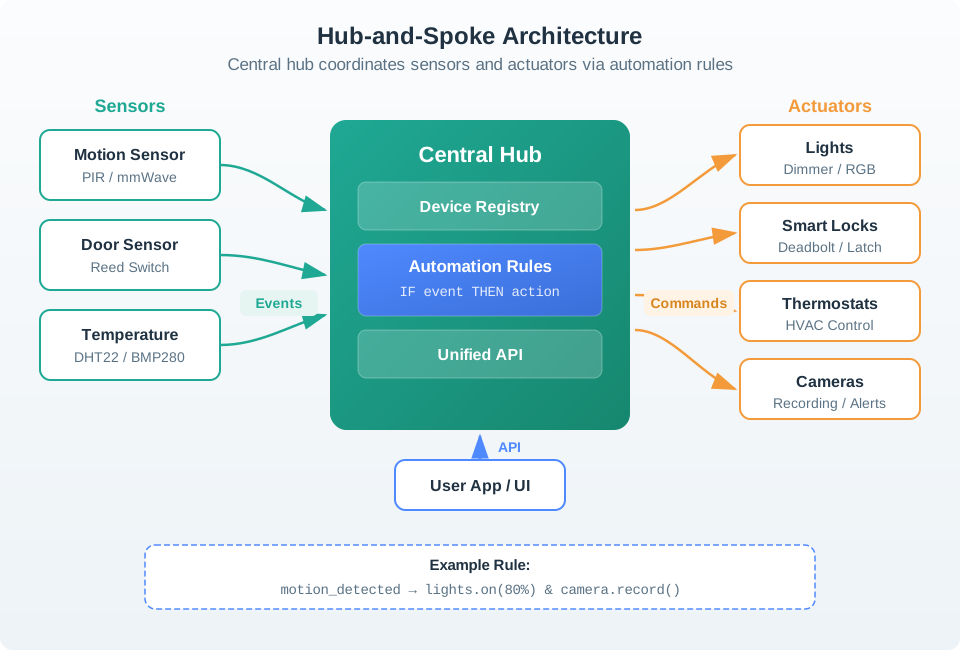
Figure 24.4 shows why the hub record must separate event intake, rule ownership, device registry, outgoing commands, user app access, and outage behavior.
24.11 Mesh Communication
A mesh pattern allows some nodes to relay messages for others. It is useful when range, obstruction, or coverage would make every endpoint communicating directly to one gateway unreliable.
Review:
- which nodes are allowed to route traffic and whether they have stable power
- whether endpoints can sleep without being expected to relay messages
- how the system chooses a route, detects a failed route, and recovers
- what users see while the network heals, rejoins, or rebuilds routes
- whether installers can see weak links, isolated nodes, crowded channels, and repeated retries
- whether a physical change, such as moving a router node, invalidates the previous coverage evidence
Mesh networking should not be treated as automatic reliability. A mesh is only as useful as its installed routing nodes, commissioning process, monitoring, and maintenance practice.
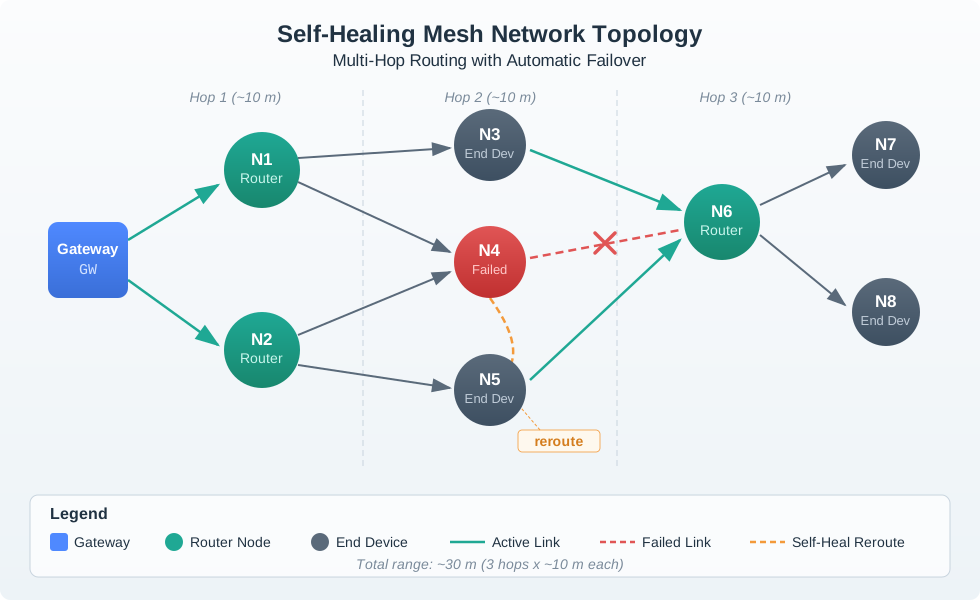
Use Figure 24.5 to keep mesh claims tied to installed evidence: which nodes route, which nodes sleep, which link failed, how rerouting appears, and how the installer proves coverage after physical changes.
24.12 Cloud-Mediated Communication
Some products route commands, state, and automation through a cloud service even when devices are physically nearby. Cloud mediation can support remote access, account policy, fleet monitoring, integration, and cross-site management.
Review:
- which actions require internet connectivity and which work locally
- whether cloud round trips affect controls that users expect to feel immediate
- how credentials, account ownership, sharing, and revocation affect local devices
- what state is cached locally and what state is authoritative in the cloud
- whether outage messages tell users what is unavailable and what still works
- whether logs support support teams without exposing unnecessary data
Cloud mediation is not wrong, but hidden cloud dependency creates poor UX. Local controls, safety functions, and recovery paths should be explicit when they exist.
24.13 Hybrid Topologies
Most real IoT systems are hybrid. A battery sensor may send to a nearby router, routers may form a mesh, a gateway may run local automations, and the gateway may synchronize with the cloud for remote access and fleet management.
Review each layer separately:
- Endpoint to nearby infrastructure: power budget, wake schedule, acknowledgements, retry behavior, and user-visible status.
- Local infrastructure: hub, router, bridge, gateway, automation engine, local logs, and local fallback.
- Remote services: account, backup, sharing, analytics, update service, remote control, and support tools.
- Human workflow: installer setup, user control, technician replacement, ownership transfer, and decommissioning.
A hybrid system needs a plain-language operating model. Users and support staff should know which parts work locally, which parts need the cloud, and what to do when a path is degraded.
24.14 Failure Modes And User Feedback
Communication failures become UX failures when the product hides the cause or suggests the wrong action.
Common failure modes:
- command sent but not acknowledged
- device online in the app but unreachable locally
- local automation works but remote control does not
- remote control works but local manual control is delayed
- mesh route heals slowly after a router node is unplugged
- endpoint sleeps while the user expects immediate status
- hub is online but its protocol bridge is offline
- cloud state disagrees with the device’s actual state
- account transfer leaves a device paired to the wrong owner
Review the message shown to users, the log shown to support, and the recovery path. “Device offline” is often too vague. Better evidence distinguishes power, local link, hub, gateway, internet, cloud service, account permission, and device firmware state when that distinction is available.
24.15 Setup And Mental Model
The communication pattern shapes onboarding. A user may think they are adding “a light,” while the system is actually commissioning a radio endpoint, binding it to a hub, assigning it to a room, authorizing account access, and creating automations.
Review:
- whether setup uses terms the user can verify in the physical world: room, device name, indicator, button, label, or QR code
- whether the app explains when a hub, phone, account, or internet connection is required
- whether discovery results avoid duplicate, stale, or ambiguous devices
- whether the product verifies that the right device was added
- whether the user can recover from failed pairing without factory reset as the first answer
- whether ownership transfer removes old credentials and preserves appropriate local function
A good setup flow hides unnecessary protocol detail but does not hide required dependencies.
24.16 Communication Pattern Readiness Record
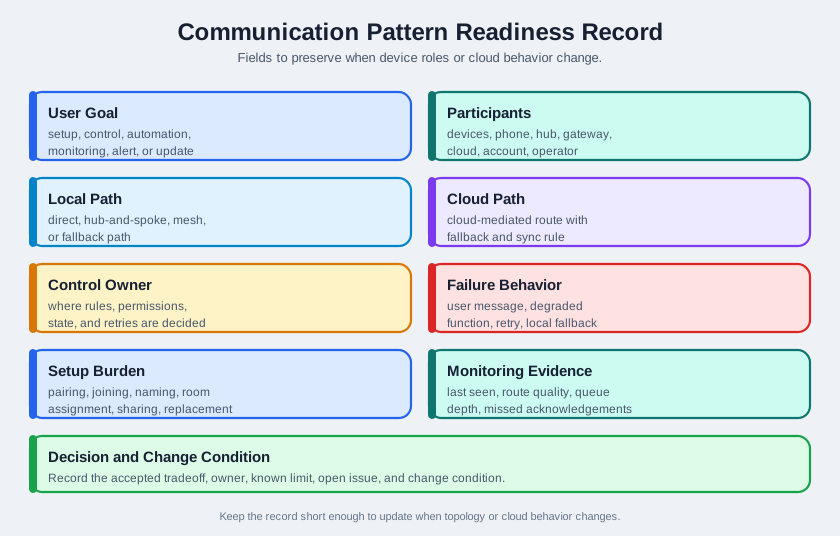
Figure 24.6 shows the fields to preserve:
- User goal: setup, control, automation, monitoring, alert, update, diagnosis, or recovery.
- Participants: devices, phone, hub, router, gateway, cloud, dashboard, account, operator, and third-party systems.
- Paths: direct, hub-and-spoke, mesh, cloud-mediated, and fallback paths.
- Control owner: where rules, permissions, state, logs, and retries are decided.
- Failure behavior: user message, degraded function, retry rule, local fallback, manual action, and support evidence.
- Setup burden: pairing, joining, naming, room assignment, account ownership, sharing, and replacement.
- Monitoring evidence: last seen, route quality, queue depth, missed acknowledgements, error class, and recovery record.
- Decision and change condition: accepted tradeoff, owner, known limit, open issue, and change condition.
The record should remain short enough to update when device roles, gateway firmware, account policy, topology, installation layout, protocol bridge, or cloud behavior changes.
Before choosing a communication pattern, review the whole connected experience:
- Outcome: what user or operator outcome requires devices to be connected?
- Coupling: which devices, apps, services, and people must coordinate, and which should stay independent?
- Connection contract: what is paired, discovered, authenticated, authorized, and remembered?
- Decision ownership: which layer makes the local, hub, cloud, or user-facing decision when data conflicts?
- Recovery path: what does the user see, do, and trust when setup, connectivity, consent, or support fails?
The pattern is ready for implementation only when the communication path, decision owner, failure feedback, and support owner are all visible.
24.17 Worked Review: Apartment Door Sensor
A battery door sensor reports open and closed state to a phone app through a local hub. The user expects status to be accurate, alerts to arrive promptly, and manual inspection to remain possible.
Communication evidence to request
- sensor wake, report, acknowledgement, retry, and sleep behavior
- hub dependency for local automation and remote notifications
- behavior during internet loss, hub reboot, low battery, and weak link
- user-facing messages for stale state, missed acknowledgement, and low battery
- support evidence that separates sensor power, local radio, hub, internet, cloud, and account issues
- replacement and re-pairing path that preserves the room and automation record
Likely review action
Hold the decision if the app shows only “closed” without age, confidence, or last-seen evidence. A stale door state can be more harmful than no state because it encourages false confidence.
Change condition
Repeat the review when the hub model, firmware, radio placement, battery type, alert policy, sleep schedule, ownership flow, or cloud notification path changes.
24.18 Building Lighting Retrofit
A retrofit project adds connected switches and occupancy sensors across many rooms. Users expect wall controls to work immediately, facility staff expect central schedules, and support needs a way to locate weak rooms.
Communication evidence to request
- which controls work locally if the internet connection is down
- whether automations run in the hub, gateway, controller, or cloud
- which powered nodes act as routers and which battery nodes are endpoints only
- route-health evidence after installation, not only in a bench test
- behavior when a router switch is removed, replaced, or moved
- installer workflow for naming rooms and verifying the correct physical device
- support workflow for identifying weak links, duplicate devices, and stale state
Likely review action
Approve a hybrid pattern only if local wall control remains responsive, central scheduling has a clear fallback, and support can see whether failures are route, device, gateway, or cloud problems.
Change condition
Repeat the review when rooms are reconfigured, powered nodes are replaced, firmware changes routing behavior, schedules move between local and cloud execution, or monitoring evidence changes.
24.19 Common Findings
- The pattern is named by protocol instead of by actual command and state paths.
- Local control is claimed but automation rules depend on the cloud.
- A hub is required but the setup flow presents it as optional.
- A mesh expects battery endpoints to relay traffic.
- Device state in the app has no age, confidence, or last-seen evidence.
- A direct setup path bypasses ownership, logging, or support records.
- The support view cannot distinguish power, radio, hub, internet, cloud, and account failures.
- Retrying hidden commands creates duplicate actions or confusing delayed behavior.
- Replacing a hub or router node breaks automations because identity and room mapping are not preserved.
- The record lacks an owner, known limit, open issue, or change condition.
24.20 Review Checklist
Before accepting a communication pattern, confirm that the record includes:
- user goal, participants, paths, and control owner
- what works locally and what requires a phone, hub, account, internet connection, or cloud service
- direct, hub-and-spoke, mesh, cloud, and fallback paths when each applies
- route, acknowledgement, retry, queueing, sleep, and recovery behavior
- user-facing status for pending, failed, stale, degraded, and recovered states
- setup, replacement, ownership transfer, and decommissioning workflows
- support evidence for power, local link, hub, gateway, internet, cloud, account, and firmware failures
- accepted tradeoff, owner, known limit, open issue, and change condition
24.21 Knowledge Check
24.22 Matching Quiz
24.23 Ordering Quiz
Choose one connected product claim such as “works locally,” “uses mesh,” or “keeps automations running during outages.” Build a six-line audit record before accepting the claim:
- User outcome: the command, status, alert, automation, or maintenance action the pattern must support.
- Participants and paths: the device, app, hub, router, gateway, cloud, account, and fallback path involved.
- Decision owner: where rules, permissions, authoritative state, acknowledgements, retries, and logs are decided.
- Outage behavior: what still works if the phone leaves, the hub restarts, the internet fails, or the cloud is delayed.
- Support evidence: the signal that separates power, radio, hub, gateway, internet, cloud, account, and firmware failures.
- Change condition: the topology, firmware, account-policy, installation, or ownership change that would invalidate the record.
Finish with one sentence: “Accept,” “accept with known limit,” or “hold,” and name the missing evidence if the decision is not ready.
24.24 Summary
Device communication patterns are product decisions, not only network diagrams. Direct, hub-and-spoke, mesh, cloud-mediated, and hybrid paths each change setup effort, responsiveness, power use, privacy, failure behavior, and support evidence.
The strongest reviews avoid generic protocol claims. They show who talks to whom, where decisions run, what works locally, what requires the cloud, how users recover, how support diagnoses failures, and what change requires review.
24.25 Key Takeaway
Communication patterns should match user intent, data timing, reliability needs, failure recovery, privacy, and cross-device visibility.
24.26 Concept Relationships
- Connected System Review Gate frames communication as part of the user’s connected-device experience.
- Device Discovery and Pairing expands the setup and trust-establishment part of the pattern.
- Ecosystem Integration reviews multi-vendor and account-level integration after communication paths are clear.
- Connected Devices - Power Management reviews power effects created by awake windows, retries, routing, and cloud synchronization.
- Layered Network Models explains the lower-level network layers behind these product choices.
24.27 What’s Next
Continue to Ecosystem Integration to review how multi-vendor services, account models, and ecosystem rules build on the communication paths accepted here.