5 User Research Fundamentals for IoT
IoT user research fundamentals, user research for IoT, IoT UX evidence, observed behavior, IoT design assumptions
5.1 Start Simple
Start with a person doing a real task, not with a feature list. IoT user research asks what the person is trying to accomplish, which physical and digital signals they can see, who else is affected, what evidence is missing, and which assumptions should be tested before the design hardens.
5.2 In 60 Seconds
User research helps IoT teams understand what people actually do, what context changes the task, who is affected, and which design assumptions need evidence.
This matters because IoT products do not live only on screens. They live in homes, workplaces, vehicles, hospitals, factories, schools, and shared spaces. They depend on physical placement, power, connectivity, sensing, alerts, maintenance, privacy, and support.
A team should not start with “What features do users want?” It should start with better questions:
- What task or decision are people trying to complete?
- What is happening around them when they use the device?
- What do they see, touch, hear, trust, ignore, or override?
- Which people are affected even if they do not operate the product?
- What evidence supports the design decision?
- What assumption still needs to be checked?
Good user research turns assumptions into evidence-bound design decisions.
5.3 Learning Objectives
By the end of this chapter, you will be able to:
- explain why IoT user research must include behavior, context, and affected roles
- distinguish observation, interpretation, assumption, and requirement
- recognize why stated preferences are weaker than observed behavior for many design decisions
- identify the curse of knowledge in technical product teams
- write a simple research question tied to a design decision
- create a lightweight user-research evidence record
5.4 IoT Research Beyond Screens
IoT user research studies people, places, devices, services, and support paths together. A setup screen can look clear in a conference room but fail on a porch at night, beside a metal equipment cabinet, in a shared apartment, or during a maintenance visit with weak connectivity.
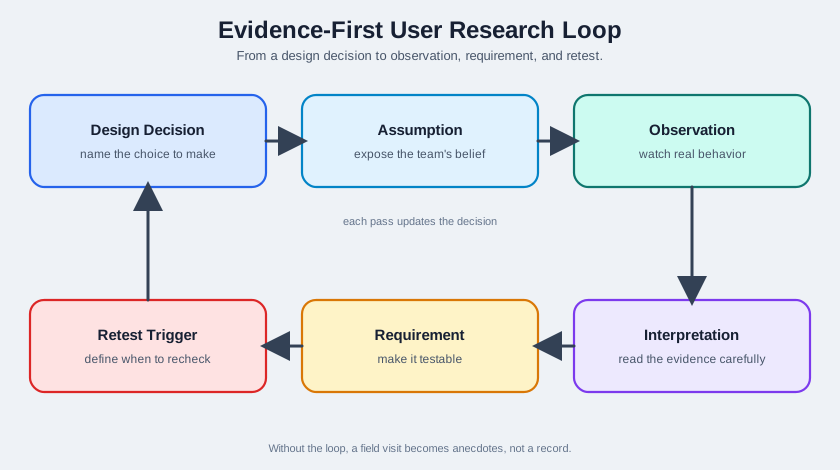
The core question is not “what feature do users want?” The core question is what people are trying to do, what physical and social context changes the task, and which system state they can trust when the device, app, gateway, and cloud disagree. A smart-lock team might learn that residents understand the app invitation but visitors still wait outside because the reader, push notification, and support script describe different states.
Research should therefore follow the loop in the figure: name the design decision, expose the team’s assumption, observe real behavior, interpret the evidence carefully, convert the finding into a requirement, and define when the team must retest. Without that loop, a field visit can become a list of anecdotes rather than a decision record.
For connected products, the useful observation often sits between human action and system state. A participant may say the leak sensor is easy to set up while repeatedly moving it away from the likely leak path. A nurse may acknowledge an alert but still rely on hallway routines because the wearable data is not trusted. A technician may complete pairing only because they know a hidden reset gesture. Those moments are the evidence that screens alone cannot provide.
- People: Include the account owner, daily user, visitor, installer, technician, support agent, bystander, or operator affected by the design.
- Context: Observe lighting, noise, reach, weather, phone permissions, shared ownership, privacy expectations, and accessibility needs.
- System state: Watch how people interpret pending, stale, offline, denied, revoked, low-battery, updating, and recovered states.
The output is not a persona poster or a wish list. It is a traceable claim about what a role tried to do, what the environment changed, what the device or service actually reported, what the team inferred, and which product decision can now move with evidence.
5.5 Field Observation with Device Logs
A useful research plan pairs human observation with system traces. Field notes may show that a resident taps “unlock” repeatedly, while device logs show BLE reconnect delays, gateway timeouts, or a cloud authorization failure. Neither source is enough by itself.
Choose research methods that match the IoT risk. Contextual inquiry can reveal installation and maintenance problems. Diary studies can reveal long-term trust and alert fatigue. Usability tests can check setup, permission, and recovery flows. Support-ticket review can expose failure language users actually understand.
Plan the session around the decision that will change after the research. If the decision is “what should the setup flow say when pairing fails?”, observe first-time pairing in the real placement context, capture phone model, OS permission state, BLE scan result, device firmware, gateway status, and support language, then compare what the participant believed with what the system recorded. If the decision is “which alert deserves escalation?”, observe the role that can act, the competing tasks, and the operating consequence of a false alarm or missed alarm.
Use interviews carefully. They are strong for language, expectations, fears, workarounds, and perceived value, but weak as proof of future behavior. A participant can honestly say they want detailed energy charts and still only act on “bill is unusual” and “device needs attention.” Pair statements with revealed behavior, event logs, support cases, maintenance records, or pilot telemetry before turning them into requirements.
- Instrument the path. Capture firmware version, battery voltage, RSSI, gateway status, timestamps, app event names, permission state, and error codes where privacy rules allow.
- Observe the task. Watch what users see, touch, wait for, override, ignore, ask another person to do, or abandon.
- Separate sources. Keep observation, device telemetry, support history, interpretation, and design action distinct so the team knows what is known and what is inferred.
For small teams, a lightweight evidence record is enough: decision, role, context, observation, supporting trace, interpretation, requirement, evidence boundary, owner, and change condition. The record should make weak evidence visible. “Three residents missed the stale-state message during a hallway test” is usable; “users are confused” is not. “Gateway logs show command timeout after RSSI dropped below -82 dBm” is usable; “connectivity was bad” is not.
The practitioner discipline is to stop research from becoming a separate UX artifact. Engineering should see which state labels, logs, error codes, and fallback paths are required. Product should see which decision is supported and which remains unproven. Support should see what language users used before the team renamed a state, added a recovery path, or changed an escalation rule.
5.6 Research Findings Need Boundaries
IoT research becomes actionable when each finding names the system boundary behind the behavior. A failed visitor invite might involve OAuth token expiry, push-notification permission, BLE commissioning state, a Matter fabric role, an MQTT retained message, a revoked credential, or a support workflow that cannot see device state.
Technical traces should be designed for research before field trials begin. App analytics, device logs, gateway counters, OpenTelemetry spans, Supabase events, packet captures, LoRaWAN RSSI/SNR, Wi-Fi RSSI, firmware build IDs, and support tags can help explain what users experienced without asking them to diagnose the system.
The trace must be scoped to the research question. A setup study may need QR-scan time, BLE advertisement discovery, pairing error, permission denial, gateway reachability, device identity, account role, and final user-visible state. An alarm study may need sensor value, threshold rule, sample age, acknowledgement time, notification delivery state, escalation target, and operator action. A maintenance study may need battery voltage, enclosure access, calibration date, firmware build, and ticket resolution path.
Boundaries also prevent overclaiming. A field note from one apartment building may support shared-entry wording for residents and visitors, but not enterprise badge policy, offline master-key behavior, or emergency egress. A LoRaWAN pilot with strong RSSI may not prove behavior in a basement. A Matter setup test with one phone model may not prove Android permission copy, iOS local-network prompts, or multi-admin transfer. Each research record should name the technology, role, environment, and failure class it does and does not cover.
- Timing: Align app, device, gateway, and cloud clocks well enough to reconstruct setup, command, alert, and recovery sequences.
- Privacy: Collect the minimum data needed, separate personal identity from device diagnostics where possible, and explain what is logged.
- Actionability: Connect each finding to the message, flow, hardware placement, policy, fallback, or service process that can change.
Implementation teams can support better research by exposing stable event names, correlation ids, state-machine transitions, error taxonomies, and support-visible summaries before the pilot. That does not mean collecting everything. It means collecting enough to distinguish user misunderstanding from device failure, radio conditions, backend authorization, stale data, expired credentials, missing consent, or support-process gaps.
Retest triggers should be as explicit as release criteria. Reopen the finding when firmware changes pairing behavior, a new gateway changes timing, a privacy policy changes data collection, a support workflow changes ownership, a new accessibility need appears, or a deployment context changes from home to workplace. That is how IoT user research stays tied to the living system instead of becoming a one-time usability report.
5.7 Field Evidence to Decisions
Use this route when a team needs research to guide an IoT UX choice:
- Name the design decision. Start with the decision the team must make, such as how to explain a failed invite, where to place a leak sensor, or when an automation should ask before acting.
- Choose the roles and context. Include the person operating the product and the people affected by sensing, access, alerts, maintenance, or support. Observe the task where the physical, social, and technical constraints are visible.
- Capture behavior and system evidence separately. Keep field notes, app events, device logs, gateway status, support tickets, and interview statements in separate columns before interpreting them.
- Translate the finding into a checkable requirement. The requirement should name the state, role, context, and acceptance condition. Avoid turning a preference quote directly into a feature.
- Write the boundary and next validation. State what the research does not prove and what change in device, firmware, policy, context, or user role would require another check.
5.8 Why User Research Matters
IoT design often fails when a technically correct system does not match the user’s real situation.
Examples:
- A setup flow works in the lab but fails on a dim porch with weak connectivity.
- A dashboard shows precise device data, but users only need to know whether the device is ready, stale, offline, or needs action.
- A caregiver alert reaches the account owner but not the person who can respond.
- A sensor is accurate in testing but hard to place, clean, power, or maintain.
- A shared-space device collects data about people who did not install it.
User research does not mean asking for feature ideas and building everything people request. It means learning enough about real tasks, constraints, roles, and risks to make better design decisions.
5.9 Evidence-First Research Loop
Use the research loop above to keep evidence tied to design action.
5.10 Evidence to Requirements Chain
User research gets weak when teams mix these four things together.
Observation
- What was seen, heard, logged, or recorded.
- Example: “Three participants checked the device LED before opening the app.”
Interpretation
- What the team thinks the observation means.
- Example: “Participants may not trust the app state until the device state is visible.”
Assumption
- What the team believes but has not yet proven.
- Example: “A clearer app status message will reduce setup retries.”
Requirement
- What the design should do, with a way to check it.
- Example: “The setup flow must distinguish device offline, app permission denied, and invite pending before field pilot review.”
Keep these separate in notes. A good evidence record shows how the team moved from observation to decision without pretending that interpretation is proof.
5.11 The Curse of Knowledge
The curse of knowledge happens when experts forget what it is like not to know what they know.
In IoT teams, this often appears as:
- internal terms in user-facing messages
- setup steps that assume network, account, or permission knowledge
- dashboards that expose raw technical state instead of action-oriented state
- hidden failure modes because engineers already know how to diagnose them
- support instructions that require tools or knowledge users do not have
User research counters the curse of knowledge by showing fresh users, affected roles, and real contexts back to the team.
A useful question is:
- “What would this screen, alert, or device state mean to someone seeing it for the first time while doing the real task?”
5.12 Stated Preference and Revealed Behavior
People can honestly say they want something and still not use it later.
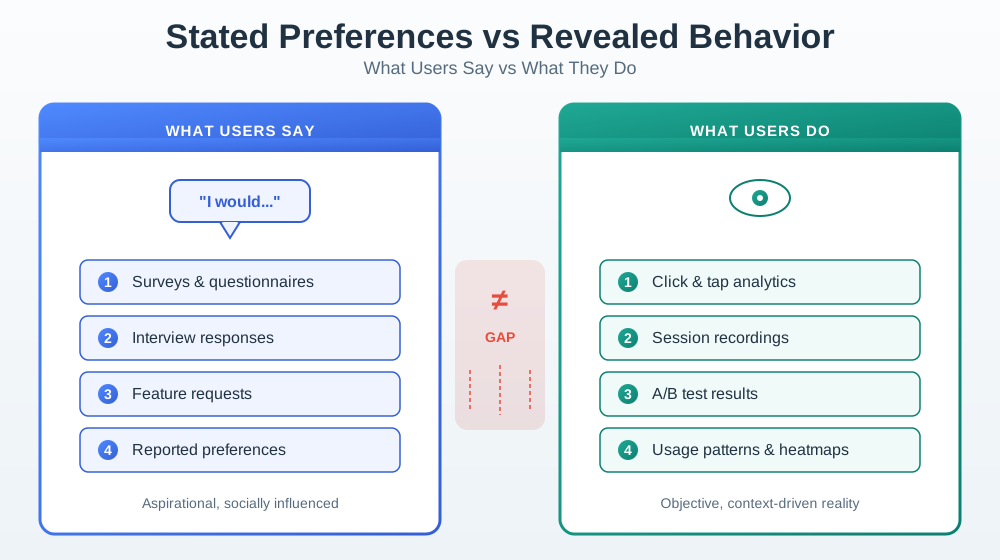
Stated preference:
- “I want detailed energy charts.”
Revealed behavior:
- The person only checks whether the bill is unusually high and whether any device needs action.
Stated preference is not useless. It can reveal language, desire, anxiety, aspiration, and perceived value. But for design decisions, observed behavior is often stronger because it shows what people do under real constraints.
For IoT, look for:
- what people check first
- what they ignore
- what they manually override
- what they ask another person to do
- what they do when the device is offline or unclear
- what workarounds they already use
- what maintenance they delay or forget
5.13 Context Changes the Design
The same user may behave differently depending on context.
Important IoT context dimensions:
- Physical: space, lighting, noise, weather, reach, mounting, cleaning, power, and placement.
- Social: alone, shared household, workplace, visitor, caregiver, technician, manager, or support agent.
- Temporal: routine, time pressure, emergency, night, shift work, seasonal use, or long-term maintenance.
- Technical: connectivity, phone state, permissions, firmware, battery, sensors, cloud dependency, and local fallback.
- Cultural: expectations, language, household norms, workplace policies, trust, and privacy boundaries.
- Accessibility: vision, hearing, mobility, dexterity, cognition, fatigue, stress, and assistive technology.
Research should capture the context that changes the decision. If the context does not change the decision, name that boundary too.
5.14 Users and Affected Roles
IoT products often affect more people than the primary user.
Common roles:
- account owner
- daily user
- installer
- visitor
- household member
- caregiver
- tenant or landlord
- worker or manager
- operator
- technician
- support agent
- bystander
Do not collapse all roles into “the user.” A smart lock, comfort sensor, leak detector, wearable, or workplace device can affect people who never open the app.
For each design decision, ask:
- Who performs the task?
- Who is affected by sensing, alerts, access, or automation?
- Who maintains or supports the system?
- Who can override or recover from failure?
- Who needs notice, consent, or privacy protection?
5.15 From Research Question to Evidence
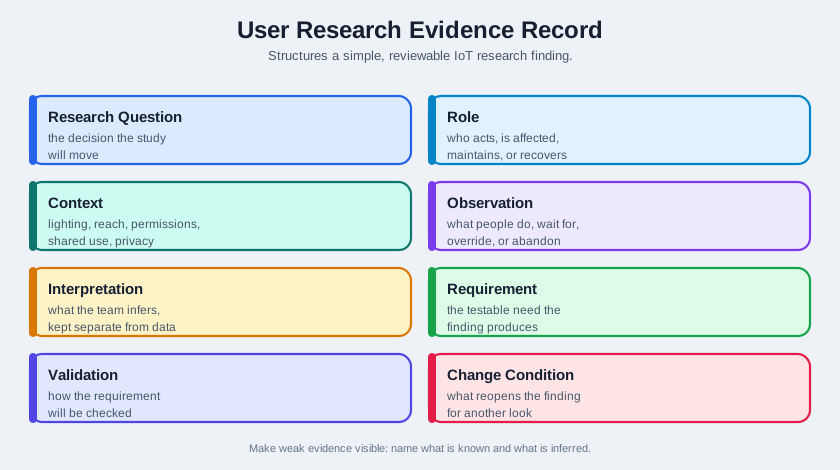
Use Figure 5.2 to structure a simple evidence record.
5.16 Write Better Research Questions
Weak research question:
- “Do users like the product?”
Stronger research question:
- “Can a first-time resident understand whether a failed shared-entry setup is caused by phone permission, device offline state, invite status, or account ownership?”
Weak research question:
- “Would people use automation?”
Stronger research question:
- “When does a comfort automation rule need to suggest, ask, act with override, or avoid acting because the consequence or privacy risk is too high?”
A strong question names:
- the design decision
- the role
- the context
- the state or task
- the evidence needed
- the action the team may take
5.17 Incremental Examples
5.17.1 Beginner Example: Leak Sensor Setup
A first research pass for a home leak sensor can observe three things: where people place the sensor, how they test reachability, and what they think the LED or app status means. The team can pair field notes with app events, Wi-Fi RSSI, battery state, firmware version, and the last successful alert timestamp. The design decision might be whether setup should show “reachable here”, “move closer to gateway”, or “test with water” before the device is trusted.
5.17.3 Advanced Example: Cold-Chain Operations
A cold-chain monitoring study may involve operators, quality staff, maintenance technicians, and external auditors. Research should observe alarm acknowledgement, door-open events, probe placement, calibration labels, cellular or LoRaWAN gateway health, MQTT or HTTPS telemetry gaps, and dashboard freshness in Grafana, InfluxDB, or a quality-management workflow. The design decision may be whether the interface should escalate an alarm, mark a reading stale, request manual confirmation, or create a maintenance ticket.
5.18 Lightweight Evidence Record
Use this structure after each research activity:
- Decision: what the design decision is.
- Question: what the team needed to learn.
- Role: who participated and who is affected.
- Context: where, when, and under what constraints the evidence was gathered.
- Observation: what happened.
- Interpretation: what the team thinks it means.
- Boundary: what the evidence does not prove.
- Requirement: what the design should do.
- Validation: how the team will check the requirement.
- Change condition: what change requires review again.
This record can be short. The goal is traceability, not paperwork.
5.19 Worked Example: Smart Door Setup
Decision:
- How should the setup flow explain why a shared entry credential is not ready?
Observation:
- A resident invited a visitor, saw a generic “not available” message, and tried the invite three times.
- The visitor waited at the entrance while the resident searched account settings.
- Support notes showed similar confusion between pending invite, phone permission, and reader offline state.
Interpretation:
- The system hides important state distinctions that users need for recovery.
Evidence boundary:
- The evidence covers shared residential entry setup. It does not prove every enterprise access-control workflow.
Requirement:
- The setup flow must distinguish pending invite, active credential, revoked credential, phone permission denied, reader offline, and account ownership conflict.
Validation:
- Test first-time setup and failure recovery with account owners, household members, visitors, and support staff.
Change condition:
- Recheck when the guest role, offline access rule, reader firmware, or support workflow changes.
5.20 Worked Example: Leak Sensor Placement
Decision:
- What placement guidance does a leak sensor need during setup?
Observation:
- Participants placed sensors where they were easy to see, but not always where leaks were likely.
- Some under-sink spaces were crowded, damp, dark, or hard to reach.
- Participants were unsure how to test whether the sensor was still reachable after placement.
Interpretation:
- The setup flow needs to connect physical placement to sensing, reachability, and future maintenance.
Evidence boundary:
- The finding comes from home sink and appliance contexts. It may not transfer to industrial water monitoring.
Requirement:
- Placement guidance must show likely leak zones, fit constraints, test steps, and maintenance access.
Validation:
- Observe first-time setup in real under-sink and appliance locations.
Change condition:
- Recheck when the sensor shape, battery, mounting method, alert behavior, or target placement changes.
5.21 Research Fundamentals Checklist
Before accepting a user-research finding, confirm:
- the design decision is specific
- the evidence comes from relevant roles and context
- observation is separated from interpretation
- assumptions are named as assumptions
- stated preference is not treated as proof of future behavior
- affected people are considered, not just operators
- context constraints are recorded
- privacy, consent, accessibility, maintenance, and support risks are noted where relevant
- the requirement is testable
- evidence boundaries and change conditions are written down
5.22 Common Defects
Watch for:
- Designing for ourselves: assuming the team’s knowledge, devices, habits, and patience match the user’s.
- Feature request drift: turning every stated preference into a requirement.
- Context omission: testing in clean conditions when real use is noisy, rushed, shared, dark, wet, mobile, or interrupted.
- Role collapse: treating account owner, daily user, visitor, caregiver, technician, and support agent as one person.
- Observation drift: writing interpretation as if it were observed fact.
- Happy-path evidence: ignoring failure, maintenance, transfer, support, and removal.
- No change condition: keeping a finding after product, context, sensing, policy, or support behavior changes.
5.23 Try It Now
Rewrite this weak research question into a decision-ready IoT research question:
“Do users like alerts?”
A stronger question should name the role, context, alert state, decision to be made, evidence source, and action the team may take. For example, ask whether night-shift operators can distinguish fresh, stale, acknowledged, and escalated cold-room alerts before the team chooses dashboard wording and notification rules.
5.24 Separate Research Claims
Split this statement into observation, interpretation, assumption, and requirement:
“Users ignored the maintenance alert, so they need a bigger red banner.”
The observation should say what was seen. The interpretation should explain what the team thinks it means. The assumption should name what is not proven yet. The requirement should be checkable in the next prototype or field trial.
5.25 Stated vs Observed Behavior
5.26 Concept Check: Match the Research Term
5.27 Order Research Workflow
5.28 Summary
User research for IoT starts with evidence, not assumptions. Teams need to observe real behavior, understand context, include affected roles, separate observation from interpretation, and record what the evidence does and does not prove.
The result should be a design decision that can be traced back to research and revisited when the product, context, users, sensing, or support path changes.
5.29 Key Takeaway
User research is the foundation for IoT UX because it reveals context, routines, constraints, trust concerns, and failure consequences.
5.30 See Also
User research fundamentals connect to the rest of the people/context sequence:
- Research Methods for IoT People and Context explains how to choose methods for evidence gaps.
- Context-of-Use Analysis expands the context dimensions introduced here.
- Personas and Journey Maps for IoT shows how to synthesize evidence into design artifacts.
- Pitfalls and Ethics for IoT User Research reviews consent, privacy, sampling, automation, and affected-role risks.
- People and Context Assessment for IoT checks whether you can apply the sequence.
5.31 What’s Next
Continue with:
- Research Methods for IoT People and Context, which helps choose the right evidence method.
- Context-of-Use Analysis, which turns real-world constraints into design requirements.
- Personas and Journey Maps for IoT, which shows how research evidence becomes shared artifacts.
- Pitfalls and Ethics for IoT User Research, which helps keep research and design decisions responsible.