25 IoT Ecosystem Integration
IoT ecosystem integration, interoperability review, smart device ecosystem, capability mapping, multi-controller IoT, ecosystem migration
25.1 Start Simple
Ecosystems make one device speak through many controllers, apps, hubs, clouds, and support paths. Start with the capability the user expects everywhere, then map where it is supported, degraded, hidden, unsupported, or owned by a different surface.
25.2 In 60 Seconds
Ecosystem integration is the work of making devices, hubs, apps, accounts, automations, platforms, and support tools behave like one understandable product experience.
The UX review question is not “does this device support a standard?” The useful question is whether each capability, command, state, permission, scene, automation, ownership boundary, and failure path is represented consistently across the ecosystem.
25.3 Learning Objectives
By the end of this chapter, you will be able to:
- review ecosystem integration as a product contract, not only a protocol feature
- map device capabilities into rooms, groups, scenes, automations, dashboards, and support views
- identify local, hub, cloud, account, and platform boundaries in a multi-device experience
- evaluate ownership, sharing, transfer, migration, and multi-controller risks
- write an ecosystem integration record with accepted limits, owners, and change conditions
25.4 Minimum Viable Understanding
An ecosystem claim is reviewable only when it names the device roles, controller roles, capability model, state authority, permission boundary, local/cloud path, automation owner, support evidence, and behavior when one part of the ecosystem is missing or degraded.
Avoid accepting broad claims such as “works with everything,” “standard compatible,” or “one app controls all devices.” Those claims need evidence: which capabilities work, which do not, who owns state, which actions work locally, and how users recover from partial integration.
25.5 Prerequisites
This chapter builds on:
- Device Communication Patterns, which maps local, hub, mesh, cloud, and hybrid paths.
- Device Discovery and Pairing, which reviews how devices join accounts, hubs, and controller inventories.
- Device Lifecycle Management, which reviews ownership transfer, maintenance, replacement, and decommissioning.
- Security and Privacy Overview, which expands authentication, authorization, privacy, and key-management concerns.
25.6 Integration Capability Contracts
An ecosystem integration is the product’s promise that a device behaves coherently across controllers, accounts, hubs, automations, and support tools. The standard or platform logo is only the start. The user experience depends on which capabilities are exposed, which controller owns state, which actions work locally, and how limits are explained.
A smart lock can appear in a manufacturer app, a Matter controller, a property-management dashboard, a voice assistant, and a support console. Those surfaces may disagree about battery state, guest access, firmware update, door position, event history, and emergency unlock. The review has to name those differences before users rely on the ecosystem.
The same pattern appears in simpler devices. A light may expose brightness and color temperature in one controller, only on/off in another, and a stale health state in a support tool. A thermostat may map occupancy, schedules, and energy reporting differently across a vendor app, Google Home, Alexa, Home Assistant, or a building dashboard. Compatibility is useful only when the difference between full support, partial support, degraded support, and unsupported behavior is visible.
Users experience the ecosystem as one product even when the implementation spans several owners. They expect room names, scenes, permissions, notifications, battery warnings, firmware status, and troubleshooting advice to agree. If the app says a device is shared but the voice controller still allows old access, or if a bridge shows a device online while the cloud automation cannot reach it, the ecosystem has broken the product contract.
- Capability contract: map commands, attributes, events, ranges, units, modes, health states, update states, and unsupported features for each controller.
- Authority contract: identify which app, hub, bridge, cloud service, automation engine, account, or site dashboard owns state and permissions.
- Lifecycle contract: define what happens during sharing, migration, replacement, bridge removal, platform outage, account closure, and device retirement.
- Support contract: preserve enough route, account, controller, platform, and device evidence to explain why a command or state differs across surfaces.
25.7 Compare Controller Models
Review the integration by comparing the actual controller models, not by accepting a broad compatibility claim. Matter clusters and fabrics, Zigbee clusters, HomeKit characteristics, Alexa Smart Home capability interfaces, Google Home device traits, Samsung SmartThings capabilities, Home Assistant entities, MQTT topics, REST APIs, and GraphQL APIs all represent device capability in different ways.
Start with the capabilities users depend on, then compare each controller surface. For a smart light, list on/off, dimming, color temperature, color, groups, scenes, energy, firmware, and health. For a lock, list lock state, door state, guest codes, schedules, battery, emergency access, tamper events, and audit history. For a gateway, list endpoint admission, bridge health, firmware, local fallback, remote access, and support diagnostics. Mark each item as supported, degraded, hidden, unsupported, or only available through the manufacturer app.
- Build the capability matrix. For each controller, list on/off, level, color, lock state, contact state, occupancy, temperature, energy, battery, health, firmware update, diagnostics, scenes, schedules, and role management where relevant.
- Trace one command and one state change. Follow a local command, a cloud command, a manual physical change, and an automation action through acknowledgement, state synchronization, conflict handling, and user-facing status.
- Test boundaries and exits. Check bridge reboot, internet loss, cloud API rate limits, webhook retries, OAuth token expiry, account unlink, platform removal, controller rename, room migration, and device replacement.
Partial compatibility can be acceptable when it is deliberate and visible. A thermostat that exposes temperature setpoint but not installer diagnostics in a voice assistant may be fine; a lock that hides guest-code revocation or reports stale door state is a different risk.
The review should include a normal workflow and a degraded workflow. Test a local command while the internet is down, a cloud command while the bridge is rebooting, a scene that includes an offline device, a role change that should revoke a guest, and a device replacement that should preserve room and automation intent. Record the exact user-facing language for unsupported features so partial compatibility does not look like a broken product.
Support teams need the same matrix. Useful evidence includes controller source, command id, route, platform response, local acknowledgement, state timestamp, sync queue status, OAuth grant, role check, bridge firmware, endpoint id, and unsupported-feature reason. Those fields let support explain whether the issue is a device fault, a semantic mapping limit, an expired account grant, or a controller-specific capability gap. ## Semantic Mapping Product Risk {.depth-l2}
Most ecosystem failures are semantic, not radio failures. A bridge may translate a Zigbee cluster into a Matter endpoint, a cloud service may translate an MQTT topic into a REST resource, and a voice platform may translate a device feature into a narrower capability interface. Each translation can lose range, unit, precision, update cadence, permission context, or error detail.
State synchronization also has ownership rules. Matter fabrics, bridge identities, hub inventories, cloud device shadows, OAuth grants, webhook subscriptions, MQTT retained messages, event queues, and support logs may all hold a version of the same device relationship. Without clear authority, users see duplicate rooms, stale scenes, ghost devices, or commands that appear successful but never reach the physical device.
The data model should separate identity, capability, authority, and observed state. A bridge id is not the same as an endpoint id, a cloud account id is not the same as a household role, and a cached shadow value is not the same as a fresh physical observation. MQTT retained messages, webhooks, event streams, and REST polling can all keep a UI populated after the source has gone stale, so the integration needs timestamps, provenance, confidence, and sync status.
Conflict handling should be explicit. Two controllers may rename a device, move it between rooms, edit a scene, rotate a credential, or send competing actuator commands. Idempotency keys, sequence numbers, causal timestamps, optimistic concurrency checks, and visible ownership rules help prevent delayed cloud writes or bridge resyncs from undoing the user’s most recent intent. For safety-sensitive devices such as locks, valves, alarms, and medical accessories, unsupported or stale commands should fail visibly rather than silently degrading.
- Identity: keep stable device ids, bridge ids, endpoint ids, account ids, fabric membership, serials, and asset tags distinguishable.
- Conflict control: use timestamps, sequence numbers, idempotent commands, sync status, and visible ownership rules for competing controllers.
- Observability: log controller source, command route, platform response, local acknowledgement, cloud sync status, role check, and unsupported-feature reason.
- Migration state: retain enough export, unlink, bridge replacement, credential rotation, and decommissioning evidence to remove ghost devices without losing legitimate history.
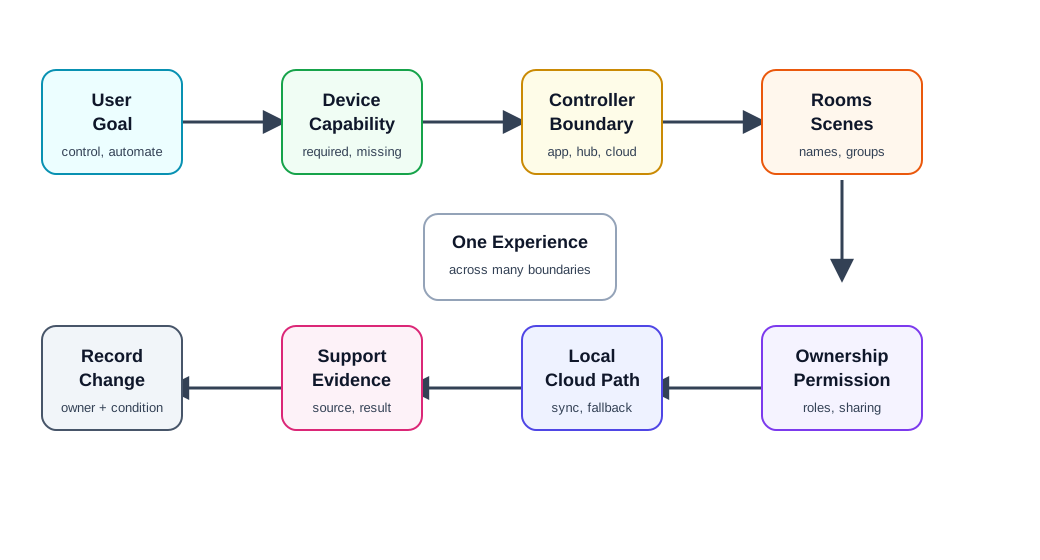
25.8 Ecosystem Review Map
Use Figure 25.2 to keep the review grounded:
- User goal: control, monitor, automate, share, troubleshoot, update, migrate, or retire.
- Device capability: sensor, actuator, camera, lock, display, gateway, bridge, battery, health state, or update state.
- Controller boundary: app, hub, gateway, voice controller, automation engine, cloud service, site dashboard, or third-party platform.
- Semantic model: rooms, zones, groups, scenes, modes, schedules, routines, and names.
- Permission and ownership: owner, resident, installer, operator, guest, support, and service account.
- Local and cloud paths: what works on site, what requires internet, what requires account state, and what is synchronized.
- Support evidence: state source, command result, route, error class, account state, and recovery history.
- Record and change control: accepted limit, owner, open issue, and change condition.
25.9 Ecosystem Boundary
Start with the boundary. An ecosystem may include the device, app, hub, bridge, router, gateway, cloud service, third-party platform, voice controller, installer tool, support dashboard, and account system.
Review:
- which parts are required for first setup, everyday use, automation, remote access, updates, and support
- what continues locally during internet loss, account outage, app uninstall, hub reboot, or platform disconnect
- where authoritative state lives for device state, room assignment, ownership, schedules, and automations
- whether the user sees one product boundary or a collection of unrelated boundaries
- whether support can tell which boundary failed
- whether decommissioning removes the relationship from every relevant boundary
An ecosystem boundary should be explicit enough that a user or support agent can answer, “What owns this device right now?”
25.10 Capability Mapping
Interoperability depends on mapping device capabilities into a shared model. A light may expose on/off, brightness, color temperature, scenes, firmware update, power state, and health. A different controller may understand only some of those capabilities.
Review:
- which capabilities are required, optional, degraded, hidden, or unsupported in each controller
- whether units, ranges, names, modes, and status meanings are consistent
- whether unsupported features are explained without implying the device is broken
- whether state changes made in one controller appear correctly in another
- whether manual physical actions update the shared state
- whether support records show the source of each state and command
The review should separate “device can do it” from “the ecosystem exposes it.” A capability that exists only in the manufacturer app may still be missing from the user’s daily control path.
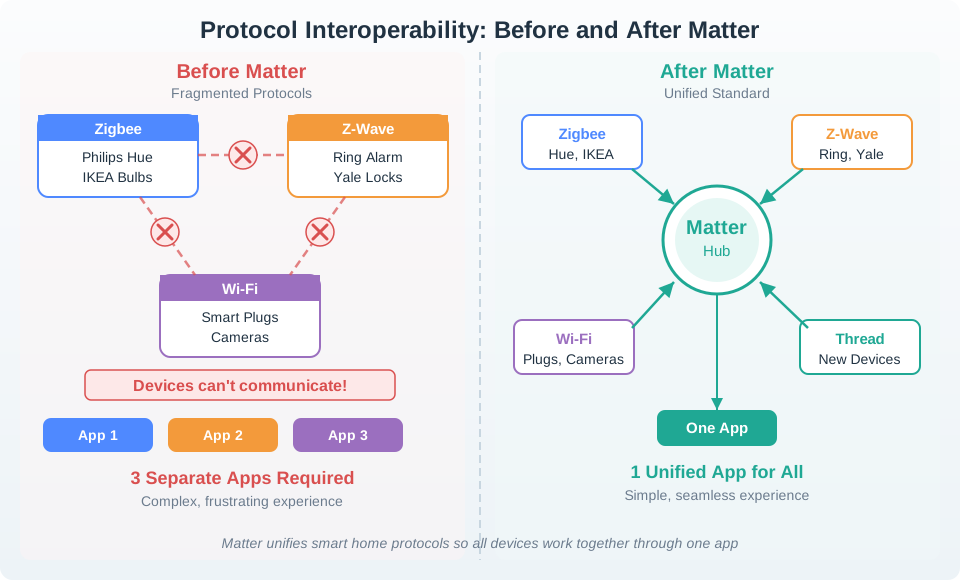
Figure 25.3 shows why interoperability evidence must still be capability-specific. A shared standard can reduce app fragmentation, but the review still has to prove which features, states, roles, and recovery paths survive the translation.
25.11 Rooms, Groups, Scenes, And Automations
Ecosystems often organize devices through semantic structures rather than protocol structures.
Review:
- room, zone, site, vehicle, machine, or asset assignment
- device type and group names that match the user’s physical context
- scene names that describe outcomes rather than arbitrary labels
- automation triggers, conditions, actions, owners, and conflict behavior
- what happens when a device in a scene is offline, asleep, busy, missing, or moved
- whether a scene preview shows which devices and states will change
- whether support can see why an automation did or did not run
Rooms and scenes are not cosmetic. They are how people understand the ecosystem. Bad names, hidden dependencies, and inconsistent state create distrust even when the underlying protocol is working.
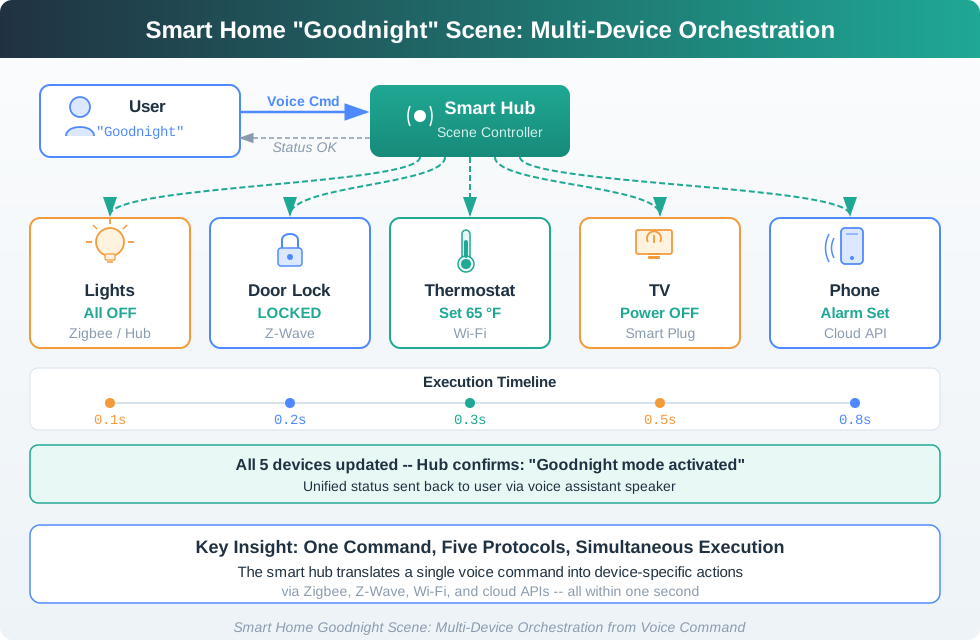
Use Figure 25.4 to review scene evidence: every target device, command path, acknowledgement, timing expectation, failed-device behavior, and final user confirmation should be explicit.
25.12 Multi-Controller And Ownership
Many ecosystems allow a device to be controlled by more than one app, hub, platform, or user. This can improve flexibility, but it also creates state, permission, and accountability risks.
Review:
- whether multiple controllers can command the same device and how conflicts are resolved
- which controller owns automations, schedules, firmware updates, and notifications
- whether role changes propagate across all controllers
- whether a guest, installer, or support account can gain more access than intended
- whether ownership transfer revokes old credentials and preserves appropriate history
- whether audit logs show who or what changed device state
Multi-controller support should not mean “everyone can do everything.” It should mean clear roles, visible ownership, and predictable conflict behavior.
25.13 Local, Cloud, And Platform Paths
Ecosystem integration usually mixes local paths and remote paths. A command may start in a phone app, pass through a cloud service, reach a local hub, and then reach a device. Another command may stay local.
Review:
- which controls need internet and which work locally
- whether local and remote commands produce the same visible state
- whether cloud latency, queueing, or rate limits change the user experience
- whether local fallback preserves safety, access, and basic control
- whether the ecosystem explains partial outage states clearly
- whether support can separate device, hub, internet, cloud, platform, and account failures
The review should make hidden dependencies visible. A dashboard that says “online” while local control is broken or “offline” while local manual control still works is not giving enough evidence.
25.14 Migration, Replacement, And Exit
Ecosystems must handle change. Devices are replaced, hubs fail, accounts transfer, standards evolve, and organizations migrate platforms.
Review:
- device replacement without losing room, group, scene, and automation intent
- hub or gateway replacement without orphaning devices
- migration between controllers or platforms without duplicated devices
- export or record of important configuration before decommissioning
- transfer between owners, tenants, sites, teams, or service providers
- what is erased, preserved, or archived at retirement
An ecosystem that is easy to enter but hard to leave creates lifecycle risk. The review should include exit behavior, not only onboarding.
25.15 Ecosystem Integration Record
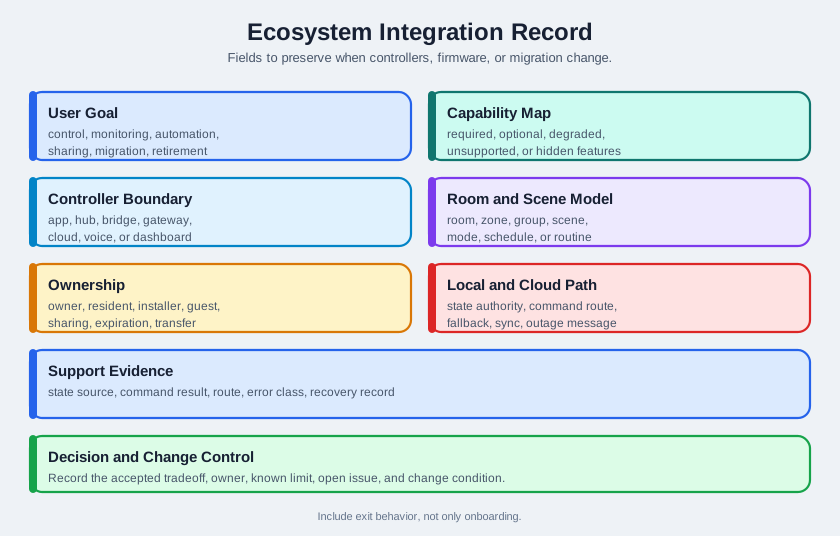
Figure 25.5 shows the fields to preserve:
- User goal: control, monitoring, automation, sharing, troubleshooting, updating, migration, or retirement.
- Capability map: required, optional, degraded, unsupported, hidden, and platform-specific features.
- Controller boundary: app, hub, bridge, gateway, cloud, voice controller, site dashboard, and third-party platform.
- Semantic model: room, zone, group, scene, mode, schedule, routine, asset, and naming rule.
- Ownership and permission: owner, resident, installer, operator, guest, support, service, sharing, expiration, and transfer.
- Local and cloud path: state authority, command route, fallback, sync rule, outage message, and queue behavior.
- Support evidence: state source, command result, automation reason, route, error class, account state, and recovery record.
- Decision and change control: accepted tradeoff, owner, known limit, open issue, and change condition.
The record should be short enough to update when devices, controllers, firmware, account policy, automation engine, cloud path, support tooling, or migration process changes.
25.17 Worked Review: Multi-Platform Home
A household wants devices to appear in more than one controller while preserving local control, clear ownership, and understandable scenes.
Ecosystem evidence to request
- device capabilities exposed in each controller and which are missing or degraded
- which controller owns room names, scenes, automations, notifications, and firmware updates
- what happens when one controller renames, moves, deletes, or resets a device
- whether a scene preview shows every affected device before activation
- whether local control still works when a cloud path or app account is unavailable
- how user sharing and guest access differ across controllers
- how support identifies the source of a command or state change
Likely review action
Approve only if the product record names the primary controller, the shared-capability subset, the conflict behavior, and the recovery path when one controller becomes inconsistent.
Change condition
Rerun the review when a new controller is added, automation ownership changes, capabilities are remapped, firmware changes exposed clusters or services, or account sharing changes.
25.18 Common Findings
- The ecosystem claim lists supported standards but not supported capabilities.
- One controller shows a state that another controller cannot confirm.
- Rooms and scenes are duplicated or renamed differently across apps.
- Automations run in an unknown location, making outages and conflicts hard to explain.
- A device is removed from one app but remains active in another account or hub.
- Guest, installer, support, and owner roles are not separated.
- Unsupported features appear as broken controls instead of documented limitations.
- Replacing a hub or device destroys room, group, scene, or schedule intent.
- Support cannot tell whether a failure is device, hub, internet, cloud, platform, permission, or automation logic.
- The record lacks an owner, known limit, open issue, or change condition.
25.19 Review Checklist
Before accepting an ecosystem integration design, confirm that the record includes:
- ecosystem boundary and required parts for setup, operation, automation, updates, support, and retirement
- capability map across each controller and platform
- state authority and command route for local and remote paths
- room, zone, group, scene, mode, schedule, and naming behavior
- ownership, role, sharing, expiration, transfer, and revocation rules
- multi-controller conflict behavior and audit evidence
- outage, degradation, local fallback, queueing, sync, and recovery messages
- replacement, migration, export, and decommissioning behavior
- accepted tradeoff, owner, known limit, open issue, and change condition
25.20 Knowledge Check
25.21 Matching Quiz
25.22 Ordering Quiz
25.23 Summary
Ecosystem integration is the review of how multiple connected-device boundaries become one understandable product experience. It covers capabilities, controllers, rooms, groups, scenes, automations, ownership, permissions, local and cloud paths, support evidence, migration, and decommissioning.
The strongest ecosystem records avoid vague compatibility claims. They show which capabilities work where, who owns state and automations, what works locally, what needs the cloud, how users recover, how support diagnoses failures, and what change requires a fresh review.
25.24 Key Takeaway
Ecosystem integration works when APIs, permissions, identity, automations, fallback behavior, and support ownership are explicit.
25.25 Concept Relationships
- Device Communication Patterns explains the paths an ecosystem coordinates.
- Device Discovery and Pairing reviews how devices enter controller inventories and accounts.
- Device Lifecycle Management connects ecosystem integration to replacement, transfer, maintenance, and retirement.
- Interoperability Fundamentals expands system-to-system integration and data-exchange evidence.
- Security and Privacy Overview expands access, account, credential, and privacy concerns.
25.26 What’s Next
Continue to Interface Design Fundamentals to connect ecosystem decisions to the screens, controls, and feedback users actually operate.