8 Context-of-Use Analysis for IoT
IoT context of use, contextual inquiry, context-aware IoT design, IoT user research, accessibility context
8.1 Start Simple
The same sensor can feel helpful, intrusive, invisible, or unsafe depending on where it is used and who is nearby. Start context analysis by naming the physical setting, social roles, timing, technical limits, accessibility needs, and cultural expectations that change what a good IoT design must do.
8.2 In 60 Seconds
Context-of-use analysis studies the real conditions in which people use an IoT system. It is not the same as adding sensors so a device can guess what people want. It is a research and design method for understanding who is involved, what they are trying to do, where the device lives, what else is happening, which constraints shape behavior, and what evidence should change the design.
For IoT, context matters because the experience crosses screens, devices, physical spaces, networks, power sources, permissions, maintenance routines, privacy expectations, and support handoffs.
Use context analysis to answer:
- Who uses, configures, shares, maintains, or is affected by the system?
- What task or decision is the person trying to complete?
- What physical conditions change input, output, placement, visibility, sound, reach, or safety?
- What social, privacy, ownership, and permission relationships shape use?
- What time pressure, routine, interruption, or urgency changes the interaction?
- What technical conditions such as connectivity, power, device age, and integration change reliability?
- What accessibility, language, cultural, and organizational constraints must be respected?
- What evidence proves these context claims, and what remains assumed?
The output should be a context record: observed conditions, design implications, acceptance criteria, evidence boundaries, and change conditions.
8.3 Learning Objectives
By the end of this chapter, you will be able to:
- distinguish context-of-use analysis from generic user preference gathering
- analyze physical, social, temporal, technical, cultural, and accessibility context
- translate context observations into interface, device, service, and support requirements
- identify when context-aware automation needs confirmation, override, or privacy limits
- avoid lab-only assumptions that hide real-world IoT failures
- write a context record that keeps later design decisions evidence-bound
8.4 Prerequisites
Before reading this chapter, you should be comfortable with:
- User Research Fundamentals, which explains why observed behavior matters more than team assumptions.
- Research Methods, which explains interviews, contextual inquiry, and field observation.
- Interface Design Fundamentals, which explains how context changes modality, feedback, and recovery.
- Interface Design Process Checklist, which explains how to turn evidence into review records and acceptance decisions.
8.5 Context Changes System Behavior
Context-of-use analysis for IoT is not a background paragraph. It explains why a connected system needs a different input, output, state model, fallback, support path, or privacy limit in the real setting. Wet hands, a shared hallway, a caregiver handoff, a poor Wi-Fi zone, a low battery, and an offline gateway are design facts when they change what the user can safely do.
For connected products, the context crosses surfaces. The same task may involve a physical button, a small device display, a companion app, a voice assistant, a dashboard, a notification, a support console, and a firmware log. A useful context finding says which surface carries the user-visible truth when the others disagree. 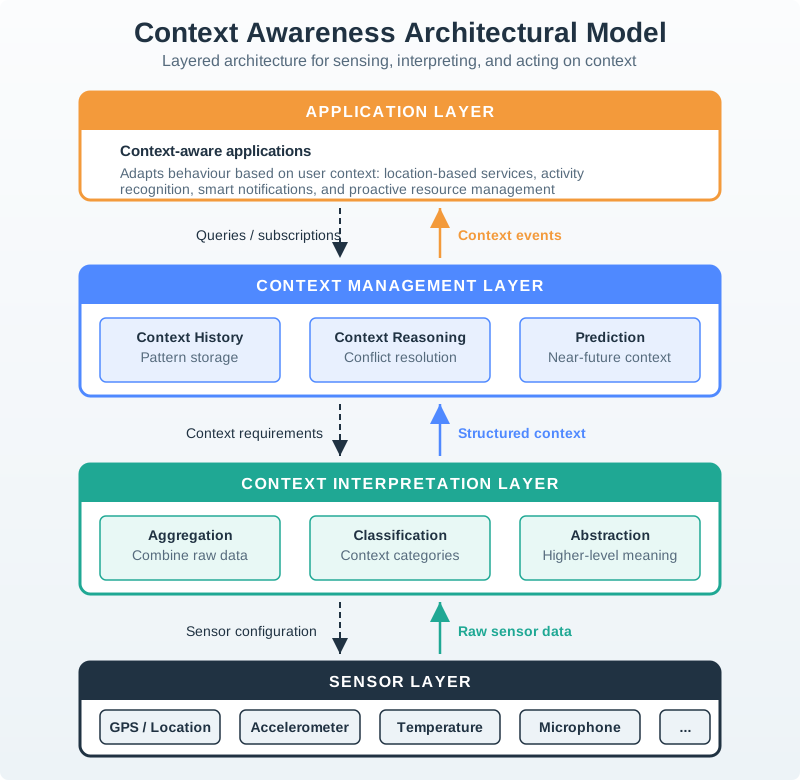
A kitchen measurement device shows the difference between context as evidence and context as guesswork. The team may believe a clean touchscreen is enough because the lab task succeeds. Field observation may show wet hands, flour on fingers, steam, background noise, side-angle viewing, limited counter space, and interruptions from other people. Those observations change the design requirement: the primary action may need tactile control, stronger visual state, saved task progress, and feedback that works when audio is masked.
The context record should therefore name the condition, consequence, evidence boundary, and retest trigger. It is not enough to write “kitchens are noisy” or “care settings are shared.” The record should say which role was observed, which task was affected, what surface or system state must change, what evidence supports the finding, what the evidence does not prove, and what deployment change would require another review. That makes later design, firmware, support, and privacy decisions traceable.
- Observed condition: name the real role, task, site, time pressure, physical constraint, and shared-use relationship.
- Design consequence: state what must change in input, feedback, automation, recovery, accessibility, privacy, or support.
- State truth: identify whether the local device, gateway, cloud service, app cache, or support console is authoritative for the moment.
8.6 Context Findings to Requirements
Write each context finding as a requirement that can be built and tested. If installers work in cold storage, “works with gloves” should affect button type, target size, confirmation feedback, and installation flow timing. If caregivers and residents share responsibility, the requirement should define what each role sees, how acknowledgement works, and what details remain private.
Use real system artifacts when translating the finding. A context requirement may reference a Matter device attribute, MQTT topic, retained state, Home Assistant automation, Node-RED flow, mobile permission state, OTA rollback state, battery threshold, device-shadow version, local event log, support ticket field, or OpenAPI endpoint. Those artifacts keep the UX requirement attached to the connected system that must satisfy it.
Use a context-to-requirement table rather than a loose list of observations. A row for “wet hands during tare” might specify a physical control, minimum target size, non-color visual confirmation, haptic or vibration feedback if the hardware supports it, water/cleaning tolerance to test, and the evidence source. A row for “shared caregiver status” might specify role visibility, acknowledgement language, stale-state handling, escalation delay, privacy limit, and support-console field. Each row should have an owner who can change the device, app, service, or support process.
Keep field evidence and implementation evidence linked. Deployment photos can show mounting and reach. Wi-Fi RSSI, gateway logs, device-shadow versions, and battery telemetry can explain state reliability. Consent notes, account-role configuration, support tickets, and accessibility settings can explain why a technically working feature still fails in context. When the team changes a sensor, enclosure, mounting height, app permission, support script, or automation rule, the affected context rows should be retested rather than treated as evergreen research.
- Map the task path: list physical device, app, automation, notification, dashboard, and support touchpoints for the same user goal.
- Map context signals: record which signals are observed, inferred, stale, missing, private, or user-correctable.
- Map acceptance criteria: define how the design behaves under the field condition, not just in a clean lab flow.
8.7 Context Findings Need Handles
A context finding is easier to maintain when it names the operational handle that proves or breaks it. Useful handles include firmware version, hardware revision, enclosure placement, RSSI/SNR, gateway id, network type, queue depth, retry count, battery voltage, sensor sampling interval, timestamp freshness, local/cloud state version, permission state, locale, accessibility setting, account role, and support correlation id.
Instrumentation should help the team separate user-context failure from system failure. A missed reminder may be caused by low volume, hearing loss, quiet hours, notification permission denial, device offline state, stale caregiver view, or an escalation rule that waited too long. The context record should point to the observable signal, the user-facing message, and the owner who changes the device, app, service, or support process.
Context-aware architecture can help, but it can also hide uncertainty if the interface treats inferred context as fact. Sensor data may be raw, aggregated, classified, predicted, stale, missing, private, or contradicted by the user. A motion event, phone proximity, ambient sound level, or location geofence is not the same as intent. For visible, costly, private, security-related, or hard-to-undo actions, the system should expose confidence, ask for confirmation, or preserve an override rather than silently acting on a single context signal.
Operational handles make those boundaries testable. A support record can show gateway id, last-seen timestamp, firmware version, queue depth, command result, and account role without exposing unnecessary household or health detail. A field trial can pair observation notes with RSSI/SNR, battery voltage, device placement, notification permission, and local event logs. An automation review can record which context signals are authoritative, which are inferred, which expire, and which user action corrects them. That is how context analysis stays alive after the first research report.
- Automation boundary: do not treat one context signal as intent; combine signals or ask for confirmation when the action is visible, private, costly, or hard to undo.
- Support boundary: give support staff enough state to explain failure without exposing extra location, health, camera, or household data.
- Change boundary: rerun context analysis when the site, role, sensor, mounting, app permission, firmware behavior, or integration changes.
8.8 Context Is Use Evidence
Context analysis starts with observed use conditions, not with a feature wish list.
Weak context statement:
- “Users need a smart kitchen dashboard.”
Stronger context statement:
- “During meal preparation, users often have wet or dirty hands, limited attention, background noise, variable lighting, and interruptions from other people. A kitchen device that requires precise touchscreen input and subtle audio-only feedback is therefore risky unless tested in that setting.”
The stronger statement links an observed condition to a design implication. It also makes the assumption testable.
Context evidence may come from:
- field observation
- contextual inquiry
- task walkthroughs
- diary studies
- support logs
- maintenance records
- deployment photos
- accessibility review
- pilot telemetry interpreted alongside user observation
- stakeholder interviews that are checked against real behavior
Do not let context become a vague word for “everything around the user.” The value is in naming the specific condition that changes the design.
8.9 Context Dimensions
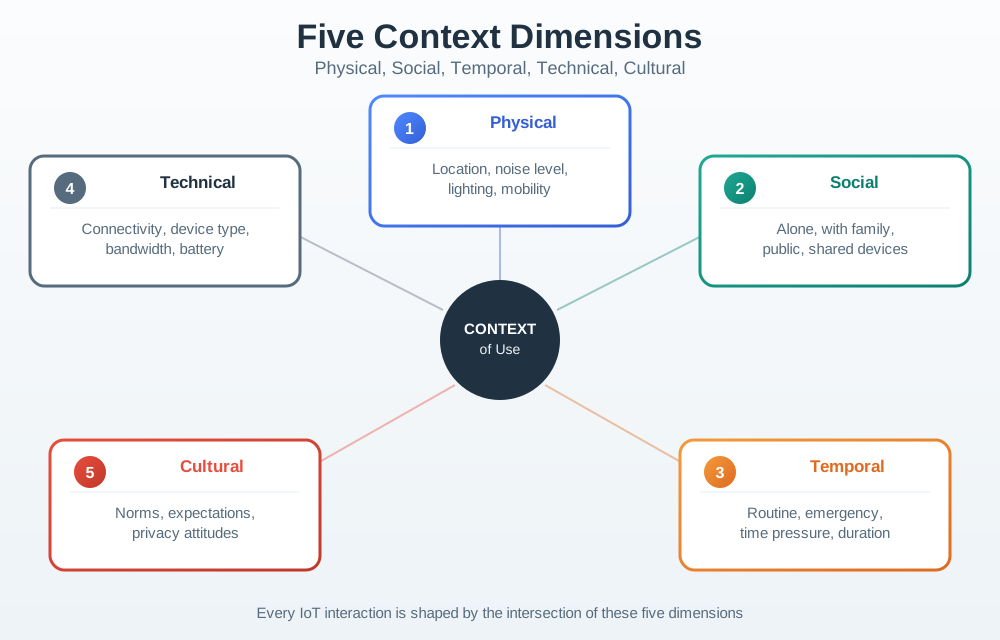
Use Figure 8.1 to structure a review. The dimensions are not separate boxes in real life; they overlap during use.
8.10 Physical Context
Physical context covers the environment and the user’s physical relationship to the device.
Review whether the design works with:
- bright sunlight, darkness, glare, vibration, or motion
- noise, echo, water, dust, dirt, grease, cold, heat, or humidity
- gloves, wet hands, limited reach, limited grip, tremor, fatigue, or one-handed use
- wall mounting, counter placement, pocket use, outdoor installation, vehicle use, or equipment-room access
- small screens, no screens, distant indicators, physical labels, hidden ports, or hard-to-reach reset controls
- cleaning, replacement, charging, battery access, mounting, and maintenance
Example finding:
- A touchscreen-only kitchen device may work in a lab but fail when users have wet hands, flour on fingers, and attention split between cooking tasks.
Design implications may include physical buttons, larger targets, redundant visual feedback, water-resistant surfaces, local indicators, mounting changes, or a different primary modality.
8.12 Temporal Context
Temporal context covers time, routine, duration, urgency, interruptions, and sequence.
Review:
- whether the task happens in a routine, rare, urgent, seasonal, or emergency moment
- whether the user has seconds, minutes, or a longer planning window
- whether the interaction is a quick glance, a repeated daily habit, a setup task, or an occasional maintenance event
- whether the device must work during sleep, travel, shift change, school pickup, commuting, cooking, service windows, or outages
- whether alerts and notifications respect attention and escalation timing
- whether historical data, last-known state, or future schedules need to be visible
Example finding:
- A setup flow that is acceptable during a calm pilot may fail when an installer is working through many devices, limited daylight, and a scheduled site closure.
Design implications may include shorter flows, saved progress, batch operations, delayed reminders, escalation windows, schedule previews, or fewer confirmation steps for well-bounded low-risk actions.
8.13 Technical Context
Technical context describes the surrounding technology environment.
Review:
- connectivity quality, local network availability, roaming, firewalls, captive portals, and offline operation
- power source, battery replacement, charging access, sleep states, and update energy
- phone age, operating system support, browser constraints, device permissions, and accessibility settings
- existing equipment, legacy protocols, hubs, gateways, dashboards, cloud services, and support tools
- firmware update paths, rollback, diagnostic visibility, logs, and maintenance access
- data freshness, sync delays, queues, retries, conflicts, and local/cloud responsibility
Example finding:
- A device that depends on cloud confirmation for a local critical action may be unsuitable in a building with unreliable internet unless local fallback behavior is designed and tested.
Design implications may include local control, queue-and-sync behavior, offline status, gateway design, reduced data dependency, clearer error states, or diagnostic views for support.
8.14 Cultural and Organization Context
Culture is not only country or language. It includes household norms, workplace rules, role expectations, privacy expectations, regulatory environment, training practice, and trust in automation.
Review:
- language, reading level, terminology, icons, symbols, units, and voice-command vocabulary
- cultural meanings of color, sound, alerts, camera use, health data, monitoring, and automation
- workplace hierarchy, consent, escalation authority, and audit needs
- household expectations around shared control, guests, children, elders, caregivers, and renters
- whether people trust the device enough to leave automation enabled
- whether a manual override is expected even when automation is technically possible
Example finding:
- A voice-first device may be inappropriate in a shared office, care setting, or multilingual household if commands expose private information or fail for common accents and vocabulary.
Design implications may include multilingual content, icon support, local units, quiet interaction modes, consent screens, manual controls, clearer automation explanations, or training material.
8.15 Accessibility Context
Accessibility should be reviewed as context, not as a final compliance layer.
Check whether the design works when the user:
- cannot rely on color alone
- needs larger text, high contrast, screen-reader support, captions, or reduced motion
- has limited hearing, vision, mobility, dexterity, attention, memory, or language fluency
- is wearing gloves, carrying items, moving, fatigued, stressed, or under time pressure
- cannot use a mobile app at the moment of need
- is using assistive technology, operating-system accessibility settings, or a physical alternative
For connected devices, accessibility also includes the physical device, local indicator, printed label, mounting position, setup flow, support path, and maintenance routine.
Design implications should be recorded as acceptance criteria. For example, “critical state must not rely on color alone” is stronger than “consider accessibility.”
8.16 Translate Context Into Requirements
Context observations become useful when they change a design decision.
Use this sequence:
- Observation: What was seen, heard, measured, or reported?
- Condition: Which context dimension does it affect?
- Risk: What can go wrong if the design ignores it?
- Requirement: What must the interface, device, service, or support path do?
- Evidence: What proves the requirement is satisfied?
- Boundary: What did the evidence not prove?
- Change condition: What change requires another context review?
Example:
- Observation: Users operate the device while wearing gloves in cold storage.
- Risk: Capacitive touch input may fail or require repeated attempts.
- Requirement: Primary local action must be possible with gloved hands.
- Evidence: Field test with representative gloves in the actual storage area.
- Boundary: This does not prove use with wet gloves or under emergency time pressure.
- Change condition: Change in button hardware, glove type, mounting location, or task urgency.
8.17 Context Analysis Record
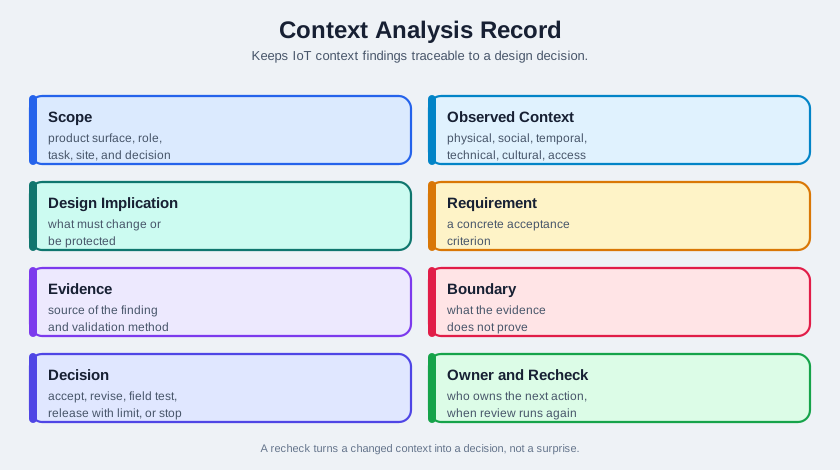
Use Figure 8.2 to keep context findings traceable.
A practical record includes:
- Scope: product surface, role, task, site, and decision.
- Observed context: physical, social, temporal, technical, cultural, and accessibility conditions.
- Design implication: what must change or be protected.
- Requirement: concrete acceptance criterion.
- Evidence: source of the finding and validation method.
- Boundary: what the evidence does not prove.
- Decision: accept, revise, test in field, release with constraint, or stop.
- Owner and change condition: who owns the next action and when the review must run again.
The record should be short enough to maintain. A long report that nobody updates is less useful than a concise record tied to a real decision.
8.18 Context-Aware Automation
Context-aware IoT systems can be helpful, but context signals are evidence, not certainty.
Risky automation logic:
- “If the phone is near home, turn on the lights.”
Stronger automation logic:
- “If the phone is near home, recent motion indicates entry, it is after sunset, the user has not disabled this automation recently, and the action is low risk, suggest or perform the action with visible override.”
Review automation using these questions:
- What context signals are being used?
- How confident is the system, and how is uncertainty represented?
- Is the action reversible?
- Is the action private, visible, noisy, expensive, safety-related, or security-related?
- Has the user recently contradicted the automation?
- Is there an obvious local and remote override?
- Does the system explain why it acted or suggested action?
- What happens when a signal is stale, missing, wrong, or delayed?
For higher-risk actions, confirmation or suggestion may be better than automatic action. For low-risk routine actions, automation may be acceptable if override and feedback are clear.
8.19 Privacy and Minimum Context
Context-aware systems can easily collect more data than the task requires. Context analysis should therefore include a minimum-context check.
Ask:
- What context signal is necessary for the user value?
- Can the signal be processed locally?
- Can the system use a less sensitive signal?
- How long must the signal be kept?
- Who can see it?
- What is shown to bystanders or shared users?
- How can the user inspect, correct, disable, or delete it?
- What still works when the user refuses a permission?
Example:
- A room-comfort system may need occupancy state, but it may not need identifiable movement history for every person in the household.
The design should collect the least sensitive context that can support the task, explain the reason at the point of use, and preserve useful fallback behavior when possible.
8.20 Field Validation
Lab testing is useful, but context claims need context evidence.
Use lab tests for:
- early terminology
- flow structure
- basic task comprehension
- prototype walkthroughs
- controlled comparison of alternatives
Use field or realistic-context tests for:
- physical placement
- lighting, noise, weather, reach, and cleaning
- multi-user conflict
- actual connectivity and power behavior
- setup under real constraints
- alerts during real routines
- maintenance, support, and ownership transfer
Do not overclaim. A lab test can show that people understand a message. It cannot prove that the message is readable on a mounted device in sunlight, during noise, or with wet hands.
8.21 Kitchen Measurement Review
Scope:
- Surface: local device controls and companion recipe screen.
- Role: home cook preparing food.
- Task: measure ingredients, reset tare, and continue cooking without losing flow.
- Context: wet or dirty hands, limited counter space, steam, noise, multitasking, and interruptions.
Weak design assumption:
- A clean touchscreen and audio beep are enough because the device works on a lab bench.
Context findings:
- Users often touch the device with wet or flour-covered hands.
- Audio cues compete with water, fans, conversation, and timers.
- The user may step away to stir, wash, or answer another question.
- The screen may be viewed from an angle or partly blocked by bowls.
Design requirements:
- Primary tare and confirm actions need tactile controls or another input that works with messy hands.
- Critical state needs visual feedback that is readable at kitchen distance.
- The device should preserve task state across ordinary interruptions.
- Cleaning and water exposure must be part of the prototype test.
Evidence boundary:
- A bench prototype can test input and feedback. A field test in real cooking conditions is needed before claiming the interaction works in context.
8.23 Common Context Analysis Defects
Watch for:
- Lab-only assumptions: testing on desks, with clean hands, strong Wi-Fi, full attention, and expert users.
- Single-signal automation: treating location, motion, time, or one sensor reading as proof of user intent.
- Role collapse: assuming buyer, installer, daily user, guest, maintainer, and support agent have the same needs.
- Privacy creep: collecting sensitive context because it is available rather than because the task requires it.
- Accessibility afterthought: reviewing only app screens while ignoring physical placement, indicators, controls, labels, and support paths.
- Cultural overgeneralization: assuming language, symbols, norms, trust, and household/workplace roles transfer unchanged.
- Unsupported metrics: using fixed time, cost, satisfaction, or return claims without evidence from the reviewed context.
- No change condition: failing to rerun context analysis after changing site, role, surface, sensor, automation, or deployment environment.
8.24 Context Review Checklist
Before accepting a context-sensitive design, confirm:
- the user role, task, site, and decision are scoped
- observations are separated from assumptions
- physical, social, temporal, technical, cultural, and accessibility conditions are considered
- design requirements are written as concrete acceptance criteria
- automation uses compound evidence, visible feedback, and override
- privacy and minimum-context questions are answered
- field evidence is used when the claim depends on real environment behavior
- evidence boundaries are explicit
- an owner and change condition are recorded
8.25 Knowledge Check
8.26 Matching Quiz
8.27 Ordering Quiz
8.28 Summary
Context-of-use analysis helps IoT teams design for the real conditions where connected systems are used. It covers physical setting, social and ownership relationships, time pressure, technical environment, cultural and organizational expectations, and accessibility. The goal is not to collect anecdotes. The goal is to translate observed conditions into design requirements, evidence boundaries, and change conditions.
Good context analysis prevents lab-only designs, overconfident automation, privacy creep, inaccessible physical interactions, and unsupported claims about how a device will work in the field.
8.29 Key Takeaway
Context analysis should capture environment, routines, constraints, stakeholders, interruptions, and safety needs before design decisions harden.
8.30 Concept Relationships
Context analysis connects to the rest of the UX sequence:
- User Research Fundamentals explains why real behavior matters.
- Research Methods explains how to collect context evidence through observation and inquiry.
- Personas and Journey Maps uses context findings to shape user models and journeys.
- Pitfalls and Ethics covers privacy, consent, sampling, and research-quality risks.
- Interface Design Process Checklist turns context findings into acceptance decisions.
8.31 What’s Next
Continue with:
- Personas and Journey Maps, which synthesizes repeated context patterns into user models and journeys.
- Pitfalls and Ethics, which reviews privacy, consent, sampling, and automation risks.
- User Research Fundamentals, which grounds context work in observed behavior.
- Understanding People and Context, which provides the broader sequence overview.
8.11 Social and Ownership Context
IoT devices often operate in shared spaces. The person who buys, configures, uses, maintains, or is affected by a device may not be the same person.
Review:
Example finding:
Design implications may include role-specific views, guest permissions, activity history, clear ownership transfer, bystander privacy, or support handoff language.