11 Design Thinking for IoT
design thinking for IoT, IoT user research, IoT prototype validation, IoT usability testing, IoT problem framing, design evidence record
11.1 Start Simple
Design thinking for IoT starts with a messy field problem, not a tidy screen brief. Use the loop to frame the human need, prototype the smallest thing that answers the risk, test it where device state and service handoffs matter, and revise the decision record when evidence changes.
11.2 In 60 Seconds
Design thinking helps IoT teams avoid building technically impressive devices that do not solve a real problem. It connects field observation, problem framing, idea generation, prototype choice, user testing, and iteration into a research loop.
The UX review question is not “did the team run a workshop?” The useful question is whether each design decision is traceable to observed user context, physical environment, device constraints, privacy and safety risks, support needs, and tested behavior.
11.3 Learning Objectives
By the end of this chapter, you will be able to:
- review design thinking as evidence, not only as a five-step label
- connect empathy research to IoT context, physical setting, routines, devices, and constraints
- frame problem statements that avoid premature sensor, app, cloud, or automation assumptions
- select prototype fidelity based on the question being tested
- evaluate user testing evidence, iteration decisions, risks, and conditions that reopen the design
11.4 Minimum Viable Understanding
Design thinking is reviewable only when the notes show who was observed, what context was studied, what problem was framed, what alternatives were considered, what prototype question was tested, what changed after testing, what risk remains, and who owns the next decision.
Avoid accepting broad claims such as “we used design thinking,” “users liked it,” or “the prototype tested well.” Those claims need evidence: the participant context, observed behavior, task result, failure mode, decision made, and unresolved assumption.
11.5 Prerequisites
This chapter builds on:
- IoT Architecture Model Selection, which reviews how model choices create constraints and responsibilities.
- 8 Facets of IoT Design, which maps visible and hidden dimensions of connected-product design.
- Understanding People and Context, which expands field research, personas, journeys, and context analysis.
- User Experience Design, which provides the UX principles behind observation, task design, and usability review.
11.6 Design Thinking for Devices
In IoT, design thinking is only useful when it leaves the workshop and reaches the place where devices are installed, powered, paired, maintained, and trusted. A team can run perfect sticky-note exercises and still miss that a QR label is unreachable, a BLE setup flow fails in a metal cabinet, a status light is invisible in daylight, or an alert sounds during a noisy shift change. The method matters because connected devices join software behavior to physical setting, ownership, maintenance, consent, and failure recovery.
The loop is evidence-shaped: observe real context, frame the problem without preselecting a sensor or app, generate alternatives, choose a prototype that answers the risky question, test behavior in realistic conditions, and update the decision. The useful artifact is not a poster naming Empathize, Define, Ideate, Prototype, and Test. It is a short record showing the input evidence, the design choice being tested, the decision made, the next action, and the output that would be different if the evidence changed.
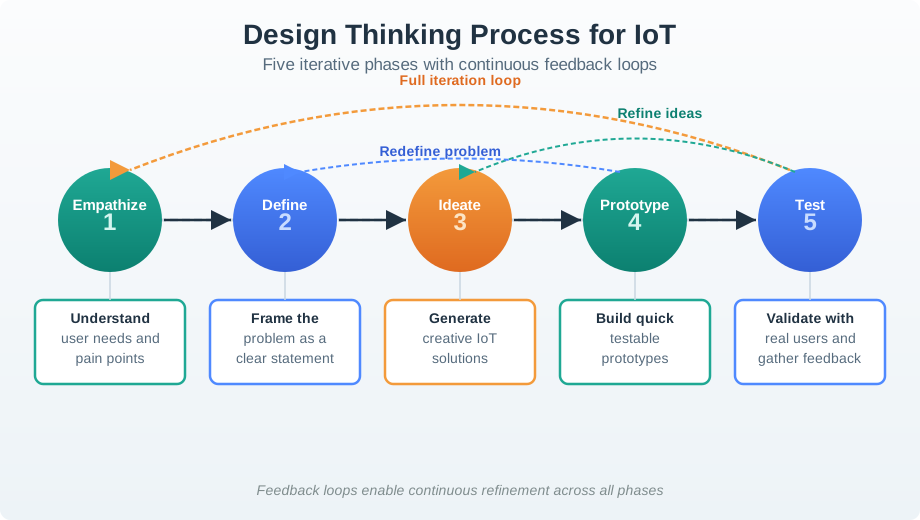
For an IoT review, every pass through the loop should include both user evidence and system evidence. User evidence covers roles, routines, language, physical access, accessibility, trust, and support handoffs. System evidence covers device placement, radio conditions, power source, sensing limits, data path, permissions, local fallback, update behavior, and service ownership. If either side is missing, the design may be pleasant in a demo and still fail in deployment.
- Context: observe roles, routines, lighting, reach, noise, gloves, wet hands, shared access, network quality, and support handoffs.
- Prototype: match fidelity to the uncertainty, from paper flow to cardboard mount, Figma setup screen, Wizard-of-Oz automation, bench electronics, or pilot deployment.
- Iteration: change the design because of observed task behavior, not because the team prefers a technology path.
- Boundary: state what the prototype did not prove, such as battery life, bystander privacy, ownership transfer, or cloud-outage recovery.
11.7 Test Hardest Assumptions
Pick the prototype that tests the assumption most likely to break in the field. A QR/BLE onboarding flow should be tested where the label is mounted, under the lighting and posture users will actually face. A maintenance alert should be tested with operator workload, handoff rules, escalation timing, and false-alarm tolerance. A sensing concept should be tested against sensor placement, calibration, power, enclosure effects, and data quality before the dashboard is polished.
Start with a review question that can be answered. “Will users like this connected appliance?” is too broad. “Can a resident identify the correct shared appliance, prove authority, complete setup when camera permission is denied, and recover when the device is offline?” is testable. “Can a technician decide whether an alert needs immediate service, deferral, or escalation when MQTT state is stale?” is also testable because it names the role, context, evidence, and failure states.
- Prototype interaction risk. Use paper sketches, Figma flows, physical labels, NFC tags, QR codes, BLE pairing mocks, and accessibility checks to test setup language, reach, permission, and recovery.
- Prototype technical risk. Use ESP32, nRF52, Arduino, Raspberry Pi, or a bench sensor rig to test sensing, latency, battery draw, enclosure placement, and connectivity claims.
- Prototype service risk. Use Mosquitto or another MQTT broker, Node-RED, Home Assistant, mock APIs, or a support dashboard stub to test alert routing, stale state, ownership transfer, and escalation paths.
Keep the prototype honest. If a human is simulating automation, call it Wizard-of-Oz. If data is mocked, label it as mocked. If a device is tethered to USB power, do not infer battery life. If support logs are not wired, do not claim the issue is diagnosable.
After each test, write the smallest decision record that future reviewers can audit: the participant role, deployment setting, task, prototype fidelity, observed behavior, error or workaround, risk found, decision made, owner, open issue, and condition that reopens the decision. This record prevents a prototype from becoming an undocumented promise. It also helps engineering separate UX evidence from technical feasibility evidence, so a team does not treat a successful Figma flow as proof that provisioning, telemetry, or support routing is production-ready. ## Research Data as Product Risk {.depth-l2}
IoT research can collect sensitive traces even during early prototypes. Presence, location, voice, image, health, home routines, worker behavior, and machine status can reveal more than a participant expects. Design thinking for IoT therefore needs data minimization, consent boundaries, retention limits, and safe test environments before prototypes leave the lab. A researcher watching a setup task may also capture bystander behavior, room occupancy, worker performance, or household routines that were never needed for the design question.
The technical prototype also changes what can be learned. BLE setup tests reveal proximity and permission friction but not long-term network reliability. MQTT dashboards can reveal stale-state and topic-design issues but not enclosure fit. A pilot deployment can reveal maintenance and support load but may expose users to real false alarms or privacy harm. The chapter reviewer should therefore ask which claims are supported by the prototype fidelity and which claims still need engineering, security, privacy, or operations evidence.
Under the hood, the best design-thinking records behave like lightweight traceability. A field note might become a problem frame; the problem frame might drive an NFC fallback concept; the concept might become a Figma flow plus a physical label mockup; the test might reveal that denied camera permission blocks setup; the iteration might add manual code entry and a support escalation path. Each link needs enough source, date, role, environment, and limitation detail to prevent over-generalization.
- Separate signals: distinguish user observation, sensor reading, inferred state, system log, support event, and participant quote summary.
- Bound claims: tie each finding to the prototype fidelity, participant role, environment, and failure states actually tested.
- Protect participants: remove unnecessary identifiers, avoid recording bystanders, limit retention, and make withdrawal and device reset practical.
- Control drift: reopen the design when the device form, deployment context, data path, permission model, automation rule, or support workflow changes.
11.8 Design Thinking Evidence Map
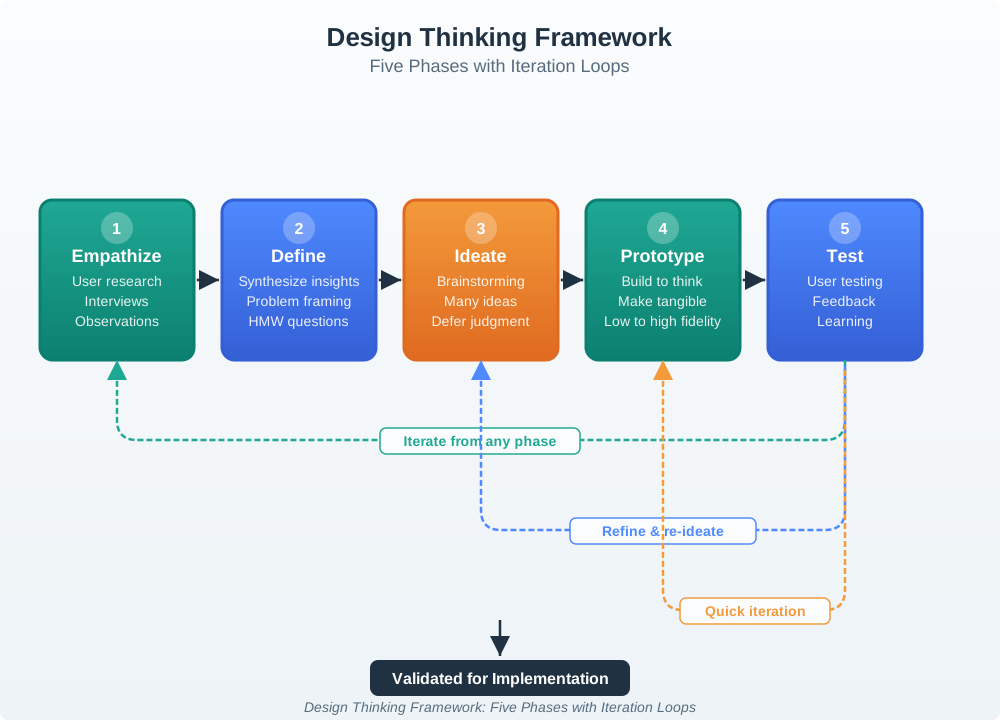
Use Figure 11.2 to keep the review evidence-based:
- Field context: user role, environment, routine, device location, constraints, workarounds, and social setting.
- Problem frame: user need, trigger, consequence, current workaround, non-goal, and assumption.
- Idea set: multiple concepts, rejected options, design constraints, and selection rationale.
- Prototype question: the specific uncertainty being tested, such as placement, language, setup, trust, alerting, or fallback.
- User test evidence: tasks, observations, errors, hesitation, recovery, accessibility barriers, and support clues.
- Iteration decision: keep, change, split, simplify, pause, or run another focused check.
- Risk review: privacy, safety, security, consent, inclusion, reliability, and operational risk.
- Change condition: new user group, device form, environment, automation, data path, permission model, or support workflow.
11.9 Empathize: Observe The Real Situation
Empathy in IoT includes more than opinions. Users interact with devices in physical spaces, routines, households, workplaces, vehicles, sites, and shared environments. Observation should capture what people do, what devices do, and what the environment makes possible or difficult.
Review:
- who was observed and whether they represent the intended users, operators, installers, maintainers, and support roles
- where the observation happened and whether that setting matches real deployment conditions
- what routines, interruptions, workarounds, physical constraints, accessibility needs, and privacy expectations were visible
- which existing devices, tools, labels, power sources, networks, and manual controls shaped behavior
- where stated preference differed from observed behavior
- what evidence was missing and should not be generalized
For IoT, the field context is often the product requirement. Lighting, distance, wall material, shared access, noise, wet hands, gloves, weak connectivity, low battery, and household routines can matter as much as screen layout.
11.10 Frame Problems Before Solutions
The Define phase turns observations into a problem frame. A good frame describes a user need and why current behavior fails without assuming the answer is a new sensor, app, dashboard, automation, or cloud service.
Review:
- whether the frame names the user, context, goal, barrier, consequence, and evidence source
- whether the problem statement separates need from proposed solution
- whether the frame includes non-goals and constraints
- whether privacy, safety, accessibility, support, and failure implications are visible
- whether the team recorded assumptions that still need testing
- whether alternative interpretations of the same observation were considered
Weak frame: “Users need a smart sensor app.” Stronger frame: “Residents need a low-effort way to confirm a shared room is safe to use because current status cues are distant, inconsistent, and hard to verify during busy handover periods.”
11.11 Ideate Before Choosing
Ideation is useful when it broadens the solution space. It is weak when the team starts with one favored technology and writes ideas around it.
Review:
- whether the team generated multiple concepts before evaluation
- whether at least some ideas changed the interaction model, physical form, service workflow, local fallback, or support path
- whether rejected ideas were recorded with reasons
- whether ideas were evaluated against user evidence rather than novelty alone
- whether constraints such as battery, installation, consent, accessibility, connectivity, and maintenance shaped selection
- whether the selected concept still fits the problem frame
An idea set should include options that do less, options that move logic locally, options that avoid collecting data, options that improve service workflow, and options that use existing manual cues. The best IoT answer is sometimes a simpler non-connected or partly connected design.
11.12 Match Fidelity to the Question
Prototypes should answer specific questions. A polished prototype can be wasteful if the question is still about terminology, placement, or trust. A rough prototype can be dangerous if the question is about physical safety, power behavior, or failure recovery.
Review:
- what question the prototype is meant to answer
- why the selected fidelity is enough for that question
- whether the prototype includes physical context, not only screens
- whether setup, alerts, permissions, failure states, and recovery paths are represented
- whether users can misunderstand the prototype as final capability
- whether the prototype avoids collecting unnecessary real personal data
- whether technical feasibility claims are separated from UX evidence
Prototype examples:
- Paper or clickable flow: test language, navigation, consent wording, setup sequence, and status labels.
- Cardboard or placement mockup: test size, mounting, reach, visibility, shared-space fit, and physical affordance.
- Wizard-of-Oz simulation: test automation expectation, trust, timing, and explanations before building intelligence.
- Bench prototype: test sensing, actuation, power, connectivity, latency, and failure behavior.
- Pilot deployment: test real context, maintenance, support, privacy, and behavior over time.
The review should ask whether the prototype teaches the next decision, not whether it looks impressive.
11.13 Test: Observe Behavior And Evidence
Testing should measure behavior against realistic tasks. Asking whether users “like” a prototype is not enough. IoT testing must include setup, physical interaction, alerts, multi-device behavior, privacy notices, degraded states, and recovery where relevant.
Review:
- whether test tasks match real situations rather than interface labels
- whether participants include the roles affected by the product
- whether the test setting includes physical and environmental constraints
- whether the facilitator observed hesitation, errors, misinterpretation, repeated attempts, and workarounds
- whether accessibility and consent barriers were recorded
- whether support and maintenance clues were captured
- whether the team separated task success from satisfaction
Useful testing evidence includes what the user tried first, what they ignored, what they misunderstood, whether they trusted the automation, whether they noticed stale state, whether they could recover, and whether they could explain what the system did.
11.14 Iterate: Make The Learning Visible
Iteration is not just changing the design. It is recording what evidence changed the decision and what remains uncertain.
Review:
- what was kept, changed, removed, split, or deferred
- which observation, task result, failure, or risk drove the decision
- whether the team simplified unnecessary connected behavior
- whether a new risk was introduced by the change
- whether the next prototype tests the highest-risk remaining assumption
- whether the notes name an accountable owner and the change that would reopen the decision
Good iteration records prevent drift. They help future teams understand why a feature exists, why an alternative was rejected, and when the decision should be reopened.
11.15 IoT-Specific Risk Checks
Design thinking for IoT must include risks that pure screen design can miss.
Review:
- Physical safety: Could a misunderstood action move, unlock, heat, dose, stop, start, or alert in a harmful way?
- Privacy and consent: Does the design collect presence, behavior, location, voice, image, health, or household data?
- Security and access: Who can control the device, share access, reset ownership, or override automation?
- Accessibility: Can people with different vision, hearing, mobility, cognition, language, or device access still complete core tasks?
- Failure recovery: What happens during low battery, weak link, app unavailability, cloud outage, stale state, or automation conflict?
- Support and maintenance: Can a user, installer, operator, or support person diagnose and recover without guessing?
- Lifecycle: What happens during onboarding, replacement, transfer, update, and decommissioning?
These checks belong inside the design thinking loop, not after launch.
11.16 Design Thinking Record
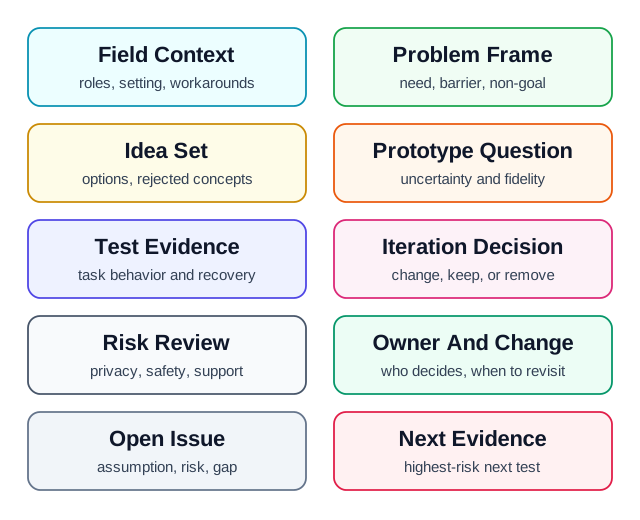
Figure 11.3 shows the fields to preserve:
- Field context: users, roles, setting, routine, constraints, workarounds, and evidence limits.
- Problem frame: need, barrier, consequence, non-goal, assumption, and source.
- Idea set: alternatives, rejected concepts, selection rationale, and constraints.
- Prototype question: uncertainty tested, fidelity, scenario, and represented failure states.
- Test evidence: task, observation, success, error, hesitation, recovery, quote summary, and accessibility note.
- Iteration decision: keep, change, remove, split, defer, or run another focused check.
- Risk review: privacy, safety, security, consent, inclusion, reliability, support, and lifecycle risks.
- Decision follow-up: accepted tradeoff, owner, known limit, open issue, and change condition.
The record should remain short enough to update after each meaningful research or test cycle.
11.18 Worked Review: Maintenance Alert Concept
A facility team wants an alerting feature that notifies operators when a device may need service. Early ideas include push notifications, dashboard badges, ambient indicators, and maintenance-ticket routing.
Design-thinking evidence to request
- observation of how operators currently notice, triage, defer, and close maintenance work
- problem frame that separates “send an alert” from “help the operator choose a timely and correct action”
- idea set that includes quiet indicators, batched reviews, escalation rules, local device cues, and service-ticket integration
- prototype question for each fidelity: wording comprehension, urgency interpretation, route to action, false alarm tolerance, and recovery
- test evidence from representative operators under realistic interruption and workload conditions
- risk review for alert fatigue, missed urgent issues, privacy, safety, stale data, and unclear ownership
Likely review action
Approve a prototype path only if the next test checks whether operators understand urgency, cause, confidence, and action without being overloaded. Hold if the design records only preference ratings and not observed triage behavior.
Reopen the review when
Rerun the review when alert categories, sensor evidence, operator roles, dashboard layout, escalation policy, or support integration changes.
11.19 Common Findings
- The team labels the process “design thinking” but starts with a chosen technology.
- Research relies on opinions without observing context, routines, workarounds, or physical constraints.
- Problem statements describe a feature rather than a user need.
- Ideation produces variants of one preferred solution instead of alternatives.
- Prototype fidelity is higher than needed for the question being tested.
- Testing measures satisfaction but not task success, recovery, or misunderstanding.
- IoT-specific failure states are omitted from prototypes and tests.
- Privacy, consent, accessibility, support, and lifecycle risks are deferred too late.
- Iteration records do not explain which evidence changed the design.
- The notes lack an owner, known limit, open issue, or condition that reopens the decision.
11.20 Review Checklist
Before accepting a design-thinking decision, confirm that the record includes:
- observed user roles, deployment context, routines, constraints, workarounds, and evidence limits
- problem frame with user need, barrier, consequence, non-goal, and assumptions
- multiple concepts, rejected alternatives, selection rationale, and IoT constraints
- prototype question, fidelity choice, represented context, and represented failure states
- test tasks, observed behavior, task success, errors, hesitation, recovery, accessibility, and consent evidence
- iteration decision and the evidence that caused it
- privacy, safety, security, reliability, accessibility, support, and lifecycle risks
- accepted tradeoff, owner, known limit, open issue, and condition that would reopen the design
11.21 Knowledge Check
11.22 Matching Quiz
11.23 Ordering Quiz
11.24 Summary
Design thinking for IoT is a research loop. It starts with real context, frames the problem without preselecting the technology, generates alternatives, selects prototype fidelity based on the question, tests realistic behavior, and records why the design changed.
The strongest design-thinking notes avoid workshop theater. They show observed context, user need, rejected alternatives, prototype questions, task behavior, IoT-specific risks, iteration decisions, owners, and the conditions that would reopen a decision.
11.25 Key Takeaway
Design thinking in IoT must turn field research into prototypes, tests, implementation constraints, and evidence-backed release decisions.
11.26 Concept Relationships
- Understanding People and Context expands the field research evidence used during Empathize.
- 8 Facets of IoT Design helps ensure prototypes cover visible and hidden design dimensions.
- IoT Architecture Model Selection constrains feasible prototype and deployment choices.
- IoT Design Patterns and Components provides implementation patterns after the design direction has evidence.
- Prototyping Hardware expands hardware prototype choices for physical and technical validation.
11.27 What’s Next
Continue to 8 Facets of IoT Design to review how user-visible interactions, service workflows, productization, and platform decisions shape connected-product experience.