3 Evaluation of IoT User Experience
IoT UX evaluation, usability testing IoT, heuristic review IoT, IoT accessibility evaluation, UX issue triage
3.1 Start Simple
A UX test is useful only when it recreates the state the user must interpret. Start with the decision that needs evidence, then test the touchpoints, stale data, permissions, accessibility needs, recovery paths, and support handoffs that would make the connected experience trustworthy or confusing in actual use.
3.2 In 60 Seconds
UX evaluation checks whether people can understand, control, trust, recover from, and maintain an IoT system in realistic conditions. It is not just a score, checklist, or opinion survey. It is an evidence process that finds where the experience breaks and turns those findings into prioritized fixes.
For IoT, evaluation must cover:
- setup and onboarding
- physical device controls and indicators
- app, dashboard, voice, notification, and support touchpoints
- online, offline, stale, updating, low-power, denied-permission, and failed states
- automation triggers, overrides, and recovery paths
- shared roles, privacy, accessibility, and maintenance responsibilities
- realistic tasks rather than “what do you think?” questions
The output should be an issue record: observed evidence, affected role, context, severity, frequency, consequence, recommended fix, owner, acceptance criteria, and follow-up condition.
3.3 Learning Objectives
By the end of this chapter, you will be able to:
- choose the right evaluation method for an IoT UX question
- run a heuristic review without treating it as a substitute for user evidence
- design task-based usability tests with realistic device states and context
- evaluate connected-system state feedback, automation, recovery, and support paths
- use accessibility review as part of UX evaluation rather than a final checklist
- turn observations into prioritized issue records and follow-up checks
3.4 Evaluate Connected Experiences
An IoT UX evaluation should test whether a person can complete the task when the physical device, app, cloud service, notification path, automation rule, and support view all have to agree. A clean screen is not enough if the device is offline, the app cache is stale, a push notification is delayed, or support cannot explain what happened. The evaluation has to follow the connected experience from first setup through everyday control, alert response, recovery, maintenance, sharing, and removal.
Begin with the decision the evaluation must support. A field-pilot decision may need setup success, recovery behavior, accessibility, and support diagnostics. A release decision for automation may need override success, explanation quality, false-trigger impact, and rollback behavior. A maintenance-workflow decision may need evidence that technicians can distinguish stale readings, gateway outage, low battery, muted alerts, and assigned work orders without guessing. The test should include the states that make the decision risky, not only the path the product team hopes will happen.
Evaluation also has to separate three kinds of evidence. A heuristic review can show that labels, feedback, recovery, or consistency are weak. Task observation shows whether representative users can complete the flow under realistic conditions. System traces show which device, broker, cloud, notification, or account state was actually present while the user struggled. When those records are kept together, a finding can become a fixable product issue instead of a vague preference.
- Task truth: watch representative users attempt setup, control, sharing, alert response, maintenance, and support handoff.
- System truth: compare what the device, app, cloud, logs, notifications, and support console report at the same moment.
- Risk truth: include offline, stale, pending, denied, low-battery, muted, delayed, rejected, and partially applied states.
A strong evaluation plan therefore names the decision, role, task, risk state, evidence threshold, and retest condition before sessions begin. If the smart-lock setup flow fails when BLE discovery times out, the record should say whether the user understood the recovery action, whether the app named the failure accurately, whether support could diagnose it, and what result must be seen before release. The same structure works for a factory dashboard, medication dispenser, building automation panel, fleet tracker, or wearable health alert.
3.5 Observation with State Evidence
For a setup flow, observe the participant while also capturing the state trace. A failed smart-lock setup may involve QR scan failure, BLE provisioning timeout, Wi-Fi join error, Matter commissioning step, phone permission denial, OAuth invite conflict, reader offline state, or account-role mismatch. The participant’s hesitation tells you where the interface failed; the trace tells engineers which state was actually present. Without both views, teams often fix wording when the real issue is delayed state feedback, or they fix a retry handler while leaving users unsure what to do next.
For dashboards and alerts, evaluate the decision people must make. An operator may need to distinguish current, stale, estimated, muted, gateway-down, and sensor-failed readings before dispatching maintenance. A caregiver may need acknowledgement status, alert freshness, quiet-hours state, and escalation result. A facilities team may need to know whether automation changed a room, a user paused it, or a sensor stopped reporting. The session should therefore include realistic alert volume, timestamps, network delay, role permissions, escalation rules, and support handoff rather than a clean demo account with one perfect device.
Choose methods by risk. Use heuristic review to remove obvious problems before spending participant time. Use task testing when the release question depends on comprehension, recovery, or confidence. Use accessibility review with keyboard, screen reader, zoom, contrast, reduced motion, touch target, voice, physical control, and support-script checks when users may not rely on a single device or sense. Use state and recovery review when the highest risk is stale data, delayed commands, automation override, denied permission, or offline operation. Use support-path review when the product depends on a call center, installer, maintenance team, or administrator seeing enough evidence to help.
- Define the release rule: state the task, user role, context, failure state, and acceptance threshold before testing.
- Run mixed methods: combine heuristic review, task observation, accessibility review, support-path review, and telemetry/log inspection.
- Close with a fix check: repeat the risky task after the change with the same state class, not only the happy path.
A practical plan might run an expert review first, then six representative task sessions for the riskiest flow, then an accessibility pass on the same flow, then a support drill using the issue evidence. For a smart-plug recovery task, the record might include first action, wrong turn, completion, confidence, time to recover, QR scan state, BLE scan result, Wi-Fi association error, cloud registration result, app version, firmware version, and support-visible diagnostic. The team can then decide whether the release rule was met instead of debating whether the design “felt okay.”
Write findings in a form that product, design, engineering, and support can all act on. A useful issue says which role was affected, which state class caused the problem, what the user believed, what the system knew, what consequence followed, how often it appeared, which owner can fix it, what acceptance criterion proves the fix, and what future change requires another test. If the fix changes only the mobile app while the wall control, notification, voice response, and support console keep the old language, the evaluation is not closed.
3.6 Traceable Evaluation Handles
Instrumentation makes UX findings actionable. Useful handles include command id, idempotency key, sequence number, device-shadow version, MQTT topic, retained message timestamp, WebSocket event, APNs or FCM delivery state, firmware version, hardware revision, battery voltage, RSSI/SNR, retry count, queue depth, clock skew, permission state, support ticket id, and feature flag or rollout cohort. The handles do not need to expose private data in the research record, but they do need to let the team reconstruct which state the product presented at the moment the user made a decision.
For command and control experiences, connect the observation timeline to the event timeline. A user may tap unlock, see pending, receive no push update, retry, and then believe the system failed. The event trace may show that the lock accepted the command, the gateway queued it, the cloud marked it delivered, the app cache missed the WebSocket update, and the support console still showed the previous shadow version. That difference matters: the UX fix may be a clearer pending state, a better timeout, a local fallback, a cache invalidation change, or a support-console freshness label.
Accessibility findings need platform handles too. Record whether the problem was in semantic HTML, accessible name, focus order, aria-live update, reduced-motion behavior, contrast token, target size, keyboard path, screen-reader announcement, haptic pattern, voice confirmation, physical label, or support script. This keeps the fix tied to an implementation surface instead of a vague “accessibility issue.” It also prevents a web-only fix from being counted as complete when the native app, physical device, voice assistant, notification template, or installer workflow still blocks the same user goal.
- Observation record: user role, task, context, state class, first wrong turn, help request, completion, confidence, and consequence.
- System record: event timestamp, device state, app state, cloud state, notification state, support-visible state, and data freshness.
- Acceptance record: measurable task outcome, accessibility result, support outcome, owner, and the condition that requires another evaluation pass.
Tooling should support the evidence loop. Product analytics can show funnel drop-off, but they rarely explain the state mismatch. OpenTelemetry traces, structured app logs, device logs, broker logs, feature-flag cohorts, crash reports, support-ticket metadata, and session notes can be joined by a privacy-safe correlation id. Automated checks such as axe-core, Playwright keyboard flows, contrast tests, and unit tests for live-region updates can protect implementation basics. They still need task sessions and support drills because no automated score proves that a caregiver understands an escalation state or that an operator trusts a stale-value warning.
The final record should be small enough to survive release pressure: decision, task, role, context, observed behavior, state trace, severity, fix owner, acceptance check, and follow-up trigger. Follow-up triggers include new firmware, new gateway, changed notification provider, new account role, additional automation rule, changed support script, different installation context, or a new accessibility requirement. Evaluation becomes durable when every finding has a state handle and every fix has a retest condition.
3.7 Tie Evaluation to Decisions
Do not begin by asking, “What evaluation method should we use?” Begin by asking, “What decision needs evidence?”
Example decisions:
- Is this setup flow ready for a field pilot?
- Can users distinguish stale data from current data?
- Can a guest complete access without installing an app?
- Can operators find the next action when many devices report warnings?
- Can users recover from offline, low battery, denied permission, or update states?
- Does automation provide enough explanation and override?
- Does the experience work with realistic accessibility and context constraints?
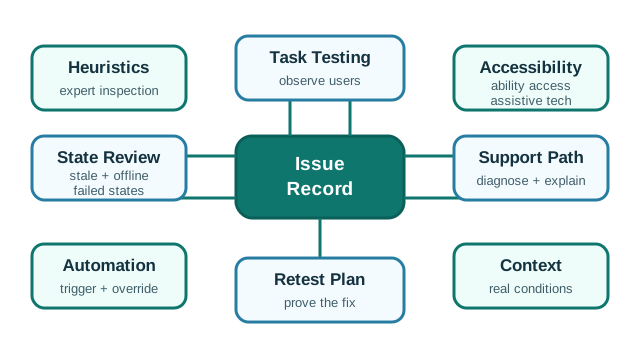
The method follows the decision. A heuristic review can find obvious design problems. Task testing shows whether representative users can complete the flow. Accessibility review checks whether the experience works across abilities and assistive technology. Support-path review checks whether failures can be diagnosed and explained.
3.8 Evaluation Method Map
Use the evaluation method map in the depth panel above to match the evaluation method to the evidence you need.
3.9 Heuristic Review
A heuristic review compares a design against established usability principles. It is useful early because it can quickly find problems such as unclear status, inconsistent wording, hidden actions, weak error prevention, poor recovery, and overloaded screens.
For IoT, adapt the review to connected-system behavior:
- Is current, stale, pending, offline, low-power, updating, muted, and failed state visible where needed?
- Does the interface use language that matches the user’s task instead of internal system terms?
- Can users pause, override, undo, or recover from automation?
- Are device, app, dashboard, and support terms consistent?
- Does the design prevent high-consequence mistakes before they happen?
- Does the user need to remember hidden state, codes, or configuration details?
- Are common actions easy while advanced actions remain discoverable?
- Are alerts, dashboards, and device indicators minimal but sufficient?
- Do error messages explain consequence and next action?
- Is help contextual rather than a disconnected manual?
Heuristic review is not proof that real users will succeed. It is a fast way to remove avoidable problems before task testing.
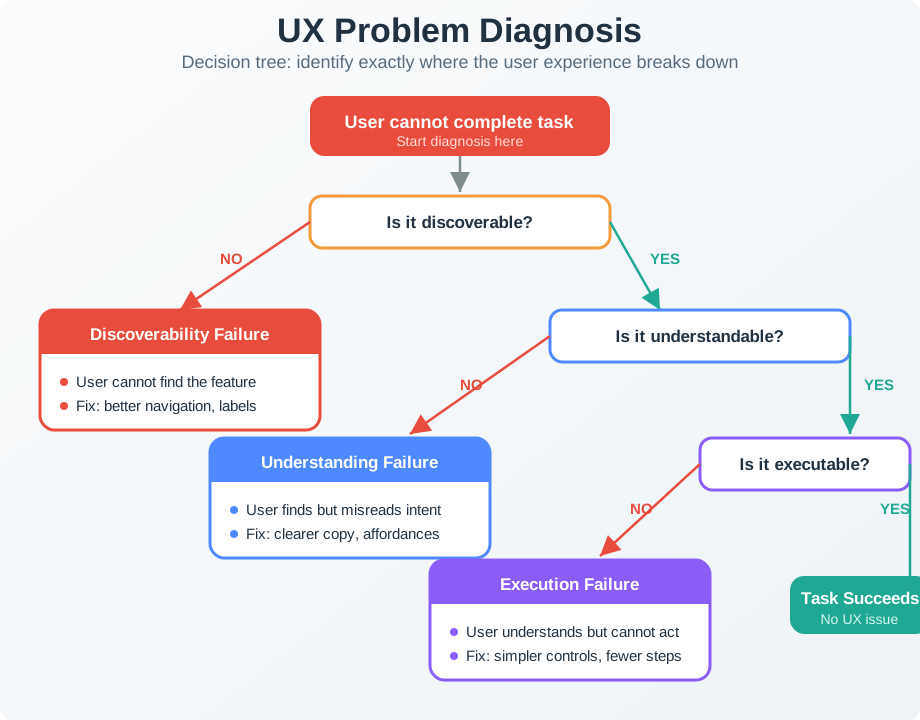
Use Figure 3.1 to keep heuristic findings specific: name where the user experience breaks before proposing the fix.
3.10 Task-Based Usability Testing
Task testing asks representative users to complete realistic tasks while the team observes what happens.
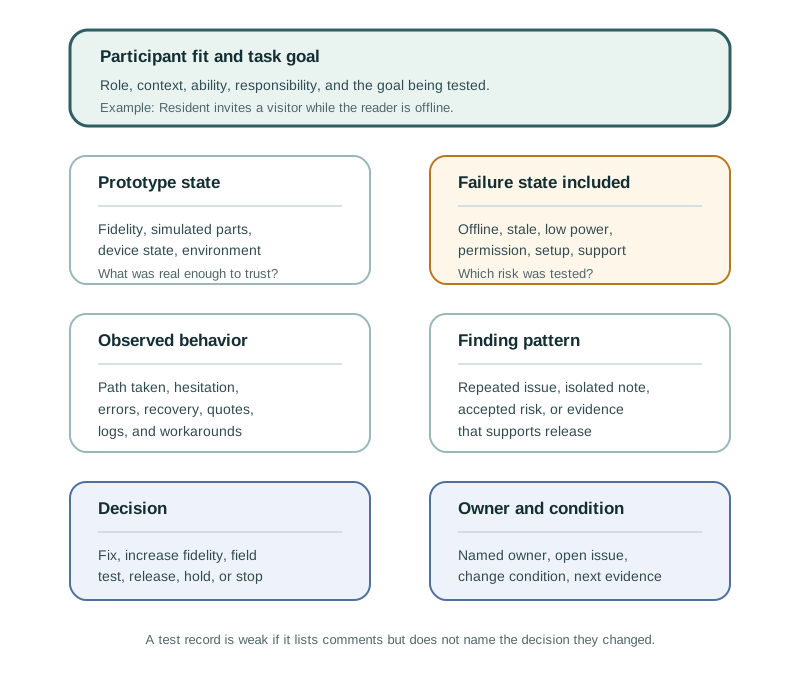
Good IoT tasks include context and success criteria:
- “You are leaving for a week. Set the system so the home stays safe and energy use is reduced.”
- “A guest needs access today from 2 PM to 4 PM without creating an account.”
- “The app says a room sensor is offline. Find what happened and what action is needed.”
- “A device is updating. Decide whether it is safe to leave the site.”
- “A low-battery warning appears for a device mounted behind equipment. Plan the next maintenance action.”
Avoid tasks that tell users where to click, such as “open Settings and tap Schedule.” That tests instruction following, not interface understanding.
Observe:
- first action
- hesitation
- wrong turns
- backtracking
- repeated reading
- requests for help
- workaround behavior
- confidence at the end
- task completion, not just user opinion
Ask follow-up questions after the task, not during the task unless safety or ethics require intervention.
3.11 Accessibility Review
Accessibility evaluation should happen during UX review, not after the design is otherwise accepted.
Check whether the experience works when users:
- cannot rely on color alone
- need larger text or higher contrast
- use keyboard, switch, screen reader, captions, or reduced motion settings
- have limited dexterity, vision, hearing, attention, memory, or language fluency
- are wearing gloves, carrying items, moving, fatigued, stressed, or under time pressure
- cannot use the app at the moment of need
For IoT, accessibility also includes physical controls, local indicators, printed labels, placement, setup, maintenance, and support. A device can pass a screen checklist and still fail because the reset button is hidden, labels are tiny, alerts are sound-only, or the fallback requires a smartphone.
3.12 State and Recovery Review
State and recovery review checks whether people can understand what the system is doing and what they can do next.
For each important flow, review:
- what the device knows
- what the app or dashboard shows
- what the user believes
- what the support team can diagnose
- what happens when the command is delayed, rejected, queued, or partially applied
- what happens when the system is offline, stale, updating, low on power, muted, or denied permission
- whether the next action is clear
If a system has one generic error state for many different causes, users and support teams will guess. Evaluation should force those states apart where the consequence differs.
3.13 Issue Record Workflow
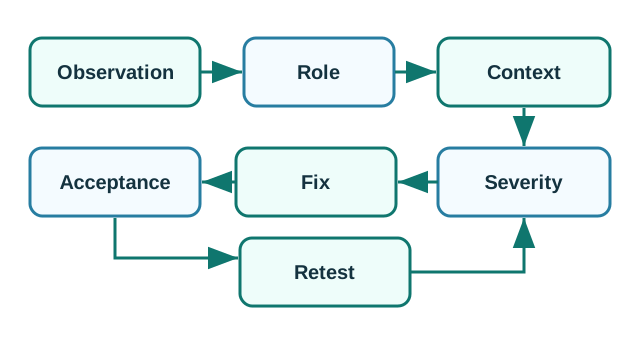
Use Figure 3.3 to turn evaluation findings into fixable work.
3.14 Prioritizing Findings
A useful issue record should answer:
- What did the evaluator or participant observe?
- Which role was affected?
- In what context did the issue appear?
- How often did it happen in the evidence set?
- What is the consequence if it remains?
- Is it a blocker, high-priority issue, medium-priority issue, or low-priority issue?
- What change should be tried?
- What evidence will prove the fix worked?
- Who owns the fix?
- What future change should trigger review again?
Prioritize by consequence and task importance, not by how easy the issue is to describe. A small wording problem can be high priority if it causes unsafe action or prevents recovery.
3.15 Incremental Examples
3.15.1 Beginner Example: Review a Status Card
A beginner evaluation can inspect a thermostat or room-sensor card before user testing. The evaluator checks whether current, stale, offline, updating, and low-battery states have different labels, whether color is not the only signal, whether the latest timestamp is visible, and whether the next action is clear. This catches obvious state-visibility defects before participants spend time on the prototype.
3.15.2 Setup Recovery Task Test
An intermediate evaluation asks representative users to recover from a smart-plug setup failure. The test should include the physical device, mobile app, QR or setup code, Bluetooth discovery, Wi-Fi provisioning, Matter commissioning or vendor-cloud account binding, permission prompts, and a support path. The issue record should separate user hesitation from technical state: BLE timeout, wrong network, Thread border-router absence, expired invite, account-role mismatch, or cloud service delay.
3.15.3 Evaluate Operations Workflows
An advanced evaluation combines heuristic review, task observation, accessibility review, telemetry, and support evidence for a factory pump monitor. Operators and maintenance staff should diagnose current, stale, muted, assigned, escalated, cleared, and recurring alerts using the dashboard, device indicator, notification path, MQTT broker logs, OpenTelemetry traces, maintenance work orders, and support console. The release decision should depend on whether the right role can take the next action without guessing which state is authoritative.
Before a design review, write one decision rule that connects the evidence to the release call:
- Design question: what decision needs evidence before the team proceeds?
- User, task, and context: who is trying to do what, and under which device, network, permission, or recovery condition?
- Metric threshold: what observation, completion rate, error count, accessibility result, or support-path outcome is strong enough to accept the design?
- Observed result: what actually happened in the evaluation?
- Release decision: ship, iterate, or rerun based on the threshold.
- Follow-up condition: what product, context, role, or risk change requires the team to evaluate again?
If the observed result misses the threshold, the release decision is “iterate or rerun,” not “ship with a note.” This keeps evaluation tied to a decision instead of a loose list of comments.
3.16 Pick Evaluation Methods
For each risk, choose the first evaluation method you would run and the evidence you would need:
- Users cannot tell whether a shared room sensor is offline or reporting a normal value.
- A setup flow fails after QR scan when the phone has Bluetooth disabled.
- Operators silence repeated pump alerts because every warning looks equally urgent.
3.17 Worked Review: Offline Sensor State
Scenario:
- A building dashboard shows room comfort sensors. Operators complain that the dashboard sometimes shows normal values when devices are disconnected.
Evaluation approach:
- Run a state and recovery review for current, stale, offline, and gateway-down states.
- Ask operators to diagnose a realistic stale-data scenario.
- Check whether support staff can separate sensor failure, gateway outage, low power, and delayed sync.
- Review alert wording for actionability.
Findings:
- The dashboard shows the last value without making data age obvious.
- Operators assume the room is normal because the value still appears green.
- Support staff need logs to distinguish sensor and gateway failures, but the operator view does not explain the next action.
Fix direction:
- Show data freshness near the value.
- Separate current, stale, offline, and estimated readings.
- Link each state to a next action: wait, inspect gateway, replace battery, check placement, or contact support.
- Repeat the task with operators using realistic alert volume.
3.18 Worked Review: Automation Override
Scenario:
- A smart lighting system automatically adjusts shared-space lights. Users report that they do not know why lights change or how to pause the behavior.
Evaluation approach:
- Run a heuristic review focused on visibility, user control, consistency, and error recovery.
- Test a realistic task: “Pause the automatic behavior during a meeting and restore it afterward.”
- Check affected roles: room user, facilities staff, and support.
- Review accessibility: visual, physical, and voice paths.
Findings:
- The app names the rule differently from the wall control.
- The pause state is not visible on the wall control.
- Users can disable the automation permanently by mistake when they only want a temporary pause.
- Support cannot tell whether a user paused the rule or a sensor failed.
Fix direction:
- Use the same automation name across app, wall control, dashboard, and support view.
- Add a visible temporary-pause state with duration.
- Separate “pause now” from “disable rule.”
- Add recovery wording and support diagnostics.
- Repeat the meeting scenario with users who did not see the original design.
3.19 Review Checklist
Before accepting a UX evaluation result, confirm:
- the evaluation question is tied to a real design decision
- users, roles, and contexts are representative of the product risk
- tasks include realistic device, network, data, permission, and recovery states
- heuristic review findings are separated from user-observation findings
- accessibility is reviewed across screen, device, physical, and support touchpoints
- state and recovery paths are tested, not assumed
- issues include evidence, consequence, severity, owner, and acceptance criteria
- fixes are checked with users or contexts that can reveal whether the issue is solved
- follow-up conditions are recorded
3.20 Common Defects
Watch for:
- Opinion testing: asking “what do you think?” instead of observing task completion.
- Non-representative users: testing only with engineers, staff, or expert users when the product serves different people.
- Happy-path testing: testing only connected, charged, well-lit, low-pressure scenarios.
- Score-only reporting: reporting a survey score without explaining observed failures and fixes.
- Heuristic overconfidence: treating expert review as proof that real users will succeed.
- Accessibility late review: checking accessibility after layout, controls, and device placement are already accepted.
- No support-path test: ignoring whether support can diagnose and explain failures.
- No follow-up observation: fixing an issue in design files without observing whether the fix works.
3.21 Concept Check: Evaluation Evidence
3.22 Concept Check: Match Methods to Evidence
3.23 Concept Check: Order the Evaluation
3.24 Summary
UX evaluation is an evidence process. It combines heuristic review, realistic task testing, accessibility review, state and recovery review, and issue records so a team can decide what to fix and how to prove the fix works.
For IoT, evaluation must include connected-system realities: physical devices, apps, dashboards, alerts, shared roles, accessibility, offline behavior, stale data, permissions, automation, maintenance, and support.
3.25 Key Takeaway
UX evaluation should combine heuristics, analytics, user observation, accessibility checks, and field evidence before changes are accepted.
3.26 See Also
This chapter connects to the rest of UX Design:
- User Experience Design explains the whole connected experience that evaluation must cover.
- UX Design Core Concepts introduces the UX process and vocabulary.
- UX Design Fundamentals explains the principles used during heuristic review.
- UX Design Examples shows scenario-based UX decisions that evaluation can test.
- UX Design Pitfalls and Patterns describes common issues evaluation should catch.
- Understanding People and Context explains how representative users, roles, and context are chosen.
- Prototyping Techniques for IoT explains how to create testable prototypes.
3.27 What’s Next
Continue with:
- UX Design Examples, if you want scenario examples of evaluation findings.
- UX Design Pitfalls and Patterns, if you want common failure patterns and safer alternatives.
- Interface Design Fundamentals, if evaluation findings point to controls, feedback, or recovery problems.
- Prototyping Techniques for IoT, if you need a prototype that can be tested before implementation.