Worked example: For a 15-question quiz, target correct answers are \(\lceil 0.8 \times 15 \rceil = 12\). If a learner moves from 8/15 to 12/15, score rises from 53.3% to 80%, crossing mastery with four additional correct answers.
After completing this assessment, you will be able to:
Assess IoT layered architecture placement decisions for latency-critical scenarios
Apply design thinking phases to real-world IoT scenarios
Select appropriate design patterns for specific IoT challenges
Evaluate component interface design decisions
Analyze trade-offs in IoT system design
For Beginners: Design Patterns Assessment
This chapter reviews UX design principles for IoT and helps you assess your understanding. Think of it as a portfolio review where you check that your design skills cover all the essential areas. Strong UX fundamentals are what separate IoT products that people love from ones they abandon after a week.
25.2 Prerequisites
Before taking this assessment, you should have completed:
These AI-generated visualizations provide alternative perspectives on IoT design model concepts covered in the assessment.
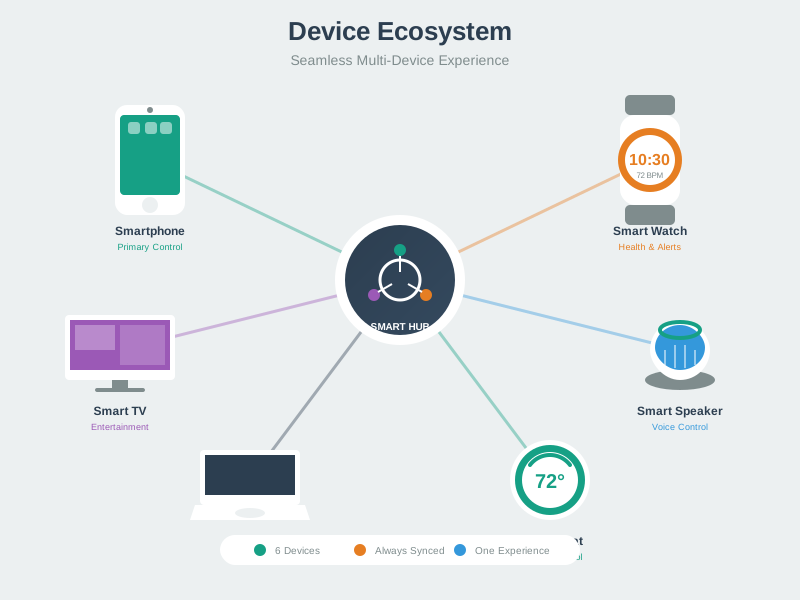
Device Ecosystem Architecture
IoT device ecosystem showing interconnections between devices, gateways, cloud, and user interfaces
IoT systems rarely operate in isolation - they exist within ecosystems of interconnected devices, services, and interfaces. This visualization shows how different components relate: edge devices generate data and execute actions, gateways aggregate and protocol-translate, cloud services provide storage and intelligence, and multiple user interfaces enable control and monitoring. Understanding this ecosystem is essential for designing coherent user experiences across touchpoints.
AI-Generated Visualization - Modern Style
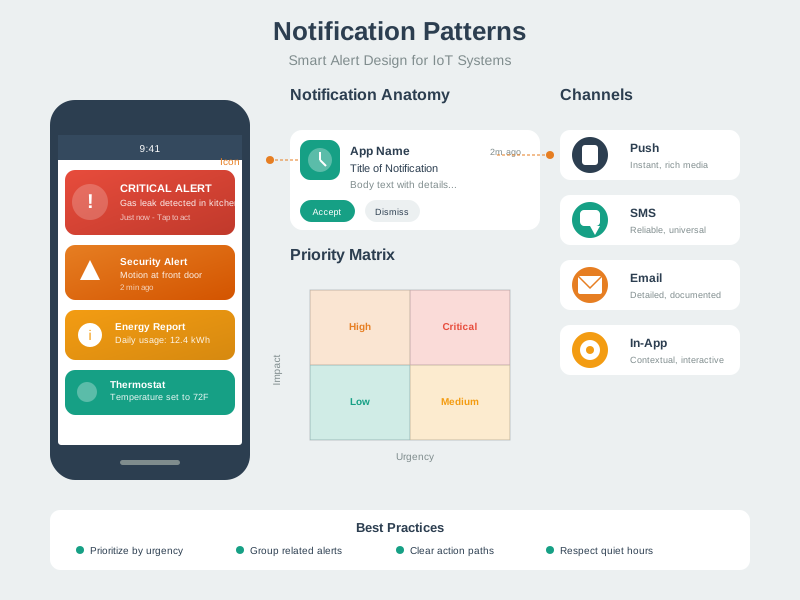
Notification Patterns
Notification patterns showing when and how to alert users based on event importance
Effective notification design prevents alert fatigue while ensuring critical events receive attention. This framework shows the notification hierarchy: critical alerts demand immediate attention through multiple channels, important events warrant push notifications, informational updates can be batched or silently logged, and routine activity should not interrupt users. The key is matching notification urgency to event importance and user context.
AI-Generated Visualization - Modern Style
25.3 Comprehensive Review Quiz
Test your understanding of IoT design models, patterns, and frameworks with these scenario-based questions. Each question presents a realistic IoT design challenge.
Test your understanding of IoT design models and frameworks with this interactive quiz. You’ll receive instant feedback on each answer.
Show code
viewof dq1_answer = Inputs.radio( ["A) Perception layer (on the sensors)","B) Application layer (in the cloud)","C) Network/Middleware layer (edge gateway with local control)","D) Distribute evenly across all layers"], {label:"Question 1: You're designing a smart agriculture system. Irrigation control must respond within 200ms to soil moisture changes, but you also need cloud-based analytics. Where should irrigation control logic be placed?",value:null})dq1_feedback = {if (dq1_answer ===null) return"";const correct ="C) Network/Middleware layer (edge gateway with local control)";const isCorrect = dq1_answer === correct;returnhtml`<div style="padding: 15px; margin: 10px 0; border-radius: 5px; background-color: ${isCorrect ?'#d4edda':'#f8d7da'}; border: 1px solid ${isCorrect ?'#c3e6cb':'#f5c6cb'}; color: ${isCorrect ?'#155724':'#721c24'}"> <strong>${isCorrect ?'Correct!':'Incorrect'}</strong><br/>${isCorrect ?'Excellent! Edge gateway placement enables sub-200ms latency without cloud round-trips, provides sufficient compute for multi-sensor coordination, continues functioning during internet outages, and forwards historical data to cloud for analytics. This is the fog/edge computing pattern - time-critical decisions at the edge, long-term analytics in the cloud.':'Think about latency requirements. Cloud round-trips take 50-500ms, too slow for 200ms requirement. Sensors lack compute power for complex logic. Edge gateway provides local intelligence for real-time control while forwarding data to cloud for analytics. This is fog computing - distribute intelligence based on latency requirements.'} </div>`;}viewof dq2_answer = Inputs.radio( ["A) Trust stated preference and implement smartphone notifications","B) Define phase should reframe: 'users need reminders they'll notice even when phones aren't nearby'","C) Skip to Prototype phase immediately","D) Tell users to keep phones with them"], {label:"Question 2: During Design Thinking Empathize phase, elderly medication reminder users say they want smartphone notifications, but you observe phones are often in other rooms. What's the next step?",value:null})dq2_feedback = {if (dq2_answer ===null) return"";const correct ="B) Define phase should reframe: 'users need reminders they'll notice even when phones aren't nearby'";const isCorrect = dq2_answer === correct;returnhtml`<div style="padding: 15px; margin: 10px 0; border-radius: 5px; background-color: ${isCorrect ?'#d4edda':'#f8d7da'}; border: 1px solid ${isCorrect ?'#c3e6cb':'#f5c6cb'}; color: ${isCorrect ?'#155724':'#721c24'}"> <strong>${isCorrect ?'Correct!':'Incorrect'}</strong><br/>${isCorrect ?'Perfect! This demonstrates proper Design Thinking progression. Empathize revealed discrepancy between stated need (smartphone) and observed behavior (phones not nearby). Define phase synthesizes insights into accurate problem statement capturing real need: reliable reminders regardless of phone location. This might lead to smart speakers, wearables, visual indicators on medicine bottles, or ambient displays.':'The Define phase should reframe surface requests into underlying needs. Users said "smartphone notifications" but observation revealed the real need: "noticeable reminders regardless of location." Proper design thinking means synthesizing observations to understand the true problem before jumping to solutions. This leads to better options like wearables, smart speakers, or ambient indicators.'} </div>`;}viewof dq3_answer = Inputs.radio( ["A) Digital Twin - create cloud twin of each vehicle","B) Gateway pattern with edge filtering (predictive filtering at vehicle gateway)","C) Observer pattern - vehicles observe routing changes","D) Command pattern - cloud sends movement commands"], {label:"Question 3: Fleet management system: 1,000 delivery vehicles report GPS every 30s (2,000 updates/min), overwhelming the cloud. Vehicle locations change gradually on highways. Which design pattern helps?",value:null})dq3_feedback = {if (dq3_answer ===null) return"";const correct ="B) Gateway pattern with edge filtering (predictive filtering at vehicle gateway)";const isCorrect = dq3_answer === correct;returnhtml`<div style="padding: 15px; margin: 10px 0; border-radius: 5px; background-color: ${isCorrect ?'#d4edda':'#f8d7da'}; border: 1px solid ${isCorrect ?'#c3e6cb':'#f5c6cb'}; color: ${isCorrect ?'#155724':'#721c24'}"> <strong>${isCorrect ?'Correct!':'Incorrect'}</strong><br/>${isCorrect ?'Excellent! Gateway pattern with predictive filtering: vehicle gateway maintains expected position based on last location/speed/heading. Only sends updates when actual position deviates significantly (>100m). For highway driving, most updates show vehicle exactly where predicted - suppress these. Only meaningful updates (turns, stops, speed changes) go to cloud. This reduces load from 2,000 to ~200-400 updates/min (80-90% reduction).':'Gateway pattern with edge intelligence is the solution. Each vehicle gateway predicts next position based on trajectory. Only transmit when actual location deviates from prediction. This filters redundant data at the edge - highway driving is predictable, so most 30-second updates are unnecessary. Only send updates for turns, stops, or unexpected deviations. This dramatically reduces cloud processing load while maintaining accuracy.'} </div>`;}viewof dq4_answer = Inputs.radio( ["A) Component outputs raw voltage; applications convert","B) Two methods: getTemperatureC() and getTemperatureF()","C) Component outputs SI base unit (Celsius) with optional conversion method","D) Output JSON: {value: 23.5, unit: 'C'}"], {label:"Question 4: Designing reusable temperature sensor component (hardware outputs 10mV per degree C). Some products need Celsius, others Fahrenheit. How should the component interface be designed?",value:null})dq4_feedback = {if (dq4_answer ===null) return"";const correct ="C) Component outputs SI base unit (Celsius) with optional conversion method";const isCorrect = dq4_answer === correct;returnhtml`<div style="padding: 15px; margin: 10px 0; border-radius: 5px; background-color: ${isCorrect ?'#d4edda':'#f8d7da'}; border: 1px solid ${isCorrect ?'#c3e6cb':'#f5c6cb'}; color: ${isCorrect ?'#155724':'#721c24'}"> <strong>${isCorrect ?'Correct!':'Incorrect'}</strong><br/>${isCorrect ?'Perfect! Good component interface design: (1) Component encapsulates hardware details (voltage to temperature), (2) Primary interface returns standard unit (Celsius), (3) Optional utility method convert(value, from, to) handles conversions, (4) Adding new units doesn\'t change component interface, (5) Most components work with standard unit, avoiding repeated conversions. This balances encapsulation, simplicity, and extensibility.':'The best practice is: component returns temperature in standard SI unit (Celsius), encapsulating the voltage to temperature conversion. Provide an optional utility method for unit conversion if needed. This keeps the interface clean and minimal while supporting flexibility. Don\'t expose raw voltage (forces all consumers to convert) or create multiple getters (interface bloat). Use standard units as base, convert when necessary.'} </div>`;}viewof dq5_answer = Inputs.radio( ["A) Option A (10-second updates, 5-day battery)","B) Option B (60-second updates, 14-day battery)","C) Hybrid: Adaptive transmission (10-second during activity, 60-second otherwise)","D) Option A but require daily charging"], {label:"Question 5: Wearable fitness tracker design choice: (A) BLE every 10s, 5-day battery OR (B) BLE every 60s, 14-day battery. Users want accurate steps, no charger while traveling (7-10 days), and real-time workout progress. Which option?",value:null})dq5_feedback = {if (dq5_answer ===null) return"";const correct ="C) Hybrid: Adaptive transmission (10-second during activity, 60-second otherwise)";const isCorrect = dq5_answer === correct;returnhtml`<div style="padding: 15px; margin: 10px 0; border-radius: 5px; background-color: ${isCorrect ?'#d4edda':'#f8d7da'}; border: 1px solid ${isCorrect ?'#c3e6cb':'#f5c6cb'}; color: ${isCorrect ?'#155724':'#721c24'}"> <strong>${isCorrect ?'Correct!':'Incorrect'}</strong><br/>${isCorrect ?'Excellent! Smart trade-off analysis recognizes context-aware behavior solves both requirements. During detected activity (accelerometer shows exercise patterns), transmit every 10 seconds for real-time feedback. During sedentary periods (22+ hours/day), transmit every 60 seconds. This achieves ~12-day battery life while providing real-time data when users care most. Adaptive behavior optimizes for user needs, not hardware convenience.':'Think context-aware design. Users don\'t need uniform behavior - they need real-time updates during workouts but not while sleeping. Adaptive transmission rates based on accelerometer activity detection gives 10-second updates during exercise (real-time feedback) and 60-second updates otherwise (battery conservation). This achieves 12-day battery life (meeting travel requirement) while satisfying real-time workout needs. Design systems that adapt to context.'} </div>`;}viewof dscore = {const answers = [dq1_answer, dq2_answer, dq3_answer, dq4_answer, dq5_answer];const correct_answers = ["C) Network/Middleware layer (edge gateway with local control)","B) Define phase should reframe: 'users need reminders they'll notice even when phones aren't nearby'","B) Gateway pattern with edge filtering (predictive filtering at vehicle gateway)","C) Component outputs SI base unit (Celsius) with optional conversion method","C) Hybrid: Adaptive transmission (10-second during activity, 60-second otherwise)" ];const answered = answers.filter(a => a !==null).length;const correct_count = answers.filter((a, i) => a === correct_answers[i]).length;if (answered ===0) {returnhtml`<div style="padding: 20px; margin: 20px 0; background-color: #e7f3ff; border-radius: 8px; border-left: 5px solid #2196F3;"> <h3 style="margin-top: 0; color: #1976D2;">Quiz Progress</h3> <p>Answer all 5 questions to see your score!</p> </div>`; }if (answered <5) {returnhtml`<div style="padding: 20px; margin: 20px 0; background-color: #fff3cd; border-radius: 8px; border-left: 5px solid #ffc107;"> <h3 style="margin-top: 0; color: #856404;">Quiz Progress</h3> <p>You've answered ${answered} out of 5 questions. ${correct_count} correct so far!</p> <p>Complete all questions to see your final score.</p> </div>`; }const percentage = (correct_count /5) *100;let grade, message, color, bgColor;if (percentage >=80) { grade ="A"; message ="Excellent! You have mastered IoT design model concepts."; color ="#155724"; bgColor ="#d4edda"; } elseif (percentage >=60) { grade ="B"; message ="Good work! Review the feedback to strengthen your understanding."; color ="#856404"; bgColor ="#fff3cd"; } else { grade ="C"; message ="Keep learning! Review the chapter content and design patterns carefully."; color ="#721c24"; bgColor ="#f8d7da"; }returnhtml`<div style="padding: 20px; margin: 20px 0; background-color: ${bgColor}; border-radius: 8px; border-left: 5px solid ${color};"> <h3 style="margin-top: 0; color: ${color};">Final Score: ${correct_count}/5 (${percentage}%) - Grade: ${grade}</h3> <p style="font-size: 1.1em;">${message}</p> <details style="margin-top: 15px;"> <summary style="cursor: pointer; font-weight: bold;">Key Takeaways</summary> <ul style="margin-top: 10px;"> <li><strong>Layered Architecture:</strong> Place time-critical control at edge, analytics in cloud (fog computing pattern)</li> <li><strong>Design Thinking:</strong> Define phase reframes stated needs into underlying problems through observation</li> <li><strong>Gateway Pattern:</strong> Edge intelligence filters redundant data using prediction and deviation detection</li> <li><strong>Component Design:</strong> Encapsulate hardware, use standard units, provide optional conversions</li> <li><strong>Context-Aware Systems:</strong> Adapt behavior based on usage patterns (active vs idle) to optimize trade-offs</li> </ul> </details> </div>`;}
Interactive Quiz: Match Concepts
Interactive Quiz: Sequence the Steps
Label the Diagram
💻 Code Challenge
25.4 Summary
This assessment tested your understanding of:
Key Concepts Covered:
Layered Architectures: Placement decisions based on latency, compute requirements, and fault tolerance
Design Thinking Process: Empathize, Define, Ideate, Prototype, Test - with emphasis on observation vs. stated preferences
Gateway Pattern: Protocol translation, data aggregation, edge filtering, and local autonomy
Digital Twin Pattern: Virtual representations for simulation and prediction
Command Pattern: Decoupling issuers from executors with scheduling and undo support
Observer Pattern: Event-driven architecture with asynchronous notification
Component Design: Interface-based design, encapsulation, and reusability
Trade-off Analysis: Context-aware solutions that optimize for user needs
25.5 Resources
Books and Standards:
“Designing the Internet of Things” by Adrian McEwen and Hakim Cassimally
“Designing Calm Technology” by Amber Case - Comprehensive guide to Weiser & Brown’s principles
“The Invisible Computer” by Donald Norman - Seminal work on technology that fades into the background
“IoT Inc: How Your Company Can Use the Internet of Things to Win in the Outcome Economy” by Bruce Sinclair
ISO/IEC 30141:2018 - IoT Reference Architecture
Design Tools:
Fritzing - Circuit and PCB design for prototyping
Node-RED - Visual programming for IoT flows
Draw.io - System architecture diagrams
Figma - UI/UX design for IoT applications
Platforms and Frameworks:
Eclipse IoT - Open source IoT frameworks
FIWARE - IoT platform components
AWS IoT Core - Cloud platform documentation
Azure IoT Reference Architecture
Communities:
IoT Design Community (iot-design-community.org)
Interaction Design Association (ixda.org)
UX for IoT online communities
Worked Example: Fleet Management System Pattern Selection
Scenario: Design tracking system for 1,000 delivery trucks. Requirements: GPS location, fuel level, maintenance alerts, route optimization.
Pattern Decisions:
Gateway Pattern: Each truck has gateway aggregating 12 sensors (GPS, fuel, tire pressure, engine diagnostics) before uploading to cloud
Principle: Patterns complement each other. Gateway handles connectivity, Digital Twin handles modeling, Command handles operations, Observer handles events.
Common Mistake: Digital Twin Without Synchronization Strategy
Problem: Create digital twins for 5,000 devices but no clear sync strategy. Twins diverge from reality as devices go offline, get updated, or fail.
Symptoms:
Digital twin shows device online, real device offline for 3 days
Twin state says “firmware v1.2,” actual device updated to v2.0
Analytics based on twins produce incorrect results
Fix: Define sync strategy: - Real-time sync (100ms): Critical state (location, alarms) - Near-real-time sync (1-5 min): Operational data (temperature, battery) - Batch sync (hourly/daily): Historical data, logs - Conflict resolution: Device state is source of truth, twin reflects reality
Lesson: Digital twin is only valuable if it accurately reflects device state. Sync strategy is non-negotiable.
25.6 Concept Relationships
This assessment integrates concepts from multiple design model chapters:
Foundational Concepts:
Layered Architecture (from Design Model Introduction) determines where to place processing logic based on latency and autonomy requirements
Design Thinking (from Design Model Design Thinking) provides the iterative framework for discovering user needs through observation
Calm Technology Principles (from Design Facets) inform how systems should communicate without overwhelming users
Pattern Interactions:
Gateway + Digital Twin: Gateways aggregate edge data while twins provide cloud-based simulation - complementary roles in distributed systems
Command + Observer: Commands queue actions while observers distribute events - together they handle both user-initiated and system-initiated behaviors
Digital Twin + Observer: Twins maintain state while observers propagate changes - the twin is the “single source of truth” that observers watch
Cross-Domain Applications:
IoT Architecture (from networking chapters) provides the physical infrastructure that design patterns organize
Security Patterns (from security chapters) extend these patterns with authentication, authorization, and encrypted communication layers
Edge Computing (from distributed systems chapters) implements the gateway pattern at scale across fog nodes
Anti-Pattern Recognition:
God Gateway violates single responsibility principle (from component design) by centralizing all functions
Synchronous Digital Twin violates asynchronous communication best practices (from distributed systems)
Polling Instead of Observing wastes bandwidth and battery (from networking and energy chapters)
In 60 Seconds
This chapter covers design patterns assessment, explaining the core concepts, practical design decisions, and common pitfalls that IoT practitioners need to build effective, reliable connected systems.
Understanding these relationships helps you combine patterns appropriately and avoid common pitfalls that arise from pattern misapplication.
25.7 See Also
Related Design Patterns:
Gateway Patterns - Deeper exploration of edge gateway architectures
The next chapter explores The Things - Connected Devices, examining how to design, select, and deploy individual IoT devices, from form factors to power management to environmental durability.
These AI-generated visualizations provide alternative representations of design model concepts covered in this chapter.
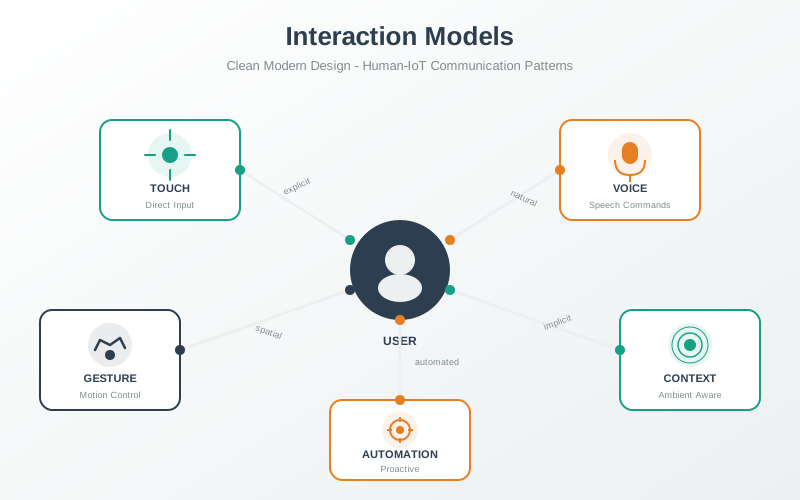
Mental Model Mapping for IoT
Mental model mapping showing alignment between designer’s conceptual model and user’s mental model of IoT systems
Successful IoT design bridges the gap between the designer’s technical conceptual model and the user’s simplified mental model. Users don’t think in terms of MQTT protocols or edge computing - they think “I press this button, the light turns on.” The design model must translate complex technical realities into intuitive interfaces that align with users’ expectations, hiding implementation complexity while providing appropriate feedback when things don’t work as expected.
AI-Generated Visualization - Artistic Style
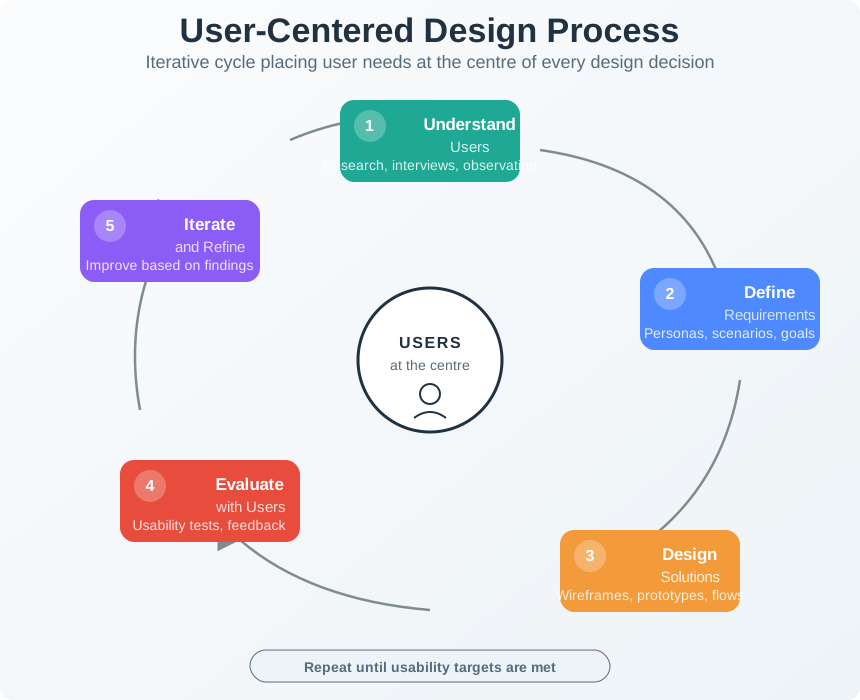
User-Centered Design Process
User-centered design process for IoT showing iterative cycles of research, design, and validation
User-centered design for IoT requires continuous engagement with actual users throughout the development process. Unlike traditional software, IoT products exist in physical spaces and integrate with daily routines, making observational research and contextual inquiry especially valuable. This iterative cycle ensures that design decisions are grounded in real user needs rather than assumptions, with rapid prototyping and testing validating concepts before full implementation.
AI-Generated Visualization - Geometric Style
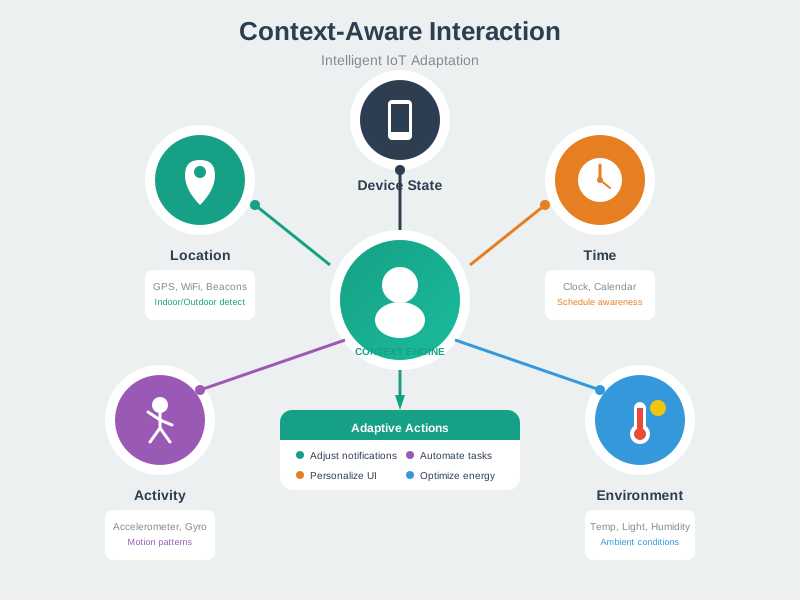
Context Awareness Model
Context awareness model showing environmental, social, and temporal factors that shape IoT behavior
Context-aware IoT systems adapt their behavior based on multiple layers of situational information. The user’s immediate state - what they’re doing, where they are - forms the core context. Environmental factors like lighting and noise levels influence how interfaces should present information. Social context determines privacy requirements and multi-user coordination needs. Temporal patterns allow systems to anticipate needs based on routines. Effective context-aware design requires sensing across all these dimensions and intelligently adapting system behavior.
AI-Generated Visualization - Modern Style
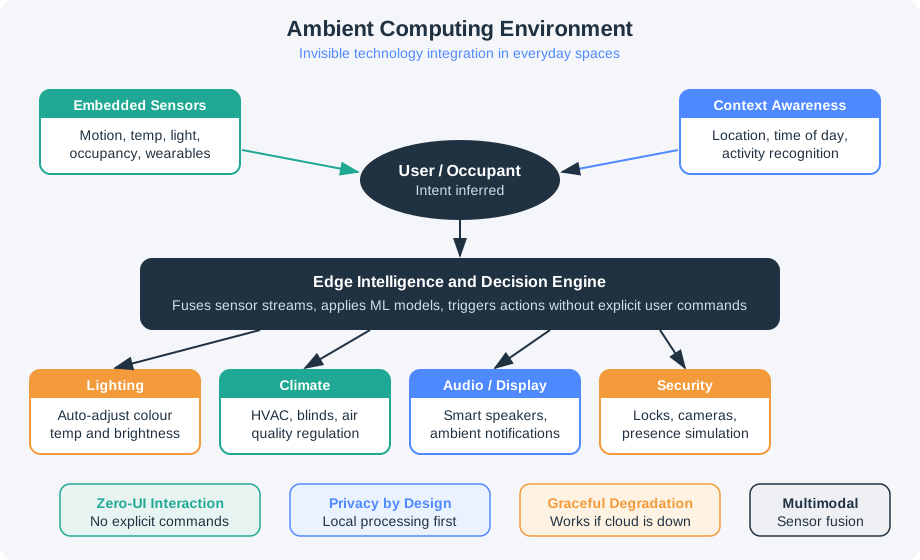
Ambient Computing Environment
Ambient computing environment showing seamless integration of IoT technology into everyday spaces
Ambient computing represents the vision of technology that recedes into the background of daily life. Rather than demanding attention through screens and explicit interactions, ambient IoT systems sense the environment and adapt invisibly. This living space illustration shows how sensors, actuators, and intelligent processing can work together to enhance comfort and convenience without requiring constant user attention. The challenge for designers is ensuring that these invisible systems remain trustworthy and controllable when users do want to intervene.