14 IoT Design Patterns and Components
IoT design patterns and components, IoT component boundaries, Gateway pattern for IoT, Digital Twin pattern for IoT, Command pattern for IoT, Observer pattern for IoT, IoT model-driven design
14.1 Start Simple
A pattern is a promise about responsibility. Start by asking what work the gateway, digital twin, command path, observer, component, or model boundary is meant to own, then check whether the people using the system can see enough evidence to trust that responsibility.
14.2 In 60 Seconds
IoT design patterns are reusable ways to assign responsibility. They are useful only when they make a real boundary, interface, state rule, command path, event path, or failure behavior easier to understand and test.
This chapter reviews component-based design, Gateway, Digital Twin, Command, Observer, and model-driven design as implementation choices. The goal is not to name patterns from memory. The goal is to decide where responsibility belongs, what evidence supports that choice, what tradeoff is accepted, and what future change should reopen the decision.
14.3 Learning Objectives
By the end of this chapter, you will be able to:
- define component boundaries that hide implementation details but expose the evidence a system needs
- explain when Gateway, Digital Twin, Command, and Observer patterns fit an IoT design problem
- combine patterns without hiding ownership, stale state, duplicate commands, or event-ordering problems
- use model-driven design when repeated deployments need consistent generated artifacts
- record pattern decisions with interface, failure, owner, open issue, and change conditions
- reject pattern choices that add complexity without solving a reviewed responsibility
14.4 Minimum Viable Understanding
A pattern is not automatically good design. A pattern is justified when it answers a specific responsibility question:
- Gateway: What translates, filters, buffers, or locally decides at a boundary?
- Digital Twin: What is the authoritative representation of device state, and when can it become stale?
- Command: What action is requested, authorized, queued, retried, rejected, canceled, or audited?
- Observer: What event is published, who subscribes, and what happens when delivery is late or duplicated?
- Component boundary: What interface lets a part be tested, replaced, or reused without hiding risk?
- Model-driven design: What shared model generates consistent configuration, code, documentation, or tests?
If the team cannot connect a pattern to evidence, an interface, failure behavior, and an owner, the pattern is probably decoration.
14.5 Prerequisites
This chapter builds on:
- IoT Pattern Selection Assessment, which frames pattern choice as an evidence review.
- IoT Architecture Model Selection, which defines the system boundary that patterns must respect.
- Design Thinking for IoT, which supplies user and prototype evidence.
- Calm Technology Attention Policy, which keeps attention, feedback, service, and platform effects visible.
- Connected Device Fundamentals, which defines endpoints, gateways, actuators, interfaces, and infrastructure roles.
14.6 Overview: Patterns Assign Responsibility
IoT patterns are useful when they make a responsibility testable. A gateway is not just a box between devices and the cloud. A digital twin is not just a database row. A command is not just a function call. An observer stream is not just a list of subscribers. Each pattern should clarify who owns state, what crosses the boundary, what fails visibly, and what support can inspect.
The first review question is not “which pattern sounds familiar?” It is “which responsibility is unclear without this pattern?” A room controller may need a gateway because field devices speak Zigbee, BLE, Modbus, or BACnet while operations needs one MQTT or HTTP contract. It may need a digital twin because several services need the same room state, freshness, and confidence rule. It may need commands because physical actions must be accepted, rejected, retried, or audited. It may need observers because dashboards, logs, alerts, and support views should receive events without becoming hidden controllers.
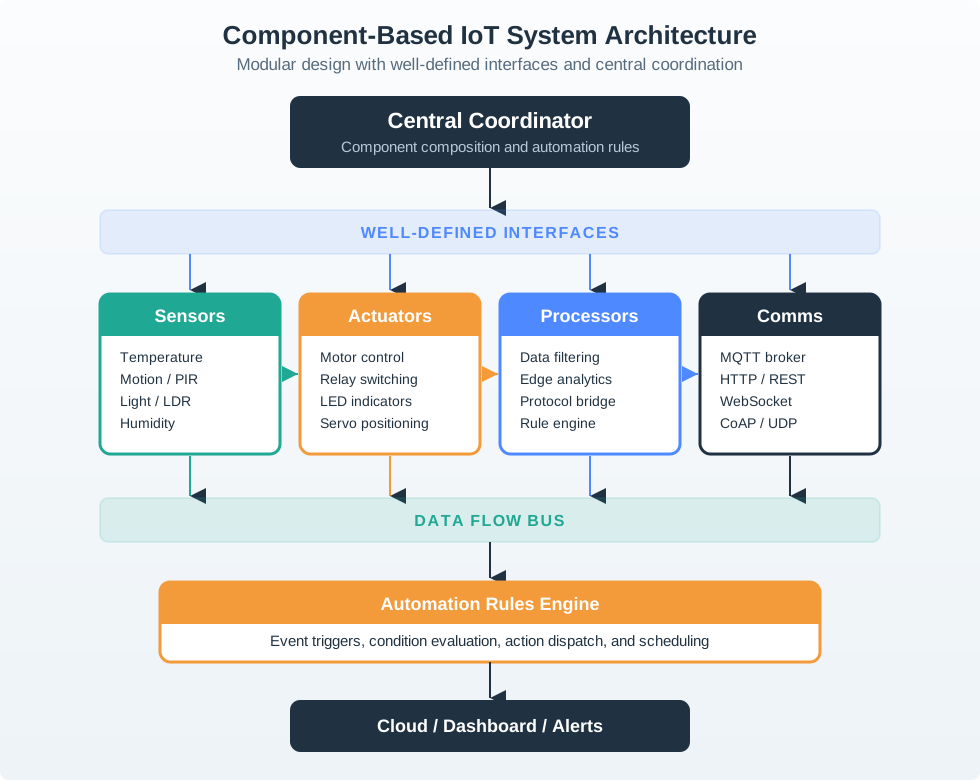
For a building-control system, a gateway may translate Modbus, BACnet, Zigbee, or BLE data into MQTT topics. A room twin may represent occupancy, freshness, confidence, and actuator relationships. A command handler may validate authorization and preconditions before changing ventilation. Observer events may feed dashboards, logs, alerts, and support tools without turning every subscriber into a controller.
The pattern record should also show rejected alternatives. A retained MQTT topic may be enough for a simple last-known state, while AWS IoT Device Shadows, Azure Digital Twins, Eclipse Ditto, or a custom state service may be justified when relationships, simulations, access rules, or fleet-scale consistency matter. A direct REST call may be enough for a harmless configuration change, while a command object is safer for actuator changes that need preconditions, idempotency, timeout, and support evidence.
- Boundary: name the component, the owned state, the interface contract, and what it deliberately does not own.
- Pattern: choose Gateway, Digital Twin, Command, Observer, Adapter, or Model-driven design because it answers a responsibility question.
- Failure: define stale state, duplicate events, rejected commands, queue overflow, offline fallback, and support evidence before implementation.
14.7 Practitioner: Make Contracts Concrete
Pattern reviews should leave behind contracts that engineers and support teams can test. MQTT topic names, QoS level, retained-message policy, CoAP response codes, REST status codes, OpenAPI paths, AsyncAPI channels, JSON Schema payloads, OPC UA node ids, LwM2M object resources, and Matter clusters all shape what the pattern actually means.
Write the contract at the boundary where a wrong assumption would harm the user promise. For a gateway, that means the device-side protocol, normalized field names, units, timestamp source, queue limit, retry policy, and local fallback rule. For a twin, it means desired state, reported state, last update time, confidence, relationship fields, schema version, and authority for conflict resolution. For command and observer patterns, it means command ID, idempotency key, acceptance state, rejection reason, event type, event version, subscriber permission, and duplicate handling.
- Gateway: state which protocols are translated, which payloads are normalized, what is buffered locally, and what works during internet loss.
- Digital Twin: state source of truth, freshness, desired versus reported state, confidence, schema owner, and how twins are archived or deleted.
- Command and Observer: state idempotency key, sequence number, authorization, acceptance rule, acknowledgement, retry, duplicate handling, subscription permission, and event version.
Use real alternatives in the review. AWS IoT Device Shadows, Azure Digital Twins, Eclipse Ditto, a Postgres state table, or a simple retained MQTT state topic make different tradeoffs. The pattern choice should explain why the selected option fits the user promise and operating burden.
A good practitioner review tests one uncomfortable case before accepting the pattern. If the gateway is offline for ten minutes, does the room twin say stale, unknown, inferred, or available? If a user taps a ventilation command twice, does the command handler deduplicate it or actuate twice? If observer delivery is delayed, do dashboards and alerts display event time, receive time, or a misleading current label? If the model-driven generator emits an invalid dashboard label, is the source model fixed or is the generated file patched by hand? These cases expose whether the pattern owns real behavior or only vocabulary. ## Boundary Drift in Models {.depth-l2}
Pattern drift happens when two components quietly own the same responsibility. A gateway and cloud service may both rewrite device state. A command queue and direct API may both actuate the same relay. A digital twin may store desired state while the dashboard treats it as measured state. An observer may publish an event that one subscriber treats as a fact and another treats as a command.
The technical cause is usually a missing authority rule. Telemetry, state, command intent, command result, alert, and support diagnosis are different facts even when they share a device ID. A robust pattern model separates them before code is written. Telemetry may come from firmware, normalized state may be owned by a gateway, desired state may be owned by a cloud service, command result may be owned by an actuator controller, and user-visible status may be owned by the application. Each one needs a timestamp, version, and failure label.
Model-driven design can reduce this drift only when the model is clear. A source model can generate MQTT topics, JSON Schema payloads, OpenAPI documentation, dashboard labels, test fixtures, or support checklists. It becomes a risk when teams edit generated output by hand or when the model cannot express a field condition such as replacement device diagnostics or site-specific permissions.
Under the hood, the safest pattern combinations are traceable. A sensor event can be followed through topic, schema, gateway log, twin update, observer event, dashboard render, and support record. A command can be followed from issuer, permission check, precondition, queue, actuator acknowledgement, retry decision, and user feedback. A generated artifact can be followed back to the source model field and generator version that produced it. Without that chain, teams cannot tell whether a problem is a device fault, a stale twin, a duplicate observer event, a direct-control bypass, or a generator drift.
- Version contracts: version schemas, events, commands, and generated artifacts so old devices and new services can coexist safely.
- Trace ownership: connect each state, command, event, and generated artifact back to an accountable owner and source model field.
- Boundary tests: use simulator, hardware-in-loop, contract tests, and field logs to prove behavior under stale, duplicate, offline, and rejected-command cases.
14.8 Review Pattern Responsibilities
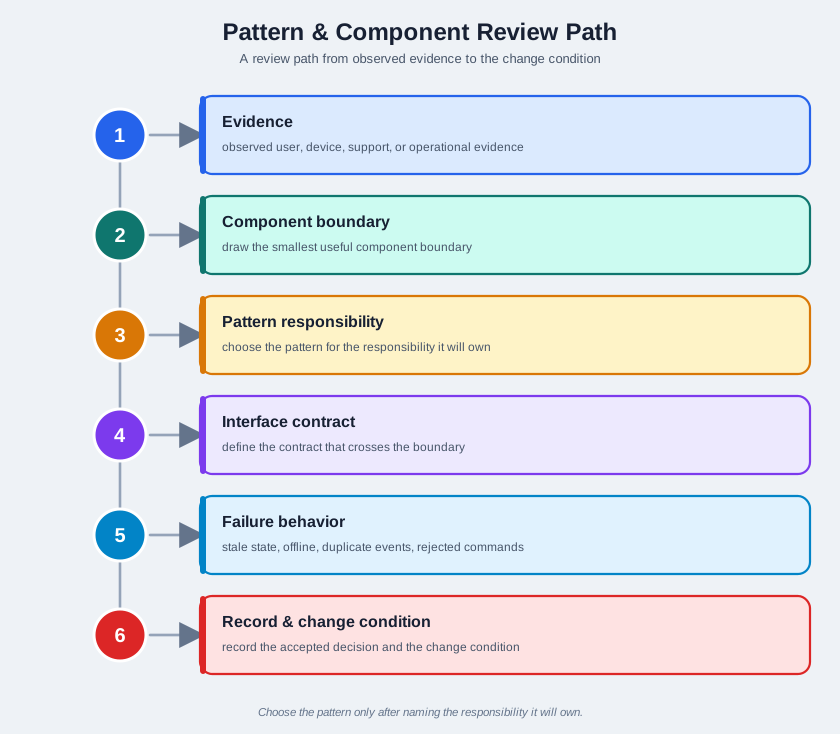
Use Figure 14.2 as a review path:
- start with observed user, device, support, or operational evidence
- draw the smallest useful component boundary
- choose the pattern only after naming the responsibility it will own
- define the interface contract that crosses the boundary
- review stale state, offline behavior, duplicate events, rejected commands, and support paths
- record the accepted decision and the change condition
14.9 Component Boundaries
Component-based design breaks a system into parts with explicit contracts. In an IoT system, a component may be a physical device, firmware module, gateway service, cloud service, mobile app feature, dashboard widget, provisioning step, support tool, or data model.
A useful component boundary makes these questions answerable:
- What does this component own?
- What does it deliberately not own?
- What crosses the boundary?
- What format, timing, state, permission, and error meaning cross with it?
- What evidence proves the interface works?
- What can replace this component without changing the rest of the system?
- What failure must be visible to users, operators, or support teams?
Avoid boundaries that only mirror the team org chart or technology stack. A cloud service, gateway process, and app view can still be one unresolved responsibility if no one knows which part owns device state, command acceptance, or failure recovery.
14.9.1 Component Interface Evidence
Review component interfaces with evidence, not just names:
- Inputs: messages, events, readings, commands, configuration, identity, permissions, and context.
- Outputs: state changes, acknowledgements, alerts, logs, command results, user feedback, and support evidence.
- State: current value, source of truth, freshness, confidence, and conflict resolution.
- Failure: timeout, stale reading, rejected command, duplicate event, unavailable path, invalid payload, or degraded mode.
- Test evidence: unit tests, integration tests, hardware-in-loop checks, field observations, support records, and simulation results.
14.10 Gateway Pattern
Use the Gateway pattern when a boundary must translate, filter, buffer, secure, or locally decide on behalf of constrained or heterogeneous devices.
Common Gateway responsibilities include:
- translating between device-side and application-side protocols
- normalizing payloads from devices with different formats
- buffering readings when upstream paths are unavailable
- performing local checks that should not wait for a remote service
- enforcing a boundary between local device networks and remote services
- exposing support evidence about local connectivity, queue state, and last successful sync
The Gateway pattern is weak when it becomes an unnamed pass-through. If all real responsibility remains hidden in remote services, the design still needs to say what happens when connectivity fails, state is stale, or a device reports data the gateway cannot interpret.
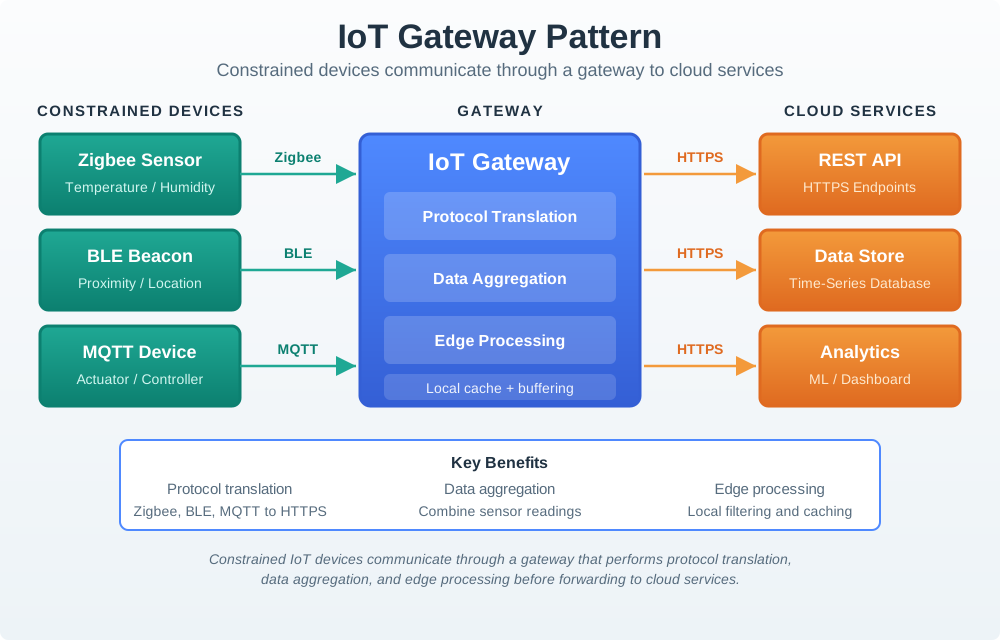
Figure 14.3 makes the gateway responsibility concrete: the gateway owns protocol translation, local cache and buffering, and edge aggregation before cloud services see a normalized contract.
14.11 Digital Twin Pattern
Use the Digital Twin pattern when the system needs an explicit representation of a physical thing, space, asset, or process that multiple services can read, compare, simulate, or reason about.
A useful digital twin records:
- identity of the represented thing
- current known state and freshness
- source of each state update
- confidence or validation status where needed
- relationship to commands and physical outcomes
- stale-state and conflict behavior
- owner of the model and schema changes
Do not use a digital twin as a label for any database row. The pattern matters when the representation changes how the system reasons about the real world. If a simple state record is enough, the added twin model may create extra synchronization and support work without improving the design.
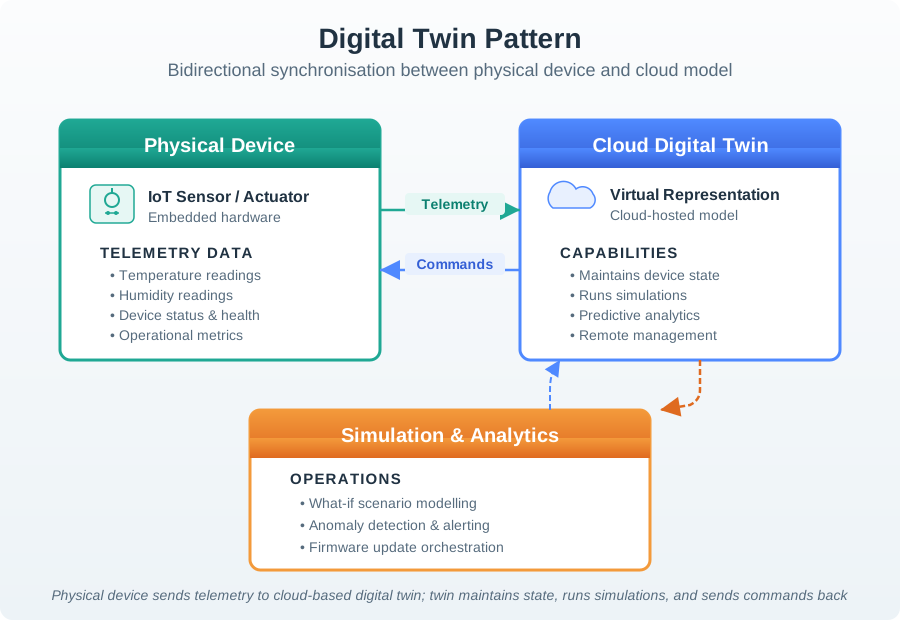
Figure 14.4 shows why freshness, authority, and command relationship rules matter: the cloud model can support simulation and analytics only when it is not mistaken for always-current physical truth.
14.12 Command Pattern
Use the Command pattern when actions must be represented as explicit requests that can be validated, authorized, queued, retried, canceled, rejected, audited, or explained.
Command decisions should make these fields visible:
- requested action
- target component or physical effect
- issuer and permission
- precondition for acceptance
- execution state
- acknowledgement rule
- retry, cancellation, and timeout behavior
- reason for rejection or partial completion
- record needed for support and review
This is especially important when a command crosses a physical boundary. A user-facing “turn off” action, a maintenance reset, or a scheduled actuator change should not disappear into a direct method call unless the system can still explain whether the request was accepted, executed, delayed, or rejected.
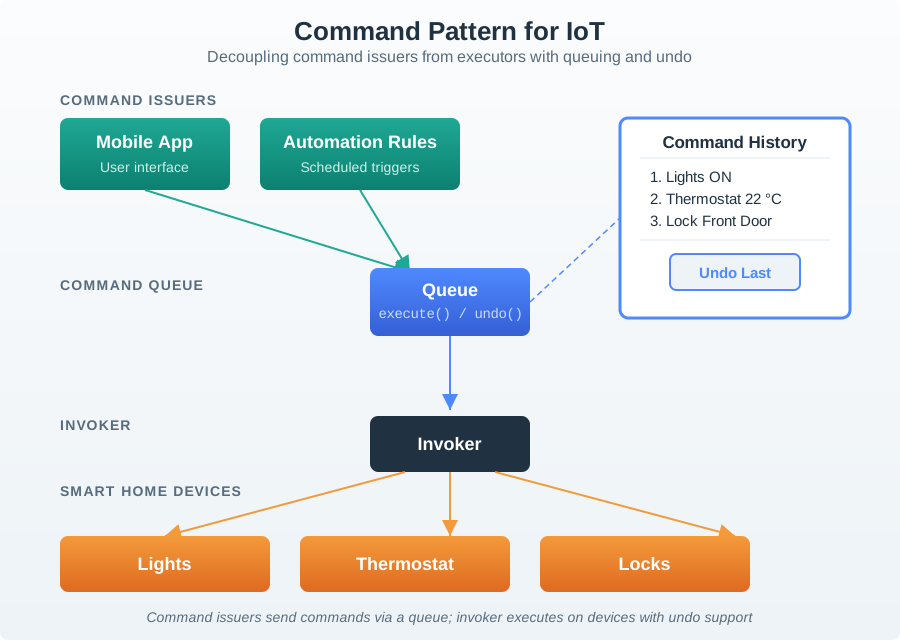
Figure 14.5 separates the action request from physical execution, which is the design space where acceptance, undo, timeout, idempotency, and support records belong.
14.13 Observer Pattern
Use the Observer pattern when one event needs to reach multiple subscribers without making the publisher know every subscriber’s implementation.
Observer reviews should define:
- event name and meaning
- publisher responsibility
- subscriber responsibility
- delivery expectation
- duplicate, late, or missing event behavior
- event ordering assumptions
- unsubscribe or permission rules
- support evidence for event delivery
The Observer pattern does not remove responsibility. It moves responsibility into event contracts. If subscribers interpret the same event differently, the event needs a clearer definition, a versioned schema, or a more specific event type.
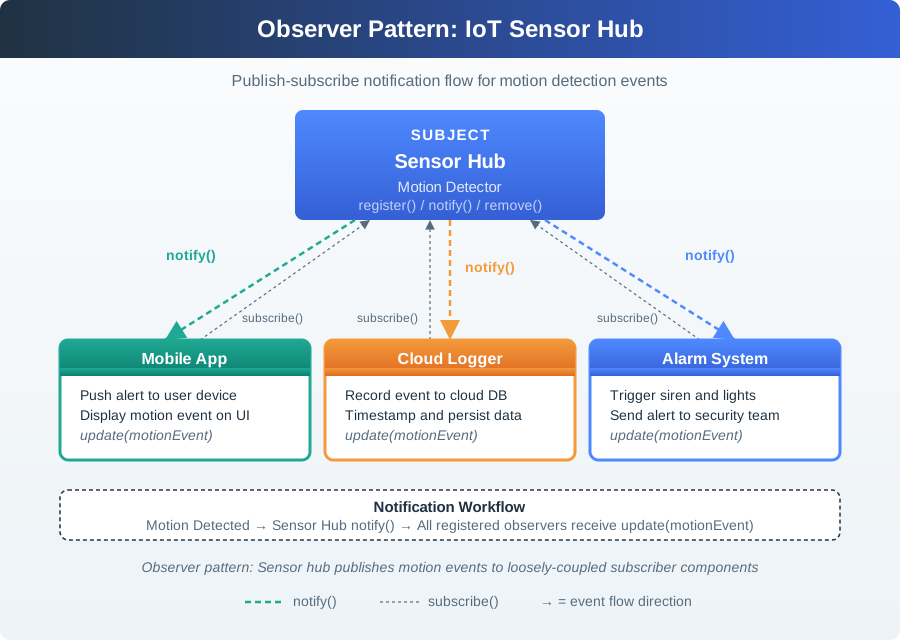
Figure 14.6 makes the event contract visible: subscribers are decoupled from the publisher, but duplicate handling, permissions, ordering, and event meaning still need owners.
14.14 Combining Patterns Without Drift
IoT systems often combine patterns. A building-control system might use a gateway for local device translation, a digital twin for room state, commands for actuator requests, and observers for events consumed by apps, dashboards, logs, or support tools.
Combine patterns only when each one owns a different responsibility:
- Gateway owns boundary translation, buffering, or local fallback.
- Digital Twin owns state representation and freshness.
- Command owns physical action requests and execution records.
- Observer owns event distribution and subscriber decoupling.
- Components own replaceable interfaces.
- Models own consistent generation across similar deployments.
Pattern drift appears when the same responsibility is claimed in several places. Examples include a gateway and cloud service both claiming state authority, a command queue and direct API both controlling the same actuator, or subscribers silently treating events as commands.
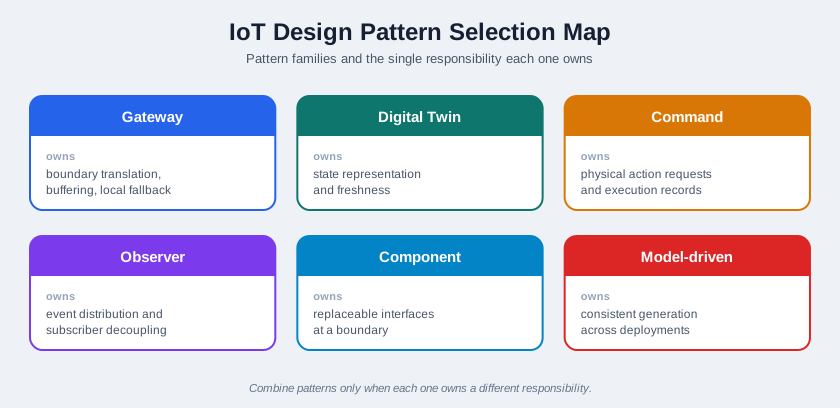
For shared IoT controls such as lighting, access, booking, or comfort systems, test the pattern combination with these questions:
- Gateway: who can still act when the internet path is unavailable?
- Digital twin: which displayed state is authoritative, and how stale can it be before it must be marked?
- Command: which commands need confirmation, undo, timeout, or escalation?
- Observer: who is notified about routine state, conflict, maintenance, and safety events?
- Model-driven design: which shared rules live in the model rather than in one screen or device?
The design is weak if it works only for the first user and not for residents, visitors, facilities staff, and support teams.
14.15 Model-Driven Design
Model-driven design uses a shared model to generate consistent artifacts. It can fit IoT work when many deployments share structure but vary by device type, location, permission, topic, threshold, interface, or support workflow.
Good model-driven design has:
- a reviewed source model
- generated artifacts with clear ownership
- traceability from generated output back to model fields
- validation that catches invalid model combinations
- a manual override policy
- change conditions when the model, generator, or target environment changes
Avoid model-driven design when the model is less clear than the generated output. The model should reduce drift, not hide design decisions behind a generator.
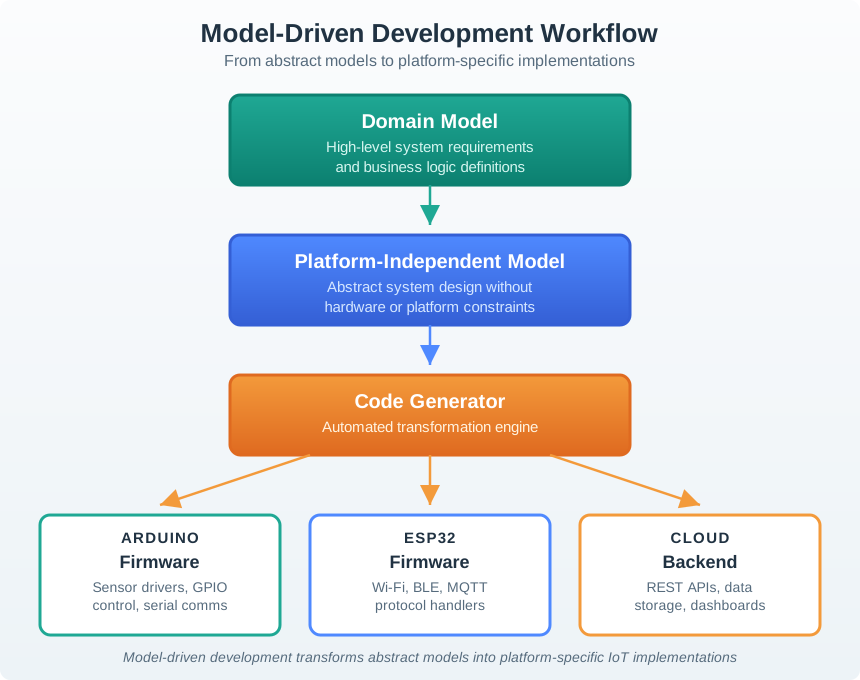
Figure 14.8 shows the traceability test: every generated artifact should point back to the domain model, platform-independent model, generator version, and target-specific constraints that produced it.
14.16 Pattern And Component Record
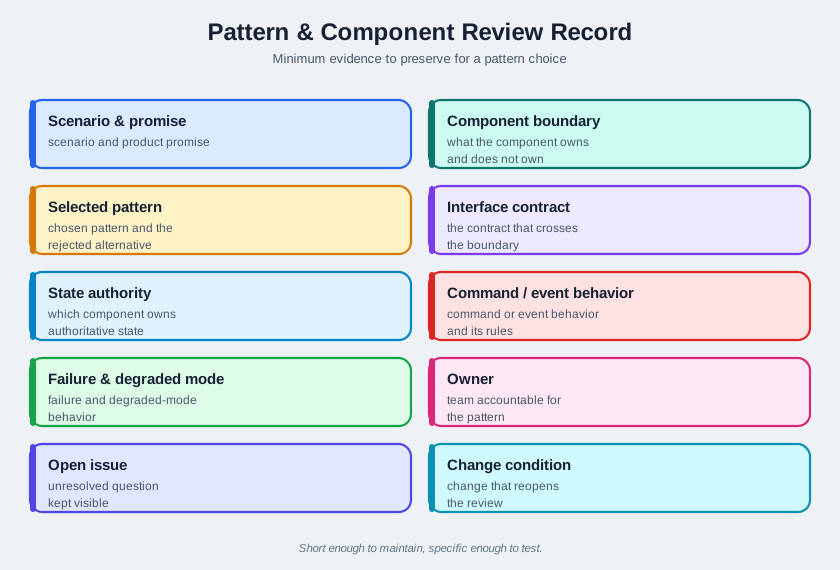
Figure 14.9 shows the minimum evidence to preserve:
- scenario and product promise
- component boundary
- selected pattern and rejected alternative
- interface contract
- state authority
- command or event behavior
- failure and degraded-mode behavior
- owner
- open issue
- change condition
This record should be short enough to maintain and specific enough to test. If the record becomes vague, the pattern choice is not ready.
14.17 Incremental Examples
14.17.1 Split Device and App Duties
A beginner review can use a single smart plug with one relay, one mobile control, and one status card. The component boundary should say whether the device firmware, mobile app, MQTT retained topic, or cloud service owns on/off state, pending command state, offline state, and last-seen time. The pattern choice may be simple: a command record for relay changes and an observer event for state updates.
14.17.2 Gateway and Twin Boundaries
A shared room-control system may use a gateway to translate Zigbee or BLE device reports into MQTT topics and a digital twin to represent room occupancy, freshness, confidence, and actuator relationships. The review should name which service owns desired versus reported state, what happens when the gateway buffers messages during internet loss, how duplicate observer events are handled, and which support view can explain stale or conflicting room state.
14.17.3 Generate Contracts from Models
A campus deployment may use model-driven design to generate AsyncAPI channels, JSON Schema payloads, OpenAPI paths, dashboard labels, support checklist fields, and hardware-in-loop test fixtures from one source model. This only helps if model owners, schema versions, rollout cohorts, field overrides, gateway firmware versions, and support diagnostics are explicit. The advanced review should reject hand-edited generated output when it breaks traceability.
14.19 Worked Review: Replaceable Field Device
Scenario: a field maintenance team needs to replace a sensor device without rewriting the app, support guide, and cloud data model. The replacement device measures the same phenomenon but reports additional diagnostics.
A pattern review might accept:
- a component boundary around the field device interface
- a gateway adapter that normalizes the replacement device payload
- a digital twin field for diagnostic state only if support workflows use it
- command records for calibration or reset actions
- observer events for replacement, calibration, diagnostic change, and rejected command outcomes
- a model-driven template if the same replacement process repeats across deployments
The design should reject any pattern that hides compatibility. If the replacement needs a new payload, permission, diagnostic state, or support action, that change must appear in the interface record and change condition.
14.20 Common Findings
During review, pattern chapters often reveal these defects:
- The design names a pattern but does not assign a responsibility.
- The component boundary hides state ownership.
- A gateway translates data but has no documented offline behavior.
- A digital twin exists but the stale-state rule is missing.
- Commands can be sent but not clearly accepted, rejected, retried, or audited.
- Observers receive events without schema, ordering, or duplicate-event rules.
- The same physical action can be triggered through both direct calls and queued commands.
- The generated model output cannot be traced back to the source model.
- Support teams cannot tell whether the issue is device, gateway, app, cloud, or user-context related.
14.21 Review Checklist
Use this checklist before accepting a pattern design:
- Is the pattern solving a reviewed problem rather than adding vocabulary?
- Is the component boundary small enough to test and replace?
- Is the interface contract explicit?
- Is state authority visible?
- Are command acceptance and rejection visible?
- Are event meanings and subscribers visible?
- Is stale, duplicate, offline, and degraded behavior documented?
- Is the tradeoff recorded?
- Does a named owner maintain the interface and pattern decision?
- Is there a change condition for new devices, new states, new subscribers, new commands, or new product promises?
14.22 Try It Now
Choose one IoT pattern choice and write a one-row responsibility review:
| Field | Your answer |
|---|---|
| Product promise | What user, support, or operations promise depends on this pattern? |
| Boundary | Which device, gateway, service, model, app, or support surface owns the responsibility? |
| Interface contract | MQTT topic, REST path, AsyncAPI channel, JSON Schema payload, command field, or event schema. |
| Failure behavior | Stale state, rejected command, duplicate event, queue overflow, offline fallback, or degraded mode. |
| Change condition | New device type, subscriber, command, schema, deployment model, or product promise that reopens the choice. |
14.23 Micro-Exercise: Find the Pattern Drift
For each symptom, name the likely drift:
- The gateway and cloud service both rewrite reported device state.
- A dashboard treats a digital-twin desired value as measured state.
- Two subscribers interpret the same observer event as different commands.
14.24 Concept Check: Pattern Readiness
14.25 Match Patterns to Duties
14.26 Concept Check: Order the Pattern Review
14.27 Summary
IoT design patterns and components help teams assign responsibility in systems that cross devices, gateways, apps, services, people, and physical environments. Gateway, Digital Twin, Command, Observer, component-based design, and model-driven design are useful when they make interfaces, state, commands, events, generated artifacts, failure behavior, owners, and change conditions easier to inspect.
Do not approve a pattern because it sounds established. Approve it when the boundary, evidence, tradeoff, owner, and failure behavior are visible.
14.28 Key Takeaway
Component patterns should clarify boundaries, state ownership, command paths, event flows, and user-visible recovery behavior.
14.29 See Also
- IoT Pattern Selection Assessment shows how to assess pattern fit before implementation.
- IoT Architecture Model Selection defines the boundary that pattern choices must respect.
- Calm Technology Attention Policy keeps attention, service, product, and platform effects visible.
- Connected Device Fundamentals explains device roles that become component boundaries.
- Reference Architecture Responsibility Record provides broader architecture vocabulary for the next review.
14.30 What’s Next
Continue to Reference Architecture Responsibility Record to review the larger architecture models that pattern and component choices must fit.