6 Research Method Selection for IoT
IoT user research methods, IoT contextual inquiry, IoT diary study, IoT field research, mixed methods IoT UX
6.1 Start Simple
Choose the research method by the uncertainty you need to reduce. If the team does not understand context, go observe; if wording is risky, interview and prototype; if reliability is doubtful, combine field pilots, telemetry, support logs, and task tests so the method matches the decision.
6.2 In 60 Seconds
Research methods are ways to reduce uncertainty before a design decision. In IoT, the right method depends on what the team needs to learn about people, context, device behavior, service touchpoints, and long-term use.
No single method is enough for every question:
- interviews reveal goals, explanations, language, and mental models
- contextual inquiry shows behavior in the real environment
- diary studies show repeated use across days or weeks
- usability tests expose interaction and comprehension failures
- prototype tests compare design alternatives before full implementation
- surveys estimate how common a pattern may be after the pattern is understood
- telemetry and support logs reveal field signals, but need interpretation
- field pilots show how product, context, service, and maintenance interact over time
The method should match the decision. A team should not use a quick survey to replace observation when the real question is physical placement, shared use, failure recovery, or trust.
6.3 Learning Objectives
By the end of this chapter, you will be able to:
- choose a research method based on the design decision and evidence gap
- distinguish behavior evidence, explanation evidence, scale evidence, and field evidence
- plan contextual inquiry, interviews, diary studies, prototype tests, surveys, telemetry review, and pilots
- combine methods without turning research into an unfocused activity list
- document method limits, affected roles, validation needs, and conditions that would reopen research
- avoid common method defects such as convenience sampling, leading questions, and overclaiming survey results
6.4 Prerequisites
Before reading this chapter, review:
- User Research Fundamentals, which explains why observed behavior matters.
- Context-of-Use Analysis, which explains how environment and constraints shape design.
- Personas and Journey Maps for IoT, which explains how research evidence becomes synthesis.
- Pitfalls and Ethics for IoT User Research, which explains consent, privacy, sampling, and automation risks.
6.5 Pick Methods for Uncertainty
An IoT research method is useful only when it answers the uncertainty behind a design decision. A team choosing setup copy for a leak sensor needs different evidence from a team deciding whether a building dashboard should aggregate occupancy by room, floor, or shift. Interviews, observation, logs, prototype tests, surveys, and pilots each answer a different kind of question.
Start by naming what is unknown: behavior, explanation, frequency, comprehension, physical fit, signal reliability, support burden, maintenance, privacy expectation, or long-term trust. Then choose the smallest method mix that can answer that unknown without pretending it proves more than it does. 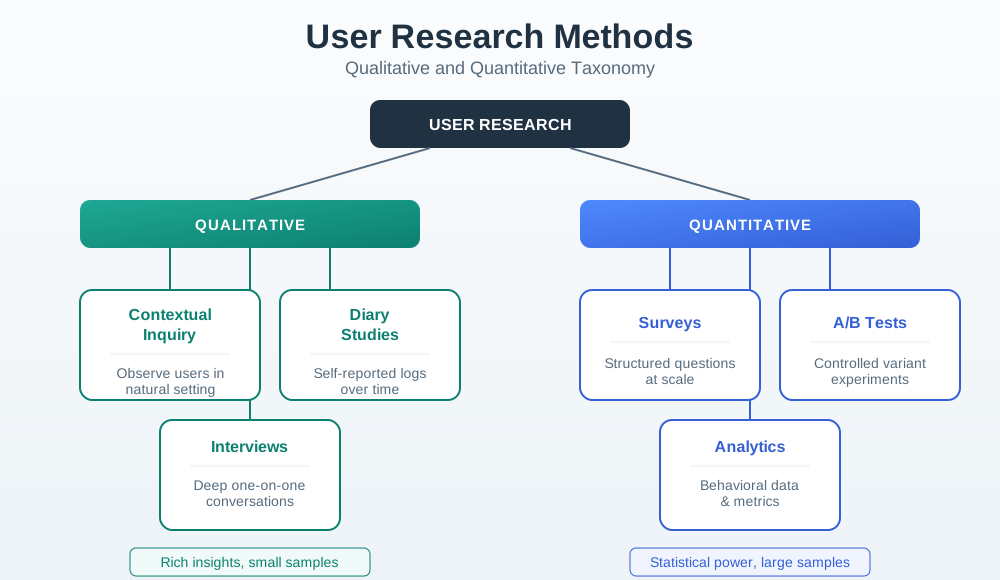
For a connected product, the evidence type is often mixed. A setup abandonment question needs observation of physical placement, a prototype check of state messages, logs for Wi-Fi join or BLE provisioning failures, and a follow-up interview about what the user believed was happening. A survey can help later, but only after the team knows which setup conditions and failure states to ask about.
For shared spaces, method choice also needs affected-role coverage. A meeting-room comfort prompt involves the person who receives the prompt, other people in the room, facilities staff, support staff, and the team responsible for sensor placement or HVAC rules. A method plan that only asks one role whether they like automation will miss social pressure, privacy expectations, signal trust, and maintenance ownership.
- Behavior unknown: observe setup, placement, workaround, handoff, alert response, or maintenance in the real environment.
- Meaning unknown: interview after an observed event so participants can explain goals, trust, language, responsibility, and expectations.
- Scale unknown: use surveys or telemetry after qualitative work defines the pattern that needs counting.
6.6 Field Tests, Prototypes, Logs
For connected products, one method rarely covers the whole decision. A first-time smart-lock setup study might combine contextual inquiry at the door, a prototype test of invite and permission screens, support-log review of failed access cases, and a short interview after the task. The observation shows what people do, the prototype test checks comprehension, the logs show which failures happen in the field, and the interview explains why a user trusted or distrusted the state.
Choose participants around roles, not only market segments. A shared-access product may need account owners, guests, installers, property managers, support agents, and bystanders. A comfort-sensor study may need workers from different shifts, facilities staff, people in shared spaces, and people with accessibility needs. A diary study can then capture intermittent events such as muted alerts, low-battery warnings, stale readings, missed notifications, and manual overrides.
Build the plan around decision checkpoints. Before a pilot, observation and prototype tests can decide whether the setup flow distinguishes permission denial, offline state, account conflict, bad placement, and low battery. During a pilot, diary entries and telemetry can show whether the same states recur across days. After support tickets arrive, interviews with users and support staff can explain whether the recovery path, diagnostic fields, or escalation script needs to change.
Keep the method mix small enough to run well. A useful plan names who will be observed, which task or state will be tested, which logs will be joined, how consent is recorded, what data is excluded, and what design decision will change if the evidence is strong. That prevents research from becoming a generic list of interviews, surveys, analytics, and workshops that no one can trace to a release decision.
- Write the decision: state the feature, state model, permission flow, alert, dashboard, or support path the research will change.
- Map method to evidence: use observation for action, interviews for explanation, prototype tests for comprehension, telemetry for field signals, and pilots for long-term interaction.
- State the boundary: record which roles, contexts, devices, firmware versions, connectivity conditions, and service paths the findings do and do not cover.
6.7 Research Plans Need Instrumentation
When a research method uses logs, telemetry, or a prototype, name the signals that will support interpretation. Setup research may need Wi-Fi join error codes, BLE provisioning state, Matter commissioning step, QR or NFC scan result, OAuth invite token status, Android or iOS permission state, APNs or FCM notification delivery, MQTT publish/ack timing, device-shadow version, firmware version, battery voltage, RSSI/SNR, and support ticket category.
Instrumentation should match the research question. A diary entry that says “the alert was late” becomes easier to interpret when it can be compared with event timestamp, sensor sampling interval, gateway queue depth, retry count, notification quiet-hours state, push delivery receipt, app foreground/background state, and acknowledgement time. The goal is not to collect everything; it is to collect the minimum signals that let the team distinguish user confusion, device failure, cloud delay, permission denial, and support-process breakdown.
Plan joins before the study starts. A prototype test can log the screen, variant, selected action, error state, and recovery path. A field pilot can join anonymized participant id, device id, firmware version, gateway id, role, event timestamp, support ticket tag, and study note without exposing unnecessary household or workplace detail. If the join key is missing, teams often end up with interviews that cannot be connected to logs or logs that cannot explain user behavior.
Also name retention and access rules. Research data may include location, occupancy, access events, health-adjacent routines, household patterns, or workplace behavior. The method plan should say who can inspect raw events, what is aggregated, what is redacted before design review, when data expires, and which claim the evidence can support. Those controls make telemetry and support review usable without turning research into uncontrolled surveillance.
- Prototype handle: name the screen, state, error copy, permission prompt, alert channel, or recovery path being tested.
- Telemetry handle: name the event, field, timestamp, version, role, and retention limit before collecting data.
- Support handle: name the ticket tag, escalation path, resolution code, and handoff point that connect field trouble to design change.
6.8 How It Works: Match Method to Evidence
A research plan should begin with the decision the team needs to make.
Weak research question:
- “What do users want?”
Stronger research question:
- “Which setup state does a first-time user need to see when a shared entry device fails: phone permission denied, invite pending, credential inactive, device offline, or account ownership conflict?”
The stronger question makes the method easier to choose. It points toward field setup observation, prototype testing of recovery messages, support-log review, and role-specific interviews.
Use this method-selection rule:
- If the question is about what people actually do, observe behavior in context.
- If the question is about why people act that way, interview after observation.
- If the question is about repeated use over time, use diaries, logs, or field pilots.
- If the question is about whether an interface is understandable, test the prototype.
- If the question is about how common a known pattern is, use a survey or telemetry review.
- If the question affects safety, privacy, access, or shared spaces, include safeguards and affected roles.
6.9 Method Selection Map
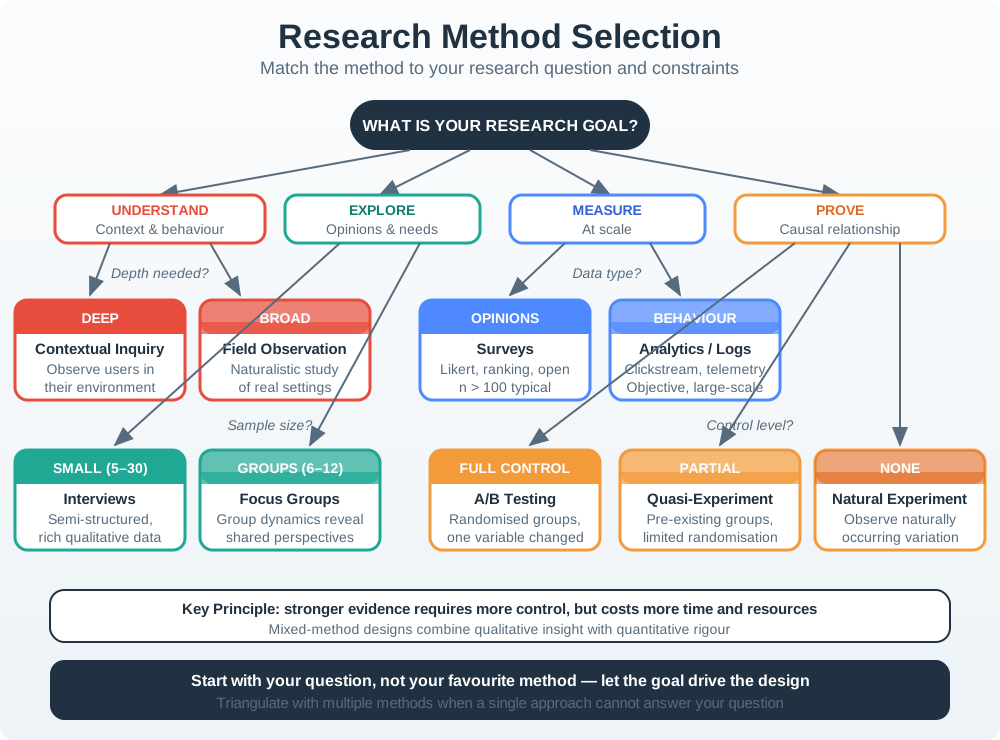
Use Figure 6.1 to match the evidence gap to a method.
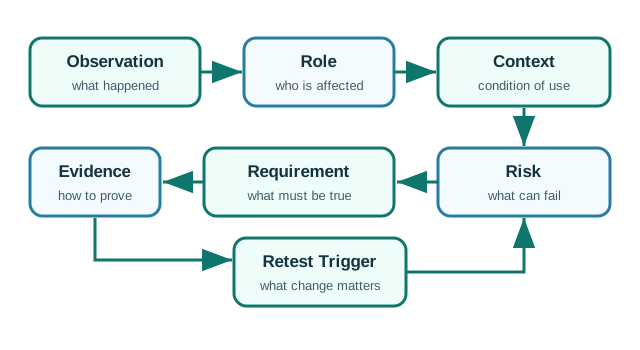
Use Figure 6.2 when the team combines methods. The record keeps observation, interpretation, boundary, and action separate so a survey result, log event, or interview quote does not become a broader claim than it can support.
6.10 Contextual Inquiry
Contextual inquiry means observing people in the environment where the product, task, or workaround happens.
Use it when the team needs to understand:
- physical placement, reach, lighting, noise, weather, power, mounting, or cleaning
- shared use between account owners, household members, visitors, workers, caregivers, or technicians
- setup behavior under realistic interruption, time pressure, and connectivity constraints
- maintenance routines such as charging, battery replacement, testing, calibration, or cleaning
- workarounds that people may not remember or may not mention in an interview
Good contextual inquiry records:
- task and setting
- participant role
- relevant devices and infrastructure
- observed actions
- interruptions and workarounds
- device, app, service, and support states
- questions asked after observation
- evidence boundary and follow-up needs
Do not interrupt every action with questions. Watch first, then ask targeted follow-up questions such as:
- “I noticed you checked the app before touching the device. What were you looking for?”
- “What told you the setup was working?”
- “What would you do if this message appeared when someone was waiting outside?”
6.11 Interviews
Interviews help explain goals, decisions, language, trust, expectations, and past experiences. They are less reliable for predicting future behavior.
Use interviews to learn:
- how people describe a task or failure
- what they believe the system should know or control
- which alerts feel urgent, useful, confusing, or intrusive
- how roles and responsibilities are understood
- how people decide whether to trust an automated action
- what support or maintenance path they expect
Avoid leading questions.
Weak question:
- “Would this smart reminder make your life easier?”
Stronger question:
- “Tell me about the last time you missed, delayed, ignored, or changed a reminder.”
The stronger question asks for evidence from a real situation instead of inviting approval of a concept.
6.12 Diary Studies
Diary studies ask participants to record events over time. They are useful when the experience is intermittent, private, distributed, or hard to observe in one session.
Use diary studies for:
- alert response across days or weeks
- comfort, noise, or environmental changes
- caregiver or household coordination
- device maintenance and battery events
- changing trust in automation
- situations where participants cannot host long observations
Keep diary prompts short and tied to events:
- What happened?
- Where were you?
- Who was affected?
- What did the device/app/service show?
- What did you do next?
- What was unclear or missing?
Avoid asking for long essays. Frequent lightweight records are more useful than a perfect diary that participants stop completing.
6.13 Prototype and Usability Tests
Prototype tests answer whether a design representation is understandable before the team commits to implementation.
Use prototype tests for:
- setup flows
- permission and consent screens
- role invitation and revocation
- alert language and escalation
- device state and data freshness displays
- maintenance reminders
- support handoff
- ownership transfer and decommissioning
Test with realistic states, not only the happy path. For IoT, include:
- device not found
- credential pending
- permission denied
- offline state
- stale data
- low battery
- muted alert
- update required
- shared-role conflict
Prototype fidelity should match the question. A sketch may be enough for sequence and wording. A clickable prototype may be needed for flow comprehension. A bench prototype or field prototype may be needed when physical sensing, placement, timing, or feedback affects behavior.
6.14 Surveys
Surveys are useful after the team understands the pattern it wants to measure.
Use surveys to estimate:
- how common a known task, constraint, or role is
- which contexts or devices participants have
- how people rank trade-offs after the trade-offs are clearly described
- whether a finding from qualitative research appears in a broader group
Do not use surveys to replace discovery when the team does not yet know what to ask.
Weak survey item:
- “Would you use automatic home access?”
Stronger survey item:
- “In the past month, how many times did you need to grant temporary access to someone while you were away from the entrance?”
The stronger item asks about past behavior and context. It can still be imperfect, but it is more useful than hypothetical enthusiasm.
6.15 Telemetry and Support Logs
Telemetry and support logs can show field signals that research sessions miss.
Useful signals include:
- setup drop-off stages
- repeated pairing attempts
- alert mute patterns
- manual overrides after automation
- device offline duration
- low-battery and stale-data events
- support categories and resolution paths
- update failures and recovery loops
Telemetry does not explain itself. A spike in overrides might mean the automation is wrong, the UI is unclear, the context changed, or users do not trust the system. Combine logs with observation, interviews, or support review before turning the signal into a requirement.
Privacy review is part of telemetry planning. Collect the least precise signal that supports the decision, and make the data practice understandable.
6.16 Field Pilots
Field pilots test how product, context, service, support, and maintenance behave together over time.
Use pilots when:
- physical placement affects sensing or actuation
- shared roles need to coordinate
- the support path is part of the experience
- maintenance or failure recovery matters
- telemetry needs interpretation in real context
- automated rules need trust-building and override evidence
A field pilot should have a clear scope:
- what decision it will inform
- who is included and excluded
- what data is collected
- what support is available
- what failure and maintenance states will be reviewed
- what conditions would stop, revise, or expand the pilot
6.17 Mixed-Method Evidence Plan
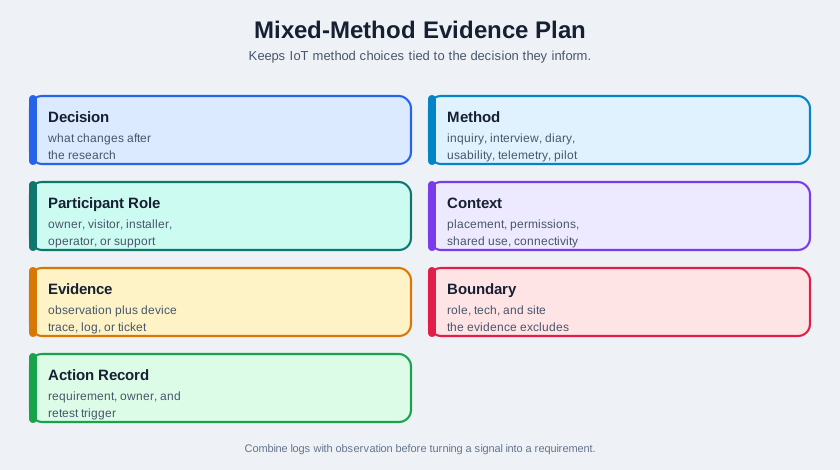
Use Figure 6.3 to keep method choices tied to decisions.
6.18 Incremental Examples
6.18.2 Comfort Sensor Feedback
Decision:
- How can a building team gather comfort evidence for facilities action without making workers feel monitored?
Evidence plan:
- Interviews with workers, facilities staff, night-shift workers, and people in shared spaces.
- Context observations in rooms with different lighting, noise, occupancy, and connectivity.
- Survey only after interviews identify the comfort and privacy concerns to quantify.
- Telemetry review at room or zone level, not individual history, unless a justified and consented purpose exists.
Evidence boundary:
- Comfort findings from one building may not transfer to another building with different zones, work patterns, or governance.
Action record:
- Requirements should state what is sensed, what is not sensed, how data is summarized, who can see it, and how occupants can report problems.
- Reopen the study when sensors, data retention, building zones, or automation policies change.
6.18.3 Cold-Chain Maintenance Pilot
Decision:
- Which research method mix should validate a cold-chain monitoring workflow before a regional rollout?
Evidence plan:
- Contextual inquiry with warehouse staff, delivery drivers, quality managers, and maintenance technicians during loading, handoff, exception handling, and device replacement.
- Prototype tests for alert wording, acknowledgement, escalation, and exception-resolution screens.
- Diary prompts for drivers and warehouse staff when alerts occur outside scheduled observation.
- Telemetry review using MQTT event time, device id, firmware version, DS18B20 or SHT31 probe id, calibration date, battery voltage, gateway id, LoRaWAN RSSI/SNR, packet loss, and queued upload duration.
- Support-log review for false alarms, missed alerts, sensor placement issues, battery swaps, and trailer gateway outages.
- Field pilot across a small set of routes before expanding to more warehouses, carriers, and product categories.
Evidence boundary:
- The pilot can support decisions about the tested routes, sensor models, firmware, trailer types, gateway placement, and escalation workflow. It does not prove performance in a different climate zone, packaging type, carrier process, or retention policy.
Action record:
- Requirements should separate product-temperature excursion, sensor fault, gateway offline state, delayed upload, driver acknowledgement, quality-manager release decision, and maintenance work order.
- Reopen the plan when probe model, calibration interval, firmware, route profile, carrier role, alert threshold, or data-retention policy changes.
This advanced mix names the method and the system handle together. Observation explains workflow, prototype tests check comprehension, diary entries catch intermittent events, telemetry distinguishes sensor and network causes, support logs reveal operational cost, and the pilot tests whether all of those signals survive field use.
6.19 Try It Now: Choose a Method Mix
Pick one IoT design decision and fill in this method plan:
| Field | Your answer |
|---|---|
| Decision | Feature, state model, alert, setup flow, dashboard, or support path |
| Evidence gap | Behavior, explanation, frequency, comprehension, physical fit, field reliability, or trust |
| Method 1 | The method that shows the most direct evidence |
| Method 2 | A second method that explains or bounds the first method |
| Signals | Logs, events, device states, firmware versions, or support tags needed for interpretation |
| Boundary | Roles, contexts, devices, and conditions the finding does not cover |
| Next action | Requirement, prototype change, support change, pilot gate, or stop condition |
6.20 Micro-Exercise: Reject the Mismatch
For each plan, name the mismatch and a better method:
- A survey asks whether users would trust automatic unlocking, but no one observes setup, proximity, or shared-access behavior.
- A field pilot records MQTT drop-offs but never interviews users or support staff about what the failures meant.
- A polished prototype test uses only happy-path device states even though the release decision depends on offline recovery.
6.21 Method Planning Checklist
Before starting research, confirm:
- the design decision is specific
- the method matches the evidence gap
- primary, secondary, affected, and excluded roles are named
- context constraints are included in the plan
- consent and data boundaries are clear
- observation and interpretation will be recorded separately
- the team knows what evidence would change the design
- telemetry or survey data will not be overclaimed
- failure, maintenance, support, and shared-use states are included where relevant
- evidence boundaries, requirements, owners, validation needs, and change conditions will be recorded
6.22 Common Defects
Watch for:
- Method mismatch: using a survey when the team needs field observation.
- Convenience sampling: recruiting only coworkers, early adopters, or available users.
- Leading questions: asking participants to agree with the intended feature.
- Happy-path testing: testing setup success but not failure, maintenance, support, or shared use.
- Telemetry overclaim: treating logs as proof of intent without interpretation.
- Prototype theater: testing a polished flow after the decision has already been made.
- No evidence boundary: writing conclusions that sound broader than the research supports.
- Stale conclusion: keeping research conclusions after the product, context, sensing, or policy changes.
6.23 Concept Check: Pick the Research Plan
6.24 Concept Check: Match Methods to Evidence
6.25 Concept Check: Order the Method Plan
6.26 Summary
Research methods help IoT teams make better design decisions when they are matched to the evidence gap. Observation shows behavior and context. Interviews explain meaning. Diary studies show repeated events. Prototype tests reveal comprehension and recovery problems. Surveys and telemetry help estimate scale after patterns are understood. Field pilots test product, context, service, and maintenance together.
The best research plan is not the largest plan. It is the plan that provides enough evidence for the decision, states its boundaries, protects participants and affected roles, and creates a record that the team can revisit.
6.27 Key Takeaway
Research methods should be selected for the question, context, risk, and evidence needed to guide IoT design decisions.
6.28 See Also
Research methods connect to the people/context sequence:
- User Research Fundamentals explains why research starts with real behavior.
- Context-of-Use Analysis identifies the constraints that field methods need to capture.
- Personas and Journey Maps for IoT synthesizes method findings into artifacts.
- Pitfalls and Ethics for IoT User Research reviews consent, privacy, sampling, and automation risks.
- People and Context Assessment for IoT checks whether you can apply the full review sequence.
6.29 What’s Next
Continue with:
- User Research Fundamentals, which explains the evidence principles behind these methods.
- Context-of-Use Analysis, which helps turn method findings into context requirements.
- Personas and Journey Maps for IoT, which shows how to synthesize research findings.
- Pitfalls and Ethics for IoT User Research, which helps review method quality and participant risk.