18 Prototype Testing and Iteration
IoT user testing, usability testing, think aloud protocol, field testing, design iteration
18.1 Start Simple
Prototype testing becomes useful when the user has to act under realistic conditions. Start with a representative task, add the state changes and failure cases the connected product will face, observe what the person can infer, and turn the result into the next design iteration.
18.2 In 60 Seconds
User testing shows what people actually do with an IoT prototype. It is not a survey about whether they like the idea. It is a structured observation of realistic tasks, device states, recovery paths, and context.
IoT testing must include the physical device, the interface, the environment, and the service promise. A user can succeed in a clean app walkthrough and still fail when the device is offline, mounted poorly, shared by several roles, affected by noise or lighting, or owned by a support team after setup.
Useful testing has a clear loop:
- Recruit people who match the target role, context, ability, and responsibility.
- Write goal-based tasks that do not tell users which button or screen to use.
- Observe behavior, hesitation, errors, recovery, workarounds, and support needs.
- Test realistic device states, including stale data, offline mode, failed pairing, permission mismatch, low power, and rejected commands when relevant.
- Separate what users say from what they do.
- Record evidence, decision, owner, open issue, and change condition.
- Iterate only where evidence shows the design is weak or risky.
The goal is not to collect compliments. The goal is to reduce uncertainty before the design becomes expensive to change.
18.3 Learning Objectives
By the end of this chapter, you will be able to:
- plan an IoT user test around realistic tasks and device states
- recruit representative participants instead of convenient participants
- write neutral task prompts that reveal user behavior
- distinguish observed behavior from preference-only feedback
- decide when to iterate, increase fidelity, field test, or release with constraints
- create a test evidence record that preserves findings and change conditions
18.4 Prerequisites
Before reading this chapter, you should be comfortable with:
- Interactive Design Principles, which defines the interaction qualities testing should observe.
- Interactive Design Process, which explains when testing drives iteration or release decisions.
- Prototyping Techniques for IoT, which helps choose the artifact and fidelity to test.
18.5 Overview: Test the Real Use Path
IoT user testing is strongest when it observes the whole path a person must use, not only the screen. The test should include the role, place, device state, service dependency, support handoff, and recovery path that make the task realistic. A participant who can complete a clean app walkthrough may still fail when a reader is offline, a sensor value is stale, a permission is missing, or a physical indicator is hard to see.
Start from the decision the team must make. If the question is whether residents can invite a visitor, the test can be screen-heavy. If the question is whether residents can recover when the access reader is offline, the test must include reader status, app language, local feedback, and support routing.
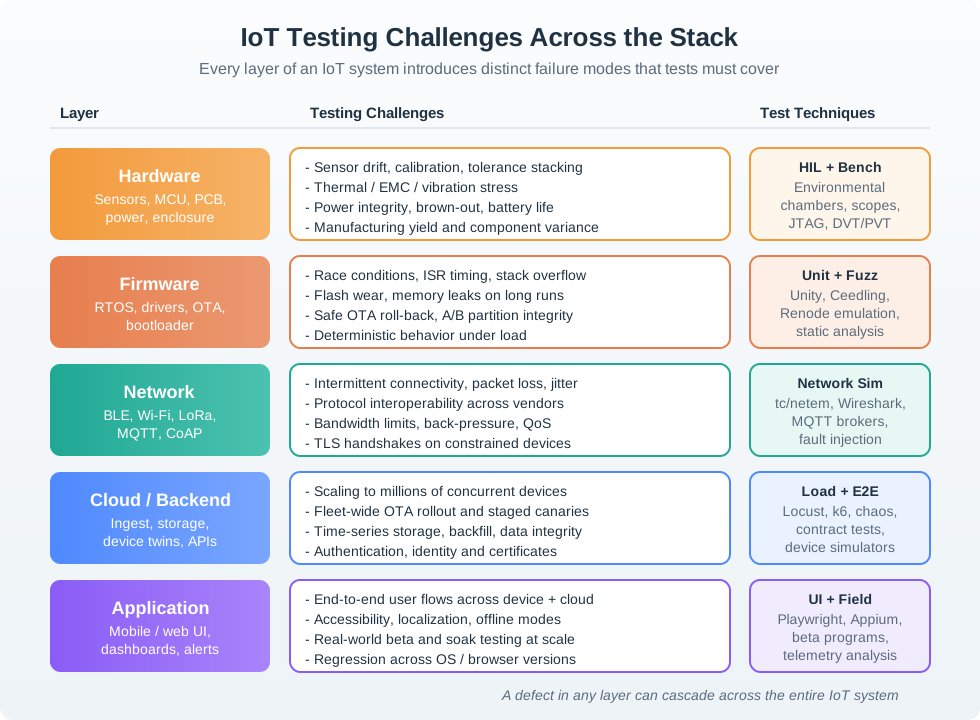
For a shared access product, the same task can mean different tests. A first lab test may ask a resident to create a visitor invite in a clickable prototype. A stronger recovery test may seed an expired invite, put the reader into an offline state, and watch whether the participant understands the app copy, reader indicator, and support handoff. A later field test may check whether poor lighting, weak Wi-Fi, quiet hours, phone battery, shared accounts, or delayed push notifications change the result.
The useful unit of planning is therefore a test risk, not a page in the interface. Name the user goal, the device or service state that could break the promise, the participant role that can reveal the risk, and the evidence that would change the design decision. A test can stay small when the question is wording or findability. It must become more realistic when the question depends on timing, physical placement, stale data, permission boundaries, support ownership, or confidence in a field setting.
- Participant fit: match the tested risk to the user’s role, ability, context, responsibility, and support expectation.
- Task realism: describe the goal and constraints without naming the interface path.
- State realism: include online, offline, stale, pending, rejected, low-power, permission-denied, and handoff states when they affect the promise.
18.6 Instrument Tests Without Leading
Testing needs observation and system evidence. Use notes, consented screen recordings, camera views of physical controls, timestamps, prototype logs, and facilitator prompts that do not teach the path. In a digital prototype, capture click paths, focus order, screen-reader behavior, notification copy, and form errors. In a device prototype, capture LED or haptic feedback, BLE pairing state, Wi-Fi provisioning state, command acknowledgement, battery state, and support handoff.
Concrete tools depend on the artifact. Figma prototypes, HTML prototypes, Playwright-backed smoke routes, Home Assistant logbook entries, Node-RED debug panels, Mosquitto logs, browser console logs, serial logs, MQTT topic captures, cloud device-shadow versions, APNs/FCM notification delivery state, and support-ticket timestamps can all explain what the user saw and what the system actually did.
Prepare a small evidence matrix before the session. Each row should name the task, participant role, seeded state, simulated part, expected observable behavior, system signal, and decision owner. For example, an offline-reader recovery row might include the app state, reader LED state, gateway last-seen timestamp, retained MQTT status, support-ticket id, and the exact copy that tells the resident what can still be done locally. That matrix keeps the facilitator from improvising the test around whatever the prototype happens to show.
During the session, keep instrumentation separate from coaching. Time-stamp observations, capture screenshots or recordings with consent, and mark when the participant hesitates, retries, asks for help, or invents a workaround. Do not explain the intended path until the task is complete or ethically unsafe to continue. After the session, align the observation notes with logs from the prototype, device, gateway, notification service, and support tool before deciding whether the issue is wording, interaction flow, device feedback, service latency, accessibility, or operational ownership.
- Prepare the scenario: define role, goal, environment, device state, simulated parts, and expected success evidence.
- Observe first: let hesitation, wrong turns, repeated taps, support seeking, and workarounds happen before prompting.
- Synthesize carefully: separate repeated behavior patterns from isolated preference comments and assign an owner to each release-relevant issue.
18.7 Findings Need State Causes
A user-test finding is weak if the team cannot explain which system state produced the behavior. A participant may tap repeatedly because the app lacks feedback, because the MQTT command acknowledgement is delayed, because the BLE connection dropped, because APNs/FCM notification delivery lagged, or because the task prompt created the wrong expectation. The design response should match the cause.
Under-the-hood testing connects observed behavior to implementation signals such as command id, event timestamp, idempotency key, retained MQTT value, device-shadow version, Matter commissioning state, OAuth token status, account role, gateway offline interval, firmware version, battery threshold, sensor freshness, and support correlation id. These signals keep the team from treating all confusion as a wording problem.
Build a timeline for each important attempt. The timeline can start with the participant prompt, then record the tap or physical action, command creation, idempotency key, gateway receipt, device acknowledgement, state update, UI refresh, notification delivery, and support-console entry. When those events are visible together, repeated taps may point to missing acknowledgement copy, a delayed WebSocket update, a stale retained MQTT message, a rejected role permission, or a device that applied the command but never confirmed it to the cloud.
Good tests also make failure states repeatable. A team can use tc/netem to add latency or packet loss, Mosquitto or an MQTT test broker to seed retained values, a device-shadow fixture to force version conflicts, a simulator to emit stale timestamps, and browser automation to verify that the UI presents pending, stale, rejected, and offline states. Hardware-in-the-loop benches, serial logs, OpenTelemetry traces, Sentry breadcrumbs, and support correlation ids are not user-research artifacts by themselves; they are evidence that helps explain why the participant behaved as observed.
- Cause: tie the finding to state, timing, permission, feedback, physical context, or support ownership.
- Scope: state whether the issue affects one task, one role, one device state, or the release promise.
- Next check: decide whether the fix needs a focused lab check, accessibility pass, hardware test, field test, or release constraint.
18.8 Turn Tests into Evidence
Weak testing asks whether people like the design. Strong testing watches whether people can use the design in the context where it must work.
Preference question:
- “Do you like this setup screen?”
Behavior task:
- “You have just replaced the device battery, and the app says the reader is offline. Show what you would do next.”
The behavior task reveals whether the user understands device state, recovery language, support route, and confidence boundary. It also reveals whether the prototype includes the right failure state. If the test includes only the happy path, the finding is incomplete.
18.9 User Test Evidence Loop
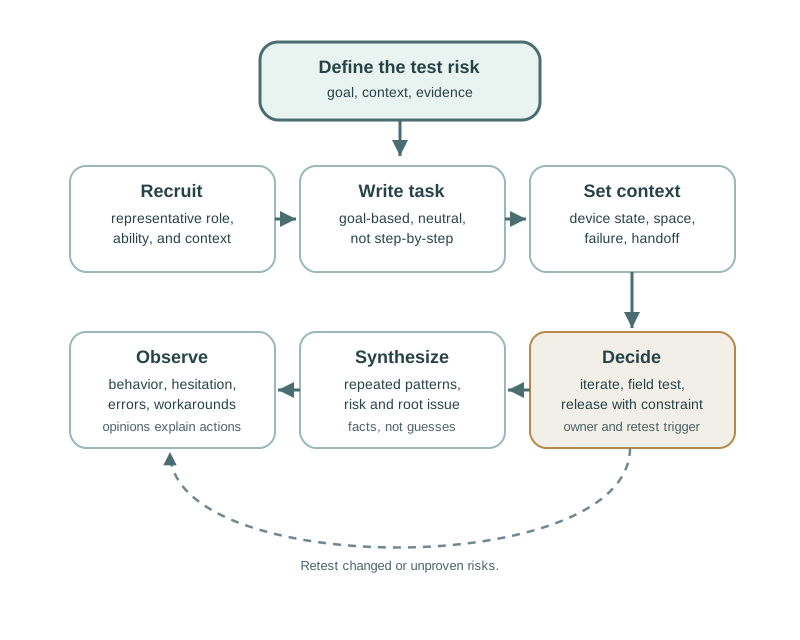
Use Figure 18.2 as the basic flow:
- Recruit: choose participants who match the real role and context.
- Task: describe the goal, not the interface steps.
- Context: include device state, environment, and service handoff.
- Observe: watch behavior before interpreting preferences.
- Synthesize: separate repeated issues from isolated notes.
- Decide: iterate, increase fidelity, field test, release with constraint, or stop.
- Change condition: define what evidence must be checked again.
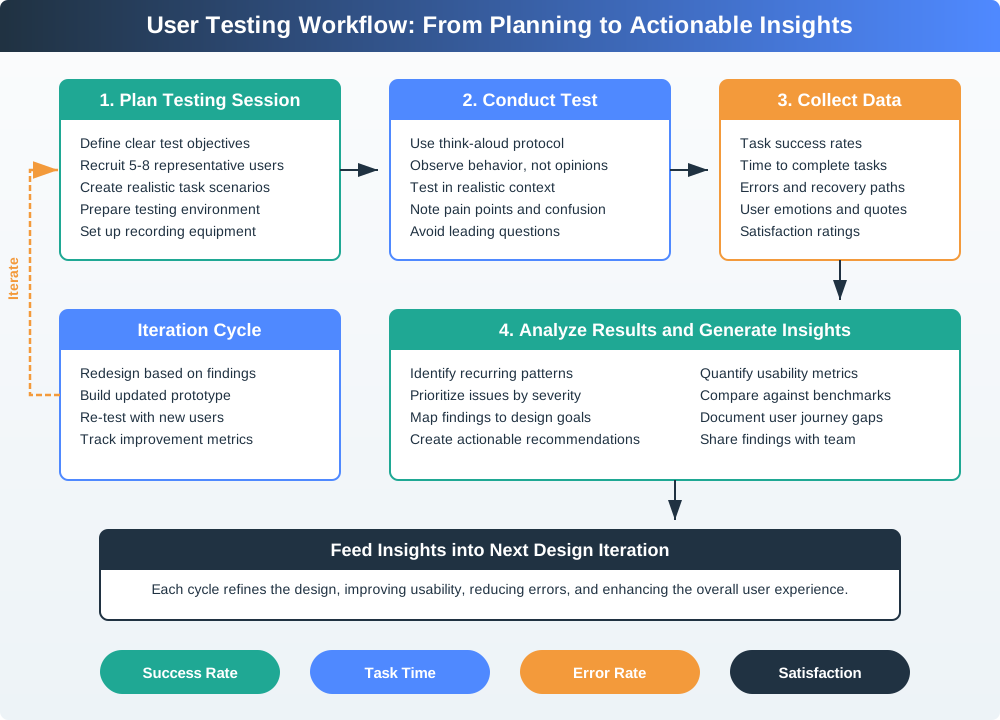
Use Figure 18.3 to keep the session from becoming an informal demo. The workflow is only useful when planning, observation, data capture, synthesis, and the next decision are all explicit.
18.10 Recruit Representative Users
Representative does not mean “any person who can try the prototype.” It means the participant matches the design risk being tested.
For IoT, screening should consider:
- user role and responsibility
- experience with similar devices
- physical setting where the device is used
- accessibility needs, language, and literacy
- shared-use relationships
- installation permission and ownership
- support responsibility after something fails
- risk tolerance for automation, privacy, and physical action
Convenient participants can be useful for early smoke tests, but they should not be treated as release evidence for a target population they do not represent.
18.11 Write Neutral Tasks
A good task gives a realistic goal without naming the solution.
Weak task:
- “Open the security tab and check the event log.”
Stronger task:
- “You heard a noise near the front door last night. Find out whether the device recorded anything useful.”
The stronger task lets the user choose a path. That choice is evidence. If the user cannot find the path, misunderstands a state, or creates a workaround, the design has learned something.
For IoT tests, task prompts should also include realistic constraints:
- hands full during entry
- weak network during setup
- device shared by several people
- app permission denied
- sensor reading delayed or stale
- physical indicator hard to see
- support handoff required
- automation acts at an unexpected time
18.12 Conduct the Session
The facilitator’s job is to observe, not rescue the design.
Before the task:
- explain that the prototype is being tested, not the participant
- ask the participant to think aloud when comfortable
- confirm consent for recording, logging, or note-taking
- explain any simulated behavior in a way that preserves safety and ethics
During the task:
- let hesitation happen before intervening
- ask neutral prompts such as “What are you looking for now?”
- avoid teaching, defending, or explaining the intended path
- record what the participant did, not only what they said
- capture device state, environment, timing, and support handoff issues
After the task:
- ask what the participant expected to happen
- ask what felt uncertain, risky, or surprising
- distinguish preference from observed behavior
- note whether the issue requires another prototype, a content fix, a hardware change, a support change, or a release constraint
18.13 Observe Behavior Before Opinion
People often try to be polite. They may say the design is clear after struggling with it. They may say they would use a feature every day, then ignore it in field use. Testing should respect participant opinions while grounding design decisions in behavior.
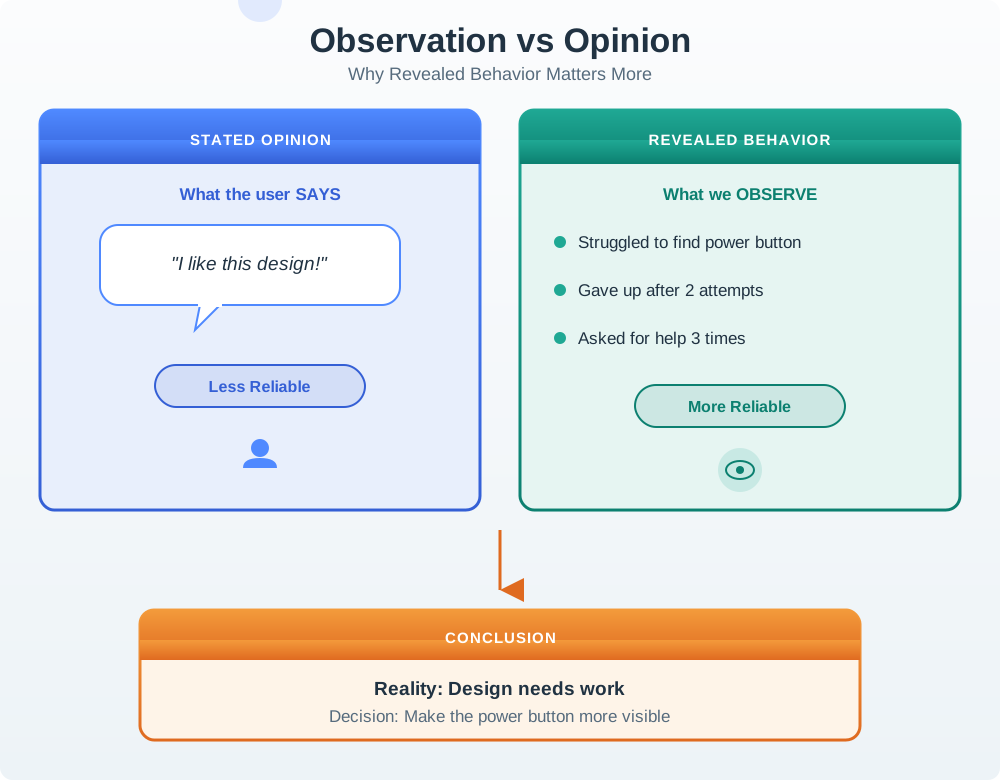
Figure 18.4 shows why the finding should start from observed behavior. Preference comments can explain behavior, but they should not replace evidence of hesitation, repeated attempts, recovery failure, or support seeking.
Useful evidence includes:
- task completion or abandonment
- where the user hesitated
- incorrect assumptions about device state
- support or help-seeking behavior
- recovery success after a failure
- repeated wording misunderstandings
- workarounds created by the participant
- visible trust, anxiety, frustration, or overconfidence
- logs showing stale data, rejected commands, or delayed feedback
Opinions matter when they explain behavior. They are weak evidence when they predict future use without observation.
18.14 Test IoT-Specific States
Connected products fail in ways that screen-only products do not. Tests should include the states most likely to affect trust and safety.
Consider testing:
- first setup and pairing
- device offline and recovery
- stale sensor reading
- low battery or low power mode
- rejected command or actuator lockout
- permission mismatch between roles
- shared household or team conflict
- privacy consent and recording state
- network interruption
- support handoff after failure
- update or maintenance interruption
Not every test needs every state. The test plan should include the states tied to the current risk.
18.15 Lab, Remote, and Field Testing
Lab testing is useful when the team needs controlled observation of a specific flow. It can reveal labeling, navigation, feedback, and task-sequence problems quickly.
Remote testing can work for screen-heavy flows, dashboards, onboarding, consent, and support copy. It is weaker when the physical device, environment, installation, or sensor behavior is the main risk.
Field testing is needed when the question depends on ordinary life:
- placement and visibility over time
- shared use by multiple people
- maintenance and charging behavior
- false alerts and alert fatigue
- privacy comfort in a real space
- connectivity and environmental variation
- adoption after the first impression fades
Good review practice is to label the test type and its limits. A lab test can validate a task flow. It cannot prove long-term field adoption.
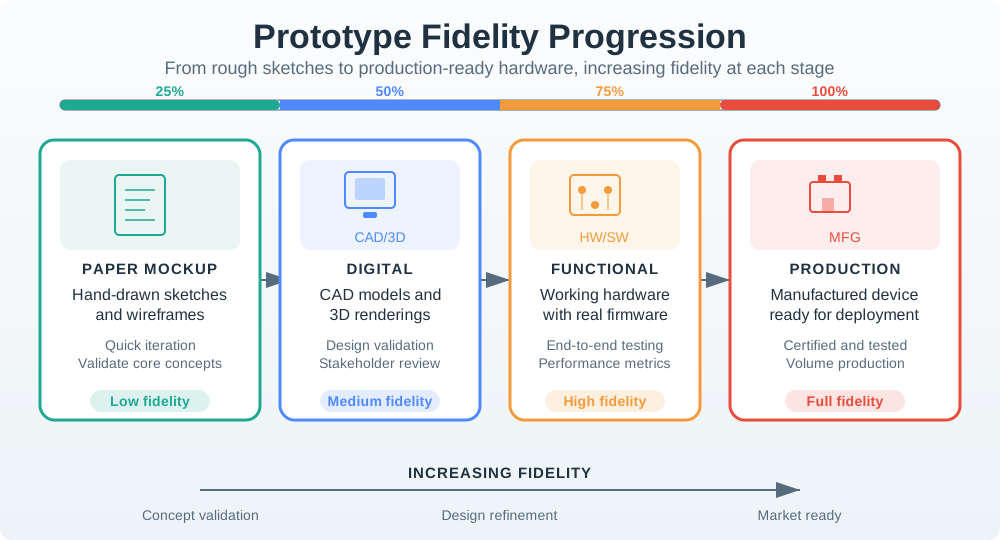
Use Figure 18.5 to choose the smallest artifact that can answer the current test question. A clickable screen can test wording and path finding. A hardware bench can test feedback timing and physical indicators. A field pilot is needed when placement, shared use, connectivity, maintenance, or long-term trust is the risk.
18.16 Iteration Decisions
Testing should end with a decision, not only a list of observations.
Common decisions include:
- Fix wording: the concept is sound but users misread a label, state, or instruction.
- Change flow: users understand the goal but take the wrong route or miss a required step.
- Change feedback: users cannot tell whether the device heard, acted, failed, or needs help.
- Change physical design: placement, controls, indicators, or ergonomics prevent success.
- Change support model: users need a handoff, escalation, or owner that the design does not provide.
- Increase fidelity: the next question requires real sensing, actuation, installation, or field context.
- Repeat focused check: the change touches a critical task or risk.
- Release with constraint: remaining issues are known, bounded, owned, and acceptable for the release scope.
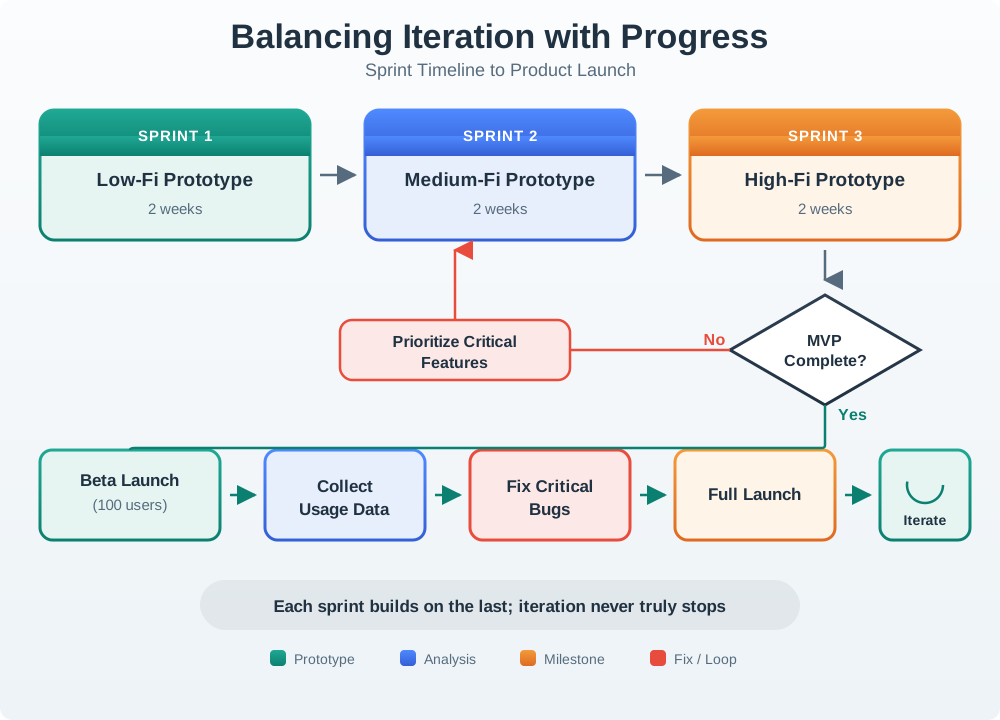
Use Figure 18.6 to keep iteration bounded. A team should loop when evidence changes the decision, but it should also name what evidence is good enough to move to the next fidelity or release stage.
Avoid endless iteration. A design does not need to be perfect. It needs enough evidence for the current decision, plus a record of accepted risks and change conditions.
18.17 User Test Evidence Record
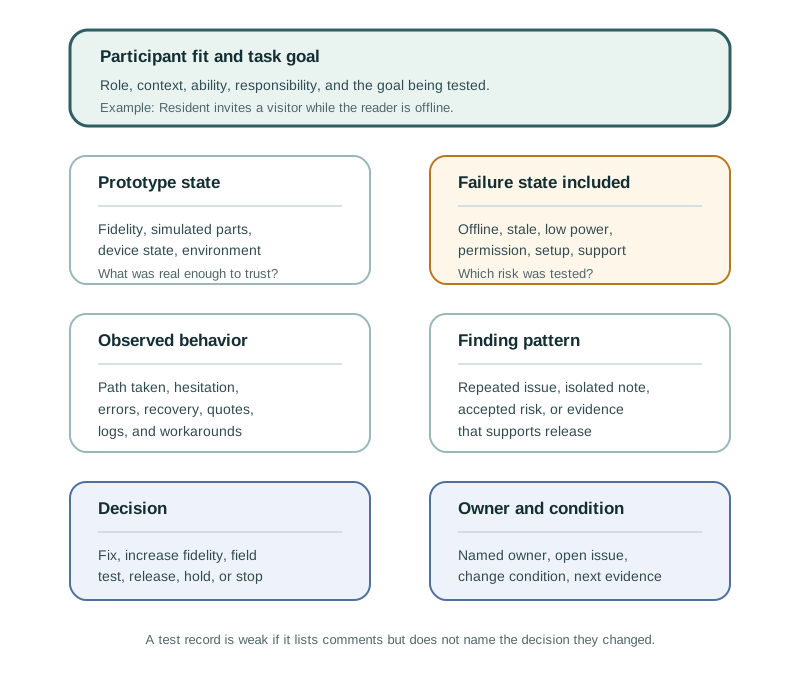
Use Figure 18.7 to keep findings actionable. A useful record includes:
- Participant fit: the role, context, and abilities represented.
- Task goal: the user goal being tested.
- Prototype state: fidelity, device state, and simulated parts.
- Observed behavior: what the participant did before explanation.
- Failure state: offline, stale, low power, permission, setup, support, or other risk included in the test.
- Finding: the issue or evidence pattern.
- Decision: fix, repeat a focused check, increase fidelity, field test, release with constraint, or stop.
- Owner: the person or team responsible for the next action.
- Change condition: the condition that requires the finding to be checked again.
The record should be short enough to use but specific enough to prevent the same issue from being rediscovered later.
18.18 Incremental Examples
18.18.1 Beginner Example: Rewrite a Leading Task
A beginner test can start with a screen prototype for a visitor invite flow. Replace “open Settings, tap Visitors, and send an invite” with “your friend needs access tonight from 7 PM to 9 PM; set that up.” Watch whether the participant finds the invite path, understands active versus pending credentials, and notices when the reader state is offline. The useful finding is the observed route and misunderstanding, not whether the participant liked the screen.
18.18.2 Add Device State to Tests
An intermediate test adds a real or simulated reader state. The facilitator sets up an expired invite, a wrong-unit selection, BLE discovery failure, or gateway offline state before the task. Evidence should include participant behavior, app screen recording, reader indicator state, MQTT retained state or device-shadow version, support-ticket timestamp, and whether the participant can recover without being taught the path.
18.18.3 Move Risk Into the Field
An advanced field test checks whether an access or maintenance prototype survives ordinary context. Residents, visitors, property managers, and support staff may use the same system under poor lighting, weak Wi-Fi, low phone battery, quiet hours, delayed push notifications, and shared-device conflict. The test should connect observed behavior to logs such as APNs/FCM delivery state, gateway offline interval, command id, idempotency key, firmware version, support correlation id, and role permission state.
18.20 Worked Review: Maintenance Alert
A facility team prototypes a maintenance alert button for shared equipment.
The test plan includes:
- a visible button on the equipment
- a user who sees a fault
- a delayed network state
- a duplicate report
- a staff member receiving the alert
- a closed-loop confirmation back to the user
The team learns that users understand how to report a problem, but they press the button repeatedly when no confirmation appears. Staff then see duplicate tickets and waste time merging reports.
The iteration is not a bigger button. The issue is feedback and service state. The prototype needs clear “request received,” “already reported,” and “staff assigned” states, then a focused check with network delay included.
18.21 Common Testing Defects
18.21.1 Testing the Wrong Participants
Testing with convenient colleagues can hide accessibility, language, age, context, role, and trust issues. Match participants to the risk being tested.
18.21.2 Leading the User Through the Flow
If the facilitator tells the user where to tap, the test has become training. Neutral task prompts reveal whether the design communicates the path.
18.21.3 Testing Only the Happy Path
IoT review should include the failure states tied to the promise. Setup, offline state, stale data, permission mismatch, rejected commands, and support handoff often decide whether the product feels trustworthy.
18.21.4 Treating Compliments as Proof
Positive comments are useful, but they do not override observed confusion, failed recovery, or workaround behavior.
18.21.5 Ignoring Physical Context
Screen recordings alone cannot prove visibility, reach, noise, placement, installation, shared use, or maintenance access.
18.21.6 Iterating Without a Review Record
If the team does not record finding, decision, owner, and change condition, the same issue can return later under a different prototype.
18.22 Review Checklist
Before accepting a user testing and iteration plan, check:
- Are participants representative of the tested risk?
- Are tasks written as goals rather than instructions?
- Does the test include relevant device state, environment, and role context?
- Are simulated parts labeled in the evidence record?
- Does the session observe behavior before asking for opinion?
- Are failure, recovery, support, and stale-state paths included when relevant?
- Are accessibility, privacy, safety, and shared use considered?
- Are findings tied to design decisions?
- Is each open issue assigned to an owner?
- Is there a clear change condition?
18.23 Try It Now
Choose one IoT prototype and write a one-row user-test plan:
| Field | Your answer |
|---|---|
| Decision | What release, iteration, or fidelity decision needs evidence? |
| Participant | Which role, context, ability, or responsibility must the participant represent? |
| Neutral task | What goal will you ask them to complete without naming the interface path? |
| Device state | Online, offline, stale, low-power, permission-denied, pending, rejected, or support-handoff state. |
| Evidence | Observed behavior, prototype log, device state, support record, or follow-up condition. |
18.24 Micro-Exercise: Remove the Leading Clue
Rewrite each task so it describes the user goal instead of the interface path:
- “Tap the bell icon and mute alerts for one hour.”
- “Open the device settings and check the last-seen timestamp.”
- “Press Retry after the Wi-Fi setup error.”
18.25 Concept Check: Neutral Task Design
18.26 Match Test Terms to Evidence
18.27 Concept Check: Order the User Test
18.28 Summary
User testing turns prototypes into evidence. Strong IoT tests use representative participants, neutral tasks, realistic device states, observation before opinion, and records that connect findings to decisions. Lab tests can refine flows, but field tests are needed when environment, shared use, maintenance, privacy, support, or long-term adoption matters. Iteration should be evidence-bound: fix what the test exposes, record what remains unproven, and check the risks that still matter.
18.29 Key Takeaway
User testing should observe real tasks, environments, devices, failures, and support paths rather than only screen-level usability.
18.30 See Also
User testing connects the UX design chapters:
- Prototyping Techniques for IoT explains what artifact and fidelity to test.
- Interactive Design Process places testing inside a loop of evidence, iteration, and release gates.
- Interactive Design Principles defines the qualities testing should make visible.
- Understanding People and Context expands the research work needed before and around testing.
Testing also connects to engineering and operations. Firmware, connectivity, device state, support routing, privacy, accessibility, maintenance, and release constraints should enter the test when they affect user trust.
18.31 What’s Next
Continue to Design Prototyping and Learning to connect prototyping, testing, iteration, and learning into a broader design practice for connected products.