13 8 Facets of IoT Design
8 facets of IoT design, IoT design facets, interusability, ubiquitous computing, calm technology, IoT conceptual model, IoT service design, IoT platform design
13.1 Start Simple
Calm IoT design is not quiet decoration; it is a product that interrupts less because responsibility, feedback, service workflow, and platform limits are clear. Start with the moment when the user should notice the system, then use the facets to decide what should stay visible, implicit, recoverable, or owned elsewhere.
13.2 In 60 Seconds
The 8 facets of IoT design help teams review a connected product beyond the visible interface. The screen, controls, and physical form matter, but so do cross-device behavior, the user’s mental model, support workflows, product promise, and platform responsibilities.
A high-quality review does not ask whether the team mentioned all eight labels. It asks whether each facet has evidence, an owner, a user-facing consequence, a failure behavior, and a change condition.
13.3 Learning Objectives
By the end of this chapter, you will be able to:
- explain the 8 facets as a visible-to-hidden review model for IoT products
- connect each facet to evidence, risk, owner, and user impact
- identify gaps caused by focusing only on UI or hardware appearance
- review interusability, conceptual models, service workflows, product promises, and platform responsibilities
- build a facet review record that supports design decisions and future review
13.4 Minimum Viable Understanding
The 8 facets are:
- UI and visual design
- Interaction design
- Industrial design
- Interusability
- Conceptual model
- Service design
- Productization
- Platform design
The top facets are easiest to see. The lower facets are easier to miss but often decide whether the product remains understandable, supportable, secure, maintainable, and trustworthy after launch.
13.5 Ubiquitous Computing Roots
Calm technology comes from the older ubiquitous-computing ambition associated with Mark Weiser at Xerox PARC: computing should move out of the desktop frame and become useful in the human environment instead of forcing people to adapt to the machine. In an IoT review, that idea is practical. The question is not “How do I make this task fit this one device?” The better question is “What is the best way for the task to happen across the devices, spaces, sensors, and people that are already involved?”
That shift matters because connected products often have overlapping capabilities. A phone, wall display, web dashboard, voice interface, wearable, tablet, and support console may all show state or offer control. A calm design assigns each surface a job instead of duplicating every feature everywhere. Routine awareness can live at the edge of attention. Risk, uncertainty, and action can move to the surface where the right person can respond.
The classic ubiquitous-computing scale of tabs, pads, and boards still helps review IoT products. Small personal devices such as phones and tags fit quick glance, identity, and private confirmation tasks. Pad-sized surfaces fit inspection, setup, and richer comparison. Room-scale boards and shared displays fit collaborative awareness, teaching, operations, and local status. The same product may need all three scales, but each scale should carry the part of the task it is best suited to carry.
Early mobile-interaction prototypes also show why sensing belongs in the design model. Proximity sensors, touch-sensitive bezels or device sides, and accelerometers can make interaction more context-aware, but only when the product explains what those signals mean. A tilt sensor might support orientation or gesture. Proximity might suppress a notification, change display behavior, or infer attention. Touch around the device body might reduce screen clutter. The design review should name the sensed condition, the inference, the user benefit, the failure case, and the fallback when the signal is wrong.
Automated capture deserves the same review discipline. A wearable, phone, glasses display, scale, or energy dashboard may reduce manual logging, but the design still has to say what was captured, what was inferred, and when the user can inspect or correct it. Classic indoor-location prototypes such as Active Badge and ParcTab also show the boundary: room or zone location can help silence a phone in a meeting, route a task to a nearby surface, or flag an unusual activity pattern, but location is not the whole context. A release-ready calm design records the place granularity, receiver or line-of-sight assumptions, activity label, confidence, retention policy, and fallback when the context guess is wrong.
13.6 Prerequisites
This chapter builds on:
- Design Thinking for IoT, which explains how design choices should trace back to observed context and tested behavior.
- Calm Technology Attention Policy, which reviews attention policy and calm behavior across the design facets.
- IoT Architecture Model Selection, which helps evaluate platform responsibility and layer boundaries.
- User Experience Design, which provides foundations for usability, feedback, and recovery.
13.7 Facets Link Polish to Truth
The eight facets help a team review a connected product from what people see to what the platform must own. A polished app, clean enclosure, or friendly notification can still fail if state is stale, permissions are unclear, support cannot diagnose a failure, or the platform cannot keep the product promise.
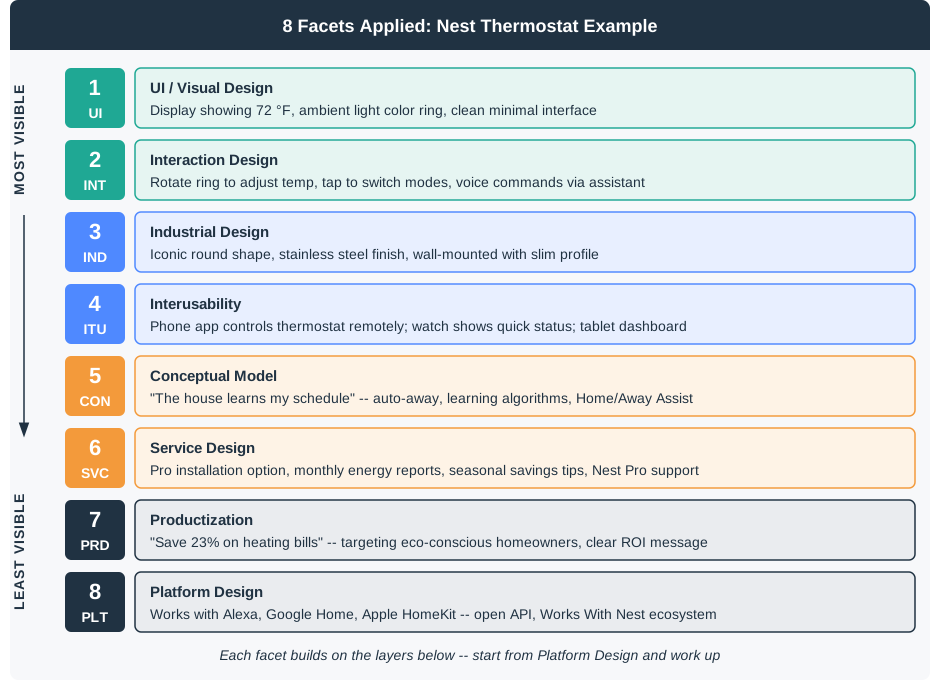
For a shared-room sensor, the UI label, wall-device placement, app workflow, dashboard state, support handoff, product claim, and cloud dependency all describe the same experience. Reviewing only one facet misses how the system behaves when motion is inferred, a phone app is stale, the gateway is offline, or ownership changes.
The facets are not a checklist of equal-sized boxes. They are a way to find the missing owner behind a user-visible problem. If the room tile says “available” after a gateway outage, the issue may look like UI copy, but the real gap may be stale-state modeling, MQTT retained-state handling, dashboard synchronization, support diagnostics, or a product promise that never named the expected freshness window.
A strong review records evidence for each layer of the experience. It names who owns the app label, who owns the device indicator, who decides when stale state becomes unknown, who can transfer a room to a new owner, which support console fields prove what happened, and which product claim would need to be changed if the platform cannot meet the promise.
- Visible facets: UI, interaction, and industrial design show state, controls, feedback, placement, affordances, and maintenance access.
- Bridge facets: interusability and conceptual model keep device, app, dashboard, voice, installer, and support surfaces coherent.
- Hidden facets: service, productization, and platform design define onboarding, support, promise, identity, data path, updates, observability, and recovery.
- Review record: connect every facet to one user role, one evidence source, one owner, one accepted limit, and one condition that reopens the decision.
13.8 Test Facets Against Failures
Review each facet with one realistic failure, not just a happy path. WCAG contrast, target size, and screen-reader behavior matter for UI. Setup cancellation, permission denial, command acknowledgement, and override matter for interaction. IP rating, battery access, reset reach, label durability, and sensor line-of-sight matter for industrial design.
Use the same scenario across every surface. For shared-room availability, test wall device status, mobile app state, web dashboard state, voice or Matter controller wording, installer setup state, and support-console evidence after a gateway reboot, low battery, stale telemetry, manual override, ownership transfer, and account permission change. In each case, record whether the facet gives a user, installer, operator, or support agent enough information to act.
- Check surfaces together. Compare wall display, mobile app, web dashboard, Matter controller, voice assistant, installer tool, and support console labels for the same state.
- Check the model users hold. Distinguish measured motion, inferred availability, manual override, stale data, low confidence, and offline state in the language and controls.
- Check the platform promise. Trace identity, permissions, telemetry, local fallback, MQTT or API state, OTA update status, support logs, and decommissioning behavior.
Use concrete signals rather than vague polish. Useful checks include last-seen timestamp, battery level, RSSI/SNR, firmware version, gateway id, account role, room assignment, update result, stale-state reason, support correlation id, and unsupported-feature language.
Give each failed check a design owner and a platform owner. UI may own the status label, but platform may own the freshness timestamp and retry state. Service design may own the support script, but firmware and cloud teams may own OTA status, reset reason, and decommissioning evidence. Productization may own the public claim about real-time availability, but that claim must be backed by measured latency, outage behavior, fallback limits, and named evidence sources. ## Calm Behavior Needs System State {.depth-l2}
Calm technology is a platform and service decision as much as a visual design decision. A notification can be calm only if the system knows state freshness, severity, actionability, ownership, and escalation route. Otherwise it either stays quiet when action is needed or interrupts people for problems they cannot fix.
IoT facets meet in the state machine. BLE or QR onboarding affects service design. Matter, Home Assistant, MQTT dashboards, or proprietary cloud APIs affect interusability. Firmware OTA behavior affects support workflow and product trust. Local fallback affects productization claims. Device telemetry affects whether the UI can safely say “available,” “occupied,” “offline,” or “unknown.”
The calmness rule needs data provenance. A PIR sensor event, door sensor event, manual override, camera-derived inference, reservation-system update, retained MQTT message, cloud shadow value, and dashboard cache can all describe a room differently. The platform has to carry timestamps, source, confidence, account role, and override state so the UI can avoid false certainty and support can explain why two surfaces disagree.
Escalation should be role-aware. A low battery may need a quiet status for an occupant, a scheduled task for facilities, and an urgent warning for support if the device is safety-critical. A gateway outage may need local display fallback, a dashboard degraded-state banner, an installer diagnostic path, and a product claim that admits the cloud dependency. Without those facet-specific responses, calm design becomes either silence or noise.
- Attention rule: only interrupt when the user role can take a useful action within the product’s promised time window.
- State rule: show measured, inferred, stale, unavailable, overridden, and failed states differently across every surface.
- Ownership rule: assign who owns labels, support scripts, update policy, telemetry exposure, recovery path, and promise changes.
- Evidence rule: log source, timestamp, confidence, role, route, and support correlation id wherever state crosses a device, gateway, cloud, or app boundary.
13.9 Review Facets Surface to Platform
Use the eight facets as a top-to-bottom review path. Start with what the user sees and touches, then check cross-surface consistency, the model the user is expected to hold, the service workflow around the product, the product promise, and the platform responsibilities that make the promise true or false.
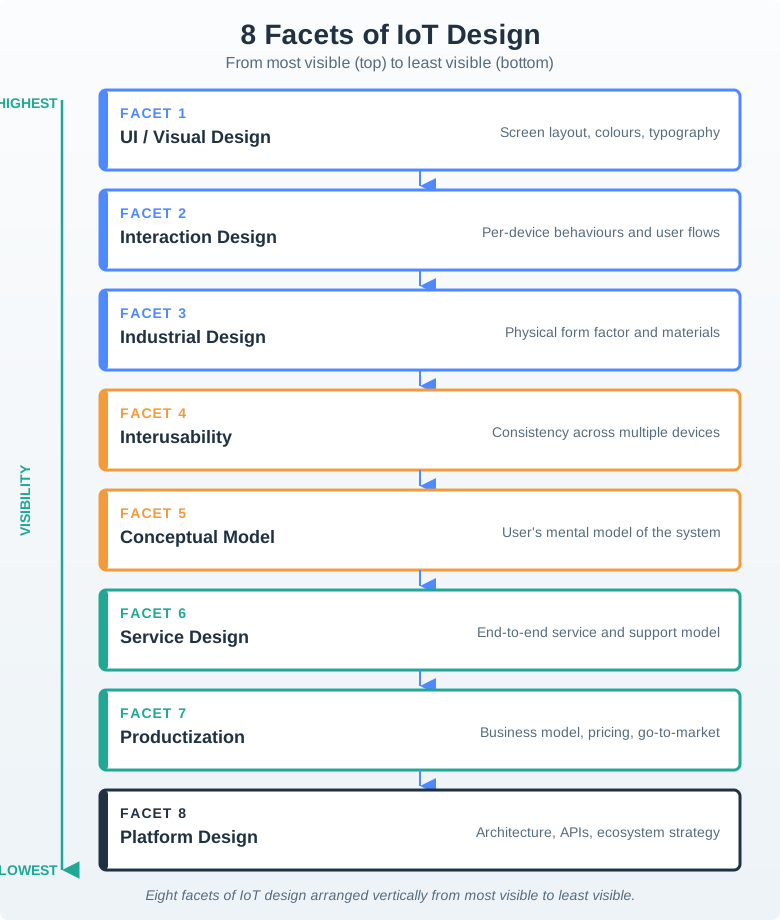
Use Figure 13.2 to keep the review balanced:
- UI and visual design: layout, typography, color, icon, status language, and visual hierarchy.
- Interaction design: tasks, flows, controls, feedback, errors, confirmations, and recovery.
- Industrial design: form factor, materials, mounting, reach, durability, placement, and maintenance access.
- Interusability: consistency across device, app, dashboard, gateway, installer tool, and support tool.
- Conceptual model: the explanation users can hold about sensing, automation, data freshness, permissions, and override.
- Service design: onboarding, installation, support, replacement, transfer, maintenance, and decommissioning.
- Productization: target user, value promise, constraints, non-goals, operating burden, and accepted tradeoffs.
- Platform design: local behavior, cloud dependency, identity, permissions, data path, updates, observability, and recovery.
13.10 UI And Visual Design
UI and visual design cover the visible information layer. For IoT, visual design must communicate real system state, not only look polished.
Review:
- whether the current state is easy to read at the distance and lighting of real use
- whether icons, colors, labels, and status text mean the same thing across the product
- whether stale, uncertain, or degraded state is visually distinct from normal state
- whether essential controls and confirmations are accessible
- whether setup and recovery screens avoid hiding the actual problem
- whether the design avoids decoration that competes with task information
A beautiful interface is not enough if it makes the user guess whether the device is connected, acting locally, waiting on a cloud path, or showing stale data.
13.11 Interaction Design
Interaction design covers how users complete tasks. In IoT, tasks include setup, pairing, permission, routine control, automation, alert response, override, troubleshooting, and recovery.
Review:
- what the user is trying to accomplish
- which role performs the task: owner, shared user, installer, operator, maintainer, or support
- what feedback appears after a command
- how errors are explained and recovered
- whether the user can cancel, override, or undo a risky action
- whether the task still works when one surface or path is unavailable
The interaction design should reveal responsibility. If a command fails, the user should not have to infer whether the problem is permission, connectivity, power, device state, or unavailable service.
13.12 Industrial Design
Industrial design covers the physical product. Connected devices live in real spaces, so physical design affects sensing quality, installation, trust, maintenance, and safety.
Review:
- whether the form fits the placement, distance, reach, mounting, cable, battery, and environment
- whether the user can identify orientation, ports, reset controls, indicators, and safe handling points
- whether maintenance access is realistic
- whether materials, enclosure, and labeling fit the environment
- whether privacy and sensing affordances are visible enough
- whether accessibility needs are considered in physical interaction
Physical affordances can reduce support burden. They can also create false confidence if they hide fragile power, network, sensing, or maintenance assumptions.
13.13 Interusability
Interusability is the experience of moving across connected surfaces. A device, phone, web dashboard, gateway, voice interface, installer screen, and support tool should feel like one coherent system where relevant.
Review:
- whether the same state has the same name across surfaces
- whether changes made on one surface appear on other surfaces clearly enough
- whether permissions, ownership, and shared access are understandable
- whether each surface has a clear role instead of duplicating everything
- whether support can explain what happened without exposing unnecessary private data
- whether handoff between user, installer, operator, and support is documented
Interusability problems often appear as user confusion: “The device says one thing, but the app says another.” That is a design issue, not only a synchronization issue.
13.14 Conceptual Model
The conceptual model is the product’s explanation of itself. Users need a reliable way to understand what the system senses, what it infers, what it controls, and when they can intervene.
Review:
- whether the model separates measured state from inferred state
- whether automation is explained in user terms
- whether users can predict likely system behavior
- whether stale, missing, or uncertain data is shown honestly
- whether the model covers shared users, permissions, and ownership
- whether support and documentation use the same explanation as the interface
Weak model: “The device is smart.” Stronger model: “The device estimates room use from recent motion and door events; the estimate may be stale when the link is weak; users can override the status locally.”
13.15 Service Design
Service design covers the journey around the product. For IoT, the service often determines whether the device remains useful after the first setup.
Review:
- how users choose, install, pair, and authorize the device
- what happens when the product changes owner or location
- how maintenance is scheduled, explained, and confirmed
- how support diagnoses device, account, permission, connectivity, and update issues
- how users recover from lost access or failed setup
- how replacement, reuse, transfer, and decommissioning are handled
Service design should be reviewed before launch, not after support tickets reveal missing flows.
13.16 Productization
Productization connects the design to a market, audience, promise, and operating model. In this review process, product claims should stay evidence-bound and avoid unsupported numbers.
Review:
- who the product is for
- what problem it promises to solve
- what use cases are out of scope
- what operating burden the user or organization accepts
- what privacy, safety, accessibility, and maintenance assumptions shape the promise
- what evidence supports the claim
- what tradeoff was accepted and who approved it
If the product promise depends on platform behavior, service support, or data quality, those dependencies must be visible in the design record.
13.17 Platform Design
Platform design is hidden but decisive. It includes identity, local behavior, cloud dependency, permissions, telemetry, updates, observability, integrations, security controls, and recovery.
Review:
- what works locally and what requires a remote service
- who owns device identity, user identity, group access, and reset
- what data is collected and why
- how updates are staged, verified, explained, and recoverable
- what telemetry support needs and what should not be exposed
- what happens during weak connectivity, expired credentials, low battery, unavailable cloud, failed update, or stale data
- whether platform constraints contradict the product promise
Platform design should be reviewed as a UX dependency. A platform failure that leaves users confused is still a user experience failure.
13.18 Facet Review Record
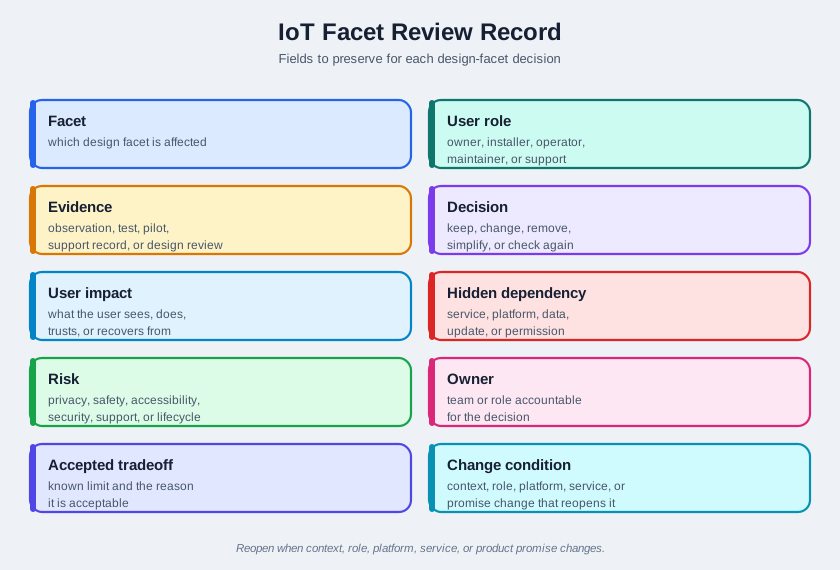
Figure 13.3 shows the fields to preserve:
- Facet: which design facet is affected.
- User role: owner, shared user, installer, operator, maintainer, or support.
- Evidence: observation, test, pilot, support record, technical validation, or design review.
- Decision: what will be kept, changed, removed, simplified, or checked again.
- User impact: what the user sees, does, trusts, or recovers from.
- Hidden dependency: service, platform, data, update, permission, or support dependency.
- Risk: privacy, safety, accessibility, security, support, maintenance, reliability, or lifecycle risk.
- Owner: team or role accountable for the decision.
- Accepted tradeoff: known limit and reason it is acceptable.
- Change condition: context, role, platform, service, or product-promise change that reopens the decision.
Calm technology is not minimal UI. It is disciplined attention management:
- Peripheral first: routine state should be available at a glance, through ambient cues, summaries, or predictable placement.
- Interrupt only for action: alerts should interrupt only when the user can or must do something now.
- Escalate by risk: maintenance, safety, comfort, privacy, and automation failures need different urgency levels.
- Return to calm: after recovery, the system should explain the result and then reduce attention demand again.
- Respect shared spaces: sound, light, screen, and mobile notifications should fit the room, role, time, and accessibility need.
Review every facet through this question: does the design ask for the right amount of attention at the right time, from the right person?
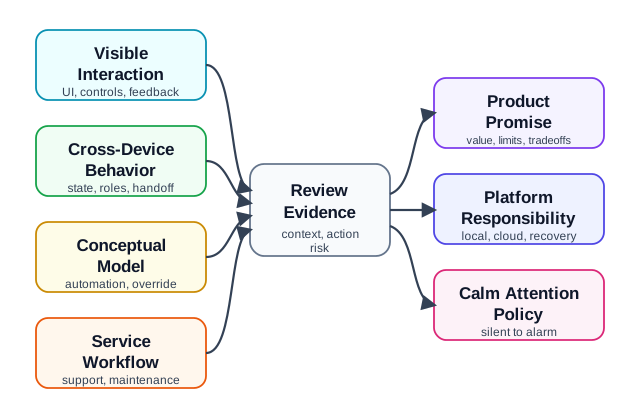
Use Figure 13.4 when the review depends on attention policy. A product is not calm because it has fewer screens; it is calm when it can distinguish routine state, actionable interruption, stale data, and role-specific escalation.
13.20 Worked Review: Maintenance Device
A maintenance sensor monitors a replaceable part and reports status to a building operator. The team focuses on a clean dashboard but has not reviewed installation, replacement, or ownership transfer.
Facet findings
- UI is clear for normal state but vague during sensor failure.
- Interaction design lacks a confirmation flow after replacement.
- Industrial design makes the battery hard to reach after mounting.
- Interusability differs between operator dashboard and installer tool.
- Conceptual model does not explain whether status is measured, inferred, or manually scheduled.
- Service design misses replacement confirmation and failed-maintenance escalation.
- Productization promises reduced manual checks without evidence of maintenance workflow fit.
- Platform design lacks clear owner for device reset and update failure.
Revision direction
- Add replacement confirmation and stale-state language.
- Test physical access with the mounted device.
- Align dashboard and installer labels.
- Record who owns reset, maintenance confirmation, and support escalation.
- Review again when the device form, operator workflow, or platform update process changes.
13.21 Common Findings
- The team polishes UI while ignoring service and platform dependencies.
- The device, app, and dashboard use different labels for the same state.
- Automation is presented as certainty even when the evidence is inferred or stale.
- The physical product hides important sensing, privacy, power, or maintenance constraints.
- Product claims are broader than the evidence.
- Support cannot diagnose what the user experienced.
- Ownership transfer, reset, update failure, and decommissioning are missing.
- Risk checks happen after the design is already framed as complete.
13.22 Review Checklist
Use this checklist before accepting an 8-facet design record:
- visible state, controls, and physical affordances fit the real context
- user tasks, errors, confirmations, overrides, and recovery are represented
- device, app, dashboard, installer, and support surfaces use consistent labels
- the conceptual model explains sensing, inference, freshness, permissions, and automation
- service workflows cover setup, maintenance, support, transfer, and decommissioning
- product promise is evidence-bound and includes non-goals
- platform dependencies and local fallback behavior are explicit
- privacy, safety, accessibility, support, security, and lifecycle risks are reviewed
- owner, accepted tradeoff, open issue, and change condition are recorded
13.23 Incremental Examples
13.23.1 Label Visible Facets
A beginner review can start with a simple leak sensor that has one LED, one mobile card, and one push notification. UI review checks whether “dry,” “wet,” “offline,” and “battery low” are readable and not color-only. Interaction review checks what happens after the user acknowledges an alert. Industrial design checks placement near a pipe, battery-door reach, reset access, and whether water exposure is obvious. This pass does not yet prove support workflow, cloud outage behavior, or lifecycle ownership.
13.23.2 Keep Room State in Sync
A shared-room availability product needs interusability and conceptual-model review. The wall display, mobile app, operator dashboard, installer tool, and support console should use the same state vocabulary for occupied, available, reserved, stale, offline, and manual override. MQTT retained state, device-shadow reported state, last-seen timestamps, room assignment, gateway id, and support correlation id should explain why one surface shows a different state. If the system only observes motion, the product promise should say “availability estimate” until door, reservation, or manual-confirmation evidence supports a stronger claim.
13.23.3 Review Service Ownership
A campus deployment needs service, productization, and platform evidence before the visible design can be accepted. BLE or QR onboarding, Matter or Home Assistant integration, account roles, SSO/SCIM provisioning, installer permissions, firmware OTA state, device transfer, decommissioning, support logs, telemetry retention, and local fallback all affect the user experience. The review should name who owns the product promise, who can change notification policy, who sees support evidence, and what platform condition reopens the design decision.
13.24 Try It Now
Choose an IoT product you know and write a one-row facet review:
| Field | Your answer |
|---|---|
| User role and task | Owner, shared user, installer, operator, maintainer, or support action. |
| Visible facets | UI, interaction, and physical design issue that affects the task. |
| Bridge facets | Interusability or conceptual-model issue across device, app, dashboard, or support. |
| Hidden facets | Service, productization, or platform responsibility that makes the experience succeed or fail. |
| Change condition | New context, product promise, platform behavior, or support signal that should reopen the decision. |
13.26 Concept Check: Eight-Facet Approval
13.27 Concept Check: Match Facets to Evidence
13.28 Concept Check: Order the Facet Review
13.29 Summary
The 8 facets of IoT design keep review work broad enough to catch problems that a screen-only or hardware-only review misses. UI, interaction, and industrial design shape first use, while interusability, conceptual model, service design, productization, and platform design determine whether the product remains understandable and supportable.
Use the facet record to make each decision traceable to evidence. The review should preserve user role, evidence, decision, user impact, hidden dependency, risk, owner, accepted tradeoff, and change condition.
13.30 Key Takeaway
IoT design facets should be reviewed together because attention, context, autonomy, feedback, privacy, and maintenance trade off in use.
13.31 See Also
- Calm Technology Attention Policy applies attention policy and calm behavior across the facet stack.
- Design Thinking for IoT supplies the field evidence and testing cycles that validate facet decisions.
- IoT Architecture Model Selection helps align platform responsibilities with architecture boundaries.
- IoT Design Patterns and Components provides implementation options after the facet risks and responsibilities are known.
- Understanding People and Context supplies the user context needed to review service and conceptual-model decisions.
13.32 What’s Next
Continue to Design Model for IoT to review how architecture, facets, design thinking, and implementation patterns fit together across the design-model chapter series.