21 Device Lifecycle Management
device lifecycle management, IoT device lifecycle, OTA update review, device provisioning review, connected device maintenance, IoT decommissioning
21.1 Start Simple
The user experience continues long after setup. Start with the device lifecycle as a set of visible promises: provisioning, update, maintenance, ownership transfer, fault recovery, retirement, and the evidence that tells people the device is still safe to trust.
21.2 In 60 Seconds
Device lifecycle management reviews what happens after a connected device leaves the design bench. A device must be provisioned, installed, operated, updated, serviced, transferred, recovered, and eventually retired without losing security, safety, usability, or maintainability.
The lifecycle review does not ask whether a device can work once. It asks whether the device can keep working through expected change: new owners, weak networks, low batteries, firmware fixes, failed updates, replacement parts, environmental wear, reset events, and end-of-life handling.
21.3 Learning Objectives
By the end of this chapter, you will be able to:
- map a connected device across provisioning, deployment, operation, update, maintenance, transfer, and decommissioning stages
- identify lifecycle checks needed before accepting device readiness claims
- review OTA update controls, rollback paths, staged rollout gates, and low-power deferral rules
- connect environmental, durability, and service evidence to the intended deployment context
- write a bounded lifecycle record with owners, known limits, acceptance gates, and change conditions
21.4 Minimum Viable Understanding
A connected device is not finished when its first firmware image boots. It is ready only when the team can explain how the device gets identity, joins the system, proves it is healthy, receives updates, recovers from failure, remains serviceable, and exits the system cleanly.
Lifecycle work should be evidence-bound. Avoid claims such as “secure provisioning,” “safe OTA,” “maintenance-free,” or “field ready” unless the record shows what was tested, under which assumptions, who owns the decision, and what change requires another review.
21.5 Prerequisites
This chapter builds on:
- Connected Device Fundamentals, which defines device roles, boundaries, and evidence.
- Device Form Factors, which reviews the physical shell, mounting, and service access.
- Power Management, which reviews power-state and update-energy constraints.
- IoT Reference Models, which places devices inside the larger system architecture.
21.6 Device Lifecycle After Launch
A connected device is still being designed after the first shipment. It needs a way to receive identity, join the system, report health, accept updates, survive failed changes, move between owners, lose authority, and leave service without leaving active credentials behind.
For a battery sensor, lifecycle design includes factory identity, QR-code or NFC association, gateway join, heartbeat interval, stale-data rules, battery-aware firmware update deferral, rollback, field replacement, owner transfer, certificate revocation, and recycling. For an actuator, it also includes safe state, manual override, command audit, and a recovery path when a bad update or lost network would otherwise affect the physical world.
The key UX point is that lifecycle failures often appear as ordinary user confusion: an installer cannot claim a device, an operator sees stale telemetry, a customer receives a used device still linked to another account, or a field unit keeps trying to reconnect after retirement. Treat those as lifecycle states, not as isolated support tickets.
A reviewable lifecycle record should therefore travel with the unit. It should say which firmware and configuration are expected, which owner or tenant has authority, which health signals prove the unit is alive, which update and rollback gates protect it, and which event means the record needs another review. Without that record, the team can only prove a successful demo, not a durable connected product. It also keeps support teams from guessing after the installer has left.
- Before deployment: define identity, firmware baseline, configuration version, installer workflow, and support ownership.
- During operation: track health, freshness, power state, fault reason, update slot, and what users or operators can see locally.
- At transfer or retirement: remove account links, rotate or revoke credentials, wipe local data, and close the asset record.
21.7 Review Every State Transition
Good lifecycle review follows the device through transitions rather than only checking features. A device may use LwM2M bootstrap and registration, Matter commissioning, LoRaWAN OTAA join, BLE-assisted Wi-Fi setup, a cellular eSIM profile, or factory certificate enrollment. In each case, the reviewer should ask what identity is created, where credentials are stored, how failure is recovered, and who has authority after the step completes.
- Provision and commission. Record hardware revision, firmware baseline, bootloader version, certificate or key boundary, owner or tenant association, gateway path, and first successful health report.
- Operate and update. Check heartbeat freshness, local buffering, low-battery behavior, staged rollout groups, signed firmware, A/B partitions or rollback slots, boot-success confirmation, and stop conditions.
- Maintain, transfer, and retire. Check calibration, cleaning, battery replacement, support logs, unlinking, re-provisioning, data wipe, certificate revocation, returned-unit handling, and disposal route.
Named protocols do not remove lifecycle responsibility. MQTT retained state, CoAP resources, LwM2M Objects, OMA firmware-update resources, Matter fabrics, Thread credentials, LoRaWAN DevEUI/JoinEUI/AppKey material, and cellular SIM or eSIM profiles all need explicit ownership and retirement behavior.
Run the review with real transition evidence. For provisioning, capture failed scans, duplicate serials, expired enrollment tokens, and devices that were claimed by the wrong tenant. For operation, test stale data, clock drift, local buffering, gateway replacement, and low-rate reporting that is silent by design. For updates, exercise low battery, full storage, weak signal, staged rollout pause, failed boot confirmation, and rollback after partial install.
The UI should expose lifecycle status at the level each role needs. Installers need claim state, site context, and first health report. Operators need freshness, update cohort, fault reason, and maintenance due state. Support teams need firmware slot, last command, credential version, and a safe reset path. Owners need transfer and deletion controls that remove authority without destroying records they must retain for warranty, safety, or compliance. ## Lifecycle State Survives Faults {.depth-l2}
Lifecycle reliability depends on state that survives bad timing. A device can lose power during flash write, wake with an old clock, miss a staged rollout window, fill its log buffer, lose gateway contact, or reboot between update download and boot confirmation. The lifecycle model should separate desired firmware, downloaded image, active image, confirmed image, rollback image, configuration version, credential version, and decommissioned state.
Storage choices shape what recovery is possible. Internal flash, external QSPI flash, FRAM, EEPROM, secure elements such as ATECC608A, TPM-class modules, and SIM/eSIM secure storage can hold different combinations of keys, counters, calibration, update images, boot flags, and ownership data. Each item needs a reset rule, wipe rule, retention rule, and support visibility rule.
Robust OTA systems usually separate download, verify, install, boot, and confirm. A/B images, bootloader rollback flags, cryptographic signatures, monotonic version counters, staged deployment cohorts, and fleet stop conditions help prevent a bad release from becoming a fleet outage. For constrained devices, the lifecycle record must also know whether the unit has enough energy, storage, network time, and maintenance access to attempt the change.
Server-side lifecycle state is just as important as device flash state. The registry should distinguish manufactured, provisioned, commissioned, active, quarantined, update-pending, transfer-pending, retired, returned, and destroyed units. Credential revocation, topic or resource authorization, warranty state, data-retention policy, and support visibility should follow those states so a wiped or retired device cannot keep publishing, receiving commands, or appearing healthy in dashboards.
- Identity state: know which credential proves device identity, which proves owner or tenant authority, and which can be rotated remotely.
- Update state: keep download, verify, install, boot, confirm, rollback, and fleet stop as separate states.
- Retirement state: revoke server-side authority first, then wipe local data, remove gateway/app references, and mark the asset as retired or returned.
21.8 Lifecycle Review Path
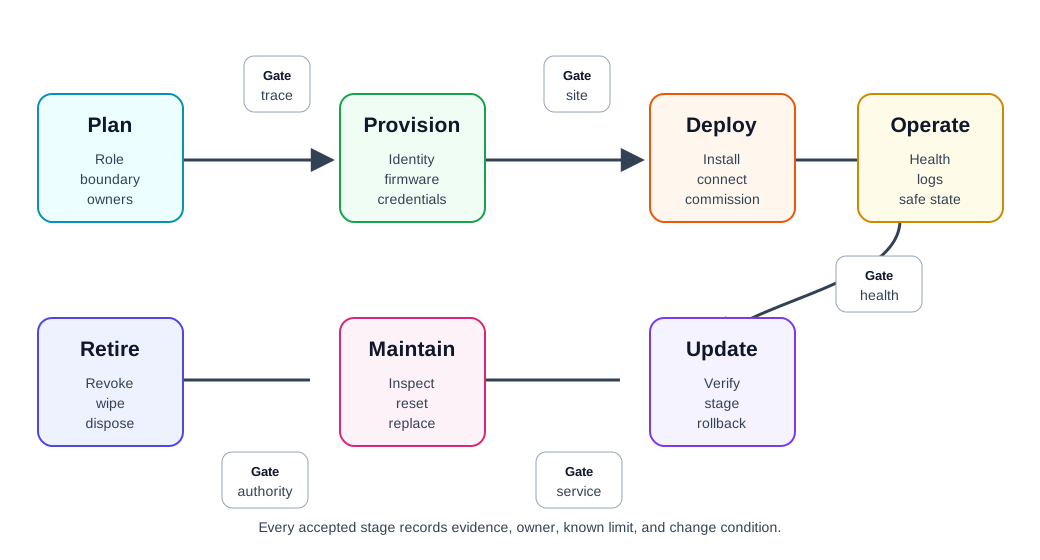
Use Figure 21.2 to keep the review anchored in the full device journey:
- Plan: define role, boundary, deployment assumptions, owners, support period, and replacement model.
- Provision: create device identity, firmware baseline, certificates or keys, configuration limits, and traceability.
- Deploy: install the device in the intended context, confirm connectivity, verify physical fit, and record site assumptions.
- Operate: monitor health, freshness, battery or power state, local logs, failure modes, and user-visible status.
- Update: deliver firmware or configuration changes through signed packages, staged rollout, compatibility checks, and rollback.
- Maintain: inspect, clean, calibrate, reset, repair, replace parts, recover credentials, and handle field support.
- Transfer: support ownership changes, account unlinking, reset, re-provisioning, and data-boundary review.
- Retire: revoke credentials, wipe local data, remove cloud records, recycle or dispose, and close the asset record.
The review is incomplete if any stage depends on informal knowledge that is not recorded.
21.9 Lifecycle Stages
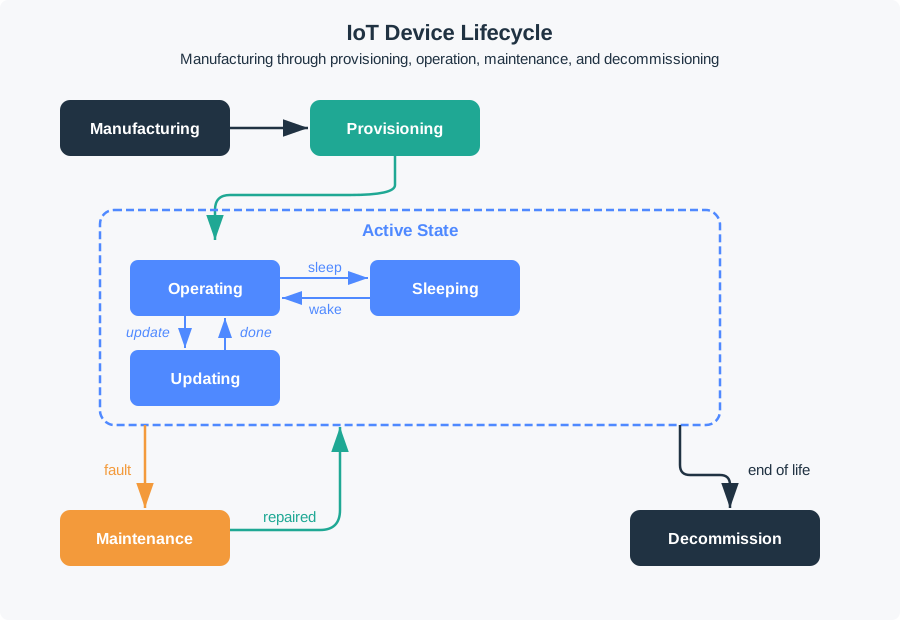
Use Figure 21.3 as the stage map for the review. A lifecycle record should know which state the physical unit is in, which firmware and credential state belongs to it, and which transition evidence is missing before the device moves forward.
21.9.1 Planning And Readiness
Planning creates the lifecycle contract for the device.
Review:
- device role, boundary, users, maintainers, and affected systems
- expected support period and minimum update path
- deployment assumptions such as weather, mounting, access, signal path, and power source
- installation and recovery responsibilities
- required logs, health signals, and fault indicators
- replacement, transfer, and retirement expectations
- acceptance gate before pilot, limited release, or production release
The strongest planning output is not a long document. It is a record that lets another reviewer understand what the device is expected to survive and who owns each lifecycle decision.
21.9.2 Manufacturing And Provisioning
Provisioning prepares a physical unit to become a trusted system participant.
Review:
- unique device identity and asset identifier
- firmware baseline, hardware revision, and configuration version
- credentials, certificates, keys, or enrollment tokens
- secure storage and reset behavior for secrets
- factory test result or intake test result
- claim that the device can be traced after shipment or installation
- recovery path when provisioning fails
Avoid treating provisioning as only “connect to Wi-Fi.” Network setup is one part of provisioning. Identity, ownership, firmware baseline, cloud or gateway enrollment, and reset behavior are also part of the lifecycle record.
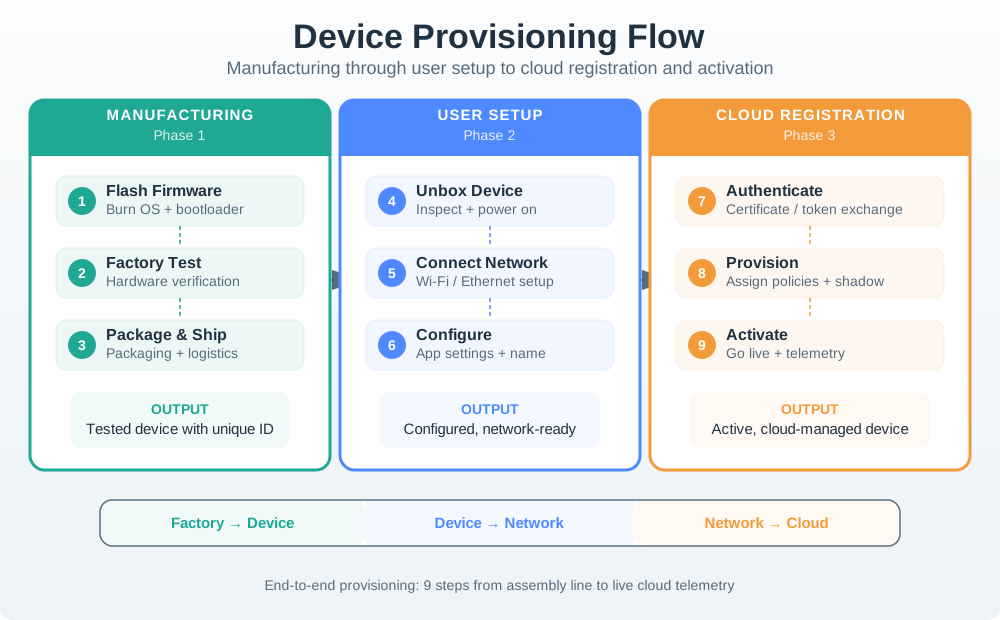
Use Figure 21.4 to separate factory evidence, setup evidence, and cloud-registration evidence. A failed review often comes from proving only network setup while leaving identity, baseline, owner, and recovery evidence undefined.
21.9.3 Deployment And Commissioning
Commissioning checks whether the device works in its real context.
Review:
- installed location, orientation, enclosure condition, and mounting method
- radio or wired path after installation, not only on the bench
- sensor or actuator behavior in the installed position
- power source, charging, battery, or service access
- local indicators, setup feedback, and installer instructions
- first health report and first successful data path
- record of deviations from the planned deployment assumptions
A device that passes bench testing can still fail after it is placed near metal, water, concrete, heat sources, moving machinery, human bodies, or sealed cabinets. Commissioning evidence belongs in the installed context.
21.9.4 Operation And Monitoring
Operation evidence shows whether the device can be trusted after deployment.
Review:
- heartbeat, last-seen time, clock source, and stale-data rule
- battery, power, thermal, enclosure, or sensor health signals
- local buffering and retry behavior during network loss
- visible status for users, installers, or operators
- recoverable error states and safe states
- log retention, privacy boundary, and diagnostic access
- support escalation path when the device is silent or inconsistent
Monitoring should distinguish healthy silence from a failure. A low-rate sensor may report rarely by design, but the system still needs a way to tell whether the device is asleep, offline, misconfigured, blocked, or retired.
21.9.5 Updates And Change Control
OTA and configuration updates change a deployed device. They need their own lifecycle gate.
Review:
- signed update package or authenticated configuration change
- compatibility check for hardware revision, bootloader, memory, and dependencies
- available power, storage, network, and maintenance window
- staged rollout plan with stop conditions
- rollback path and boot-success confirmation
- user or operator notice for disruptive changes
- post-update health check and record of changed behavior
Safe update design separates “can download a file” from “can survive a failed change.” A robust lifecycle record explains how the device avoids becoming unrecoverable when power fails, the network drops, a package is corrupt, or the new firmware cannot boot successfully.
21.9.6 Maintenance And Service
Maintenance covers the recurring work needed to keep the device useful.
Review:
- inspection, cleaning, calibration, consumable replacement, and battery or power checks
- tool, access, permission, and training requirements
- spare unit or replacement part availability
- service interval and service-start conditions
- reset and recovery behavior
- impact of service on data continuity and user trust
- evidence that maintenance is practical in the deployment context
Do not accept “maintenance-free” as a design claim unless the record shows what changes would prove otherwise. A sealed device can still need cleaning, reset, update, replacement, or retirement.
21.9.7 Transfer And Reuse
Connected devices often change owners, accounts, sites, gateways, or tenants.
Review:
- unlinking from the previous account or tenant
- local data wipe and credential rotation
- reset mode that does not expose previous user data
- re-provisioning workflow for the new owner or site
- transfer history for replacement, returned units, and owner or tenant changes
- data-retention boundary between device, gateway, app, and cloud service
Ownership transfer is a lifecycle stage, not an edge case. Devices that cannot be safely transferred can create privacy, support, and security risks.
21.9.8 Decommissioning
Decommissioning removes a device from service without leaving active trust relationships behind.
Review:
- credential revocation and certificate or key retirement
- local data wipe or documented data destruction
- cloud, gateway, dashboard, and inventory removal
- disposal, recycling, return, or refurbishment path
- final status recorded in the asset system
- support behavior if the retired device tries to reconnect
The decommissioning record should make it clear that the device no longer has authority in the system.
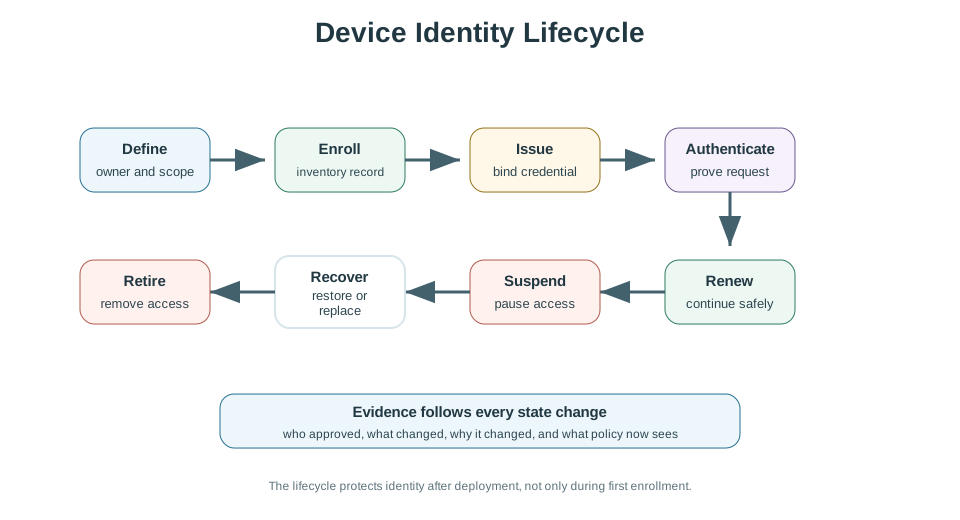
Use Figure 21.5 for transfer, recovery, and retirement reviews. The lifecycle decision is not complete until owner authority, credential state, recovery path, and retirement behavior are tied to evidence that support and security teams can inspect.
21.10 Environmental And Durability Evidence
Environmental testing should match the intended deployment. The review should not list every possible standard or test. It should explain which conditions matter for this device and what evidence supports the claim.
Common evidence areas:
- Temperature: expected operating range, storage range, self-heating, thermal cycling, and battery effect.
- Moisture and dust: ingress path, seal, venting, condensation, cleaning, and enclosure rating evidence.
- Mechanical stress: vibration, shock, mounting load, connector strain, wear, and service handling.
- Chemical and UV exposure: cleaning agents, sunlight, oils, corrosion, and material compatibility.
- Electromagnetic environment: radio coexistence, emissions, susceptibility, grounding, shielding, and cable routing.
- Human contact: skin contact, heat, edges, fasteners, cleaning, comfort, and accessibility for users or technicians.
The lifecycle question is simple: will the evidence still be credible after the device has been installed, updated, cleaned, serviced, and exposed to its expected environment?
21.11 Provisioning Review
Provisioning should create a device that is unique, traceable, recoverable, and associated with the correct system owner.
Strong provisioning records usually include:
- unit identifier and hardware or assembly revision
- firmware, bootloader, and configuration baseline
- credential source and storage boundary
- network or gateway enrollment method
- owner, tenant, site, or account association
- reset and re-provisioning behavior
- failure path when setup cannot finish
Provisioning methods such as QR code association, cable-based setup, SoftAP, BLE-assisted setup, gateway-assisted join, or factory enrollment can all be valid. The review should focus on fit: what the method assumes, what can fail, how the user or installer recovers, and how credentials remain protected.
21.12 OTA Update Review
OTA update readiness is an evidence gate, not just a feature.
Review before accepting OTA readiness:
- update package integrity and authenticity checks
- hardware, firmware, bootloader, and configuration compatibility checks
- enough storage for the package, metadata, and rollback state
- enough energy or external power for download, write, verification, and reboot
- staged rollout plan with health gates and halt conditions
- automatic rollback or recovery path
- post-update confirmation and monitoring
- explicit rule for devices that are offline, low power, or in critical operation
The update record should answer: what happens if the update is interrupted, rejected, delayed, partially applied, or causes repeated boot failure?
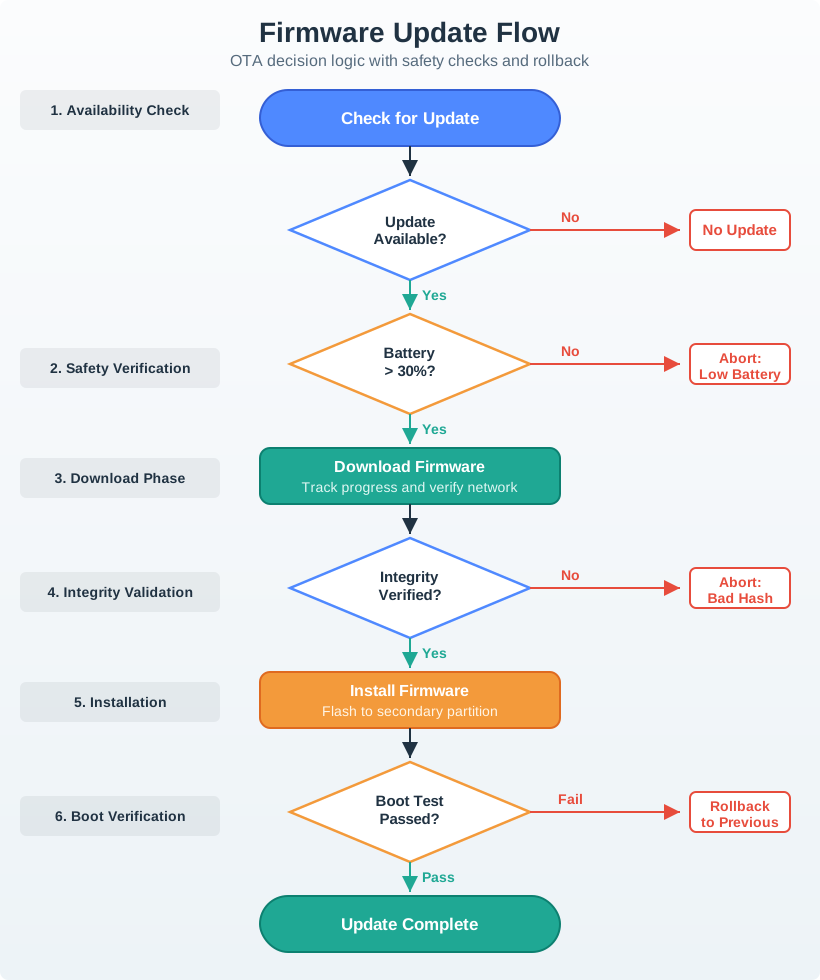
Use Figure 21.6 to review OTA as a controlled lifecycle transition. The update gate should state which devices are allowed to proceed, which devices defer, how integrity is checked, and how rollback is confirmed after reboot.
21.13 Lifecycle Readiness Record
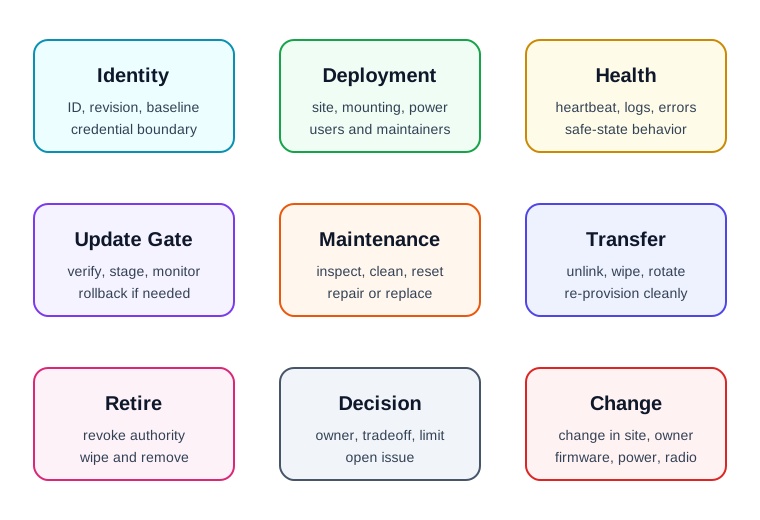
Figure 21.7 shows the fields to preserve:
- Identity and baseline: device ID, hardware revision, firmware baseline, configuration version, and credential boundary.
- Deployment context: intended environment, mounting, network path, power source, users, and maintainers.
- Health signals: heartbeat, last-seen rule, battery or power state, local logs, error states, and safe-state behavior.
- Update gate: package verification, compatibility, energy, storage, staged rollout, rollback, and post-update checks.
- Maintenance path: inspection, cleaning, calibration, reset, repair, replacement, and service access.
- Transfer path: unlink, wipe, re-provision, owner change, returned unit, and data boundary.
- Decommissioning path: revoke, wipe, remove from inventory, recycle, refurbish, or dispose.
- Decision and change condition: accepted tradeoff, owner, known limit, open issue, and condition requiring another review.
The record should be short enough to maintain and specific enough to audit.
21.14 Worked Review: Outdoor Battery Sensor
A battery-powered outdoor sensor reports site conditions through a local gateway.
Lifecycle evidence to request
- Unit identity and firmware baseline are recorded before installation.
- The installation record includes mounting, enclosure orientation, signal path, and service access.
- Commissioning confirms sensor behavior and gateway connectivity after installation.
- Heartbeat and stale-data rules distinguish sleep from failure.
- Battery level is checked before any update attempt.
- OTA update path includes compatibility, staged rollout, verification, and rollback.
- Maintenance includes cleaning, battery replacement, seal inspection, and reset.
- Decommissioning revokes credentials and removes the unit from gateway and cloud inventory.
Likely review action
Hold the lifecycle decision if the record proves only first-day connectivity. A field sensor also needs evidence for update, maintenance, failure recovery, transfer, and retirement.
Change condition
Rerun the review when the enclosure, mounting, antenna path, battery, gateway, firmware, update policy, reporting interval, maintenance access, or deployment environment changes.
21.16 Common Findings
- The lifecycle record stops at installation and ignores operation, update, transfer, or retirement.
- Provisioning is treated as Wi-Fi setup only, with no identity or ownership evidence.
- The device has no clear way to distinguish sleeping, offline, failed, reset, and retired states.
- OTA readiness is claimed without power, storage, compatibility, staging, rollback, or post-update evidence.
- Maintenance depends on physical access, tools, accounts, or permissions that are not recorded.
- Ownership transfer does not wipe local data or rotate credentials.
- Decommissioned devices can still reconnect or appear active in dashboards.
- Environmental evidence was collected on the bench instead of in representative deployment conditions.
- The record lacks an owner, known limit, open issue, or change condition.
21.17 Review Checklist
Before accepting a connected-device lifecycle decision, confirm that the record includes:
- device identity, hardware revision, firmware baseline, and configuration version
- deployment assumptions, commissioning checks, and installed-context evidence
- provisioning, ownership, credential, reset, and recovery paths
- health signals, stale-data rules, local logs, and safe-state behavior
- update verification, compatibility, power, storage, rollout, rollback, and post-update checks
- maintenance tasks, service access, replacement path, and support escalation
- transfer, returned-unit, re-provisioning, and data-boundary handling
- decommissioning steps for revocation, wiping, inventory removal, and disposal or reuse
- accepted tradeoff, owner, known limit, open issue, and change condition
21.18 Knowledge Check
21.19 Matching Quiz
21.20 Ordering Quiz
21.21 Summary
Device lifecycle management is the practice of keeping connected devices trustworthy after they leave the bench. The review follows the device through planning, provisioning, deployment, operation, update, maintenance, transfer, and retirement.
The strongest lifecycle records are bounded, testable, and revisable. They show identity, deployment assumptions, health signals, update gates, maintenance paths, ownership-transfer behavior, decommissioning steps, decision owners, known limits, and change conditions.
21.22 Key Takeaway
Device lifecycle design must plan onboarding, operation, maintenance, updates, retirement, ownership transfer, and support evidence before deployment.
21.23 Concept Relationships
- Connected Device Fundamentals defines the device role and boundary that lifecycle records preserve over time.
- Device Form Factors supplies the physical evidence for deployment, service, durability, and environmental exposure.
- Power Management expands the power-state evidence needed for operation, update deferral, and maintenance.
- Security and Privacy Overview connects provisioning, credentials, reset, and decommissioning to trust boundaries.
21.24 What’s Next
Continue to Power Management to review battery, power-state, and update-energy evidence in more detail.