9 Pitfalls and Ethics for IoT User Research
IoT research ethics, IoT privacy creep, IoT sampling bias, context inference errors, ethical user research
9.1 Start Simple
Research can harm people when a connected product quietly observes, infers, records, or automates more than participants understand. Start with the ethical risk: consent, privacy, sampling bias, safety, automation impact, and the safeguards that keep research evidence useful without turning people into hidden data sources.
9.2 In 60 Seconds
IoT user research can fail even when a team talks to real users. The most common failures happen when the team collects the wrong evidence, interprets evidence too confidently, or treats privacy and consent as paperwork instead of part of the user experience.
For connected products, ethics and research quality are tightly connected because the system can sense physical spaces, infer behavior, affect people who did not install it, and continue operating after the research session ends.
Good review asks:
- Who was included, excluded, observed, recorded, or affected?
- What did participants understand and consent to?
- What data is necessary for the feature, and what data is unnecessary?
- Which conclusions are supported by evidence, and which are assumptions?
- What happens when context signals are wrong?
- Can users see, correct, pause, override, or remove the system?
- What evidence record will help the team revisit the decision later?
Ethical research does not slow design down. It prevents false confidence, privacy creep, biased personas, harmful automation, and brittle requirements.
9.3 Learning Objectives
By the end of this chapter, you will be able to:
- identify common IoT research and design-ethics pitfalls
- distinguish observed evidence from inference, assumption, and team preference
- review consent, privacy, bystander, and recording risks in IoT studies
- recognize sampling, confirmation, and leading-question bias
- decide when automation should suggest, ask, or act
- create a lightweight ethics and pitfall review record for design decisions
9.4 Prerequisites
Before reading this chapter, you should be comfortable with:
- User Research Fundamentals, which explains why observed behavior matters.
- Research Methods, which explains how evidence is collected.
- Context-of-Use Analysis, which explains how environment shapes behavior.
- Personas and Journey Maps for IoT, which explains how research evidence becomes synthesis artifacts.
9.5 Ethics Protects Evidence
In IoT design, an ethics issue is often also a research-quality issue. A field study that records more than participants expected will produce distrust. A sample that includes only account owners will miss guests, technicians, caregivers, tenants, workers, and bystanders. A prototype that treats proximity as intent will make the product look smarter in a demo than it will be in daily use.
Begin the review by naming the sensing, the affected people, and the consequence of being wrong. A location-aware door, workplace occupancy sensor, medical-adjacent reminder, smart speaker, camera doorbell, or building-control system can affect people who never opened the app. The design must account for what they can understand, refuse, correct, pause, or escalate. 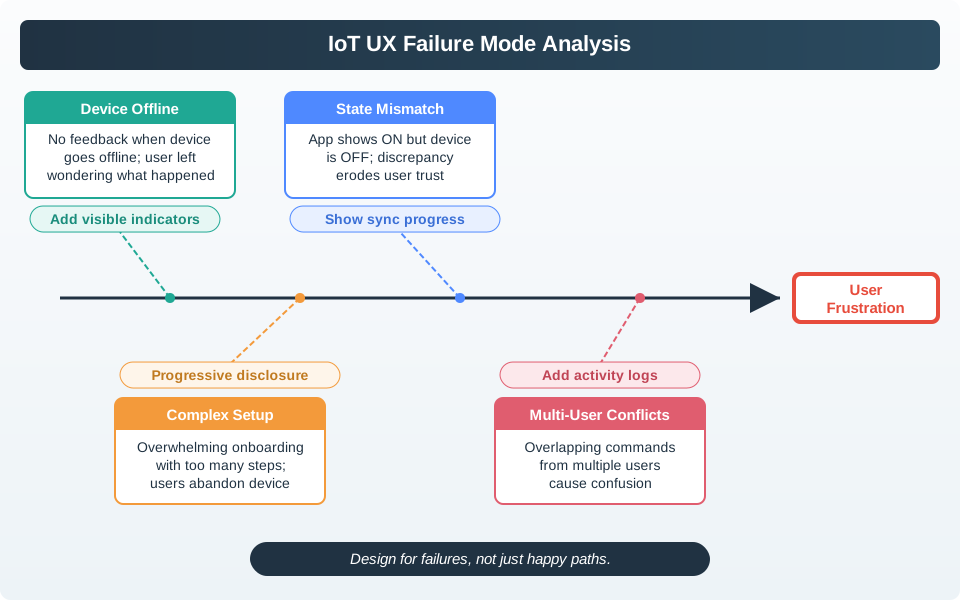
- Sensing boundary: name what is collected, such as audio, video, BLE proximity, UWB range, GNSS location, Wi-Fi RSSI, motion, temperature, contact state, or device logs.
- People boundary: include account owners, shared users, guests, bystanders, staff, installers, support agents, and administrators when they are affected.
- Action boundary: separate low-risk suggestions from actions that change access, safety, privacy, money, health, comfort, or shared-space conditions.
The practical reason to do this early is that the same study evidence can support very different decisions. A worker saying “this room is always too cold” might justify a local feedback control, a facilities review, a better sensor placement plan, or a privacy-invasive occupancy history. The ethical design asks which decision the evidence actually supports and what the evidence does not prove. That protects participants and keeps the team from converting a narrow observation into an oversized requirement.
Shared environments make the issue sharper. An account owner can approve a device, but a child, visitor, cleaner, night-shift worker, patient, tenant, installer, or neighbor may be sensed or affected. A field study that ignores those roles can produce a clean-looking journey map with a hidden harm: an automation that is convenient for one role but confusing, coercive, or inaccessible for another. The research plan should therefore name affected roles before recruiting participants.
Ethics also protects future maintainability. If the team records the sensing boundary, evidence boundary, safeguard owner, validation method, and review condition, later firmware, analytics, support, or partner-integration changes can be checked against the original promise. Without that record, privacy creep and over-automation arrive quietly as “small” implementation changes. ## Pitfalls as Design Constraints {.depth-l1}
Review each research finding as a chain from signal to inference to action. If a phone is near a lock, the signal may be GNSS, BLE RSSI, UWB ranging, Wi-Fi association, or an app geofence. None of those signals proves that the account owner intends to unlock a door. A responsible design might prepare the credential, show a ready state, require biometric app confirmation, preserve keypad or physical-key fallback, and pause automation after a manual override.
Do the same for consent and privacy. A study consent screen should not merely say “we collect usage data.” It should tell participants whether the prototype records raw video, audio clips, room occupancy, location history, notification taps, support sessions, OTA failures, or MQTT/device-shadow events. For shared environments, pair the account-owner consent flow with signage, visitor explanation, guest mode, local mute, or a visible recording indicator where appropriate.
- Reduce data first: prefer local processing, aggregation, coarse location, event counts, short retention, and opt-in diagnostics before collecting raw streams.
- Make control visible: expose pause, delete, revoke, mute, override, transfer ownership, factory reset, and support-escalation paths in the journey.
- Sample beyond the buyer: recruit users from the roles and contexts affected by the decision, including accessibility needs, night shifts, low-connectivity homes, shared devices, and support recovery cases.
Use neutral research prompts and artifact reviews to reduce confirmation bias. Instead of asking whether a feature is helpful, ask what people currently do, what goes wrong, what they would notice, what they would need to override, and who else is affected. During synthesis, mark each statement as observation, participant interpretation, team inference, assumption, or policy decision. That labeling prevents a quote, dashboard metric, or prototype success from becoming stronger evidence than it really is.
Then convert each risk into an acceptance condition. If automation affects access, the design may require explicit confirmation and an audit trail. If occupancy data supports comfort tuning, the acceptance condition may require aggregation and a worker-facing explanation. If support diagnostics are needed, the support view may show event ids, firmware version, and device state without exposing unrelated video or location history. A safeguard that cannot be tested is still only an intention.
Close the loop after launch or field trial. Review override patterns, support tickets, withdrawal requests, deletion requests, accessibility complaints, false alerts, battery failures, and manual workarounds. Those signals are not separate from UX research; they are evidence that the original study missed a role, context, failure mode, or maintenance burden. The review record should say who owns that check and what change would force the team to revisit the decision. ## Ethics Reviews Need Handles {.depth-l2}
A pitfall review becomes enforceable when it is tied to concrete implementation handles. Privacy creep may map to event schema fields, telemetry flags, retention TTLs, role-based access control, OAuth scopes, support-console permissions, export/delete jobs, and data warehouse tables. Weak consent may map to consent version, collection purpose, recording indicator state, participant withdrawal status, and whether a device keeps sending telemetry after study closeout.
Inference risk also needs system names. For location and presence, record whether the design depends on Android or iOS location permission state, approximate versus precise location, BLE RSSI threshold, UWB range, motion debounce, stale timestamp, geofence radius, APNs or FCM notification delivery, cloud connectivity, local fallback, or firmware version. These names let engineers test the failure mode instead of treating “context” as a vague design word.
- Trace the claim: link the research conclusion to the exact field note, log source, prototype state, support ticket class, or usability observation that supports it.
- Trace the safeguard: name the app setting, firmware behavior, cloud policy, support workflow, or admin permission that reduces the risk.
- Trace the revisit trigger: review again when a sensor changes, a model is retrained, retention changes, a new integration launches, a role gains access, or a support pattern shows harm.
System handles make ethical promises auditable. Consent can be represented by purpose_id, consent_version, granted_at, withdrawn_at, data_category, retention_until, and sharing_scope. Support access can be represented by role, case_id, reason code, expiry, and access log. Automation risk can be represented by confidence, source list, stale_after, override state, last_manual_action, and consequence tier. Those fields let tests assert that the system behaves according to the review.
Engineering should also test absence. A privacy-preserving occupancy feature should not emit named-user room histories. A support dashboard for setup recovery should not expose unrelated household routines. A study closeout should stop telemetry collection or switch the device back to normal product logging. An export or deletion request should include downstream stores, analytics tables, retained MQTT topics, and partner webhooks if they hold the affected data.
The same record helps when the product changes. A new sensor, ML classifier, retention period, admin role, third-party integration, firmware telemetry field, or data-warehouse join can invalidate the original ethics review. Treat that change as a testable event: identify affected roles, compare the new data path to the old promise, run the safeguard checks again, and decide whether users or participants need a new explanation or choice.
9.6 Review Evidence, Risk, Safeguards
Ethics is not a separate checklist added after the design is finished. It is part of deciding what the product should do, what it should not do, what it should sense, and how much control people should keep.
For IoT, research ethics matters because:
- sensing may capture behavior, location, presence, sound, images, routines, or shared-space activity
- one person’s device may affect visitors, family members, tenants, workers, patients, neighbors, or technicians
- automated action may change physical conditions, access, alerts, locks, appliances, or safety-related workflows
- logs and telemetry may continue after a study if the team does not set boundaries
- participants may feel pressure to agree when the device is installed by an employer, landlord, caregiver, school, or service provider
The review goal is practical: protect people, keep evidence honest, and make design decisions traceable.
9.7 Pitfall Review Loop
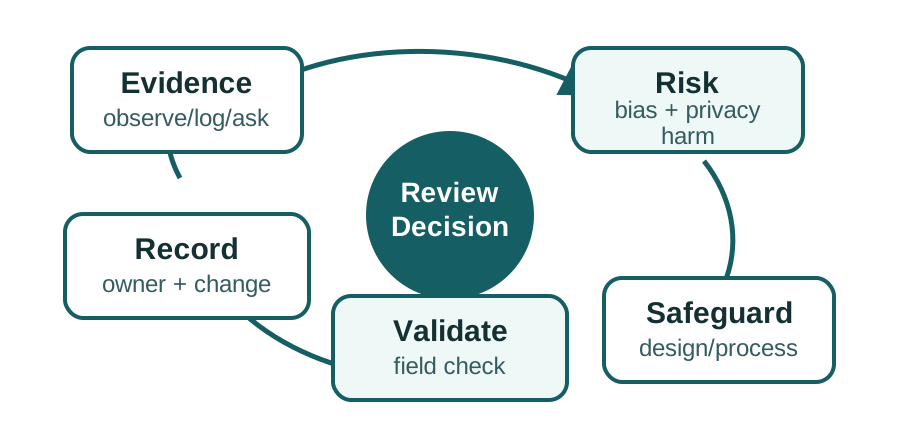
Use Figure 9.1 when a research finding changes a feature, data practice, automation rule, or journey requirement.
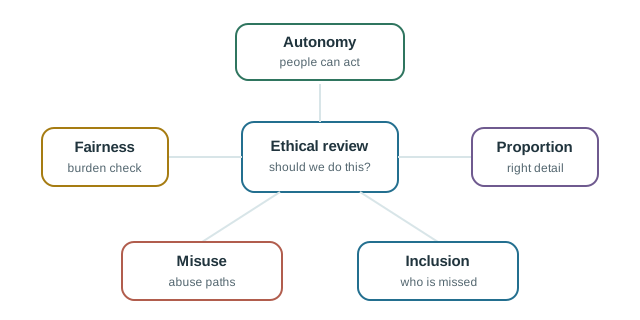
Use Figure 9.2 to check whether the research plan and product behavior line up. A study that asks for consent but hides retention, purpose, or control is still a weak design input.
9.8 Pitfall 1: Treating Context as Certainty
IoT systems often infer intent from signals such as location, time, motion, proximity, device state, or historical routine. These signals are useful, but they are not proof of what a person wants.
Weak interpretation:
- “The phone is near the home, so the user wants the door unlocked.”
Stronger interpretation:
- “The phone is near the home, but intent is uncertain. The system should show readiness, request confirmation for high-impact action, and preserve a manual override.”
Review questions:
- What signal is being used?
- How could the signal be wrong?
- What is the consequence of acting on a wrong signal?
- Can the user see the inferred state?
- Can the user correct or override it quickly?
- Does a recent manual override reduce automation confidence?
- Is the action reversible?
Design rule:
- Low-impact, reversible actions may be automated after evidence supports them.
- Medium-impact actions should be visible and easy to override.
- High-impact actions should ask, confirm, or require explicit policy approval.
9.9 Pitfall 2: Privacy Creep
Privacy creep happens when a team collects more data than the feature needs because the data might be useful later.
Weak pattern:
- “Collect raw presence, location, room activity, and device events continuously so future personalization features have data.”
Stronger pattern:
- “Collect only the minimum data needed for the enabled feature, process sensitive signals locally where possible, summarize before sharing, and explain the value in user-visible language.”
Review questions:
- What feature needs this data?
- Can the feature work with less precise, less frequent, or local-only data?
- Who can see the data?
- How long is it retained?
- Can users inspect, pause, delete, or disable collection?
- Are bystanders affected?
- Does the explanation match what the system actually collects?
Privacy-respecting design does not rely on hidden settings or dense policy text. It makes the data practice visible enough for a reasonable user to understand the exchange.
9.10 Pitfall 3: Weak Consent
Consent is weak when people do not understand what is being recorded, what will happen to the data, or whether participation is optional.
In IoT studies, weak consent often appears when:
- cameras, microphones, presence sensors, or location logs are enabled during field research
- telemetry continues after a study session
- visitors or bystanders are captured by a participant’s device
- a participant agrees because a manager, landlord, teacher, or caregiver is present
- the study changes a shared space that affects people who did not sign up
- recordings are reused for a different purpose without renewed review
Good consent should be specific, understandable, and reversible. Participants should know what is collected, why it is collected, who will access it, how long it will be kept, and how to withdraw where withdrawal is feasible.
For shared spaces, consent planning should include affected people, not only the account owner.
9.11 Pitfall 4: Sampling Bias
Sampling bias happens when the team studies people who are easy to recruit instead of people who represent the design decision.
Common biased samples:
- team members and friends
- early adopters only
- people with strong connectivity, new phones, and high technical confidence
- only account owners, not guests, caregivers, technicians, support staff, or affected bystanders
- only successful setup cases
- only people who speak the team’s first language
- only office or lab participants when the product will be used in messy field conditions
Sampling bias does not mean every study needs a large sample. It means the sample must match the decision being made.
If the decision affects shared access, include shared-access roles. If the decision affects installation, include installers or first-time setup participants. If the decision affects alerts, include the people who receive, escalate, ignore, or recover from alerts.
9.12 Pitfall 5: Confirmation Bias
Confirmation bias happens when the team notices evidence that supports the preferred design and discounts evidence that challenges it.
Signs of confirmation bias:
- interview questions describe the intended feature as helpful before asking for feedback
- negative comments are treated as edge cases without evidence
- manual workarounds are ignored because they do not fit the roadmap
- a prototype is tested only after the team has already committed to the design
- telemetry is used to prove usage but not to explain confusion, abandonment, or support burden
Better practice:
- write the risky assumption before the study
- ask neutral questions
- search for disconfirming evidence
- record counterexamples
- separate observation from interpretation
- decide in advance what evidence would change the design
9.13 Pitfall 6: Over-Automation
Automation fails when it removes control before trust is earned.
IoT automation should be reviewed by consequence:
- Suggest: the system recommends an action but waits for the user.
- Ask: the system is ready to act but requests confirmation.
- Act with easy override: the system acts, shows what happened, and makes reversal simple.
- Do not automate: the action is too sensitive, ambiguous, or harmful if wrong.
Use suggestion or confirmation when:
- the action affects access, safety, privacy, money, health, or shared spaces
- the system is relying on uncertain context
- the user has recently contradicted the automation
- people besides the account owner are affected
- the cost of a wrong action is hard to reverse
Automation quality is not measured only by whether the rule fires. It is measured by whether people trust, understand, and recover from the rule in real context.
9.15 Ethics Review Record
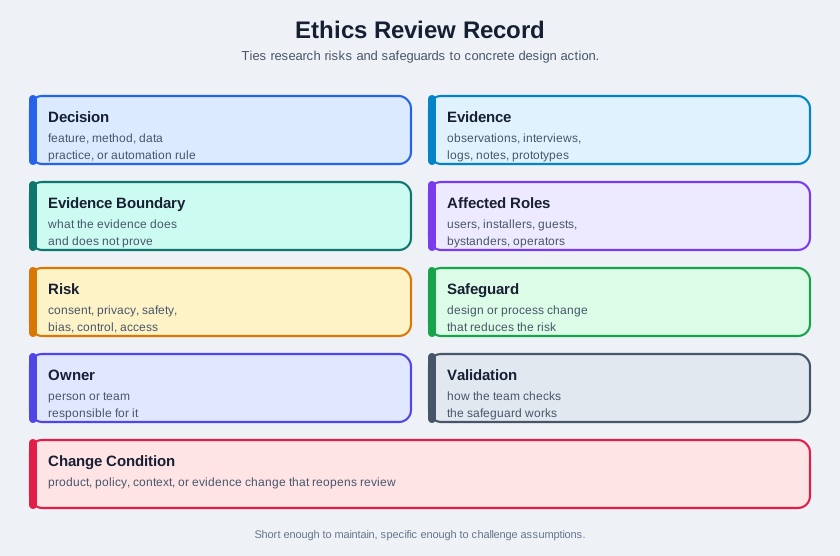
Use Figure 9.3 to keep research risks and safeguards tied to design action.
9.16 What to Record
A lightweight ethics and pitfall review record should include:
- Decision: the feature, research method, data practice, or automation rule under review.
- Evidence: observations, interviews, logs, support records, field notes, or prototype findings.
- Evidence boundary: what the evidence does and does not prove.
- Affected roles: users, buyers, installers, guests, bystanders, caregivers, operators, technicians, administrators, and support staff.
- Risk: consent, privacy, safety, bias, control, accessibility, maintenance, or support risk.
- Safeguard: the design or process change that reduces the risk.
- Owner: the person or team responsible for the safeguard.
- Validation: how the team will check whether the safeguard works.
- Change condition: the product, policy, context, or evidence change that requires review again.
The record should be short enough to maintain but specific enough to challenge future assumptions.
9.17 Incremental Examples
9.17.1 Presence-Based Lighting
Scenario:
- A home lighting system turns lights on when it detects a person in a room after sunset.
Evidence:
- Field notes show that presence detection works in normal evenings.
- Participants sometimes sit still long enough for the sensor to miss them.
- Guests sometimes sleep in rooms with different preferences.
- A manual wall switch is still expected to work.
Risks:
- context inference error
- privacy discomfort if occupancy history is shown too broadly
- annoyance when automation contradicts occupants
- accessibility issue if the only override is in the app
Safeguards:
- keep the physical switch authoritative
- show automation state in the app without exposing detailed occupancy history unnecessarily
- pause automation after a manual override
- provide room-level controls for shared spaces
- avoid using lighting behavior as a hidden presence log for unrelated features
Validation:
- observe first-time setup and daily use in real rooms
- check whether people understand the automation state
- review support reports and manual override patterns
- review again when the sensing method, room type, guest mode, or sharing model changes
9.17.2 Workplace Comfort Sensors
Scenario:
- A building team wants to use temperature, occupancy, and comfort feedback to tune heating and cooling.
Evidence:
- Occupants want fewer hot and cold spots.
- Facilities staff need actionable location and time information.
- Workers worry that occupancy data could be used for surveillance.
- Some areas have intermittent connectivity and irregular use.
Risks:
- privacy creep from unnecessary individual tracking
- sampling bias if only office-based staff are surveyed
- weak consent if sensors are installed without explanation
- overconfident automation that changes comfort without local feedback
Safeguards:
- aggregate comfort evidence at a level that supports facilities action without identifying individuals
- explain what is sensed and what is not sensed
- include workers from varied shifts, spaces, and accessibility needs
- keep local feedback and facilities review in the loop before changing control rules
- publish a simple escalation path for discomfort and sensor concerns
Validation:
- compare field observations, feedback, and maintenance tickets
- check whether people understand the data practice
- review whether the system improves comfort without creating surveillance concerns
- review again when sensors, building zones, data retention, or automation policies change
9.18 Try It Now: Build an Ethics Review Row
Choose one IoT research finding and fill in one row before turning it into a requirement:
| Field | Your answer |
|---|---|
| Decision | Feature, data practice, automation rule, or research method under review |
| Evidence | Observation, interview, field note, support ticket, log, or prototype result |
| Evidence boundary | What this evidence does not prove |
| Affected roles | Users, buyers, guests, bystanders, operators, installers, support, or admins |
| Risk | Consent, privacy, bias, control, safety, accessibility, maintenance, or support |
| Safeguard | Concrete product, research, or operations change |
| Owner | Role responsible for the safeguard |
| Validation | How the team will check whether the safeguard works |
9.19 Signal vs Inference
For each signal, write one possible inference and one safer design response:
- A phone is near a shared door reader.
- A workplace sensor reports a room as unoccupied.
- A support log shows repeated failed credential setup.
9.20 Review Checklist
Before accepting a research finding or design decision, confirm:
- the research question is explicit
- the participant sample matches the decision
- affected roles and bystanders are considered
- consent covers the actual sensing, recording, retention, and reuse plan
- sensitive data is minimized, localized, summarized, or avoided where possible
- observed evidence is separated from interpretation
- assumptions and evidence boundaries are named
- automation consequence is matched to suggest, ask, act, or do-not-automate behavior
- users can see, correct, pause, override, or remove the system where appropriate
- maintenance, failure, support, and decommissioning are included in the journey
- safeguards have owners and validation plans
- change conditions are recorded
9.21 Common Defects
Watch for:
- Consent theater: a form exists, but participants do not understand what is sensed or recorded.
- Data hoarding: the team collects detailed data because it may be useful later.
- Owner-only thinking: the account owner is studied, but affected people are ignored.
- Early-adopter drift: the team optimizes for technical users while the product requires mainstream reliability.
- False certainty: location, presence, time, or routine is treated as user intent.
- Dark defaults: privacy-invasive features are enabled by default or hidden behind confusing settings.
- Happy-path evidence: setup success is observed, but failure, maintenance, support, and removal are not.
- No disconfirmation rule: the team never states what evidence would change the design.
- Stale evidence: the decision survives after product, context, sensing, or policy changes make the evidence stale.
9.22 Context Signal vs Intent
9.23 Match Pitfalls to Safeguards
9.24 Concept Check: Order the Ethics Review
9.25 Summary
IoT research quality and ethics are inseparable. A team can make a harmful or low-quality design decision when it overtrusts context signals, collects unnecessary data, studies the wrong people, asks leading questions, hides automation, or ignores affected bystanders.
The practical defense is an evidence-bound review record. Name the decision, evidence, affected roles, risks, safeguards, owner, validation plan, and change condition. This keeps ethical concerns connected to design action instead of leaving them as vague warnings.
9.26 Key Takeaway
Ethical UX review should surface dark patterns, bias, consent gaps, safety risks, and maintenance burdens before deployment.
9.27 See Also
Pitfalls and ethics connect to the people/context sequence:
- User Research Fundamentals explains how to ground research in observed behavior.
- Research Methods explains how to choose appropriate evidence-gathering methods.
- Context-of-Use Analysis identifies the physical, social, temporal, technical, cultural, and accessibility constraints that create risk.
- Personas and Journey Maps for IoT turns evidence into synthesis artifacts while preserving evidence boundaries.
- Interface Design Process Checklist turns research and ethics findings into acceptance decisions.
9.28 What’s Next
Continue with:
- People and Context Assessment, which checks understanding of research, context, personas, journeys, and ethics.
- Research Methods, which helps choose evidence methods for the next research question.
- Interface Design Process Checklist, which turns findings and safeguards into reviewable acceptance records.
- Understanding People and Context, which provides the broader sequence overview.