After completing this section, you will be able to:
Apply established design patterns to common IoT challenges
Use the Gateway Pattern for protocol translation and edge processing
Implement the Digital Twin pattern for device modeling and simulation
Apply the Observer pattern for event-driven IoT systems
Use the Command pattern for decoupled device control
Explain model-driven development approaches for IoT applications
Sensor Squad: The Problem-Solving Toolkit!
“Every time we build an IoT system, we run into the same problems,” said Max the Microcontroller. “Like, how do I talk to a cloud server when I only speak Zigbee? That is where the Gateway Pattern comes in – a translator device that speaks both languages and passes messages between us and the internet.”
Sammy the Sensor was excited about another pattern. “The Digital Twin is my favorite! It is a virtual copy of me that lives in the cloud. When I measure 25 degrees, my twin says 25 degrees too. Engineers can run experiments on my twin – like ‘What happens if temperature hits 100 degrees?’ – without cooking the real me!”
“I love the Observer Pattern,” said Lila the LED. “Instead of Max constantly asking ‘Did anything change? Did anything change?’, I just announce ‘Hey, the door opened!’ and everyone who cares about doors gets the message. No wasted questions, no wasted energy!” Bella the Battery agreed, “Smart patterns mean less work and longer battery life. Always use a proven recipe before inventing a new one!”
24.2 Prerequisites
Before diving into this chapter, you should have read:
Design patterns are proven solutions to recurring problems in software and system design. In the IoT context, these patterns address challenges unique to distributed, resource-constrained, and heterogeneous systems. This chapter explores four essential patterns that form the foundation of robust IoT architectures: Gateway, Digital Twin, Command, and Observer.
Each pattern provides a reusable template for solving specific challenges:
Gateway Pattern: Bridging heterogeneous protocols and enabling edge intelligence
Digital Twin Pattern: Creating virtual representations that mirror physical devices
Command Pattern: Decoupling command issuers from executors for flexible automation
Observer Pattern: Enabling event-driven communication between components
Understanding these patterns helps you design systems that are modular, maintainable, and scalable.
24.4 IoT Design Patterns
Time: ~15 min | Difficulty: Advanced | Unit: P12.C02.U07
Key Concepts
Mental Model: User’s internal representation of how a system works, which designers must match to create intuitive interactions.
Affordance: Property of a design element that signals how it should be used (a button looks pressable, a slider looks draggable).
Progressive Disclosure: UI pattern revealing advanced options only when needed, keeping primary interfaces simple for new users.
Status Visibility: Nielsen heuristic requiring systems to always inform users about what is happening through appropriate feedback.
Error Prevention: Design approach making mistakes impossible or unlikely rather than just providing good error messages.
Feedback Loop: System response acknowledging user action—visual, auditory, or haptic—that confirms the command was received.
Learnability: Ease with which new users achieve basic proficiency; measured as time to first successful task completion.
Common design patterns address recurring IoT challenges:
24.4.1 Gateway Pattern
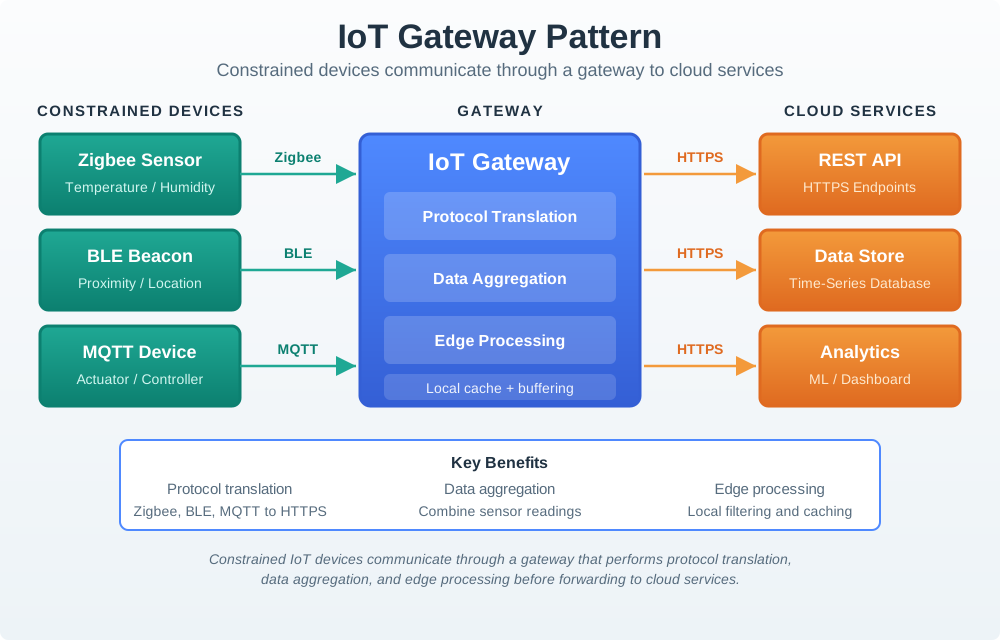
The Gateway Pattern uses an intermediary device to translate between constrained devices and cloud services. This is one of the most fundamental patterns in IoT architecture.
Figure 24.1: Gateway pattern diagram showing constrained IoT devices communicating through a gateway that performs protocol translation, data aggregation, and edge processing before forwarding to cloud services.
Key characteristics of the Gateway Pattern:
Protocol Translation: Converts between device protocols (Zigbee, BLE, MQTT) and cloud protocols (HTTPS, REST)
Data Aggregation: Combines readings from multiple sensors before transmission, reducing bandwidth
Edge Processing: Performs local computation, filtering, and decision-making
Local Autonomy: Continues functioning during internet outages
Security Boundary: Acts as a security perimeter between constrained devices and the internet
When to use the Gateway Pattern:
Multiple devices use different protocols that need cloud connectivity
Bandwidth is limited and data needs aggregation
Real-time decisions require low latency (faster than cloud round-trip)
System must operate during connectivity interruptions
Security requires isolation of constrained devices from internet
For Beginners: Gateway Pattern Explained
Think of a gateway like a translator at the United Nations. Different countries (devices) speak different languages (protocols), but they all need to communicate with headquarters (cloud). The translator (gateway) understands all the languages and converts them to one common language that headquarters understands.
The gateway also acts like a smart filter - instead of sending every little detail to headquarters, it summarizes the important information and only sends what’s necessary.
24.4.2 Digital Twin Pattern
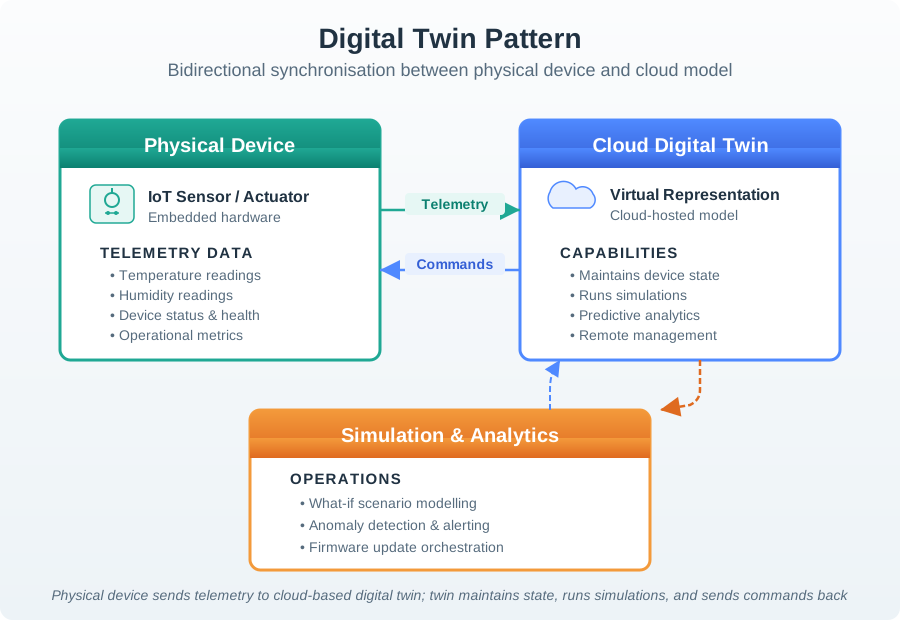
The Digital Twin Pattern creates a virtual representation that stays synchronized with a physical device. This enables simulation, analytics, and remote management without directly impacting the physical device.
Figure 24.2: Digital twin pattern showing physical device sending telemetry to cloud-based digital twin model which maintains state, runs simulations, and sends commands back to physical device.
Key characteristics of the Digital Twin Pattern:
State Synchronization: Cloud maintains virtual model mirroring physical device state
Bidirectional Communication: Telemetry flows up, commands flow down
Simulation Capability: Twin enables simulations, analytics, and predictions without impacting physical device
Application Decoupling: Applications interact with twin instead of directly with constrained device
Predictive Maintenance: Historical data enables failure prediction before problems occur
Real-world example: Factory equipment digital twins predict maintenance needs before failures occur. Engineers can simulate changes to machine parameters in the digital twin, verify they work correctly, then push the changes to the physical equipment.
For Beginners: Digital Twin Explained
Imagine you have a virtual copy of your house in a video game. This virtual house looks exactly like your real house and updates in real-time - if you turn on a light in your real house, the light turns on in the virtual one too.
You can use this virtual house to test things before doing them in real life. Want to see if moving your furniture looks good? Try it in the virtual house first! Want to see how much energy you’d save with new windows? The virtual house can simulate that without you buying actual windows.
That’s what a digital twin does for IoT devices - it creates a virtual copy in the cloud that you can monitor, analyze, and experiment with.
24.4.3 Command Pattern
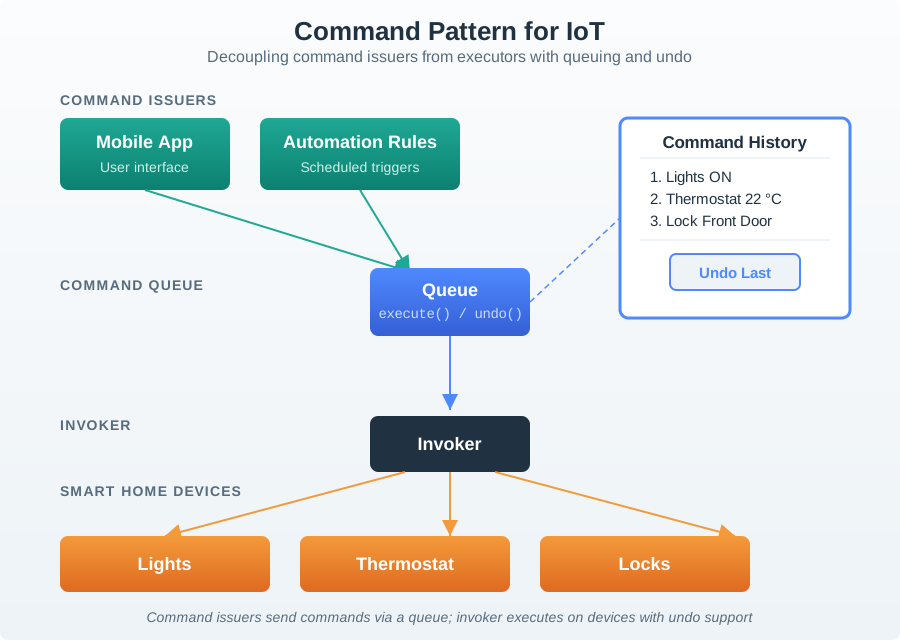
The Command Pattern decouples command issuers from executors, enabling flexible scheduling, queuing, undo functionality, and audit trails.
Figure 24.3: Command pattern diagram showing mobile app and automation rules issuing commands through command queue with invoker executing commands on smart home devices, supporting undo and command history.
Key characteristics of the Command Pattern:
Commands as Objects: Commands have execute() and undo() methods, making them first-class entities
Issuer Independence: Issuers create commands without knowing execution details
Queue Management: Queue enables scheduling, prioritization, and retry logic
Command History: Supports undo operations and audit trails
Flexible Execution: Commands can be delayed, batched, or conditionally executed
Example use case: Smart home automation rules issue commands that can be undone if a user manually overrides them. If an automation turns off the lights when you leave, but you quickly return, you can undo the command rather than wait for the automation to re-trigger.
24.4.4 Observer Pattern
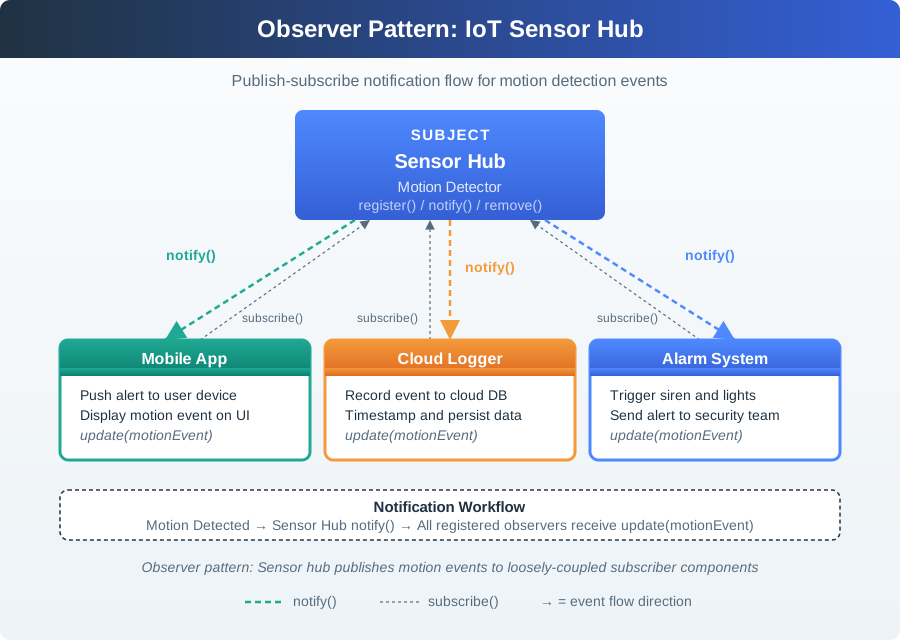
The Observer Pattern enables components to subscribe to device events, creating loosely-coupled, event-driven architectures.
Figure 24.4: Observer pattern diagram showing sensor hub as subject with multiple observers including mobile app, cloud logger, and alarm system subscribing to motion events with notification workflow.
Key characteristics of the Observer Pattern:
Subject Management: Subject maintains list of observers and notifies them of state changes
Dynamic Registration: Observers register/unregister dynamically at runtime
Asynchronous Notifications: Use async notifications to avoid blocking subject
Scalable Event Distribution: Easy to add new observers without modifying subject
Example use case: A motion sensor notifies multiple systems (app, logger, lights, alarm) when motion is detected. Each observer decides how to respond independently.
A common mistake is implementing synchronous notification where the subject blocks while notifying all observers. If you have 50 sensors as observers and each takes 200ms to process, the hub blocks for 10 seconds!
Solution: Use asynchronous notifications with a thread pool or message queue. The hub queues notifications and returns immediately; observers process in parallel.
24.5 Model-Driven Development
Time: ~8 min | Difficulty: Advanced | Unit: P12.C02.U08
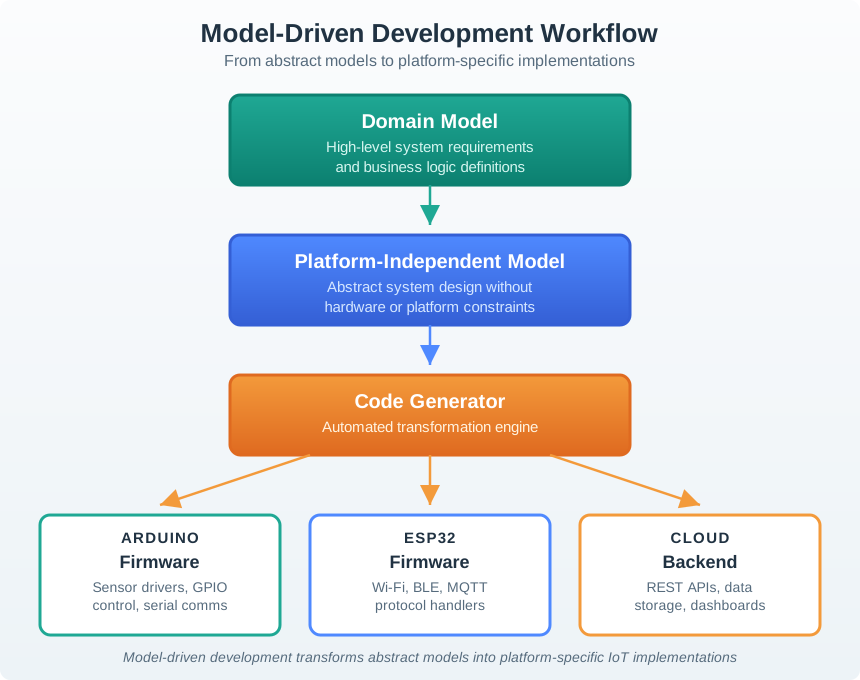
Model-driven development (MDD) uses high-level models to generate implementation code and configurations:
Figure 24.5: Model-driven development workflow showing domain model and platform-independent model being transformed by code generators into platform-specific implementations for Arduino, ESP32, and cloud backend.
Key characteristics of Model-Driven Development:
High Abstraction: Define system at platform-independent level
Automated Generation: Code generators create device firmware, configurations, and documentation
Change Propagation: Requirement changes happen at model level, regenerating all artifacts
Consistency Guarantee: All deployments follow same structure, reducing configuration drift
Example: A smart city platform where each city configures model with their parameters (reporting intervals, dimming schedules, alert thresholds), and the system generates custom device firmware and cloud configurations for that city’s deployment.
Quiz: Model-Driven Development
24.6 Choosing the Right Pattern
Each pattern addresses different challenges. Here’s a decision guide:
Challenge
Recommended Pattern
Why
Multiple device protocols need cloud access
Gateway
Protocol translation and aggregation
Need to simulate/predict device behavior
Digital Twin
Virtual model enables safe experimentation
Commands need scheduling, undo, or audit
Command
Commands as objects with history
Multiple systems react to device events
Observer
Loose coupling, dynamic subscription
Many similar deployments with variations
MDD
Model generates consistent configurations
Interactive Pattern Selector:
Show code
viewof protocols_count = Inputs.range([1,10], {value:1,step:1,label:"Number of different device protocols"})viewof need_simulation = Inputs.radio(["Yes","No"], {value:"No",label:"Need to simulate/test without affecting devices?"})viewof need_command_history = Inputs.radio(["Yes","No"], {value:"No",label:"Need command scheduling, undo, or audit trails?"})viewof observer_count = Inputs.range([0,20], {value:1,step:1,label:"Number of systems that react to same events"})viewof deployment_sites = Inputs.range([1,50], {value:1,step:1,label:"Number of deployment sites with variations"})// Pattern recommendationsgateway_score = protocols_count >=3?10: (protocols_count >=2?5:0)twin_score = need_simulation ==="Yes"?10:0command_score = need_command_history ==="Yes"?10:0observer_score = observer_count >=3?10: (observer_count >=2?5:0)mdd_score = deployment_sites >=5?10: (deployment_sites >=3?5:0)recommended = [ { pattern:"Gateway",score: gateway_score,reason: protocols_count >=3?"Multiple protocols need translation":"Consider if bandwidth is limited" }, { pattern:"Digital Twin",score: twin_score,reason: need_simulation ==="Yes"?"Simulation/prediction required":"Simple state storage may suffice" }, { pattern:"Command",score: command_score,reason: need_command_history ==="Yes"?"Audit/undo required":"Direct API calls may suffice" }, { pattern:"Observer",score: observer_score,reason: observer_count >=3?"Multiple subscribers benefit from loose coupling":"Point-to-point may suffice" }, { pattern:"Model-Driven Dev",score: mdd_score,reason: deployment_sites >=5?"Many deployments justify automation":"Manual config acceptable" }].sort((a, b) => b.score- a.score)top_patterns = recommended.filter(p => p.score>0)html`<div style="background: #2C3E50; color: white; padding: 20px; border-radius: 8px; margin-top: 15px;"> <h4 style="margin-top: 0; color: #16A085;">Recommended Patterns for Your Scenario</h4>${top_patterns.length>0?html` <div style="margin-top: 15px;">${top_patterns.map(p =>html` <div style="background: rgba(22,160,133,0.2); padding: 12px; border-radius: 6px; margin-bottom: 10px; border-left: 4px solid ${p.score===10?'#16A085':'#E67E22'};"> <div style="display: flex; justify-content: space-between; align-items: center;"> <div style="font-size: 1.2em; font-weight: bold; color: ${p.score===10?'#16A085':'#E67E22'};">${p.pattern}</div> <div style="font-size: 0.9em; opacity: 0.8;">${p.score===10?'Highly Recommended':'Consider'}</div> </div> <div style="font-size: 0.95em; margin-top: 6px; opacity: 0.9;">${p.reason}</div> </div> `)} </div> `:html` <div style="padding: 15px; background: rgba(255,255,255,0.1); border-radius: 6px; text-align: center;"> <p style="margin: 0; opacity: 0.8;">Based on your inputs, you may not need specialized patterns. Simple direct implementations may be sufficient.</p> </div> `}${top_patterns.length>1?html` <div style="margin-top: 15px; padding: 12px; background: rgba(230,126,34,0.2); border-radius: 6px; border-left: 4px solid #E67E22;"> <strong>💡 Pattern Combination:</strong> Your scenario suggests combining ${top_patterns.map(p => p.pattern).join(' + ')} for a complete solution. </div> `:''}</div>`
Adjust the parameters above to match your IoT project requirements and see which patterns are recommended.
24.7 Combining Patterns
Real IoT systems typically combine multiple patterns:
Combined pattern architecture showing how Gateway, Digital Twin, Observer, and Command patterns work together in a complete IoT system
Example combined architecture:
Gateway aggregates sensor data and translates protocols at the edge
Digital Twin maintains device state in the cloud
Observer pattern distributes state changes to interested applications
Command pattern queues and executes user actions and automation rules
24.8 Code Example: Digital Twin in Practice
The following Python example shows a simplified Digital Twin that maintains cloud state synchronized with a physical temperature sensor. This pattern is used by AWS IoT Device Shadow, Azure IoT Device Twins, and custom MQTT-based systems:
import jsonimport timeclass DigitalTwin:"""Cloud-side digital twin for a temperature sensor. Maintains reported state (from device) and desired state (from cloud/user). Delta between them triggers device commands. """def__init__(self, device_id):self.device_id = device_idself.reported = {} # State reported by physical deviceself.desired = {} # State requested by cloud/userself.metadata = {"created": time.time(),"last_sync": None,"sync_count": 0 }def update_reported(self, state):"""Device reports its current state."""self.reported.update(state)self.metadata["last_sync"] = time.time()self.metadata["sync_count"] +=1# Calculate delta (what device still needs to do) delta =self._calculate_delta()if delta:print(f"[{self.device_id}] Delta detected: {delta}")return {"action": "sync", "delta": delta}return {"action": "none"}def update_desired(self, state):"""Cloud/user requests a state change."""self.desired.update(state) delta =self._calculate_delta()if delta:# Send command to physical devicereturn {"action": "command", "payload": delta}return {"action": "none"}def _calculate_delta(self):"""Find differences between desired and reported state.""" delta = {}for key, value inself.desired.items():if key notinself.reported orself.reported[key] != value: delta[key] = valuereturn deltadef simulate(self, scenario):"""Run what-if simulation without affecting physical device.""" sim_state =self.reported.copy() sim_state.update(scenario)# Run prediction model on simulated stateif sim_state.get("temperature", 0) >35:return {"risk": "high", "action": "activate_cooling"}return {"risk": "low", "action": "none"}# Usagetwin = DigitalTwin("sensor-001")# Device reports current statetwin.update_reported({"temperature": 22.5, "humidity": 45, "mode": "auto"})# User wants to change target temperatureresult = twin.update_desired({"target_temp": 20.0})# Returns: {"action": "command", "payload": {"target_temp": 20.0}}# Simulate extreme conditions without affecting real devicesim = twin.simulate({"temperature": 40, "humidity": 90})# Returns: {"risk": "high", "action": "activate_cooling"}
UX design implications of Digital Twins:
Feature
User Experience Benefit
Reported + Desired state
App shows both current state AND pending changes (“Setting to 20C… currently 22.5C”)
Delta synchronization
User sees when device is “catching up” to their command
Simulation mode
“What if” testing without risk to physical devices
Offline state
Last known state visible even when device is disconnected
Audit trail
“Who changed the thermostat at 3 AM?” visible in twin history
24.9 Case Study: Siemens MindSphere Digital Twin Platform
Siemens deployed Digital Twins across its gas turbine fleet (over 1,300 units globally) through its MindSphere platform, providing one of the largest real-world validations of the Digital Twin pattern in industrial IoT.
The business problem: Gas turbines cost $10-50 million each and generate $500,000-2 million per day in electricity revenue. Unplanned downtime costs $500,000-1 million per incident, and a catastrophic failure requiring turbine replacement can cost $15-30 million. Traditional maintenance schedules (time-based, every 8,000 operating hours) meant either:
Performing unnecessary maintenance on healthy turbines (wasting $50,000-200,000 per inspection)
Missing developing failures between scheduled inspections
Digital Twin architecture:
Each physical turbine has a cloud-based twin that ingests 500+ sensor readings per second (blade vibration, exhaust temperature, fuel flow, bearing pressure, combustion dynamics). The twin maintains:
Twin Layer
Data
Update Frequency
Real-time state
Current sensor values, operating mode
Every 1 second
Physics model
Thermodynamic simulation, stress analysis
Recalculated every 5 minutes
Historical baseline
5 years of operating data
Updated daily
Predictive model
Remaining useful life, failure probability
Updated hourly
How the patterns work together:
Gateway Pattern: Edge gateways at each turbine site aggregate 500+ sensor streams, perform local anomaly detection (flagging readings outside 3-sigma bounds), and compress data before cloud transmission – reducing bandwidth from 2.4 GB/hour raw to 150 MB/hour.
Digital Twin Pattern: Cloud twins maintain both “reported state” (actual turbine) and “simulated state” (physics model prediction). When these diverge beyond a threshold, the system flags a developing anomaly.
Observer Pattern: When a twin detects an anomaly, it notifies multiple subscribers: the operations dashboard, the maintenance scheduling system, the parts inventory system, and the engineering analysis team.
Command Pattern: Maintenance recommendations are issued as command objects with full audit trails, priority levels, and rollback capability if a recommendation is later determined unnecessary.
Measurable results (2017-2022):
Unplanned downtime reduced by 30-50% across the fleet
Maintenance costs reduced by $1.7 billion over 5 years
Turbine efficiency improved 1-2% through continuous optimization (worth $200,000-500,000 per turbine annually)
6 catastrophic failures prevented by early detection of blade cracks and bearing degradation
Mean time between predicted failure and actual occurrence: 14-45 days (sufficient for planned maintenance)
Design lesson: The Digital Twin pattern delivers its greatest value when combined with Gateway (for edge data reduction), Observer (for multi-system notification), and Command (for auditable actions). A twin without these supporting patterns is just a dashboard – with them, it becomes a predictive maintenance engine that pays for itself within 6-12 months per turbine.
Putting Numbers to It
How do you calculate the ROI of implementing a Digital Twin for industrial equipment? Here’s the Siemens gas turbine case with real numbers.
Key insight: Even a $68,500 implementation cost pays for itself in under 2 months when preventing a single $750K turbine failure. The Digital Twin delivered 6.7× ROI in year 1, scaling to 37× over 5 years.
Try adjusting the parameters above to see how different scenarios affect ROI. Notice how even modest improvements in failure prevention or efficiency deliver significant returns.
Worked Example: Building a Digital Twin for Predictive Maintenance of Industrial Pumps
Scenario: A chemical plant operates 200 centrifugal pumps. Unplanned failures cost $50,000 per incident (downtime + emergency repair). You need a Digital Twin system to predict failures 7-14 days in advance.
class PumpDigitalTwin:def__init__(self, pump_id):self.pump_id = pump_idself.reported_state = {}self.historical_baseline = load_baseline(pump_id)self.anomaly_threshold =2.5# Sigma from baselinedef update_reported_state(self, sensor_data):"""Ingest real-time telemetry"""self.reported_state = {'vibration_rms': sensor_data['vibration'],'temperature': sensor_data['temp'],'flow_rate': sensor_data['flow'],'timestamp': sensor_data['timestamp'] }# Run anomaly detection anomalies =self.detect_anomalies()if anomalies:self.escalate_alert(anomalies)def detect_anomalies(self):"""Compare current vs historical baseline""" anomalies = [] vibration =self.reported_state['vibration_rms'] baseline_mean =self.historical_baseline['vibration_mean'] baseline_std =self.historical_baseline['vibration_std']# Z-score anomaly detection z_score = (vibration - baseline_mean) / baseline_stdif z_score >self.anomaly_threshold: remaining_life =self.predict_failure_time(vibration) anomalies.append({'type': 'bearing_wear','severity': 'high'if z_score >3.5else'medium','predicted_failure': remaining_life })return anomaliesdef predict_failure_time(self, current_vibration):"""Physics-based remaining useful life prediction"""# Simplified: vibration increases linearly before failure# Real implementation uses Weibull analysis or exponential models# Assume current vibration reflects 30 days of degradation vibration_rate_of_change = (current_vibration -self.historical_baseline['vibration_mean']) /30.0# mm/s per day failure_threshold =8.0# mm/s RMS (from OEM specs)if vibration_rate_of_change >0: days_to_failure = (failure_threshold - current_vibration) / vibration_rate_of_changeelse: days_to_failure =float('inf') # Not degradingreturnmax(0, days_to_failure)def escalate_alert(self, anomalies):"""Notify maintenance system"""for anomaly in anomalies:if anomaly['predicted_failure'] <14: create_maintenance_work_order( pump_id=self.pump_id, priority='high', estimated_failure=anomaly['predicted_failure'], recommended_action='Replace bearings' )# Usagetwin = PumpDigitalTwin('pump-027')sensor_data = {'vibration': 4.2, 'temp': 78, 'flow': 450, 'timestamp': '2026-02-08T14:30:00Z'}twin.update_reported_state(sensor_data)# If vibration = 4.2 mm/s RMS and baseline = 1.8 ± 0.6, z-score = 4.0# Predicted failure in 9 days → High-priority work order created
Measurable Results (After 18 Months):
Metric
Before Digital Twins
After Digital Twins
Improvement
Unplanned failures per year
46 incidents
8 incidents
83% reduction
Mean advance warning
0 days (reactive)
11.2 days
Proactive maintenance enabled
Parts pre-staged
12% of repairs
76% of repairs
Faster repairs, less downtime
Average downtime per failure
18 hours
4.5 hours
75% reduction (parts ready, diagnosis done)
Annual maintenance cost
$2.3M
$1.1M
$1.2M savings
Key Lesson: Digital Twins deliver ROI when they enable actions that reduce costs or increase revenue. For this plant, the twin paid for itself ($180K implementation) in 6 months through avoided downtime ($50K per incident × 38 incidents prevented).
Decision Framework: When to Use Each IoT Design Pattern
Question to Ask
If YES → Use This Pattern
If NO → Use This Instead
Do I have devices using 3+ different protocols?
Gateway Pattern
Direct cloud connection (if all devices use same protocol)
Do I need to simulate device behavior without impacting real devices?
Digital Twin Pattern
Simple state storage (if no simulation needed)
Do I need scheduling, undo, or audit trail for commands?
Command Pattern
Direct API calls (if fire-and-forget is OK)
Do 3+ systems need to react to the same device events?
Observer Pattern
Point-to-point calls (if only 1-2 subscribers)
Am I deploying the same system to 5+ different sites with parameter variations?
Model-Driven Development
Manual configuration (if < 5 deployments)
Do I need edge intelligence (local processing when cloud is unavailable)?
Gateway Pattern with edge compute
Cloud-only (if always-connected devices)
Do I need to predict failures or optimize performance based on telemetry?
Digital Twin with ML
Rule-based alerts (if failure patterns are deterministic)
Observer distributes motion events, Command arms/disarms—no gateway if Wi-Fi devices, no twin if no prediction
Anti-Pattern Alert: Using all patterns together “just in case.” Each pattern adds complexity (code, latency, cognitive load). Only use patterns that solve actual requirements.
Common Mistake: Building a Digital Twin for Simple On/Off State Tracking
What Practitioners Do Wrong: Implementing a full Digital Twin system (bidirectional sync, conflict resolution, state history, simulation engine) for IoT devices that only need to track simple on/off or temperature state with no prediction requirements.
The Problem: Digital Twins are complex systems requiring: - Bidirectional synchronization (reported state ↔︎ desired state) - Conflict resolution (what if cloud and device disagree?) - State history storage (for analytics and simulation) - Delta calculation (detect changes that need propagation) - Timeout handling (what if device doesn’t confirm?) - Schema versioning (as device capabilities evolve)
For a simple smart plug that tracks “on” or “off,” this is massive over-engineering.
Real-World Example: A startup building smart light switches implemented AWS IoT Device Shadow (Digital Twin) for 10,000 devices. Each switch had 3 state variables: power (on/off), brightness (0-100), and last_toggle_time. After 6 months:
Metric
Cost/Impact
AWS IoT Shadow operations
43 million updates/month at $1.25 per million = $54/month
Simple DynamoDB state table
43 million reads/writes at $0.25 per million = $11/month
Shadow sync latency
800-1200ms (cloud round-trip + delta calculation)
Simple state check
200-400ms (direct database read)
Code complexity
2,400 LOC for shadow sync handlers
Simple implementation
420 LOC for state CRUD
They migrated to simple state storage, saving $43/month ($516/year) and reducing latency by 60%.
When Digital Twins ARE Worth It:
Predictive maintenance: Historical data + physics models predict failures
Simulation testing: Test firmware changes on twin before deploying to device
Complex state: > 10 state variables with interdependencies
Command queueing: Device offline, queue commands for later execution
Multi-app access: 3+ applications need device state without polling device
When Simple State Storage Suffices:
Device state has < 5 variables
No prediction or simulation needed
Device is always online (no queue needed)
State changes are rare (< 1 per minute)
Key Lesson: Digital Twin pattern is powerful but expensive in complexity and operational cost. Use it when the value (prediction, simulation, offline queueing) justifies the cost. For simple state tracking, use a database.
24.10 Anti-Patterns: What Not to Do
Understanding what fails is as valuable as knowing what succeeds. These anti-patterns appear repeatedly in IoT deployments.
24.10.1 Anti-Pattern 1: The “God Gateway”
Problem: A single gateway handles protocol translation, data storage, ML inference, device management, security, and user interface for 500+ devices. When the gateway crashes, the entire system goes dark.
Real-world example: A logistics company deployed a single industrial PC as the gateway for a 300-sensor warehouse monitoring system. The gateway ran RabbitMQ, InfluxDB, a Python ML service, an Nginx web server, and a Zigbee coordinator – all on one machine. Six months into deployment, the InfluxDB write-ahead log consumed all available disk space (256 GB SSD). The database locked, the message queue backed up to 2 million unprocessed messages, and the system went completely offline for 14 hours. Total cost: $340,000 in spoiled temperature-sensitive inventory.
Fix: Apply the Gateway Pattern with separation of concerns. Dedicate one device to protocol coordination (Zigbee coordinator), another to data ingestion (lightweight MQTT broker), and use cloud services for storage, ML, and dashboards. If the dashboard goes down, sensors still collect data. If the broker goes down, the coordinator buffers locally.
24.10.2 Anti-Pattern 2: Polling Instead of Observing
Problem: A dashboard queries every device for its current state every 5 seconds, regardless of whether anything changed. With 200 devices, this generates 40 queries per second – 3.4 million queries per day – of which 95% return identical data.
Fix: Implement the Observer Pattern. Devices publish state changes only when values change beyond a configurable threshold (e.g., temperature changes by more than 0.5 degrees C). This typically reduces network traffic by 80-95% and extends battery life for wireless devices by a similar factor.
24.10.3 Anti-Pattern 3: Synchronous Digital Twin Updates
Problem: A Digital Twin implementation blocks until the physical device confirms every state change. If the device is on a cellular connection with 2-second latency, every user action in the dashboard takes 2+ seconds to reflect.
Fix: Use optimistic updates with eventual consistency. Update the Digital Twin’s “desired” state immediately (giving the user instant feedback), then reconcile when the device reports its actual state. Show a subtle “syncing” indicator rather than blocking the entire interface. AWS IoT Device Shadow and Azure Device Twins both implement this pattern natively.
24.11 Concept Check
Quiz: IoT Design Patterns
24.12 Concept Relationships
IoT design patterns build on and interact with concepts from across the curriculum:
Pattern Foundations:
Component-Based Design (from Design Thinking chapter) provides the modularity that patterns organize - each pattern is a proven way to compose components
Layered Architecture (from Design Model) determines where patterns apply - Gateway at network layer, Digital Twin at application layer, Observer across layers
Calm Technology (from Design Facets) informs pattern implementation - patterns should enable ambient awareness, not constant notification
Digital Twin + Observer: Twin maintains authoritative state, Observers subscribe to twin state changes - together they implement “single source of truth with push updates”
Command + Observer: Commands represent user intentions (explicit actions), Observers handle system events (implicit reactions) - together they cover both control flows
Gateway + Observer: Gateway publishes filtered events, cloud Observers consume them - decoupled event-driven architecture across edge and cloud
Cross-Domain Applications:
Edge Computing (from distributed systems) implements Gateway pattern at scale - fog nodes are essentially gateways with compute
MQTT/CoAP (from networking protocols) provide the pub/sub infrastructure that Observer pattern uses in IoT
Security Patterns (from security chapters) extend these patterns with authentication (only authorized commands), encryption (secure twin updates), and access control (observer authorization)
Energy Optimization (from power management) influences Gateway pattern design - edge filtering reduces radio transmission, the largest battery drain
Anti-Pattern Recognition:
Skipping Gateway for Direct Cloud Connection: Violates separation of concerns (from software architecture) - devices shouldn’t handle cloud protocols, certificate management, and retry logic
Synchronous Digital Twin Updates: Violates asynchronous best practices (from distributed systems) - cloud round-trips create perceived latency
Polling Instead of Observer: Violates efficient resource use (from networking) - wastes bandwidth and battery checking for changes that rarely occur
Pattern Evolution:
Serverless + Digital Twin: Cloud functions triggered by twin state changes (from cloud computing patterns) - scales automatically with device count
Federated Learning + Digital Twin: ML models train on local twin data without centralizing sensitive information (from privacy patterns)
In 60 Seconds
This chapter covers iot design patterns, explaining the core concepts, practical design decisions, and common pitfalls that IoT practitioners need to build effective, reliable connected systems.
Understanding these relationships helps you: (1) Combine patterns appropriately (Gateway + Twin for edge/cloud split), (2) Avoid pattern mismatches (don’t use synchronous patterns in asynchronous systems), (3) Extend patterns for new requirements (add security layers to basic patterns).
Node-RED - Visual programming for IoT flows, implements many patterns visually
AWS IoT Device Shadow - Managed Digital Twin service
Azure IoT Device Twins - Microsoft’s Digital Twin implementation
Eclipse Ditto - Open-source Digital Twin framework
Interactive Quiz: Match Concepts
Interactive Quiz: Sequence the Steps
Common Pitfalls
1. Designing Without Mapping to User Mental Models
Creating interaction flows that make sense to engineers but contradict users’ existing mental models from smartphones and web applications produces steep learning curves and abandonment. Map every primary interaction to an existing familiar pattern before inventing new paradigms.
2. Over-Relying on Icons Without Labels
Icon-only interfaces that appear clean in design reviews fail when users cannot identify what an icon means without trying it. Pair icons with text labels in primary navigation and reserve icon-only presentation for secondary or expert-level interactions where meaning is established.
3. Ignoring State Transition Feedback
Interactions that change device state (locking a door, arming a sensor) without immediate visual or auditory feedback leave users uncertain whether their action was registered, often triggering repeated taps. Acknowledge every state change with a clear animation, LED change, or sound within 200 ms.
Label the Diagram
💻 Code Challenge
24.14 Summary
This chapter explored essential IoT design patterns:
Key Takeaways:
Gateway Pattern: Bridges heterogeneous devices to cloud services through protocol translation, data aggregation, and edge processing. Essential for systems with diverse device types or connectivity constraints.
Digital Twin Pattern: Creates cloud-based virtual representations synchronized with physical devices. Enables simulation, analytics, and prediction without impacting physical systems.
Command Pattern: Decouples command issuers from executors through command objects. Enables scheduling, queuing, undo functionality, and audit trails.
Observer Pattern: Enables loose coupling through event subscription. Use asynchronous notifications to avoid blocking with many observers.
Model-Driven Development: Uses high-level models to generate consistent implementations. Manages complexity when deploying similar systems with variations.
Pattern Combination: Real systems combine patterns - Gateway at edge, Digital Twin for state, Observer for events, Command for actions.
Pattern Selection: Choose patterns based on specific challenges - protocol diversity, simulation needs, command management, or event distribution.
24.15 Try It Yourself
Ready to apply these design patterns? Here are hands-on exercises progressing from concept to implementation:
Exercise 1: Pattern Selection Decision Tree (15 minutes)
Given these scenarios, select the most appropriate pattern and justify your choice:
Continue to Design Patterns Assessment for comprehensive quizzes testing your understanding of IoT design patterns, architectures, and design thinking principles.