23 Device Discovery and Pairing
IoT device discovery, device pairing review, IoT commissioning UX, proof of possession, device setup recovery, connected device ownership
23.1 Start Simple
Discovery and pairing are the first trust ceremony for many IoT products. Start with the person holding the device, the proof that identifies the right thing, the credential boundary, the permission being granted, and the recovery path when setup fails or ownership changes.
UX Uma
“If a tired person at 2am can’t use it, the feature doesn’t exist yet — design for the worst moment, not the demo.”
Through this chapter, Uma tests each proof step at 2am: can a tired, gloved person still tell which device is theirs, and recover when it fails?
23.2 In 60 Seconds
Discovery is how a product finds candidate devices. Pairing is how it proves the selected device is the right one, binds credentials, assigns permissions, and remembers the relationship for later use.
The UX review question is not “which discovery protocol is implemented?” The useful question is whether the setup flow helps a user identify the correct physical device, confirm authority, recover from failure, and understand what account, network, hub, or cloud dependency was created.
23.3 Learning Objectives
By the end of this chapter, you will be able to:
- separate discovery, identification, proof of possession, credential binding, authorization, and recovery
- review discovery results for ambiguity, stale devices, privacy exposure, and setup burden
- explain how pairing methods affect security, accessibility, support, and ownership transfer
- identify what users and support teams need when pairing fails or a device is already owned
- write a discovery-and-pairing record with accepted limits, owners, and change conditions
23.4 Minimum Viable Understanding
A setup flow is reviewable only when it names what is being discovered, how the user confirms the right physical device, how the device proves possession, what credentials are created, what permissions are granted, and how failed, duplicate, or transferred devices recover.
Avoid treating discovery as a purely technical scan. A scan result that lists several similar devices can still be a poor experience if the user cannot tell which one is in their hand, room, machine, vehicle, or customer site.
23.5 Prerequisites
This chapter builds on:
- Device Communication Patterns, which explains the paths devices use after they are connected.
- Connected Device Fundamentals, which defines device role, boundary, and evidence.
- Device Lifecycle Management, which reviews provisioning, transfer, update, maintenance, and decommissioning.
- Privacy and User Consent, which reviews permission, notice, and user control.
23.6 Overview: Pairing Is a Chain of Trust
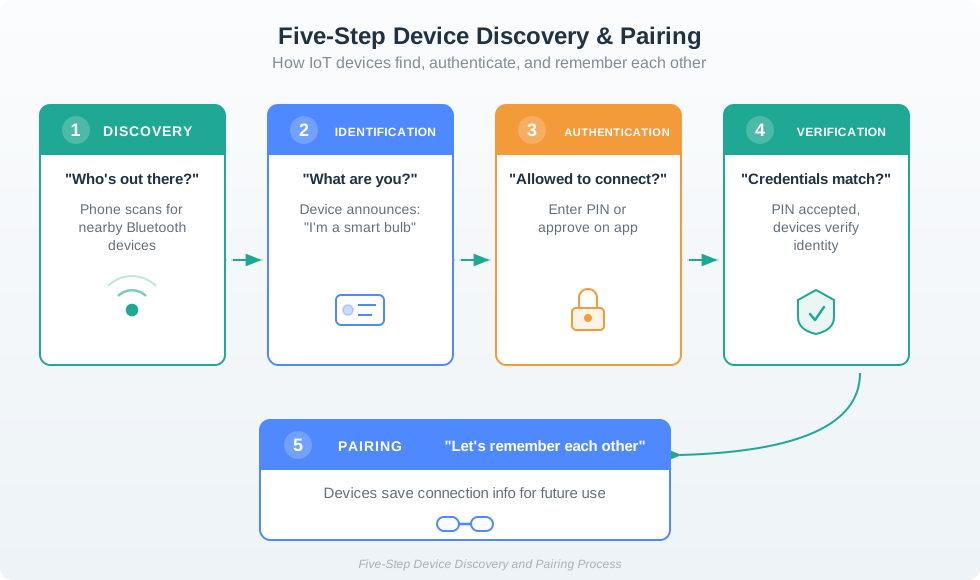
Discovery and pairing are not one step. A product first discovers candidates, then helps the user identify the correct physical device, proves possession or authority, creates credentials, assigns permissions, and stores enough state to recover later. A smooth setup screen is weak if any link in that chain is ambiguous.
For example, a phone may find a thermostat through Bluetooth Low Energy advertising, confirm it with a QR code or blinking display, send Wi-Fi credentials, bind the thermostat to a cloud account, and assign an installer or resident role. Each step answers a different question: which device is this, who is allowed to add it, where will it communicate, and who can use it afterward?
That chain matters because discovery evidence is often weaker than users assume. A BLE advertisement, Wi-Fi SoftAP name, mDNS service record, hub inventory item, or cloud registry entry can show that a candidate exists, but it does not prove the person selected the right device or has authority to bind it. The review should ask what the user can see, touch, scan, hear, or verify at the installed location.
Good pairing UX makes the hidden relationship visible. It explains when the device is only nearby, when possession has been checked, when a credential has been created, when a role has been granted, and when the setup can be safely retried or transferred. Without that separation, users can end up with duplicate devices, old owners retaining access, cloud records without local joins, or local joins that support cannot diagnose.
- Discovery: the scan finds candidates through BLE, Wi-Fi, mDNS/DNS-SD, a hub inventory, a cloud registry, or a typed code.
- Proof: the flow uses a QR label, setup PIN, button press, NFC tap, display code, work order, or ownership release to avoid binding the wrong device.
- Binding: the system stores keys, tokens, certificates, network credentials, hub membership, account links, roles, and revocation paths.
- Recovery: the product records enough state to retry, roll back, transfer ownership, revoke stale access, or escalate with useful support evidence.
23.7 Review Installed Setup Paths
Review the deployed pairing path, not only the protocol name. Matter, Thread, Zigbee, BLE, Wi-Fi, LoRaWAN, and cellular products can all have strong or weak setup experiences depending on labels, ownership checks, retries, account rules, and support visibility.
Start with one installed workflow and trace it as the person in the field experiences it. A resident scanning a smart lock, a maintenance worker replacing a thermostat, a technician commissioning a LoRaWAN sensor, and a lab student adding a gateway all need different proof, delegation, and recovery paths. The review should include the physical label, setup window, account role, network credential path, gateway or cloud dependency, and what the UI says when any one of those pieces fails.
- Map how candidates appear. Record whether discovery uses BLE advertisements, Wi-Fi SoftAP, Wi-Fi Easy Connect/DPP, mDNS/DNS-SD, Matter setup payloads, Zigbee install codes, LoRaWAN DevEUI/JoinEUI/AppKey values, a gateway list, or a fleet registry.
- Map how the user selects the right device. Check QR placement, serial labels, NFC tags, blink or sound confirmation, display codes, signal-strength hints, site asset tags, room names, and duplicate handling.
- Map how the relationship can change. Test expired setup windows, failed joins, wrong-device selection, app permission denial, offline gateways, factory reset, ownership transfer, credential rotation, and old-owner revocation.
The strongest review evidence comes from failure cases. Ask support to show the logs or screens that distinguish “not found,” “nearby but not authorized,” “already owned,” “pairing window closed,” “network join failed,” “account bind failed,” and “credential revoked.”
Also check the recovery burden on the person doing setup. If the flow asks for a factory reset, confirm what credentials, calibration, history, automation membership, and warranty state are lost. If it supports transfer, confirm whether old access is revoked before or after the new owner binds the device. If it supports installer delegation, confirm whether the installer receives a temporary role instead of permanent owner authority. The accepted record should name the owner of each unresolved tradeoff.
Document the support evidence while testing, not after launch. Useful records include candidate id, visible label, setup-code type, app permission state, gateway id, account id, role assigned, firmware version, join result, rollback result, revocation result, and a correlation id that links app, hub, device, and cloud logs. ## Discovery, Authority, Credentials {.depth-l2}
Discovery can prove proximity, but proximity is not ownership. BLE advertising, mDNS service discovery, Wi-Fi SoftAP names, Zigbee permit-join mode, and LoRaWAN join attempts can reveal that a device is nearby or ready, but a product still needs a separate authority check before it grants durable access.
Modern commissioning flows separate transport setup from trust setup. Matter uses setup payloads and commissioning windows, then establishes session security and fabric membership. Thread devices receive an operational dataset through a commissioner and border router. Zigbee products may use install codes or touchlink-style flows. LoRaWAN OTAA uses device and join identities with keys managed outside the phone UI. These details shape what can be recovered, transferred, revoked, or inspected.
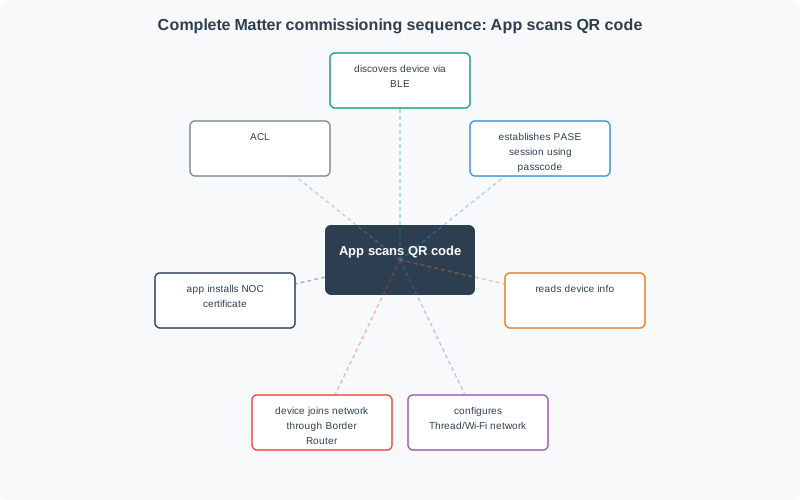
The implementation should treat setup as a state machine instead of a single success flag. Candidate discovered, setup code verified, secure session established, network credentials delivered, device joined, cloud account linked, role assigned, and stale relationship revoked are separate states with different rollback rules. Matter commissioning, for example, separates the setup payload and PASE session from later operational membership on a fabric. Wi-Fi Easy Connect/DPP separates bootstrapping from network access. LoRaWAN OTAA separates join identity from the application session that later carries data.
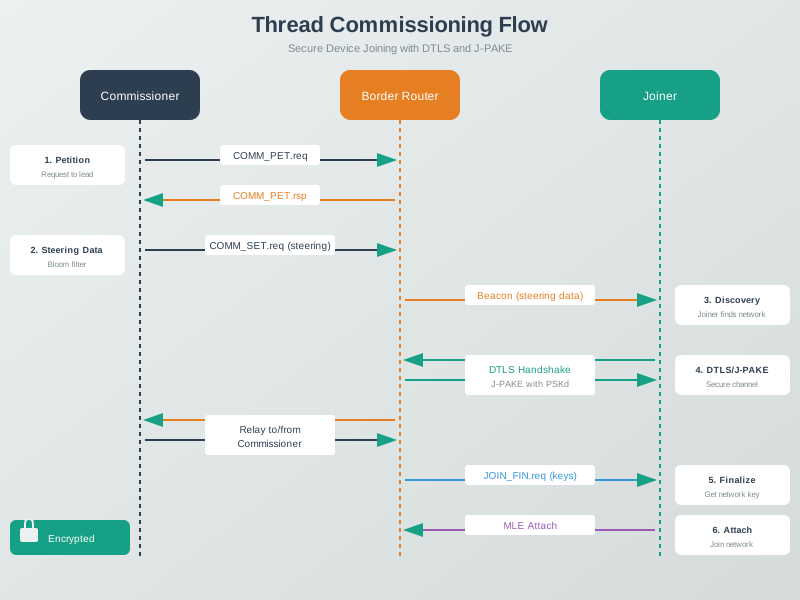
Credential storage and revocation need the same separation. Phones, hubs, gateways, devices, and cloud services may each hold pairing tokens, Wi-Fi credentials, network keys, certificates, refresh tokens, or role grants. A clean unpairing flow must know which stores to delete or rotate, which audit records to preserve, and which old owner, installer, tenant, or support credential should stop working. A partial failure should not leave a device locally joined but invisible to the account, or visible in the cloud but still controlled by an old hub.
- Setup state: store enough progress state to roll back partial local joins, cloud records, hub memberships, and role assignments.
- Secret storage: protect Wi-Fi passwords, network keys, device certificates, pairing tokens, and account refresh tokens on the phone, hub, device, and cloud.
- Support diagnosis: log candidate id, setup code type, commissioning window state, join result, account role, firmware version, gateway id, correlation id, and revocation result.
- Change control: repeat the review when setup payloads, labels, firmware, account policy, gateway model, cloud registry fields, transfer rules, or support logging changes.
23.8 Discovery And Pairing Review Path
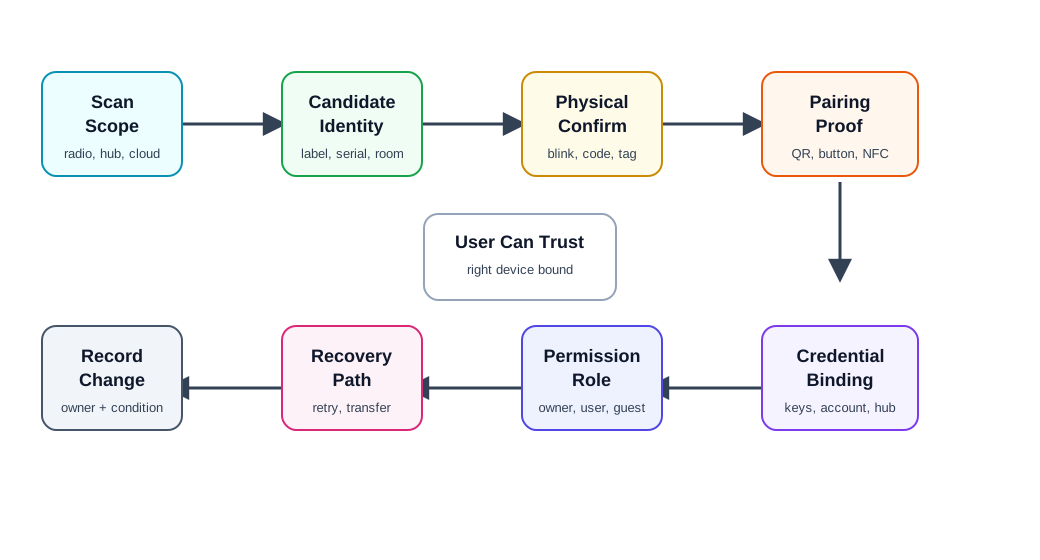
Use Figure 23.5 to keep the review concrete:
- Scan scope: local radio, local network, hub inventory, cloud account, fleet registry, manual code, or installer list.
- Candidate identity: product type, serial, room, label, signal clue, indicator, ownership state, and last-seen evidence.
- Physical confirmation: blink, sound, button press, code, QR label, NFC tap, installer tag, or service record.
- Proof of possession: evidence that the person pairing has physical or administrative control.
- Credential binding: keys, tokens, certificates, hub membership, account link, role, and revocation path.
- Permission assignment: owner, installer, resident, operator, guest, maintenance, or viewer.
- Recovery: retry, reset, transfer, replace, support escalation, and stale state cleanup.
- Change condition: firmware, app, hub, identity label, account policy, installation context, or support evidence changes.
23.9 Discovery Scope
Start by naming where discovery is allowed to look.
Review:
- whether discovery searches nearby radios, the local IP network, a hub, the cloud account, a fleet registry, or a typed code
- whether the user expects the device to be nearby, already powered, in pairing mode, assigned to an account, or installed by someone else
- whether the scan exposes device names, locations, addresses, serials, or ownership state to people who should not see them
- whether discovery times out in a way the user can understand
- whether the system distinguishes “not found” from “found but not allowed,” “already owned,” “asleep,” “out of range,” and “unsupported”
- whether support can see the scan path used and the reason discovery failed
Discovery should narrow the user’s choices. If it only returns a long list of similar names, the design has moved the hard work from the system to the user.
23.10 Candidate Identity
A candidate device must be identifiable enough for a user or installer to select the correct physical object.
Review:
- visible label, serial, QR code, short code, device name, model, room, or asset tag
- local physical signal such as blink, sound, vibration, display code, relay click, or temporary indicator
- whether the same device can appear twice through different discovery paths
- whether stale records are hidden, labeled, or removed
- whether signal strength or proximity clues are used only as hints, not proof
- whether the app avoids exposing sensitive location or ownership details before authorization
Identity evidence should match the deployment. A consumer setup flow may rely on a QR label and blinking LED. An industrial setup may require asset tag, work order, cabinet location, installer role, and commissioning log.
23.11 Pairing Proof
Pairing proof shows that the person pairing the device is allowed to do so.
Common proof patterns:
- QR or short code: the user scans or enters a code printed on the device, packaging, service label, or installation sheet.
- Button press: physical access is proved by pressing a device button during a short pairing window.
- Display confirmation: the same code appears in the app and on the device display.
- NFC tap: close physical proximity exchanges setup information.
- Installer authorization: a signed work order, fleet token, or admin role authorizes pairing for a site.
- Account transfer: previous ownership is released, delegated, or revoked before a new owner can bind the device.
Review whether the proof fits the risk. A temporary button press may be enough for a low-risk sensor in a private room. A lock, payment device, medical accessory, shared building device, or industrial controller needs stronger evidence, clearer ownership, and a supportable revocation path.
23.12 Credential And Permission Boundary
Pairing usually creates more than a connection. It may create keys, cloud links, hub membership, room assignment, notification permissions, data-sharing permissions, and user roles.
Review:
- what credential is stored on the device, app, hub, gateway, cloud service, and account
- whether credentials can be rotated, revoked, transferred, or recovered
- whether the device remembers the relationship after power loss, battery replacement, factory reset, app reinstall, or hub replacement
- whether setup grants the minimum role needed for the user
- whether users can share access without sharing the owner credential
- whether logs distinguish pairing, unpairing, transfer, reset, and failed authorization
The strongest pairing design makes the relationship inspectable. A user or support agent should be able to answer who owns the device, who can use it, what hub or account it belongs to, and how that relationship can be changed.
23.13 Setup Flow And Recovery
Pairing failures are normal. The quality bar is whether the user can recover without guessing.
Review:
- what progress states are visible: scanning, found, verifying, joining, binding, updating, assigned, complete, failed, or rolled back
- whether retries preserve useful work without duplicating devices
- whether setup can resume after app close, low battery, network loss, hub reboot, or permission denial
- whether failure messages name an actionable cause when one is known
- whether factory reset is treated as a last resort rather than the default recovery step
- whether support can correlate app events, device logs, hub logs, and cloud records
A useful setup flow should not strand users between worlds: device paired locally but missing from the account, account linked but local join failed, cloud record created but physical device unbound, or old owner still attached.
23.15 Discovery And Pairing Record
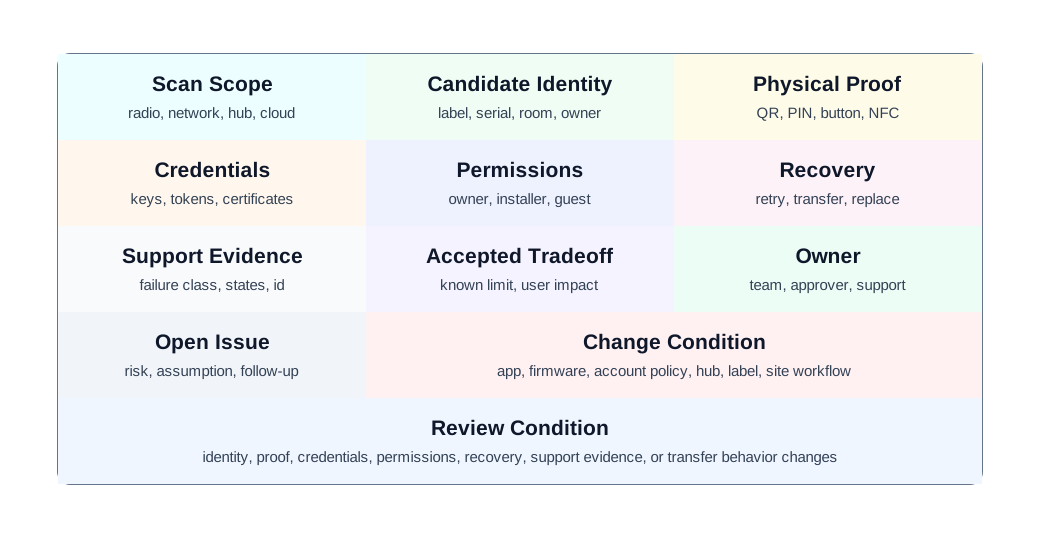
Figure 23.6 shows the fields to preserve:
- Scan scope: local radio, local network, hub, cloud account, fleet registry, manual code, or installer list.
- Candidate identity: label, serial, indicator, room, asset tag, ownership state, duplicate handling, and last-seen evidence.
- Physical proof: QR, PIN, button, display, NFC, admin approval, installer token, or ownership release.
- Credential binding: key, token, certificate, hub membership, account link, role, rotation, and revocation.
- Permissions: owner, installer, resident, operator, guest, maintenance, viewer, and expiration.
- Recovery: retry, resume, reset, transfer, replace, support escalation, and stale record cleanup.
- Support evidence: event log, failure class, device state, hub state, cloud state, account state, and correlation id.
- Decision and change condition: accepted tradeoff, owner, known limit, open issue, and change condition.
The record should remain short enough to update whenever the setup flow, account policy, firmware, hub behavior, label, installation workflow, or support tooling changes.
23.16 Worked Review: Shared Door Lock Setup
A shared building uses connected locks for residents, guests, maintenance, and property managers.
Discovery and pairing evidence to request
- how the installer identifies the correct physical lock during commissioning
- proof that the installer has authority for the unit and building
- how owner, resident, guest, and maintenance roles are created and revoked
- what happens when a lock is already paired to a previous owner or old hub
- how pairing failure avoids leaving the lock in an unsafe or unusable state
- how support distinguishes device power, local link, account permission, and cloud state problems
- how access logs preserve accountability without exposing unnecessary resident data
Likely review action
Hold the decision if the flow creates one shared credential for all users or requires factory reset to change residents. Shared locks need individual credentials, role boundaries, revocation, transfer, and support evidence.
Change condition
Repeat the review when the account model, resident workflow, lock firmware, installer app, hub model, credential policy, access-log retention, or transfer process changes.
Uma’s Worst-Moment Test
- Moment: a lock is already paired to a previous owner or old hub, and residents, guests, maintenance, and property managers all need their own access.
- Fails when: the flow creates one shared credential for all users or requires factory reset just to change residents.
- Fix: individual credentials, role boundaries, revocation, transfer, and support evidence — shared locks hold the decision until all five exist.
23.17 Field Gateway Commissioning
A technician commissions a gateway and several sensors at a remote utility site.
Discovery and pairing evidence to request
- work order, site id, asset tags, and physical labels used to identify the correct devices
- whether commissioning works when internet access is intermittent
- how sensor identities are bound to the gateway and later synchronized to the fleet record
- whether retries create duplicate sensors in the cloud or hub inventory
- how the app reports “found but not authorized,” “already assigned,” “out of range,” and “awaiting sync”
- how a replacement gateway imports or rebuilds device relationships
- what support evidence is available after the technician leaves the site
Likely review action
Approve only if the flow has an offline-tolerant record, duplicate prevention, clear site identity, and a supportable recovery path after partial setup.
Change condition
Repeat the review when offline support, gateway firmware, fleet registry fields, installer roles, asset labels, sensor replacement, or sync behavior changes.
23.18 Common Findings
- Discovery returns many similar devices without a physical confirmation step.
- The app says “device not found” when the real issue is permission, ownership, sleep state, or unsupported firmware.
- Pairing creates a cloud record before local binding succeeds, leaving stale duplicates.
- Factory reset is the first recovery step instead of a last resort.
- A device can be paired by someone nearby without enough ownership proof.
- Setup grants owner permission when installer or guest permission would be enough.
- QR codes, labels, or buttons are unreachable after installation.
- Transfer between owners preserves old access or destroys needed service history.
- Support cannot correlate app setup errors with device, hub, account, and cloud logs.
- The record lacks an owner, known limit, open issue, or change condition.
Uma’s Worst-Moment Test
- Moment: the app says “device not found” when the real issue is permission, ownership, sleep state, or unsupported firmware.
- Fails when: pairing creates a cloud record before local binding succeeds, leaving stale duplicates, or factory reset becomes the first recovery step instead of the last resort.
- Fix: support that correlates app setup errors with device, hub, account, and cloud logs, tied to an owner, known limit, and change condition.
23.19 Review Checklist
Before accepting a discovery-and-pairing design, confirm that the record includes:
- discovery scope and the scan paths used
- candidate identity evidence and duplicate/stale handling
- physical confirmation and proof-of-possession method
- credential binding, rotation, revocation, and storage locations
- permissions, role boundaries, sharing, expiration, and transfer behavior
- progress states, failure classes, retry behavior, and setup resume path
- accessibility alternatives for camera, NFC, display, sound, color, reach, and labels
- support evidence across app, device, hub, gateway, cloud, and account records
- accepted tradeoff, owner, known limit, open issue, and change condition
23.20 Knowledge Check
23.21 Matching Quiz
23.22 Ordering Quiz
23.23 Summary
Device discovery and pairing are trust-building workflows. They help a user find the right physical device, prove authority, create credentials, assign permissions, and recover when setup fails or ownership changes.
The strongest reviews avoid protocol-only claims. They show scan scope, identity evidence, physical proof, credential binding, role boundaries, accessibility alternatives, recovery paths, support evidence, and change conditions.
23.24 Key Takeaway
Pairing should be clear, recoverable, secure, and observable so users know which device joined which account or ecosystem.
23.25 Concept Relationships
- Device Communication Patterns explains the paths devices use after discovery and pairing.
- Ecosystem Integration reviews multi-vendor behavior after devices are bound into accounts and ecosystems.
- Device Lifecycle Management connects pairing to provisioning, maintenance, ownership transfer, and retirement.
- Privacy and User Consent reviews permission, notice, data sharing, and user control created during setup.
- Security and Privacy Overview expands identity, authentication, authorization, and key-management concerns.
23.26 What’s Next
Continue to Ecosystem Integration to review how paired devices work across hubs, accounts, platforms, and vendor ecosystems without hiding ownership or support boundaries.