15 Principles of IoT Interaction Design
Interactive Design Principles, IoT interaction design, user control, IoT feedback loops, error recovery, usability evidence
15.1 Start Simple
Interaction design starts when a person tries to make the connected system do something and waits for proof. The useful principles are the ones that keep context, state, feedback, control, recovery, accessibility, and trust visible while devices, apps, networks, and services coordinate behind the scenes.
15.2 In 60 Seconds
Interactive design principles help a team decide whether an IoT product is understandable, controllable, recoverable, and trustworthy in the context where people actually use it. The principles are not decoration rules. They are review criteria for physical controls, mobile screens, notifications, setup flows, automation behavior, and support evidence.
For connected products, interaction quality depends on more than a screen:
- Context evidence shows who uses the system, where it is used, what else competes for attention, and what can fail.
- Visible state shows current, pending, stale, offline, uncertain, and rejected states without pretending the system knows more than it does.
- Useful feedback confirms actions at the right time, in the right channel, with language the user can act on.
- User control keeps important physical actions, permissions, notifications, and overrides understandable.
- Error recovery helps people detect, undo, retry, escalate, or safely ignore problems.
- Accessibility and trust make the interaction usable across abilities, shared spaces, privacy boundaries, and maintenance roles.
The design is ready only when the team can show evidence, not just preference.
15.3 Learning Objectives
By the end of this chapter, you will be able to:
- explain core interactive design principles for IoT products
- connect each principle to reviewable evidence from users, context, prototypes, logs, and support scenarios
- identify weak interactions where state, feedback, control, recovery, or trust is hidden
- review IoT setup, notification, and device-control interactions without relying on unsupported claims
- write a short interaction review record with owner, open issue, and change condition
- choose when to iterate at the same fidelity before increasing prototype detail
15.4 Prerequisites
This chapter builds on:
- User Experience Design, which introduces user-centered design goals.
- UX Design Fundamentals, which explains usability, usefulness, and experience quality.
- Design Prototyping and Learning, which places prototyping and learning inside the design process.
- Design Facets and Calm Technology, which reviews attention, feedback, and cross-device experience.
15.5 Principles Protect Interaction
IoT interaction principles matter because the user experience is split across physical device behavior, mobile or web screens, cloud services, automation rules, notifications, and support handoffs. A clear screen can still be a poor interaction if it hides stale sensor data, delays a command without feedback, or gives a user no local recovery path when the internet connection is down.
Start each review by naming the user goal and the system state that could change the meaning of the action. A door unlock request, irrigation override, pump alarm, wearable consent prompt, or room-occupancy dashboard all need different visibility, control, recovery, and privacy choices. The principle is useful only when it changes what the team designs or tests.
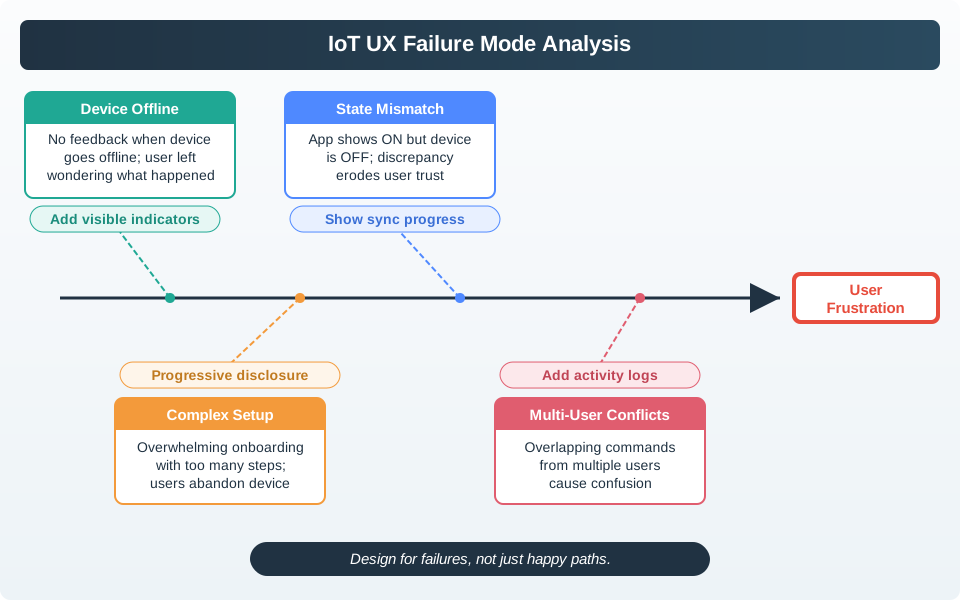
A smart-building dashboard makes this concrete. If a room card shows “occupied” while the gateway is offline, the design problem is not only the label. The interaction must say whether the value is fresh, inferred, stale, unavailable, or locally cached; who needs the information; what action is still safe; and where the user can recover. An office worker reserving a room, a facilities operator checking a gateway, and a support agent handling a ticket may need different views of the same underlying state.
For that reason, interaction principles should be reviewed as a chain from evidence to behavior. Context evidence tells the team which role, place, device condition, and privacy boundary matters. Visible state prevents the product from overstating certainty. Feedback closes the loop after the user acts. Control and recovery keep the person from being trapped by cloud, account, permission, or sensor failure. Accessibility and trust checks keep the result usable in the physical setting, not only in a design review meeting.
- State: show fresh, pending, stale, offline, uncertain, rejected, and fallback states where they affect user action.
- Feedback: confirm acceptance, progress, completion, delay, rejection, and safe fallback in the channel the user can notice.
- Control: keep important permissions, overrides, notification levels, and local physical actions understandable.
15.6 Tie Principles to Mechanisms
Make the interaction review concrete enough that a designer, firmware engineer, cloud engineer, and support lead can test the same behavior. For setup flows, that may include BLE advertising state, QR-code setup payloads, Matter commissioning windows, Wi-Fi provisioning, OAuth consent, and account role assignment. For live operation, it may include MQTT retained messages, device-shadow desired and reported state, command acknowledgements, event timestamps, Web Push, Firebase Cloud Messaging, Apple Push Notification service, SMS fallback, or local LED/haptic feedback.
- Visible state: define freshness thresholds, last-seen timestamps, confidence labels, offline rules, and whether inferred state may trigger an automation.
- Feedback and control: define command acceptance, queueing, cancellation, retry, undo, override, escalation, and notification quiet hours.
- Accessibility and trust: check WCAG contrast and focus order, screen-reader names, non-color cues, touch target size, physical reach, consent copy, retention language, and role boundaries.
The output should be visible in the prototype and in implementation artifacts. A Figma flow, ESP32 bench rig, Home Assistant automation, Node-RED dashboard, support console, OpenAPI endpoint, or firmware log can each carry part of the interaction contract if the owner and state rule are explicit.
A practical review table usually has one row per critical state transition. For a room occupancy card, rows might cover fresh sensor event, stale last-known event, gateway offline, conflicting sensors, manual override, privacy-restricted room, and support escalation. Each row should name the user-facing copy, icon or physical cue, data source, freshness limit, retry or override rule, accessibility constraint, telemetry event, and owner. That table keeps the design from drifting when the same state appears in a dashboard, mobile notification, device LED, and support console.
Use prototypes to prove the row, not just the screen. A low-fidelity flow can test wording and task sequence. A bench rig or simulator can test timing, command acknowledgement, duplicate tap handling, and offline recovery. A seeded support-console record can test whether support sees the same stale/offline evidence the user saw. If the review cannot point to the artifact that proves a principle, the principle is still only an intention. ## Interaction Quality Needs State {.depth-l2}
Many IoT UX defects come from a mismatch between interface language and system truth. The app says a lock is open because a command was sent, while the device only reported that the command was queued. A dashboard says a room is clear because an occupancy model inferred it, while the gateway is offline. A notification says a pump fault is urgent, while the sensor confidence is low and the maintenance role is off shift.
Designers need enough implementation detail to avoid these mismatches. Command ids, idempotency keys, sequence numbers, acknowledgements, retained MQTT state, device-shadow version numbers, clock skew, battery thresholds, retry budgets, firmware rollback state, and support correlation ids all affect what the user should see. Under-the-hood review does not turn designers into backend owners; it gives the interaction a truthful vocabulary.
The vocabulary starts with a state hierarchy. A measured value comes from a sensor or actuator report. An inferred value comes from a model, rule, or aggregation. A desired value is what the user or automation asked for. A commanded value is what the cloud or gateway sent. An applied value is what the device confirmed. A displayed value is what the interface currently shows. Interaction defects appear when these are collapsed into one word such as “on,” “available,” or “safe” without showing authority, age, confidence, and recovery.
Implementation choices decide whether the interface can tell that truth. MQTT quality of service and retained messages affect what a reconnecting client may believe. Device-shadow versions and ETags help reject stale updates. Monotonic sequence numbers, server timestamps, and clock-skew handling help separate old events from new events. Idempotency keys stop duplicate taps from becoming duplicate physical actions. OpenTelemetry traces, support correlation ids, and structured event logs let the team reconstruct what the user saw when a failure report arrives.
- Authority: state which source owns measured, inferred, desired, overridden, and expired state.
- Timing: state when feedback is immediate, delayed, batched, retrying, expired, or no longer trustworthy.
- Recovery: test simulator, bench device, hardware-in-loop, field log, and support-console paths for offline, duplicate, rejected, and permission-denied cases.
15.7 How It Works: Review an IoT Interaction
Start with a concrete interaction, not a principle label. A useful review asks:
- What user goal is being served?
- What physical, social, environmental, and device context changes the interaction?
- What must the user know before acting?
- What does the system know, and what does it only infer?
- What feedback confirms that the request was accepted, rejected, pending, complete, stale, or unsafe?
- What can the user undo, retry, override, postpone, or escalate?
- What happens when the network, cloud service, sensor, actuator, battery, display, app, or account flow fails?
- What privacy, consent, accessibility, and shared-use boundary is involved?
- What evidence would make the team change the design?
The same principle may be expressed through a physical button, a mobile screen, an LED pattern, a spoken prompt, a haptic cue, a notification, a support record, or a device-local fallback. Review the complete interaction path.
15.8 Interaction Principle Map
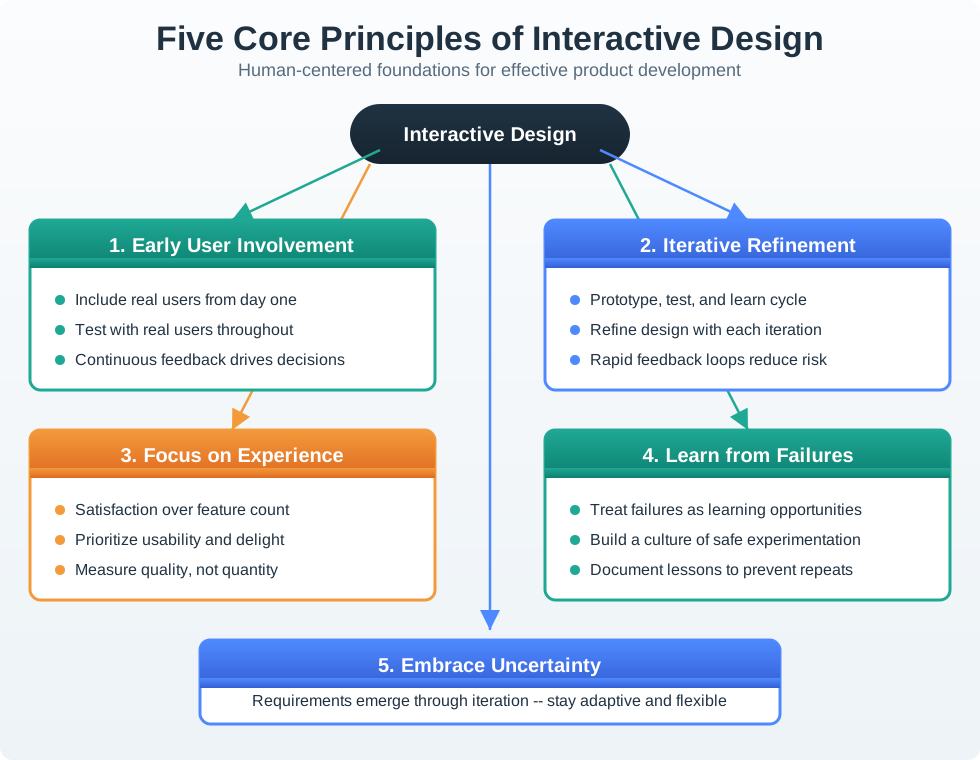
The estate figure in Figure 15.2 shows why the principles must be reviewed together. Early user involvement and iterative refinement keep the design grounded, while failure learning and uncertainty checks prevent a polished interface from hiding weak system behavior.
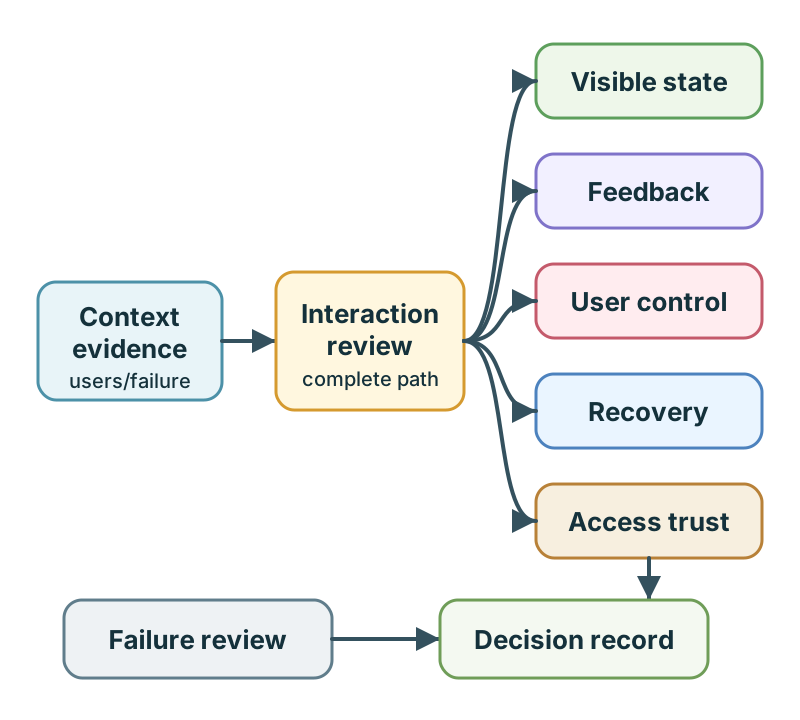
Use Figure 15.3 as a review sequence:
- collect context evidence before choosing interface details
- make system state visible without overstating certainty
- close the feedback loop for every meaningful action
- preserve user control for important physical and privacy decisions
- design error recovery before the product leaves the prototype stage
- check accessibility, shared use, and trust boundaries
- record the owner, open issue, and change condition
15.9 Context Evidence Before Interface Choice
IoT interactions happen in rooms, vehicles, factories, hospitals, farms, buildings, and outdoor sites. A screen that works at a desk may fail when the user has wet hands, gloves, bright sunlight, poor connectivity, noise, fatigue, or a shared device.
Strong context evidence includes:
- representative users and support roles
- physical location, lighting, noise, reach, mounting, and movement constraints
- connectivity, power, battery, sensor, and actuator failure modes
- shared use, guest use, maintenance access, and handoff scenarios
- privacy and consent boundaries
- accessibility needs that affect vision, hearing, cognition, language, and motor control
- evidence from prototype sessions, field observation, support tickets, or deployment reviews
Weak context evidence sounds like “users will understand it” or “the app can explain it later.” A review should ask what was observed, what was tested, and what uncertainty remains.
15.10 Visible System State
Connected systems often hide uncertainty. A dashboard may show a room as occupied even when the last sensor reading is old. A lock screen may show “locked” even when the command is still queued. A thermostat may show a target temperature without explaining that the device is offline.
Good interaction design shows state with enough precision for the decision being made:
- current when the state is fresh and confirmed
- pending when a request has been accepted but not completed
- stale when the last known value is too old for confident action
- uncertain when evidence conflicts or confidence is low
- offline when the device or service cannot be reached
- rejected when a command cannot be accepted
- safe fallback when local behavior continues with limits
Do not make stale or inferred state look like confirmed state. If the system is uncertain, the interaction should say so in plain language and provide the next useful action.
15.11 Useful Feedback
Feedback answers the user’s immediate question: “Did the system notice what I did, and what happens next?”
Feedback should be:
- close enough in time to the action that the user can connect cause and effect
- specific about acceptance, progress, completion, rejection, or delay
- available in the channel that fits the context, such as physical indicator, app message, sound, haptic cue, or support record
- understandable to the person who must act, not only to engineers
- consistent across device, app, cloud, automation, and support surfaces
- calm enough not to create unnecessary attention load
For example, a gateway reset control should not only blink an LED. It should show whether the reset was requested, whether it is running, whether local rules remain active, and when remote service reconnects. The support view should show the same sequence without forcing the user to retell it.
15.12 User Control and Consent
IoT products affect physical spaces and personal routines. User control is therefore a product requirement, not a preference.
Review user control by asking:
- Can the user perform the core physical task if the app, account, or cloud path is unavailable?
- Are important actions confirmable before they affect people, property, privacy, or safety?
- Can users undo, cancel, retry, silence, postpone, or escalate appropriate actions?
- Are notification levels, automation rules, data sharing, and access permissions visible and changeable?
- Are shared-space roles clear, such as owner, occupant, guest, maintainer, caregiver, installer, or support agent?
- Does the system explain why it asks for a permission or credential at the moment it is needed?
Avoid workflows where setup, account creation, firmware updates, or remote permissions block basic local value unless the product’s risk model truly requires it. If a restriction is required, the design should explain the reason and provide a recovery path.
15.13 Error Prevention and Recovery
Error prevention means designing the interaction so common mistakes are less likely. Error recovery means helping people recover when mistakes or failures still happen.
Strong IoT recovery design covers:
- invalid setup choices, wrong device selection, and duplicate pairing attempts
- weak signal, low battery, missing permissions, and expired credentials
- actuator commands that are unsafe, rejected, late, duplicated, or conflicting
- notification overload, muted alerts, and missed alerts
- handoff between user, installer, maintainer, and support staff
- local fallback when remote services are unavailable
- logs or event records that explain what happened without exposing unnecessary private data
Do not treat the happy path as the whole interaction. A user usually judges the system when something goes wrong.
15.14 Accessibility, Shared Use, and Trust
Accessibility is not a late polish task. It changes the interaction architecture.
Review the design for:
- readable text, sufficient contrast, clear focus order, and screen reader labels
- alternatives to sound-only, color-only, gesture-only, and app-only feedback
- physical reach, tactile affordance, force, grip, glove, wet-hand, and mobility constraints
- voice, haptic, visual, and physical-control fit for the use context
- language, literacy, cognitive load, and memory demands
- household, workplace, public-space, and maintenance role boundaries
- data visibility, consent, retention, and explanation for sensitive behavior
Trust improves when the product shows what it knows, what it does not know, what it is doing, who can control it, and how the user can recover.
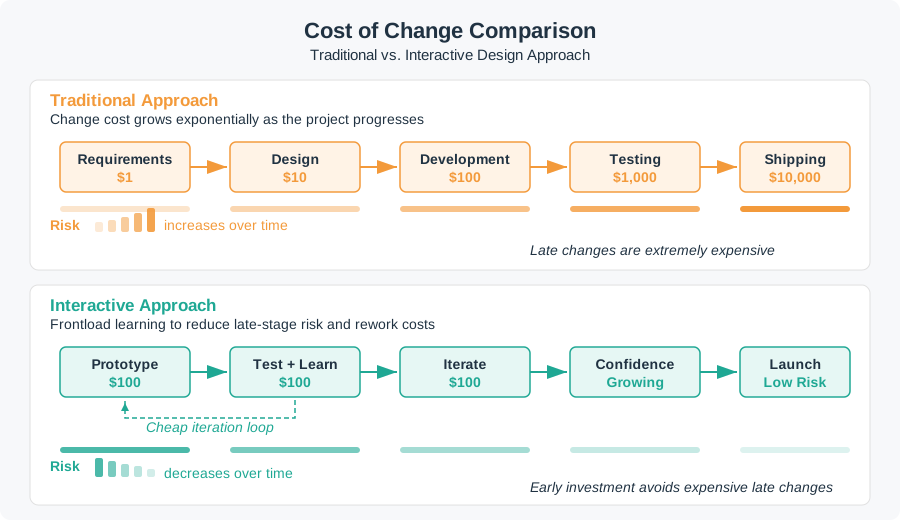
Figure 15.4 is the practical reason to review these principles early. The cheapest point to discover a hidden state, consent, recovery, or accessibility problem is while the team is still using low-cost prototypes and short learning loops.
15.15 Iteration Discipline
Iteration is not random redesign. Each iteration should answer a specific question.
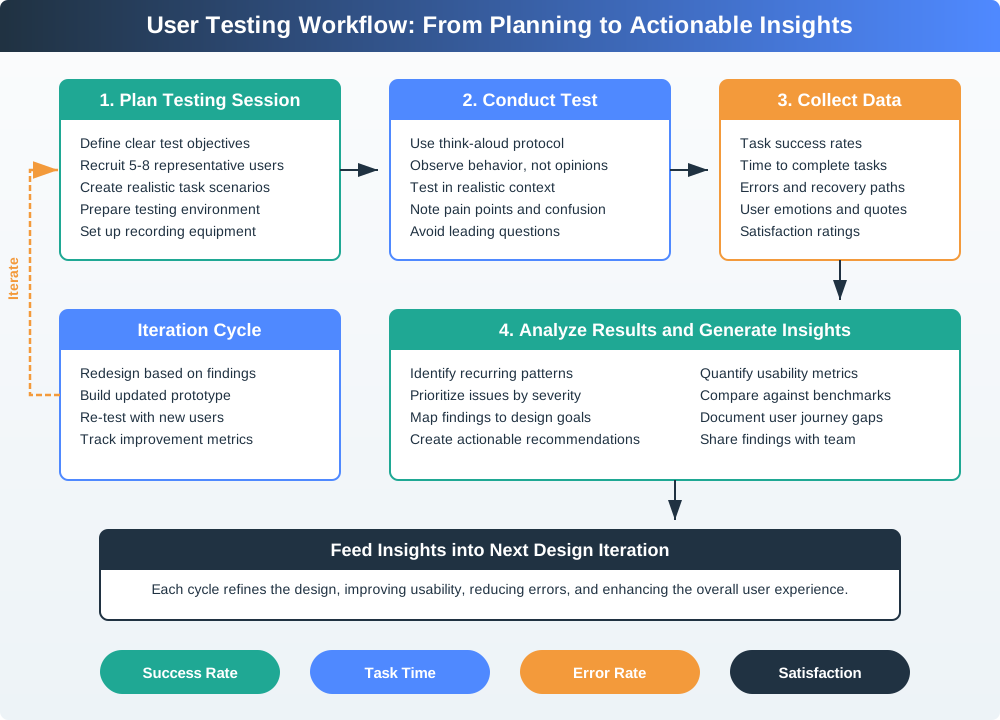
Use low-fidelity prototypes when the question is about concept, sequence, wording, role, or layout. Use functional prototypes when the question depends on timing, physical feel, device feedback, sensor behavior, connectivity, or recovery. Increase fidelity only after the current level has answered its question.
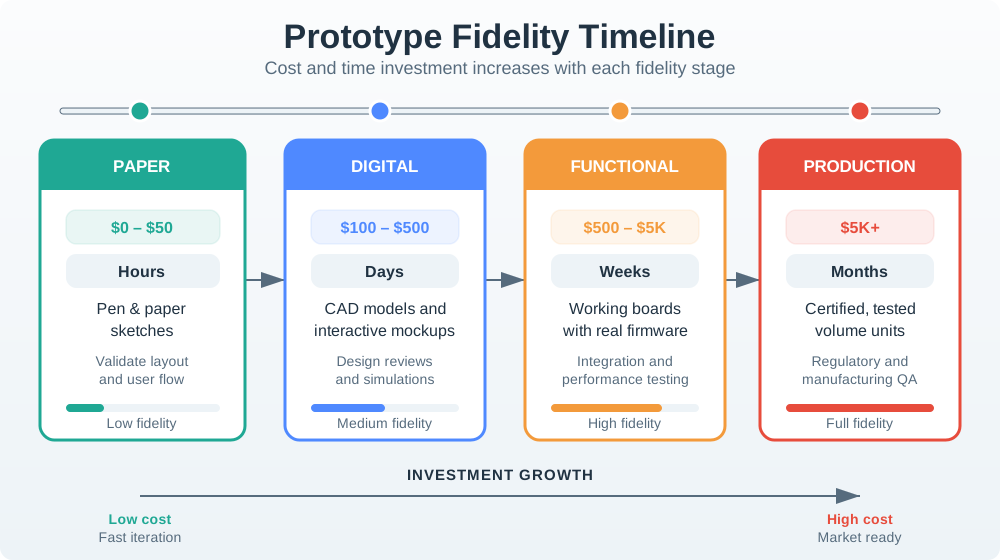
Use Figure 15.6 to choose the cheapest prototype that can answer the current interaction question. Do not build a functional prototype merely to test wording, and do not rely on a paper sketch when the question depends on latency, physical feedback, or offline recovery.
An iteration record should capture:
- design question
- prototype fidelity
- user or context evidence
- observed behavior
- decision made
- remaining risk
- owner
- change condition
If the team only asks whether people like a mockup, it has not tested the interaction. Ask people to complete a task, observe what they do, and revise the design around the behavior that matters.
15.16 Incremental Examples
15.16.1 Honest Sensor Readings
A beginner interaction review can start with a desk prototype for a soil-moisture sensor. The mobile card should distinguish “moisture 28% measured 2 minutes ago,” “last reading 4 hours old,” “sensor offline,” and “irrigation command pending.” The physical node can use a status LED, but the app must not rely on color alone. A useful first test is to ask a learner which action is safe when the device is online, stale, or offline.
15.16.2 Recover from Setup Failure
A shared smart-lock product needs a setup flow that spans the wall reader, mobile credential, installer app, and cloud policy service. The interaction should show whether BLE discovery found the correct reader, whether the QR setup payload or NFC tag matched the expected unit, whether Wi-Fi or Ethernet provisioning succeeded, whether the account role was approved, and whether the credential is active. Recovery paths should cover duplicate credentials, expired invites, lost phones, low reader battery, and support handoff without exposing private access history to the wrong role.
15.16.3 Coordinate Alert Ownership
An industrial pump monitor needs interaction rules across the device indicator, operator dashboard, maintenance app, MQTT broker, notification service, and support console. The design should name who owns acknowledged, assigned, snoozed, escalated, cleared, recurring, stale, and offline alert states. Evidence can come from sensor confidence, last-seen timestamps, vibration and temperature trends, gateway health, MQTT session logs, OpenTelemetry traces, maintenance work orders, and role-based notification policy. The interface is ready only when the operator and maintenance lead can explain the same state from their own surface.
15.17 Worked Review: Door Access Setup
Scenario: a shared building door access product has a wall reader, mobile credential, cloud policy service, and installer app. New occupants must gain access quickly, but facility staff need a secure setup and support trail.
A strong interaction review would accept:
- local entry behavior that is understandable when the phone, network, or cloud service is unavailable
- setup feedback that distinguishes scanning, credential exchange, policy approval, activation, and failure
- a clear recovery path for wrong unit, expired invite, duplicate credential, lost phone, and low reader battery
- visible role boundaries for occupant, guest, installer, facility manager, and support agent
- notification language that explains what happened without exposing unnecessary private data
- support evidence that shows accepted, rejected, pending, and completed setup events
- a change condition when credential flow, device firmware, access policy, or shared-space role changes
The review should reject a design that says “the app handles setup” but does not show device feedback, offline behavior, role boundaries, error recovery, or support evidence.
15.18 Maintenance Alert Review
Scenario: a connected pump monitor sends alerts to operators and maintenance staff. The product team wants to avoid alert fatigue while still making actionable failures visible.
A strong interaction review would accept:
- alert levels tied to user action, not only sensor severity
- visible confidence and freshness for the reading that triggered the alert
- distinct feedback for acknowledged, assigned, snoozed, escalated, cleared, and recurring alerts
- a local device indicator for field staff who are near the equipment
- a support record that links the alert to device state, recent maintenance, and communication health
- an escalation rule for repeated alerts, missing acknowledgements, and device offline state
- a review point for privacy, safety, and operational language before deployment
The review should reject a design where every threshold crossing becomes the same urgent notification or where users can only silence alerts without recording why.
15.19 Interaction Review Record
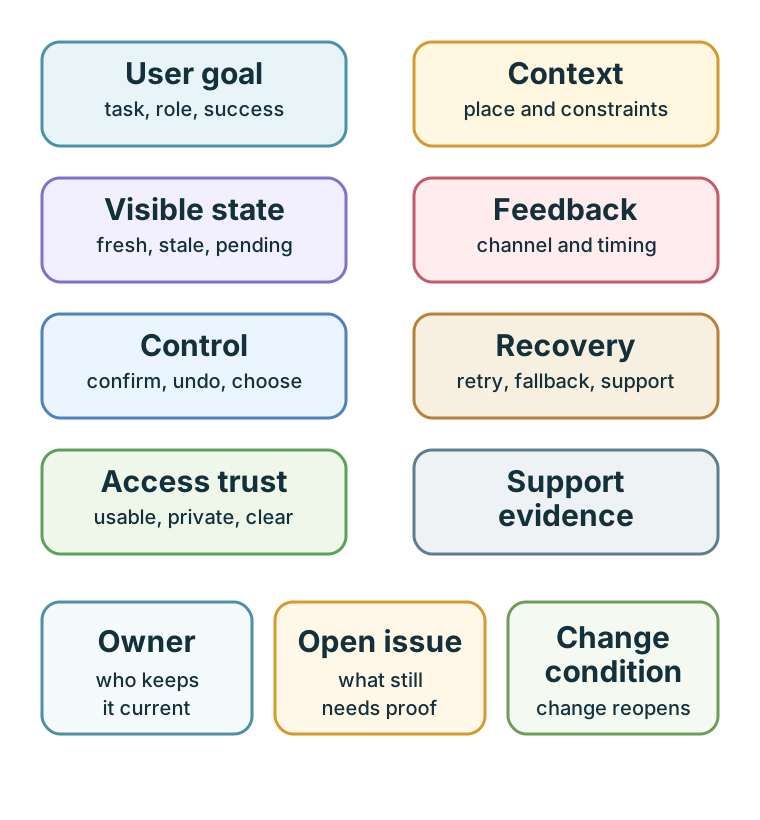
Use Figure 15.7 to make review outcomes short and durable. A good record includes:
- user goal
- context evidence
- visible state rule
- feedback channel and timing
- control or consent decision
- recovery path
- accessibility and trust check
- owner
- open issue
- change condition
The record should be small enough to maintain and specific enough to revisit when conditions change.
15.20 Common Design Defects
Watch for these defects during review:
- hiding stale, pending, rejected, or uncertain state behind a simple success message
- making cloud or app access mandatory for a core local action without a clear risk reason
- using sound, color, gesture, or touchscreen input as the only control path in difficult contexts
- asking users whether they like a mockup instead of observing task behavior
- adding notification settings without explaining alert meaning, ownership, and escalation
- treating accessibility, privacy, consent, and shared roles as later documentation tasks
- allowing support staff to see less interaction evidence than the user saw
- increasing prototype fidelity before the design question has been answered
- recording a design decision without owner, open issue, or change condition
15.21 Review Checklist
Before accepting an IoT interaction design, check:
- Is the user goal and context evidence explicit?
- Does the design show current, pending, stale, offline, uncertain, rejected, and fallback states where relevant?
- Does every important action receive useful feedback in the right channel?
- Can users control, confirm, undo, cancel, retry, silence, postpone, or escalate appropriate actions?
- Is there a recovery path for device, network, cloud, account, sensor, actuator, battery, and permission failures?
- Are accessibility needs addressed in the interaction architecture?
- Are shared-space roles, consent, privacy, and trust boundaries visible?
- Does support evidence match what users experienced?
- Does the prototype fidelity match the design question?
- Is there an owner, open issue, accepted tradeoff, and change condition?
15.22 Try It Now
Choose one IoT interaction and write a one-row review:
| Field | Your answer |
|---|---|
| User task | What the person is trying to do, not the feature name. |
| System state | Current, pending, stale, uncertain, rejected, offline, or fallback state that changes the task. |
| Feedback channel | Device indicator, app message, haptic cue, sound, notification, dashboard, or support surface. |
| Recovery path | Undo, retry, cancel, override, escalate, local fallback, or support handoff. |
| Trust boundary | Permission, consent, privacy, shared role, accessibility, or support visibility issue. |
15.23 Micro-Exercise: State Truth
For each interface phrase, rewrite it so the user can see what the system really knows:
- “Door unlocked” when the command has only been queued.
- “Room available” when the gateway is offline and the last motion event is stale.
- “Pump fault urgent” when sensor confidence is low and no maintenance role is currently assigned.
15.24 Concept Check: Visible State
15.25 Match Principles to Evidence
15.26 Order Interaction Review
15.27 Summary
Interactive design principles help IoT teams make connected products understandable, controllable, recoverable, accessible, and trustworthy. The most important review question is not whether the interface looks polished. It is whether the product shows the right state, provides useful feedback, preserves user control, supports recovery, respects shared context, and records enough evidence to revisit the decision when conditions change.
Strong interaction design is evidence-bound. It connects user goals, physical context, system uncertainty, feedback channels, permission boundaries, support evidence, owners, and change conditions.
15.28 Key Takeaway
Interactive IoT design should make system state, action, feedback, autonomy, and recovery understandable across physical and digital touchpoints.
15.29 See Also
- Design Prototyping and Learning explains why prototypes should answer specific learning questions.
- Interactive Design Process turns these principles into a step-by-step workflow.
- Prototyping Techniques for IoT helps choose the right prototype fidelity for the current design question.
- User Testing and Iteration shows how to observe behavior and revise the design.
- Interface Design Fundamentals connects these principles to screen, control, and feedback patterns.
- Design Facets and Calm Technology reviews attention, trust, and cross-device behavior.
15.30 What’s Next
Continue to Interactive Design Process to apply these principles as a structured workflow for discovery, prototyping, testing, iteration, and release decisions.