7 Personas and Journey Maps for IoT
IoT personas, IoT journey maps, evidence-based personas, IoT service journey, user research synthesis
7.1 Start Simple
A persona or journey map helps only when it stays tied to evidence. Start with a role, a task, a context, and a failure moment, then map how the person crosses devices, apps, alerts, permissions, support, and physical spaces while trying to complete the connected-product job.
7.2 In 60 Seconds
Personas and journey maps are research synthesis tools. They are useful only when they preserve evidence about real people, roles, tasks, constraints, and touchpoints.
A persona should not be a fictional character the team invents to win arguments. It should be a compact record of repeated patterns found across research participants. A journey map should not be a decorative timeline. It should show how a user, device, app, service, environment, and support path interact over time.
For IoT, this matters because the experience includes:
- buying, installation, pairing, setup, and permission
- physical placement, power, connectivity, sensing, and actuation
- daily use across app, device, voice, dashboard, alert, and support channels
- failures such as stale data, offline state, low battery, bad placement, permission denial, and maintenance
- shared ownership, guests, caregivers, technicians, operators, and support agents
- firmware updates, replacement, transfer, removal, and decommissioning
The output should be a persona record and a journey record tied to observed evidence, design implications, acceptance criteria, and update conditions.
7.3 Learning Objectives
By the end of this chapter, you will be able to:
- distinguish evidence-based personas from stereotypes and marketing segments
- identify primary, secondary, affected, and excluded user roles without overfitting the design
- create persona records that capture goals, context, constraints, device relationship, and evidence
- map IoT journeys across physical, digital, service, maintenance, and failure touchpoints
- use journey maps to find design requirements, not just pain-point labels
- avoid common defects such as demographic-only personas, one-person personas, and happy-path journey maps
7.4 Prerequisites
Before reading this chapter, you should be comfortable with:
- User Research Fundamentals, which explains why observed behavior matters.
- Research Methods, which explains how evidence is collected.
- Context-of-Use Analysis, which explains how environment and constraints shape behavior.
- Interface Design Process Checklist, which explains how to turn findings into acceptance records.
7.5 IoT Personas as System Roles
An IoT persona is most useful when it names the role a person plays in a connected system. The same product can involve a buyer, installer, daily user, guest, caregiver, technician, dispatcher, administrator, bystander, and support agent. Those roles see different states, have different rights, and experience different failures.
A journey map should show how those roles meet the product over time: purchase, installation, pairing, permissions, first success, shared use, alert, failure, maintenance, support, transfer, and removal. For IoT, the journey is not complete until it includes device state, cloud state, local fallback, data freshness, ownership, and recovery. 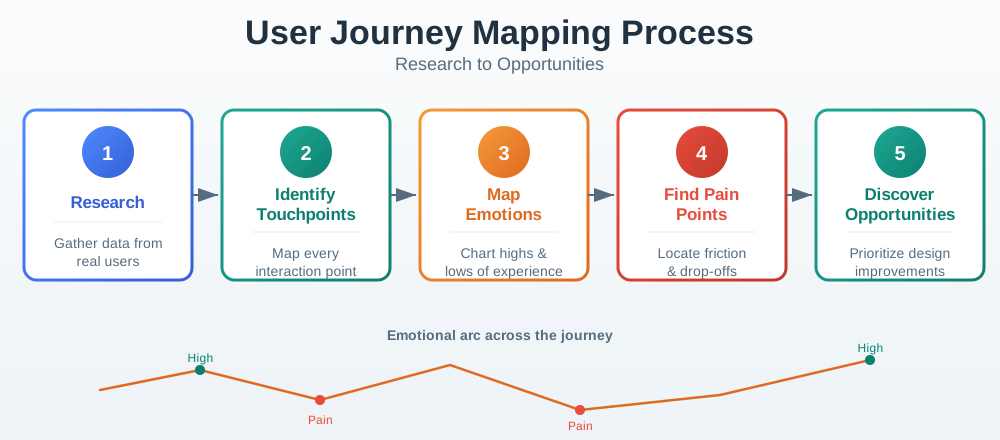
For a smart lock, the persona should separate the household owner from the guest, cleaner, child, landlord, and support agent because each role needs a different level of visibility and control. The owner may need to see invite status, credential validity, reader readiness, offline behavior, and revoke confirmation. The guest may need only arrival instructions, active credential status, local fallback guidance, and a recovery path that does not expose household history.
For a leak sensor, the primary resident, landlord, plumber, and neighbor are not interchangeable. The resident needs clear wet/offline/low-battery state, placement advice, alert acknowledgement, and a way to mute a resolved alarm. The landlord may need maintenance evidence without unnecessary private activity detail. The plumber needs location and access information at the right moment, not account ownership. Those distinctions turn a persona from a story into a design control.
- Role pattern: describe what the person controls, depends on, avoids, maintains, or is affected by.
- Critical moment: map when trust changes, such as first unlock, first offline alert, first low-battery warning, or first support handoff.
- State visibility: show which role sees active, pending, stale, revoked, offline, muted, shared, transferred, or decommissioned state.
7.6 Rights and Recovery Journeys
Start each persona with what the role is allowed to do. A shared-access coordinator may invite a guest, revoke a credential, see activity history, and contact support, but a guest may only see whether their credential is active and how to recover at the door. A caregiver may see acknowledgement status, but not every private activity detail. A technician may need diagnostics without becoming the account owner.
Then map the states that the role must understand. In a smart-lock journey, useful states may include invite_sent, invite_accepted, credential_active, credential_expired, credential_revoked, reader_online, reader_offline, battery_low, local_cache_active, and support_escalated. In a leak-sensor journey, states may include placed, paired, dry, wet, muted, testing, stale, offline, low_battery, and contact_notified.
Write the map as a design artifact, not a workshop poster. For each stage, include the role, evidence source, visible state, hidden system state, expected action, failure branch, owner, and validation method. A row for “guest arrives at locked door” might name credential_active versus credential_revoked, BLE/NFC reader readiness, local cache policy, phone battery risk, door-side fallback copy, support escalation, and the owner for app, firmware, service, and support-script changes.
Use different rows for rights and recovery. Rights rows answer who can invite, revoke, acknowledge, transfer, delete, view history, see location, inspect diagnostics, or contact support. Recovery rows answer what happens when the app is offline, the device is stale, the cloud confirms but the reader does not, a push notification fails, a battery drops below threshold, or a caregiver misses an acknowledgement. The journey is strong only when those rows produce testable requirements.
- List role permissions: account owner, delegated manager, guest, affected bystander, installer, support, and admin should not share one generic view.
- List state transitions: include success, waiting, failure, revocation, maintenance, transfer, and deletion states for each role.
- List recovery paths: define what the user, local device, app, cloud service, and support team can do when the state is wrong or unclear.
7.7 Journey Maps Need State Names
Connect journey stages to implementation handles so the design can survive handoff. Useful handles include OAuth invite token, credential id, Matter lock cluster state, BLE provisioning state, Wi-Fi setup result, MQTT retained state, device-shadow version, APNs or FCM push delivery state, WebSocket dashboard state, firmware version, OTA rollout cohort, battery threshold, offline interval, support ticket id, and account-transfer event.
Do the same for service and maintenance journeys. A persona that “wants reliability” is too vague; a journey stage that names retry budget, stale timestamp, notification quiet hours, acknowledgement timeout, escalation rule, ownership transfer, device reset, data deletion, and support visibility can be implemented and tested.
State names also prevent teams from hiding ambiguity behind cheerful copy. “Guest access failed” may mean the invite token expired, the phone never accepted the credential, the credential is active in the cloud but not cached on the reader, the reader is offline, the battery is too low for the actuator, or the owner revoked access after the guest saved an old instruction. A journey row should expose which state the interface can know, which state support can verify, and which state requires physical inspection.
The implementation record should preserve privacy as well as debugging value. Support staff may need account role, credential id status, last-seen timestamp, firmware version, command result, battery range, and ticket correlation id; they usually do not need raw household activity history or precise location beyond the relevant device. That distinction lets the persona and journey map drive engineering fields, support tooling, retention rules, and access-control checks instead of remaining UX-only documentation.
- Persona boundary: do not use one memorable interview as the whole persona; keep repeated pattern, excluded roles, and update condition visible.
- Journey boundary: avoid stopping at first success; include first failure, first shared use, first maintenance event, and end-of-life removal.
- System boundary: separate app copy, device firmware, cloud service, integration, and support-process responsibilities for each critical moment.
7.8 Personas Are Pattern Records
An evidence-based persona summarizes repeated patterns from research. It should help the team answer design questions such as:
- Who is this design primarily serving?
- What is the user’s goal in the real context?
- What constraints change the task?
- What does the user know, control, trust, or avoid?
- Which device, app, service, and support touchpoints matter?
- What design decision does this persona influence?
- What evidence supports the persona, and when should it be updated?
Weak persona:
- “Maria, 45, busy, not technical.”
Stronger persona record:
- “Shared-home coordinator: manages household access and device settings, wants predictable guest access and clear failure recovery, often acts remotely, shares control with family members, needs low-noise notifications, and depends on visible reader/app state before visitors arrive.”
The stronger version names role, goal, context, device relationship, constraints, and design implications. It can guide design decisions without pretending that every person in the segment is identical.
7.9 Persona Evidence Flow
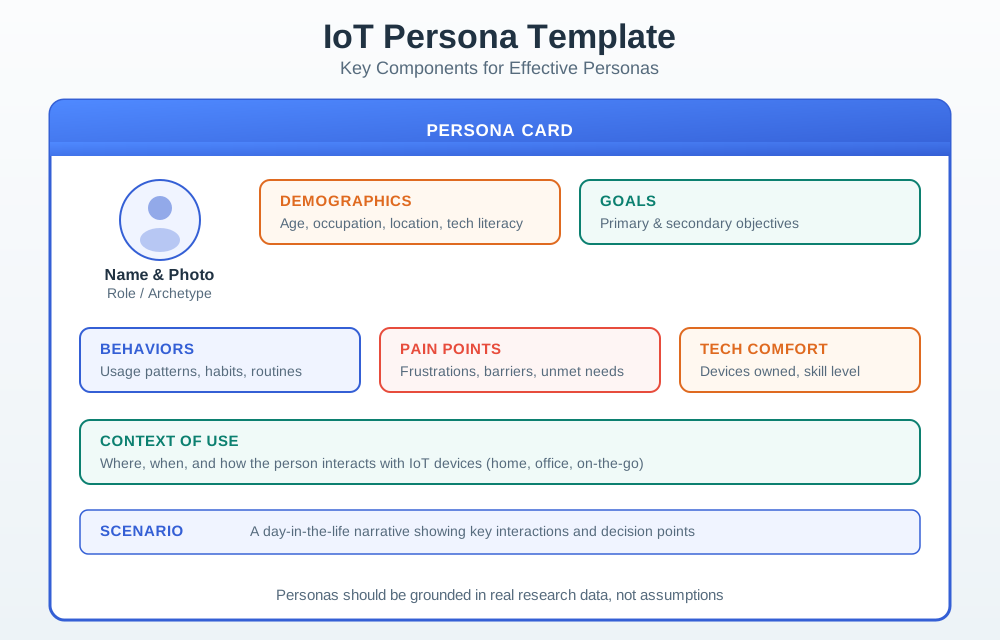
Use Figure 7.1 to keep personas tied to evidence.
7.10 Build Personas From Patterns
A persona should be synthesized from multiple evidence sources. Useful inputs include:
- contextual inquiry notes
- field observations
- interviews
- diary studies
- support logs
- setup failure reports
- maintenance records
- accessibility findings
- pilot feedback
- deployment photos
- telemetry interpreted alongside user observation
Group findings by behavior and constraint, not just demographics.
Weak grouping:
- “Users aged 25-34.”
Stronger grouping:
- “People who configure devices for others and receive support calls when something fails.”
The stronger grouping can drive design: role delegation, setup records, recovery messages, support handoff, and permission clarity.
7.11 Persona Record Contents
A compact persona record should include:
- Role: user, buyer, installer, caregiver, guest, operator, technician, administrator, affected bystander, or support agent.
- Goal: what the person is trying to achieve or avoid.
- Context: physical, social, temporal, technical, cultural, and accessibility constraints that shape behavior.
- Device relationship: owns, shares, configures, monitors, maintains, trusts, avoids, or is affected by the device.
- Current workaround: what the person does now when the system does not help.
- Failure sensitivity: what happens when setup, sensing, connectivity, permission, alerting, or recovery fails.
- Design implications: requirements the design must satisfy for this persona.
- Evidence: source and strength of the pattern.
- Boundary: what the persona does not represent.
- Update condition: what change requires updating the persona.
Avoid irrelevant biographical detail unless it affects design. A hobby, age, income, or invented quote should not appear unless it explains a design constraint.
7.12 Prioritize Roles Without Hiding Others
IoT products often have more than one relevant role.
Use four categories:
- Primary role: the role whose core task the design must serve first.
- Secondary role: a role the design should support without compromising the primary task.
- Affected role: a person who may not operate the device but is affected by sensing, alerts, access, privacy, or physical placement.
- Excluded role: a role or behavior the design intentionally does not optimize for because doing so would distort the product.
Excluded roles are not an excuse to ignore safety, privacy, or accessibility. They are a guardrail against feature drift. For example, a consumer setup flow may not optimize for a power user who wants raw configuration files, but it still needs a support path and diagnostic evidence for legitimate troubleshooting.
7.13 Journey Maps Show Touchpoints
A journey map shows how experience changes across time and touchpoints.
For IoT, include more than screens:
- discovery, purchase, unboxing, installation, pairing, and account setup
- physical placement, mounting, charging, battery, cleaning, and replacement
- app, device, dashboard, voice, notification, printed guide, and support surfaces
- local state, cloud state, data freshness, permissions, and ownership
- shared use, guest access, caregiver/operator/technician roles, and handoff
- alerts, failures, offline behavior, update behavior, and recovery
- long-term maintenance, transfer, removal, resale, and decommissioning
The map should show where evidence came from. If a stage is assumed, mark it as assumed.
7.14 Journey Map Evidence Model
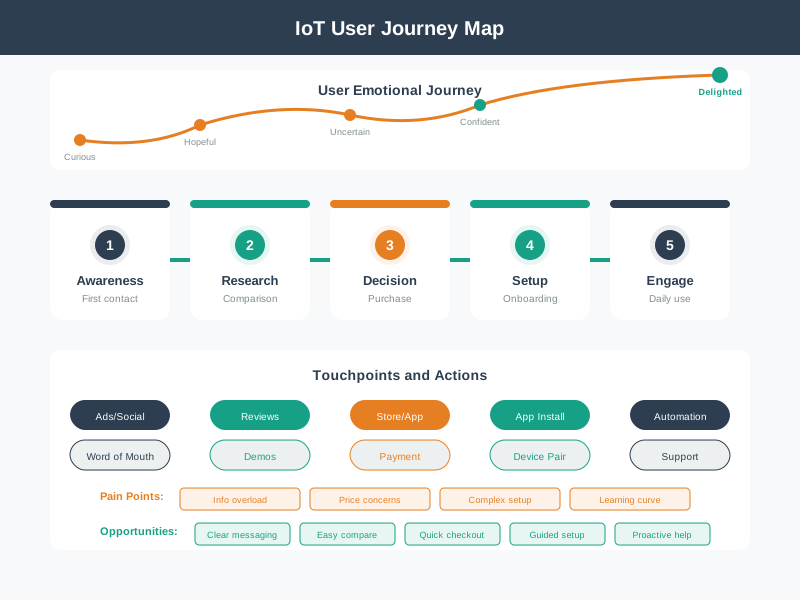
Use Figure 7.2 to connect journey stages to evidence and action.
7.15 Map the Critical Moments
A journey map becomes useful when it identifies moments where the design must be better.
Common IoT critical moments:
- First setup: device discovery, proof of possession, pairing, network, permission, account, and location.
- First success: the moment the user sees the device do the promised thing.
- First failure: offline state, denied permission, bad placement, stale data, low battery, or setup error.
- Shared use: inviting, delegating, revoking, transferring, or explaining access.
- Alert escalation: deciding what is urgent, what is informational, and who owns the next action.
- Maintenance: charging, replacing batteries, cleaning, updating firmware, troubleshooting, and support.
- Ownership transfer: moving home, selling device, changing tenant, replacing user, or decommissioning.
For each moment, record:
- user goal
- user emotion or confidence if observed
- device/service state
- touchpoints involved
- failure modes
- design requirement
- evidence boundary
- owner of the next action
Do not map every possible moment with equal weight. Find the moments that decide trust, safety, privacy, setup success, support load, or continued use.
7.16 Turn Journey Findings Into Requirements
Weak journey finding:
- “Setup is frustrating.”
Stronger journey finding:
- “During setup, users cannot tell whether the failure is caused by wrong Wi-Fi credentials, device offline state, app permission denial, or an account ownership problem. The setup flow must distinguish these states and give a safe next action before the next pilot.”
The stronger finding names the stage, observed confusion, possible states, design requirement, and decision timing.
Use this translation path:
- Stage: where in the journey the problem appears.
- Evidence: what was observed.
- State: device, service, network, permission, or data condition.
- Impact: why the moment matters.
- Requirement: what the design must show or support.
- Validation: how the team will check the fix.
- Change condition: what future change requires review.
7.18 Worked Journey: Water Leak Sensor
Scope:
- Product: battery leak sensor with mobile app and alerting.
- Primary role: resident who wants early warning without constant monitoring.
- Affected roles: landlord, plumber, family member, and neighbor in shared housing.
Journey stages:
- Unbox: user expects simple setup and clear placement guidance.
- Place: sensor must fit under sink, near appliance, or by water heater without blocking normal use.
- Pair: app must distinguish discovered, paired, placed, online, and battery-ready states.
- Daily use: device should stay quiet unless state changes or maintenance is needed.
- Alert: user must know whether leak is detected, sensor is wet, battery is low, or data is stale.
- Recover: user needs instructions for drying, testing, muting, replacing, or contacting help.
- Maintain: battery, placement, cleaning, and test reminders must not be hidden.
Design requirements:
- Placement guidance should include common physical constraints and a way to confirm the sensor is still reachable.
- Alerts should separate leak, test, low battery, offline, and stale data.
- A shared contact path should exist without exposing unnecessary household data.
- The journey map should be updated after field testing in actual under-sink and appliance contexts.
7.19 Persona and Journey Review Checklist
Before accepting personas or journey maps, confirm:
- they are based on evidence, not team preference or marketing aspiration
- the primary role is explicit and connected to a real design decision
- secondary, affected, and excluded roles are named where relevant
- context constraints are included, not just demographics
- journey stages include physical device, app, service, support, maintenance, and failure touchpoints
- assumptions are marked as assumptions
- each critical moment has a design requirement or research question
- evidence boundaries are recorded
- update conditions and owners are assigned
7.20 Common Defects
Watch for:
- Demographic-only personas: age and income without goals, constraints, behavior, or device relationship.
- One-person personas: copying one interview into a persona instead of synthesizing repeated patterns.
- Hero personas: ideal users who are patient, motivated, trained, and forgiving.
- Early-adopter drift: making the primary persona a technical enthusiast when the product needs mainstream reliability.
- Journey decoration: using a pretty timeline without evidence, state, failures, requirements, or owners.
- Happy-path mapping: ignoring setup errors, stale data, offline state, support, maintenance, and ownership transfer.
- Role collapse: treating buyer, installer, user, guest, caregiver, technician, and support agent as one person.
- No update rule: keeping personas and journeys unchanged after research, release, support evidence, or deployment context changes.
7.21 Knowledge Check
7.22 Matching Quiz
7.23 Ordering Quiz
7.24 Summary
Personas and journey maps help IoT teams connect research to design decisions. Personas summarize repeated patterns across roles, goals, context, constraints, device relationships, and failure sensitivity. Journey maps show how the experience unfolds across device, app, service, support, maintenance, and failure touchpoints.
Both artifacts must remain evidence-bound. If a persona does not name its evidence boundary, or a journey map does not include critical states and failures, the artifact can create false confidence instead of better design.
7.25 Key Takeaway
Personas and journey maps are useful when they preserve research evidence and expose friction across onboarding, use, failure, and support.
7.26 Concept Relationships
Personas and journeys connect to the people/context sequence:
- User Research Fundamentals explains why personas must be based on observed behavior.
- Research Methods explains how to gather the evidence used in persona synthesis.
- Context-of-Use Analysis provides the context constraints that make personas and journeys actionable.
- Pitfalls and Ethics reviews privacy, consent, representation, and sampling risks.
- Interface Design Process Checklist turns persona and journey findings into acceptance decisions.
7.27 What’s Next
Continue with:
- Pitfalls and Ethics, which covers research quality, consent, privacy, and representation risks.
- Research Methods, which explains how to gather better evidence for personas and journeys.
- Context-of-Use Analysis, which deepens the context constraints behind journey touchpoints.
- Understanding People and Context, which provides the broader sequence overview.