17 Prototyping Techniques for IoT
IoT prototyping, prototype fidelity, Wizard of Oz prototype, breadboard prototype, pilot prototype
17.1 Start Simple
A prototype is not a smaller product; it is an instrument for answering a design question. Start by naming the risk, then choose the cheapest fidelity that can expose it: wording, flow, hardware feedback, sensor behavior, network delay, support evidence, or field context.
17.2 In 60 Seconds
IoT prototypes are learning tools. A strong prototype is not the most polished artifact the team can build. It is the smallest artifact that can answer the current uncertainty without hiding the risks that matter.
For connected products, prototype choices must cover more than a screen flow. They may need to test physical placement, sensor behavior, actuator safety, offline state, shared use, permissions, setup recovery, accessibility, power assumptions, update behavior, support handoff, and service operations.
Choose fidelity by the question:
- Sketch or paper when the uncertainty is vocabulary, mental model, task order, or screen layout.
- Storyboard or role-play when the uncertainty is context, handoff, timing, or service behavior around the device.
- Wizard of Oz when the uncertainty is whether users understand, trust, or want a smart behavior before the automation exists.
- Digital click-through when the uncertainty is navigation, visual hierarchy, feedback, or task flow.
- Breadboard or bench prototype when the uncertainty is sensing, actuation, connectivity, latency, or device feedback.
- Integrated form prototype when the uncertainty is placement, enclosure, accessibility, setup, safety, power, and everyday handling.
- Pilot prototype when the uncertainty is real environment behavior, support evidence, maintenance, update path, and release readiness.
The goal is not to climb the fidelity ladder as fast as possible. The goal is to collect the next trustworthy piece of evidence.
17.3 Learning Objectives
By the end of this chapter, you will be able to:
- select an IoT prototype fidelity from the evidence needed
- distinguish concept, interaction, hardware, environment, and operations prototypes
- decide when Wizard of Oz testing is appropriate for smart behavior
- identify prototype gaps that can create false confidence
- write a prototype review record that preserves evidence, limits, decisions, and change conditions
17.4 Prerequisites
Before reading this chapter, you should be comfortable with:
- Interactive Design Principles, which defines the interaction qualities prototypes should test.
- Interactive Design Process, which explains where prototypes fit inside discovery, framing, testing, and iteration.
- Decision-First Prototype Learning Loop, which introduces prototypes as learning artifacts rather than demos.
17.5 Overview: Fidelity Follows the Risk
An IoT prototype should be judged by the uncertainty it exposes, not by how close it looks to a finished product. A paper flow can be the right prototype when the risk is setup wording. A bench rig is needed when the risk is sensor noise, command latency, radio range, or local feedback. A pilot is justified only when earlier prototypes have already reduced concept, interaction, and hardware uncertainty.
The same product may need several prototypes. A shared access reader might use a Figma click-through for invitation copy, a cardboard placement mockup for reach and visibility, a Wizard of Oz session for support handoff, an ESP32 or nRF52 bench rig for BLE pairing feedback, and a bounded pilot for offline reader behavior.
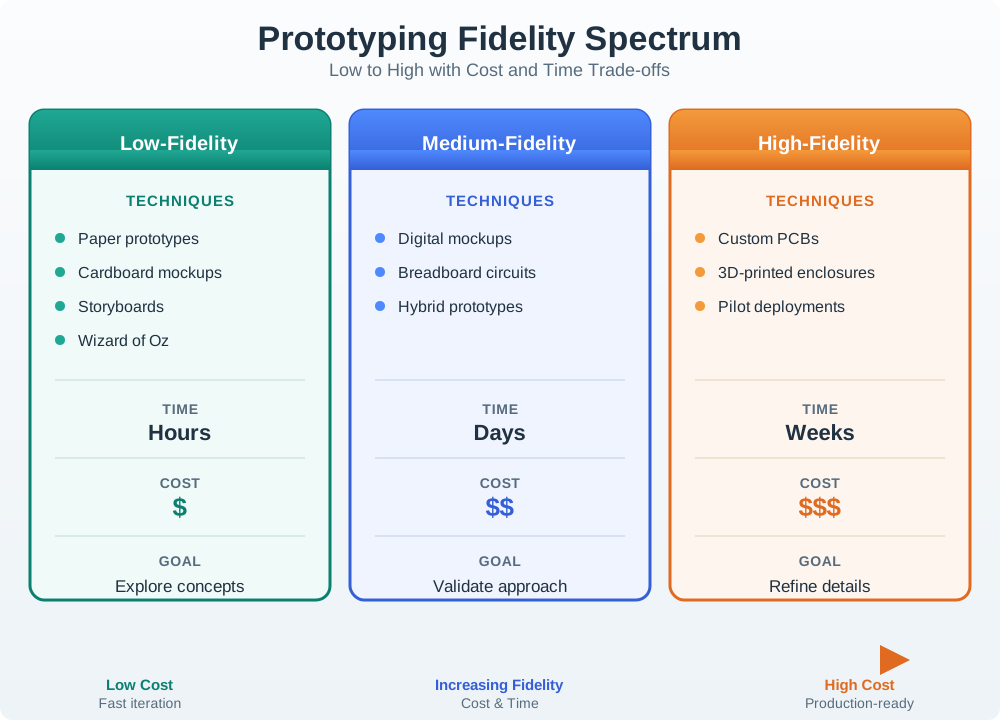
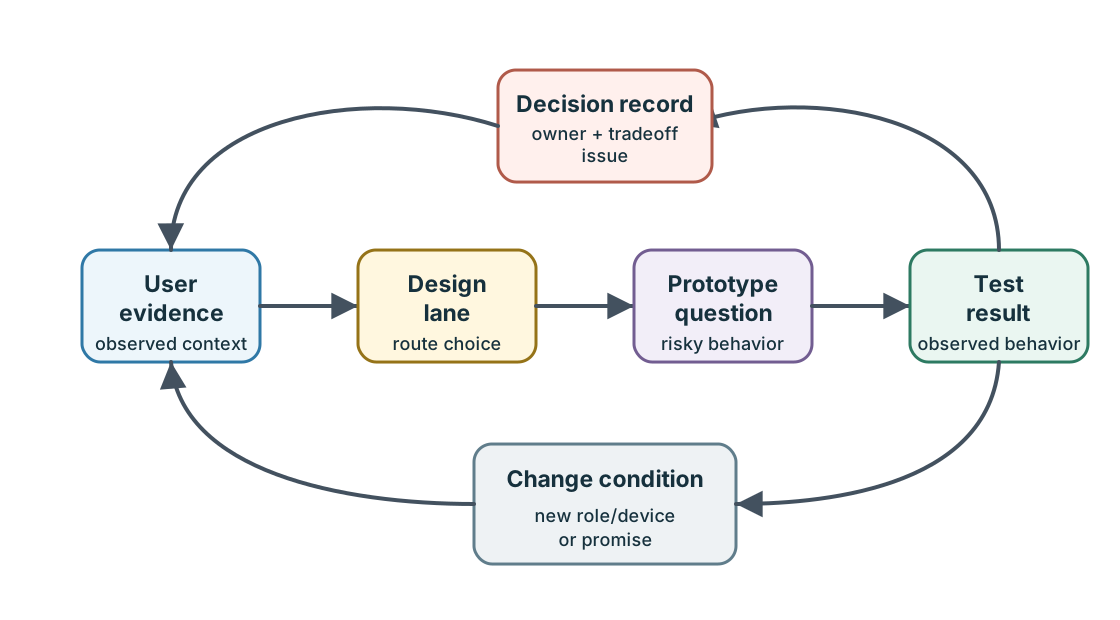
- Question: name the user behavior, device state, physical constraint, or service handoff being tested.
- Fidelity: choose the lightest artifact that can reveal that risk without hiding the important signal.
- Boundary: state what is real, what is simulated, and what must wait for hardware, firmware, field, or support validation.
A strong prototype plan also has a stop condition. If the question is whether installers recognize a failed pairing state, the team can stop when realistic installers encounter denied permission, weak signal, and offline reader states and can explain the next action. If the question is battery confidence, a screen flow is not enough; the plan needs measured duty cycle, radio wake behavior, and a visible low-power state. Each artifact should make one risk easier to decide, not merely make the concept feel more complete. That decision boundary keeps review meetings from rewarding the artifact that looks finished while ignoring the uncertainty that remains. ## Practitioner: Build the Right Slice {.depth-l1}
Prototype slices should be concrete enough for the risk. Digital flows can use Figma, HTML, or a small React/Vue prototype to test task sequence, ARIA names, focus order, consent timing, and notification copy. Device slices can use Arduino, Raspberry Pi, ESP32, nRF52, CircuitPython, Zephyr, FreeRTOS, or vendor SDK examples to test BLE GATT, Wi-Fi provisioning, MQTT publish/subscribe, CoAP request/response, Matter commissioning, Thread or Zigbee joining, and local LED/haptic feedback.
Measurement should match the claim. Use serial logs, browser console logs, packet captures, Mosquitto logs, Home Assistant traces, Node-RED debug panels, logic analyzers, Nordic Power Profiler Kit II, Otii Arc, Joulescope, or a simple shunt and oscilloscope when timing, power, or communication behavior affects the user promise.
For a shared access-reader slice, pair the interaction artifact with the evidence source that can disprove it. A Figma invite flow can test wording and consent, but a BLE bench rig or mocked reader state should expose pairing timeout, denied credential, and offline feedback. A support-board stub should show whether an installer or resident owns the next action. Keep a short run sheet that says which roles participated, which device states appeared, which logs were captured, and which states remained simulated.
- Keep the slice narrow: include only the screens, hardware behavior, service stubs, and support cues needed for the current question.
- Label simulation: mark mocked analytics, hand-triggered automation, fake sensor data, and manual support handling before stakeholders see the result.
- Capture evidence: record observations, logs, screenshots, measurements, failure cases, and excluded risks while the test is still fresh.
Write the review record before the prototype becomes a demo. The record should make clear whether the team observed a real device, a scripted device shadow, a local simulator, or a human operator. It should also name the next fidelity step: for example, moving from copy validation to a bench BLE test, from bench timing to an integrated enclosure, or from integrated form to a limited field pilot. ## Prototype Gaps Become Product Gaps {.depth-l2}
False confidence usually appears where a prototype hides a distributed-system boundary. A click-through may show a successful unlock without command acknowledgement. A bench sensor may publish clean MQTT messages without enclosure interference. A Wizard of Oz automation may appear trustworthy because a human silently fixes cases the future model will not understand. A pilot may look stable because firmware update, battery depletion, ownership transfer, and support escalation were outside scope.
Under-the-hood prototype review asks which implementation details change the interaction. MQTT QoS, retained-state policy, message ordering, clock skew, BLE connection interval, Wi-Fi roaming, Thread border-router availability, Matter fabric membership, cloud device-shadow version, OTA rollback slot, battery threshold, and support correlation id can all change what the prototype proves.
- State truth: separate measured, inferred, simulated, stale, offline, pending, rejected, and recovered state.
- Failure coverage: include duplicate commands, low battery, expired credential, missing permission, lost connection, update rollback, and support handoff when those affect use.
- Next fidelity: increase fidelity only for the risk the current prototype cannot answer.
The review should also separate product risk from instrumentation risk. A packet capture can prove that an MQTT acknowledgement arrived, but it does not prove that the resident understood the pending state. A power profiler can prove the radio stayed within a budget, but it does not prove that the low-battery warning gave enough time to act. A device-shadow fixture can test stale-state copy, but it does not prove production ordering, retry, or conflict behavior unless the same semantics are used later.
This boundary discipline keeps prototype evidence portable. When the team moves from an ESP32 bench rig to a custom board, or from a Node-RED service stub to a cloud API, the old result remains useful only if the record names what was measured, what was simulated, which failure states were skipped, and which engineering change invalidates the decision.
17.6 Prototypes Answer Questions
Every useful prototype starts with one review question. Without that question, teams often build impressive artifacts that do not remove the actual risk.
Weak prototype brief:
- “Build a realistic demo of the device.”
Stronger prototype brief:
- “Test whether a first-time installer can identify offline reader state, recover from a failed pairing attempt, and know when to contact support.”
The stronger brief tells the team what to include, what to ignore, who to observe, and what evidence will change the design. It also prevents prototype drift. A screen mockup is enough for wording and flow. It is not enough for pairing recovery, power state, device placement, or actuator safety.
Use prototyping to learn before you build:
- Name the decision: setup flow, feedback timing, trust cue, physical placement, automation rule, or support path.
- Choose the weakest adequate fidelity: sketch, storyboard, click-through, simulated behavior, bench prototype, or pilot.
- Test the whole IoT experience: include device state, app state, service delay, failure, recovery, and shared-user context.
- Decide from evidence: keep, change, loop back, increase fidelity, or stop.
- Record the boundary: what the prototype proved, what it simulated, and what still needs real hardware or field validation.
Do not let the tool drive the design. A beautiful prototype that does not answer the decision question is still weak evidence.
17.7 Fidelity Decision Map
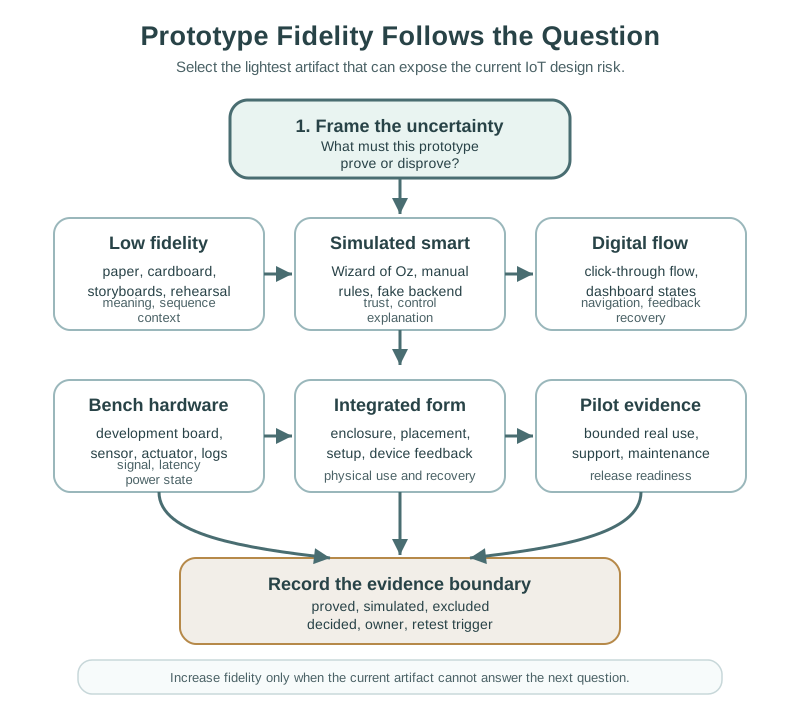
Use Figure 17.3 as a decision path:
- Start with the question the prototype must answer.
- Select the lightest prototype that can expose that risk.
- Include enough context to avoid false confidence.
- Record what the prototype proves and what it does not prove.
- Increase fidelity only when the previous evidence justifies it.
17.8 Low-Fidelity Prototypes
Low-fidelity prototypes are valuable because they make weak ideas cheap to find. They are appropriate when the team is testing meaning, sequence, role boundaries, or physical concept before committing to implementation.
17.8.1 Paper and Screen Sketches
Paper sketches are useful for:
- testing terminology and labels
- comparing navigation paths
- checking whether people understand device states
- exploring permission and setup flows
- exposing missing confirmation, undo, or recovery steps
For IoT, sketches should include device state, not only app screens. If the app says “connected,” the sketch should also show what the device does, what the user sees on the physical object, and what happens when the device is offline.
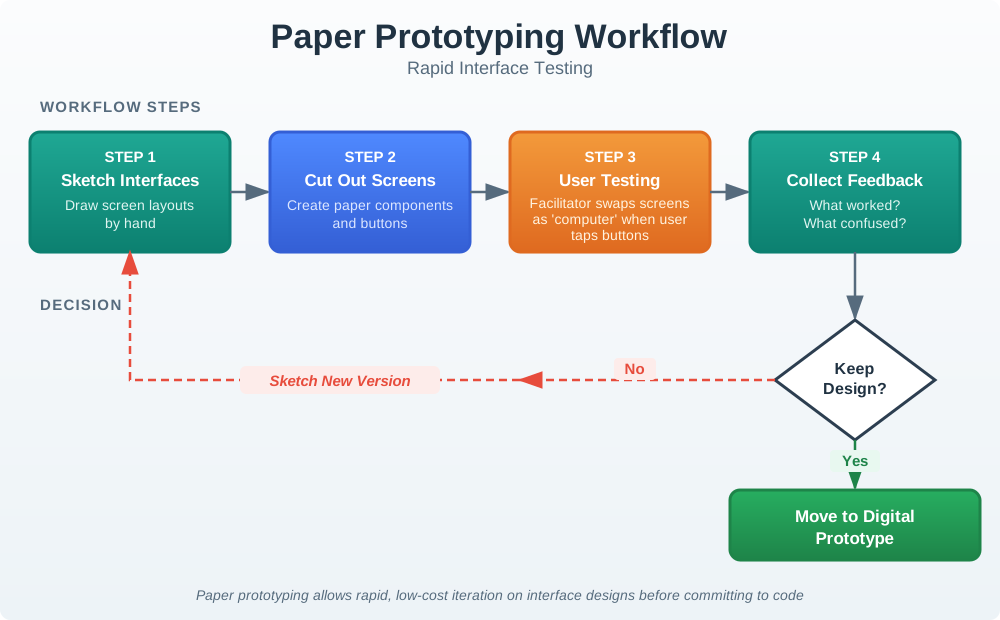
Use Figure 17.4 when the question is still about meaning, order, or recovery wording. Paper is useful because the facilitator can change the flow immediately when a device state or support step is missing.
17.8.2 Cardboard and Physical Mockups
Physical mockups test reach, placement, size, affordance, visibility, mounting, and shared use. They are not about electronics. They are about whether the object makes sense in the space where it will live.
Useful questions include:
- Can the user see the indicator from the expected distance?
- Can the device be reached while carrying tools, groceries, or equipment?
- Does the label remain understandable when mounted at the expected height?
- Does the control invite the correct action?
- Does the placement create privacy, safety, accessibility, or maintenance problems?
17.8.3 Storyboards and Service Rehearsals
Storyboards show what happens around the device over time. Service rehearsals let the team act out installation, failure, escalation, replacement, and support handoff.
These methods are helpful when the design depends on multiple roles:
- resident and installer
- patient and caregiver
- facility manager and technician
- operator and supervisor
- customer and support agent
An IoT design can pass a single-user app test and still fail because handoff, ownership, or support evidence was never prototyped.
17.9 Simulated Smart Behavior
Wizard of Oz prototypes test a smart behavior before the smart system is built. A human operator quietly simulates automation so the team can observe whether users understand, trust, override, or reject the behavior.
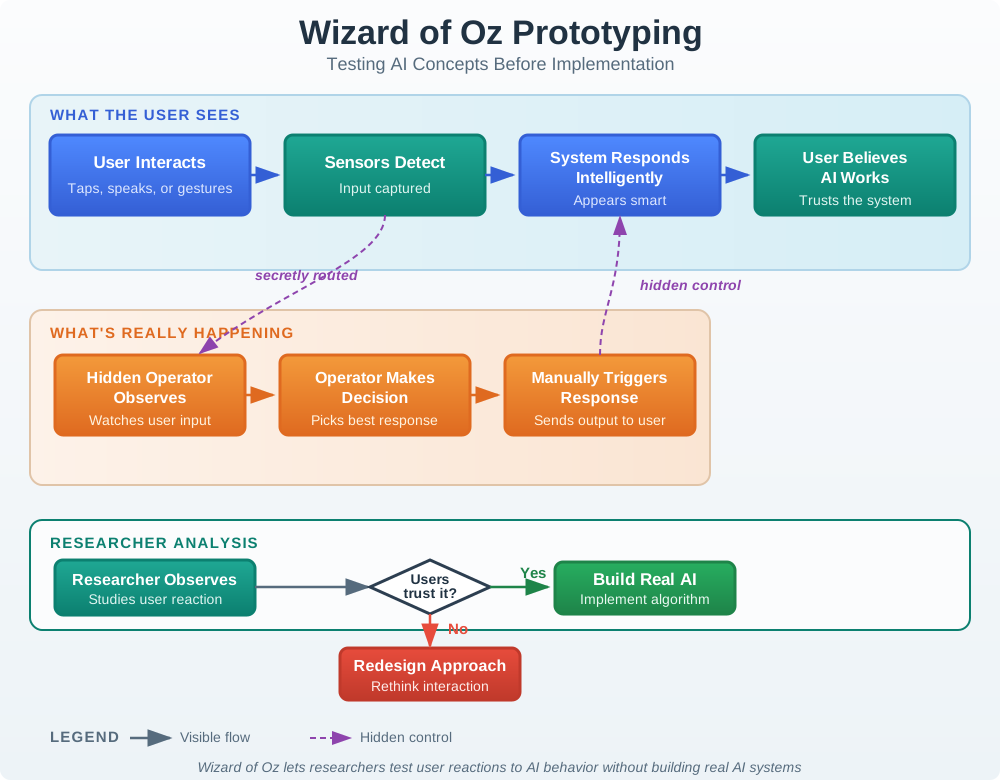
Figure 17.5 is useful only when the record is honest about the hidden operator. The test can validate trust, explanation, and override expectations, but it cannot validate the future model or automation pipeline.
Use this method when the question is about interaction with intelligence, not the technical model itself:
- Should the system suggest an action or take action automatically?
- Do users understand why an automation occurred?
- What override do users expect?
- What level of explanation is enough?
- Does shared use create conflicting preferences?
Do not use Wizard of Oz testing to hide privacy-sensitive observation or to simulate safety-critical control without proper disclosure, boundaries, and review. Participants should be debriefed when the session is complete, and the prototype record should clearly state what was simulated.
17.10 Medium-Fidelity Prototypes
Medium-fidelity prototypes combine more realistic interaction with selective implementation. They should still be question-driven.
17.10.1 Digital Click-Through Prototypes
Digital click-through prototypes are useful for mobile apps, dashboards, setup flows, consent screens, notification controls, and support journeys.
They can test:
- navigation and task sequence
- visual hierarchy
- copy and device-state language
- notification timing and wording
- accessibility of controls and status
- recovery from setup, permission, or identity errors
They cannot prove that real sensing, connectivity, power, latency, or actuator behavior will work. A digital prototype that uses perfect data can hide the real design problem: what the user should see when data is delayed, stale, missing, contradictory, or unsafe to act on.
17.10.2 Breadboard and Bench Prototypes
Bench prototypes use development boards, sensors, actuators, debug wiring, test fixtures, and simple firmware to prove a technical behavior before form factor or production design.
They are appropriate for:
- sensor range, noise, drift, and calibration checks
- actuator response and safe default behavior
- radio behavior in expected spaces
- latency that changes user perception
- local feedback when cloud services are unavailable
- power-state measurement under representative duty cycles
The record should separate what the bench prototype proves from what remains unproven. A bench prototype may prove that the sensor can read a value. It may not prove that the enclosure placement, battery strategy, installer workflow, or long-term maintenance model is ready.
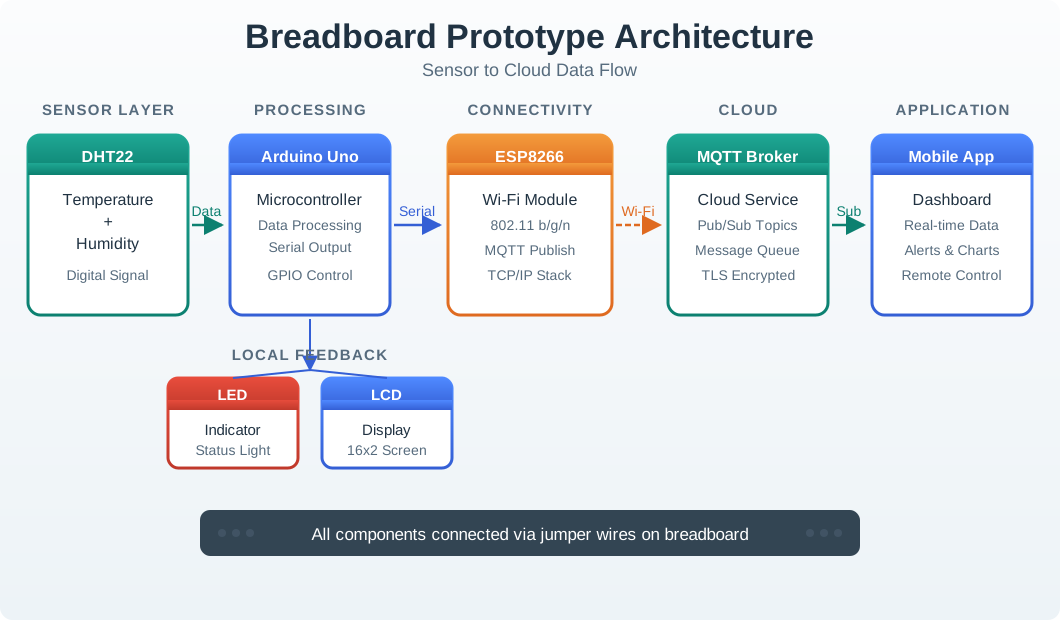
Use Figure 17.6 to separate bench evidence from product evidence. It can test sensing, data flow, local feedback, and cloud messaging, but it still leaves enclosure, battery life, maintenance, and field support unproven.
17.10.3 Hybrid Prototypes
Hybrid prototypes combine real and simulated pieces. For example, a real sensor may publish readings while the analytics, app state, support workflow, or recommendation logic is simulated.
Hybrid prototypes are useful when the team needs realistic user behavior before every backend or hardware component is finished. They must be labeled carefully in the review record. Otherwise, stakeholders may believe a mocked subsystem has already been validated.
17.11 High-Fidelity Prototypes
High-fidelity prototypes are appropriate after lower-fidelity evidence has reduced concept and interaction uncertainty. They are expensive in attention, coordination, and review effort, so they should be used for questions that lower fidelity cannot answer.
17.11.1 Integrated Form Prototypes
Integrated form prototypes combine enclosure, device feedback, mounting, controls, firmware behavior, app flow, and service assumptions closely enough to test everyday use.
They should be used for:
- placement and visibility in realistic spaces
- accessibility of physical controls and indicators
- setup and recovery with real device state
- safe behavior during power, network, or sensor faults
- enclosure influence on sensor quality, heat, radio, or maintenance access
- user trust when the device acts in the physical world
17.11.2 Pilot Prototypes
Pilot prototypes test the system in real environments with bounded scope. They are not a substitute for earlier learning. They are a release-readiness gate that checks whether the product survives ordinary conditions.
A useful pilot record includes:
- who used the prototype and in what setting
- what failures were intentionally included in the test
- what support and maintenance evidence was collected
- what logs, observations, and user reports were reviewed
- what remains outside the pilot scope
- what must be checked again before release
17.12 Prototype Review Record
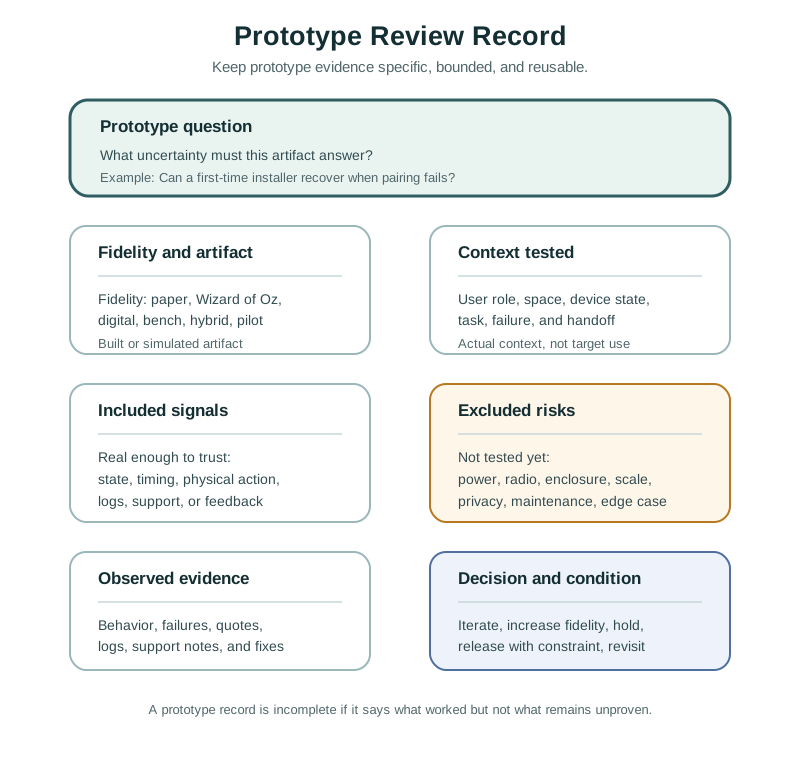
Use Figure 17.7 to keep prototypes honest. A prototype review record should include:
- Question: the uncertainty the prototype was built to answer.
- Fidelity: paper, storyboard, Wizard of Oz, digital, bench, hybrid, integrated form, or pilot.
- Artifact: what was actually built or simulated.
- Context: the user role, space, device state, and task observed.
- Included signals: the parts of the system that were real enough to trust.
- Excluded risks: what the prototype did not test.
- Evidence: observed behavior, failures, quotes, logs, or support findings.
- Decision: iterate, increase fidelity, hold, release with constraint, or stop.
- Owner and change condition: who owns the open issue and what event requires another review.
The excluded-risk field matters. It protects the team from treating a partial prototype as proof of the whole system.
17.13 Laundry Sensor Review
A team wants to prototype a sensor that reports whether shared laundry machines are available.
The first uncertainty is not the sensor. It is whether residents understand availability, reservation, and stale state.
A useful sequence is:
- Paper sketch: Test labels for available, in use, likely finished, offline, and unknown.
- Storyboard: Show a resident walking to the laundry room after checking the app and finding a stale reading.
- Wizard of Oz: Simulate notifications manually to learn whether reminders feel helpful or annoying.
- Bench prototype: Check whether vibration or current sensing can distinguish running, idle, and finished states.
- Integrated form prototype: Mount the device in a realistic location and test visibility, tampering, power, and maintenance.
- Pilot: Observe real usage, false readings, support contacts, and maintenance work over a bounded period.
The important decision is not “did the prototype work?” The important decision is which uncertainty was reduced and which risk moves to the next prototype.
17.15 Common Prototyping Defects
17.15.1 Demos vs Evidence Tools
A polished demo can impress stakeholders while avoiding the hard question. If the prototype does not name the uncertainty, it should not be accepted as evidence.
17.15.2 Testing Only the Happy Path
IoT products must explain offline state, stale data, failed setup, rejected commands, permission problems, low power, and safe fallback. Prototypes that skip those states create false confidence.
17.15.3 Simulated Subsystems Risk
Mocked analytics, fake sensor data, manual support handling, and hidden operator control are legitimate prototype techniques. They become dangerous when the record does not say what was simulated.
17.15.4 Increasing Fidelity Too Early
Higher fidelity can slow learning by making the team reluctant to change direction. Increase fidelity when the current question requires it, not because the previous artifact looks unfinished.
17.15.5 Ignoring the Physical Context
Screens cannot prove mounting height, light visibility, sound audibility, cable access, cleaning constraints, tamper risk, or maintenance reach. Physical context must be prototyped when it affects use.
17.15.6 Missing Operations Evidence
Connected products are operated after they are designed. Prototype reviews should include owner, support route, alert triage, maintenance, update path, and change condition when those issues affect the promise.
17.16 Review Checklist
Before accepting an IoT prototype, check:
- Is the prototype question explicit?
- Is the fidelity the lightest one that can answer the question?
- Does the prototype include the device state, physical context, and user role needed for the test?
- Are simulated parts clearly labeled?
- Does the review include failure, recovery, or stale-state behavior when relevant?
- Does the evidence come from observed behavior, not preference alone?
- Are accessibility, privacy, safety, support, and maintenance considered at the right level?
- Does the record say what the prototype proves and what remains untested?
- Is the next decision clear?
- Is there an owner and change condition for unresolved risk?
17.17 Knowledge Check
17.18 Matching Quiz
17.19 Ordering Quiz
17.20 Summary
IoT prototyping is evidence work. The best prototype is the lightest artifact that can answer the current uncertainty without hiding the risks that matter. Paper, cardboard, storyboards, Wizard of Oz tests, digital click-throughs, bench rigs, integrated form prototypes, and pilots all have a place. Quality depends on matching the artifact to the question, labeling simulated parts, testing failure and recovery when relevant, and recording what remains unproven.
17.21 Key Takeaway
IoT prototypes should answer specific learning questions about behavior, feedback, hardware constraints, connectivity, and service recovery.
17.22 Concept Relationships
Prototype decisions connect to the rest of the UX design process:
- Interactive Design Process frames the loop that decides which question needs a prototype.
- Interactive Design Principles defines the qualities that prototypes should make observable.
- User Testing and Iteration explains how to observe prototype use and convert evidence into revisions.
- Interface Design Fundamentals expands screen, control, status, and feedback decisions that digital prototypes often test.
Prototype fidelity also connects to engineering review. Hardware, firmware, cloud, support, accessibility, privacy, security, and maintenance risks should be pulled into the prototype when they affect the user promise.
17.23 What’s Next
Continue to User Testing and Iteration to learn how to observe prototype use, interpret evidence, avoid preference-only findings, and decide whether the design should iterate, increase fidelity, or move toward release.