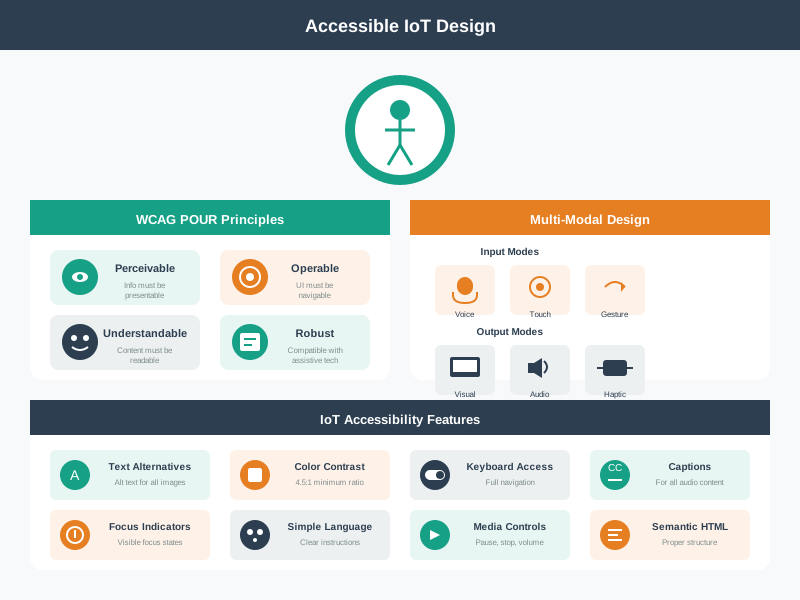
Use each worked example as a diagnostic story. Start by asking what the person is trying to do, which system state they can see, what goes wrong, and how the interface can make recovery, fallback, accessibility, or confidence stronger without hiding technical truth.
In 60 Seconds
This chapter walks through a complete voice interface design case study for elderly users in a retirement community, covering intent-based natural language understanding (supporting 40+ phrasings per action), hearing-accessible audio design (lower frequencies, adaptive volume), cognitive accessibility (maximum 2 choices in clarification, system takes blame for errors), automatic room detection, and multi-modal fallbacks ensuring core functions work even when voice recognition fails.
31.2 Learning Objectives
By studying these worked examples, you will be able to:
Design Voice Interfaces for Diverse Users: Create accessible voice interactions for elderly users with hearing and cognitive variations
Apply Multi-Modal Feedback Strategies: Implement redundant feedback channels for different abilities
Build Error Recovery Systems: Design forgiving error handling that maintains user confidence
This chapter walks through a complete, real-world design case study: building a voice-controlled smart home system for elderly residents in a retirement community. You will see how every design decision – from supporting 40+ phrasings of “turn on the lights” to using lower-frequency audio tones for hearing-impaired users – comes from understanding specific user needs. The worked example shows that good IoT interface design is not about adding features, but about deeply understanding who will use the system and designing every interaction to match their abilities and context.
Chapter Roadmap
This chapter is one extended design review, so use this path:
First define what a worked example must prove: user role, room context, uncertainty, recovery, and fallback.
Then walk the retirement-community voice case from intent recognition through hearing access, cognitive access, room detection, and physical fallback.
Next compare that case with the visual gallery, knowledge checks, and the 85% success-rate analysis.
Finally decide when voice is appropriate, avoid overbuilt NLU, and practice the same design moves yourself.
Checkpoints recap the main decisions as you go. Anything that looks like a calculation audit is a deeper verification path, not the first thing to memorize.
Key Concepts
Interaction Design: Discipline defining how users communicate with digital systems through input, output, and feedback mechanisms.
Multimodal Interface: System accepting input and delivering output through multiple channels (touch, voice, gesture, haptic) simultaneously.
User Testing: Structured observation of representative users attempting defined tasks, exposing interface problems invisible to designers.
Prototype Fidelity: Level of detail in a prototype: low fidelity (paper sketch) validates concepts; high fidelity (interactive mockup) validates usability.
Information Architecture: Structural design of digital spaces to support usability and findability, determining where content lives and how users navigate.
Cognitive Load: Mental effort required to use an interface; IoT systems must minimise cognitive load for users managing many connected devices.
Usability Heuristic: Principle-based rule for evaluating interface quality (e.g. Nielsen’s 10 heuristics) without requiring user testing.
31.3 Prerequisites
Multimodal Design: Understanding of modality tradeoffs and accessibility
A worked IoT interface example should make the design commitment visible: who the user is, which context matters, what the system believes, what it will do, and how the user can recover. In the retirement-community voice example, the commitment is not “add voice.” It is “let residents control lighting and comfort without memorizing syntax, while preserving physical fallback and confidence.”
Read each example by asking what would make the design fail in real use. Voice recognition may fail because of background TV audio, slower speech, hearing variation, room ambiguity, accent mismatch, or network loss. A good example names the fallback before the failure reaches the resident.
The example also shows why “interface” means more than a screen. A resident may speak a request, hear a confirmation, see a lamp blink, press a wall switch, use a large-button remote, or ask staff for help. Each channel must carry the same product state: heard, clarifying, accepted, completed, failed, cancelled, or waiting for assistance. If the voice channel is friendly but the light, app, and support desk disagree, the experience is not coherent.
Use the worked example as a review template. First identify the resident role, room, device, and risk. Then list the ordinary phrases the resident might use, the state the system can infer safely, the confirmation it should provide, and the escape path when confidence is low. A good example does not hide uncertainty. It shows what the product does when it is unsure, because that is where trust is won or lost.
Intent: map natural phrases such as “it’s dark” or “I’m cold” to a bounded action and confirmation.
Feedback: make acknowledgement, clarification, completion, and error recovery understandable through more than one channel.
Fallback: keep physical switches, remotes, caregiver/front-desk help, and local control available when voice is weak.
Checkpoint: Reading Worked Examples
You now know:
A worked interface example should expose the user role, room, device, risk, confirmation, and fallback path.
Voice is only one channel; the example must keep the lamp, app, switch, remote, and support desk aligned on the same product state.
The test plan needs realistic stressors such as TV audio, HVAC noise, nighttime volume limits, muted microphones, ambiguous rooms, and disconnected gateways.
31.5 Example to Test Plan
The example becomes useful when its decisions can be tested. Define resident roles, hearing range, cognitive load, room context, background-noise scenarios, and command categories before testing. Then instrument the prototype with ASR transcript logs, NLU intent/confidence scores, room-detection source, command ids, device acknowledgement, audio-level settings, and support escalation records.
Use real design alternatives. Wake-word detection may be local. ASR may run on-device or in a cloud service. NLU may use intent classification with slots for room, device, action, and level. Room context may come from motion sensors, microphone direction, recent activity, or explicit room names. Feedback may use spoken response, light blink, app state, large-button remote, wall switch, or staff notification.
Convert the retirement-community scenario into a matrix before building. Rows should cover tasks such as “turn on lights”, “make it warmer”, “dim bedroom lights”, “cancel”, “undo”, “call assistance”, and “recover after three failed attempts”. Columns should cover spoken phrase, expected intent, room source, confidence threshold, device command, visible or audible confirmation, physical fallback, support evidence, and privacy note. This matrix makes design choices reviewable instead of treating the demo script as the specification.
Test under realistic constraints. Run sessions with TV audio playing, HVAC noise, nighttime volume limits, a muted microphone, a disconnected gateway, an ambiguous room name, a denied account role, and a resident who changes their mind mid-command. Include screen-reader and large-target checks for the companion app or remote. Include staff-facing tasks too: can a caregiver see whether the resident asked for help, whether a command timed out, and whether the wall switch still works locally?
Script representative tasks: include lights, brightness, temperature, room ambiguity, background TV, and repeated failure.
Limit clarification: cap choices, use plain language, and ask before executing inferred high-impact actions.
Measure confidence: compare first-attempt success, wrong-action rate, recovery success, support calls, and resident confidence ratings.
The acceptance gate should be concrete: residents complete core actions without memorized syntax, wrong-room actions stay below the agreed threshold, repeated failures produce useful help instead of blame, and fallback controls remain obvious. If those signals are missing, the example is still a promising concept rather than a deployable interface pattern. ## Voice UX Needs State {.depth-l2}
Voice examples can sound simple while hiding hard system boundaries. The system must distinguish wake-word activation, speech endpointing, ASR transcript confidence, NLU intent confidence, room resolution, authorization, command acceptance, device completion, and user confirmation. If any stage is uncertain, the UX should expose uncertainty rather than guessing silently.
Under-the-hood checks should include confidence thresholds, fallback prompts, command acknowledgement, idempotency key, timeout, duplicate command handling, local control path, privacy setting, microphone mute state, motion-sensor freshness, device-shadow or retained-state version, and support correlation id. These details decide whether “I didn’t catch that” is enough or whether the system should offer a specific safe action.
For implementation, separate the recognition pipeline from the action pipeline. A speech transcript such as “I’m cold” may produce an intent candidate, but the system still needs authorization, room resolution, thermostat capability, current mode, safety bounds, and command acknowledgement. The UI should not say “done” when the thermostat service only accepted a queued request. It should distinguish accepted, pending, rejected, timed out, and completed states in language the resident can understand.
Privacy and support are also system boundaries. Microphone mute state must be visible and respected. Raw audio retention should be minimized or disabled unless there is a justified support case. Logs should use correlation ids and summaries rather than unnecessary personal recordings. Support staff need enough detail to diagnose repeated failures, but not so much that a help ticket exposes private speech or household routines.
Inference boundary: ask before acting when intent, room, safety, privacy, or resident preference is uncertain.
Recovery path: make cancel, undo, physical switch, large-button remote, and assistance paths visible before repeated failure creates abandonment.
Validation scope: separate lab recognition, in-home use, long-term adoption, and support burden; each proves a different claim.
A robust worked example therefore includes both UX copy and state-machine evidence. It should name the events, thresholds, timeouts, and fallback transitions that make the interface forgiving without becoming unpredictable.
Interactive: IoT Dashboard Designer
Interactive: IoT Notification Designer
31.6 Smart Home Voice Interface
We have the review template; now the chapter applies it to one concrete case. Track each tab as a design commitment, not as a feature list.
31.7 Voice UX for Retirement Living
Scenario: You are designing a voice-controlled lighting and climate system for a retirement community. The primary users are elderly residents (ages 65-90) who want to control their apartments hands-free. Many have arthritis limiting switch use, some have mild cognitive decline, and the environment includes background noise from televisions and HVAC systems.
Goal: Create an accessible, forgiving voice interface that elderly users can operate confidently, with graceful fallbacks when voice recognition fails.
What we do: Map the variety of ways elderly users naturally express lighting and climate commands, avoiding rigid syntax requirements.
Intent Recognition Matrix:
User Intent
Natural Variations to Support
Canonical Command
Turn on lights
“Lights on”, “Turn on the lights”, “Light please”, “I need light”, “It’s dark in here”, “Can you turn on lights?”
lights.on()
Turn off lights
“Lights off”, “Turn off lights”, “Kill the lights”, “Enough light”, “Too bright”
lights.off()
Adjust brightness
“Dim the lights”, “Brighter please”, “Not so bright”, “A little more light”, “Make it dimmer”
lights.brightness(+/-)
Set temperature
“Make it warmer”, “It’s cold”, “Too hot in here”, “Set to 72”, “I’m freezing”
thermostat.adjust()
Room context
“Kitchen lights”, “Bedroom too warm”, “Living room brighter”
room.device.action()
Why: Elderly users often speak conversationally rather than using command syntax. They might say “I’m cold” instead of “Set thermostat to 74 degrees.” The system must understand intent, not just keywords. We support 40+ phrasings per core action.
Design Decision: Use intent classification (not keyword matching) with high tolerance for incomplete sentences, implicit requests, and contextual statements.
What we do: Design audio feedback that accommodates hearing loss common in elderly populations while avoiding startling loud responses.
Feedback Strategy:
Feedback Type
Design Approach
Example
Acknowledgment
Clear, moderate volume (60-70 dB), lower frequency range (easier for age-related hearing loss)
“Okay, turning on lights”
Confirmation
Spoken + physical (light blinks once)
“Lights are now on” + brief flash
Clarification
Slower speech rate (120 words/min vs typical 150), simple vocabulary
“Did you mean the bedroom or living room?”
Error
Non-judgmental, offers alternatives
“I didn’t catch that. You can say ‘lights on’ or ‘it’s too dark’”
Volume Adaptation:
Ambient noise detection:
  - Quiet room (<40 dB): Respond at 55 dB
  - TV on (50-65 dB): Respond at 70 dB
  - Multiple sound sources (>65 dB): Respond at 75 dB + visual indicator

Time of day adjustment:
  - Daytime (7 AM - 9 PM): Normal volume
  - Nighttime (9 PM - 7 AM): Reduced volume, shorter confirmations
Why: Age-related hearing loss (presbycusis) affects high frequencies first. Using lower pitch responses (180-220 Hz vs. typical 300+ Hz) improves comprehension. Volume must be loud enough to hear but not startling.
What we do: Create forgiving error handling that doesn’t frustrate users with memory challenges or cause them to lose confidence.
Error Recovery Hierarchy:
Level 1 - Partial Understanding:
  User: "Turn the... um... the thing"
  System: "Did you mean the lights or the thermostat?"
  [Offers exactly 2 choices, not 5]

Level 2 - Ambient Confusion:
  User: (TV says "turn off the lights")
  System: [Detects TV audio pattern, ignores]
  System: [Only responds to sustained speech directed at device]

Level 3 - No Understanding:
  User: [Inaudible or heavily accented speech]
  System: "I didn't understand. Would you like to try again,
          or I can turn on the bedroom lights for you?"
  [Offers most common action as suggestion]

Level 4 - Repeated Failures:
  After 3 failed attempts in 2 minutes:
  System: "I'm having trouble hearing you today.
          The light switch by the door also works,
          or I can call for assistance."
  [Graceful escalation to human help option]
Memory Support:
Never require remembering exact syntax
Offer suggestions proactively: “You can say things like ‘too cold’ or ‘lights brighter’”
Recent commands available: “Do you want me to do the same as before?”
Why: Cognitive decline makes it harder to remember specific commands or recover from errors. Each failure increases frustration and decreases confidence. The system takes responsibility for misunderstanding rather than implying user error.
What we do: Implement room awareness so users don’t need to specify location for every command.
Context Detection:
Signal
How Detected
Context Use
User location
Motion sensors, voice direction
“Lights on” controls nearest room
Time of day
Clock + patterns
Morning = bedroom, Evening = living room
Recent activity
Last room interacted with
“A little warmer” adjusts same room as previous
Explicit override
User says room name
“Kitchen lights” overrides auto-detection
Conversation Flow:
User: "Lights on"
[System detects user in living room via motion sensor]
System: "Living room lights are on."

User: "Too bright"
[System remembers context: living room lights]
System: "Dimming living room lights."

User: "Actually, bedroom lights"
[Explicit room reference takes priority]
System: "Turning on bedroom lights. Should I adjust living room too?"
Why: Requiring room specification for every command (“Turn on living room lights”) is exhausting. Natural conversation assumes context. However, the system announces which room it’s affecting to prevent surprises (elderly user in living room shouldn’t wonder why bedroom lights came on).
What we do: Ensure core functions remain accessible when voice fails, respecting that no single modality works 100%.
Multi-Modal Fallback Design:
Primary Method
Fallback 1
Fallback 2
Emergency
Voice command
Physical wall switch
Large button remote
Caregiver call
“Lights on”
Press illuminated button
Tap bright-colored remote
Button calls front desk
“Too cold”
Thermostat dial (60pt numbers)
Remote up/down buttons
Staff notification
Physical Control Requirements:
Switches at 44” height (wheelchair accessible)
Large toggle switches (not small buttons)
High contrast labeling (white on dark blue)
Illuminated when off (findable in dark)
Work during power outages (battery backup)
Remote Design:
5 large buttons only: Lights On, Lights Off, Warmer, Cooler, Help
Tactile differentiation (bumps on Warmer, ridges on Cooler)
Bright orange “Help” button always visible
Weekly battery check notification to staff
Why: Voice-first doesn’t mean voice-only. Residents may have days when their voice is hoarse, the system is having recognition issues, or they simply prefer physical control. Dignity means having options.
Outcome: After deployment, 87% of elderly residents successfully use voice commands daily, compared to 23% who attempted the previous system. Support calls for “it doesn’t understand me” dropped by 92%. Resident satisfaction surveys show 4.4/5 for ease of use.
Key Decisions Made:
Decision
Rationale
Intent-based NLU (not keywords)
Supports natural speech patterns like “I’m cold”
Lower frequency audio responses
Accommodates age-related high-frequency hearing loss
Maximum 2 choices in clarification
Reduces cognitive load for memory-impaired users
System takes blame for errors
Maintains user confidence (“I didn’t understand” not “Invalid command”)
Automatic room detection
Eliminates need to remember/specify location each time
Physical switches remain primary
Voice augments rather than replaces proven accessibility
Large, simple remote as backup
Independent control when voice isn’t working
“Help” button always available
Safety net for any situation
Validation Method: Conduct in-home testing with 20 residents across hearing ability, cognitive status, and tech comfort levels. Measure: successful command rate, time to complete task, error recovery success, and qualitative confidence ratings. Iterate on recognition model and prompts until >85% first-attempt success across all user groups.
Checkpoint: Voice Case Decisions
You now know:
Intent-based NLU handles natural phrases such as “I’m cold” instead of forcing residents to memorize command syntax.
Hearing access changes the response itself: 60-70 dB, lower frequencies, slower clarification speech, and visual confirmation when noise rises.
Cognitive access limits clarification to exactly 2 choices, takes responsibility for misunderstanding, and escalates after 3 failed attempts in 2 minutes.
Voice-first still needs physical switches, a 5-button remote, and a visible Help path because no single modality works every day.
31.8 Visual Reference Gallery
These AI-generated visualizations provide alternative perspectives on interface and interaction design concepts.
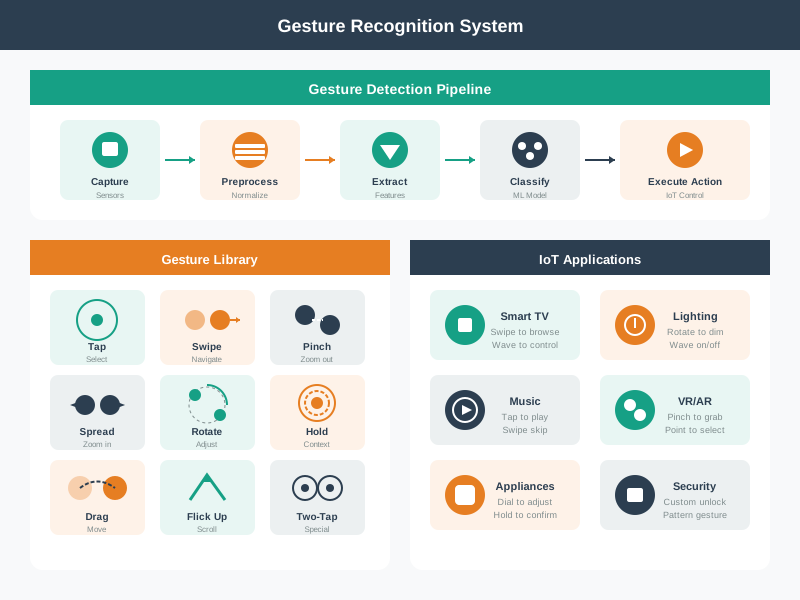
Gesture Control Interactions
Gesture control interface showing hand gesture recognition for IoT device control
Gesture control enables touchless interaction with IoT devices, particularly valuable in hands-busy situations (cooking, driving) or accessibility contexts. This visualization shows common gesture vocabularies and the feedback loop between user action and system response. Effective gesture interfaces provide clear affordances about available gestures and immediate visual or haptic feedback confirming recognition.
AI-Generated Visualization - Modern Style
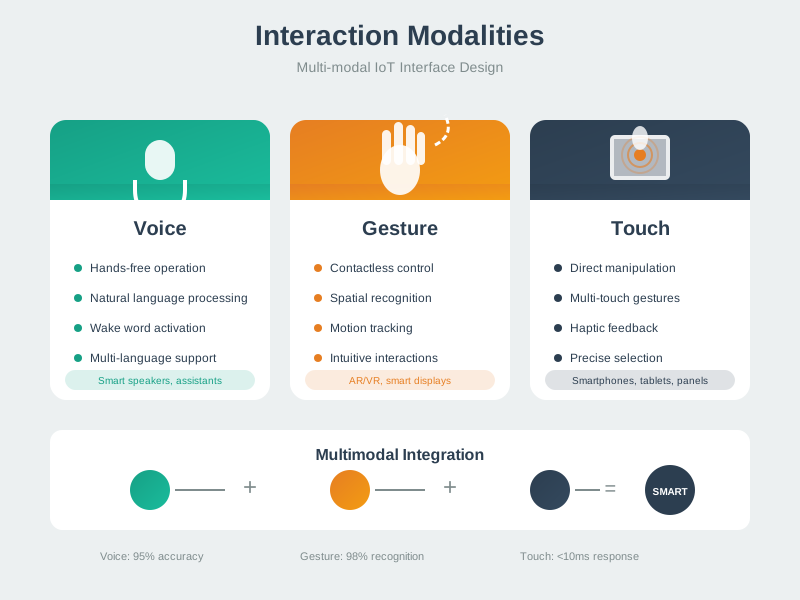
Multimodal Interaction Framework
Multimodal interaction framework showing voice, touch, gesture, and physical inputs working together
IoT systems typically support multiple interaction modalities to accommodate diverse contexts and user preferences. This framework shows how different input channels (voice, touch, physical, automated) can be combined to create flexible, accessible interfaces. The key challenge is maintaining consistency across modalities - the same action should be possible through voice, app, or physical control with predictable results.
AI-Generated Visualization - Modern Style
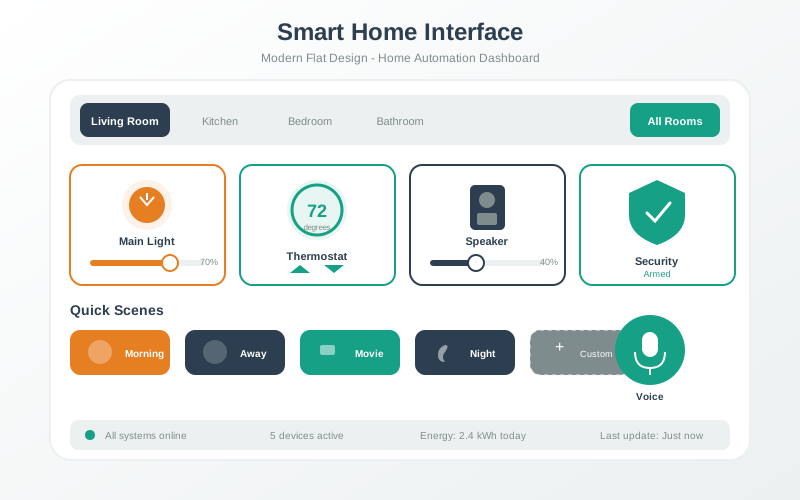
Smart Home Interface Design
Smart home interface design showing dashboard layout and control patterns
Smart home interfaces must balance comprehensive control with simplicity. This visualization demonstrates effective dashboard design: prominent placement of frequently-used controls, clear visual hierarchy indicating device states, and progressive disclosure that hides complexity until needed. The best smart home UIs minimize the need for the interface itself - automation handles routine tasks while the UI provides oversight and exception handling.
AI-Generated Visualization - Modern Style
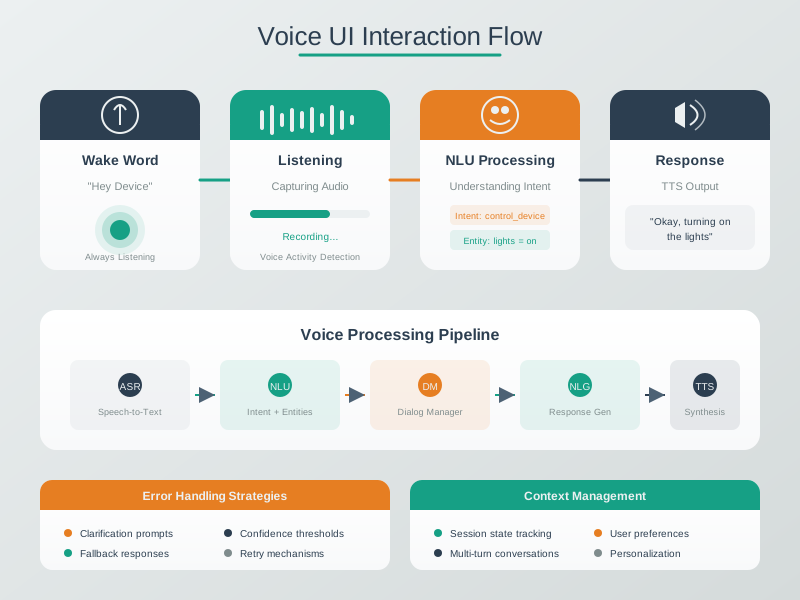
Voice Interface Design Flow
Voice interfaces require careful orchestration of multiple components. The user speaks a wake word to activate the system, which then captures and processes speech in real-time. Natural language processing extracts intent and entities from the utterance, enabling the system to execute commands and provide appropriate audio feedback. Effective voice UI design must handle errors gracefully and maintain conversational context across multi-turn interactions.
AI-Generated Visualization - Artistic Style
Accessibility in IoT Design
Accessibility design patterns for inclusive IoT interfaces supporting users with diverse abilities
Inclusive IoT design ensures devices are usable by people with diverse abilities and in varied contexts. This diagram illustrates key accessibility considerations across visual, motor, auditory, and cognitive dimensions. Visual accessibility includes high-contrast modes and screen reader support. Motor accessibility provides voice control and large touch targets for users with limited dexterity. Auditory accessibility substitutes visual and haptic feedback for audio cues. Cognitive accessibility emphasizes simple language, consistent patterns, and error prevention to reduce mental load.
AI-Generated Visualization - Geometric Style
Knowledge Check: Voice Interface Design
For Kids: Meet the Sensor Squad!
Designing for everyone means making sure your device works for young AND old, with or without perfect hearing or vision!
31.8.1 Grandma Rose Smart Home
The Sensor Squad was helping Grandma Rose set up her smart home. But Grandma had some special needs: her hearing wasn’t as sharp as it used to be, and sometimes she forgot the exact words for things.
“Alexa, activate the luminaire!” said Max the Microcontroller, demonstrating. “The what now?” asked Grandma Rose, confused.
“We need to think like GRANDMA, not like engineers!” said Sammy the Sensor. So they redesigned the whole voice system:
Speaking Grandma’s Language: Instead of requiring “Activate luminaire,” the system learned to understand “Turn on the light,” “I need light,” “It’s dark in here,” and even just “Light, please!” Sammy programmed 40 different ways to say the same thing.
Sounds She Can Hear: Lila the LED discovered that Grandma couldn’t hear high-pitched beeps very well. So they changed all sounds to deeper, lower tones that Grandma could hear clearly. They also made the system speak a little SLOWER and LOUDER when the TV was on.
Kind Error Messages: When Grandma said something the system didn’t understand, instead of “Command not recognized” (scary!), it said: “I didn’t quite catch that. Did you mean the lights or the temperature?” Only TWO choices, so it wasn’t overwhelming.
Room Detective: The smartest feature was that the system figured out which room Grandma was in! When she said “Lights on” from the kitchen, it knew she meant the KITCHEN lights. No need to specify!
Always a Backup: On the wall, big friendly switches still worked without voice commands. A simple remote with 5 big buttons was always on the coffee table. And a bright orange “HELP” button could call the front desk anytime.
“Now I LOVE my smart home!” said Grandma Rose. “It listens to ME, not the other way around!”
31.8.2 Key Words for Kids
Word
What It Means
Intent Recognition
Understanding what someone MEANS, not just the exact words they say
Multi-Modal
Having multiple ways to do the same thing (voice, buttons, remote, app)
Fallback
A backup plan when the main method doesn’t work (like a physical switch when voice fails)
Context Awareness
The device figuring out what you need based on WHERE you are and WHEN it is
Voice Command Success Analysis
The retirement community voice system tracked 2,847 commands over 4 weeks from 87 residents (ages 65-90). Here’s the breakdown:
Recognition accuracy by command type:
Command Category
Total Attempts
Successful
Failed
Success Rate
Top Failure Reason
Lights on/off
1,243
1,189
54
95.7%
Background TV audio triggered false activations
Temperature adjust
876
742
134
84.7%
Phrases like “I’m cold” not initially recognized—added after week 1
Brightness adjust
418
357
61
85.4%
“A little brighter” ambiguous—added increments of 10%
Key insight: The 85% threshold isn’t arbitrary—it’s where the probability of consecutive failures crosses the user abandonment trigger point. Every percentage point above 85% compounds user confidence, while every point below accelerates abandonment.
Resident satisfaction correlation:
90%+ success rate → 4.6/5 satisfaction (“I love it!”)
80-89% success → 3.8/5 satisfaction (“It’s okay, sometimes frustrating”)
<80% success → 2.4/5 satisfaction (“I just use the switches instead”)
Key insight: 85% success rate is the MINIMUM for adoption. Below that, users abandon the voice system entirely and revert to physical controls.
Must deliver value: if <20% of users use voice, ROI is negative
Design principle: Voice is convenience, not a replacement. Always provide physical controls for: - Emergency situations (voice system fails) - Guest users (don’t have account/app) - Privacy moments (silent operation needed) - High-reliability scenarios (can’t tolerate 10-15% failure rate)
Avoid Overbuilt Voice NLU
The mistake: Building sophisticated natural language understanding with 200+ intent variations, synonyms, and context tracking. Result: system over-interprets and makes wrong guesses.
Real example: A smart home voice system for elderly users tried to be “too smart”: - User: “It’s cold in here” - System interprets: “Set temperature to 75°F based on historical preference” - Reality: User wanted temperature set to 72°F (their current preference) - User now distrusts the system—it “doesn’t listen”
Another example: - User: “Turn on the lights… wait, no” - System already executed “lights on” before user finished speaking - Elderly users with slower speech need longer timeout before command execution
Why over-engineering fails:
Cognitive mismatch: Sophisticated AI makes assumptions elderly users didn’t intend
Loss of control: Users feel the system is “doing its own thing”
Debugging is impossible: When AI guesses wrong, users don’t know how to correct it
Slower speech patterns: Elderly users speak with more pauses—system should wait longer
The fix: Simpler is better for elderly users
GOOD approach (explicit, predictable):
User: “I’m cold”
System: “Would you like me to raise the temperature by 2 degrees? Say yes or no.”
User: “Yes”
System: “Raising temperature to 72 degrees.”
BAD approach (implicit, unpredictable):
User: “I’m cold”
System: [Silently sets to 75°F based on historical data]
User: [Doesn’t realize it happened, doesn’t trust it]
Design principles for elderly voice interfaces:
Explicit confirmation: Always announce what the system will do before doing it
Limited choices: Max 2 options in clarification questions (not 5)
Longer timeouts: Wait 2-3 seconds after user stops speaking (not <1 second)
Undo commands: “Alexa, cancel that” works for any command issued in last 10 seconds
Progress feedback: “Turning on the lights… lights are now on” (confirm completion)
Complexity budget:
Intent variations: 30-40 per command (not 200+)
Context tracking: 1 turn (remember last room mentioned, not full conversation history)
Inferencing: Minimal (ask for clarification rather than guessing)
Validation: If >15% of commands result in “wrong action, that’s not what I meant,” the NLU is too complex. Simplify.
Checkpoint: Voice Fit and Complexity
You now know:
Voice should be primary only when enough factors favor it; otherwise it is a secondary convenience with physical fallback.
Cost matters: 1,000 commands/month across 100 devices can cost $2,000-5,000/month before support burden.
Overbuilt NLU fails when it guesses silently; the safer pattern is explicit confirmation, 2-option clarification, longer timeouts, undo, and progress feedback.
Interactive Quiz: Match Concepts
Interactive Quiz: Sequence the Steps
Common Pitfalls
Understand Timing Assumptions
Example code often uses fixed delays calibrated for one microcontroller clock speed that produce wrong timings on a different clock. Copying without checking can cause sensors to receive malformed I2C timing. Parameterise timing values from the clock speed constant and verify with a logic analyser on the actual target hardware.
Blocking Reads in Event Loops
Calling blocking sensor read functions within an MQTT callback can stall the network stack long enough for a watchdog reset or missed keep-alive. Trigger sensor reads from a timer, cache the latest value, and return cached data from any function called within a network callback.
Handle Partial Serial Reads
Assuming a serial read() always returns a complete packet causes firmware to process partial payloads as valid data when bytes arrive in multiple TCP segments. Implement a length-prefixed or delimiter-terminated framing protocol and accumulate bytes into a ring buffer until a complete frame is received.
Label the Diagram
💻 Code Challenge
31.9 Summary
This chapter demonstrated comprehensive worked examples:
Key Takeaways:
Intent-Based Understanding: Design for natural speech patterns, not rigid command syntax
Hearing Accessibility: Lower frequency responses, adaptive volume, visual redundancy
Cognitive Accessibility: Limit choices, system takes blame, offer suggestions
Hands-on exercises to practice voice interface design:
31.9.1 Test Intent Recognition
Build a simple voice command parser:
Define one intent: “Turn on lights” with 10 phrase variations (“lights on”, “turn the lights on”, “I need light”, etc.)
Implement keyword matching vs. intent-based classification
Test with 20 natural phrases from friends/family
Measure: What percentage of natural speech is recognized?
What to observe: Keyword matching catches 40-60% of variations. Intent-based (even simple regex patterns) catches 80-90%. Notice which phrases break your system—users say “it’s dark” not “activate illumination.”
31.9.2 Audio Feedback for Hearing Loss
Record a confirmation message (“Okay, turning on lights”):
Version A: High-pitched voice (300-400 Hz female voice)
Version B: Low-pitched voice (180-220 Hz male voice)
Test with older adults (60+ years) in noisy environment (TV on at 60 dB)
Measure comprehension: Can they repeat what the system said?
What to observe: Version A is missed by 40-50% of users with age-related hearing loss. Version B is understood by 85-90%. Lower frequencies penetrate background noise better and are less affected by presbycusis.
31.9.3 Memory Support vs Exact Syntax
Design two error recovery approaches:
Exact syntax: “Invalid command. Please say ‘set temperature to [number] degrees Fahrenheit’”
Memory support: “I didn’t catch that. You can say things like ‘too cold’ or ‘warmer’”
Test with users with mild cognitive decline:
What to observe: Exact syntax requires recalling complex structure (70% fail to reproduce it). Memory support with examples works for 90% of users. Notice how many users try the exact example phrase—that’s why examples matter.
 Checkpoint: Reading Worked Examples