2 Edge Acquisition: Device Architecture
More
Depth: Practitioner
Progress saves as you read. Mark sections complete as you go; your progress appears in the sidebar.
2.1 Start With the Decision
This section: Start With the Decision — An accelerometer measures acceleration, including the effect of gravity.
An accelerometer measures acceleration, including the effect of gravity. Its stream is a sequence of readings that can overwhelm a small gateway, the device passing them to another network, before any model runs. The sample rate says how often readings are taken. A buffer holds readings briefly; the compute budget limits how much work the device can do. Device choice sets all three limits.
Practitioner Knowledge Check
2.2 Route Overview
This section: Route Overview — This is part 1 of 3.
This is part 1 of 3. Continue with Edge Acquisition: Control Paths and Bandwidth.
2.3 Part Objectives
This section: Part Objectives
- Compare MCU, gateway, and edge-computer acquisition roles.
- Size sampling and buffer needs from device constraints.
2.4 Start With the Story
This section: Start With the Story
2.4.1 Keep the Decision Close Enough to Survive
A conveyor bearing begins to shake. The local controller can stop the machine, while a remote service can compare the change with months of history. If every raw value must travel away before anyone acts, a broken link may turn a useful warning into late evidence. The operations owner must decide what stays near the machine.
Trace one reading from motion to action. Keep the source, event time, unit, quality, and device state with it. Mark the local rule, the summary sent upstream, and the person who may approve a stop. State how much delay is safe and what the local system should do when the remote service is absent.
Then inject poor evidence. Drop samples. Change the event time. Send a value outside the known range. Load the local computer with other work. Disconnect the remote path. Check whether the local rule stays bounded, whether uncertain data is marked, and whether stored records arrive later without losing order or identity.
This split does not prove that all analysis belongs near the machine. Local work has limits in power, memory, context, and upkeep. The deeper sections compare device classes, collection paths, local processing, remote history, and the evidence needed before a local result is allowed to change an operation.
The design record should answer: What must happen now? What can wait? What must stay on site? What history does the remote team need? Which source made the value? How old is it? What marks poor quality? Who may change the local rule? What safe state remains when the link is gone?
Prove the split with matched runs. Use a known good bearing trace. Use a known bad trace. Drop part of each one. Fill local storage. Slow the local task. Restore the remote path. Compare the local action with the later full record. Keep the code version, rule, input, time, and result together. A quick local answer is useful only when its scope and failure state are just as clear.
Place the urgent bearing warning near the device while retaining the trace needed to review a remote summary.

- Start With the Story
- In 60 Seconds
- Phoebe’s Field Notes: What “0.05g Rising to 0.5g” Actually Moves
- Quick Check: Edge Data Architecture
- Prerequisites
- Edge Data Acquisition Basics
- Introduction to Edge Data Acquisition
- Key Concepts
- Key Takeaway
- Why Edge Matters
- IoT Device Categories
- Three Categories of Things
- Mobile diagram summary
- Device Characteristics Comparison
2.5 Learning Objectives
This section: Learning Objectives
By the end of this chapter, you will be able to:
- Classify IoT Data Sources: Distinguish between Big Things, Small IP Things, and Non-IP Things in edge architectures
- Explain Device Connectivity Paths: Describe how different device types connect to cloud infrastructure through direct IP or gateways
- Analyze Data Generation Rates: Calculate data volumes across device categories and assess their implications for edge processing
- Design Data Acquisition Strategies: Select and justify appropriate transmission schedules based on device capabilities and constraints
2.6 Quick Check: Edge Data Architecture
This section: Quick Check: Edge Data Architecture
2.7 Prerequisites
This section: Prerequisites
Before diving into this chapter, you should be familiar with:
- Edge, Fog, and Cloud Overview: Understanding the three-tier IoT architecture provides context for where edge data acquisition fits
- Sensor Fundamentals: Knowledge of sensor types and characteristics helps understand data acquisition requirements
Think of edge data acquisition like a local newspaper reporter versus a national news network.
A local reporter (edge device) collects news from the neighborhood and decides what’s important enough to send to the national headquarters (cloud). They don’t send everything - just the highlights. This saves time, money, and keeps headquarters from being overwhelmed.
The “Edge” is simply where your sensors live:
| Location | Example | Why “Edge”? |
|---|---|---|
| Your thermostat | Living room wall | At the edge of your network |
| Factory sensor | On a machine | Far from the central servers |
| Traffic camera | Roadside pole | Collecting data at the source |
Three types of “Things” at the edge:
- Big Things - Computers, servers (they can talk to the internet directly)
- Small IP Things - Smart bulbs, webcams (they have their own internet connection)
- Non-IP Things - Simple sensors that need a “translator” (gateway) to reach the internet
Why process data at the edge instead of sending everything to the cloud?
| Challenge | Without Edge | With Edge |
|---|---|---|
| Speed | Wait for cloud response | Instant local decisions |
| Battery | Constant transmission drains battery | Send only summaries, save power |
| Bandwidth | Network gets clogged | Only important data travels far |
| Privacy | All your data goes to remote servers | Sensitive data stays local |
Real-world example: A security camera generates 1GB of video per hour. Instead of sending all that to the cloud, edge processing detects “motion” and only uploads the 5-second clips that matter.
2.8 Introduction to Edge Data Acquisition
This section: Introduction to Edge Data Acquisition
Key Concepts
This section: Key Concepts — Edge data acquisition is the process of collecting, processing, and transmitting sensor data at the network periphery - where physical devices meet the digital infrastructure.
- Big Things: Devices with substantial compute and direct network connectivity.
- Small IP Things: Resource-constrained devices that still have an IP path.
- Non-IP Things: Sensors or actuators that use a field bus or short-range link and need a gateway for IP services.
Edge data acquisition is the process of collecting, processing, and transmitting sensor data at the network periphery - where physical devices meet the digital infrastructure. This chapter explores the fundamental architecture and device categories that form the foundation of efficient data collection at the IoT edge.
In one sentence: Collect raw data at the edge, but only transmit what’s needed - 90% of IoT data is never analyzed.
Remember this rule: If you can’t name who will use the data and how, don’t collect it.
Traditional cloud-centric architectures require all sensor data to travel to remote servers for processing. Edge data acquisition shifts some processing closer to the source, reducing:
- Latency: Critical for time-sensitive applications (autonomous vehicles, industrial safety)
- Bandwidth: Raw sensor streams can overwhelm network capacity
- Energy: On TI’s CC2652P7, radio transmission at +10 dBm draws 21 mA versus 3.10 mA for active MCU operation; compare active durations to estimate energy per task. TI
- Privacy: Sensitive data can be processed locally without cloud exposure
Practitioner Knowledge Check
2.9 IoT Device Categories
This section: IoT Device Categories — The key sources of data in IoT are the ‘Things’ - the physical devices and controllers located on Level 1 of the IoT Reference Model.
The key sources of data in IoT are the ‘Things’ - the physical devices and controllers located on Level 1 of the IoT Reference Model. Things can be accessed directly to send and receive data, however, to be IoT ‘Things’, they must be connected to the Internet.
2.10 Three Categories of Things
This section: Three Categories of Things — The connectivity diagram in Figure 2.1 is the reason to compare device categories here: it shows when a thing can carry an IP path itself and when a gateway must preserve its meaning across a protocol boundary.
The connectivity diagram in Figure 2.1 is the reason to compare device categories here: it shows when a thing can carry an IP path itself and when a gateway must preserve its meaning across a protocol boundary.
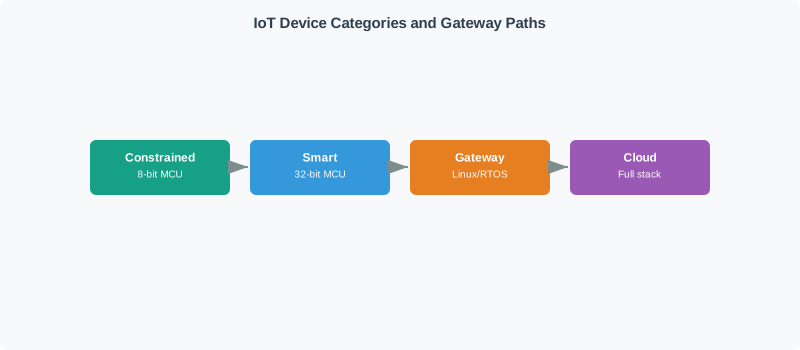
Read Figure 2.1 from Big Things through Small IP Things to Non-IP Things. Big Things combine compute and direct connectivity; Small IP Things retain an IP path but operate with tighter local resources; Non-IP Things end at a field bus or short-range link and therefore require gateway translation before cloud services can use their data. The different routes, not the physical size of the device, define the categories. This connects the classification to the chapter’s running design path from source capability to acquisition, reduction, and reliable forwarding.
2.11 Mobile diagram summary
- Edge acquisition architecture: The hardware and software design of a system that captures, validates, and pre-processes sensor data at or near the source before transmission to higher processing tiers.
- Sensor interface bus: The low-level communication protocol connecting sensors to a microcontroller or gateway — common IoT interfaces include I2C, SPI, UART, and ADC.
- Data aggregation gateway: A device that collects raw readings from multiple nearby sensors, applies local processing (averaging, event detection), and forwards summarised data to the cloud.
- Ring buffer: A circular fixed-size memory structure used in edge devices to store a rolling window of recent sensor readings without dynamic memory allocation.
- Interrupt-driven sampling: A microcontroller technique where a hardware timer interrupt triggers sensor reads at precise intervals, ensuring consistent sample timing without busy-wait polling.
- DMA (Direct Memory Access): A hardware mechanism allowing peripherals (ADC, sensor buses) to transfer data directly to memory without CPU intervention, freeing the processor for other tasks.
Big Things might be computers and databases. Small IP-enabled Things could include webcams, lights, and smartphones. Non-IP Things may need a Gateway or other device to assist - examples include lights, temperature gauges, locks, and gates.
2.12 Device Characteristics Comparison
This section: Device Characteristics Comparison — Read the Device Characteristics Comparison material as a decision path rather than as isolated entries.
Read the Device Characteristics Comparison material as a decision path rather than as isolated entries. First identify the operating condition in each entry and keep its units, timing, source, and assumed system state attached to it. Next compare the entries at the point where responsibility changes between device, gateway, network, analytic service, and operator; that hand-off is where apparently similar choices often produce different outcomes. Then follow the failure case: ask what becomes stale, delayed, unavailable, or unsafe, who detects it, and what evidence permits recovery. Finally connect the result to the chapter’s running design record by naming the selected behavior, the rejected alternative, the measurement that justifies the choice, and the condition that forces a recheck. That order turns the examples or comparison into an auditable engineering argument.
| Category | Examples | Connectivity | Data Rate | Processing Capability |
|---|---|---|---|---|
| Big Things | Servers, industrial PLCs | Full IP stack | GB/day | High (full OS) |
| Small IP Things | Smart cameras, lights | Wi-Fi, cellular | MB/day | Medium (embedded) |
| Non-IP Things | Temperature sensors, door locks | Zigbee, BLE, Modbus | KB/day | Low (microcontroller) |
2.13 Continue to the Next Part
This section: Continue to the Next Part — Carry this evidence into Edge Acquisition: Control Paths and Bandwidth, which begins with Cloud and Edge Control Paths.
Carry this evidence into Edge Acquisition: Control Paths and Bandwidth, which begins with Cloud and Edge Control Paths.
Find help
3 reviewed answers.
Where should I start in a module?
Open the module page from the sidebar to see its chapters in order. Use the module map to return to a topic you need.
Modules and pathsReviewed
What can I try when a project does not work?
Check the symptom, then work through the diagnostic steps. Keep the error message and the smallest example that reproduces it.
When you are stuckReviewed
How do interactive examples work?
Use the interactive guide to check how examples and simulations work before changing your project.
Interactive examples guideReviewed