54 Big Data Pipelines
More
Depth: Practitioner
Progress saves as you read. Mark sections complete as you go; your progress appears in the sidebar.
54.1 Start With the Story
This section: Start With the Story — Imagine a food company receiving a temperature fact from every delivery box.
Keep the Reading Understandable as It Moves
Imagine a food company receiving a temperature fact from every delivery box. One fact may pass through a vehicle, a message service, a cleaning step, storage, and a warning screen. If its time, unit, or box name changes on the way, a neat chart can support the wrong decision.
A data pipeline is this ordered path of steps. The system owner should begin with one known fact and its allowed delay. At every step, record what arrived, what changed, what was rejected, and what left. Keep the original name, time, unit, and quality linked to the result.
Then test a late fact, a repeated fact, a broken format, and a stopped step. The path should recover without hiding a gap or counting the same event twice.
Make a small table for the test. One row names the step. The next fields show input count, output count, oldest time, and rejected items. A person should be able to follow the known fact without opening every system or guessing which clock was used.
Finish with the action, not the storage box. Ask whether the warning or report still has enough context for a safe choice. If a cleaning step removed detail, record that loss. If the original is kept, state where it lives and who may read it.
This simple journey leaves out large-scale scheduling and storage choices. Practitioner builds the step contracts. Under the Hood explains event time, repeated work, back pressure, and recovery.
Keep the device ID, event time, and rejected records as each step turns readings into a decision.
Before naming pipeline products, Figure 54.1 shows where a physical reading changes custody and what evidence must cross each boundary.

At boundary B1 in Figure 54.1, Edge / fog must preserve device identity and local time while filtering or buffering. At B2, Cloud data hands features and lineage to Data science; an Alert may be fast and a Report complete, but neither is trustworthy without that retained evidence.
54.2 Pipelines Turn Events to Evidence
This section: Pipelines Turn Events to Evidence — An IoT big-data pipeline is the path from a physical reading to a trusted decision record.
An IoT big-data pipeline is the path from a physical reading to a trusted decision record. It should not be described only as "ETL" or "streaming." A useful pipeline states what each stage accepts, rejects, transforms, enriches, stores, and proves. Raw sensor evidence may flow through MQTT or a gateway, into Kafka or a managed stream, through validation and enrichment, then into raw, curated, aggregate, and serving zones.
The pipeline contract is different from the technology list. It defines ownership of timestamps, schemas, quality flags, retries, late data, units, enrichment joins, retention, and lineage. A temperature alert, maintenance dashboard, and model-training table may use the same raw event, but each needs different latency, completeness, and audit evidence.
Every derived result should be traceable back to its source events, transformation version, quality checks, and timing assumptions. Without that lineage, a dashboard number is hard to debug and a model feature is hard to trust.
Before selecting pipeline products, inspect Figure 54.2 to see which evidence each stage must accept, preserve, or produce.
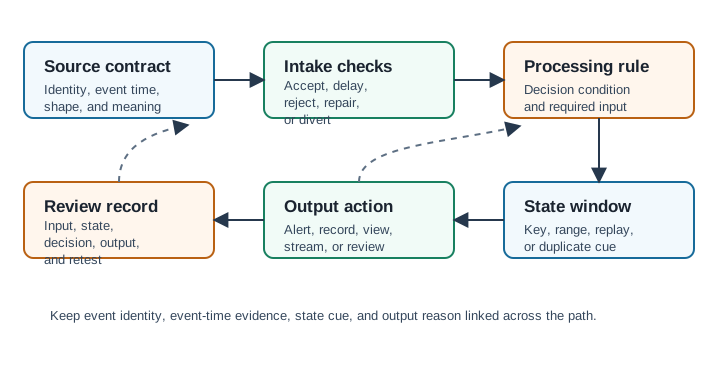
Trace Figure 54.2 from the source contract through intake checks, processing rules, and stateful windows to outputs and review records. Intake establishes identity, time, and schema; processing transforms values under versioned rules; windows add event-time and late-data boundaries; outputs trigger storage or action; the review record makes the route reproducible. The final arrow is not an afterthought: it closes the chapter's running evidence chain by tying an operational decision back to the exact inputs, state, and code that produced it.
Ingest
Receive device events, authenticate source identity, attach arrival metadata, and reject malformed payloads.
Validate
Check schema, units, timestamp range, duplicates, missing fields, and device health context.
Enrich
Add site, asset, calibration, firmware, or weather context with versioned reference data.
Transform
Window, aggregate, filter, normalize, and feature-engineer using event-time rules.
Serve
Publish alerts, dashboards, model features, reports, and replayable tables with lineage.
Overview Knowledge Check
The pipeline also needs a return path from decisions to evidence. Figure 54.3 makes that feedback explicit before latency and completeness are budgeted.

In Figure 54.3, PREPARE preserves quality flag Q2 rather than silently repairing the 7.4 °C event. REPORT carries both alert reason and caveat, while LEARN records outcomes and drift; this closes the loop back to the source instead of treating model release as the end.
54.3 Budget Latency and Completeness
This section: Budget Latency and Completeness — Stream processing is useful only when its latency target matches the decision.
Stream processing is useful only when its latency target matches the decision. A machine-protection alert may need a few seconds. A parking availability dashboard may need tens of seconds. A monthly compliance report may tolerate hours if it is more complete. The pipeline should state the latency budget from device sampling through gateway buffering, broker lag, stream processing, serving write, and user-visible refresh.
Completeness has a cost. Watermarks let Spark Structured Streaming, Flink, and similar systems decide how long to wait for late events before closing a window. A short watermark produces faster outputs but drops more late readings. A long watermark captures more delayed data but makes outputs arrive later. The right setting depends on the physical decision, not on a default value.
That latency-versus-completeness tension is easiest to hold as two physical paths fed by the same events. Figure 54.4 splits a cold-chain fleet’s traffic into a fast provisional lane and a complete historical lane, and pins each of the four V pressures to the spot in the pipeline where it actually bites.

Trace one reading through both lanes of Figure 54.4. On the top lane it meets the Stream window with its 12 s watermark and becomes an Alert in ≤ 30 s — provisional by construction, because the watermark closed the window before every straggler arrived. On the bottom lane the same reading lands in the Raw store at 69 GB/day and is recomputed overnight into the complete answer. The red VERACITY tie between the two outcomes is the operational obligation this section’s worked example quantifies: when the corrected nightly number disagrees with the 30-second alert, the pipeline must publish the correction rather than leave two truths standing.
Worked example: latency budget for a cold-chain alert
target user-visible alert latency: 30 seconds

budget by stage:
sensor sampling interval: 5 seconds
gateway batching: 4 seconds
network and broker delay: 3 seconds
stream window and watermark wait: 12 seconds
alert rule evaluation: 2 seconds
serving write and notification delivery: 4 seconds

total:
5 + 4 + 3 + 12 + 2 + 4 = 30 seconds

design implication:
If the watermark is raised from 12 seconds to 60 seconds, the same alert path
can no longer meet a 30-second promise. The team must either accept slower
alerts, use a separate fast-but-provisional alert path, or improve device and
network delay so the watermark does not carry the whole uncertainty.
Lambda-style pipelines use separate speed and batch views when fast provisional answers and slower corrected answers are both required. Kappa-style pipelines keep one replayable stream path and recompute by replaying retained events. The choice is operational: two code paths with eventual correction, or one stream path with stronger replay discipline.
Practitioner Knowledge Check
54.4 Pipeline Failure Paths
This section: Pipeline Failure Paths — A production pipeline is not complete until the failed-event path is designed.
A production pipeline is not complete until the failed-event path is designed. Some events are malformed, duplicated, late beyond the watermark, missing calibration context, or produced by devices with stale firmware. Dropping them silently makes metrics look clean while hiding operational problems. A dead-letter queue or quarantine table keeps failed records with reasons so the team can fix devices, schemas, or transformations.
Replay also needs a contract. When a schema bug or enrichment error is fixed, the team should know which raw partitions, broker offsets, table versions, and transformation code can rebuild the affected outputs. Idempotent writes prevent replay from double-counting. Lineage links each corrected aggregate or model feature back to raw events, quality rules, enrichment versions, and processing time.
Worked example: validation failures and dead-letter rate
ingest rate: 50,000 events/minute
schema validation failure rate: 0.4 percent
range validation failure rate: 0.2 percent
duplicate retry rate: 0.1 percent

failed or quarantined events per minute:
50,000 * (0.004 + 0.002 + 0.001) = 350 events/minute

failed or quarantined events per hour:
350 * 60 = 21,000 events/hour

if 80 percent of schema failures come from one firmware version:
schema failures/minute = 50,000 * 0.004 = 200
affected firmware contribution = 200 * 0.80 = 160 events/minute

design implication:
The dead-letter path is not a trash bin. It identifies fixable sources of bad
data and protects downstream aggregates from silently mixing incompatible
payloads, units, duplicates, or stale device behavior.
Dead Letter
Stores rejected events with reason, schema version, raw payload pointer, and owner for investigation.
Replay
Rebuilds outputs from broker offsets, raw lake partitions, table versions, and deterministic transforms.
Idempotency
Uses event ids, stable keys, upserts, or transactional table writes so retries do not double-count.
Lineage
Links every aggregate, alert, feature, or report back to source events and rule versions.
Under the Hood Knowledge Check
54.5 Summary
This section: Summary — IoT big-data pipelines turn physical events into trusted decision evidence.
IoT big-data pipelines turn physical events into trusted decision evidence. A strong pipeline defines stage contracts for ingest, validation, enrichment, transformation, storage, serving, failure handling, and replay. It budgets latency across every stage, chooses windows and watermarks from the decision requirement, and keeps dead-letter, lineage, checkpoint, and idempotency evidence so outputs can be corrected rather than merely displayed.
Design the pipeline around proof: what event was accepted, what was rejected, what rule transformed it, what window closed it, what late-data policy applied, and how the result can be replayed. Without those records, fast streaming results are difficult to trust.
54.6 See Also
This section: See Also
Big Data Fundamentals
Introduce IoT big-data fundamentals through volume, velocity, variety, veracity, value, event-time pipelines, retention tradeoffs, and operational limits.
Big Data Technologies
Compare IoT big-data technologies for ingestion, brokers, storage, stream processing, batch jobs, analytics, governance, and operational fit.
Big Data Operations
Operate IoT big-data systems with ingestion checks, storage lifecycle, schema control, observability, cost, reliability, governance, and retests.
Data Quality Validation
Validate IoT data with schema checks, physical limits, rate rules, plausibility tests, outlier bounds, quarantine, and audit evidence.
Find help
3 reviewed answers.
Where should I start in a module?
Open the module page from the sidebar to see its chapters in order. Use the module map to return to a topic you need.
Modules and pathsReviewed
What can I try when a project does not work?
Check the symptom, then work through the diagnostic steps. Keep the error message and the smallest example that reproduces it.
When you are stuckReviewed
How do interactive examples work?
Use the interactive guide to check how examples and simulations work before changing your project.
Interactive examples guideReviewed